
Local Storage CCTV in India: NVR, DVR and Your Own Hard Disk, Explained
How on-site CCTV recording works, why a one-time recorder-plus-disk setup with no monthly bill still suits most Indian homes and shops, and how to counter its one real weakness — a stolen recorder.
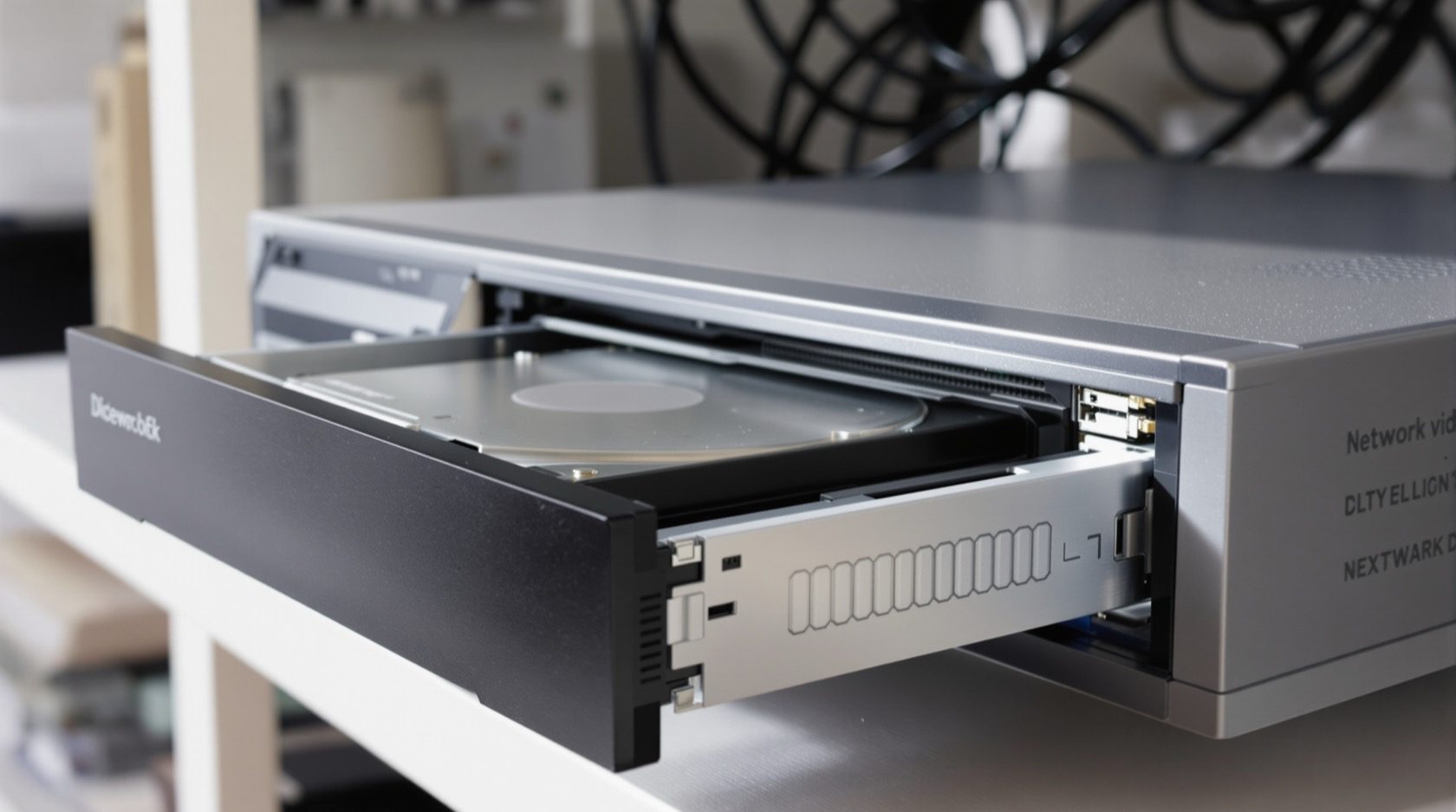
For most Indian homes and shops, the quiet workhorse of a CCTV system is not a cloud account — it is a small box with a hard disk sitting in a cupboard. Local-storage CCTV records everything on-site: the cameras feed a recorder (an NVR for network cameras or a DVR for analogue ones), the recorder writes the video to its own hard disk, and when the disk fills up it loops back and records over the oldest footage. No monthly bill, no upload, no third party holding your video.
This guide is the focused explainer on on-site storage in Studio Matrx's CCTV hub. It is the companion to the cloud CCTV guide — read both, then let the cloud-vs-local cost calculator put rupee figures on the choice for your own camera count and retention.
Scope & safety. This guide helps you understand, choose and coordinate. Mounting the recorder, running structured cabling and anything on the mains belong to a licensed installer — plan it here, have it installed and certified by a professional. A security cupboard or rack must never block a door, window or fire-escape route.
What "local storage" actually means
In a local-storage system, the whole recording chain lives on your premises:
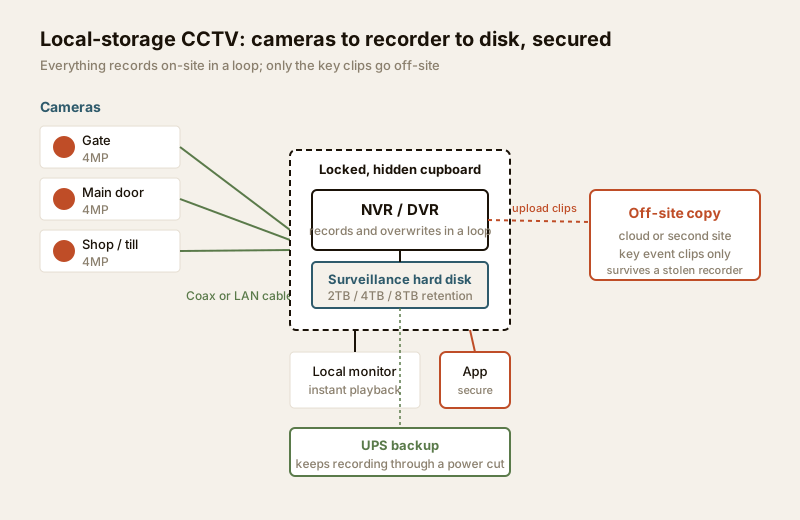
1. Cameras capture video and send it — over coax (analogue/DVR) or over a LAN cable (IP/NVR) — to the recorder.
2. The recorder (NVR or DVR) compresses and writes that video to a hard disk installed inside it.
3. The disk records continuously. When it is full, the recorder overwrites the oldest footage first — a rolling loop. How many days you keep depends only on disk size and how many cameras write to it.
4. You watch live and recorded video on a monitor plugged into the recorder, or on a phone app when you set up remote access.
Nothing leaves the building unless you deliberately send it out. That single fact drives every advantage and the one big risk below. If you are still choosing between analogue and network cameras feeding that recorder, the analogue CCTV and IP CCTV guides cover the camera side.
Why local storage still wins for most homes and shops
Set beside a cloud-only subscription, on-site recording holds up well on the things that matter day to day.
- One-time cost, no subscription. You buy the recorder and disk once. There is no monthly or yearly cloud fee eating into the budget for years. Over three to five years this is usually the cheaper path for a typical home or shop, and the cost calculator shows exactly where the crossover sits for your setup.
- Works with no internet — and through outages. The recorder does not need broadband to record. If the internet drops (common enough in India), footage keeps writing to the disk. As long as the recorder has power — from a UPS or inverter during a cut — it never misses a moment. A cloud-only camera goes blind the instant the link or the router dies.
- Fast local playback. Scrubbing through yesterday evening on a monitor wired to the recorder is instant — no waiting for a slow upload link to stream footage back down. India's broadband is asymmetric: download is fast, but the upload that cloud recording depends on is often a fraction of it.
- Footage stays on your own premises. Your video sits on your disk, in your cupboard, under your control — not on a company's servers. That is a genuine privacy benefit, and it sits well with the data-minimisation spirit of the DPDP Act 2023. For a full walkthrough of who can see what, read the security privacy assessment.
The one real weakness — and how to counter it
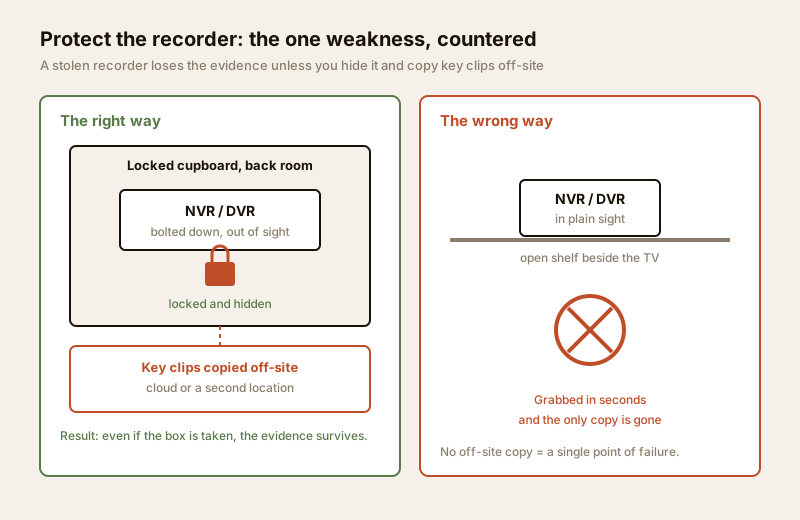
Local storage has a classic failure that every honest guide must name: if a burglar finds and smashes or steals the recorder, the evidence goes with it. The video was never anywhere else. This is the single scenario where cloud has the edge, because footage there is already off-site the moment it is captured.
You do not have to choose blind, though. Three practical counters close the gap:
- Hide and secure the recorder. Do not sit the NVR on a shelf beside the TV. Put it in a locked cupboard, a bolted-down lockbox, or a small rack in a back room — somewhere an intruder will not stumble on in the sixty seconds they have. Out of sight is most of the battle.
- Keep an off-site copy of the footage that matters. You do not need to mirror everything. Send the important clips — motion events, the gate, the till — to a cloud account or a second location automatically. Most NVRs can upload event clips or a low-bitrate substream even while full recording stays local. This is the hybrid approach: local for bulk and speed, cloud for the theft-proof safety copy. The cloud CCTV guide explains that off-site layer.
- Redundancy inside the box. A second disk or a RAID setup (below) protects against a disk failing, and some recorders can mirror to a network drive elsewhere in the building.
The hard disk is the heart of the system
Not every hard disk is built for CCTV. A recorder writes video continuously, 24x7, to many camera streams at once — a workload that quickly kills an ordinary desktop drive designed for a few hours of office use a day.
Surveillance-grade drives (often sold in a distinct colour tier by the major makers) are built for exactly this: rated for continuous writing, tuned for many simultaneous streams, and warranted for the workload. They cost a little more and are worth every rupee, because a drive that fails silently means the night you needed footage, there was none.
| Factor | Desktop hard drive | Surveillance-grade drive | Why it matters |
|---|---|---|---|
| Designed for | A few hours' office use / day | Continuous 24x7 writing | CCTV never stops writing |
| Simultaneous streams | 1–2 | Many (8, 16, 32+ cameras) | Recorders write all cameras at once |
| Annual workload rating | ~55 TB/year | ~180 TB/year and up | CCTV writes far more data per year |
| Vibration handling | Single-drive | Multi-drive vibration tolerant | Several disks in one recorder shake each other |
| Warranty for this use | Not covered for 24x7 CCTV | Rated and warranted for it | A failed drive = lost evidence |
| Typical life under CCTV load | Often 1–2 years | 3–5+ years | Fewer silent failures, replacements |
| Indicative price (2–4 TB) | ₹4,000 – ₹7,000 | ₹5,500 – ₹11,000 | A small premium for reliability |
The lesson is simple: buy the surveillance-grade drive. The few thousand rupees saved on a desktop disk is a false economy when the whole point of the system is to have footage when it counts. For whole-system sizing, see security data-storage planning; for where the recorder physically lives — heat, dust, ventilation — the equipment and power planning guide.
Retention: how many days your disk holds
The other thing local storage forces you to decide is how far back you can see — your retention window. It is a straightforward relationship: the more cameras, the higher their resolution, and the longer you want to keep footage, the bigger the disk you need. When the disk fills, the oldest day is overwritten, so retention is fixed by disk size divided by how fast the cameras fill it.
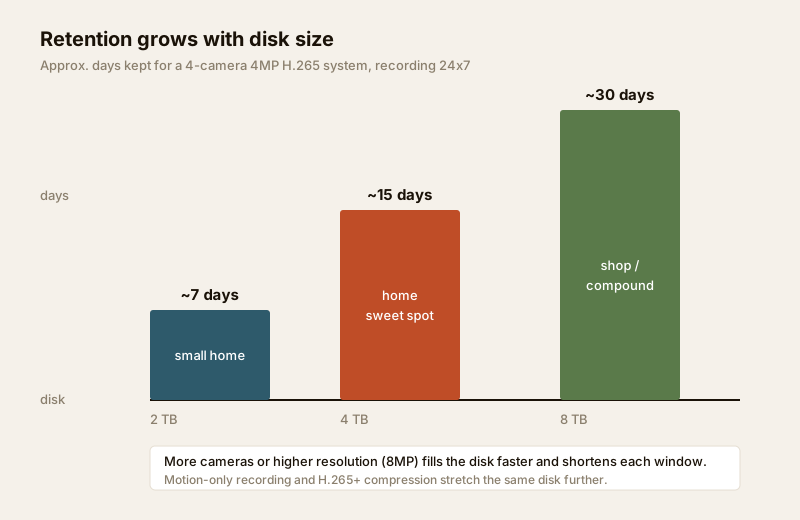
Here is a practical quick-reference for a common home setup — four 4MP cameras, H.265 compression, recording 24x7. Real numbers shift with motion, frame rate and scene busyness, so treat these as planning estimates.
| Disk size | ~Retention (4x 4MP, 24x7) | Roughly suits | Notes |
|---|---|---|---|
| 1 TB | ~3–4 days | A 2-camera basic setup | Too short for most; overwrites fast |
| 2 TB | ~7 days | A small home / shop | The practical minimum for 4 cameras |
| 4 TB | ~14–15 days | The home sweet spot | Most common home choice |
| 6 TB | ~22 days | Larger home, more cameras | Good headroom |
| 8 TB | ~30 days | Shop / compound, evidence buffer | A month of history |
Two levers stretch the same disk further: record motion-only or on smart events for low-traffic cameras instead of 24x7, and use H.265 / H.265+ compression, which roughly halves the data of the older H.264. To size your own system, run the cloud-vs-local cost calculator and the camera coverage calculator.
Redundancy: protecting against a disk dying
A single disk is a single point of failure. For a home, the honest answer is often "buy surveillance-grade and replace it every few years" — but where the footage is important (a shop, a clinic, a valuables store), two options add resilience:
- A second disk in the recorder, mirroring the first, so a failure of one does not lose the footage.
- RAID (typically RAID 1 mirroring for small setups) in recorders that support it, giving the same protection more formally, plus RAID 5 on larger NVRs that pools disks with one drive's worth of parity for failure tolerance.
Redundancy protects against a disk failing. It does not protect against the recorder being stolen — only an off-site copy does that. Treat the two as separate problems with separate fixes.
Remote access — do it the safe way
You will want to check the cameras from your phone. The wrong way is the old trick of port-forwarding the recorder straight to the internet — it exposes the NVR to the whole world, and cheap recorders with default passwords are a well-known target for hijacking into botnets and worse.
Do it the safe way instead:
- Use the manufacturer's secure cloud-relay app (P2P), which connects your phone to the recorder without opening a port to the internet.
- Or have your installer set up a VPN into your home network, so remote viewing rides an encrypted tunnel.
- Always change every default password, keep the recorder's firmware updated, and put cameras on a separate network segment so a compromised device cannot reach your laptops and banking.
For the wider network and cyber picture, see internet and network readiness for security and the smart-home privacy and security guide.
When to bring in a professional. Decide the camera count, resolution, retention days and where the recorder hides yourself — then hand the cabling, recorder mounting, disk installation, mains power and the secure remote-access setup to a licensed installer. They will terminate connectors properly, seat the disk correctly, put the recorder and network on a UPS, and configure remote access without exposing it to the internet. Any work at the mains board is a licensed electrician's job — see the electrical hub.
Local storage at a glance — pros, cons and best fit
| Aspect | Strength | Watch-out | Best fit |
|---|---|---|---|
| Cost | One-time buy, no subscription | Upfront disk + recorder spend | Long-term owners; homes & shops |
| Internet | Records with no internet, through outages | Remote view needs a link | Areas with patchy broadband |
| Playback | Instant local scrubbing | Only on-site or via app | Anyone reviewing footage often |
| Privacy | Footage stays on your premises | You own the security of it | Privacy-conscious households |
| Theft risk | — | Recorder stolen = evidence gone | Counter with hiding + off-site copy |
| Retention | Set purely by disk size | Fills and overwrites | Size the disk for your days |
| Reliability | Surveillance-grade disks last years | Desktop drives die early | Buy the right drive; add RAID if critical |
For most owned homes and shops, local storage as the base, with a small off-site copy of the key clips, is the pragmatic default — the cheapest reliable path that still survives the burglar-with-a-hammer scenario. Cloud-only makes sense mainly where you cannot secure a recorder or a landlord forbids on-site equipment; the cloud CCTV guide covers that case. For the whole four-block picture — cameras, alarms, access and resilience — see the building security systems guide; for budgeting the lot, the security cost planning guide.
Key takeaways
- Local storage records on-site to an NVR or DVR with its own hard disk, looping over the oldest footage as it fills — no subscription, no upload.
- Its real wins are a one-time cost, recording that works with no internet and through power cuts (on a UPS), instant local playback, and footage that stays private on your premises.
- Its one real weakness is a stolen or smashed recorder. Counter it by hiding and locking the recorder and keeping an off-site / cloud copy of the important clips — the hybrid approach.
- Buy a surveillance-grade hard disk, not a desktop drive — it is built for continuous 24x7 writing and will not fail silently the night you need it.
- Size the disk for your retention (roughly 4 TB for ~15 days on a 4-camera 4MP H.265 system), add RAID or a second disk where footage is critical, and set up remote access securely — never by port-forwarding.
References
- Digital Personal Data Protection Act, 2023 — record only your own property and shared areas for a legitimate purpose; keep footage no longer than needed and secure the recorder and any off-site copy.
- Manufacturer surveillance-drive documentation — verify a hard disk's continuous-write (24x7) rating, supported number of camera bays and annual workload before buying; desktop drives are not warranted for CCTV duty.
- National Building Code of India (SP 7), Bureau of Indian Standards, and local municipal bye-laws for any structural, electrical or life-safety aspect of an install; verify the current edition via the BIS catalogue: https://www.services.bis.gov.in/
This is an educational overview. Recorder mounting, structured cabling, mains power and secure remote-access configuration are qualified professional tasks — engage licensed installers and verify any standard's current status via the BIS catalogue before relying on it.
Export this guide
Related Guides — Deep-dive reading
CCTV Remote Access in India (2026): Watch From Your Phone, Safely
How to view your own cameras from anywhere without leaving the front door open to the internet — change the defaults, use strong credentials and 2FA, keep firmware current, prefer the vendor's secure cloud relay or a VPN, segment the camera network, and treat footage as personal data.
SecurityLocal Storage vs Cloud CCTV in India (2026): Where Your Footage Should Live
A homeowner's honest head-to-head on where CCTV footage is kept — on a hard disk in the recorder at home, or uploaded to a per-camera cloud plan — across cost, theft resilience, internet dependence, retention, remote access and DPDP privacy, ending in a clear which-suits-whom, with hybrid usually the smartest answer.
SecurityCloud CCTV in India: Footage That Survives a Stolen Recorder
How cloud-stored CCTV works, its genuine advantages for Indian homes and shops, the real trade-offs of subscriptions, upload bandwidth and third-party data, and why hybrid local-plus-cloud is usually the smart middle.
SecurityRelated Tools — Try Free
CCTV Camera Coverage & Count Calculator
Estimate how many CCTV cameras you need, the NVR channels, storage in TB for your retention period, and an indicative all-in cost with GST.
CCTV CalculatorCCTV Cloud vs Local Cost Calculator
Compare cloud CCTV subscription against a local NVR + HDD — upfront, 5-year total, monthly fee and break-even.
Cloud vs LocalSecurity Backup Power Calculator
Size a UPS/inverter and battery to keep CCTV, NVR, router and alarm running through a power cut — load, Ah, VA and cost.
Backup Power