
Cloud Access Control in India (2026): Manage Every Door from One Dashboard
How cloud-managed access control lets you administer doors from anywhere and revoke a credential in seconds, weighed honestly against internet dependence, DPDP data residency, subscription cost and cyber-security.
An on-premises access system keeps its brains in a server cupboard: to add a user, change a rule, or pull a report, someone usually has to be at that building. Cloud access control moves that management layer to a provider's servers, so you administer every door from a web or app dashboard, from anywhere. For a firm with two offices, a chain of stores, a factory and a head office, or an RWA managing several blocks, that shift is the difference between a site visit and a thirty-second edit on a phone.
This guide is written for the person specifying or approving the system — an architect, a facilities or IT manager, a builder, an RWA committee. It explains what cloud access control genuinely buys you, and it leads with the honest India concerns first: what happens in a power cut or an internet outage, where your data actually lives under the Digital Personal Data Protection Act, what the recurring cost and lock-in really look like, and how to keep an internet-connected door system secure. It sits inside Studio Matrx's access control pillar and the Smart Locks & Access Control hub.
Scope & safety. This guide helps you plan, decide and coordinate — the actual door hardware, mains and network wiring, and the fire-alarm interlock are licensed jobs. A cloud door on an escape route must fail-safe and free-exit even when the internet, the network or the provider's cloud is unreachable — it releases on power loss and on the fire-alarm signal, wired to the fire panel with a manual emergency release, so a cloud outage can never trap anyone. Access logs, visitor records and attendance data are sensitive personal data under the DPDP Act, 2023: mind where they live, who administers them, and how a departed user is deleted. This is educational guidance, not legal advice.
What "cloud" actually changes
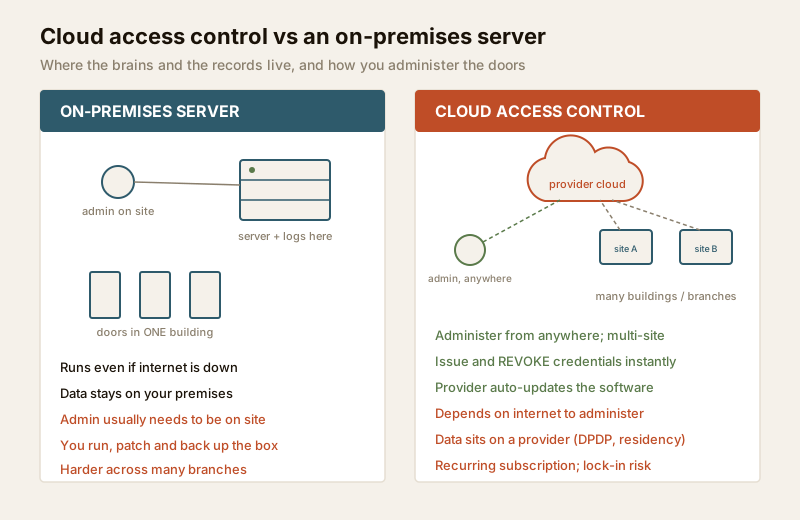
In a traditional install, a local server or controller PC in the building holds the user database, the access rules and the event logs. You manage it from a machine on that network. Cloud access control keeps the same door hardware — readers, controllers, locks, the fire-egress fail-safe — but hosts the management software and the central database on the provider's servers, reached over the internet. You log in to a browser or an app; the doors phone home to the cloud.
Crucially, the smart part still lives at the door. A well-designed cloud system puts an intelligent door controller at each site that holds a local copy of who is allowed in. The cloud is where you administer and record; the controller is what decides and enforces, moment to moment. That split is the whole reason a cloud system can survive an outage — more on that below.
Why teams move to the cloud
The pull is real, especially for anything beyond a single door or building:
- Administer from anywhere. Add a user, change hours, lock down a door, or pull a report from a laptop or phone — no trip to the server room. For a manager covering several sites this is the headline benefit.
- Multi-site and multi-branch from one screen. Every office, store or block appears in one dashboard under one login, with consistent rules. This pairs naturally with role-based access control so a regional manager sees only their sites.
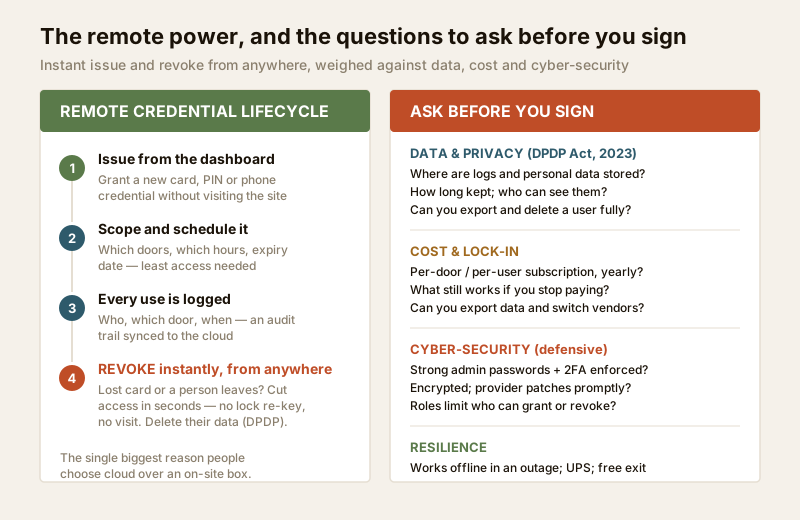
- Issue and, above all, revoke credentials instantly and remotely. When someone loses a card or an employee leaves, you cut their access in seconds from wherever you are — no re-keying, no site visit, and you can delete their data to meet DPDP obligations. This is the single feature most teams cite. It works across cards, mobile credentials and biometrics alike.
- Automatic software updates. The provider patches and upgrades the platform; you are not maintaining, backing up and securing a server yourself.
- Easy integration. Cloud platforms plug into visitor management and time-and-attendance, and often into video door phones and CCTV, without wiring a new box.
- Lower up-front IT. No server to buy, house, power and cool; you rent the software instead. The cost moves from a large one-time spend to a predictable subscription — which is also its own caution (below).
The honest India concerns — read these first
A cloud system is a good fit for many Indian sites, but only if you go in clear-eyed about four things.
1. It depends on the internet — so the door must not
This is the fear people raise first, and the answer is a design rule, not a leap of faith. The door controller must keep working through an internet or power outage. A properly specified cloud system stores the authorised-user list locally on the controller at each door, so during an outage the door keeps deciding correctly from its cached list; it queues the events and syncs them to the cloud the moment the connection returns, leaving no gap in the log. Put the controllers on a UPS so a power cut does not stop them either.
Ask the vendor to state, in writing, exactly how the system behaves offline — valid users still admitted, events buffered, real-time sync on recovery. If the honest answer is "the doors stop working when the internet drops," that is the wrong product for India's power and connectivity. When resilience is a top priority, pair the cloud with the discipline in offline access control, which is the natural complement to this guide.
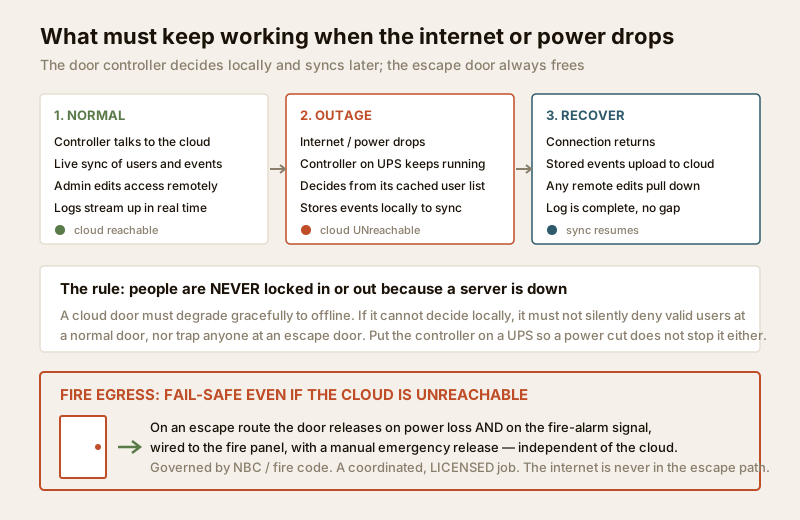
And life-safety sits above all of this: a door on an escape route must free-exit even when the cloud is unreachable, releasing on power loss and on the fire-alarm signal via the fire panel, with a manual emergency release. The internet is never in the escape path.
2. Where your data lives — DPDP and residency
With cloud, your access logs, visitor records and employee attendance — all sensitive personal data under the DPDP Act, 2023 — sit on a provider's infrastructure rather than in your building. That raises fair questions you must answer before signing:
- Where are the servers located (an Indian region matters for many organisations), and where are backups held?
- How long is data retained, and can you set the retention period to the minimum you actually need?
- Who at the provider can see your data, and is it encrypted at rest and in transit?
- Can you export and delete a user's data completely — for a departed employee's right to erasure, and for your own exit?
Treat the provider as a data processor acting on your instructions: you remain accountable for lawful basis, notice and consent (especially for employees), minimisation and retention. Do not use the ease of cloud logging as licence to over-surveil staff or residents — collect what you need for security, and no more. The audit-trail guide covers keeping a defensible log without crossing into surveillance.
3. Subscription cost and vendor lock-in
Cloud trades a big up-front spend for a recurring one. That is often good for cash flow, but you must model the full picture:
- The subscription is forever. Typically billed per door or per user, per month or year. Over five to seven years the total can meet or exceed an on-premises system — run the sums, do not just compare day-one price.
- What happens if you stop paying? Some systems keep the doors working offline but freeze remote management; others degrade further. Know this before you commit.
- Lock-in is real. Proprietary readers, controllers and credentials can make switching vendors expensive. Ask whether you can export your data in a usable format and whether the hardware is open or standards-based.
Use the access control cost estimator to lay one-time hardware against multi-year subscription, and the system designer to size doors and readers before you price anything.
| Dimension | On-premises server | Cloud access control |
|---|---|---|
| Up-front cost | Higher (server + software licence) | Lower (hardware + setup only) |
| Ongoing cost | Maintenance, occasional upgrades | Recurring subscription, indefinitely |
| Manage from anywhere | Usually no / VPN needed | Yes, by design |
| Multi-site from one login | Harder, often per-site | Native strength |
| Software updates | You schedule and apply | Provider applies automatically |
| Data location | On your premises | On the provider's cloud (ask where) |
| Internet outage | Unaffected for local management | Doors keep working if controllers cache locally; remote admin pauses |
| Who secures the server | You | The provider (plus your account hygiene) |
| Exit / switching | Your data, your box | Depends on export + lock-in terms |
4. Cyber-security of an internet-connected system
An access system reachable over the internet is, like any connected system, something to secure deliberately. The framing here is strictly defensive — good hygiene, never methods of attack — and it mirrors the discipline in CCTV remote-access security.
- Strong, unique admin credentials and enforced two-factor authentication (2FA) on every account that can grant or revoke access. This is the highest-value control.
- Least privilege via roles. Not everyone needs to be a full administrator; scope each login to the sites and actions it needs, per role-based access control.
- Prompt updates. One advantage of cloud is that the provider patches the platform — confirm they do so promptly and transparently.
- Encryption of data in transit and at rest, and a provider with a credible security posture you can ask about.
- Account discipline. Remove logins the moment a person leaves, and never leave a former installer or integrator with standing admin access.
Choosing well: the questions that decide it
Before you sign, put every candidate through the same short interrogation. The best vendors answer these plainly and in writing.
| Area | The question to ask |
|---|---|
| Offline behaviour | Do doors keep working, and events buffer, when the internet drops? Controllers on UPS? |
| Fire egress | Does the escape door free-exit and fail-safe independently of the cloud, wired to the fire panel? |
| Data residency | Where are data and backups stored? Can I keep them in India if I need to? |
| DPDP | Retention I can set, encryption, export and full deletion of a user? |
| Subscription | Per-door or per-user? What still works if I stop paying? Five-year total? |
| Lock-in | Can I export my data and switch vendors? Is the hardware open or proprietary? |
| Security | Enforced 2FA, roles, prompt patching, encryption? |
| Integration | Visitor management, attendance, VDP/CCTV — supported out of the box? |
For homes and single doors, a full cloud platform is usually overkill — an app-controlled lock or remote-access lock gives you remote control of one door without a subscription platform. Cloud earns its keep once you have multiple doors, multiple sites, or staff turnover to manage. See the complete smart-locks guide and the smart-lock selector to place a single door correctly.
When to bring in a professional. Decide the model, the residency and the DPDP terms yourself, and run the vendor through the questions above. Hand the door hardware and reader fitting, the mains and network wiring, and the fire-alarm interlock to licensed installers and electricians — see the electrical hub — and have the fire-egress fail-safe designed and signed off to code. For a multi-block society or a multi-branch business, involve your IT lead on residency, 2FA and account governance, and put data, retention and exit terms in the contract. Never leave a former installer with standing admin access to your dashboard.
Key takeaways
- Cloud access control hosts the management software and central database on a provider's servers, so you administer every door and site from a web or app dashboard, anywhere — its stand-out powers are multi-site management and revoking a credential instantly and remotely.
- The door must not depend on the internet. Insist the controller caches the authorised list locally, keeps working through an outage on a UPS, and syncs events with no gap when the connection returns; pair it with offline access control where resilience is critical.
- Fire egress is non-negotiable and cloud-independent — the escape door frees on power loss and on the fire-alarm signal, via the fire panel with a manual release, even when the cloud is unreachable.
- Mind the data. Logs, visitor and attendance records are sensitive data under the DPDP Act, 2023 — pin down residency, retention, who can see them, and how you delete a departed user; do not over-surveil.
- Cost the whole life and secure the account. Model the recurring subscription and lock-in over five-plus years with the cost estimator, and protect an internet-connected system with strong admin credentials, enforced 2FA, roles and prompt updates.
References
- Digital Personal Data Protection Act, 2023 — access logs, visitor records and attendance are personal (often sensitive) data; a cloud provider acts as a processor while you remain accountable for lawful basis, notice, consent, minimisation, retention, data residency and erasure.
- Manufacturer and platform specifications — verify each cloud vendor's stated offline/failover behaviour, data-centre location and backups, encryption, 2FA enforcement, patching cadence, data-export format and per-door/per-user pricing on their own documentation before committing.
- National Building Code of India (SP 7) and local fire regulations — for the fire-alarm interlock, fail-safe release and manual emergency egress on access-controlled doors; confirm the current edition via the BIS catalogue: https://www.services.bis.gov.in/
This is an educational overview, not legal advice. Door hardware, mains and network wiring, and the fire-egress interlock are qualified professional tasks — engage licensed installers and electricians, confirm DPDP obligations with a competent adviser, and verify any standard's current status via the BIS catalogue before relying on it.
Export this guide
Related Guides — Deep-dive reading
Access Control Maintenance in India (2026): Readers, Locks and Fail-Safe Egress
How to keep a card, keypad, fingerprint or face access-control system reading reliably and locking securely — and, above everything, how to test that its doors still release on a fire alarm and on power loss, so an access-controlled door never becomes a life-safety trap.
SecurityOffline Access Control in India (2026): Standalone Locks That Work Without a Network
How standalone, non-networked access control works when the permission lives on the door or on the card, where offline is the right choice, how you manage it, and the honest trade-offs versus a live cloud system.
SecurityMulti-Factor Access Control in India (2026): Two-Factor Doors, Anti-Passback and Mantraps Done Right
What multi-factor access control means, the three factor categories, common two-factor combinations, and which high-security doors truly need them versus where a second factor just slows honest people down.
SecurityRelated Tools — Try Free
Security System Cost Estimator
Estimate the all-in capex with GST, annual running cost and 5-year total cost of ownership of a home or building security system.
Cost EstimatorVideo Door Phone Type Selector
Answer a few questions about your building, cabling, budget and internet and get the right video door phone — analog / wired / wireless / IP, single-home or multi-apartment, monitor or app.
Door Phone SelectorAccess-Control Battery-Backup Calculator
Size the standby battery so an access system keeps running through a power cut, with an egress life-safety note.
Battery Backup