

Role-Based Access Control in India (2026): Access by Role, Not by Person
How to run an access system by roles instead of per person: define roles like resident, staff, manager, contractor and visitor, map each to zones and time schedules, apply least privilege, and make onboarding and offboarding one click.
Picture a 200-flat society, or an office with sixty staff and a stream of contractors and visitors. If every person's access is set door by door, by hand, the system slowly rots: a housekeeper still opens the terrace six months after leaving, a resident who sold their flat can still enter the gym, and nobody can say who is allowed where without scrolling through hundreds of individual entries. The problem is not the hardware. It is the model used to grant access.
Role-based access control fixes this by granting access to a role, not to a person. You define a small set of roles once — resident, housekeeping or staff, manager or admin, contractor, visitor — and for each role you decide which doors and zones it may use and at which times. A new person is then simply assigned a role; a departing person has their role removed. One action, applied everywhere. This guide is part of the Studio Matrx access-control hub and covers how the permission model itself is structured — the discipline that makes an access system stay correct as it grows.
Scope & safety. This guide helps you plan and administer the permission model. The door hardware, mains and network wiring, and the fire-egress interlock are licensed jobs — route them to professionals. Roles govern entry only. Every door on an escape route must still fail-safe: it must free-exit at all times, release on power loss and on a fire-alarm signal, integrate with the fire panel, and carry a manual emergency release, governed by the NBC and local fire code. No role, schedule or "deny" rule may ever trap a person inside. Role, permission and log data are personal data under the DPDP Act, 2023. This is educational guidance, not legal advice.
Two ways to grant access, and why the model matters
There are broadly two ways to decide who opens which door.
- Per-user (direct) access. You take each person and tick the doors they may use. For a two-door home with four family members, this is perfectly fine — four people, two doors, done in a minute.
- Role-based access. You define roles, attach door and time permissions to each role, and then assign people to roles. The permissions live on the role; people just inherit them.
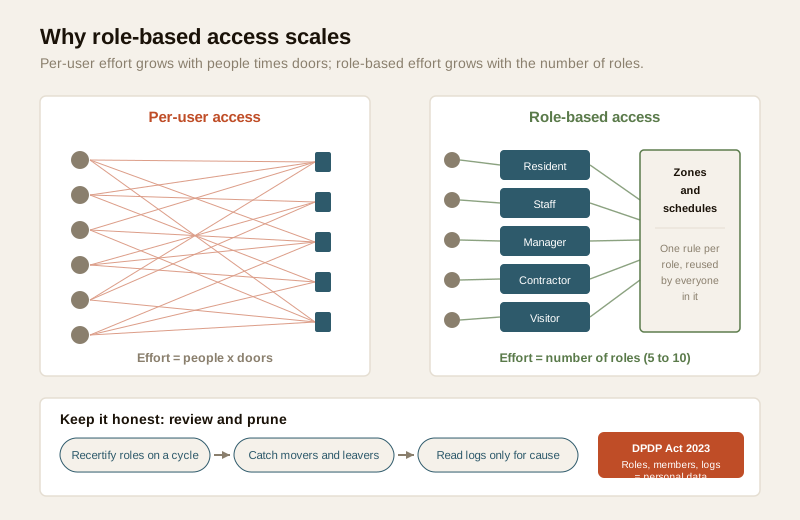
The difference is invisible at small scale and decisive at large scale. With per-user access, the work of managing the system grows with people multiplied by doors. Fifty people across twenty doors is up to a thousand little decisions, each of which can be wrong, forgotten, or left behind when someone leaves. With role-based access, the work grows with the number of roles — usually five to ten, no matter how many people or doors you add.
| Per-user (direct) access | Role-based access control | |
|---|---|---|
| Permission lives on | Each individual person | The role; people inherit it |
| Onboarding a joiner | Tick every door they need, by hand | Assign one role |
| Offboarding a leaver | Remember and untick every door | Remove the role — access gone everywhere |
| A policy change | Edit every affected person | Edit the role once |
| Effort scales with | People × doors | Number of roles (usually 5–10) |
| Risk as it grows | Forgotten permissions pile up | Consistent, auditable |
| Best for | A home, 1–3 doors, a few people | Offices, societies, factories, any managed site |
The rule of thumb: if one person administers access and can hold the whole picture in their head, per-user is fine. The moment access is a job — a facility manager, an RWA secretary, an HR/admin team — you want roles.
The three building blocks: roles, zones, schedules
A role-based system is defined by three things working together.
1. Roles
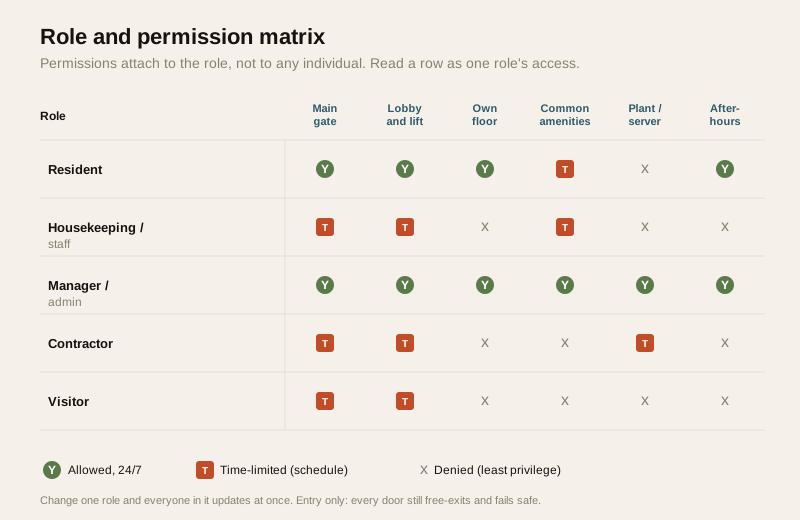
A role is a named group of people who need the same access. Keep the list short and meaningful. A typical site might use:
- Resident / owner — the people who live or own space here.
- Housekeeping / staff — cleaners, cooks, maintenance, security on the payroll.
- Manager / admin — the small number who can also change the system (see the warning on this below).
- Contractor / vendor — temporary trades: the plumber, the AC service team, a renovation crew.
- Visitor / guest — one-off entrants, handled through a separate visitor management flow.
Resist the urge to create a role per person ("Mr Sharma's role"). That defeats the whole point — you are back to per-user access wearing a costume. Roles should describe jobs or relationships, not individuals.
2. Zones (access levels)
A zone is a group of doors that logically belong together — "ground-floor common areas", "third floor", "plant and electrical rooms", "server room". Instead of listing individual doors for each role, you grant a role a whole zone. Group your doors into a handful of zones first, then think about which roles need which zones. This keeps the matrix small and readable: five roles against six zones is thirty simple decisions, not five hundred.
3. Time schedules
Access is not just where but when. A time schedule attaches hours and days to a permission:
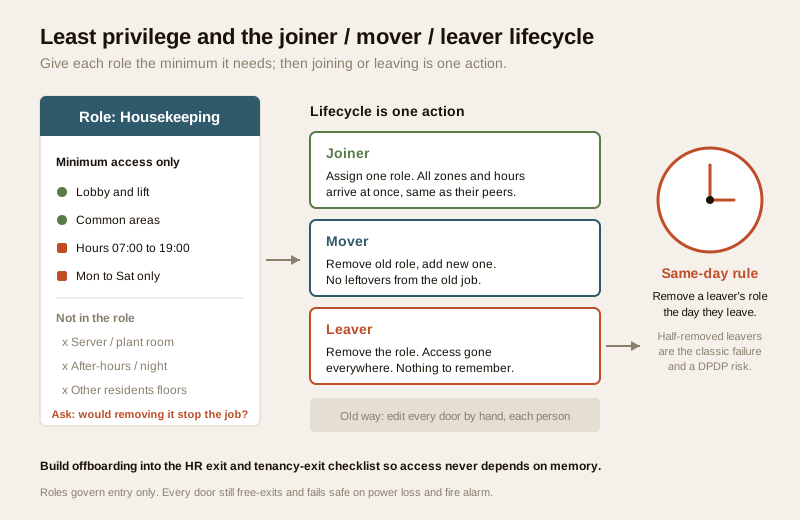
- Housekeeping may enter common areas 07:00–19:00, Monday to Saturday, and never the plant room.
- A contractor's role is valid only for the fortnight of the job, working hours only, then it expires automatically.
- Residents typically get 24/7 access to their own floor and the main gate.
- An "after-hours" zone (a gym, a co-working floor) might be open to residents around the clock but closed to staff at night.
Time-bounding is one of the strongest, quietest security controls you have: a credential that only works during expected hours is far less useful if lost or misused, and an auto-expiring contractor role means nobody has to remember to switch it off.
Least privilege: the principle that ties it together
The organising idea behind all of this is least privilege — every role gets the minimum access it needs to do its job, and nothing more. Not "what would be convenient", not "give them everything so they don't call us", but the smallest set of zones and hours that lets the role function.
Least privilege is what turns a tidy role list into actual security:
- A housekeeper does not need the server room, the electrical room, or 2 a.m. access — so those are simply not in the role.
- A contractor gets exactly the doors for their job, for exactly the days of the job.
- A visitor gets the gate and the one place they are visiting, once.
- Even a manager's door access should be scoped; being able to administer the system is a separate power from being able to walk through every door (see below).
The test for any permission is one question: would removing this stop the role from doing its legitimate work? If not, it should not be there. Least privilege also shrinks your exposure under the DPDP Act — fewer people able to reach sensitive areas, and fewer logs of them doing so, is less personal data to justify holding.
A note on the admin/manager role. The people who can change roles and permissions are the most powerful users in the system. Keep that group tiny, name each person, require multi-factor sign-in for the admin console (see multi-factor access), and never share one admin login. Administering the system and physically entering every door are two different privileges — do not casually bundle them.
Onboarding and offboarding become one action
This is where role-based access pays for itself. In a per-user world, a person joining means hunting down every door they need and enabling it; a person leaving means remembering every door they had and disabling it — and the second one is the one that goes wrong. Half-removed leavers are the single most common access-control failure in Indian societies and offices.
With roles, the lifecycle collapses to three moves:
- Joiner — assign the appropriate role. All the correct zones and hours arrive at once, consistent with everyone else in that role.
- Mover — someone changes jobs (a resident joins the managing committee; a guard becomes a supervisor). Remove the old role, add the new one. Their access changes cleanly, with no leftovers from the old job.
- Leaver — remove the role. Access disappears everywhere in one action. There is nothing to remember, which is exactly why it works.
The same-day rule for leavers
The single most important piece of admin discipline: remove a departing person's role the same day they leave — the day a tenancy ends, an employee is offboarded, a contractor finishes, or a flat is sold. A former housekeeper or ex-employee who can still enter the building is both a security risk and, because the system keeps logging their entries, a live DPDP problem. Where the credential is a mobile credential or managed in the cloud, revocation is instant and remote; where it is a card, you disable the card in software (do not merely hope it comes back). Build offboarding into the HR/exit and tenancy-exit checklist so it never depends on memory.
How it scales: offices, societies, factories
The same three-block model stretches across very different sites; only the roles and zones change.
| Setting | Typical roles | Typical zones | Schedule notes |
|---|---|---|---|
| Office | Employee, department lead, admin/HR, contractor, visitor, cleaning | Reception, general floor, department wings, server room, finance, terrace | Working hours for staff; server/finance restricted; visitor day-passes |
| Society / RWA | Resident, tenant, domestic staff, committee/admin, vendor, guest | Main gate, tower lobbies, own floor, gym/pool/club, plant & pump rooms | Residents 24/7 own floor; staff daytime; amenities by timing |
| Factory / warehouse | Operator, shift supervisor, maintenance, admin, contractor, driver, visitor | Shop floor, stores, QA lab, electrical/utility, offices, loading bay | Shift-based schedules; hazardous zones tightly scoped; contractor windows |
| Co-working / mixed-use | Member, day-pass, community manager, tenant staff, vendor | Common lounge, meeting rooms, private cabins, server, service areas | Member hours by plan; auto-expiring day passes |
As a site grows, you add people to existing roles rather than inventing new rules. When a genuinely new job appears, you add one role and slot people into it. This is why role-based access is standard for commercial buildings and larger apartments and gated communities: it is the only model whose administrative effort does not explode with size. For multi-tower or multi-site groups, roles can also be scoped per building so a tower's committee administers only its own towers.
Two practical patterns help at scale:
- A guest/visitor role plus a proper visitor flow. Do not create real roles for one-off entrants. Route them through visitor access management with time-limited passes.
- Attendance from the same events. In offices and factories, the same role-based entry events can feed time and attendance — but only where employees have lawful notice and consent, and the data is minimised to what attendance actually needs.
The audit discipline: review roles, prune access
A role model is only as good as its upkeep. Two recurring habits keep it honest:
- Periodic access review (recertification). On a schedule — quarterly for offices, at least half-yearly for societies — the administrator or a reviewer looks at each role and its members and asks: does everyone in this role still belong here, and does each role still have the right zones and hours? This catches the movers who were never fully re-roled and the leavers who slipped through.
- Read the logs, but only for cause. The system's audit trail records which role and person used which door and when. Use it to investigate an incident or verify a review — not to routinely watch where a particular staff member or resident goes all day. Over-surveilling people with access logs is both a trust failure and, under the DPDP Act, an unlawful purpose creep.
Because roles, their members and the logs are all personal data under the DPDP Act, 2023, the same principles apply throughout: a lawful basis and clear notice (especially for employees), consent where required, minimisation (collect and keep only what the role and logs genuinely need), a defined retention period after which old logs are deleted, a named person accountable for administration, and prompt deletion or disabling of a departed user's records and credentials. Roles help here too — fewer distinct rules means a permission model you can actually explain to the people it covers.
Where roles meet the door hardware
Roles are a software model, but they run on real doors, and the life-safety rules override everything above. However you scope a role:
- Entry is controlled; exit is never blocked. Roles and schedules decide who may come in. On any escape route the door must always let people out freely (a request-to-exit device, panic hardware, or free egress), regardless of role or time.
- Fail-safe on power loss and fire. An access-controlled door on an egress path must release when power is lost and when the fire panel signals an alarm, and must have a manual emergency release, per the NBC and local fire code. A "deny" rule must never become a trap.
- The system degrades gracefully. If the network, internet or cloud server is down, the door controller must keep enforcing the roles it already holds locally (see offline access control) and must still free-exit. Roles should never depend on a live connection to let people out.
The permission model is yours to design and administer; the interlock that makes those doors safe is a coordinated, licensed job — the fire consultant, the electrical contractor and the access installer together.
When to bring in a professional. Design the role list, zones, schedules and admin process yourself, or with your facility manager and the Studio Matrx access-control system designer. Hand the door hardware, locking type, mains and network wiring, fire-panel interlock and emergency-release to a licensed installer and electrician coordinated with your fire consultant — see the electrical hub. For a large office, factory or multi-tower society, involve them before you buy the controllers: the number of doors, zones and controllers, and how the system fails safe, all follow from the model you have chosen.
Key takeaways
- Grant access by role, not by person. Define a short list of roles (resident, staff, manager, contractor, visitor), map each to zones and time schedules, and assign people to roles — the permissions live on the role.
- Least privilege is the rule. Every role gets only the zones and hours it genuinely needs; keep the admin/manager group tiny and multi-factor-protected.
- Onboarding and offboarding become one action — assign a role, remove a role — and a departing person's role must be removed the same day they leave; half-removed leavers are the classic failure.
- It is the only model that scales. Per-user access is fine for a 1–3-door home but unmanageable for offices, societies and factories, where effort must grow with roles (5–10), not people times doors.
- Review and respect privacy. Recertify roles on a schedule, use audit logs only for cause, and treat roles, members and logs as personal data under the DPDP Act, 2023 — with lawful basis, notice, minimisation, retention limits and prompt deletion of leavers.
References
- Digital Personal Data Protection Act, 2023 — role assignments, permission records, visitor data and access logs are personal data; establish a lawful basis and notice (especially for employees), minimise and time-limit retention, name an accountable administrator, and delete or disable a departed user promptly.
- Manufacturer and access-control platform documentation — verify how a given controller or cloud platform models roles, access levels, time schedules and offline caching, and confirm its behaviour on network or power loss, from the maker's own datasheet before specifying.
- National Building Code of India (SP 7) and local fire bye-laws, Bureau of Indian Standards, for fail-safe egress, fire-panel interlock and emergency release on access-controlled doors; verify the current edition via the BIS catalogue: https://www.services.bis.gov.in/
This is an educational overview, not legal advice. Door hardware, locking, mains and network wiring, and the fire-egress interlock are qualified professional tasks — engage licensed installers coordinated with a fire consultant, and verify any standard's current status via the BIS catalogue before relying on it.
Export this guide
Related Guides — Deep-dive reading
Access Control Maintenance in India (2026): Readers, Locks and Fail-Safe Egress
How to keep a card, keypad, fingerprint or face access-control system reading reliably and locking securely — and, above everything, how to test that its doors still release on a fire alarm and on power loss, so an access-controlled door never becomes a life-safety trap.
SecurityOffice Access Control in India (2026): Zones, Credentials and Fire-Safe Egress
How to plan access control for an office: employee credentials, zones by sensitivity, time schedules, visitor management, time-attendance for payroll, CCTV and HR integration, and doors that always fail safe for escape.
SecurityVisitor Vehicle Management in India: A Professional Guide
The everyday weak point of every society and office gate is not the resident's car — it is the visitor, the cab, the delivery rider and the contractor who must be let in without opening the whole park to anyone. This is the process, not just the hardware: verify at the gate before the boom lifts, park visitors away from resident bays, and never jam the gate a fire tender needs.
SecurityRelated Tools — Try Free
Door Access-Level Planner
Plan who can open which doors — an access matrix by role and zone, following least privilege.
Access MatrixEmergency-Egress Checker
A life-safety self-check that access-controlled doors on escape routes still let people out in an emergency.
Egress CheckElectrical Safety & Load Audit
Home electrical audit — 10 categories, 65+ checkpoints across earthing, RCCB, MCB, wiring, switchboards, appliance circuits, DG/inverter backup.
Safety Audit