
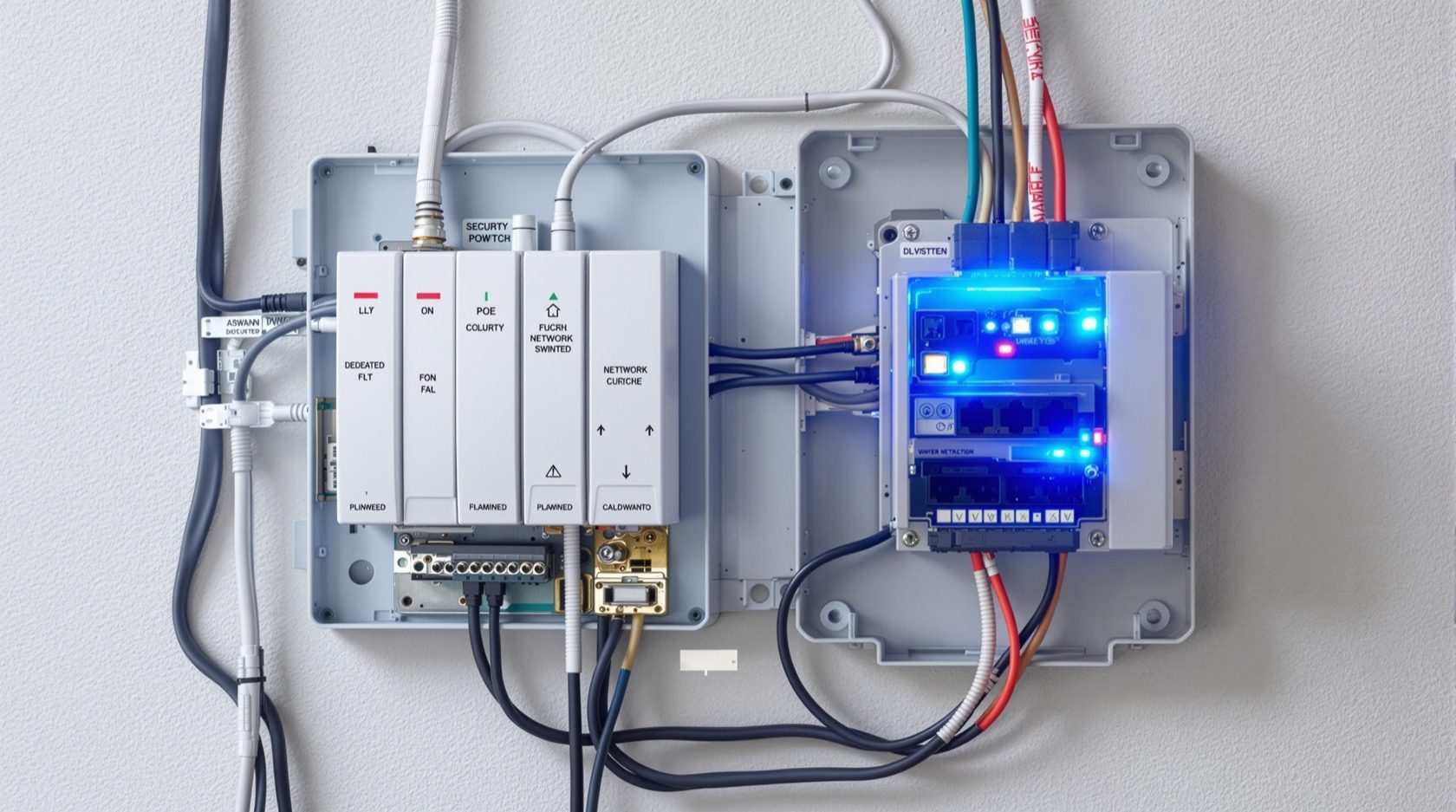
Security Power Supply Requirements for Indian Homes
How to plan and provision the electricity a security system needs — PoE over the data cable versus local 12V adapters, where mains points actually belong, a dedicated circuit for the equipment room, and surge, earthing and drawing coordination for the Indian grid.
A security system is only as reliable as the electricity behind it. Yet power is the part most homeowners plan last — after the cameras are bought, when the electrician has closed the walls and the only sockets nearby are meant for a table lamp. The result is a tangle of extension boards, a 12V adapter dangling in the rain at the gate, and a camera that browns out every time the geyser switches on. This guide flips that order: it shows you how to plan and provision the power a security system needs while the home is still on the drawing, so the supply is designed for the load, not improvised around it.
This is a planning and coordination guide, part of the Home Security Hub and the risk-led approach in the home security risk assessment guide. One boundary up front: this guide is about designing the supply — how power reaches each device and how much it draws. It is not about keeping that power alive during a cut. Resilience, batteries and runtime are a separate subject, covered in the electrical backup assessment for security and sized with the backup power calculator. Get the supply right first; layer backup on top afterwards.
Scope & safety. All mains-electrical work — the distribution board, a dedicated circuit, socket points, surge devices and earthing — is qualified, licensed work. This guide helps you specify and coordinate it so your electrician builds the right thing. It never asks you to touch live wiring. Low-voltage PoE and 12V wiring is safer to handle, but the mains that feeds it is not.
How security devices actually get their power
Before you can provision anything, you need to know the three ways security hardware is powered. Almost every device in an Indian home uses one of them.
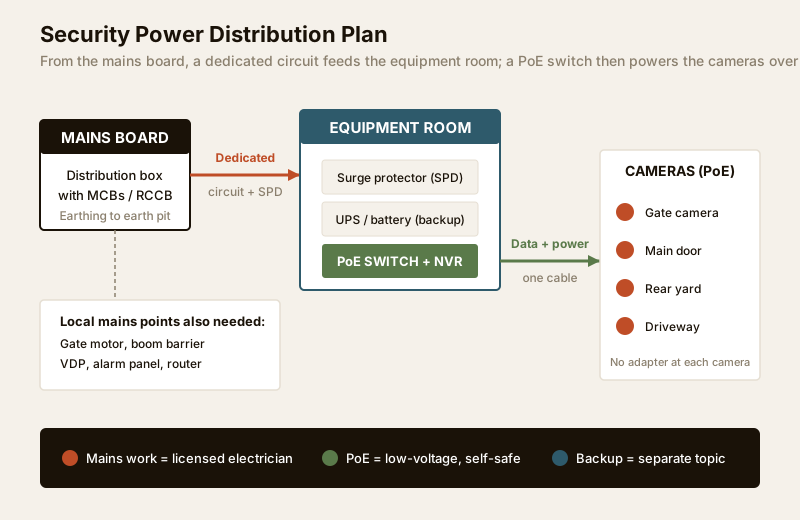
1. PoE — Power over Ethernet. The camera is powered through the same network cable that carries its video. A PoE switch (or the recording NVR itself, if it has PoE ports) sits in the equipment room and pushes low-voltage DC down each cable to the camera at the far end. One cable, both jobs — no adapter and no socket at the camera position at all. This is the modern default for a multi-camera CCTV system, pairing directly with the security cabling requirements guide and the network readiness guide.
2. Local low-voltage adapter. The device has its own 12V (sometimes 5V or 24V) adapter that plugs into a nearby mains socket. Common for a single Wi-Fi camera, a video door phone, or a standalone unit where no data cable runs. Simple for one or two devices, but each now needs a mains point beside it — and every adapter is one more thing that can fail, especially outdoors in monsoon and heat.
3. Direct mains points. Some hardware is mains-powered outright and needs a proper point: the gate motor or boom barrier, the sliding-gate controller, the alarm panel, the router and ONT, and the equipment room rack itself. These are fixed loads the electrician must plan sockets or fused spurs for.
The art of provisioning is deciding, device by device, which of these three applies, then making sure the drawing has a point exactly where each mains-powered or adapter-powered item sits — and no wasted point where PoE does the job.
PoE versus local adapter: making the call
This is the single most consequential power decision, because it determines how many mains points you need and where your cabling runs. Decide it during design, not on installation day.
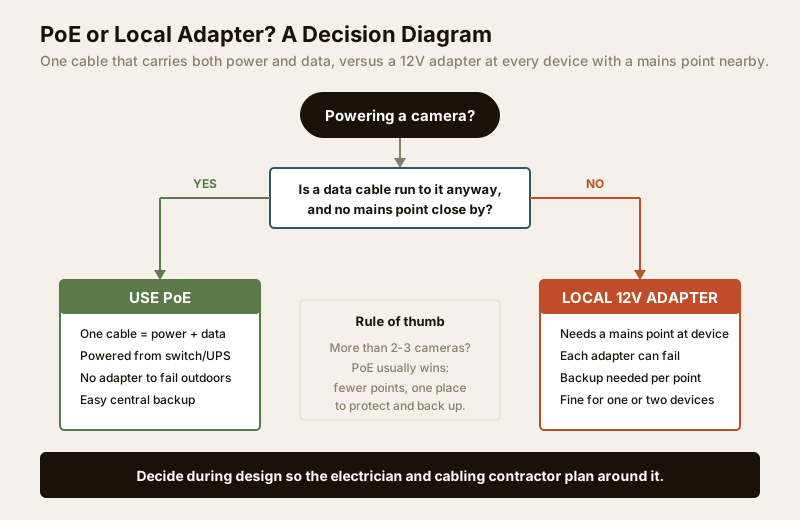
The logic is simple. If you are running a data cable to a camera anyway — which you are, for any wired CCTV — then PoE gives you power for free along that same cable, and you avoid a socket at an awkward, high, weather-exposed position. If instead the device is wireless, or sits next to an existing socket where no data cable goes, a local adapter is the pragmatic choice.
| Factor | PoE (power over data cable) | Local 12V adapter |
|---|---|---|
| Mains point at the device | None needed | Required at every device |
| Cabling | One cat-6 cable does power + data | Data (or Wi-Fi) plus a separate power socket |
| Outdoor reliability | Good — no adapter to fail in rain/heat | Weaker — exposed adapters degrade |
| Central backup | Easy — back up one switch/UPS | Hard — each point needs its own backup |
| Best for | 3+ wired cameras, gate/perimeter runs | 1-2 cameras, Wi-Fi units, retrofit |
| Failure diagnosis | One place to check (the switch) | Hunt device by device |
| Upfront cost | PoE switch adds cost, saves sockets | Cheap per unit, adds up at scale |
Rule of thumb: beyond two or three cameras, PoE almost always wins. You concentrate all the power into one switch in one room, which is far easier to protect with surge devices and to keep alive on a single UPS. The cabling implication is important and must be coordinated: PoE means you plan cat-6 home runs from every camera back to the equipment room, rather than a mains socket at each camera. Distance matters too — standard PoE reaches about 90-100 metres per run; a very long perimeter or gate run may need a PoE extender or a mid-span injector, which the cabling contractor should flag. Plan this alongside the security cabling requirements guide and, when you are ready to count cables and points, the security cabling and PoE planner.
Where power is actually needed
With the PoE-versus-adapter logic settled, mark the plan. The goal is a small, deliberate set of points — not a socket behind every camera.
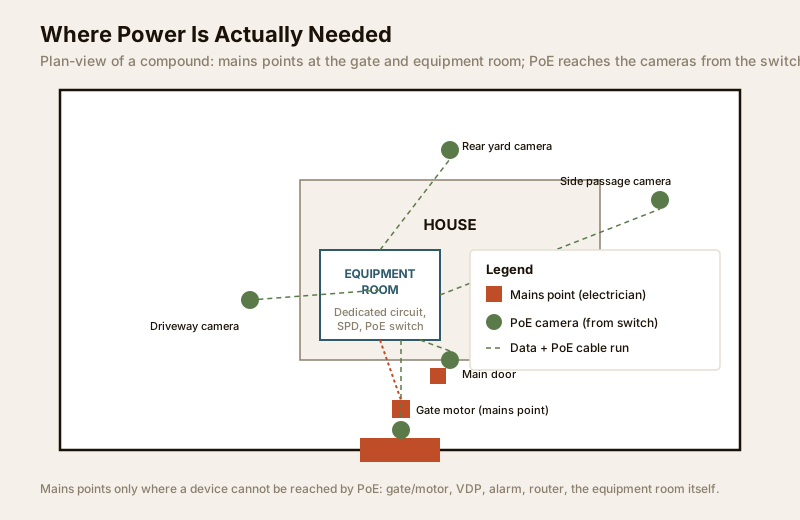
Here is the practical requirements table to hand your electrician and cabling contractor together. It maps each location to what it needs and how it is powered.
| Location | What it powers | Power provision | PoE or point |
|---|---|---|---|
| Equipment room / rack | NVR/DVR, PoE switch, router, UPS | Dedicated circuit + 2-3 sockets | Mains point (essential) |
| Camera positions (wired) | IP cameras | Cat-6 home run to switch | PoE (no local point) |
| Main gate | Gate motor, boom barrier, controller | Fused mains point at gate | Mains point |
| Main door | Video door phone, door camera | Socket for VDP; PoE for door cam | Point + PoE |
| Boundary / perimeter | Perimeter or floodlight cameras | Long PoE run (extender if far) | PoE |
| Standalone Wi-Fi camera | Single indoor/outdoor camera | Nearby socket for adapter | Local adapter |
| Alarm / sensor panel | Control panel, keypad, siren | Dedicated point near panel | Mains point |
Two habits keep this clean. First, the equipment room is the hub — pull power to one well-planned location and let PoE fan out from there, rather than scattering points across the house. The room itself is worth planning properly; see the security equipment room planning guide. Second, never let a security point block or share a fire-escape or life-safety circuit — security hardware must never compromise egress or trip a circuit that also serves essential lighting.
Estimating the connected load
You do not need to be an electrical engineer, but hand your electrician a rough total so they can size the circuit and, later, the backup. Security loads are small compared with a home's overall demand — a comfort, not a worry. Typical draws to add up (nameplate figures vary, so treat these as planning estimates):
- IP camera (PoE): roughly 4-12 W each. Ten cameras is on the order of 60-120 W.
- PoE switch / NVR: 30-100 W depending on ports and drives.
- Router + ONT: 15-30 W.
- Video door phone: 10-20 W.
- Alarm panel + siren: 10-30 W (siren peaks higher briefly).
- Gate motor: intermittent but heavier — often 200-600 W while running, near zero at rest. Plan its point for the running load, not the average.
For most homes the continuous security load sits comfortably under a few hundred watts — which is why a modest UPS can carry the whole electronic side for a long time. The gate motor is the outlier: a real motor load, it wants its own adequately rated point and is usually not kept on the small electronics UPS. Note the connected load on your drawing; it feeds directly into sizing backup with the electrical backup assessment and the backup power calculator.
A dedicated circuit for the equipment room
The single most valuable provisioning decision is a dedicated circuit for the security equipment room — its own MCB at the distribution board, its own run, not shared with kitchen appliances, geysers or air-conditioners.
Why it matters in Indian homes specifically:
- No nuisance trips. The CCTV does not go dark because someone switched on a high-load appliance elsewhere and tripped a shared breaker.
- Clean isolation. You can work on other circuits without killing the recorder, and label exactly what feeds security.
- Stable supply. Fewer shared loads means fewer voltage sags that make electronics misbehave.
- Backup-ready. It is far easier to put one known, bounded load behind a UPS or inverter later than a whole mixed circuit.
Ask your electrician for this explicitly, with the equipment-room sockets for the rack, switch and router all on this circuit. It is standard practice, and dovetails with the wider home wiring in the electrical guides hub.
Surge, spikes and earthing on the Indian grid
Indian power is hard on electronics. Voltage swings, sags when the grid is loaded, spikes when it recovers, and — during the monsoon — carries the real risk of surges from nearby lightning coupling into long outdoor cable runs. A security system is unusually exposed because its cameras and cables reach outside the house, where they can pick up a surge and carry it straight back to your NVR. Provision for it at design time:
- Surge protection device (SPD) at the board. A licensed electrician can fit a surge protector at the distribution board to clamp incoming spikes. This is the first line of defence for everything downstream.
- A protected point for the equipment room. Feed the rack through a good surge-protected outlet or a UPS with surge filtering, so the recorder and switch sit behind two layers.
- Mind the outdoor cable runs. Long PoE runs to a gate or perimeter camera are the most likely path for a lightning-induced surge. Where runs are exposed, ask about inline network surge protectors at the switch end.
- Proper earthing. Everything above depends on a sound earth. Surge devices dump energy to earth; without a good earth pit and continuous earthing to the board and rack, they cannot work, and metal camera housings and gate hardware can become a shock risk. Earthing is qualified work — have it tested, not assumed.
None of this defends against a full power cut — that is what backup is for. Surge protection defends against the power that is there being dirty or dangerous. The two are complementary and both belong on your plan.
Coordinating with the electrician and the drawing
Provisioning only works if it lands on paper before the walls close — during the electrical drawing stage, alongside the architect and electrician. A short checklist to run through with them:
1. Mark every device on the plan — cameras (as PoE runs to the equipment room), gate motor, VDP, alarm panel, router, and the rack.
2. Confirm the PoE-versus-adapter call per device so the drawing shows cable home runs where PoE applies and sockets only where truly needed.
3. Specify the dedicated security circuit with its own MCB and the two or three sockets the equipment room needs.
4. Locate the equipment room where cabling can reach every camera within PoE distance — central and accessible, not a far corner.
5. Add SPD, confirm earthing at the board, and protected outlets for the rack.
6. Leave conduit and spare capacity — an empty conduit and a spare MCB way now saves opening walls later.
7. Note the connected load on the drawing so backup sizing has a starting number.
Doing this during design is dramatically cheaper than retrofitting a dedicated circuit or gate-motor point into a finished home, which means chasing walls and lifting tiles. If you are building or renovating, fold all of this into the security planning guide for new homes and, for professionals, the security design guide for architects.
When to bring in a professional
Do the planning yourself — you know your home, your devices and where you want cameras. But every step that touches mains electricity is licensed work: the dedicated circuit and MCB, the SPD at the board, socket points, the gate-motor supply, and the earthing. Specify what you want and why, then let a licensed electrician size, install and certify it. Low-voltage PoE and 12V wiring you can reasonably run or supervise, but the mains feeding it — and anything involving the distribution board — is professional-only. Have earthing tested rather than trusting it, and verify any applicable municipal wiring rule for your project.
Key takeaways
- Provision power during design, not after purchase — mark every device on the electrical drawing so the supply is built for the load.
- PoE is the default beyond two or three cameras — one data cable carries power and video, so plan home runs to the equipment room instead of sockets at each camera.
- Provision mains points only where they are truly needed — the equipment room, gate motor, VDP, alarm panel and router — and let PoE cover the rest.
- Give the equipment room a dedicated circuit with its own MCB, plus SPD surge protection and sound earthing for the Indian grid.
- Supply is not backup — get the provisioning right here, then size resilience separately with the electrical backup assessment and the backup power calculator.
- Route all mains work to a licensed electrician — specify and coordinate; never touch live wiring yourself.
Plan the rest of your infrastructure alongside this: the cabling requirements, network readiness and equipment room, then browse the full security guides collection.
This is an educational planning guide. It is strictly defensive and does not describe how to defeat any security measure. All mains-electrical work — distribution board, dedicated circuits, socket points, surge devices and earthing — is qualified professional work; engage a licensed electrician and verify any applicable National Building Code or municipal wiring rule for your project.
Export this guide
Related Guides — Deep-dive reading
Electrical Safety for Security Systems in India (2026): Powering It Without Peril
A homeowner's guide to the power side of home and RWA security systems, CCTV, alarms, gates, access control and NVRs, done so it protects you instead of quietly becoming a shock or fire hazard. What makes a supply safe, what to insist on, and why the mains work belongs to a licensed electrician.
SecuritySecurity Cabling Requirements for Indian Homes
How to plan the wiring behind a home security system - which cable feeds which device, the 90-metre ethernet rule and the interference rules, and why laying conduit at construction stage beats surface trunking every time.
SecurityLightning Protection for Outdoor Cameras in India (2026): Keeping the Strike Out
Why a pole-mounted or boundary-wall camera is one of the most lightning-exposed devices on your property, and how a homeowner thinks about the two threats, a direct strike and the far more common induced surge, and the coordinated protection, earthing and placement that keep gear alive through an Indian monsoon.
SecurityRelated Tools — Try Free
Security Cabling & PoE Planner
Estimate cable length, drops, PoE power budget, the right switch, conduit and cost for a CCTV/security cabling plan.
Cabling PlannerSecurity Backup Power Calculator
Size a UPS/inverter and battery to keep CCTV, NVR, router and alarm running through a power cut — load, Ah, VA and cost.
Backup PowerElectrical Safety & Load Audit
Home electrical audit — 10 categories, 65+ checkpoints across earthing, RCCB, MCB, wiring, switchboards, appliance circuits, DG/inverter backup.
Safety Audit