
Access Control System Cost in India (2026): Priced Per Door, Per System, Per User
What a building-scale access control system actually costs in India — broken down per controlled door (reader, electric lock, controller, cabling and power) and per system (software, licences, integration and AMC) — with the standalone-versus-networked split, how the bill scales with the number of doors and the credential you choose, and the non-negotiable rule that escape-route doors must fail safe.
An access control system is what a smart lock becomes when a building outgrows a single door. Instead of one homeowner unlocking one entrance from a phone, you have many doors, many people, and a need to know who went where and when. A factory turnstile, an apartment lobby, an office floor with server rooms and finance cabins, a hospital wing — these all buy the same underlying thing: controlled entry across a set of doors, tied to a central record. And they all ask the same first question. What does it cost?
The honest answer is that "access control" has no single price, because it is not one product. It is priced two ways at once: per controlled door (the reader, the electric lock, the door hardware, the controller and the cabling that make one opening work) and per system (the software, the licences, the server and the integration that tie every door into one managed whole). A cheap quote and an expensive quote can both say "access control" and describe completely different animals — a single standalone door with a card reader versus a networked, software-managed estate with a central audit trail. This guide prices both, shows how the bill scales with the number of doors and the credential technology you choose, and separates the one-time capex from the ongoing opex that most buyers forget until the first renewal invoice arrives.
If you are securing one door at home, the cousin guide is smart lock cost in India — a single-door problem with a single-door budget. This guide is the building-scale relative: many doors, many users, an audit trail, and a head-end. Read it against the pillar, home security system cost in India, which frames where access control sits inside a whole-site security budget.
Scope & safety. These are indicative, plan-your-budget bands for facility managers, architects, MEP consultants and security integrators — not quotes, and not an installation manual. Prices move with brand, spec, site conditions, city and time, and GST is extra. Get at least three written, itemised quotes — priced per door and per system, capex and opex separated line by line — before you commit. Never let cost-cutting touch life safety: any access-controlled door on an escape route must fail safe and allow free egress on fire alarm or power loss, per the National Building Code (NBC = SP 7:2026). Access logs and biometrics are personal and sensitive data under the DPDP Act 2023; guards who operate the system must come through a PSARA 2005-registered agency.
The two ways access control is priced
Every access control quote is really two quotes stapled together, and reading them apart is the single most useful budgeting skill.
- Per controlled door (mostly capex). Each door you want to control carries its own hardware stack: a reader, an electric lock, door hardware (exit button, door closer, break-glass release), a share of a controller, and the cabling and power to join it up. Multiply the per-door figure by the number of doors and you have the bulk of the hardware bill.
- Per system (capex plus recurring opex). On top of the doors sits the head-end: the controller panels, the software or server, the licences (frequently charged per door or per user — a real, recurring cost), and any integration with CCTV, video door phones, lifts and time-attendance. This is where standalone and networked systems diverge violently in price, and where the opex hides.
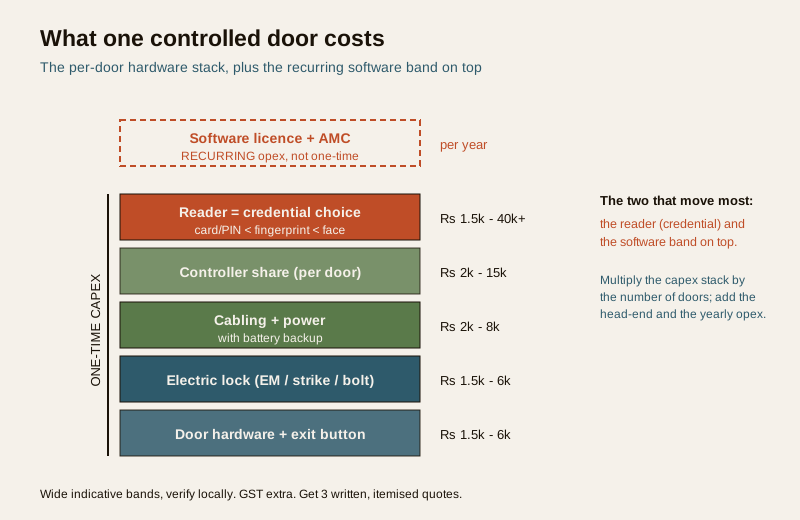
Where the money goes, per controlled door
Take one door and walk up the stack. Each element is a cost driver you can move up or down, and the wide bands below are ballpark figures to verify locally, never firm prices.
The reader — your biggest per-door variable
The reader is what the user presents a credential to, and the credential technology is the single largest per-door cost driver. Broadly, cost climbs with the sophistication and the "cannot be lent or copied" quality of the method:
- RFID card or fob, and PIN keypad — the cheapest, most common workhorse. A card or proximity reader is inexpensive, but remember the recurring cost of issuing and replacing cards for every user.
- Fingerprint (biometric) — a clear step up in hardware cost, and it removes the shared-card problem, but it introduces sensitive personal data and hygiene and reliability considerations.
- Face recognition — materially more expensive again, and squarely inside DPDP sensitive-data territory.
- Mobile credential (phone as the key) — shifts cost from the card to the software and licensing; the reader may cost less but the head-end and per-user licence carry more.
The rule of thumb: a plain card-or-PIN door is the floor; each move toward biometrics and face recognition raises the per-door reader cost and, with biometrics, your data-protection obligations. Multi-factor doors (card plus PIN, or card plus fingerprint) cost more still — worth it on a server room or a cash room, wasteful on a stationery cupboard.
The electric lock and door hardware
The reader makes a decision; the lock enforces it. The common choices — an electromagnetic (EM) lock, an electric strike, or a drop/dead bolt — sit in a modest per-door band, but the choice is not only about price. The lock type decides fail-safe behaviour (covered in full below), and on an escape route that decision is not yours to make on cost — the code makes it. Around the lock sits the rest of the door hardware: the exit push button, the door closer, the mounting brackets, and critically the break-glass or manual release that guarantees a person can always get out. None of this is where you save money.
The controller — the brain per door or per panel
The controller (or door panel) is the device that actually reads the credential, checks it against permissions, drives the lock and writes the event to a log. Its cost is where standalone and networked part company:
- A standalone single-door controller — often built into the reader itself — is cheap, because the intelligence and the (small, local) memory live at the door.
- A networked controller panel typically serves several doors and talks to a central server. Priced per door it costs more, but it is what makes a real audit trail, remote management and instant credential revocation across the building possible.
Cabling, power and battery backup
The quiet line item that a cheap quote shrinks and reality expands. Every controlled door needs data and power cabling run back to a controller and a power supply, plus a battery backup so the system behaves correctly through a mains failure — and in India, mains failures are routine, so backup is not optional. Long cable runs, conduiting, core-cutting and containment on a retrofit can cost more than the reader itself. This is the item most under-quoted and most likely to balloon on site.
The head-end — software, licences and integration
Above the doors sits the system. On a single standalone door there is almost nothing here; on a networked estate it is a substantial and partly recurring cost.
- Software and server. A networked system runs management software on a server or PC (or in the cloud). That is a capex item at install, and often an opex item forever after.
- Licences — the opex most buyers miss. Access control software is frequently licensed per door or per user, sometimes as an annual subscription, sometimes as a one-time licence with paid upgrades. A quote that lists cheap hardware and a quiet "software licence" line can carry a running cost that dwarfs the difference over five years. Ask explicitly: is the licence one-time or annual, per door or per user, and what does a new door or a new hire add?
- Integration. Tying access control into CCTV, a video door phone, the lifts and the time-attendance/payroll system adds engineering cost — and value, because an access event that is also an attendance record and a camera bookmark earns its keep. Price integration as its own line; it is rarely free.
For the wider device context — how access control relates to smart locks, and how a building composes them — see the smart locks and access control hub.
Standalone versus networked — the split that decides your budget
This is the fork in the road, and it is worth naming plainly because it explains why two "access control" quotes can differ by an order of magnitude.
- Standalone. One door, one self-contained controller-reader, credentials programmed at the door, a small local log if any. Cheap, quick, no server, no licence. Perfectly adequate for a single side gate, a lone store-room, a clinic back door. Its limits are real: no central record, painful to manage many doors, and revoking a lost card means visiting every door.
- Networked. Many doors wired or connected back to controller panels and a central server or cloud, one place to add and revoke users, a genuine audit trail, and estate-wide rules. Far more expensive per door and it carries software and licence opex — but it is what an apartment block, an office floor or a factory actually needs, because the whole point at building scale is central control and a defensible log of who went where.
The honest guidance: do not buy a networked head-end for three doors, and do not try to run forty doors on standalone controllers. Right-size to the number of doors, the number of users, and whether you genuinely need a central audit trail. Most buildings above a handful of doors, or with any staff turnover, need networked; most single-door problems do not.
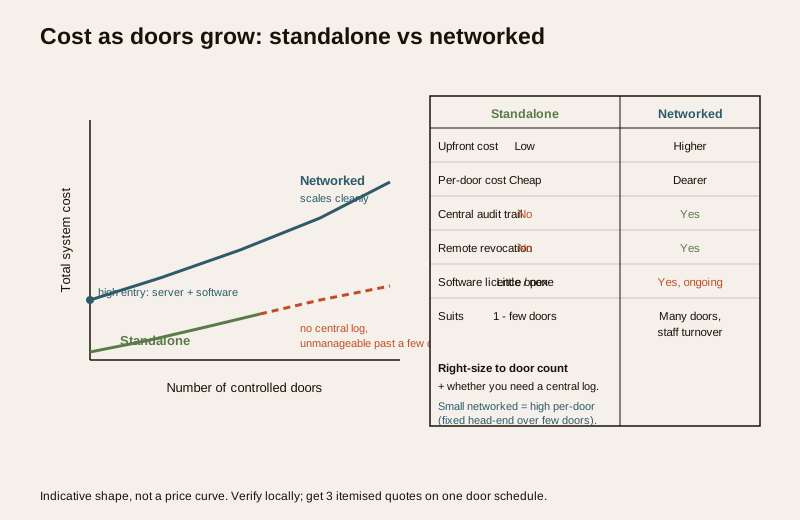
How the total scales — doors times credential, plus the head-end
Two numbers set your capex before anything else: how many doors and which credential. A useful way to estimate is:
1. Per-door hardware = reader (driven by credential choice) + electric lock + door hardware + controller share + cabling and power. This is a wide band per door, from a modest figure for a plain card-or-PIN door to several times that for a face-recognition, multi-factor, long-cable-run door.
2. Times the number of controlled doors. This is where a whole building's capex is set. Ten doors of biometrics cost far more than ten doors of cards, and forty doors of anything is a different budget from four.
3. Plus the head-end — controllers, server, software and integration — largely fixed-ish for a networked system regardless of exact door count, which is why networked systems have a high entry cost that then amortises across more doors.
4. Plus recurring opex — licences, AMC, cloud, and issued cards — every year, forever.
The counter-intuitive result: a small networked system can cost more per door than a large one, because the fixed head-end is spread over few doors. If you have only a couple of doors, the standalone route is often the honest-value answer.
Capex versus opex — the running cost buyers forget
The most expensive mistake in an access control budget is treating it as a one-time purchase. It is not. Separate the two columns explicitly in every quote:
| Cost | Type | What it covers | How to read it |
|---|---|---|---|
| Readers, locks, door hardware | Capex (one-time) | Per controlled door hardware | Scales with door count and credential choice |
| Controllers and panels | Capex (one-time) | The per-door or per-panel brain | Standalone cheap; networked higher but manageable |
| Cabling, power, battery backup | Capex (one-time) | Wiring, PSU, backup per door | Under-quoted; balloons on retrofit and long runs |
| Server and software install | Capex (one-time) | Head-end for a networked system | Near-zero for standalone; real for networked |
| Software licence | Opex (recurring) | Per-door or per-user, one-time or annual | The hidden running cost — pin down the model |
| AMC / maintenance | Opex (recurring) | Support, service visits, spares | Commonly a percentage of hardware value per year |
| Cloud / hosting subscription | Opex (recurring) | Cloud-managed access, remote features | Per-door or per-user monthly on many systems |
| Credential cards issued | Opex (recurring) | New and replacement cards, enrolment | Small per unit, real across turnover |
The lesson: a slightly dearer system with a one-time licence and modest AMC can beat a "cheap" system whose per-user cloud subscription compounds every year. Ask every bidder to project the five-year total cost, not just the install price.
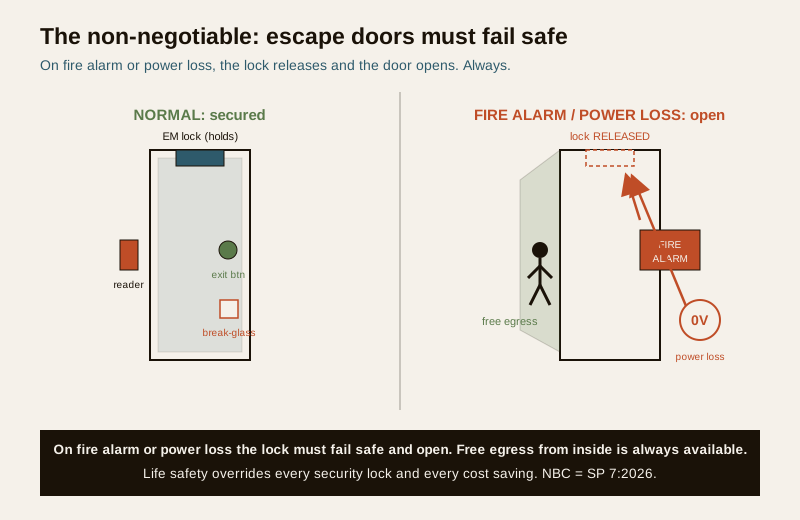
The non-negotiable — escape-route doors must fail safe
Here cost stops being a trade-off. An access-controlled door on an escape route must release and allow free egress on fire alarm and on power loss — always, without exception. This is life safety, governed by the National Building Code (NBC = SP 7:2026), and it overrides every security consideration and every rupee saved.
- Fail-safe versus fail-secure is a design decision, not a budget one. An EM lock is inherently fail-safe — cut power and it releases — which is why it is common on escape doors. Some strikes and bolts are fail-secure and stay locked without power; those must never sit alone on an escape route.
- Tie the system into the fire alarm. On a fire signal, access-controlled escape doors must drop open. This integration is a line item — budget for it, never delete it to save money.
- Free egress from the inside, always. A person leaving must never need a card, a code or a working network to get out. A break-glass or mechanical release on the egress side is mandatory, not an upgrade.
- A door locked against theft that traps a person in a fire is a fatal error, not a saving. No stock, no data and no security requirement is worth an egress you cannot open.
Data, guards and the paperwork around the cost
Two obligations ride alongside the budget and belong in the plan, not as afterthoughts:
- DPDP Act 2023 — the logs are personal data. An access control system by design records who went where and when, and biometric and face-recognition systems hold sensitive personal data. Agree in writing who may view the logs, how long they are retained, how biometric templates are stored and secured, and how you honour a person's rights. This is a governance cost (policy, consent, retention, security) as much as a hardware one, and it is cheaper to design in than to retrofit.
- PSARA 2005 — guards through a licensed agency. Where guards operate the gate, issue visitor passes or manage the head-end, they must be supplied by a PSARA-registered agency. That is an opex line — factor it into the running cost of a manned system.
How to read a quote and where to spend
- Insist on itemisation, per door and per system. A lump-sum "access control system" price hides everything that matters. Make each door a line and the head-end a line.
- Separate capex from opex on the page. If a bidder cannot tell you the licence model and the five-year running cost, that is your answer about the bidder.
- Ask what a cheap quote leaves out. Usually: battery backup, proper cabling and containment, fire-alarm integration, the software licence beyond year one, and enough controllers for real audit logging.
- Spend where it earns. Fail-safe hardware and fire-alarm integration on escape doors, a genuine networked audit trail if you have turnover or many doors, and battery backup — never cut these. Save by right-sizing the credential (cards where biometrics add nothing) and by not buying a heavy head-end for a few doors.
- Get three written, itemised quotes. On the same door schedule and the same credential spec, so you are comparing like with like. This one discipline saves more money than any single product choice.
For a structured way to plan the whole security spend this sits inside, use the security cost planning hub, and for the device landscape, the main security hub.
Key takeaways
- Access control is priced two ways at once — per controlled door (reader, lock, hardware, controller, cabling) and per system (software, licences, integration, AMC). Read the two apart in every quote.
- The reader and the credential are your biggest per-door variable — card and PIN are the floor; fingerprint, then face recognition, cost progressively more and carry data obligations.
- Standalone is cheap for one door; networked costs far more but is what a building needs — central management, a real audit trail and instant revocation across many doors.
- Total capex is roughly per-door cost times number of doors, plus a largely fixed head-end — small networked systems cost more per door because the head-end spreads over fewer doors.
- The software licence and AMC are recurring opex, not a one-time buy — a cheap system with a per-user cloud subscription can lose to a dearer one over five years. Ask for the five-year total.
- Escape-route doors must fail safe and allow free egress on fire alarm and power loss — per NBC (SP 7:2026), life safety overrides every security lock and every saving.
- Logs and biometrics are personal and sensitive data under DPDP 2023; guards need a PSARA agency — govern and budget for both.
- Get three written, itemised quotes on one door schedule — the single best cost-control discipline there is.
Where to go next
- Home security system cost in India — the pillar that frames where access control sits in a whole-site budget.
- Smart lock cost in India — the single-door cousin; compare a one-door budget with a building-scale one.
- Video door phone cost in India and CCTV data storage cost in India — the entry-point and evidence systems access control commonly integrates with.
- The smart locks and access control hub, the security cost planning hub and the main security hub.
References
- National Building Code of India (SP 7), Bureau of Indian Standards — means of egress, exit doors, fail-safe release of access-controlled doors on escape routes, and fire-alarm interface for life-safety functions. Verify the current edition (SP 7:2026) via the BIS catalogue: https://www.services.bis.gov.in/
- Digital Personal Data Protection Act, 2023 — access logs, card and enrolment records, and biometric and face-recognition templates are personal and sensitive personal data; agree who may view them, retention periods, storage security and data-subject rights in writing.
- Private Security Agencies (Regulation) Act, 2005 (PSARA) — any guard operating the gate, issuing passes or managing the access head-end must be supplied through a PSARA-registered agency; verify licensing before contracting.
- Goods and Services Tax (GST) — applies to access control equipment and installation and management services; treat all indicative bands in this guide as pre-tax and confirm the applicable rate on each itemised quote.
This is an educational, budget-planning overview for facility managers, architects, MEP consultants and security integrators — not a price list, a quote, or an installation manual, and not legal advice. All rupee figures are wide, indicative bands that move with brand, specification, site conditions, city and time; obtain at least three written, itemised quotes before deciding. Life-safety egress, fail-safe release and fire provisions take priority over any security measure or cost saving; verify any standard's current status via the BIS catalogue before relying on it.
Export this guide
Related Guides — Deep-dive reading
Access Control Maintenance in India (2026): Readers, Locks and Fail-Safe Egress
How to keep a card, keypad, fingerprint or face access-control system reading reliably and locking securely — and, above everything, how to test that its doors still release on a fire alarm and on power loss, so an access-controlled door never becomes a life-safety trap.
SecurityHome Security System Cost in India (2026): The Honest Budgeting Guide
There is no single price for a home security system — it is a stack of choices. This pillar gives you the mental model to budget the whole home: the cost drivers, the split between one-time capex and ongoing opex, wide indicative tier bands, a five-year total-cost lens, and how to read and compare quotes.
SecurityWireless CCTV Cost in India (2026): Cheap to Buy, Read the Running Costs First
What Wi-Fi and wire-free CCTV really costs an Indian home — a low, DIY-friendly install price that hides a subscription, battery and reliability bill. An honest, capex-versus-opex look at where the money actually goes over three to five years, with indicative bands and the drivers that move them.
SecurityRelated Tools — Try Free
CCTV Cloud vs Local Cost Calculator
Compare cloud CCTV subscription against a local NVR + HDD — upfront, 5-year total, monthly fee and break-even.
Cloud vs LocalAccess-Control Power Calculator
Total current and power an access system draws, to size the power supply — locks, readers and controllers.
AC PowerBefore vs After — Cost Reality Check
Compare what you expected to pay vs what you actually paid, category by category.
Reality Check