
CCTV Image Quality Explained (India 2026): Why More Megapixels Isn't Enough
The whole picture beyond megapixels — sensor size, aperture, lens quality, codec and bitrate — and why a well-lit 2MP camera beats a dark 8MP one on an Indian street.
Walk into any electronics market or scroll any listing and the pitch is always the same number: megapixels. 2MP, 5MP, 8MP, "4K Ultra HD". It is the one figure printed largest on the box, and it is the one buyers fixate on. Yet the single most common disappointment with home CCTV in India is a camera bought for its megapixels that produces mushy, noisy, unusable footage the one night it matters.
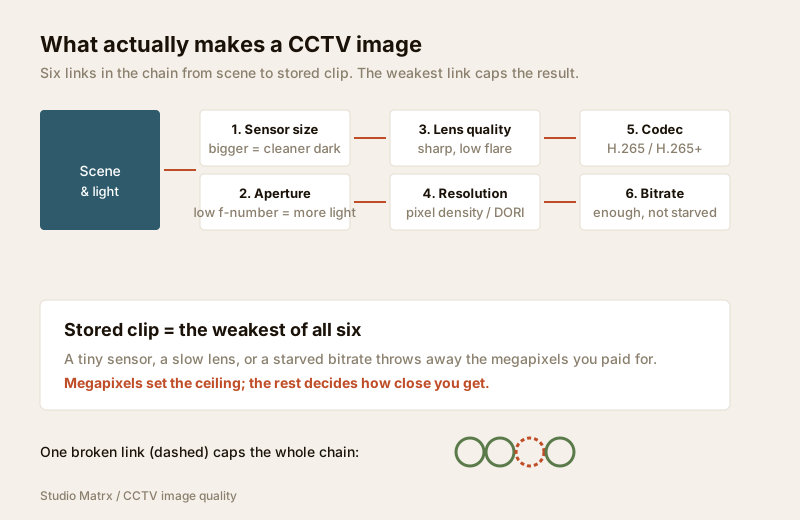
This is the umbrella guide to cctv image quality in Studio Matrx's CCTV hub — the whole picture beyond the megapixel count. Resolution is real and it matters, but it is one ingredient of maybe six. Sensor size, aperture, lens quality, the video codec and the bitrate all decide whether those megapixels turn into a face you can recognise or a smear you cannot. Get these right and a modest camera earns its keep for years; get them wrong and the biggest number on the box buys you a folder full of useless clips.
Scope & safety. This guide helps you choose and brief an installer — it is not a wiring manual. Running cabling, mounting at height and any mains-electrical work belong to licensed professionals. And remember the privacy trade-off: a sharper, more identifiable image is a bigger responsibility, not a smaller one. Cameras belong only on your own property and shared areas — never bathrooms, bedrooms or changing areas — positioned to respect neighbours and the spirit of the Digital Personal Data Protection Act, 2023.
The megapixel myth, stated plainly
Megapixels count the dots in the image. A 2MP (1080p) camera paints roughly two million pixels; an 8MP (4K) camera paints four times as many. More dots means more potential detail — if every dot is a good dot.
The catch is that a pixel is only as good as the light that fell on it and the lens that focused it. Cram four times the pixels onto the same tiny sensor and each pixel becomes smaller, collects less light, and turns noisier the moment the sun goes down. On a bright afternoon the 8MP wins easily. On a poorly lit Indian street at 9pm — precisely when most footage is needed — that same 8MP camera can produce a grainier image than a well-built 2MP camera would. The dots are there; the detail is not.
So the honest rule is: resolution sets the ceiling of what is possible; everything else on this page decides how close you get to it. For how much resolution a given view actually needs (and the DORI detect-observe-recognise-identify idea), read the dedicated resolution guide. This guide is about the rest of the chain.
Sensor size — the quiet number that matters most
The image sensor is the chip behind the lens that actually catches light. Its physical size is written as a fraction of an inch — 1/3", 1/2.8", 1/2.7", 1/1.8" and so on — and, counter-intuitively, a larger fraction (1/1.8" is bigger than 1/3") means a bigger chip.
A bigger sensor gathers more light. That is the whole story, and it is enormous:
- Bigger sensor = bigger pixels = less noise in the dark. This is why two "5MP" cameras can look nothing alike at night — the one on a 1/2.7" sensor has larger, cleaner pixels than one squeezing 5MP onto a tiny 1/3.6" chip.
- It sets the real low-light limit far more than the IR LEDs do. India's streets are full of harsh point-lights and deep shadow; a generous sensor is what keeps a face out of the murk.
The uncomfortable truth for buyers: sensor size is often buried in the spec sheet or left off entirely, while megapixels are in the headline. When you compare two cameras at the same price, find the sensor size — it is frequently the single line that separates a good camera from a bad one. A 4MP camera on a 1/1.8" sensor will almost always beat a 4MP camera on a 1/3" sensor after dark. For cameras built specifically around this, see the low-light CCTV guide.
Aperture and f-stop — how much light the lens lets in
The aperture is the opening in the lens, written as an f-number (f/1.6, f/2.0, f/2.4). Smaller f-number = wider opening = more light reaching the sensor. An f/1.6 lens lets in noticeably more light than an f/2.4 lens, which again matters most at night and at dawn/dusk.
Pair the two ideas and you have the core of night performance: a big sensor behind a wide (low f-number) lens is what lets a camera hold colour and detail in gloom. This is exactly the combination behind the "colour night vision" cameras that show a lit scene in colour instead of IR black-and-white — covered in the colour night vision guide and the broader night vision guide.
| Spec line | What "good" looks like | Why it matters in India |
|---|---|---|
| Sensor size | 1/2.8" or larger; 1/1.8" is excellent | Bigger pixels survive poorly lit streets and shadow |
| Aperture (f-number) | f/1.6–f/2.0 preferred | Wider opening = usable image at dusk and night |
| Resolution | 2–4MP for most home views; 8MP only with light | More MP needs more light and storage to pay off |
| WDR | True-WDR, 120dB+ for backlit spots | Faces against a bright doorway or west sun |
| Codec | H.265 / H.265+ (smart codec) | Cuts storage and Jio/Airtel upload roughly in half |
Lens quality — the part no spec sheet admits
Two cameras can share the same sensor, resolution and aperture and still look different because of the glass. A cheap plastic or soft lens blurs the edges of the frame, flares badly when a headlight or the low sun hits it, and cannot resolve the fine detail the sensor is capable of. You are, in effect, throwing away megapixels the lens cannot deliver to the sensor.
You will rarely see lens quality quantified, so judge it indirectly: buy from a reputable brand, prefer metal-and-glass builds over the cheapest plastic units, and — most usefully — look at real sample footage at night and against backlight before you commit. The lens is also where field of view is decided; a fixed lens gives one angle, while a varifocal lens lets an installer dial the exact framing on site. And "zoom" is a lens-and-sensor question too: only optical zoom adds real detail, while digital zoom just crops pixels you already have — the difference is spelled out in the optical vs digital zoom guide.
Codec and bitrate — where good pixels get thrown away
Here is the step almost every buyer forgets. The camera does not store what the sensor sees; it stores a compressed version of it, and how aggressively it compresses decides how much of your carefully captured detail actually survives to the recording.
The codec is the compression method:
- H.264 — the older, universal standard. Reliable and widely compatible, but heavy on storage and bandwidth.
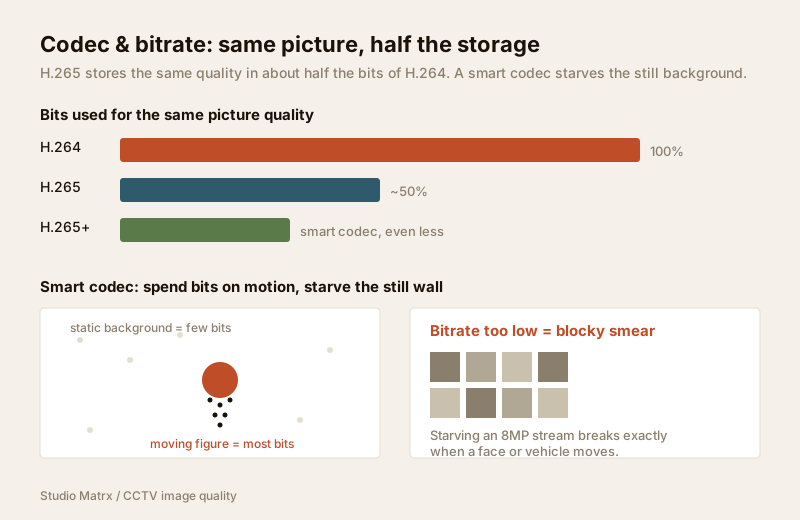
- H.265 (HEVC) — the modern standard. Roughly half the file size of H.264 for the same picture. This is the one to want.
- H.265+ / H.264+ ("smart codec") — a manufacturer layer on top that spends bits on the moving parts of the scene and starves the static background (a still wall, an empty road). It can cut storage dramatically for typical CCTV, which is mostly nothing-happening.
The bitrate is how many bits per second the camera is allowed to spend — the real knob for quality. Squeeze an 8MP stream into a low bitrate to save disk space and you get blocky, smeared footage: exactly the moment a face moves or a vehicle passes, the compression breaks down and the detail you paid megapixels for turns to mush. Give it enough bitrate and the same camera is crisp.
The practical takeaway for India, where storage costs money and Jio/Airtel upload for cloud backup is finite: choose H.265/H.265+ and set an honest bitrate for the resolution. Do not buy 8MP and then starve it. Work the storage-and-bandwidth maths — days of retention, disk size, monthly cloud upload — with the CCTV storage & bitrate calculator, and see the recording side in the local storage guide and cloud CCTV guide.
Frame rate and WDR — the rest of the optics act
Two more spec lines complete the picture, each with its own guide:
- Frame rate (fps) decides motion. A gate or a shop till needs enough frames to freeze a fast-moving person or vehicle without blur; a quiet corridor is fine at fewer. More fps also costs more storage — the balance is set out in the frame rate guide.
- Wide Dynamic Range (WDR) handles the contrast that wrecks so many Indian entrance cameras — a face standing in a dark doorway against a blazing bright street or a west-facing gate at sunset. True-WDR sensors expose the bright and dark parts separately and merge them, so the face is visible instead of a silhouette. Where and how much WDR you need is in the WDR guide.
Together, these lines are image quality. No single one is "the" answer; the weakest link caps the whole chain.
Why a well-lit 2MP beats a dark 8MP
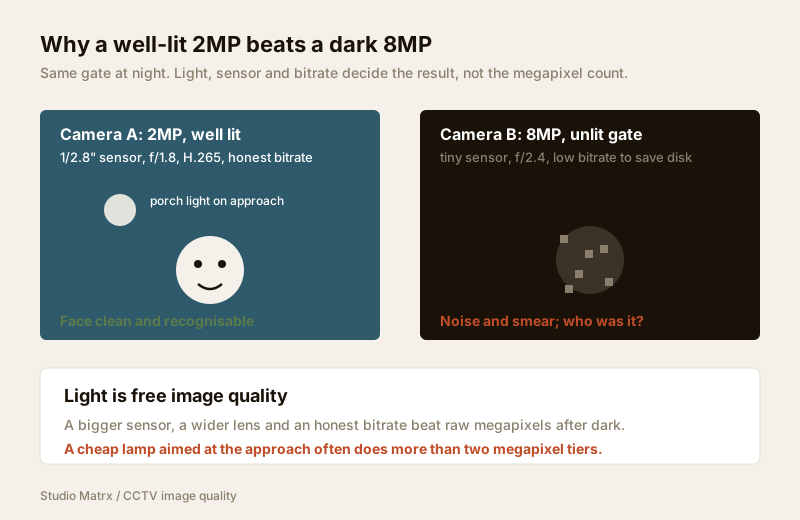
Put it all together with the scenario that decides most real cases. Two cameras watch the same gate at night:
- Camera A: 2MP, on a decent 1/2.8" sensor, f/1.8 lens, H.265, honest bitrate — pointed at a spot with a warm porch light on the approach.
- Camera B: 8MP, on a cramped tiny sensor, f/2.4 lens, low bitrate to save disk — pointed at an unlit gate.
Camera A gives you a clean, readable face. Camera B gives you four times the pixels of noise and compression blur, and you cannot tell who it was. The megapixels lost to the camera with better light, a bigger sensor, a wider lens and an honest bitrate. Light is free image quality — a ₹300 lamp aimed at the approach often does more for footage than upgrading two megapixel tiers. For the lighting-and-visibility side of this, see the lighting & visibility security assessment.
Reading a spec sheet without being fooled
Use this order when you compare two cameras at the same price. It is roughly the order of what actually decides the image:
| Priority | What to check | The trap to avoid |
|---|---|---|
| 1 | Sensor size (1/2.8" or bigger) | Buying MP while ignoring a tiny sensor |
| 2 | Aperture (low f-number, f/1.6–2.0) | A high f-number that dies at night |
| 3 | Codec (H.265 / H.265+) | H.264-only, then blaming storage cost |
| 4 | Resolution (enough, not maximum) | Chasing 8MP for a small view with no light |
| 5 | Real night/backlit sample footage | Trusting a bright daytime demo clip |
| 6 | WDR + frame rate for the spot | Ignoring the specific problem of that view |
Match the camera to the view, not to the biggest number. A tight porch needs little resolution; a wide compound may justify more. The camera type selector and the lens field-of-view calculator help you size each spot, and the whole-system logic sits in the complete guide to CCTV systems.
The privacy trade-off, said out loud
Every improvement on this page makes footage more identifiable — sharper faces, readable plates, clearer detail. That is more capability and more responsibility. A camera that can now recognise a neighbour walking past their own door is a camera that must be aimed more carefully, not less. Point cameras at your own property and shared areas, avoid overlooking neighbours' private spaces, and treat the footage as personal data. The security & privacy assessment works through this properly.
When to bring in a professional. Decide the specification — sensor, resolution, codec, framing — yourself using this guide, then hand the mounting at height, cable pulling, weatherproof terminations, recorder configuration and bitrate/retention setup to a licensed installer. Anything at the mains board is a licensed electrician's job; see the electrical hub. A correctly specified, well-lit, honestly-encoded camera beats an expensive one configured badly every single time.
Key takeaways
- Megapixels set the ceiling, not the result. Sensor size, aperture, lens, codec and bitrate decide how much of that resolution becomes usable footage.
- Sensor size is the quiet hero — a bigger sensor (1/2.8" or larger) means bigger, cleaner pixels that survive India's dark, harsh-lit streets. Find it on the spec sheet.
- A wide aperture (low f-number) and H.265/H.265+ codec carry night quality and cut storage and Jio/Airtel upload roughly in half.
- An honest bitrate matters more than an extra megapixel tier — starving an 8MP stream gives you blocky, smeared clips exactly when detail is needed.
- A well-lit 2MP camera beats a dark 8MP one. Light is free image quality; size each view with the storage & bitrate calculator and route install work to a licensed professional.
References
- Digital Personal Data Protection Act, 2023 — a sharper, more identifiable image carries a greater duty of care; position cameras to cover only your own property and shared areas with a legitimate purpose.
- H.264 (AVC) and H.265 (HEVC) are international video-compression standards; verify a camera's supported codecs and maximum bitrate on the manufacturer's specification sheet before ordering.
- National Building Code of India (SP 7), Bureau of Indian Standards, and local municipal bye-laws for any structural, electrical or life-safety aspect of an install; verify the current edition via the BIS catalogue: https://www.services.bis.gov.in/
This is an educational overview. Mounting at height, cabling and any electrical work are qualified professional tasks — engage licensed installers and verify any standard's current status via the BIS catalogue before relying on it.
Export this guide
Related Guides — Deep-dive reading
How to Choose a CCTV Camera (2026): The Homeowner's Decision Guide for India
Cut through the spec-sheet noise and choose the right CCTV camera for each spot around an Indian home. What actually matters — sensor and low-light performance, lens and field of view, form factor, IP and IK ratings, honest smart features — and the marketing claims to ignore.
SecurityCCTV-Compatible Lighting for Indian Homes (2026): How to Light a Scene So the Camera Actually Sees It
The bridge between your lighting and your cameras — why a scene that looks fine to your eye can still be useless footage, and how uniformity, no light in the lens, the right white and flicker-free drivers make the difference.
SecurityCCTV WDR Explained (India 2026): Beating Harsh Backlight & Glare
Why a face against a bright doorway, glass shopfront or west-facing gate turns into a silhouette, what wide dynamic range actually does, and how to tell true multi-exposure WDR from cheap digital WDR before you buy.
SecurityRelated Tools — Try Free
CCTV Resolution Selector
The camera resolution (MP) a scene needs for identify, recognise or detect, using DORI pixel density.
ResolutionCCTV Cloud vs Local Cost Calculator
Compare cloud CCTV subscription against a local NVR + HDD — upfront, 5-year total, monthly fee and break-even.
Cloud vs LocalCCTV Identification-Distance Calculator
How far a camera can still identify a face or number plate (DORI 250 px/m), from resolution, lens and sensor.
Identify Distance