
CCTV Resolution Explained (India 2026): How Many Megapixels You Actually Need
What MP, 1080p, 2K, 4K and 8MP really mean, how pixels-per-metre and DORI decide whether you can recognise a face or read a number plate, and why 'enough' beats 'maximum' for Indian homes and shops.
Walk into any electronics market in India and the CCTV pitch is almost always the same one word: megapixels. 2MP, 4MP, 5MP, 8MP "4K" — bigger number, better camera, buy the biggest. That is the wrong way to read a spec sheet. CCTV resolution is not a score you maximise; it is a tool you match to a distance and a job. This guide opens the Features section of Studio Matrx's CCTV hub with the number everyone quotes and few explain — so you can choose enough, not maximum, and know exactly what that buys you at your gate.
Scope & safety. This guide helps you plan and decide. Choosing a resolution is a desk exercise; mounting cameras at height, running cabling and any mains-electrical work belong to licensed professionals. And note the privacy corollary up front: more resolution means more identifiable footage, which means more responsibility, not less. Cameras belong only on your own property and shared areas — never bathrooms, bedrooms or changing areas — positioned to respect neighbours and the spirit of the Digital Personal Data Protection Act, 2023.
What "megapixels" actually measures
A camera image is a grid of tiny dots — pixels. Resolution counts how many. A megapixel (MP) is one million pixels. Multiply the width by the height of the image and you get the pixel count:
- 2MP = 1920 x 1080 — this is exactly 1080p, also sold as "Full HD".
- 4MP = 2560 x 1440 — this is 2K / "QHD".
- 5MP = 2592 x 1944 — a common Indian middle rung.
- 8MP = 3840 x 2160 — this is 4K / "Ultra HD".
So the marketing words and the megapixel numbers are the same thing said twice: "1080p", "Full HD" and "2MP" all describe one resolution. "4K", "Ultra HD" and "8MP" all describe another. Do not pay twice for a camera because the box lists both a "p" number and an "MP" number as if they were separate features — they are not.
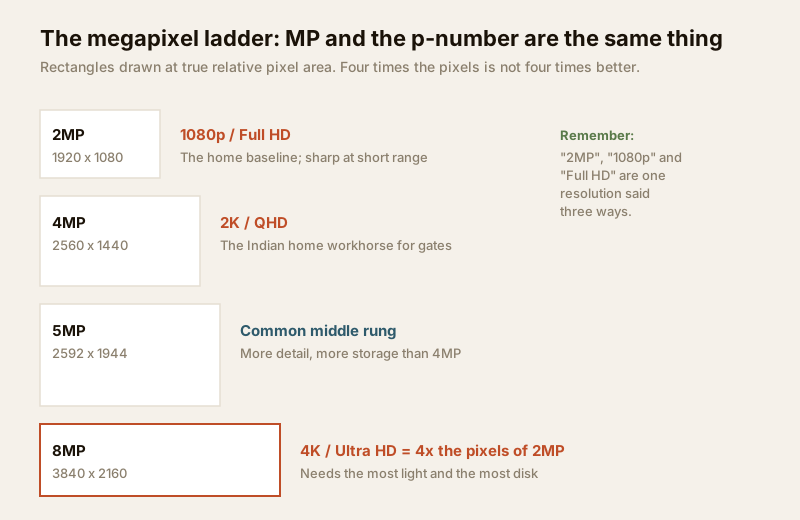
The jump between rungs is bigger than it looks. Going from 2MP to 8MP is four times the pixels, not four times "better". Those extra pixels are only useful if two other things hold up: there is enough light to fill them cleanly, and you have somewhere to store the much larger stream they produce. Hold those two thoughts — they are where the "buy the biggest" logic falls apart.
The number that actually matters: pixels per metre
Resolution alone tells you nothing about whether you can identify a person. What matters is how many of those pixels land on the thing you care about — the face, the number plate — at the distance it sits from the camera. That measure is pixels per metre (px/m): the horizontal pixels spread across one metre of real-world width in the scene.
A 4MP camera watching a narrow 2-metre-wide gate puts a lot of pixels on each face. The same 4MP camera watching a 20-metre-wide car park spreads those same pixels thin — each face now gets a tenth as many, and turns to mush. Same megapixels, wildly different usefulness. This is why a modest camera aimed tight can out-identify an expensive camera aimed wide.
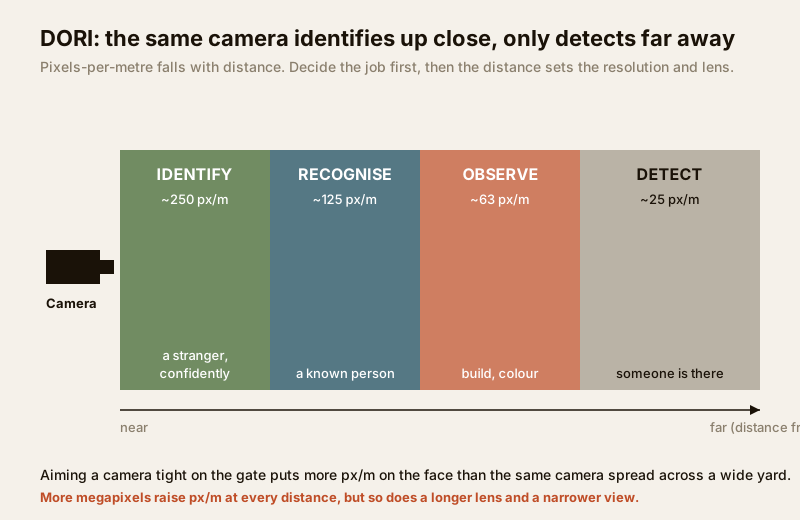
The security industry turns px/m into four plain jobs, known by the initials DORI (a widely used industry framework, EN 62676-4):
| Level | Meaning | Rough pixels/metre | What you can tell |
|---|---|---|---|
| Detect | Something is there | ~25 px/m | A person is present in the frame |
| Observe | Some detail | ~63 px/m | Clothing colour, rough build, direction |
| Recognise | A known person | ~125 px/m | "That is our watchman / my neighbour" |
| Identify | A stranger, confidently | ~250 px/m | Enough facial detail to identify an unknown person |
The lesson: decide the job first, then the distance, then the resolution and lens follow. If you need to identify a stranger at your gate, you are aiming for roughly 250 px/m on the face — and whether a given camera hits that depends as much on the lens and how tightly it is aimed as on the megapixels. That is exactly what the CCTV lens field-of-view calculator works out for you: feed it the camera resolution, lens and distance, and it tells you the px/m you will actually get — and therefore whether you land at Detect, Recognise or Identify.
Why more megapixels is not free — light and storage
Here is the part the market never mentions. Every extra pixel is a smaller bucket for light, and a bigger burden for your recorder.
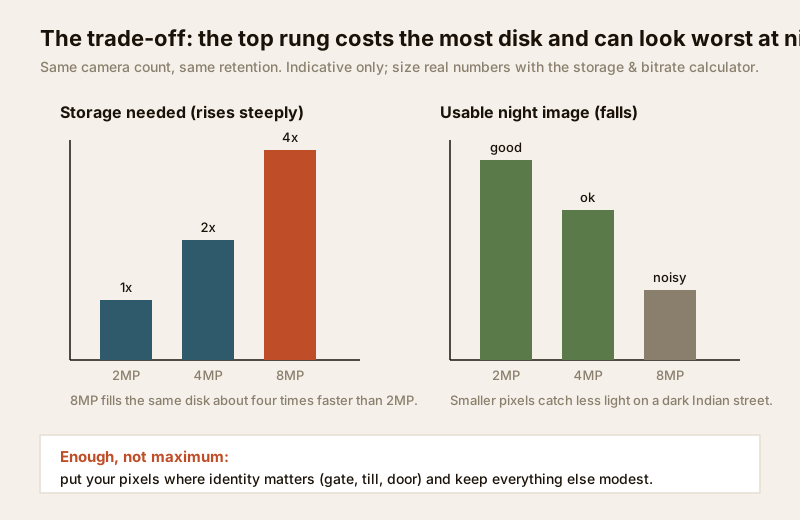
More pixels need more light. On most CCTV cameras, a jump in megapixels is packed onto a sensor of the same physical size. Four times the pixels on the same silicon means each pixel is smaller and catches less light. In bright daylight that is fine. But on a poorly lit Indian street after dark, an 8MP camera's tiny pixels are starved — the image turns noisy, grainy and smeared, often worse than a 2MP or 4MP camera on the same wall. This is the single most common disappointment with cheap 4K cameras. If night performance matters, resolution is the wrong lever — read the low-light CCTV cameras guide and consider colour night vision instead of chasing megapixels.
More pixels need far more storage. This is the big one for cost. A 4K stream carries roughly four times the data of a 1080p stream, so at the same settings it fills your recorder's hard disk four times faster — or forces you to keep only a quarter of the days. In an Indian home wanting 30 days of footage from several cameras, that is the difference between one hard disk and three. Resolution multiplies with frame rate, too: doubling one while holding the other doubles the storage. Before you commit to a resolution across a whole system, run the numbers in the new CCTV storage & bitrate calculator — it turns "8MP on six cameras for 30 days" into an actual disk size and monthly cloud cost so the choice is made on rupees, not marketing.
The "enough, not maximum" argument
Put px/m, light and storage together and a sensible Indian home or shop rarely wants its cameras at maximum resolution everywhere. The right move is to match each view to its job:
| Where | Typical job (DORI) | Sensible resolution | Why |
|---|---|---|---|
| Main gate / entrance (tight) | Identify faces, read plates | 4MP–8MP, aimed narrow | The one view worth the pixels and storage |
| Front door / porch | Recognise callers | 2MP–4MP | Short distance means even 2MP identifies well |
| Driveway / side approach | Recognise, observe | 4MP | Distance needs pixels; a longer lens helps more |
| Wide compound / parking | Detect, observe movement | 2MP–4MP wide, or split views | One camera cannot identify across a wide yard |
| Indoor room / corridor | Observe, recognise | 2MP | Short throw; 2MP is plenty, saves disk |
| Backup / overview camera | Detect | 2MP | Context only; do not waste 4K here |
The pattern that works: put your pixels where identity matters — the gate, the till, the front door — and keep everything else modest. A shop might run 8MP on the till and entrance and 2MP on the aisles. A home might run 4MP at the gate and 2MP elsewhere. This costs less, stores far more days, and often performs better at night than a house full of budget 8MP cameras straining in the dark. A well-lit, well-aimed 2MP or 4MP camera beats a dark, wide 8MP one almost every time — a point the companion image quality guide develops in full, because sensor size, lens and codec matter as much as the megapixel count.
Resolution is also only one dial on the spec sheet. It sets how much detail is possible; frame rate sets how smoothly motion is caught (a fast gate or till needs more frames — see the CCTV frame rate guide); and the lens sets where the pixels land. For the whole-system logic of choosing and layering cameras, see the complete guide to CCTV systems, and for how the stream reaches the recorder, how CCTV systems work.
A worked example — one gate, three choices
Say your gate is 6 metres wide and you want to identify a stranger there (target ~250 px/m).
- A 2MP camera aimed across the full 6 m gives roughly 1920 ÷ 6 = 320 px/m — comfortably into Identify, if aimed tightly on the gate and not wasted on sky and wall.
- Aim that same 2MP camera wide to also cover the whole front yard (say 18 m across) and you drop to ~107 px/m — now only Recognise, not Identify.
- Jump to 8MP across the full 18 m and you are back to ~213 px/m — near Identify again, but at four times the storage and worse night performance.
The cheaper, better answer is usually two cameras with the right job each: a tight 2MP–4MP on the gate for identity, and a separate wide 2MP for yard context. That is the "enough not maximum" logic in one plot. Confirm the exact px/m for your distances and lenses with the lens field-of-view calculator before you buy, and size the disks with the storage & bitrate calculator.
The India realities that shift the choice
- Poor street lighting. Dark approaches punish high-megapixel cameras hardest. Prioritise light and sensor over MP for anything facing an unlit road.
- Heat, dust and monsoon. None of these change resolution, but they degrade the lens surface — a dusty or rain-streaked lens throws away detail that megapixels cannot recover. Keep glass clean.
- Storage cost and power cuts. Bigger streams mean bigger disks and a recorder that must survive load-shedding on a UPS; a 4K system that stops recording during the evening cut has failed. Weigh local storage against cloud CCTV with the cost in mind.
- Upload for cloud/remote view. On Jio or Airtel home broadband, an 8MP camera's live stream can strain the upload channel, especially with several cameras. Higher resolution costs bandwidth, not just disk. The IP CCTV guide covers the network side.
When to bring in a professional
Decide the resolutions, views and camera count yourself — that is a planning decision, and this guide plus the calculators are built to let you make it well. Hand the mounting at height, cable pulling, weatherproof terminations, recorder and disk commissioning, and any mains-electrical work to a licensed installer and, at the board, a licensed electrician — see the electrical hub. A good installer will also confirm on site that your chosen resolution and lens actually hit the px/m you need at each spot, and set the recorder's retention to match your disk. Getting the plan right first means their skilled time is spent installing the right system, not re-doing a guessed one.
Key takeaways
- CCTV resolution (MP) is a match, not a maximum: 2MP = 1080p, 4MP = 2K, 8MP = 4K — the "p" number and the "MP" number describe the same thing.
- What decides if you can identify someone is pixels per metre at the target distance, not megapixels alone — aim for the DORI level the job needs (~250 px/m to identify a stranger).
- More megapixels need more light and far more storage; a cheap 8MP camera on a dark Indian street can look worse than a 4MP one and fills disks four times faster.
- Choose enough, not maximum: pixels where identity matters (gate, till, door), modest resolution elsewhere — a well-lit 2MP–4MP beats a dark, wide 8MP.
- Size every choice with the lens field-of-view calculator and the storage & bitrate calculator, and route mounting, cabling and mains work to a licensed professional.
References
- EN 62676-4 (DORI) — the widely used industry framework defining Detect, Observe, Recognise and Identify by pixels-per-metre; verify the current edition and figures against the standard before relying on them.
- Digital Personal Data Protection Act, 2023 — higher-resolution footage is more identifiable personal data; capture only your own property and shared areas for a legitimate purpose, and avoid neighbours' private spaces.
- National Building Code of India (SP 7), Bureau of Indian Standards, and local municipal bye-laws for any structural, electrical or life-safety aspect of an install; verify the current edition via the BIS catalogue: https://www.services.bis.gov.in/
This is an educational overview. Pixel-per-metre and DORI figures are industry rules of thumb; mounting at height, cabling and any electrical work are qualified professional tasks — engage licensed installers and verify any standard's current status via the BIS catalogue before relying on it.
Export this guide
Related Guides — Deep-dive reading
How to Choose a CCTV Camera (2026): The Homeowner's Decision Guide for India
Cut through the spec-sheet noise and choose the right CCTV camera for each spot around an Indian home. What actually matters — sensor and low-light performance, lens and field of view, form factor, IP and IK ratings, honest smart features — and the marketing claims to ignore.
SecurityCCTV Frame Rate Explained (India 2026): How Many FPS You Really Need
What frame rate (fps) actually means, how 12 vs 15 vs 25 vs 30 fps looks on real footage, when motion blur costs you a face or a number plate, and why most Indian homes are perfectly served at 12-15 fps.
SecurityCCTV-Compatible Lighting for Indian Homes (2026): How to Light a Scene So the Camera Actually Sees It
The bridge between your lighting and your cameras — why a scene that looks fine to your eye can still be useless footage, and how uniformity, no light in the lens, the right white and flicker-free drivers make the difference.
SecurityRelated Tools — Try Free
CCTV Identification-Distance Calculator
How far a camera can still identify a face or number plate (DORI 250 px/m), from resolution, lens and sensor.
Identify DistanceCCTV Cloud vs Local Cost Calculator
Compare cloud CCTV subscription against a local NVR + HDD — upfront, 5-year total, monthly fee and break-even.
Cloud vs LocalCCTV Resolution Selector
The camera resolution (MP) a scene needs for identify, recognise or detect, using DORI pixel density.
Resolution