
Residential CCTV in India: What a Home Actually Needs to Cover
How to plan CCTV for an Indian home — apartment or independent house: which zones matter, how many cameras is enough, the indoor-outdoor mix, honest privacy discipline, and tiered budgets in rupees.
A home is not a shop or a factory. You are not watching a till or a loading bay — you are protecting a family, and that changes every decision: where cameras go, how many you need, and, most of all, where they must never point. Residential CCTV done well is quiet, targeted and respectful. Done badly it is either useless (blind at the one spot that mattered) or intrusive (pointed where no camera belongs).
This is the home-focused guide in Studio Matrx's CCTV hub. It complements the wider complete guide to CCTV systems and the modern-default IP CCTV guide — read those for the technology; use this to plan a system that actually fits how a family lives.
Scope & safety. This guide helps you plan, choose and coordinate. Mains wiring, drilling through structure and any work at height belong to a licensed installer and electrician — plan the layout here, then have it fitted and certified. Cameras and cabling must never block a door, window or fire-escape route.
What a home actually needs to cover
Most break-ins and disputes happen at a handful of predictable spots. Cover those well before you spend on anything clever. Think in layers, from the boundary inward: the point of entry, the approach, and the doors an intruder would actually use.
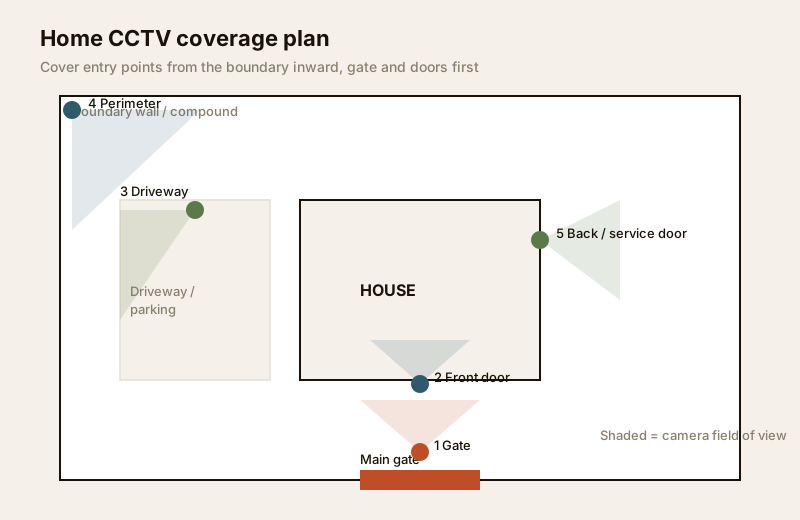
Here is how to prioritise, from must-have to nice-to-have. Fund the top rows first.
| Zone | Why it matters | Camera to use |
|---|---|---|
| Main gate / entry | Every visitor, delivery and intruder passes here — your single most valuable view | Outdoor bullet or turret, 4MP, wide but readable |
| Front door | Confirms who actually reached the house; catches parcel theft and tampering | Outdoor turret or video doorbell, 4MP |
| Driveway / parking | Protects vehicles; captures approach and number plates | Outdoor bullet, 4MP–8MP for plate detail at range |
| Boundary / perimeter | Spots someone testing the wall or fence before they are at the door | Outdoor bullet with wide field of view + good night IR |
| Back / service door | The quiet entrance intruders prefer; also staff and deliveries | Outdoor turret or dome, 4MP |
| Common indoor area | Living room / main hallway — a fallback record if someone gets inside | Indoor dome, 2MP–4MP, motion-triggered |
Notice what is not on the list: bedrooms, bathrooms, children's rooms, changing areas, the pooja room. Those never get a camera — more on that below, because it is the single most important rule in the whole guide.
How much is enough — 2, 4 or 6 cameras
The honest answer is: enough to cover your real entry points, and not one camera of vanity beyond that. Over-buying is the common mistake — six cameras badly placed protect less than three placed with intent. Match the count to the home.
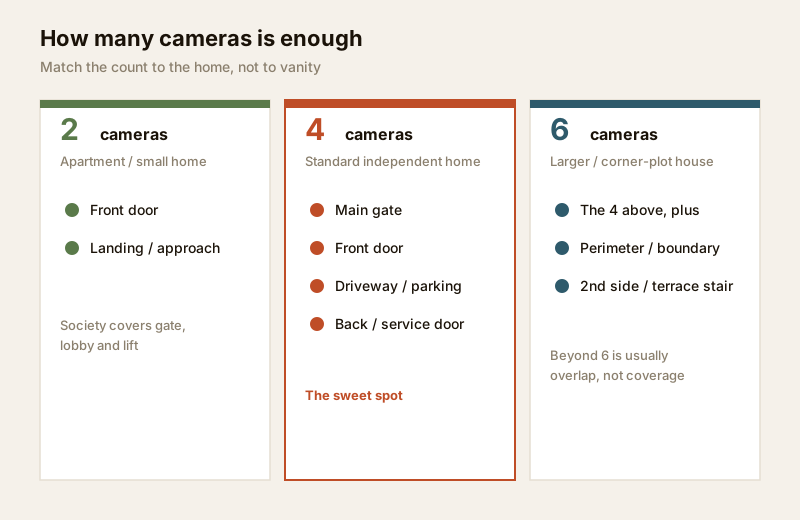
- 2 cameras — apartment or small home essentials. Main door and one covering the approach/common landing. For a flat, this is often genuinely enough, because the society already covers the gate, lobby and lift (see the apartment security guide).
- 4 cameras — the standard independent-home setup. Gate, front door, driveway/parking, and back/service door. This is the sweet spot for most 2–4 BHK houses: it closes every ground-level entry without waste.
- 6 cameras — larger house or corner plot. The four above plus a boundary/perimeter camera and one covering a second side or the terrace stair. Beyond six, most homes are adding overlap, not coverage — spend the next rupee on better night vision or storage instead.
Use the camera coverage calculator to check a camera's field of view actually reaches the zone before you commit, and the camera type selector to match a form factor to each spot.
The indoor-outdoor mix
A home system is mostly outdoor — the goal is to record people before they are inside, at the gate and doors. A small number of indoor cameras act only as a fallback in shared living spaces. A sensible 4-camera home might be 3 outdoor + 1 indoor; a 6-camera home, 4–5 outdoor + 1–2 indoor.
- Outdoor cameras must be weather-sealed (look for an IP66 rating for Indian dust, heat and monsoon), have strong infrared night vision, and be mounted high enough to be out of easy reach but angled to capture faces, not just the tops of heads. See the outdoor CCTV guide.
- Indoor cameras belong only in common areas — the main living room, the entrance hallway. They are best set to record on motion or smart events, and many families switch them off or use a privacy shutter when everyone is home. See the indoor CCTV guide.
Discreet vs deterrent
There are two philosophies, and a good home uses both. A visible camera at the gate and front door is a deterrent — most opportunists move on when they see one. A more discreet camera (a small dome, a neutral colour) covering the driveway or a side approach still records honestly without turning your home into a fortress. The rule of thumb: deter at the boundary, record discreetly inside it. Avoid the temptation of hidden or covert cameras aimed at people — that crosses into surveillance you should not be doing, and it undermines the trust of everyone who lives and works in the home.
Home-appropriate cameras and resolution
You do not need broadcast gear for a house. 4MP is the home default — sharp enough to recognise a face at a gate or door, without the storage bill of 4K on every camera. Reserve 8MP (4K) for the one or two views where you genuinely need detail at range: a long driveway, a wide compound, a number plate at the gate.
- Turret cameras — the friendly all-rounder for doors and porches; less IR glare than a dome, tidier than a bullet.
- Bullet cameras — visible and directional; ideal at the gate, driveway and along a boundary as a clear deterrent.
- Dome cameras — discreet and vandal-resistant; good for a porch ceiling or an indoor common area.
- A video doorbell — a neat add-on at the front door for two-way talk with deliveries and visitors.
Skip pan-tilt-zoom (PTZ) cameras for a normal home — they are for someone actively watching a large site, and while a PTZ is turned one way, everything else is a blind spot.
Storage and retention for a home
Footage is only worth having if it is still there when you need it. For a home, 7 to 30 days of retention is plenty — you usually discover a problem within days, not months. Two honest paths:
- Local storage (NVR/DVR + surveillance hard disk) — a one-time cost, footage stays in your home, no monthly fee. Use a surveillance-grade disk (a desktop drive dies fast under continuous CCTV writing). See local storage CCTV.
- Cloud storage — footage survives even if the recorder is stolen or damaged, viewable anywhere, but it is a recurring subscription and needs steady upload bandwidth. See cloud CCTV.
Many homes do best with a hybrid: local recording for everything, plus cloud clips for the gate/door cameras as theft-proof backup. Because India's power is not guaranteed, put the recorder and router on a small UPS so a load-shedding evening is not a scheduled blind spot. Weigh the two with the cloud-vs-local cost calculator.
Watching from the family's phones
The point of a home system is that the family can glance at it. Any modern system gives you a phone app for live view and playback from anywhere on your broadband. Set it up sensibly:
- Give each adult their own login, not one shared password taped to the router.
- Change every default password the day it is installed, and keep the camera firmware updated — a networked camera left on factory defaults is a doorway, not a guard.
- Prefer the maker's secure app over opening risky ports on your router. Network readiness matters as much as the cameras — see internet and network readiness.
The privacy discipline — the most important part
A camera in a home records the people you love and the people who work for you. That is a responsibility, not a right, and India's Digital Personal Data Protection Act, 2023 treats footage of identifiable people as personal data. Get this wrong and a security system becomes a source of harm.
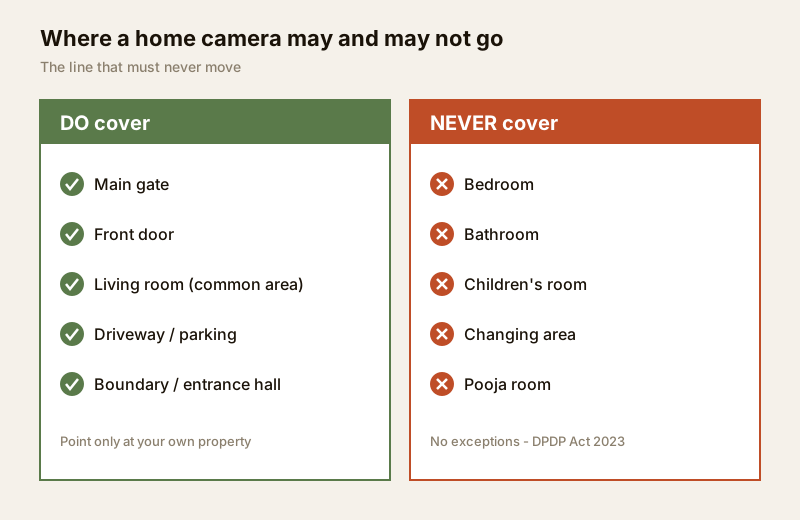
- Never place a camera in or pointing into a bedroom, bathroom, children's room, changing area or the pooja room. No exceptions, no "just in case". This is the line that must never move.
- Point cameras at your own property — your gate, doors, driveway, boundary. Angle them so you are not recording a neighbour's window, balcony or private garden. If a view unavoidably clips a neighbour's space, use the camera's privacy-mask feature to black it out.
- Tell everyone in the household, including children old enough to understand, where the cameras are and why.
- Inform domestic help, drivers and any staff that CCTV is in use and where — openly, in advance. Covert recording of the people who work in your home is both wrong and legally risky.
- Restrict who can see the footage. The app and recorder should be reachable only by the adults who need it.
For a fuller framework, read the security and privacy assessment guide. Getting privacy right is not a constraint on a good system — it is a good system.
Apartment vs villa — who controls what
Where you live changes what is yours to install versus what the society or your own compound provides.
| Apartment / flat | Independent house / villa | |
|---|---|---|
| Gate, lobby, lift | Covered by the society / RWA — not yours to install | Yours — the gate camera is your #1 view |
| What you control | Your front door / private landing only, within society rules | The whole boundary, all doors, driveway, terrace |
| Typical cameras | 1–2 (door + landing) | 4–6 (gate, doors, driveway, perimeter) |
| Permissions | Ask the RWA before drilling common walls; respect neighbours' doors | Your own structure — still respect the neighbour's line of sight |
| Shared footage | Society CCTV footage on request via the managing committee | Entirely your own recorder |
In a flat, your job is small and specific — secure your own door and coordinate with the society for the rest (apartment security guide). In an independent house, the whole perimeter is yours to plan, which is more work but more control (villas and independent houses guide).
Tiered residential budgets (indicative)
Prices move with brand, resolution and season — treat these as ballparks to sanity-check a quote, not fixed rates. Figures are for an IP (PoE) system installed, before any cloud subscription.
| Tier | Setup | What it covers | Typical range (₹) |
|---|---|---|---|
| Essential | 2-camera + 4-ch recorder, local disk | Flat: door + landing. Small home: gate + door | ₹12,000 – ₹25,000 |
| Standard | 4-camera 4MP + PoE NVR + surveillance HDD + small UPS | Independent home: gate, front door, driveway, back door | ₹28,000 – ₹55,000 |
| Comprehensive | 6-camera (mix 4MP/8MP) + 8-ch NVR + larger HDD + UPS + cloud backup on gate/door | Larger or corner-plot house: full perimeter + parking + terrace stair | ₹55,000 – ₹1,10,000 |
Add roughly ₹150–₹600 per month if you choose cloud backup, depending on how many cameras and how many retention days. Size and price your own with the camera coverage calculator and the security system cost estimator.
When to bring in a professional. Decide the zones, camera count and retention yourself — that is the planning this guide is for. Then hand the cabling, mounting, mains power and recorder commissioning to a licensed installer: they will pull cable neatly, seal outdoor cameras against the monsoon, mount them at the right height and angle, and hand over a system you can actually operate on your phone. Any work at the mains board is a licensed electrician's job — see the electrical hub. Never let a camera or its cabling obstruct a door, window or escape route.
Key takeaways
- Cover the entry points first: main gate, front door, driveway, boundary and back door — in that order of priority.
- 2 cameras suit most flats, 4 the standard independent home, 6 a larger or corner plot; beyond that is usually overlap, not coverage.
- The mix is mostly outdoor (record people before they are inside) with a small number of indoor cameras in common areas only, set to motion.
- Privacy is non-negotiable: never a bedroom, bathroom, children's room or changing area; point at your own property; inform the household and domestic staff; respect the DPDP Act 2023.
- Apartments control little more than their own door (the society covers the rest); villas own the whole perimeter — plan accordingly, and route wiring and mounting to a licensed professional.
References
- Digital Personal Data Protection Act, 2023 — footage of identifiable people is personal data; cover only your own property and shared areas, inform household and staff, and avoid capturing neighbours' private spaces.
- Bureau of Indian Standards (BIS) and local municipal bye-laws for any structural, electrical or life-safety aspect of an install; verify the current edition via the BIS catalogue: https://www.services.bis.gov.in/
- Ingress-protection (IP) ratings such as IP66 indicate dust and water resistance for outdoor cameras — confirm the rating on the product's own datasheet.
This is an educational overview. Cabling, mounting at height and any electrical work are qualified professional tasks — engage licensed installers, and verify any standard's current status via the BIS catalogue before relying on it.
Export this guide
Related Guides — Deep-dive reading
How to Choose a CCTV Camera (2026): The Homeowner's Decision Guide for India
Cut through the spec-sheet noise and choose the right CCTV camera for each spot around an Indian home. What actually matters — sensor and low-light performance, lens and field of view, form factor, IP and IK ratings, honest smart features — and the marketing claims to ignore.
SecurityLocal Storage vs Cloud CCTV in India (2026): Where Your Footage Should Live
A homeowner's honest head-to-head on where CCTV footage is kept — on a hard disk in the recorder at home, or uploaded to a per-camera cloud plan — across cost, theft resilience, internet dependence, retention, remote access and DPDP privacy, ending in a clear which-suits-whom, with hybrid usually the smartest answer.
SecurityCCTV vs Video Door Phone: Which Does Your Home Need?
They look similar and get confused constantly, but a CCTV camera and a video door phone do different jobs — one watches the whole property and records, the other answers your door and controls who comes in. This guide settles CCTV vs video door phone for Indian homes: what each is for, where they overlap, real rupee costs, apartment versus villa relevance, and why most homes end up wanting both.
Smart HomeRelated Tools — Try Free
CCTV Camera Coverage & Count Calculator
Estimate how many CCTV cameras you need, the NVR channels, storage in TB for your retention period, and an indicative all-in cost with GST.
CCTV CalculatorCCTV Camera Type Selector
Answer five questions and get the right camera form factor — dome, vandal dome, bullet, turret or PTZ — with reasons.
Camera SelectorCCTV Cloud vs Local Cost Calculator
Compare cloud CCTV subscription against a local NVR + HDD — upfront, 5-year total, monthly fee and break-even.
Cloud vs Local