
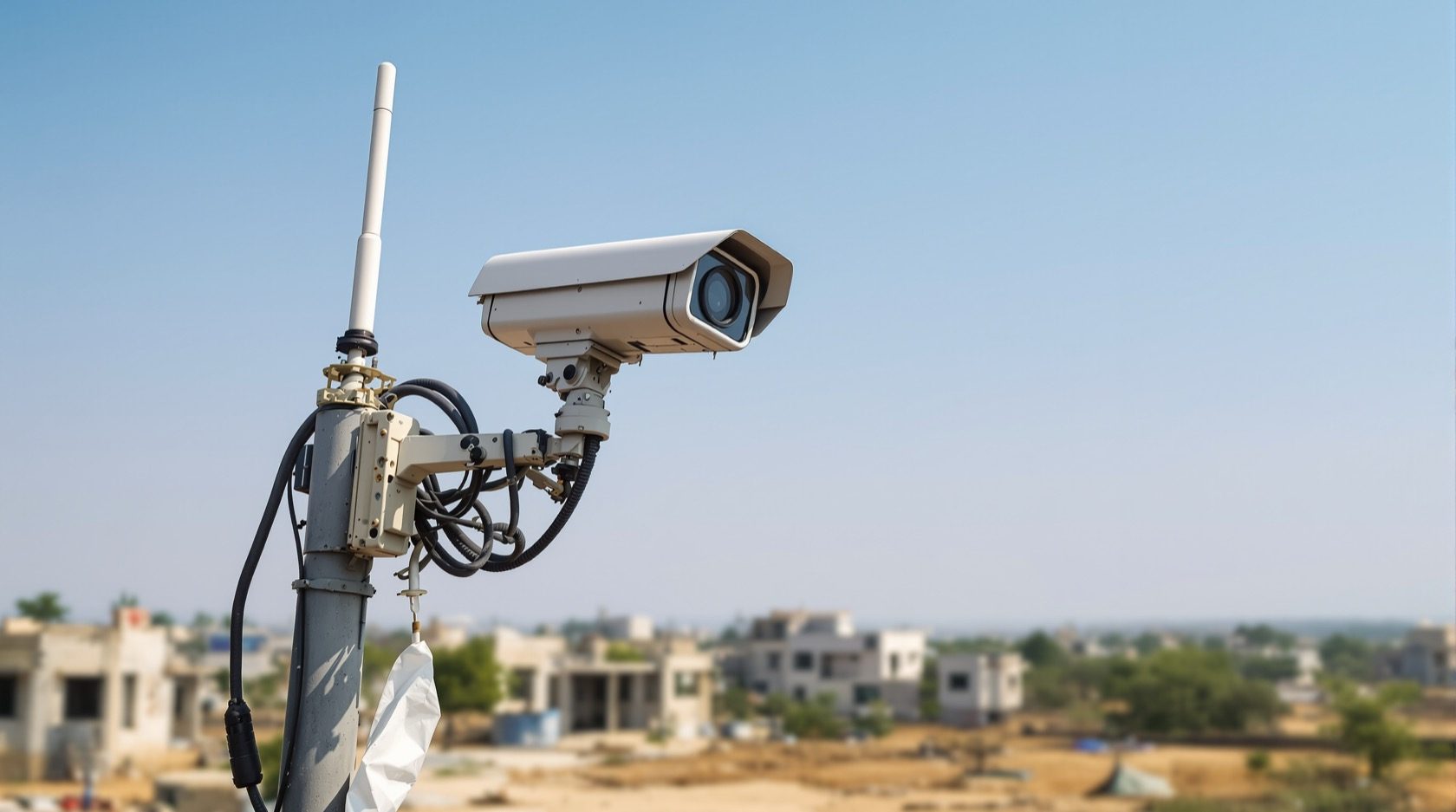
4G 5G CCTV Cameras in India: SIM Cellular Security for Sites Without Broadband
How a SIM-card camera sends its footage over the mobile network when there is no Wi-Fi or wired internet — for farms, under-construction sites, remote plots and second homes — and how to plan the data, signal and cost realistically.
Some of the places that most need a camera are exactly the places with no internet. A farm gate an hour from town. A plot you bought and are watching until you build. An under-construction site where the broadband line will not arrive until the building does. A second home shut for months at a stretch. For all of these, a 4G 5G CCTV cameras setup solves the one problem Wi-Fi and wired cameras cannot: it carries its own SIM card and sends footage back over the mobile network, the same towers your phone uses.
This guide is the focused explainer on the cellular connectivity form factor in Studio Matrx's CCTV hub. It is not about the camera's shape or its sensor — a 4G camera can be a bullet or a dome. It is about how the footage gets home when there is no broadband, so you can decide whether cellular is the right link for your site, and plan the data, signal and cost before you buy.
Scope & safety. This guide helps you choose and plan. Mounting cameras at height, running any cabling, solar wiring and mains-electrical work belong to licensed professionals — plan the positions here, but have them installed by a qualified installer. A camera must never block a window, door or fire-escape route, and cameras belong only on your own property and shared areas — never bathrooms, bedrooms or changing areas, and positioned to respect neighbours and the spirit of the DPDP Act, 2023. Cellular connectivity is about reaching a site with no broadband — never a way to hide a camera from the people it lawfully records.
What a 4G / 5G camera actually is
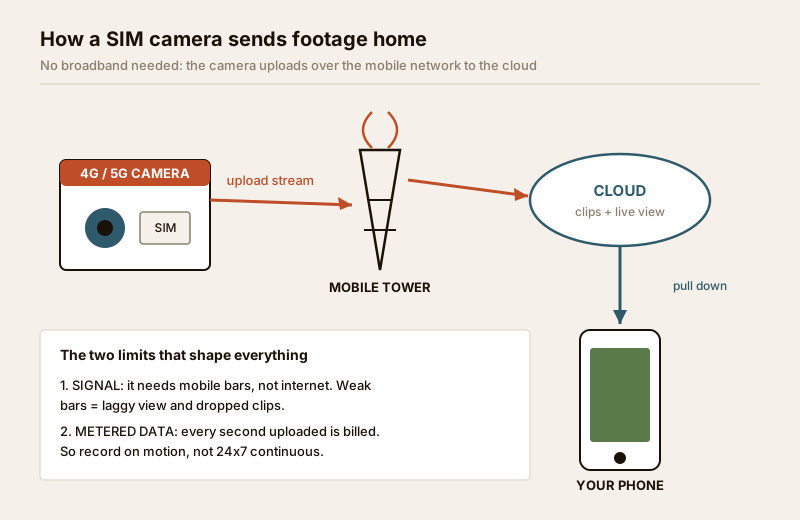
A cellular camera is an ordinary IP camera with a mobile modem and a SIM slot built in. Instead of joining your home Wi-Fi or plugging into a router, it inserts a SIM — a normal Jio, Airtel or Vi data SIM, or a purpose-made IoT SIM — and connects to the nearest mobile tower. From there it reaches the manufacturer's cloud, and you watch the live view and clips through an app on your phone, from anywhere.
Two things follow from that, and they shape everything else:
- It needs mobile signal, not internet. Where your phone gets a usable 4G bar, the camera will generally work. Where your phone shows one flickering bar or "No service", the camera will struggle or drop out. The tower, not a cable, is the lifeline.
- Every second of footage it uploads is billed data. Unlike broadband, mobile data is metered. A camera streaming and recording to the cloud all day can burn through tens of gigabytes, and that is a real monthly rupee cost. This single fact drives how you set the camera up — more on that below.
Where cellular earns its place
Cellular is a niche link, but in its niche nothing else works. It is the answer whenever the site has no broadband and no realistic way to get it.
- Farms and agricultural land. A pump house, a gate, a boundary line across acres — no ISP will run a line there, but a mobile tower usually covers it. Pair with solar power and the camera is fully off-grid: sun for power, SIM for signal.
- Under-construction sites. Watch the site, the materials and the labour before the building — and its broadband connection — exists. When the fibre finally arrives, you can switch the camera to Wi-Fi and keep the SIM as backup.
- Remote plots and second homes. A plot you are holding, a farmhouse or hill home shut for the season — a cellular camera lets you look in from the city without paying for a broadband line that sits idle most of the year.
- Temporary and mobile needs. Events, a stall, a parked vehicle, a site office that moves — anywhere a camera must go up fast with no infrastructure.
- Broadband backup. On a normal property, a 4G camera (or a 4G router feeding the whole system) can be the failover that keeps you watching through an ISP outage.
For the shape and outdoor-hardening of the camera itself, see the outdoor CCTV guide; for large-site and perimeter thinking, the industrial CCTV guide.
The SIM and the data plan — plan this first
The camera is the easy part. The data plan is where cellular setups succeed or fail, so decide it before you buy.
- Which SIM. Use whichever network gives the best signal at that spot — check on your own phone standing where the camera will go. In rural India Jio and Airtel usually have the widest reach; the best network in a city is often not the best at a remote farm.
- Consumer SIM vs IoT SIM. A normal prepaid/postpaid data SIM works and is cheapest per GB, but it can deprioritise "machine" traffic and needs manual recharges. A dedicated IoT / M2M data SIM (sold for exactly this) auto-renews, is built for always-on devices, and some roam across networks for the strongest signal — worth it for a site you cannot visit often.
- Prepaid vs postpaid. Prepaid caps your spend and your risk; postpaid or an IoT plan avoids the camera going dark because a recharge lapsed. For an unattended farm, a lapsed recharge is the most common reason a cellular camera silently stops.
| SIM choice | Best for | Watch out for |
|---|---|---|
| Consumer prepaid data SIM | Lowest cost, occasional check-in sites | Manual recharge — camera dies if it lapses; daily FUP caps |
| Consumer postpaid data SIM | A site you can manage the bill for | Overage charges if data runs high; still single-network |
| Dedicated IoT / M2M SIM | Unattended farms, plots, remote sites | Higher per-GB cost; buy from a reputable IoT provider |
| Multi-network roaming IoT SIM | Weak/patchy signal locations | Priciest; picks strongest tower automatically |
Signal strength — check before you commit
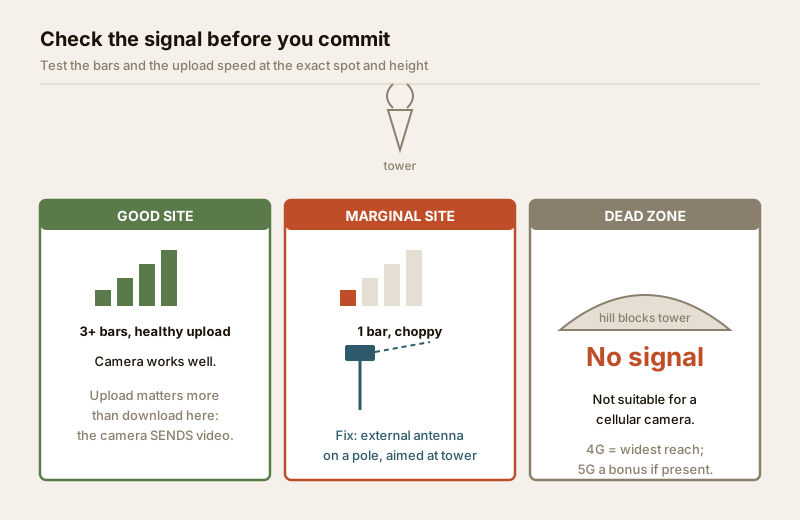
A cellular camera is only as good as the bar count where it sits. This is the single biggest reason a 4G setup disappoints, and it is entirely checkable in advance.
- Test on site, at the exact spot and height. Signal at the gate can differ from signal on the pole three metres up. Stand where the camera will go, note the bars and run a quick speed test on your phone.
- You need upload, not download. A camera sends video up, so it is the upload speed that matters — often the weaker direction on mobile. A comfortable upload for one HD camera is a few Mbps; below about 1 Mbps upload, expect a laggy live view and choppy clips.
- Height and an external antenna help. Cameras with an external antenna socket let you add a higher-gain or panel antenna aimed at the tower — often the difference between "unusable" and "fine" at a marginal site.
- 4G is the workhorse; 5G is a bonus. 4G/LTE has the widest rural footprint and is plenty for CCTV. 5G adds speed and lower lag where it is available, but rural 5G coverage is still patchy, so choose a camera for its 4G performance first and treat 5G as a bonus.
Data cost and why you tune the camera down
This is the part most people miss until the bill or the FUP cap arrives. Metered mobile data changes how you set the camera up. The goal is to record what matters and not pay to upload empty scenes.
- Record on motion (PIR/event), not 24x7. For a quiet farm gate or an empty plot, PIR-triggered clips — the camera wakes, records the event, then sleeps — cut data use by a huge margin versus continuous streaming. This is also why cellular pairs so well with battery and solar cameras, which record on motion anyway to save power.
- Store locally, upload selectively. Keep continuous or high-resolution footage on the camera's microSD card or a local recorder, and let the SIM upload only clips, thumbnails and the on-demand live view. You get the detail on the card and pay data only for what you actually watch.
- Tune resolution and bitrate down for the cloud stream. Many cameras let you record locally at full resolution but stream a lighter, lower-bitrate sub-stream over the SIM. Dropping the cloud stream from 4MP to a leaner 1080p or 720p, and the frame rate from 25 to 10–15 fps, slashes data with little loss for a remote-monitoring view.
- Turn off needless always-on features — constant cloud recording, high-res snapshots on every trigger — for an unattended site.
Rough, indicative figures to sanity-check a plan (real usage varies hugely with scene activity and settings):
| Mode | Rough data / month (one camera) | Fit |
|---|---|---|
| PIR clips only, light activity | ~2 – 10 GB | Quiet farm gate, empty plot, second home |
| PIR clips, busy scene + daily live checks | ~10 – 30 GB | Active site entrance, frequent viewing |
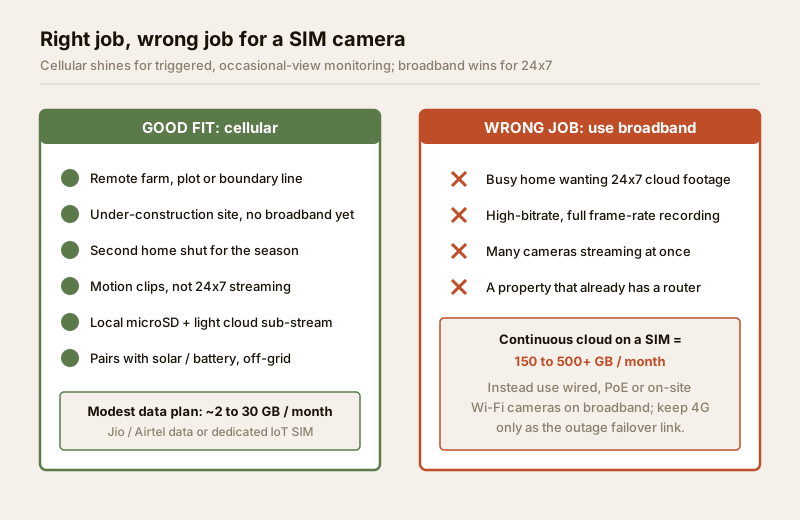
| Continuous cloud recording, 1080p | ~150 – 400+ GB | Not advisable on a SIM — huge cost |
| Continuous cloud, higher bitrate/24x7 | 500 GB+ | Wrong tool — use wired/PoE broadband |
The headline: cellular is superb for triggered, occasional-view monitoring and poor for high-bitrate 24x7 continuous cloud recording. If you genuinely need round-the-clock, full-frame-rate footage of a busy scene sent to the cloud, that is a job for broadband and a wired or PoE camera or on-site Wi-Fi — not a SIM. For a normal home with a router, cellular is the failover, not the everyday link; see the wireless CCTV guide for the broader wireless picture.
Power — the other half of an off-grid camera
Signal solves the data; you still have to power the camera. On a site with no broadband there is often no mains either, which is why cellular so often travels with off-grid power:
- Mains available: simplest — plug in, and the SIM handles the link.
- No mains, sunny site: pair the SIM camera with a solar panel and battery for a fully self-contained gate or perimeter camera. Size the panel and battery for your sun-hours and monsoon derating with the Solar CCTV Sizing Calculator.
- Short-term / shaded: a battery-powered cellular camera recharged periodically, recording on motion to stretch each charge.
Because both the radio (uploading) and the recording draw power, an off-grid 4G camera leans even harder on motion-triggered recording to make its battery and panel last — the same discipline that saves your data also saves your charge.
Costs and where cellular fits
Indicative bands to sanity-check a quote — brand, resolution and season move them:
| Item | Typical range (₹) | Notes |
|---|---|---|
| 4G SIM camera (2–3MP, motion-record) | ₹3,500 – ₹8,000 | Entry off-grid gate/plot camera |
| 4MP 4G camera with external antenna | ₹6,000 – ₹14,000 | Better signal handling and detail |
| 4G solar kit (camera + panel + battery) | ₹8,000 – ₹20,000 | Fully off-grid; sizing matters |
| Consumer data SIM (recharge) | ₹200 – ₹600 / month | Cheapest per GB; manual renewal |
| Dedicated IoT / M2M data SIM plan | ₹150 – ₹700 / month | Auto-renew, always-on, per plan/GB |
| External high-gain / panel antenna | ₹800 – ₹3,000 | Rescues a marginal-signal site |
When to bring in a professional. Decide the site, the camera and the SIM plan yourself — then hand the mounting at height, any pole or bracket work, the solar panel and battery wiring, and any mains connection to a licensed installer, and route mains work to a qualified electrician (see the electrical hub). For a whole-property scheme with cellular as backup, and to size the wider system, work through the building security systems guide and the security system cost estimator.
Key takeaways
- A 4G / 5G CCTV camera carries its own SIM and sends footage over the mobile network — the one link that works where there is no broadband: farms, plots, building sites and second homes.
- It lives or dies on signal — test the bars and the upload speed at the exact spot before buying, and add an external antenna at a marginal site; 4G is the workhorse, 5G a bonus.
- Mobile data is metered, so tune the camera down: PIR-triggered clips, local microSD/recorder storage, a lighter cloud sub-stream — record what matters, do not pay to upload empty scenes.
- It is the wrong tool for high-bitrate 24x7 continuous cloud recording — that needs broadband with wired, PoE or on-site Wi-Fi cameras.
- Off-grid sites usually pair the SIM with solar or battery power — size it with the Solar CCTV Sizing Calculator — and all mounting, wiring and mains work goes to a licensed professional.
References
- Digital Personal Data Protection Act, 2023 — position cameras to cover only your own property and shared areas with a legitimate purpose; avoid capturing neighbours' private spaces. Cellular connectivity is for reaching remote sites, never for concealing lawful recording from those it captures.
- Mobile network coverage — verify signal at the exact site on your own handset before ordering, and confirm current 4G/5G coverage on the operator's published coverage map (Jio, Airtel, Vi).
- National Building Code of India (SP 7), Bureau of Indian Standards, and local municipal bye-laws for any structural, electrical or life-safety aspect of an install; verify the current edition via the BIS catalogue: https://www.services.bis.gov.in/
This is an educational overview. Mounting at height, cabling, solar wiring and any electrical work are qualified professional tasks — engage licensed installers and verify any standard's current status via the BIS catalogue before relying on it.
Export this guide
Related Guides — Deep-dive reading
PoE vs Wi-Fi CCTV: Which Home Security Cameras Are Better?
One camera type runs power and video down a single Cat6 cable to an NVR and almost never drops out; the other clips to a wall in minutes and streams over your home Wi-Fi. This guide settles PoE vs Wi-Fi CCTV for Indian homes — reliability, video quality and bandwidth, cabling and power, retrofit versus new-build effort, NVR versus SD and cloud storage, hacking risk, real rupee costs, scalability and outdoor use — and gives a clear verdict for each kind of home.
Smart HomeCCTV vs Video Door Phone: Which Does Your Home Need?
They look similar and get confused constantly, but a CCTV camera and a video door phone do different jobs — one watches the whole property and records, the other answers your door and controls who comes in. This guide settles CCTV vs video door phone for Indian homes: what each is for, where they overlap, real rupee costs, apartment versus villa relevance, and why most homes end up wanting both.
Smart HomeHow to Choose a CCTV Camera (2026): The Homeowner's Decision Guide for India
Cut through the spec-sheet noise and choose the right CCTV camera for each spot around an Indian home. What actually matters — sensor and low-light performance, lens and field of view, form factor, IP and IK ratings, honest smart features — and the marketing claims to ignore.
SecurityRelated Tools — Try Free
Solar CCTV Sizing Calculator
Enter cameras, sun-hours and backup days to get the solar panel wattage, battery Ah and an indicative kit cost for an off-grid camera.
Solar SizingCCTV Camera Coverage & Count Calculator
Estimate how many CCTV cameras you need, the NVR channels, storage in TB for your retention period, and an indicative all-in cost with GST.
CCTV CalculatorSecurity Cabling & PoE Planner
Estimate cable length, drops, PoE power budget, the right switch, conduit and cost for a CCTV/security cabling plan.
Cabling Planner