
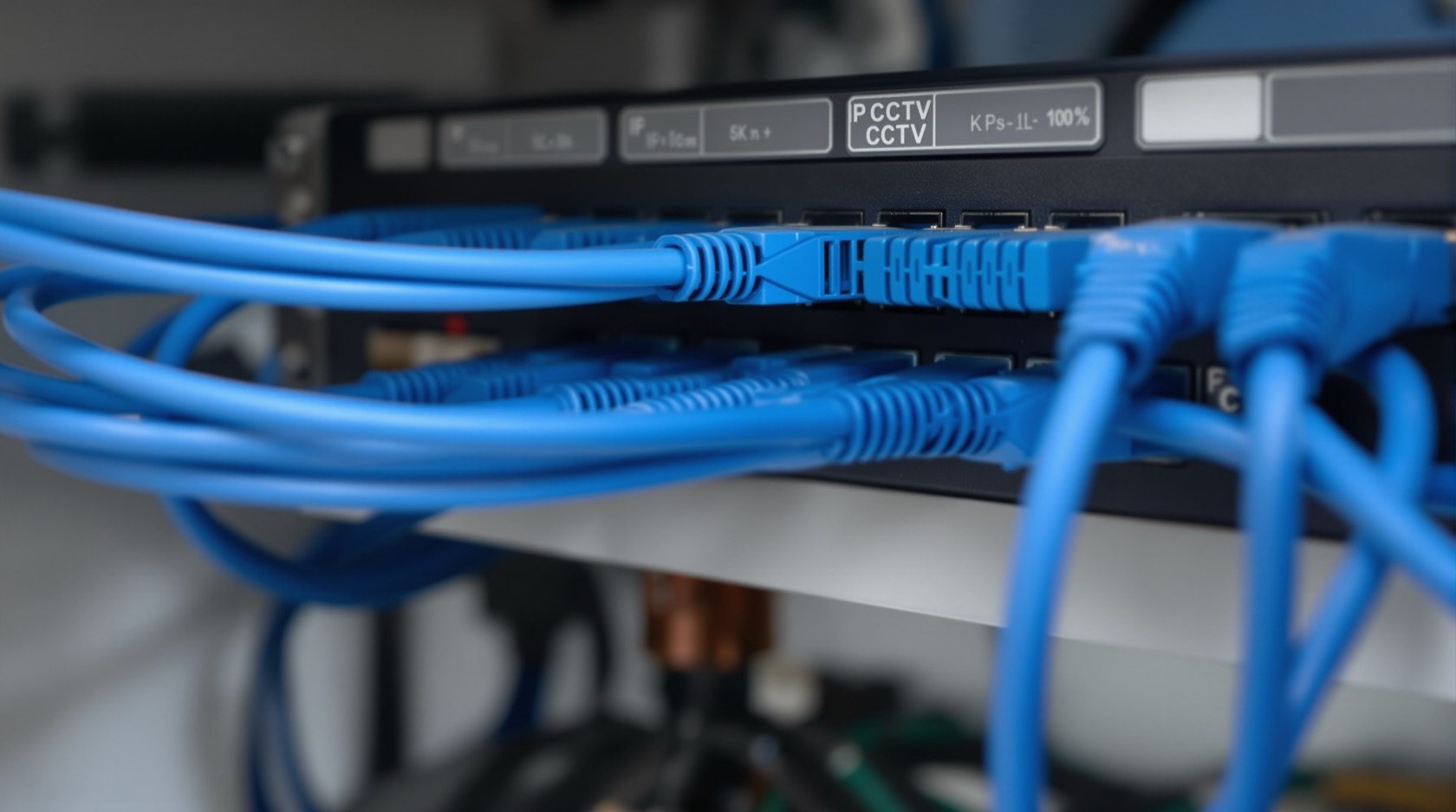
PoE CCTV Cameras in India: Power-over-Ethernet Wiring & Buying Guide
How Power over Ethernet sends power and video down one cable, what the PoE / PoE+ / PoE++ classes and watt budgets mean, the ~100 m cable-run limit, and why PoE is the most reliable wired choice for an Indian home or shop.
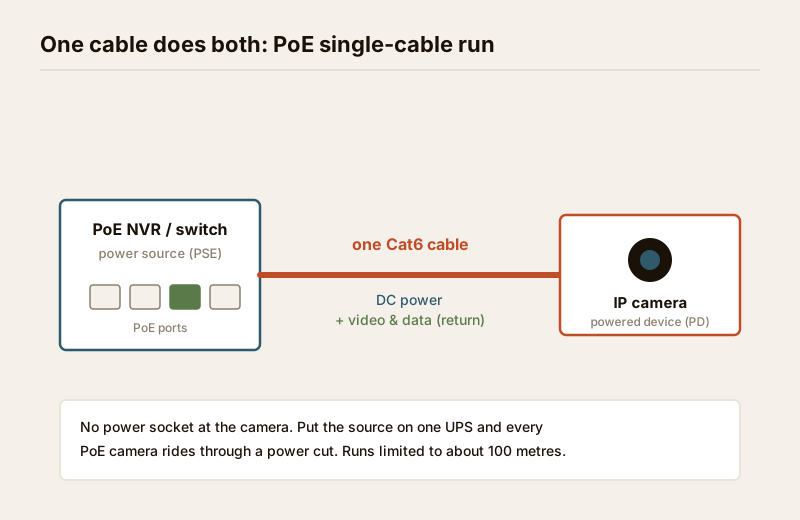
PoE CCTV cameras solve the most annoying problem in wiring a camera: you no longer pull two cables to each position, one for power and one for video. Power over Ethernet (PoE) sends both down a single network cable — the camera draws its electricity and returns its video and data on the same run. Fewer cables, no power socket at the camera, and one of the most reliable wired security setups you can build for an Indian home, shop or office.
This guide is the focused explainer on the PoE connectivity form factor in Studio Matrx's CCTV hub. It is not about the camera's shape — a bullet, dome or turret can all be PoE — nor about analogue systems. It is about how the camera is powered and connected, so you can decide whether PoE is right for you and coordinate a clean install. For the wider wired-versus-wireless choice, start with the wired CCTV guide.
Scope & safety. This guide helps you plan and decide. Pulling structured cabling through walls and ceilings, terminating connectors, mounting cameras at height and anything at the mains board belong to licensed professionals — set the positions and the plan here, then have a qualified installer run and terminate the cable. A camera must never block a window, door or fire-escape route, and cameras belong only on your own property and shared areas — never bathrooms, bedrooms or changing areas, and positioned to respect neighbours and the spirit of the DPDP Act, 2023.
What Power over Ethernet actually does
An ordinary network cable — Cat5e or Cat6 — has eight thin copper wires inside. PoE uses the same cable to carry a low-voltage DC supply alongside the data, injected at one end by power-sourcing equipment (PSE) and drawn at the other by the powered device (PD), which is your camera. The camera contains no separate power brick; it wakes up the instant the cable is live.
That single-cable idea gives PoE its headline advantages:
- One cable per camera. One run does power and video. No electrician needs to add a socket beside every camera, and there is one thing to pull, label and troubleshoot instead of two.
- Power from a central point. Every camera is fed from one place — the NVR or switch in your equipment cupboard. Put that one point on a UPS and every camera rides through a power cut. In India, where evening cuts are routine, this is the single biggest reliability win over cameras with their own local adaptors.
- Standardised and interoperable. PoE follows international IEEE standards, so a compliant camera and a compliant switch from different brands will talk to each other and negotiate power safely.
PoE, PoE+ and PoE++ — the power classes
Not all PoE delivers the same wattage. The camera negotiates how much power it needs, and the source must be able to supply it. The classes matter because a demanding camera on an underpowered port will reboot, drop offline in the cold, or refuse its heater and infrared at night.
| PoE type | IEEE standard | Power at the source (per port) | Power the camera can use | Typical camera it suits |
|---|---|---|---|---|
| PoE | 802.3af | ~15.4 W | ~12.95 W | Fixed bullet, dome, turret — most home cameras |
| PoE+ | 802.3at | ~30 W | ~25.5 W | IR-heavy, heated, small PTZ, varifocal |
| PoE++ (Type 3/4) | 802.3bt | ~60–100 W | ~51–71 W | Large PTZ, cameras with wipers/heaters, illuminators |
Most residential fixed cameras are happy on plain PoE (802.3af). Reach for PoE+ when a camera runs strong infrared all night, carries a heater for cold or foggy sites, or is a modest PTZ. PoE++ is for big motorised cameras and is rarely needed at home. Always check the camera's datasheet for its power draw and its required PoE type before buying the switch.
The watt budget — the number people forget
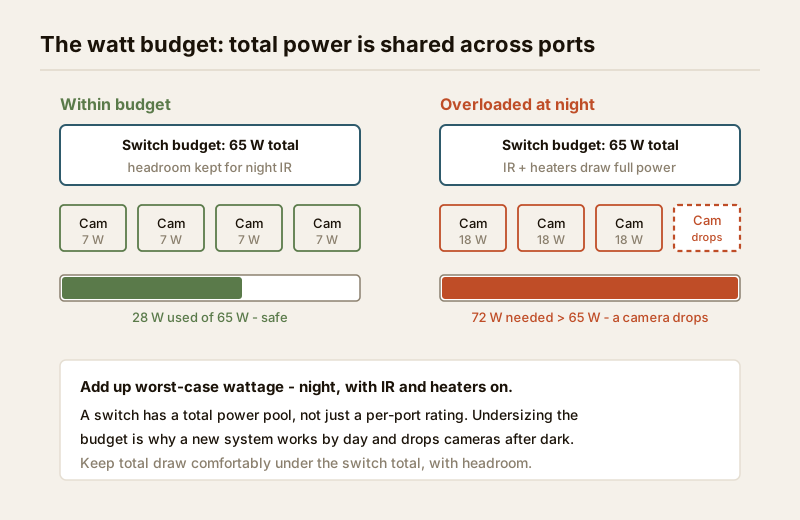
A PoE switch or NVR has a total power budget shared across all its ports, not just a per-port rating. An 8-port switch labelled 802.3at might still only supply, say, 65 W in total — enough for a handful of PoE+ cameras but not eight of them at full draw. Add up every camera's worst-case wattage (night, with IR and heater on) and keep it comfortably under the switch's budget, with headroom to spare. Undersizing the budget is the most common reason a new system works by day and drops cameras at night.
Three ways to power PoE cameras
There are three common ways to get PoE to the cameras. Most Indian homes use the first.
| Method | What it is | Best for | Watch out for |
|---|---|---|---|
| PoE NVR (built-in ports) | The recorder itself has PoE LAN ports; cameras plug straight in | Most homes and small shops — simplest, one box | Fixed port count; its own isolated camera network; budget shared |
| PoE switch + separate NVR | A dedicated PoE switch powers cameras; a separate NVR records | More cameras, longer runs, mixed brands, future growth | One more device and rack space; size the switch budget |
| PoE injector (midspan) | A small in-line unit adds PoE to one cable from a non-PoE source | One or two cameras added to an existing network | Clutter if used for many; one per camera |
A PoE NVR is the neat all-in-one: the recorder has, say, 4, 8 or 16 PoE ports, and each camera is a single cable back to it. A PoE switch with a separate NVR is the more flexible route when you want more cameras than the NVR has ports, or you are building out a larger commercial system. A PoE injector is a patch — handy for adding a single camera to a spot that only has a plain network point. For how these tie into recording and network, see how CCTV systems work and the IP CCTV guide.
The ~100 metre rule — why cable length matters
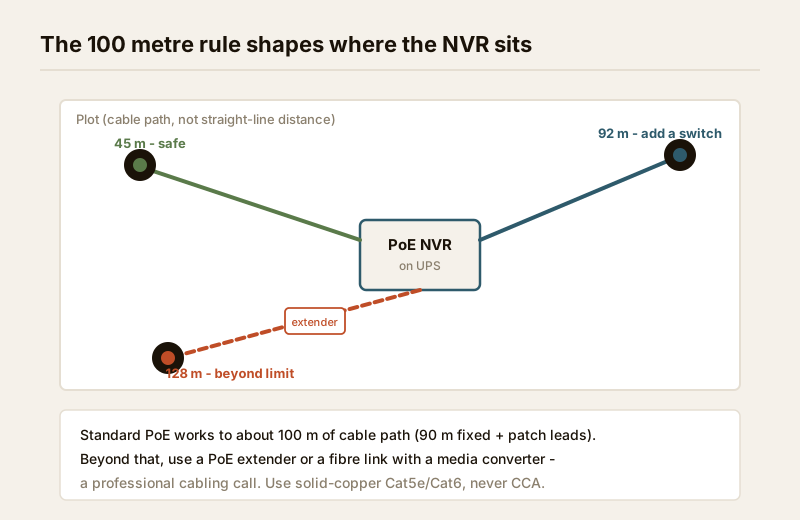
Ethernet, and therefore standard PoE, is specified to work reliably over a maximum run of about 100 metres (roughly 90 m of fixed cable plus short patch leads at each end). Push past that and you risk dropped data, a camera that will not power up, or one that works intermittently. This is the number that quietly shapes where your equipment cupboard should sit.
- Plan the equipment point centrally. If a far camera is more than ~100 m of cable path — not straight-line distance — from the recorder, you need to move the recorder, add a switch partway, or use a PoE extender.
- Measure the real route. Cable goes up walls, across ceilings and around corners; the run is always longer than the map suggests. Add generous slack.
- Use quality cable. Solid-copper Cat5e or Cat6 rated for the job. Avoid the copper-clad-aluminium (CCA) cable common in cheap kits — it loses power over distance, runs hot, and is the classic cause of a far PoE camera that never quite powers on. Cat6 gives more headroom for 4K streams and longer runs.
- Beyond 100 m, use a PoE extender (which repeats power and data) or a fibre link with a media converter — a professional cabling call. Plan these runs with the security cabling & PoE planner.
Surge, earthing and the Indian outdoor reality
Any long copper cable running to an outdoor camera is an antenna for lightning-induced surges and static — a real risk in monsoon India. It is also exposed to heat, dust and driving rain.
- Surge protection. Fit network surge protectors on runs to exposed outdoor or rooftop cameras, and make sure the system's earthing is done properly. A single nearby strike can otherwise travel the cable back and take out the NVR's PoE ports. This is an electrician-and-installer job, tied to the building's earthing.
- Weatherproof terminations. The RJ45 joint at an outdoor camera must sit inside a weatherproof junction box or gland — a bare connector taped to a wall fails in the first monsoon.
- Keep data cable away from mains. Run network cable clear of, and crossing at right angles to, heavy mains cabling to avoid interference.
- Central UPS. Because PoE feeds everything from one point, a single UPS on the NVR or switch keeps every camera alive through a cut. Size it with the security backup-power calculator.
PoE versus Wi-Fi — why wired wins for anything permanent
The honest comparison most buyers need. PoE and Wi-Fi cameras solve different problems.
| Factor | PoE (wired) | Wi-Fi (wireless) |
|---|---|---|
| Reliability | Very high — no radio to drop | Varies with signal, walls, congestion |
| Power | From the cable; one central UPS covers all | Needs a socket, or a battery to recharge |
| Install effort | Cable must be pulled — plan it in | Easy — just power and signal |
| Best fit | Permanent home, shop, office, any serious system | Small homes, rentals, temporary, hard-to-cable spots |
| Bandwidth | Full, stable, good for 24x7 and 4K | Shared with the household; can throttle streams |
| Interference | None | Microwaves, neighbours' networks, thick walls |
The rule of thumb: if a camera is going up permanently and you can run a cable to it, choose PoE. Wi-Fi earns its place where cabling is genuinely impractical — a rented flat, a heritage wall you cannot chase, a spot you will move next year. For sites with no mains at all, look instead at solar-powered cameras, and where there is no broadband, at 4G/5G cellular cameras. See also the broader wireless CCTV guide.
India price bands (indicative)
Prices move with brand, resolution and season — treat these as ballparks to sanity-check a quote, not fixed rates.
| Item | Typical range (₹) | Notes |
|---|---|---|
| 4MP PoE IP camera (the home workhorse) | ₹2,500 – ₹6,500 | Insist on IP66 for outdoors; solid-copper cable |
| 8-port PoE NVR (all-in-one) | ₹6,000 – ₹16,000 | Check total watt budget and channel count |
| 8-port PoE switch (with separate NVR) | ₹3,500 – ₹12,000 | Note the shared power budget, not just ports |
| PoE injector (single camera) | ₹500 – ₹1,500 | For adding one camera to a plain network point |
| Cat6 solid-copper cable (per metre) | ₹18 – ₹45 | Avoid CCA; buy a known brand for long runs |
| Network surge protector (per line) | ₹300 – ₹1,200 | Essential on exposed outdoor/rooftop runs |
| Cabling + termination labour (per camera) | ₹500 – ₹1,500 | Part of the installer's quote |
Size and cost a full system with the camera coverage calculator and the security system cost estimator, and plan the cable routes with the security cabling & PoE planner.
When to bring in a professional
When to bring in a professional. Decide the camera positions, count, and whether PoE suits you yourself — then hand the cable pulling and routing, RJ45 termination, mounting at height, surge protection and earthing, and NVR/switch commissioning to a licensed installer. Anything at the mains board is a licensed electrician's job; see the electrical hub. Get the cabling right once and a PoE system runs for years; a badly terminated or under-spec cable is the single most common cause of a camera that keeps dropping.
Key takeaways
- PoE CCTV cameras carry power and video on one Ethernet cable, so a single run per camera does both jobs — no socket needed at the camera.
- Match the PoE class to the camera: plain PoE (802.3af) for most fixed home cameras, PoE+ (802.3at) for heavy IR, heaters or small PTZ, PoE++ for large motorised cameras — and keep the total draw under the switch's watt budget, with headroom for night-time IR.
- Choose between a PoE NVR (simplest, all-in-one), a PoE switch with a separate NVR (more flexible), or a PoE injector (adding one camera).
- Respect the ~100 metre cable-run limit, use solid-copper Cat5e/Cat6 (never CCA), and fit surge protection and weatherproof terminations on outdoor runs.
- A single central UPS keeps every PoE camera alive through a power cut — PoE's biggest advantage in India. Choose PoE for anything permanent; use Wi-Fi only where cabling is impractical. Plan the runs with the security cabling & PoE planner and route cabling and mains work to a licensed professional.
References
- IEEE 802.3af / 802.3at / 802.3bt — the international standards defining PoE, PoE+ and PoE++ power classes; verify a camera's required type and a switch's supported type on the manufacturer's specification sheets before ordering.
- Digital Personal Data Protection Act, 2023 — position cameras to cover only your own property and shared areas with a legitimate purpose; avoid capturing neighbours' private spaces.
- National Building Code of India (SP 7), Bureau of Indian Standards, and local municipal bye-laws for the structural, electrical, earthing and life-safety aspects of an install; verify the current edition via the BIS catalogue: https://www.services.bis.gov.in/
This is an educational overview. Structured cabling, termination, mounting at height, surge/earthing and any electrical work are qualified professional tasks — engage licensed installers and verify any standard's current status via the BIS catalogue before relying on it.
Export this guide
Related Guides — Deep-dive reading
PoE vs Wi-Fi CCTV: Which Home Security Cameras Are Better?
One camera type runs power and video down a single Cat6 cable to an NVR and almost never drops out; the other clips to a wall in minutes and streams over your home Wi-Fi. This guide settles PoE vs Wi-Fi CCTV for Indian homes — reliability, video quality and bandwidth, cabling and power, retrofit versus new-build effort, NVR versus SD and cloud storage, hacking risk, real rupee costs, scalability and outdoor use — and gives a clear verdict for each kind of home.
Smart HomeElectrical Safety for Security Systems in India (2026): Powering It Without Peril
A homeowner's guide to the power side of home and RWA security systems, CCTV, alarms, gates, access control and NVRs, done so it protects you instead of quietly becoming a shock or fire hazard. What makes a supply safe, what to insist on, and why the mains work belongs to a licensed electrician.
SecurityHow to Choose a CCTV Camera (2026): The Homeowner's Decision Guide for India
Cut through the spec-sheet noise and choose the right CCTV camera for each spot around an Indian home. What actually matters — sensor and low-light performance, lens and field of view, form factor, IP and IK ratings, honest smart features — and the marketing claims to ignore.
SecurityRelated Tools — Try Free
PoE Power-Budget Calculator
Whether a PoE switch can power the connected cameras with cable-loss headroom, and how many devices it supports.
PoE BudgetSecurity Cabling & PoE Planner
Estimate cable length, drops, PoE power budget, the right switch, conduit and cost for a CCTV/security cabling plan.
Cabling PlannerCCTV Camera Coverage & Count Calculator
Estimate how many CCTV cameras you need, the NVR channels, storage in TB for your retention period, and an indicative all-in cost with GST.
CCTV Calculator