

Smart Home Lift Design (India): App Control, Touchless and Connected Cabins
The technology layer of the home lift — IoT monitoring, smart and touchless controls, the non-negotiable ARD, and home-automation integration, with an honest worth-it verdict on every feature
A home lift used to be a machine you summoned with a button and forgot about until it stopped working. In 2026 it is closer to an appliance that talks back: it tells your vendor when a part is tiring, lets you call the car from your phone, opens its doors without a touch, and quietly switches its lights and fan off when nobody is inside. This is the smart home lift — and like all "smart" things, some of it is genuinely transformative and some of it is marketing.
This guide is the technology layer of our design cluster. We will not relitigate cabin materials or lighting mood here — for those, see Lift Cabin Material Selection and Home Lift Lighting Design. Instead we will be honest about what the connected cabin actually does for an Indian home, what is worth paying for, and what is a gimmick you will switch off within a month.
The smartest feature in any Indian home lift is not the app or the voice control. It is the ARD — the battery that brings you to the nearest floor when the power cuts. Everything else is convenience; that one is safety.
What "smart" really means in a home lift
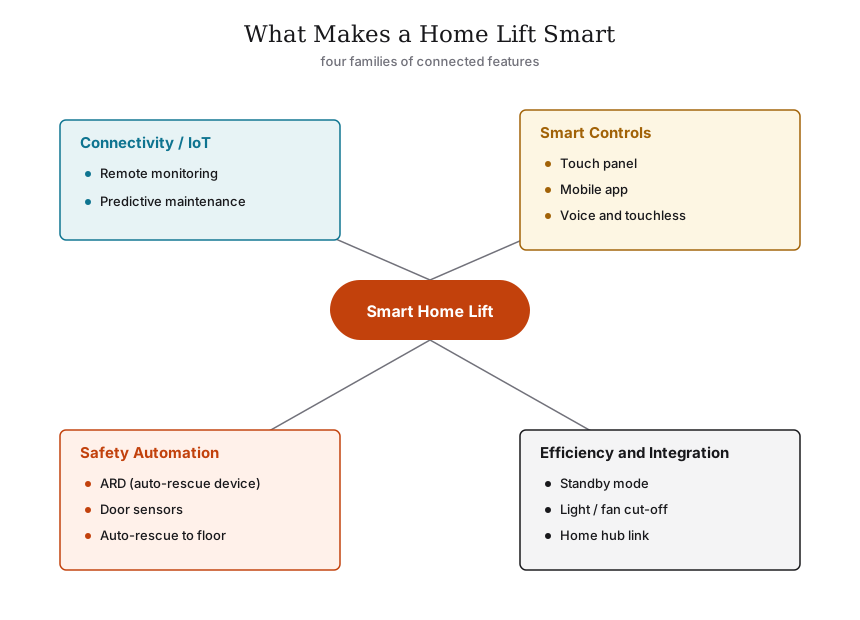
Strip away the brochure language and a smart home lift is built from four honest layers:
1. Connectivity (IoT): the controller has a SIM or Wi-Fi link back to the vendor's cloud, streaming health data.
2. Smart controls: how you and the car talk to each other — touch panels, a mobile app, voice, gesture, touchless.
3. Safety-smart automation: features that act on their own to keep you safe — the ARD above all, plus sensors and auto-rescue logic.
4. Efficiency and integration: standby modes, auto light/fan cut-off, and links into your wider home automation.
Hold those four layers in mind as you read brochures. A cabin can have a beautiful touch panel (layer 2) and no remote monitoring (layer 1) at all — they are sold together but they are not the same thing.
Layer 1 — IoT and remote monitoring (the quiet workhorse)
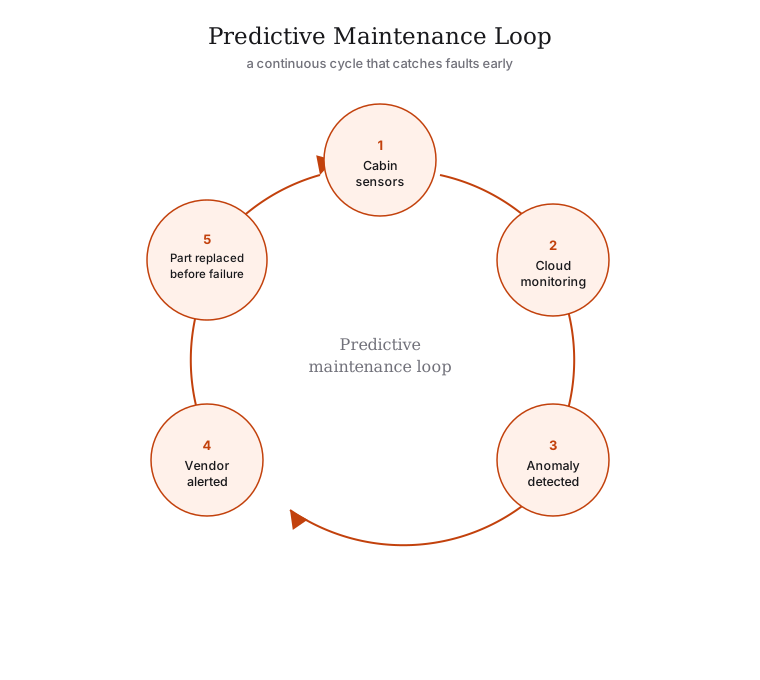
This is the layer most homeowners overlook and the one that pays you back the most. A connected controller continuously logs how the lift behaves: door-cycle counts, motor temperature, levelling accuracy, fault codes, how long doors stay open, how often the ARD engages. That data goes to the vendor's monitoring centre.
The point is predictive maintenance. Instead of waiting for the lift to fail and then calling for a breakdown visit, the system spots a drift — a door operator drawing more current than usual, levelling that is creeping out of tolerance — and the vendor is alerted before the lift strands anyone. In a country where a stranded lift on a Sunday evening can mean a 48-hour wait for a part, being warned in advance is worth real money and real dignity.
| What remote monitoring tracks | Why it matters in an Indian home |
|---|---|
| Fault and error codes | Vendor diagnoses remotely; arrives with the right part, not a second visit |
| Door-cycle and motor data | Predicts wear before failure (predictive maintenance) |
| Power events / ARD activations | Flags an unstable supply or a failing backup battery |
| Levelling and ride quality | Catches a drift before it becomes a jolt or a trip hazard |
| Usage patterns | Helps right-size your next AMC and spot misuse |
A word of realism: remote monitoring is only as good as the service network behind it. An alert is useless if the nearest engineer is three cities away. When you compare smart lifts, ask the harder question — when the system flags a fault, how fast does someone actually reach my home? Tie this to the maintenance contract you sign; the Residential Elevator Buyer's Guide covers AMC structure in depth.
Layer 2 — Smart controls: panels, apps, voice, gesture, touchless
This is the layer you actually touch (or, increasingly, do not touch). Here is where the gap between genuinely useful and gimmick is widest.
Touch panels and digital displays
The flush capacitive touch panel has quietly become the default on premium home cabins, replacing mechanical buttons. It looks cleaner, suits handle-less and minimal interiors, and is easy to wipe down. Paired with it is the digital position display — a slim screen showing the current floor and direction of travel, sometimes with the time or a soft animation.
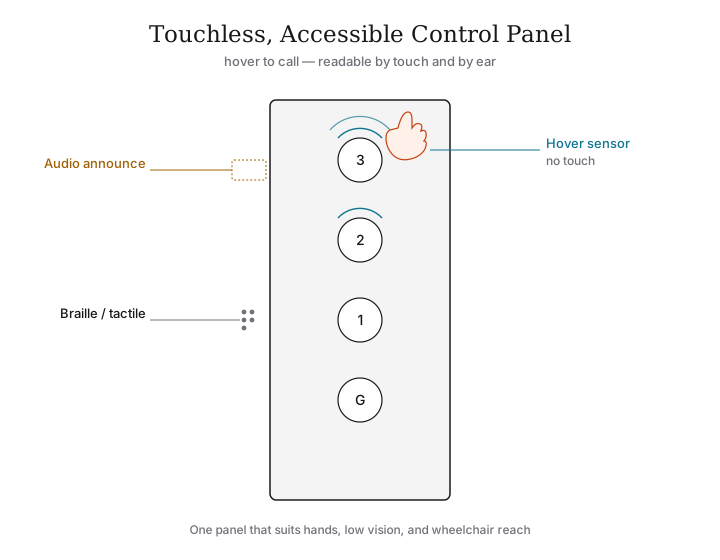
These are worth it. They age well, they match modern interiors, and the position display genuinely reduces that "is it coming?" anxiety. The only caution: insist that there is tactile and Braille marking somewhere on the controls, and audible floor announcements, so the lift stays usable by an elderly parent or a visually impaired guest. A pure glass touch surface with no tactile feedback is a beautiful accessibility failure — IS 14665 and the CPWD Harmonised Guidelines both expect tactile buttons and audio-visual floor indicators in an accessible car.
Mobile-app control
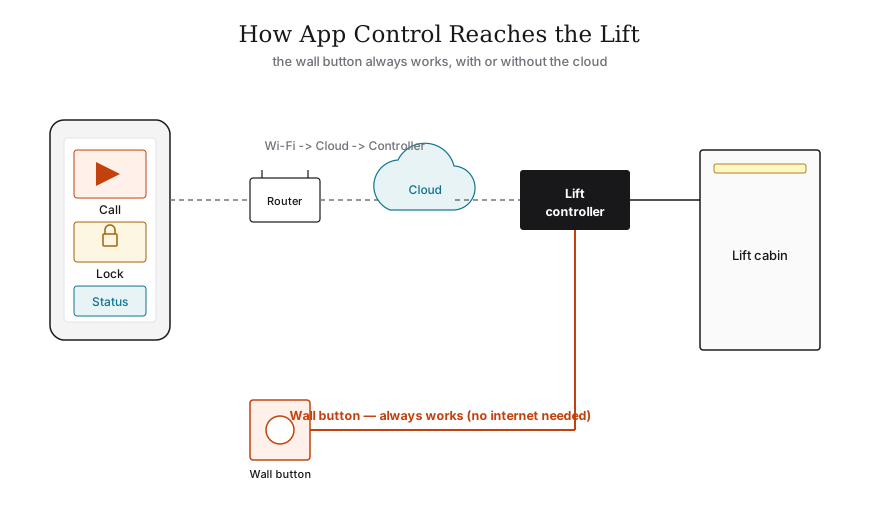
The app lets you call the car to a floor before you reach it, see which floor it is on, lock the lift (handy with small children or when you travel), and receive maintenance alerts. In a multi-storey villa, calling the lift down to the basement parking as you walk in from the car is a small, real pleasure.
Be clear-eyed, though: app control is a convenience, not a necessity, and it must never replace the physical landing controls. If the Wi-Fi is down or the phone is upstairs, the wall buttons must still work exactly as before. Treat the app as a bonus layer over a fully functional manual lift.
Touchless and gesture control
Born of the pandemic, touchless control earns its place in a home for one honest reason: hygiene. Instead of pressing a button, you hover a hand over a sensor or wave to select a floor. In a household with elderly members, young children or anyone immunocompromised, a shared lift button is a shared surface — touchless removes that.
| Touchless option | How it works | Honest verdict |
|---|---|---|
| Infrared hover sensor | Hover a finger near the button; no contact | Useful, mature, low-fuss — the pick for hygiene |
| Hand-wave gesture | Wave to open doors or select | Works but can mis-trigger; novelty wears off |
| Foot / proximity call | Approach the landing and the car comes | Genuinely handy when carrying things |
| Full gesture "air" panel | Mid-air gestures select floors | Largely a gimmick at home; tiring, error-prone |
In short: hover-sensor touchless is worth it; elaborate mid-air gesture control is not. A home has so few floors and so few users that gesture menus solve a problem you do not have.
Voice control
Voice ("take me to the second floor") is the most photogenic feature and the most over-sold. It can be convenient when your hands are full, and it helps a wheelchair user or someone who cannot easily reach a panel — a real accessibility win in those specific cases. But for most families it is a party trick used twice and abandoned. If voice matters to you for accessibility, prioritise it; if it is just on the brochure, do not pay a premium for it.
Layer 3 — The ARD: the one non-negotiable smart feature
Of every feature in this guide, exactly one is not optional. The Automatic Rescue Device (ARD) is a battery system that, the instant mains power fails, drives the car gently to the nearest floor and opens the doors. Given how routinely Indian power cuts out, a home lift without an ARD is a trap waiting to happen — a child, an elderly parent or a guest left stranded in a dark box between floors.
Frame the ARD not as a luxury smart feature but as the floor below which you do not negotiate. When a vendor offers you voice control and panoramic glass but is vague about the ARD, you are talking to the wrong vendor. Confirm it is fitted, confirm the backup battery is monitored (this is where remote monitoring earns its keep — it flags a dying ARD battery), and put it at the top of your Lift Specification Checklist.
Rank your smart spending in this order: ARD first, then sensors and intercom, then remote monitoring, then the controls you will actually use every day. Voice and gesture come last.
Layer 4 — Efficiency and home-automation integration
Energy-efficient standby and auto cut-off
A home lift sits idle most of the day. A smart cabin uses that: after a set idle time it drops into a low-power standby, and auto light-and-fan cut-off switches the cabin lighting and ventilation off when the car is empty, waking instantly when called. On an MRL or screw-driven lift the standing energy use is already modest; these features trim it further and, just as usefully, extend lamp and fan life. This is quietly worth it — it costs little, asks nothing of you, and pays back every day. (Running and energy costs sit alongside the base price; see Home Lift Cost India 2026 — figures are indicative, confirm with your vendor.)
Integration with Alexa, Google and home hubs
The newest layer is tying the lift into the home you already automate — "Alexa, send the lift to the ground floor," or the lift appearing as a tile in your Google Home or smart-hub app alongside the lights and AC. It is genuinely pleasant in a fully automated villa and a real help for accessibility.
Two cautions, both important:
- Security. A lift is a moving machine that carries people. Any voice-assistant or app pathway that can move the car must be access-controlled — PIN, recognised-user, or call-only (it can summon but not over-ride safety). Never let a guest's "Alexa, go to the third floor" become a way to move the car while someone is stepping in.
- Graceful failure. Cloud and hub integrations must degrade safely. If the internet drops, the lift must keep working as an ordinary, fully safe lift. Integration is a layer on top, never a dependency.
For how the lift fits a wider connected, future-ready home, see Lift Design for Luxury Residences and the Contemporary Elevator Design Trends.
The smart-features table: worth it or gimmick?
Here is the whole layer condensed to one honest verdict. Treat "worth it?" as guidance for a typical Indian home — your accessibility needs may legitimately move voice or touchless up the list.
| Smart feature | What it does | Worth it? |
|---|---|---|
| ARD (Automatic Rescue Device) | On power cut, drives car to nearest floor and opens doors | Non-negotiable — never buy without it |
| Remote monitoring / IoT | Streams health data to vendor's cloud | Yes — if backed by a fast local service network |
| Predictive maintenance | Vendor alerted before a part fails | Yes — prevents most strandings |
| Touch panel + digital display | Flush capacitive controls, slim position screen | Yes — clean, durable, intuitive (keep tactile/Braille too) |
| Mobile-app call and lock | Summon, lock, see status, get alerts | Yes, as a bonus — never the only control |
| Infrared touchless (hover) | Operate without touching buttons | Yes — real hygiene value, low fuss |
| Auto light-and-fan cut-off / standby | Powers down empty cabin, low-power idle | Yes — cheap, automatic, daily savings |
| Voice control | Speak the destination floor | Situational — strong for accessibility, else a novelty |
| Home-hub integration (Alexa/Google) | Lift as a device in your smart home | Situational — pleasant in automated villas; secure it |
| Gesture / mid-air "air" panel | Wave to select floors | Mostly gimmick at home — mis-triggers, tires |
| Mood/scene lighting via app | App-set lighting scenes | Optional — nice-to-have, see lighting guide |
How to specify a smart home lift without being sold a story
A simple rule of thumb keeps you grounded: buy the safety, evaluate the service, treat the rest as preference.
- Lock in the ARD, door sensors / light curtain, overload sensor, emergency alarm and intercom first. These are baseline, not "smart upgrades."
- Make remote monitoring count by pinning the vendor down on response time when an alert fires — and read the AMC fine print.
- Choose the controls you will actually use: a touch panel and app for most homes; add touchless for hygiene; add voice only if accessibility needs it.
- Insist on graceful failure everywhere — every app, voice or hub feature must fall back to a fully working manual lift.
- Keep accessibility in the cabin even as it gets smart: tactile/Braille controls, audible announcements, a rear mirror, and a handrail, per IS 14665 and the CPWD Harmonised Guidelines.
Get those right and the "smart" lift earns its name — not because it has the longest feature list, but because the few features it has are the ones that keep your family safe, comfortable and rarely stranded.
Browse the rest of the design cluster for the look and feel that wraps around this technology: Modern Home Lift Design Ideas, Glass Elevator Design, Luxury Home Elevator Interiors, Premium Lift Finishes and Designer Elevator Doors. For accessibility-first planning, see Accessible Home Design.
References
- IS 14665 Part 1 — Electric Traction Lifts, Outline Dimensions (BIS): https://law.resource.org/pub/in/bis/S05/is.14665.1.2000.pdf
- IS 14665 Part 2 — Code of Practice for Installation, Operation and Maintenance (BIS): https://law.resource.org/pub/in/bis/S05/is.14665.2.1-2.2000.pdf
- BIS — National Building Code 2016: https://www.bis.gov.in/standards/technical-department/national-building-code/
- CPWD Harmonised Guidelines and Space Standards for a Barrier-Free Built Environment: https://www.cpwd.gov.in/Publication/Harmonisedguidelinesdreleasedon23rdMarch2016.pdf
- RPwD Act 2016 (full text): https://ssepd.odisha.gov.in/sites/default/files/2024-01/RPWD%20ACT.pdf
- Brio Elevators — custom cabins, materials, finishes and lighting: https://brioelevators.com/blog/custom-elevator-cabins-materials,-finishes-lighting
- Elite Elevators — classic home elevator styles for Indian homes: https://www.eliteelevators.com/blog/top-classic-home-elevator-styles-for-indian-homes/
- Nibav — best home elevators in India 2026: https://www.nibavlifts.com/blog/best-10-home-elevators-in-india/
Export this guide
Related Guides — Deep-dive reading
Universal Design Doors for Indian Homes: Inclusive Doors That Work for Everyone (2026)
How to design and specify doors that serve children, the elderly, pregnant women, the injured and wheelchair users by default - generous width, lever handles, near-flush thresholds, low-force closing, contrast and good lighting - without your home ever looking medical.
Home Doors & EntrancesLift Emergency Communication in India (2026): The Phone That Must Answer
The life-safety system that lets someone trapped in a lift reach help: the alarm button, the two-way voice that connects to a manned point answering 24x7, the backup power that keeps it alive in a mains cut, and the responder and testing habit without which the hardware is just a box on the wall.
SecurityGeofencing Home Security in India (2026): Convenience Without the Trap
A geofence is a virtual boundary around your home; your phone crossing it can arm the alarm as the last person leaves and light the place up as you arrive. This guide explains the genuinely useful security uses, and the honest caveats: never let a phone's location alone unlock your door, never make a geofence the only thing that arms your home, and treat continuous family tracking as sensitive data.
SecurityRelated Tools — Try Free
Accessibility Compliance Calculator
Check a planned lift against the CPWD and RPwD accessible-lift benchmarks for a score.
Lift CheckerSmart Home Lift Compatibility
Which smart features your lift can support, what to ask for, and the safety boundary.
Lift CheckerAccess-Control Battery-Backup Calculator
Size the standby battery so an access system keeps running through a power cut, with an egress life-safety note.
Battery Backup