
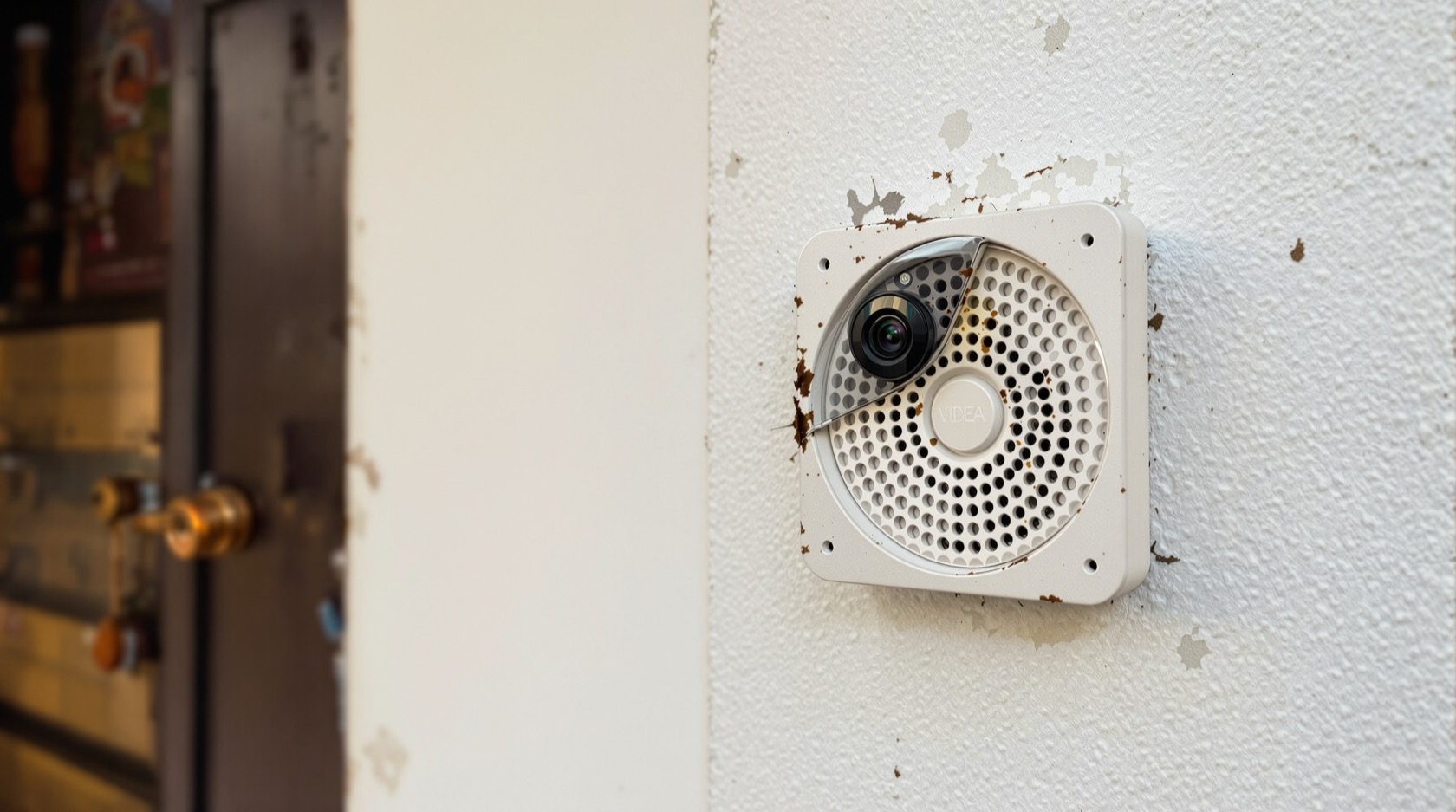
CCTV Two Way Audio in India (2026): Talk-Back for Doors, Gates and Shops
How two-way audio talk-back works on a doorbell, gate or shop camera, what latency and echo do to it, and how to use it as calm deterrence, not confrontation, within India's audio and privacy law.
CCTV two way audio is the feature that turns a camera from something you only watch into something you can speak through. Press the talk button in the app and your voice comes out of a small speaker on the camera at your gate or door; a microphone there carries the visitor's reply back to your phone. It is, in plain terms, a doorbell intercom that you can answer from anywhere — the sofa, the office, or another city.
This guide is the focused explainer on talk-back / intercom audio in Studio Matrx's CCTV hub. It stays in its lane: it is about speaking through a camera, not about recording what a camera hears. For microphones, audio quality and the law around recording sound, read its companion, the CCTV audio recording guide — the two overlap on the law, and you should read both before switching any audio on.
Scope, safety and audio law. This guide helps you plan and use talk-back well. Mounting at height, cabling and any mains-electrical work belong to licensed professionals — plan the position here, install with a qualified hand, and never let a camera or its wiring obstruct a door, window or fire-escape route. Audio is legally sensitive in India: capturing and playing back people's speech engages privacy and consent. Post clear notice, keep it to your own property, and treat what follows as general education, not legal advice — consult a professional for your situation.
What two-way audio actually is
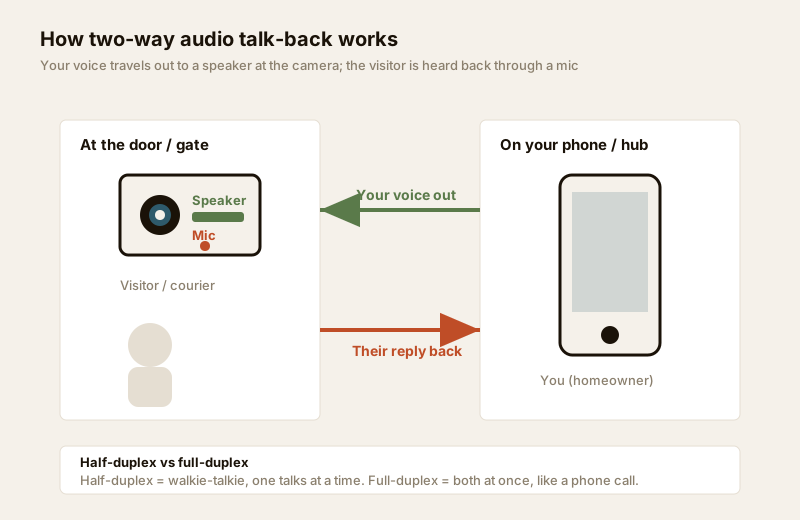
A one-way audio camera has only a microphone: it can hear, but it cannot speak. A two-way audio camera adds a speaker, so the sound travels both directions — your voice out to the visitor, their voice back to you. That is the whole idea. It is the same principle as the old wired door intercom in an apartment block, but built into the camera and reachable through the app on your phone.
You will see it most on three kinds of unit:
- Video doorbells — the flagship use. Someone presses the bell, your phone rings like a call, and you answer with your voice from wherever you are. See the dedicated doorbell cameras guide for the doorbell as a whole product.
- Gate and outdoor cameras — a bullet or outdoor camera with a built-in speaker, so you can address someone at the gate without going down.
- Shop-counter and indoor cameras — a small indoor unit behind a counter or in a godown, letting a shopkeeper speak to staff or a customer, or a parent speak to a child at home.
How the talk-back works, step by step
Nothing exotic happens under the hood, but three parts have to line up for it to feel good.
1. You press talk. In the camera app (or on a paired indoor hub) you hold or tap a microphone button. Your phone captures your voice.
2. It travels to the camera. The audio rides your home internet and the camera's WiFi or wired link — often via the manufacturer's cloud, sometimes on the local network — to the speaker on the unit.
3. The visitor hears you and replies. They speak; the camera's microphone picks it up and sends it back to your phone the same way. On many units your live video keeps running so you can see their reaction.
Two design choices shape the experience:
- Half-duplex vs full-duplex. Half-duplex works like a walkie-talkie: only one side talks at a time, and you release the button to listen. Full-duplex works like a phone call: both can talk at once. Full-duplex feels more natural but demands better echo control (below); many budget units are half-duplex, and that is perfectly fine for short exchanges.
- Where the audio is processed. A unit that keeps audio on your local network usually has lower delay than one that routes every word through a distant cloud server.
Latency and echo: the two things that make or break it
Two technical qualities decide whether talk-back is a pleasure or a headache. They are worth understanding before you buy, because they are hard to fix after.
Latency (the press-to-hear delay)
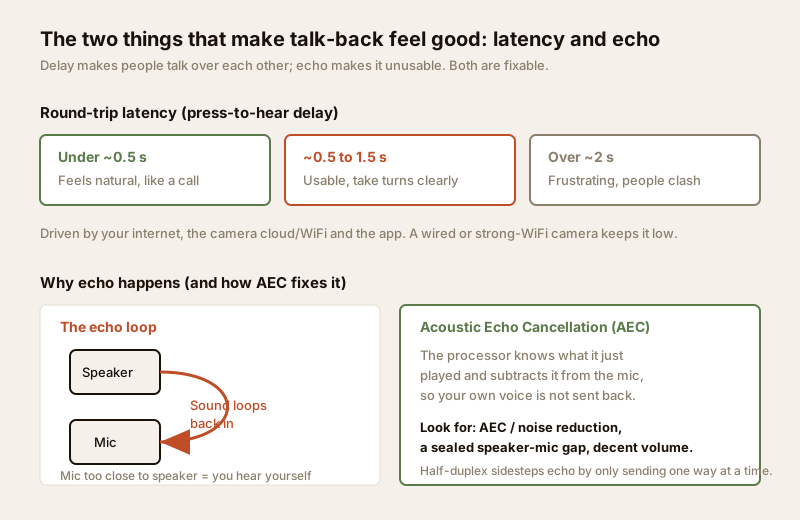
Latency is the round-trip delay between you speaking and the visitor hearing you (and back again). It is set by your internet speed, the camera's link, the cloud path and the app. As a rough feel:
| Round-trip delay | How it feels | Typical cause |
|---|---|---|
| Under ~0.5 s | Natural, like a normal call | Strong WiFi or wired camera, local audio, good broadband |
| ~0.5 to 1.5 s | Usable if you take turns | Average home WiFi and cloud routing |
| Over ~2 s | Frustrating; people talk over each other | Weak WiFi, congested or slow internet, distant cloud |
The practical lesson: latency is mostly a network problem, not a camera problem. A doorbell on a weak WiFi corner will always feel laggy. Put the camera where the signal is strong, prefer a wired or PoE unit for a fixed gate position, and give your recorder and router a stable connection.
Echo (hearing yourself come back)
Echo happens when the camera's microphone picks up sound from its own speaker and sends your voice looping back to you — so you hear yourself a beat late, which is deeply off-putting. The fix is Acoustic Echo Cancellation (AEC): the unit knows what it just played and subtracts that from what the microphone hears, so only the visitor's real voice returns. Half-duplex units dodge echo neatly by only sending one direction at a time.
When comparing cameras, look for AEC / echo cancellation and noise reduction on the spec sheet, a physically sealed gap between speaker and mic, and a speaker loud enough to be heard outdoors over traffic and monsoon rain. A tinny, quiet speaker on a noisy street is a common disappointment.
Where talk-back genuinely helps — deterrence, not confrontation
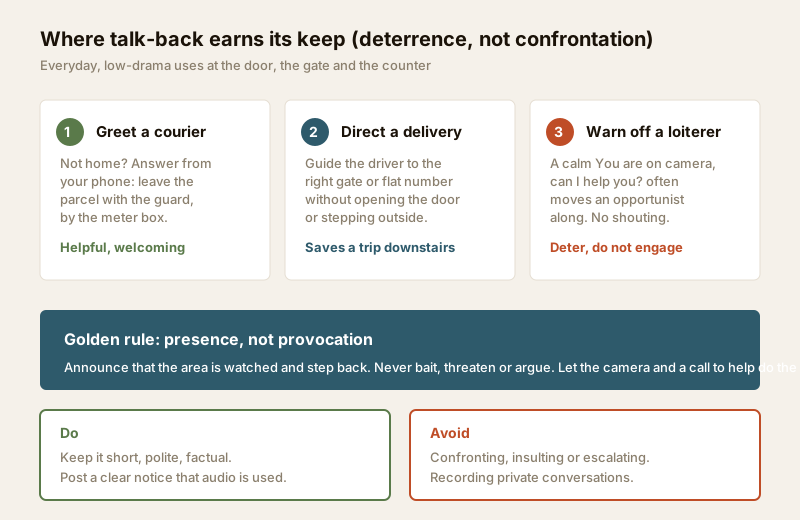
The honest framing matters here. Two-way audio is at its best for everyday convenience and calm deterrence — announcing that a place is watched — and at its worst when treated as a tool to argue with strangers. Use it to establish presence, then step back.
- Greet a courier or delivery. The everyday winner. You are at work; the parcel arrives; you answer from your phone and say, "Please leave it with the guard," or "It is safe to leave it by the meter box." No missed delivery, no one waiting.
- Direct a delivery or visitor. Guide a driver to the right gate, flat number or the service lane without walking down or opening the door — useful in a large plot, a villa with a long drive, or an apartment.
- Reassure or instruct at home. Tell a child who has just got home that you are on your way, or ask domestic help to expect a visitor — a soft intercom between rooms and the outside.
- Warn off a loiterer. A calm, factual "You are on camera — can I help you?" is often enough to move an opportunist along. The value is that the person realises a real human is watching now. That is deterrence.
- Shop counter and staff. A shopkeeper watching a second counter or a godown can call out to staff or greet a customer, an owned commercial setting where audio is far less fraught (see the commercial CCTV guide).
The golden rule is presence, not provocation. Announce that the area is watched, keep it short and polite, and disengage. Never bait, threaten, insult or argue through the speaker — it escalates a situation you are trying to defuse, and an aggressive recording can rebound on you. Let the camera and, if needed, a call to your guard or the police do the real work.
Two-way audio and the law in India — read before you switch it on
Talk-back involves both playing sound to a person and, on most units, the microphone that could record their reply. That second part is where India's privacy and data-protection concerns sit, and the caveats are the same ones carried in the audio recording guide — read it in full.
- Post clear notice. Put up a visible sign that the premises are under CCTV surveillance with audio. Notice is the single most important courtesy and safeguard — people should know before they speak.
- Stay on your own property and legitimate purpose. Point the camera at your gate, door or counter — your space and shared access — not into a neighbour's home, window or private conversation. To black out areas you must not capture, see the privacy masking guide.
- Do not record private conversations. Talk-back is for brief, functional exchanges you are party to. Continuously recording the private conversations of neighbours, staff, guards or passers-by without a lawful basis is exactly what to avoid. Many owners keep the microphone/recording off by default and only speak when they choose to — a sensible, privacy-respecting posture.
- The DPDP Act, 2023. India's Digital Personal Data Protection Act, 2023 frames how personal data — which can include identifiable audio — should be handled with a legitimate purpose and appropriate care. Treat this as a reason to be minimal and transparent, not a checklist you can self-certify.
- Never in private spaces. Cameras — with or without audio — never belong in bathrooms, bedrooms or changing areas. This is not negotiable.
Not legal advice. This is general guidance to help you act responsibly. Audio consent and surveillance law turn on your exact situation — a home gate, a shop, a rented premises, an RWA common area all differ. For anything with legal weight, consult a qualified lawyer, and for the RWA/society dimension, agree audio use with your committee up front (see the gated communities security guide).
Buying and setting up talk-back — a short checklist
Most two-way audio is bundled into a camera rather than bought separately, so the choice is really which camera. Weigh these:
| What to check | Why it matters | Good sign |
|---|---|---|
| Duplex mode | Decides if it feels like a call or a walkie-talkie | Full-duplex for a busy door; half-duplex is fine for basics |
| Echo cancellation (AEC) | Stops you hearing yourself | Listed AEC + noise reduction on the spec sheet |
| Speaker loudness | Must beat street and rain noise | Loud, clear outdoor-rated speaker |
| Network path | The biggest driver of latency | Strong WiFi, or wired/PoE for a fixed gate |
| Weather sealing | Outdoors it faces monsoon and dust | Suitable IP rating for the mount (see below) |
| Notification speed | A slow alert means you miss the visitor | Fast push alerts, reliable app |
A few setup pointers specific to Indian homes:
- Signal first. A talk-back doorbell is only as good as the WiFi at the door. Test the signal at the exact spot, or run a wired unit; a mesh node near the entrance often solves a laggy doorbell.
- Weatherproof the position. A gate or door camera faces sun, dust and monsoon — choose an appropriate weather rating and, if it sits within reach, an impact rating; see the weatherproof IP rating guide and the vandal-proof IK rating guide.
- Plan for power cuts. A camera and router that die with the evening cut cannot answer the door — put the recorder, router and any doorbell hub on a UPS as part of the wider resilience plan in the building security systems guide.
- Match the feature to the camera type. Not every camera needs to speak. Decide view by view with the CCTV camera type selector, and reserve talk-back for the door, gate and counter where a conversation actually happens.
When to bring in a professional. Decide the positions and features yourself, then hand the mounting at height, cabling, weatherproof terminations, doorbell wiring and commissioning to a licensed installer. Any work at the mains board or an existing wired-doorbell transformer is a licensed electrician's job — see the electrical hub. For the legal and consent side of audio, the professional is a lawyer, not an installer.
Key takeaways
- Two-way audio (talk-back) adds a speaker to a camera's microphone so you can speak and listen through your gate, door or counter from your phone.
- It shines at everyday convenience — greeting a courier, directing a delivery — and at calm deterrence; the rule is presence, not provocation, never confrontation.
- Latency (keep it low with strong WiFi or a wired unit) and echo (fixed by acoustic echo cancellation) decide whether it feels natural or frustrating.
- Audio is legally sensitive in India: post clear notice, stay on your own property, do not record private conversations, respect the DPDP Act, 2023, and treat this as general guidance — not legal advice; consult a lawyer.
- Choose the camera and mount with care — check duplex mode, AEC, speaker loudness and weather rating with the camera type selector — and route mounting, cabling and mains work to a licensed professional.
References
- Digital Personal Data Protection Act, 2023 — handle identifiable personal data, including audio, with a legitimate purpose, transparency and care; verify applicability to your situation with a qualified professional.
- Post visible CCTV-with-audio notice and keep coverage to your own property and shared access; avoid capturing neighbours' private spaces or private conversations.
- National Building Code of India (SP 7), Bureau of Indian Standards, and local municipal bye-laws for any structural, electrical or life-safety aspect of an install; verify the current edition via the BIS catalogue: https://www.services.bis.gov.in/
This is an educational overview, not legal advice. Audio surveillance law depends on your specific circumstances — consult a qualified lawyer; and route mounting, cabling and electrical work to licensed professionals, verifying any standard's current status via the BIS catalogue before relying on it.
Export this guide
Related Guides — Deep-dive reading
Video Door Phone Two-Way Audio in India (2026): Talking Back at the Door
The talk-back function that turns a door camera into a doorway intercom: how the mic and speaker at the gate and monitor work, why full-duplex feels natural, and what good two-way audio needs in Indian conditions.
SecurityHow to Choose a CCTV Camera (2026): The Homeowner's Decision Guide for India
Cut through the spec-sheet noise and choose the right CCTV camera for each spot around an Indian home. What actually matters — sensor and low-light performance, lens and field of view, form factor, IP and IK ratings, honest smart features — and the marketing claims to ignore.
SecuritySecurity for People Living Alone in India (2026): Calm, Practical Habits When There Is No Second Person to Notice
Living alone is an ordinary and growing part of Indian life - the student in a new city, the working single, the elder whose children are abroad, the person after a separation. It does not call for fear. It calls for a few deliberate habits, because there is no second person in the home to notice trouble, raise the alarm, or catch an accident. This is calm self-reliance, layer by layer.
SecurityRelated Tools — Try Free
Security Cabling & PoE Planner
Estimate cable length, drops, PoE power budget, the right switch, conduit and cost for a CCTV/security cabling plan.
Cabling PlannerApartment Video Door System Planner
Enter flats, entrances, floors and guard desk for a first-pass building intercom plan — door stations, indoor monitors, guard station, the right architecture and an indicative cost band.
Building PlannerCCTV Camera Coverage & Count Calculator
Estimate how many CCTV cameras you need, the NVR channels, storage in TB for your retention period, and an indicative all-in cost with GST.
CCTV Calculator