
CCTV Video Analytics Explained (India 2026): What the AI Can and Can't Do
The umbrella guide to CCTV video analytics for Indian homes and shops — people counting, loitering, queue and crowd, heatmaps, object-left-behind — where they run, what they cost, how accurate they really are, and the privacy duty they carry.
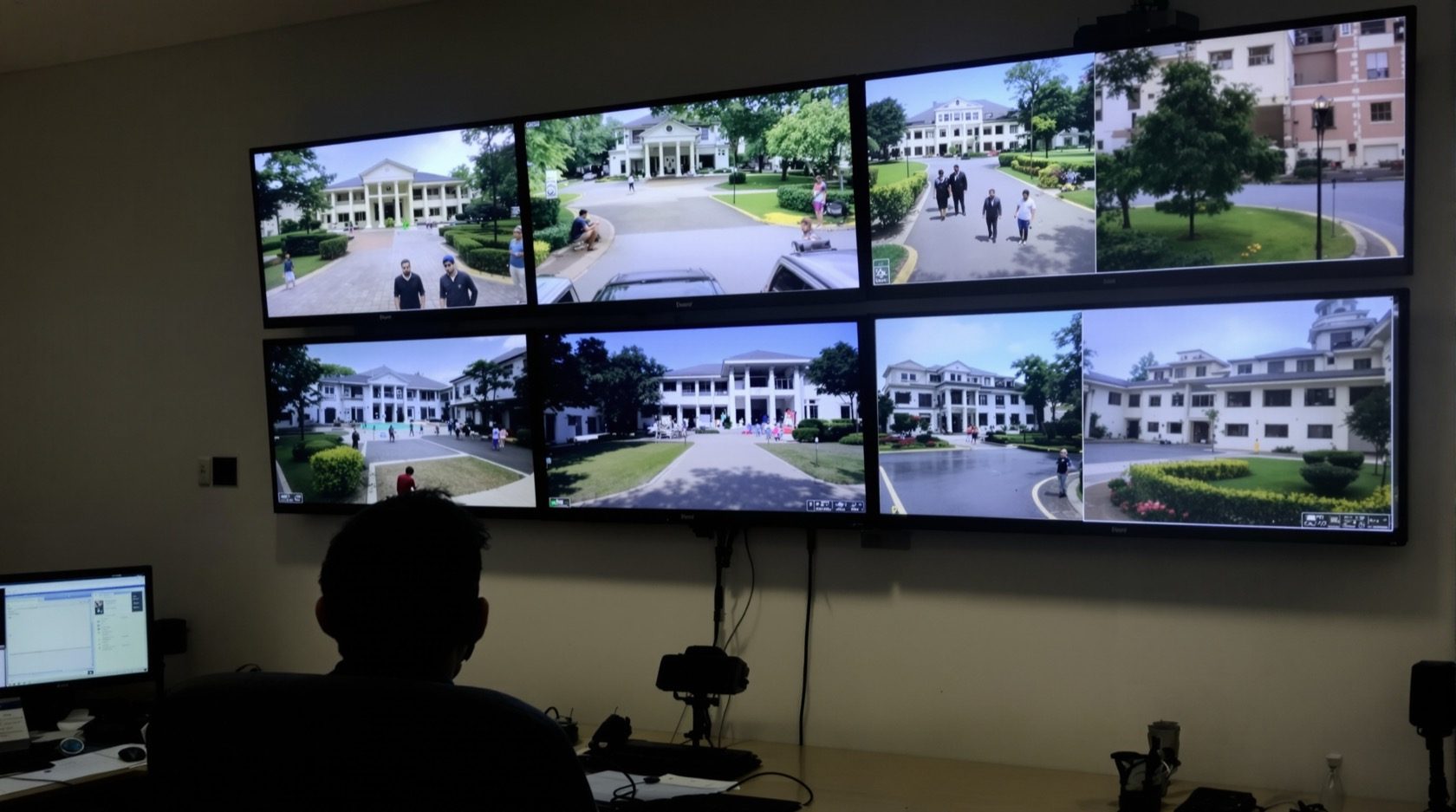
CCTV video analytics is the layer of software intelligence that sits on top of ordinary camera footage and turns moving pixels into counts, alerts and patterns: how many people entered, who lingered too long, where a queue is building, which shelf draws a crowd, and whether a bag was left behind. If plain recording answers what happened, analytics tries to answer what is happening, right now, and what does it mean — without a human staring at a wall of screens.
This guide is the umbrella explainer for Studio Matrx's CCTV hub. The individual detection features each have their own focused guide; this one ties the whole detection act together — what the different analytics are, where they run, what they cost, and, most importantly, an honest account of what the AI can and cannot do on an Indian street, forecourt or shop floor.
Scope & stance. This guide helps you plan, decide and coordinate — to choose analytics wisely and brief an installer. It is strictly defensive and privacy-respecting. Analytics that identify, count or profile people carry more privacy duty, not less: keep detection zones on your own property and shared areas, never point them at neighbours or the public street to profile passers-by, never place cameras in bathrooms, bedrooms or changing areas, and treat the Digital Personal Data Protection Act, 2023 as a floor, not a ceiling. Mains-electrical, structured cabling and working-at-height belong to licensed professionals, and no camera or box may ever block a fire-escape route.
What "video analytics" actually covers
"Analytics" is an umbrella word, and vendors stretch it. Underneath it are a handful of distinct capabilities, each solving a different question. It helps to sort them into three families.
Detection triggers — the building blocks, each with its own guide:
- Motion — the oldest and crudest trigger: pixels changed. See motion detection for why plain motion floods you with false alerts in India.
- Human & vehicle classification — AI that only fires on a person or a vehicle, cutting the noise dramatically. See human & vehicle detection.
- Object / auto tracking — a PTZ that locks onto and follows a moving subject. See object tracking.
Counting & behaviour — the "analytics" people usually mean:
- People counting / footfall — a running tally of entries and exits across a line or door.
- Loitering / dwell — flags a person or object that stays in a zone longer than a set time.
- Queue & crowd — estimates how many are waiting or gathered, and how long the wait is.
- Heatmaps — colours a floor plan by how much time people spend where — a retail and layout tool.
- Object-left-behind / object-removed — alerts when a bag appears and stays, or a fixed object (a cycle, a fire extinguisher) vanishes.
Identity analytics — the heaviest, covered in their own guides because their privacy weight is so high:
- ANPR (number-plate recognition) — reads vehicle plates at a gate or forecourt. See ANPR cameras.
- Face recognition — matches faces against a list. See facial recognition cameras.
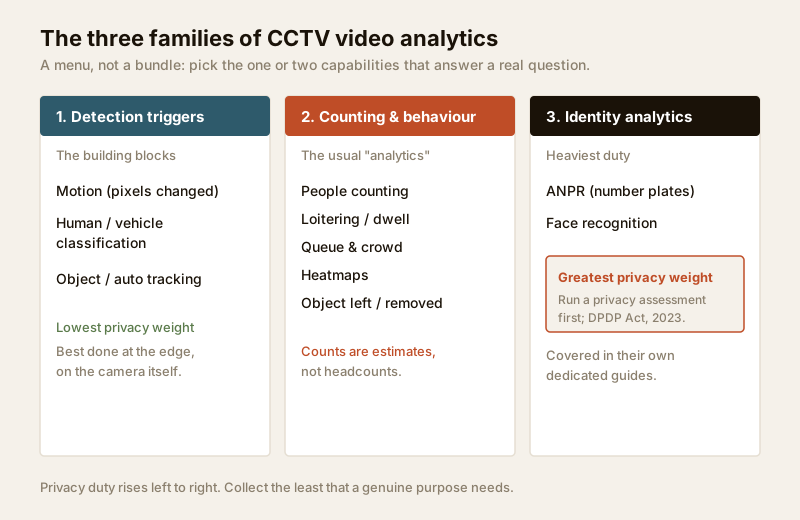
The rest of this guide treats these as a menu. You almost never want all of it — you want the one or two capabilities that answer a real question for your home or shop, running in the right place, at a cost and privacy footprint you can justify.
Where analytics run: edge vs server vs cloud
The single biggest architecture decision — and the one that drives cost, accuracy and privacy — is where the thinking happens. There are three places, and most systems mix them.
- Edge (on-camera). The AI chip lives inside the camera. It classifies a person or counts a line locally and sends only the result (and a clip) onward. This is the AI-powered camera and smart camera approach. Lowest ongoing cost, best privacy (raw video need not leave the device), but each camera's brain is fixed at what you bought.
- Server / NVR-side. A recorder or a small on-site PC runs analytics across several camera feeds. More horsepower, can correlate cameras, upgradeable — but it is a bigger box, draws more power, and needs the video streamed to it.
- Cloud. Footage or metadata goes to a provider's servers, which run heavy analytics and bill a monthly fee. Most powerful and always improving, but it means your video leaves your premises, depends on your uplink surviving a power cut, and carries a recurring cost and the greatest privacy exposure. See cloud CCTV for the wider trade-off.
| Where it runs | Upfront cost | Ongoing cost | Privacy exposure | Best for |
|---|---|---|---|---|
| Edge (on-camera) | Higher per camera (₹4,000–₹15,000) | Near zero | Lowest — raw video stays on device | A home or single shop; person/vehicle alerts, line-crossing, simple counting |
| Server / NVR-side | Medium (a capable NVR or mini-PC) | Power + maintenance | Low–medium — video stays on-site | A larger property or multi-camera shop needing correlation and heatmaps |
| Cloud | Low hardware | ₹200–₹2,000+/camera/month | Highest — video leaves premises | Multi-site chains needing dashboards; only with a clear DPDP basis |
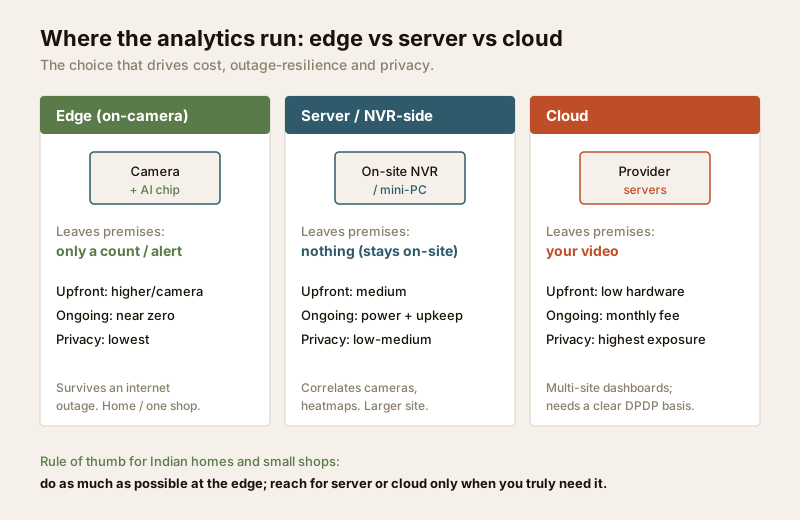
The practical rule for most Indian homes and small shops: do as much as possible at the edge. It is the cheapest to run, survives an internet outage, and keeps raw footage on your own property — which is also the strongest privacy posture. Reach for a server or cloud only when you genuinely need cross-camera correlation, heatmaps over time, or a multi-site dashboard.
How accurate is it, really? (The honest part)
Vendor demos run in bright, sparse, staged spaces. Your gate at 9 pm in July does not. Analytics reduce false alarms and missed events — they do not eliminate them. Being honest about the limits is what separates a system you trust from one you learn to ignore.
The recurring Indian failure modes:
- Lighting. Low light, backlight from a headlamp or a shop tube-light, and the harsh contrast of noon sun all degrade classification. A person in shadow or against glare may be missed; see low-light cameras and the image quality guide.
- Angle and distance. Analytics want a reasonably front-on view at a sensible size in the frame. A camera aimed too steeply down, or a person too far away and too few pixels, breaks counting and classification. Resolution matters here — see the resolution guide.
- Occlusion and crowd density. Two people walking close, an umbrella in the monsoon, a scooter passing a pedestrian — the AI merges or loses them. Indian crowd density at a shop entrance or a festival gathering is genuinely hard: people-counting error climbs steeply as bodies overlap.
- India's own false-alarm zoo. Stray dogs, cats, cattle, crows, swaying trees, monsoon rain streaks, headlight glare sweeping a wall, and insects crawling on the lens at night all fool cruder analytics. Good human/vehicle classification filters most of this; plain motion does not.
| Analytic | Typical honest accuracy | What wrecks it in India |
|---|---|---|
| Human vs vehicle classification | High in good light; noticeably lower at night/distance | Backlight, glare, small/far subjects, heavy rain |
| People counting (single door) | Good for sparse flow; error grows with density | Crowding, overlap, umbrellas, groups entering together |
| Loitering / dwell | Reliable for a lone subject in a clear zone | Busy scenes, people stopping to talk, parked-then-moving |
| Queue / crowd estimate | An estimate, not a headcount | Dense clusters, non-linear queues, mixed pedestrian traffic |
| Heatmaps | Good for relative patterns over time | Not a precise count; skewed by camera angle |
| Object-left / removed | Works for a clear fixed scene | Busy thoroughfares, shadows, cleaning/restocking activity |
Treat every number an analytics dashboard shows you as an estimate with an error bar, especially counts and crowd figures. Use them for trends and alerts, not as courtroom-grade truth. And always keep the recorded footage: analytics point you at the moment, but the video is the evidence.
Privacy and proportionality — the duty analytics add
This is where analytics differ from a plain camera, and it deserves its own section. A camera that merely records is one thing. Software that counts, profiles, tracks dwell time, or recognises identity is processing personal data in a far more active way — and under the Digital Personal Data Protection Act, 2023, that raises your responsibilities as the person deploying it.
The guiding idea is proportionality: collect and process only what a genuine, stated purpose needs, and no more.
- Have a real purpose. "Count footfall to staff my shop" or "alert me if someone loiters at my gate at night" is proportionate. "Profile everyone who walks past to build a database" is not, and pointing analytics at the public street or your neighbours to do it is out of bounds.
- Keep zones on your own property. Draw counting lines, dwell zones and heatmap areas inside your boundary and shared areas — not across the pavement or into a neighbour's plot.
- Prefer edge and on-site. The less raw video that leaves your premises, the smaller the exposure. Edge analytics that send only a count or an alert are far easier to justify than cloud pipelines shipping full video.
- Minimise, retain briefly, secure. Keep only what you need, for as long as you need it, on a secured recorder; don't hoard months of identity data "just in case."
- Notice and the heaviest tools. Where analytics identify individuals — face recognition especially — the duty is highest. Run a proper security & privacy assessment before deploying identity analytics, and think hard about whether you need them at all.
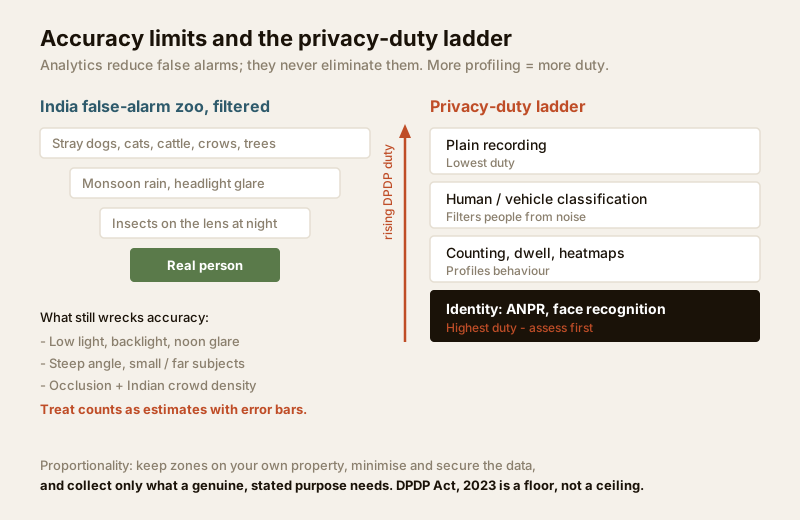
Analytics that watch people are powerful, and power is exactly why restraint matters. The most respected systems are the ones that collect the least to do the job — not the most.
Choosing the right analytics for you
Work backwards from a question you actually need answered, not from a feature list.
- A home wanting fewer junk alerts: you don't need "analytics" as a product — you need good human/vehicle classification at the edge, plus perhaps a tripwire on the drive. Start with the detection feature selector.
- A shop wanting footfall and busy-hours: people counting on the entrance and a heatmap of the floor, run NVR-side, with data kept on-site.
- A queue or crowd problem (clinic, canteen, showroom): queue/crowd estimation — but remember it is an estimate, and staff it accordingly.
- A gate/forecourt logging vehicles: ANPR, sized and sited for plate angle and speed.
- A perimeter alert: an intrusion zone or line, backed by human classification, covered in the detection guides above.
Size and cost the cameras and storage behind any of these with the storage & bitrate calculator and the camera coverage calculator, and pick the hardware with the camera type selector.
When to bring in a professional. You can and should decide which analytics you need, where, and why — that is the planning this guide equips you for. Hand the mounting at height, structured cabling, weatherproof terminations, NVR/analytics-server commissioning and network configuration to a licensed installer, and any work at the mains board to a licensed electrician (see the electrical hub). For anything touching identity analytics, a documented privacy assessment is part of doing it properly. A well-scoped, well-sited analytics setup that respects privacy is worth far more than a maximal one bolted on without a purpose.
Key takeaways
- Video analytics is an umbrella: detection triggers (motion, human/vehicle, tracking), counting-and-behaviour (footfall, loitering, queue, heatmaps, object-left), and heavy identity tools (ANPR, face) each covered in their own guides.
- Where it runs matters most — prefer edge (on-camera) for cost, outage-resilience and privacy; use server or cloud only when you truly need correlation, heatmaps or multi-site dashboards.
- Analytics reduce, never eliminate false alarms; Indian lighting, angles, occlusion and the stray-dog-to-monsoon "false-alarm zoo" degrade accuracy. Treat counts and crowd figures as estimates with error bars.
- Analytics that count or profile people carry more privacy duty, not less — apply proportionality, keep zones on your own property, minimise and secure data, and treat the DPDP Act, 2023 as a floor.
- Start from a real question, use the detection feature selector, and route mounting, cabling, commissioning and mains work to licensed professionals.
References
- Digital Personal Data Protection Act, 2023 — process only what a genuine, stated purpose needs; keep analytics zones on your own property and shared areas, minimise and secure the data, and document a basis before deploying identity analytics.
- Manufacturer specification sheets — verify each analytic's stated conditions (minimum subject size, lux, mounting angle, maximum count density) before relying on a figure; demo accuracy is not field accuracy.
- National Building Code of India (SP 7), Bureau of Indian Standards, and local municipal bye-laws for any structural, electrical or life-safety aspect of an install; verify the current edition via the BIS catalogue: https://www.services.bis.gov.in/
This is an educational overview. Analytics accuracy figures are indicative and vary widely by scene and product; mounting at height, cabling and any electrical work are qualified professional tasks — engage licensed installers, run a privacy assessment for identity analytics, and verify any standard's current status via the BIS catalogue before relying on it.
Export this guide
Related Guides — Deep-dive reading
CCTV Human Vehicle Detection (India 2026): Human & Vehicle AI Alerts, Fewer False Alarms
How AI object classification alerts you only on people and vehicles - cutting the flood of false alarms that plain motion creates - where the AI runs (edge, NVR-side or cloud), its real limits, and the extra privacy weight of person-detection.
SecurityAI-Powered CCTV in India: What the Analytics Really Do
What AI-powered CCTV actually means, which analytics are genuinely useful at a home, and how to weigh the cost, accuracy limits and privacy of features like facial recognition before you buy.
SecurityHow to Choose a CCTV Camera (2026): The Homeowner's Decision Guide for India
Cut through the spec-sheet noise and choose the right CCTV camera for each spot around an Indian home. What actually matters — sensor and low-light performance, lens and field of view, form factor, IP and IK ratings, honest smart features — and the marketing claims to ignore.
SecurityRelated Tools — Try Free
CCTV Camera Coverage & Count Calculator
Estimate how many CCTV cameras you need, the NVR channels, storage in TB for your retention period, and an indicative all-in cost with GST.
CCTV CalculatorCCTV Cloud vs Local Cost Calculator
Compare cloud CCTV subscription against a local NVR + HDD — upfront, 5-year total, monthly fee and break-even.
Cloud vs LocalCircadian Light Meter
Patient-centric circadian lighting visualizer for Indian healthcare design — time-of-day × intensity → CCT, melanopic lux (EML / mEDI), melatonin suppression, and an alertness curve. Calibrated against WELL v2 L03 Circadian Lighting Design, CIE S 026:2018, Brainard 2001, and Lucas et al. 2014.
Circadian Tool