
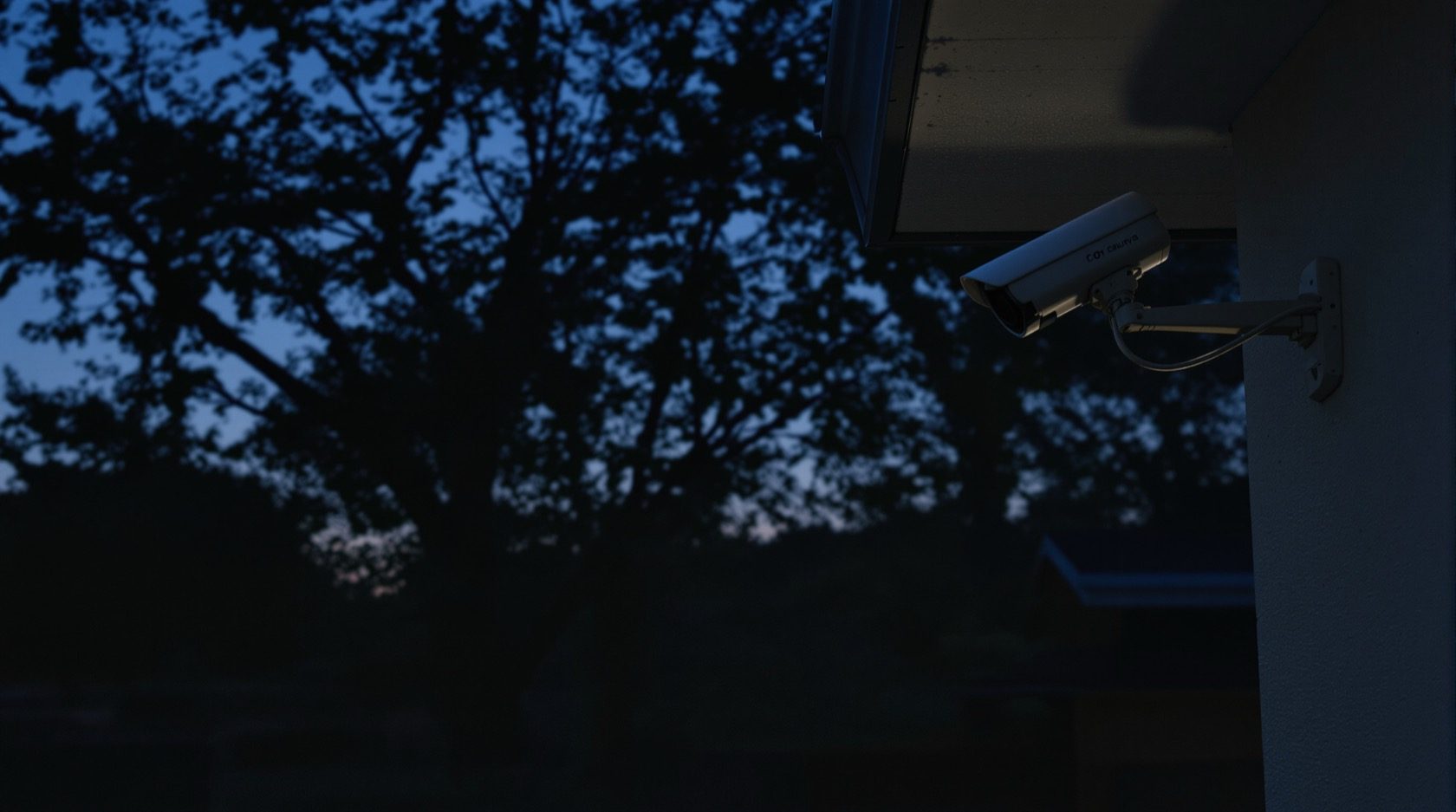
CCTV Motion Detection Explained (India 2026): Cutting the False Alarms
Why plain motion detection floods your phone with alerts in India, how basic pixel-change, PIR-assisted and smart motion differ, and how zones, sensitivity and scheduling get you to alerts you can actually trust.
CCTV motion detection is the feature that decides when your camera bothers to tell you something happened. It is the oldest and most universal detection line on any spec sheet — every DVR, NVR and Wi-Fi camera has it — and it is the single biggest reason people either love or abandon their system. Set up well, it is a quiet, useful watchdog. Set up naively in an Indian home, it buzzes your phone forty times a night for a crow, a passing scooter and a moth, until you mute the app and miss the one alert that mattered.
This guide is the plain-language explainer on motion detection in Studio Matrx's CCTV hub. It covers what motion detection actually does, why the basic kind fires so much in Indian conditions, the three main flavours you will meet, and the free settings — zones, sensitivity and scheduling — that tame it. Motion is the gateway to smarter detection, so it also points you to the upgrade path: human and vehicle detection.
Scope & safety. This guide helps you choose and tune a feature so you can brief an installer well. It is strictly about detecting activity on your own property to protect it — never about defeating, disabling or evading anyone else's system. Cameras belong only on your own plot and shared areas, never in bathrooms, bedrooms or changing areas, and should be positioned to respect neighbours and the spirit of the Digital Personal Data Protection Act, 2023. Any cabling, mains-electrical work or mounting at height is a licensed professional's job.
What motion detection actually does
At its simplest, a camera does not "see" motion the way you do. It compares one video frame with the next and looks for change — pixels that got brighter or darker. When enough pixels change by enough, the camera decides "something moved here" and does whatever you told it to: start recording, mark the clip, sound a siren, or push an alert to your phone.
That is the whole trick, and also the whole problem. A basic motion detector has no idea what moved. A person walking to your gate and a branch nodding in the wind produce the same thing on screen — changed pixels. The detector cannot tell a burglar from a butterfly. Everything after this in the guide is about narrowing that gap between "pixels changed" and "something I care about happened."
Why plain motion floods you in India
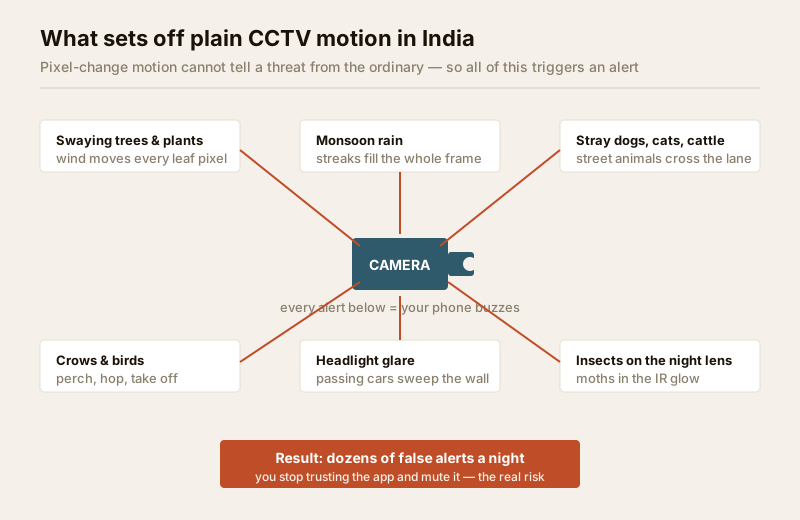
Indian homes and shops sit in an environment almost designed to fool a pixel-change detector. The false-alarm sources below are not edge cases — they are your ordinary night.
- Swaying trees and plants. A neem or gulmohar by the compound wall moves every leaf in the breeze. To the camera, half the frame is "changing" constantly.
- Monsoon rain. Rain streaks fill the entire image with motion, and heavy drops close to the lens look like large moving objects. A storm can trigger continuously for hours.
- Stray dogs, cats and cattle. Street animals wander lanes, driveways and shopfronts all night. They are warm, real, moving bodies — every one is an "event."
- Crows and birds. They perch on the wall, hop, and take off across the frame, often right in front of the lens.
- Headlight glare. A car or auto passing on the road sweeps a bright fan of light across your gate and wall. The pixels brighten sharply — instant alert — even though nothing entered your plot.
- Insects on the night lens. This is the classic. Infrared (IR) night-vision LEDs glow warm and attract moths and mosquitoes. One insect crawling across the lens looks like a giant blurred object filling the screen. Spiders spinning webs in the IR glow do the same.
- Power and light flicker. A tubelight cycling on, a flickering streetlamp, or the sudden brightness change when clouds pass can all cross the threshold.
The damage is not the alerts themselves — it is what they do to you. After a week of noise you stop trusting the notifications and silence them. A motion system you have muted protects nothing. So the real goal of tuning motion detection is not "catch everything"; it is "alert me rarely enough that I still look."
The three flavours of motion detection
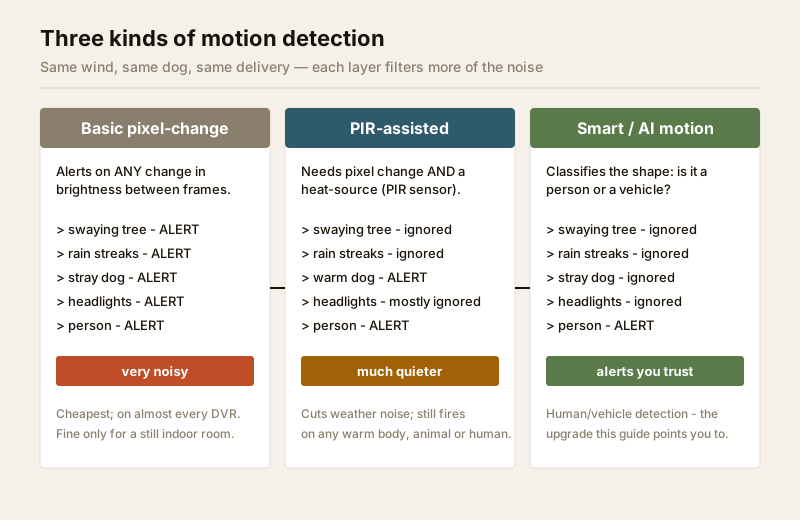
Not all motion detection is the same line item. When you read a camera or NVR spec, you will meet three broad kinds, each filtering more of the noise than the last.
1. Basic pixel-change motion
The default on almost every camera and every budget DVR. It alerts on any sufficient change in brightness between frames. Cheap, universal, and — outdoors in India — very noisy. It is genuinely fine for one job: a still indoor room (a shop floor after hours, a store room) where nothing should ever move.
2. PIR-assisted motion
Some cameras, especially battery and Wi-Fi models, add a PIR (passive infrared) sensor — the same kind of sensor in an automatic light. PIR detects heat movement, so the camera only counts it as motion when pixels change and a warm body is present. This instantly kills weather noise: rain, swaying leaves and headlight glare are not warm, so they are ignored. The catch is that PIR still fires on any warm body — a stray dog, a cow, a cat, a person — because it cannot tell them apart. It also has a limited range (a few metres) and can be fooled by hot afternoons. PIR is a big step quieter than basic, not a cure.
3. Smart (AI) motion detection
The modern upgrade. Instead of just measuring change, the camera or recorder runs a small AI model that classifies the shape: is this a person, a vehicle, an animal, or nothing of interest? It then alerts only on the categories you chose. A swaying tree, a dog and a headlight sweep are recognised as "not a person or vehicle" and stay silent; a person at the gate fires immediately. This is really the doorway into human and vehicle detection, which this guide points you to as the proper fix for false alarms — and, further along, the whole family of tools covered in the video analytics guide.
| Flavour | Fires on | Ignores | India false-alarm level | Where it fits |
|---|---|---|---|---|
| Basic pixel-change | Any brightness change | Nothing | Very high outdoors | Still indoor rooms only |
| PIR-assisted | Warm body + change | Rain, leaves, glare | Medium (animals still fire) | Battery/Wi-Fi cameras, porches |
| Smart / AI motion | Chosen classes (person/vehicle) | Weather, animals, most noise | Low | Outdoor gates, driveways, perimeters |
The three free settings that tame motion
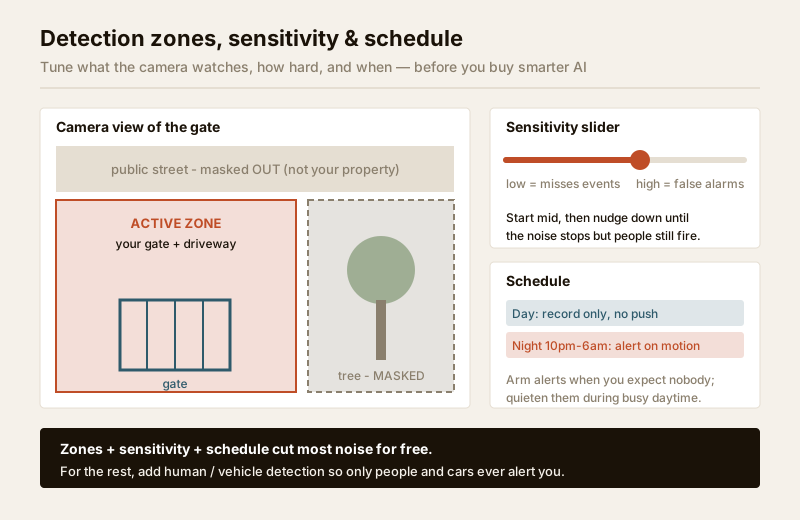
Before you spend on smarter AI, three settings on almost every camera and NVR will remove most of the noise at no cost. Get these right first.
Detection zones (and masks)
You almost never need the whole frame watched. Detection zones let you draw the exact area that matters — the driveway, the gate, the shop shutter — and mask out the rest. Two masks pay for themselves immediately:
- Mask the swaying tree, the flag, the flapping tarpaulin — anything that moves on its own.
- Mask the public street beyond your boundary. This kills headlight glare and passing-traffic alerts, and it is also the right thing to do for privacy: keep your detection on your own property, not the pavement or a neighbour's gate.
Sensitivity
The sensitivity slider decides how much pixel change counts as motion. Too high and every leaf triggers; too low and a real person in dark clothing at 2 a.m. is missed. There is no universal number — it depends on your scene. Start around the middle, watch the alerts for a day, and nudge it down until the noise stops but a person walking through still reliably fires. Some cameras also expose an object-size threshold: set a minimum size so a distant crow or insect is too small to count, while a human-sized object still does.
Scheduling
You do not need the same alerting all day. Scheduling (sometimes called arm/disarm or a "profile") lets you say when motion should push a notification versus merely record. A common home pattern:
- Daytime: record on motion, but do not push alerts — people coming and going is normal.
- Night (say 10 p.m. to 6 a.m.): push alerts on any motion in the zone, when nobody should be at the gate.
This alone removes the bulk of daytime nuisance notifications while keeping the footage.
| Setting | What it does | Best use in India | Watch out for |
|---|---|---|---|
| Detection zone | Limits where motion counts | Cover only your gate/driveway/yard | Do not include the public street |
| Privacy mask | Blanks part of the frame | Hide a neighbour's window or the road | Masked areas are not recorded either |
| Sensitivity | How much change triggers | Nudge down until noise stops | Too low misses dark-clothed intruders |
| Object-size threshold | Ignores tiny movers | Filter crows and insects | Set below human size, not above |
| Schedule / arm-disarm | When alerts push | Alert only when you expect nobody | Remember to disarm before you arrive |
Motion is the gateway, not the destination
Even perfectly tuned, plain motion has a ceiling. Zones and sensitivity cannot tell a stray dog from a person walking the same path, and a determined nuisance — cattle in the lane, a cat that loves your porch — will still trip it. This is exactly where smart detection earns its price. Adding human and vehicle detection means the camera only ever alerts when it recognises a person or a car, so animals, weather and glare go quiet for good.
From there, the detection family branches into more targeted tools, each better than plain motion for a specific job:
- A virtual tripwire across your gate or driveway — see line-crossing detection — alerts only when someone crosses a line, direction-aware.
- A drawn area that alerts on entry or loitering — see intrusion-zone detection — combines beautifully with human detection to watch a compound or terrace.
- The full umbrella of counting, loitering, heatmaps and object-left alerts lives in the video analytics guide.
Not sure which of these you actually need? The new CCTV detection feature selector walks you view by view and recommends the right detection line for each camera, so you buy the feature that fits rather than the longest spec sheet.
A note on privacy
Motion detection is comparatively light on privacy — it flags that something moved, not who. But the moment you upgrade toward person-detection and analytics, the privacy weight goes up, not down, because the system is now singling out people. Keep every detection zone on your own property, avoid pointing cameras at neighbours' windows or the public road, and store footage no longer than you genuinely need. For a structured way to check your setup against the DPDP Act, 2023, work through the security and privacy assessment. None of these tools are for covertly profiling neighbours, staff or passers-by.
When to bring in a professional. You can plan the camera positions, draw the zones and set sensitivity and schedules yourself — those are configuration, not construction. But mounting at height, running cabling, weatherproof terminations and any mains-electrical work are licensed-professional jobs; see the electrical hub. If your system spans several cameras and an NVR, a good installer will also commission the smart-detection models and help you set realistic sensitivity per camera. A security hardware layout must never block a door, window or fire-escape route.
Key takeaways
- CCTV motion detection works by spotting pixel change between frames — it flags that something moved, not what moved.
- In India, plain motion floods you with false alerts from swaying trees, monsoon rain, stray dogs and cattle, crows, headlight glare and insects on the night lens — and a muted system protects nothing.
- There are three flavours: basic pixel-change (noisy, indoor-only), PIR-assisted (ignores weather, still fires on any warm body), and smart AI motion (alerts only on chosen classes like people and vehicles).
- Three free settings tame most noise: detection zones/masks, sensitivity (nudge down until quiet), and scheduling (alert only when nobody should be there).
- Motion is the gateway — for real relief, upgrade to human and vehicle detection and let the detection feature selector match the right line to each view; keep every zone on your own property.
References
- Digital Personal Data Protection Act, 2023 — keep detection zones and footage limited to your own property and a legitimate purpose; avoid capturing neighbours' private spaces or the public road.
- Manufacturer specification sheets — confirm whether a camera offers basic motion, PIR, or on-device AI person/vehicle classification, and at what range, before ordering.
- National Building Code of India (SP 7), Bureau of Indian Standards, and local municipal bye-laws for any structural, electrical or life-safety aspect of an install; verify the current edition via the BIS catalogue: https://www.services.bis.gov.in/
This is an educational overview to help you plan and brief an installer. Cabling, mains-electrical work and mounting at height are qualified professional tasks — engage licensed installers and verify any standard's current status via the BIS catalogue before relying on it.
Export this guide
Related Guides — Deep-dive reading
CCTV Human Vehicle Detection (India 2026): Human & Vehicle AI Alerts, Fewer False Alarms
How AI object classification alerts you only on people and vehicles - cutting the flood of false alarms that plain motion creates - where the AI runs (edge, NVR-side or cloud), its real limits, and the extra privacy weight of person-detection.
SecurityMotion-Activated Security Lighting in India (2026): Sensor Types, the False-Trigger Problem, and Pairing Motion With a Base Light So Your Camera Never Goes Blind
How PIR, microwave and dual-tech sensors really behave in Indian conditions, how to stop the stray-dog-and-passing-auto false triggers that make owners disable the light, and why a motion-only light leaves a camera dark until it is too late.
SecurityGlass-Break Sensors in India (2026): Catching a Smashed Pane Before Entry
How acoustic glass-break sensors listen for the twin sound of breaking glass, why they cover what door and window contacts miss, and how to place one sensor to protect a whole room of windows in an Indian home or shop.
SecurityRelated Tools — Try Free
CCTV Detection Feature Selector
Answer four questions and get the right detection feature — basic motion, human/vehicle AI, line-crossing, intrusion-zone, auto-tracking or video analytics.
Detection SelectorCross-Ventilation Analyzer
Estimate airflow and air changes per hour (ACH) from room size, window areas, layout, and local wind — with NBC 2016 Part 8 compliance check.
Ventilation CalculatorCCTV Camera Coverage & Count Calculator
Estimate how many CCTV cameras you need, the NVR channels, storage in TB for your retention period, and an indicative all-in cost with GST.
CCTV Calculator