
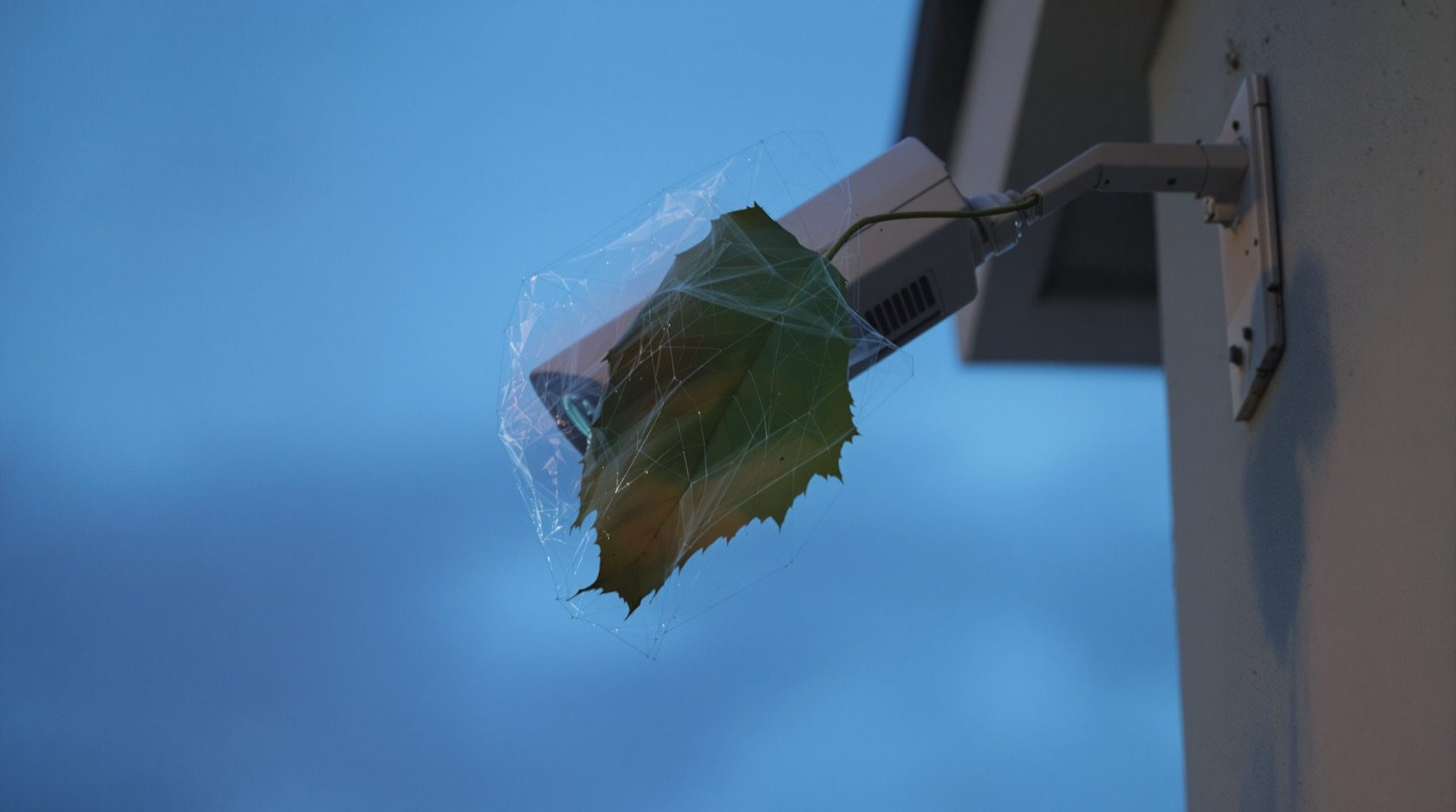
CCTV Tamper Detection in India (2026): Alerts When a Camera Is Blocked or Moved
How a camera raises an alarm the moment its view is covered, sprayed, defocused or turned away, why it matters most for a lone outdoor camera, and how to tune out India's real false triggers.
A camera only protects you while it can see. The moment someone drapes a cloth over the lens, sprays it, twists it toward a blank wall, or nudges it out of focus, an ordinary camera keeps happily recording a useless picture and tells no one. CCTV tamper detection closes that gap: it watches the camera's own view for the tell-tale signs of interference and raises an alarm the instant the view is defeated, so a blinded camera does not sit blinded for a week before you notice.
This guide is the focused explainer on tamper detection as a feature in Studio Matrx's CCTV hub. It sits alongside motion detection and the wider video analytics family: motion tells you something moved in the scene, tamper tells you the scene itself was attacked. Everything here is strictly about detecting interference so you can respond, never about defeating a camera.
Scope & safety. This guide helps you choose and configure a feature. Mounting at height, cabling and any mains-electrical work belong to a licensed installer. Security hardware must never block a window, door or fire-escape route. Cameras belong only on your own property and shared areas, positioned to respect neighbours and the spirit of the Digital Personal Data Protection Act, 2023, and never in bathrooms, bedrooms or changing areas.
What tamper detection actually is
Tamper detection is a piece of logic running in the camera or the recorder that continuously asks one question: does what I am seeing now still look like a working view of my scene? When the answer flips to "no" in a way that looks deliberate, it fires a tamper event, usually surfaced as a push notification, an entry in the recorder log, and optionally a siren or light.
The events it is built to catch fall into a handful of familiar types.
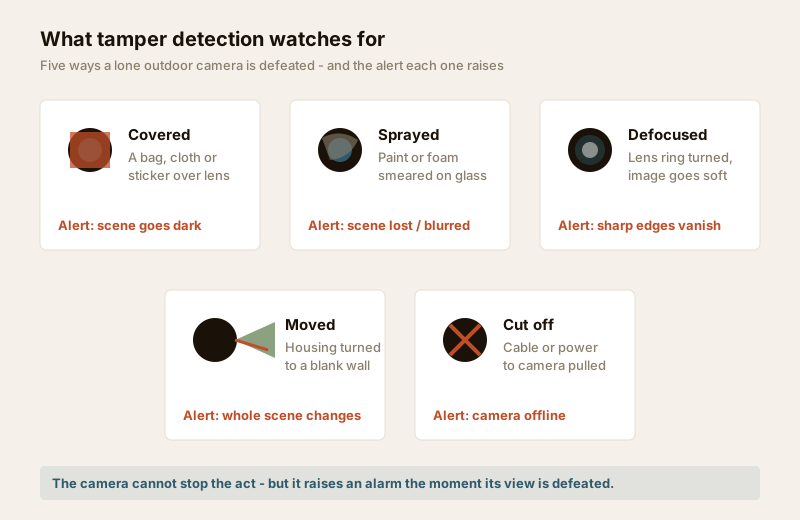
- Covered. A bag, cloth, sticker or hand over the lens. The scene drops to a dark or uniform blob.
- Sprayed or smeared. Paint, foam or mud on the glass. The image survives but goes blurred and low-contrast.
- Defocused. The lens ring or the whole housing is nudged so the picture goes soft and no edges are sharp.
- Moved or redirected. The camera is turned to face a wall, the sky or the ground, so the frame changes wholesale.
- Cut off. The cable or power is pulled and the camera drops offline. This last one is usually handled as video loss at the recorder rather than by the camera's own scene analysis, but most people treat it as part of the same protective net.
The one honest thing to say up front: tamper detection does not prevent any of this. It cannot stop a hand reaching the lens. What it does is make the attempt loud and immediate, so an obstruction becomes an alert on your phone rather than a silent blind spot discovered days later.
How scene-change detection works
Under the bonnet, the most common mechanism is scene-change (or scene-comparison) detection. The camera holds a rough reference of what its normal view looks like and, frame after frame, measures how much of that view has changed. A person walking through changes a small slice of the frame for a moment. Covering or moving the camera changes most of the frame and the change holds. That combination, a large proportion of the frame altered and sustained for several seconds, is what trips the tamper alarm.
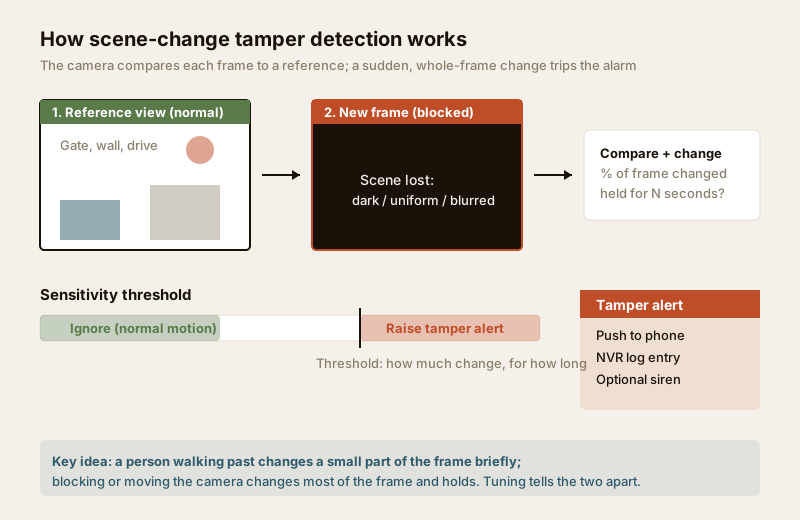
Two knobs govern the behaviour, and understanding them is the whole game:
- Sensitivity (how much change). How large a share of the frame must change before it counts. High sensitivity catches subtle smears but cries wolf at rain and shadows; low sensitivity is calm but can miss a partial cover.
- Hold time / duration (how long). How many seconds the change must persist. A short hold reacts fast but fires at a passing lorry filling the frame; a longer hold ignores momentary events and waits for a sustained block, which is exactly what real tampering looks like.
Different brands dress this up under names like "video tampering", "camera occlusion", "scene change" or bundle it inside an IVS / smart-detection menu, but the underlying idea is the same. Some newer cameras add dedicated defocus detection (watching for the sudden loss of high-frequency edge detail) and scene-change/repositioning detection as separate toggles, which is worth having because a smear or a defocus does not necessarily darken the frame the way a full cover does.
Why it matters most for a lone outdoor camera
Tamper detection earns its keep unevenly. On an indoor camera that you glance at daily, a covered lens is obvious the next time you open the app. The feature matters most exactly where cameras are alone, outdoors, and unattended for long stretches:
- A single gate or boundary camera with no overlapping view. If it is blinded, nothing else is watching that line, so a silent failure is a real gap.
- A reachable mount. A camera on a low wall, a gate pillar or beside a shutter at head height can be covered or turned by hand. (Height is the first defence here, which is why tamper detection pairs with mounting, below.)
- A shop or plot watched remotely where the owner is not on site to spot a dark feed. The alert is the only thing standing between "blinded at 2 a.m." and "you knew at 2 a.m."
- A camera doing a job on its own such as watching a car in the porch or a stretch of side wall a bullet camera owns. If that one view goes down unnoticed, the whole purpose lapses.
For a camera that is part of a dense, overlapping scheme covering the same ground three ways, a single tampered unit is less catastrophic because its neighbours still see. Even so, the alert is useful: it turns a maintenance problem into a known event. For the wider logic of layering and overlap, see the outdoor CCTV guide and the complete guide to CCTV systems.
Tamper detection vs the neighbouring features
It is easy to muddle tamper detection with the other things a smart camera watches for. This table keeps them in their lanes.
| Feature | What it answers | Typical trigger | Guide |
|---|---|---|---|
| Tamper detection | Was my view attacked? | Sustained whole-frame block, move or defocus | This guide |
| Motion detection | Did something move in the scene? | A person or object crossing the frame | Motion detection |
| Video analytics / IVS | What moved and where? | Line-cross, intrusion zone, person vs vehicle | Video analytics |
| Video loss | Did the camera disappear? | Signal or power to the camera lost | Recorder / how CCTV works |
The practical takeaway: turn on tamper detection and keep video-loss alerts on at the recorder. Between them they cover both "the view was blinded" and "the camera vanished" cases, which a would-be tamperer might attempt either way.
False triggers in India and how to tune them
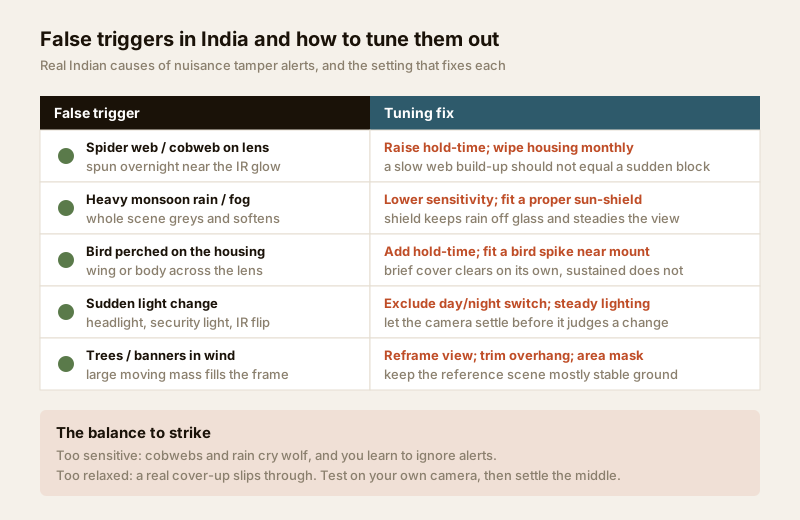
Here is where most people give up on tamper detection: out of the box, on an Indian outdoor camera, it can fire nuisance alerts until you stop trusting it. Every one of these has a cause and a fix, and none of them is a reason to switch the feature off.
| False trigger (very Indian) | Why it fools the camera | How to tune it out |
|---|---|---|
| Spider web / cobweb on the lens | Spiders love the warm IR glow and spin webs overnight; the web whitens the frame | Raise the hold-time so a slow build-up is not read as a sudden block; wipe the housing monthly |
| Heavy monsoon rain or fog | The whole scene greys, softens and loses contrast at once | Lower sensitivity a step; fit a proper sun-shield to keep rain off the glass |
| Bird perched on the housing | A wing or body drapes across the lens briefly | Longer hold-time (brief cover clears itself); a small bird spike near the mount |
| Sudden light change | A headlight, a security light switching on, or the day/night IR flip changes brightness sharply | Steady the lighting; exclude or delay judgement across the IR day/night switch |
| Trees or banners in wind | A large moving mass fills much of the frame | Reframe so the reference view is mostly stable ground; trim the overhang |
| Insects at night | Moths swarm the IR LEDs and blur across the lens | Move the light source away from the lens; longer hold-time |
The balance to strike is simple to state and worth testing on your own camera: too sensitive and cobwebs and rain train you to ignore alerts; too relaxed and a real cover-up slips through. Set it, then genuinely test it, walk up on a dry day and briefly cover the lens with your hand, confirm the alert lands on your phone, then dial sensitivity and hold-time until normal weather and wildlife stay quiet. The detection feature selector can help you decide which of these smart features each camera on your plot actually needs turned on.
Two related features help keep the picture stable enough that tamper detection is not fighting the weather: good wide dynamic range handles the harsh light changes, and adequate image quality and resolution means a smear or defocus is easier for the logic to distinguish from a naturally soft night scene.
Pair detection with tamper-resistant mounting
An alert is a response, not a defence. The strongest posture pairs the software alert with hardware that makes tampering hard in the first place. Detection tells you it happened; mounting makes "it" less likely and buys time.
- Height and reach. Mount cameras above roughly 3 metres, out of casual reach, so covering or turning one needs a ladder, not an arm. This is the single most effective physical defence, and it usually means working at height, which is an installer's job.
- Vandal-resistant housings. For any camera that must sit low, at a gate, a shutter, a school, or a public shopfront, choose an impact-rated vandal-dome with a metal body. The impact rating is the IK scale, covered in the vandal-proof / IK rating guide; a fixed dome is far harder to turn or knock out of aim than an exposed bullet.
- Concealed and protected cabling. Run cable inside conduit or the wall so it cannot simply be snipped; a dangling lead is the easiest tamper of all. Weatherproof the joint properly.
- Anti-loosening fixings. Security screws on the housing and bracket stop a camera being casually unclipped or re-aimed.
- Backup power. A camera and recorder on a small UPS keeps watching, and keeps alerting, through the evening power cut that would otherwise be an easy cover for interference.
Between them, an out-of-reach, well-fixed, impact-rated camera and a tuned tamper alert give you defence and warning. For the whole-plot resilience picture, backup power, overlap and blind-spot removal, see the building security systems guide.
Setting it up sensibly
A short checklist to get real value from the feature:
1. Turn it on per camera. It is often off by default. Enable tamper/scene-change detection on each outdoor and gate camera in the smart-detection menu.
2. Keep video-loss alerts on at the recorder for the "camera vanished" case.
3. Route the alert to your phone, and to the recorder log, so an event is both immediate and recorded.
4. Tune, then test. Set sensitivity and hold-time for your site, then verify with a deliberate hand-over-lens test on your own camera.
5. Add a maintenance habit. A monthly wipe of the housing clears the cobwebs and dust that cause most nuisance alerts in India.
6. Do not rely on it alone. It is a warning layer on top of good placement, overlap, height and mounting, not a substitute for them.
When to bring in a professional. Decide the feature settings and camera positions yourself, then hand the mounting at height, concealed cabling, vandal-housing fitment and recorder commissioning to a licensed installer. Anything at the mains board is a licensed electrician's job; see the electrical hub. A tuned tamper alert on a camera that is out of reach and properly fixed is worth far more than the feature switched on for its own sake on a camera anyone can turn by hand.
Key takeaways
- CCTV tamper detection raises an alarm the moment a camera's view is covered, sprayed, defocused, moved or cut off, so a blinded camera does not sit unnoticed.
- It works mainly by scene-change detection, flagging when a large share of the frame changes and holds, governed by a sensitivity and a hold-time setting.
- It matters most for a lone, outdoor, unattended camera with no overlapping view, and pairs with, but does not replace, motion detection and video loss.
- India's real false triggers, cobwebs, monsoon rain, birds, insects, sudden light and windblown trees, are all tunable: raise hold-time, lower sensitivity, reframe, and wipe the housing monthly.
- Pair the alert with tamper-resistant mounting, height out of reach, an IK-rated vandal housing, concealed cabling and backup power, and route mounting and mains work to a licensed professional.
References
- Digital Personal Data Protection Act, 2023 - position and configure cameras to cover only your own property and shared areas with a legitimate purpose; tamper alerts are a security-of-processing measure, not a licence to widen surveillance.
- Impact protection (IK) and ingress protection (IP) ratings - verify a camera housing's impact and weather rating on the manufacturer's specification sheet before ordering; see the vandal-proof and weatherproof guides in this hub.
- National Building Code of India (SP 7), Bureau of Indian Standards, and local municipal bye-laws for any structural, electrical or life-safety aspect of an install; verify the current edition via the BIS catalogue: https://www.services.bis.gov.in/
This is an educational overview and not legal advice. Mounting at height, cabling and any electrical work are qualified professional tasks - engage licensed installers, and consult a lawyer for your specific situation before relying on any legal point.
Export this guide
Related Guides — Deep-dive reading
Security for People Living Alone in India (2026): Calm, Practical Habits When There Is No Second Person to Notice
Living alone is an ordinary and growing part of Indian life - the student in a new city, the working single, the elder whose children are abroad, the person after a separation. It does not call for fear. It calls for a few deliberate habits, because there is no second person in the home to notice trouble, raise the alarm, or catch an accident. This is calm self-reliance, layer by layer.
SecurityHow to Choose a CCTV Camera (2026): The Homeowner's Decision Guide for India
Cut through the spec-sheet noise and choose the right CCTV camera for each spot around an Indian home. What actually matters — sensor and low-light performance, lens and field of view, form factor, IP and IK ratings, honest smart features — and the marketing claims to ignore.
SecurityMotion-Activated Security Lighting in India (2026): Sensor Types, the False-Trigger Problem, and Pairing Motion With a Base Light So Your Camera Never Goes Blind
How PIR, microwave and dual-tech sensors really behave in Indian conditions, how to stop the stray-dog-and-passing-auto false triggers that make owners disable the light, and why a motion-only light leaves a camera dark until it is too late.
SecurityRelated Tools — Try Free
CCTV Detection Feature Selector
Answer four questions and get the right detection feature — basic motion, human/vehicle AI, line-crossing, intrusion-zone, auto-tracking or video analytics.
Detection SelectorSecurity Backup Power Calculator
Size a UPS/inverter and battery to keep CCTV, NVR, router and alarm running through a power cut — load, Ah, VA and cost.
Backup PowerCCTV Camera Overlap Calculator
The overlap or blind gap between two adjacent cameras, from coverage width and spacing, plus the spacing for a target overlap.
Overlap