
Accessible Alarm Systems for Indian Homes (2026): Alerts Everyone Can Perceive, Understand and Operate
An alarm only protects if the people in the home can hear or see it, make sense of it, and reach the controls. How to make an Indian home alarm accessible for a deaf, blind, elderly, cognitively disabled or wheelchair-using resident - with multi-sensory alerting, reachable controls and a help path that never traps anyone.
An alarm is only as good as the people it can actually reach. A siren that screams in an empty frequency band a deaf resident cannot hear does not protect that resident. A keypad mounted at shoulder height, with tiny low-contrast buttons and half a dozen confusing modes, does not protect an elder, a person with a cognitive disability, or someone who uses a wheelchair. The uncomfortable truth is that a lot of home alarms are designed for one imagined user - a sighted, hearing, standing adult who reads the manual - and quietly fail everyone else in the house.
This guide is about closing that gap. Making an alarm accessible means designing it around three plain questions for every person who lives there: can they perceive the alert, can they understand what it is telling them, and can they operate the controls. Get those three right and the alarm protects the whole household. It sits under the security for specific users pillar and the for-users sub-hub, and it is a close companion to security for people with disabilities and the senior citizen homes guide.
Scope & safety. Accessibility is a dignity and a rights issue, not an add-on. Security for a person is for them, not against them. Two rules override everything else here. First, life-safety and escape always win: an accessible alarm must never impede accessible escape, the fire alarm needs its own accessible alerting, and no security setting may ever lock a person inside - see emergency door release and fire-egress compatibility. Second, an alarm that can raise a medical or personal emergency handles sensitive health and location data under the Digital Personal Data Protection Act, 2023; the Rights of Persons with Disabilities Act, 2016 frames accessibility as an entitlement, and the National Building Code of India (SP 7) covers accessible egress. Engage the right professional - a licensed installer for wiring, a doctor for any medical-alert protocol, and legal advice for tenancy or shared-building rules. This is educational guidance, not legal or medical advice.
Perceive, understand, operate: the three tests
Before choosing any device, walk the alarm through three questions for each resident.
- Perceive. When the alarm activates, will this person notice? A deaf resident will not hear a siren. A blind resident will not see a strobe. A person who sleeps deeply, or removes a hearing aid at night, may miss both. Perception has to be delivered through a sense the person can actually use, and ideally through more than one.
- Understand. Once alerted, does the person know what is happening and what to do? Is this a break-in, a fire, a test, or a low-battery chirp? A single unlabelled tone teaches nobody. Clear, distinct, consistent signals - and a clear armed or disarmed status - let a person act rather than freeze.
- Operate. Can this person arm, disarm and call for help? A control out of reach fails a wheelchair user. A fiddly keypad fails arthritic hands and low vision. A confusing menu fails an elder or a person with a cognitive disability. Operation has to fit the person's body and mind.
An alarm that passes all three for every resident is accessible. If it fails even one for even one person, that person is unprotected - and the fix is almost always cheap and simple.
1. Multi-sensory alerting: sound, light and touch together
The single most important accessibility upgrade is to stop relying on sound alone. A standard audible-only siren is designed around hearing, and that leaves out a large group of people - permanently deaf residents, hard-of-hearing elders, anyone who has taken out a hearing aid to sleep, and anyone in a noisy room. The fix is to pair the siren with visual and tactile channels so the same alert arrives through several senses at once.
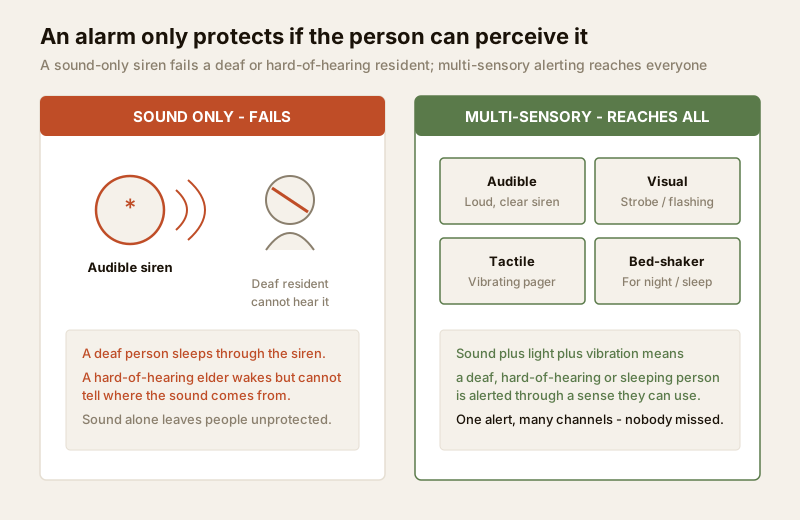
Visual alerts. A bright strobe or flashing light turns an alarm into something you can see across a room, and a bright flash at night is unmissable even to a deep sleeper. Place visual alerts where people spend time - the living room, the bedroom, the kitchen - not only on an outdoor box that faces the street.
Tactile alerts. Vibration reaches people that sound and light cannot. A vibrating pager clipped to a belt, a smartphone set to vibrate hard on a security push, and above all a bed-shaker - a small pad under the pillow or mattress that shakes the bed - wake a deaf or hard-of-hearing person at night when a strobe is behind closed eyelids. For many households the bed-shaker is the difference between an alarm that works while everyone sleeps and one that does not.
Loud and clear for the hard-of-hearing. Not everyone who struggles with a standard siren is fully deaf. For hard-of-hearing residents, a louder sounder and a lower-pitched tone are easier to hear than a thin high-frequency screech - high frequencies are usually the first hearing anyone loses. Combine that with the visual and tactile channels rather than relying on volume alone.
Because these alerts often ride on the same rails as your everyday alarm messages, plan them alongside your smart security notifications so a phone push, a strobe and a shaker all fire from the same event. The principle is simple: one event, many channels, nobody missed.
2. Accessible controls: reachable, readable, operable
If a resident cannot reach or work the controls, the alarm is not theirs - it belongs to whoever installed it at a convenient height for a standing adult. Accessible controls follow a few clear rules.
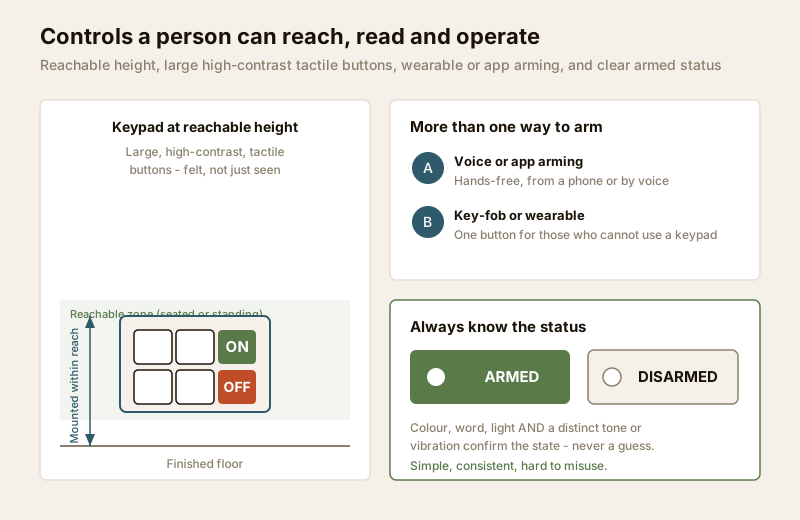
Reachable height. Mount keypads and panels within comfortable reach of a seated wheelchair user as well as a standing person - not tucked high on a wall or behind a door. A control a person cannot reach is a control they do not have. The accessible home design and accessible doors guides cover reach ranges and clear approach space in more depth.
Large, tactile, high-contrast buttons. Big buttons suit arthritic hands and low vision. High contrast between button and background helps failing eyesight. Tactile buttons - shapes and edges you can feel, or a raised marker on the key you use most - let a blind resident or anyone in the dark operate the pad by touch alone.
More than one way to arm. A keypad should not be the only door in. Offer voice or app arming for hands-free control, and a key-fob or wearable one-button device for anyone who cannot use a keypad at all - a person with limited dexterity, or who wants to arm from bed. A wearable also doubles as the fastest way to call for help.
Clear, unmistakable status. A person must always know whether the system is armed. Show it in more than one way at once - a word, a colour, a light, and a distinct confirming tone or a short vibration - so the state is never a guess. Nobody should ever leave the house unsure if it is set, or disarm and not be certain it worked.
Simple, consistent, hard to misuse. The same button should do the same thing every time. Arming and disarming should be forgiving of a fumble. Consistent, predictable feedback is what turns a control from a source of anxiety into something a person trusts. These control principles run straight into the next section, and they are shared with security for people with disabilities.
3. Cognitive simplicity: forgiving, not a trap
Accessibility is not only physical. For an elder, a person with a cognitive disability, or anyone under the stress of a real alarm, a system with too many modes and too many ways to go wrong is itself a barrier. Design for cognitive ease.
- Minimise modes. The more arming states, partial-arm options and hidden menus a system has, the more chances there are to set it wrong or misread it. Most homes need very few states. Fewer, clearer choices beat a feature list nobody uses.
- Be forgiving of mistakes. A generous entry delay, an easy way to cancel a wrong entry, and a system that does not punish a fumble with a lockout let a nervous or slower user recover gracefully. A person should never feel that one wrong press has trapped them or triggered chaos.
- Never trap or lock in. Avoid designs where a mistake, a dead battery, or a security state can leave a person unable to get out or unable to summon help. Graceful degradation - the system failing safe, toward escape and toward help - is the rule. This is where accessibility and life-safety meet.
A confusing alarm does not just annoy people; it makes them stop using it, which is the same as having no alarm. Simplicity is a security feature.
4. Help built in: an alarm that also raises the alert
For many households the same system that guards against intruders should also be able to summon help for a person - a fall, a medical episode, a frightening moment alone. Building that in makes the alarm serve the resident directly, not only the property.
- A wearable or fixed button that raises a personal emergency alert turns the security system into a lifeline; see personal emergency response systems.
- A dedicated medical alert path can call a family member, a neighbour on a call-list, or a monitored service when someone needs help fast - see medical emergency buttons.
- A panic button, fixed by the bed or worn on the person, sends an immediate alert when someone feels threatened - covered in panic buttons.
Because these paths carry sensitive health and location data, keep them consented, minimal and controlled under the DPDP Act, 2023, and agree in writing who receives an alert and how they respond. If you route alerts to a service, alarm monitoring services and remote security monitoring cover how that response is arranged.
Life-safety: an accessible alarm must never block accessible escape
This is the rule that overrides every other in this guide. An accessible alarm must never impede accessible escape. Security exists to protect people; the moment a security feature makes it harder for a resident to get out or to be reached in a fire, it has failed at the one job that matters most.
The fire alarm's own accessible alerting is life-safety, not a nicety. A deaf resident who cannot hear a smoke alarm needs the same multi-sensory alerting for fire that they need for intrusion - a strobe and a bed-shaker linked to smoke detection so they wake to a fire at night. Treat accessible fire alerting as non-negotiable, and verify egress against the National Building Code (SP 7), whose current status can be confirmed via the BIS catalogue.
Never lock a person in. No security arming state, smart lock or access control may ever prevent a resident from getting out. Any electrically held door on an escape route must fail safe and release - see emergency door release - and every security choice must stay compatible with the home's escape routes, covered in fire-egress compatibility. If a person cannot self-evacuate, the plan must reach help, not seal them in. When security and escape appear to conflict, escape wins, every time.
Who benefits: universal design helps everyone
Design the alarm for the person who has the most trouble with a standard system, and you improve it for everyone. A strobe that alerts a deaf resident also catches the eye of a hearing person in a loud room. A large, high-contrast, reachable keypad is easier for every family member to use in a hurry. A simple, forgiving interface reduces false alarms for the whole household. This is universal design: features added for one group turn out to serve all.
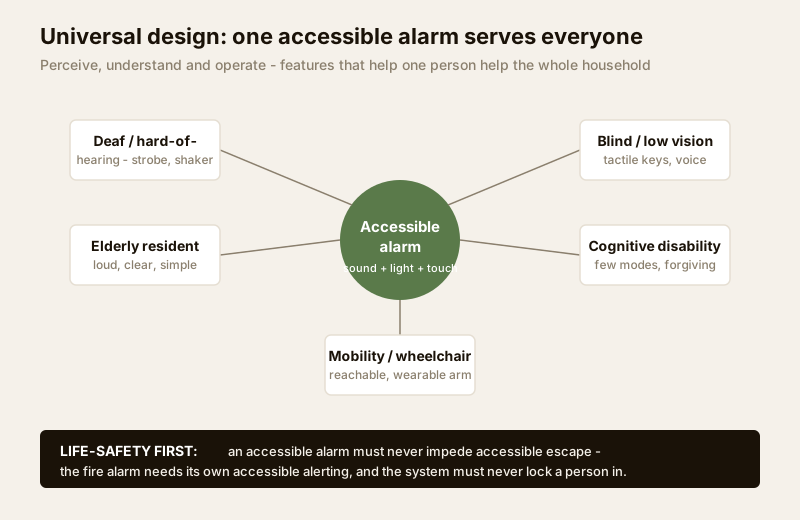
The table below maps each sense or ability to the accessible feature that serves it - and each of these features helps far more people than the one it was added for.
| Sense or ability | The accessible feature that serves it |
|---|---|
| Hearing (deaf / hard-of-hearing) | Visual strobe, vibrating pager and bed-shaker; louder, lower-pitched sounder; the same multi-sensory alerting for the fire alarm |
| Vision (blind / low vision) | Tactile, high-contrast buttons; voice prompts and voice or app arming; audible and spoken status feedback |
| Age (elderly) | Loud, clear, simple controls; large reachable buttons; wearable help button; few modes and forgiving operation |
| Cognition (cognitive disability) | Minimal modes, consistent behaviour, generous entry delay, forgiving of mistakes, never a lock-in trap |
| Mobility (wheelchair / limited dexterity) | Controls at a reachable height; app, voice, key-fob or wearable arming; never a control out of reach |
| Everyone (universal design) | Multi-channel alerts, reachable readable controls and a simple interface reduce missed alarms and mistakes for the whole household |
Putting it together for a real Indian home
A practical accessible setup, layered onto an ordinary self-monitored Indian alarm, might look like this.
| Layer | What to add | Who it protects |
|---|---|---|
| Alerting | Siren plus a strobe in living areas and bedrooms, plus a bed-shaker and phone vibration at night | Deaf, hard-of-hearing, deep sleepers - and everyone in a noisy home |
| Controls | A large, high-contrast, tactile keypad at reachable height, plus app or voice arming and a wearable fob | Wheelchair users, low vision, arthritic hands, elders |
| Simplicity | Few modes, a clear always-on armed status, a forgiving entry delay | Elders, cognitive disability, anyone under stress |
| Help | A wearable or bedside button that raises a personal or medical emergency alert | Anyone at risk of a fall, a medical episode, or a frightening moment alone |
| Escape | Fail-safe egress, accessible fire alerting, no lock-in - verified against the NBC | Every resident, without exception |
To pressure-test your own home against these layers, run the home security risk scorecard. If you are choosing wider hardware, smart locks and a smart home security system can host much of this, provided the accessibility and fail-safe rules above are kept.
Key takeaways
- An alarm only protects people it can reach. Test every device against three questions for every resident: can they perceive it, understand it, and operate it.
- Never rely on sound alone. Pair the siren with a visual strobe and tactile alerts - a vibrating pager by day and a bed-shaker at night - so a deaf, hard-of-hearing or sleeping resident is alerted through a sense they can use.
- Make the controls reachable and readable. Keypads at a reachable height, large high-contrast tactile buttons, and voice, app, key-fob or wearable arming, with a clear armed status a person can never mistake.
- Keep it cognitively simple and forgiving. Few modes, consistent behaviour, generous entry delay, never a design that traps a person or punishes a fumble.
- Build in help, and never block escape. Let the alarm raise a personal or medical alert, and hold life-safety above all: accessible fire alerting, fail-safe egress, and no lock-in - when security and escape conflict, escape wins.
- Universal design helps everyone - the features that serve a disabled or elderly resident make the alarm clearer and safer for the whole household.
Where to go next
- Security for specific users - the pillar that frames security around who lives in the home.
- Security for people with disabilities - the fuller accessibility playbook this alarm guide sits inside.
- Senior citizen homes security guide - accessibility, help paths and reassurance for older residents.
- Smart security notifications - how alerts reach phones and devices, the rails your multi-sensory alerts ride on.
- Personal emergency response systems, medical emergency buttons and panic buttons - the help paths to fold into an accessible alarm.
- Emergency door release and fire-egress compatibility - the fail-safe escape rules that override every security setting.
- Home security risk scorecard - test your own home against these layers.
References
- Rights of Persons with Disabilities Act, 2016 (RPwD Act), Government of India - the statutory basis for treating accessibility of home systems and the built environment as an entitlement rather than an optional extra.
- Digital Personal Data Protection Act, 2023 - health, location and alert-log data raised by an accessible alarm with a medical or personal-emergency path are personal data; collect with consent, keep minimal and control who can access it.
- National Building Code of India (SP 7), Bureau of Indian Standards - accessible and fail-safe egress and life-safety provisions that any accessible alarm and the home's fire alerting must respect; verify the current edition via the BIS catalogue: https://www.services.bis.gov.in/
- Manufacturer specifications - confirm on the maker's own datasheet that a device genuinely provides the accessible feature you need: strobe and bed-shaker outputs, sounder loudness and tone, tactile and high-contrast controls, reachable mounting, and voice, app or wearable arming.
This is an educational overview, not legal or medical advice. Accessibility and life-safety choices should be confirmed with a licensed installer, a doctor for any medical-alert protocol, and legal advice for tenancy or shared-building rules, and any standard's current status verified via the BIS catalogue before you rely on it.
Export this guide
Related Guides — Deep-dive reading
Security for People with Disabilities
How to design home security that works for and empowers a person with a disability in India — reachable, usable controls; multi-sensory alerts that everyone can perceive; a reliable path to summon help; and accessible escape that is never traded away for a lock. Tailored by disability type, with dignity, autonomy and the RPwD Act 2016 at the centre.
SecurityPersonal Emergency Response Systems for Indian Homes (2026): The Help Button When a Phone Is Out of Reach
A personal emergency response system is the wearable or bedside help button that lets an elder living alone, or anyone with a medical condition or disability, summon help fast when they cannot reach a phone. This guide covers how it works, what to choose, and the honest truth: it is only as good as the response behind it.
SecuritySecurity for People Living Alone in India (2026): Calm, Practical Habits When There Is No Second Person to Notice
Living alone is an ordinary and growing part of Indian life - the student in a new city, the working single, the elder whose children are abroad, the person after a separation. It does not call for fear. It calls for a few deliberate habits, because there is no second person in the home to notice trouble, raise the alarm, or catch an accident. This is calm self-reliance, layer by layer.
SecurityRelated Tools — Try Free
Accessible-Home Scorecard
A room-by-room aging-in-place and universal-design audit — score your home, see the critical safety gaps, and get a prioritised fix list.
Accessibility AuditHome Security Risk Scorecard
Score your home across six security layers — perimeter, entry points, lighting, detection, alarm and habits — and get a prioritised action plan.
Security ScorecardEmergency-Egress Checker
A life-safety self-check that access-controlled doors on escape routes still let people out in an emergency.
Egress Check