
Medical Emergency Buttons for Indian Homes (2026): The One-Press Lifeline for a Fall, a Heart Event or a Medical Crisis
A medical emergency button is the simple, life-saving device - on the wall, by the bed or worn on the body - that lets a person summon medical help in one press during a fall, a cardiac or breathing event, a diabetic or epileptic emergency, or after surgery. This guide covers the button, where to place it, and the response that makes it real.
There is a moment that decides everything in a medical emergency at home, and it lasts only seconds. An elder slips getting out of the bath and cannot stand. A person with a heart condition feels their chest tighten while alone in the flat. Someone recovering from surgery grows faint and cannot reach the phone charging in the next room. In each case the person is conscious enough to call for help, but has no fast way to do it. A medical emergency button is built for exactly that moment: a single, obvious control - on a wall, beside the bed, or worn on the body - that a person presses to summon medical help fast, without finding a phone, unlocking it, or remembering a number.
This guide is about the button itself and the medical crisis it answers. It is the close companion to the broader personal emergency response systems guide, which covers the whole system end to end; here we zoom in on the trigger a person actually reaches for, where to place it so it is there when they need it, and the honest truth that a button is only as good as the response behind it. It sits under the security for specific users pillar and the for-users sub-hub.
Scope & safety - read this first. A medical emergency button is a lifeline the person controls for their own safety and independence - never surveillance imposed on them. Four things must be true for it to be honest. First, it must reach real medical help fast and never trap or fail anyone - fail-safe help paths always win. Second, it must keep working on backup power through India's mains cuts and on a charged battery; test it monthly, because a dead button is worse than none. Third, for any medical condition, involve a doctor in the plan - what an emergency looks like for this person, and what responders need to know. Fourth, health data - conditions, medicines, who pressed and when - is sensitive personal data under the Digital Personal Data Protection Act, 2023: keep it minimal and share it only with the people who respond. This is educational guidance, not medical or legal advice.
What a medical emergency button is - and how it differs from a panic button
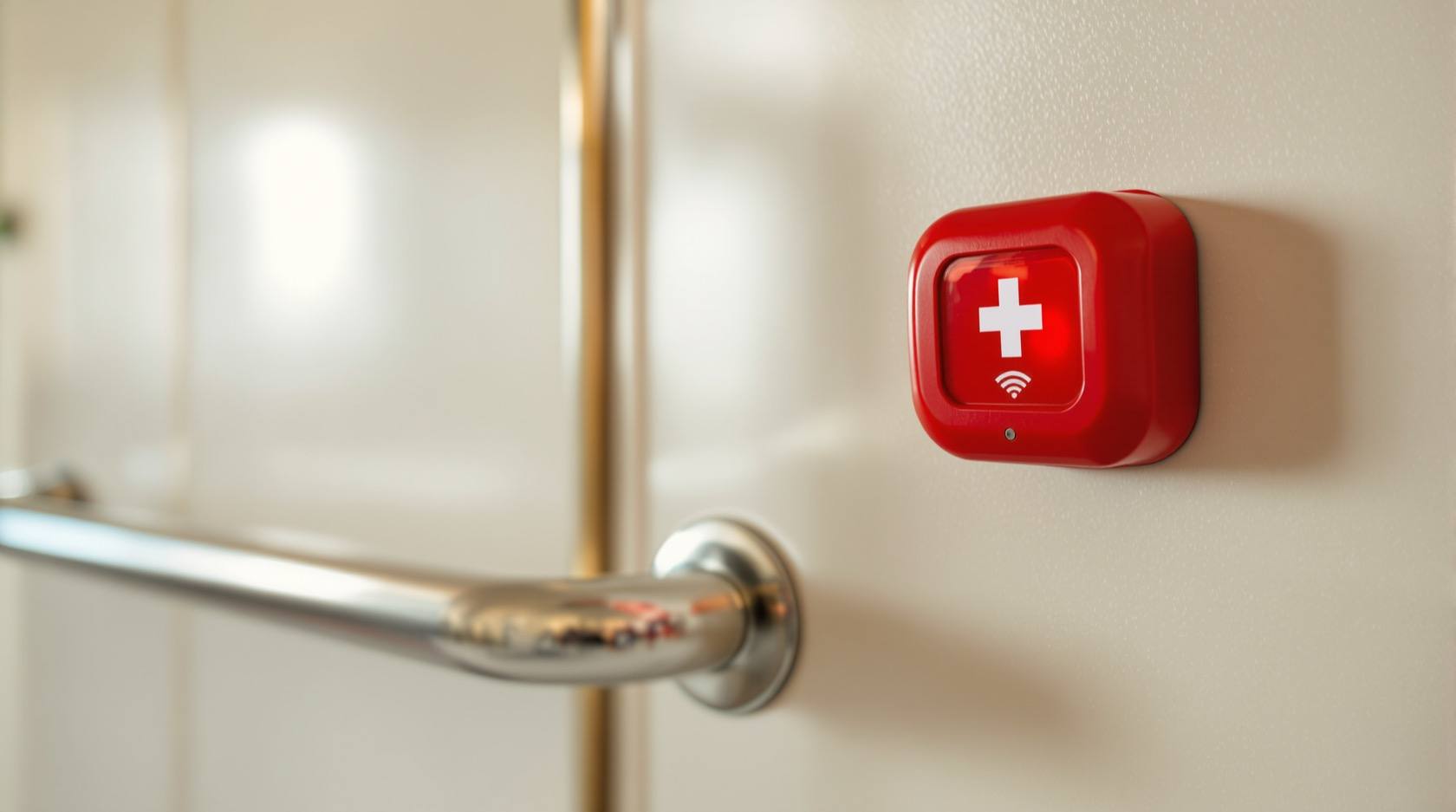
A medical emergency button has one very small, very focused job. The person keeps a single button within reach - worn, fixed to a wall, or sitting on a bedside table. When a medical crisis strikes - a fall, chest pain, a diabetic low, a seizure aura, a breathing struggle, faintness after surgery - they press it. That press does not dial a number they must remember or navigate a menu. It simply raises the alarm and opens a path to help. One action, doable from the floor, in the dark, in pain: a single press.
The word medical matters, and it is what sets this device apart from a security panic button. The two look similar and sometimes share the same hardware, but they answer different questions and, crucially, they call different people.
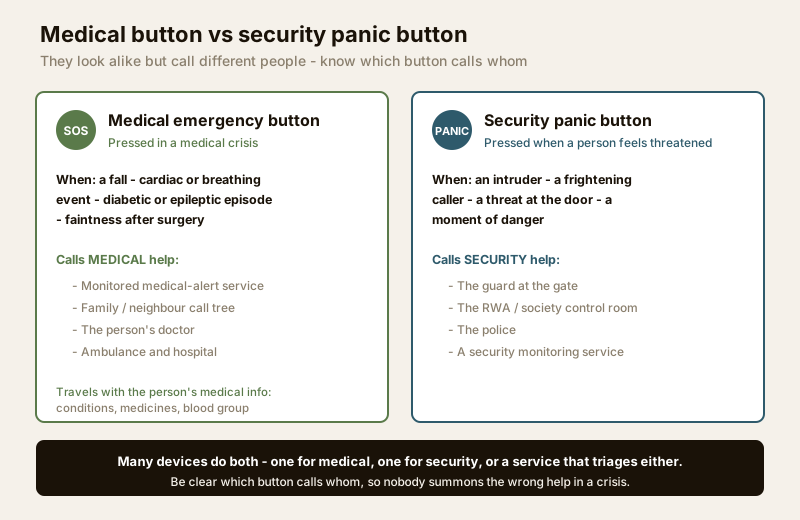
A medical button routes to medical help: a monitored medical-alert service, a family member or neighbour, the person's doctor, and ultimately an ambulance and hospital. A security panic button routes to security help: a guard, the RWA or society control room, the police, or a security monitoring service. Many devices genuinely do both - one button for medical, another for security, or a single button that reaches a service which triages either way - and that is fine. What matters is that the household is clear about who each button calls, so that in a real crisis nobody presses a button that summons the wrong kind of help. If you are choosing between them, or want both, read the two guides together and decide who each device should reach before you install it.
Forms and placement: the button has to be there when the crisis is
A medical button only works if the person can reach it in the exact moment they need it. That is a placement problem before it is a technology problem, and it is where most home setups quietly fail. There are four forms, and the best homes use more than one.
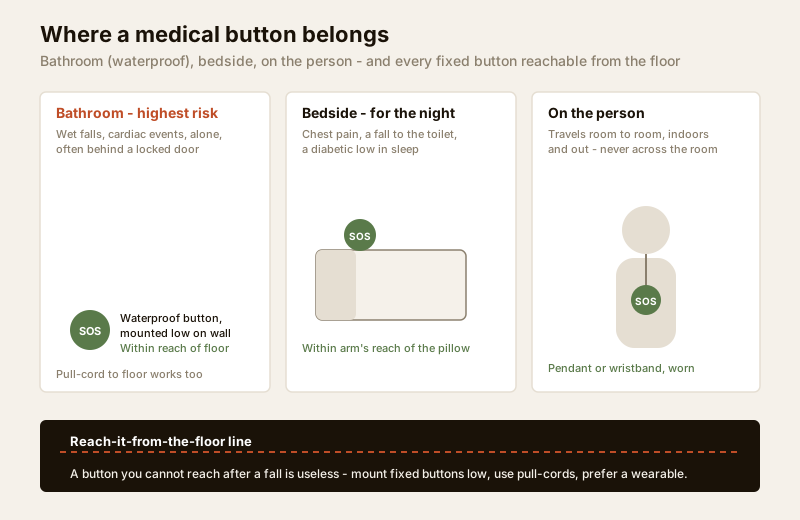
The bathroom - a waterproof button, and this placement matters most. The bathroom is the single most important place for a medical button, and the most commonly overlooked. It is where a large share of falls happen - wet floors, low seats, standing up too fast - and where cardiac and fainting events strike people who are alone, undressed and vulnerable, often behind a locked door. A phone is rarely carried into a bathroom. So a waterproof button, mounted low on the wall within reach of the floor, is the placement that saves the most lives. If you install a medical button in only one room, install it here.
Bedside - for the night. Many medical crises begin at night: chest pain that wakes a person, a fall on the way to the toilet, a diabetic low in sleep. A button within arm's reach of the pillow means a person does not have to cross a dark room or find a phone to raise the alarm.
Wearable - on the person, not across the room. A pendant on a cord or a wristband keeps the button with the person as they move from room to room, into the garden, onto the stairs. A wall button in the living room is useless to someone who has fallen in the kitchen. For anyone who spends time alone, a comfortable, water-resistant wearable is the single most reliable form, because it removes the question "was I near a button?"
The reach-it-from-the-floor principle. This is the rule that ties the others together: a button you cannot reach after a fall is useless. A wall button mounted at light-switch height is out of reach of a person on the floor - which is exactly the situation the button exists for. Mount fixed buttons low, within reach of someone lying down. Pull-cords that hang to the floor are a classic solution for bathrooms. And a wearable sidesteps the problem entirely, because it fell with the person.
| Where to place a medical button | Why here |
|---|---|
| Bathroom (waterproof, low on the wall or a floor-length pull-cord) | The highest-risk room: wet-floor falls, cardiac and fainting events, a person alone and often behind a locked door, with no phone to hand. The one placement to prioritise. |
| Bedside (within arm's reach of the pillow) | Night-time crises - chest pain, a fall on the way to the toilet, a diabetic low in sleep - when the person is drowsy and a phone is out of reach. |
| On the person (wearable pendant or wristband) | Keeps the button with the person room to room, indoors and out; the most reliable form for anyone who spends time alone, because it is never "across the room". |
| Living area / kitchen (reachable height, near where the person sits) | Where a person spends waking hours; a fixed button near the favourite chair or the cooking area catches a daytime episode. |
| Reachable from the floor (every fixed button, mounted low) | A button at switch height cannot be pressed by someone who has already fallen - the exact moment it is for. Mount low; use pull-cords; prefer a wearable. |
The response is what makes it real
This is the part that decides whether a medical button is a lifeline or reassuring theatre. A device is only as good as who answers and who comes. A button that raises an alarm nobody is committed to answering does nothing. Before you buy any hardware, decide the response - because the response, not the button, is the product.
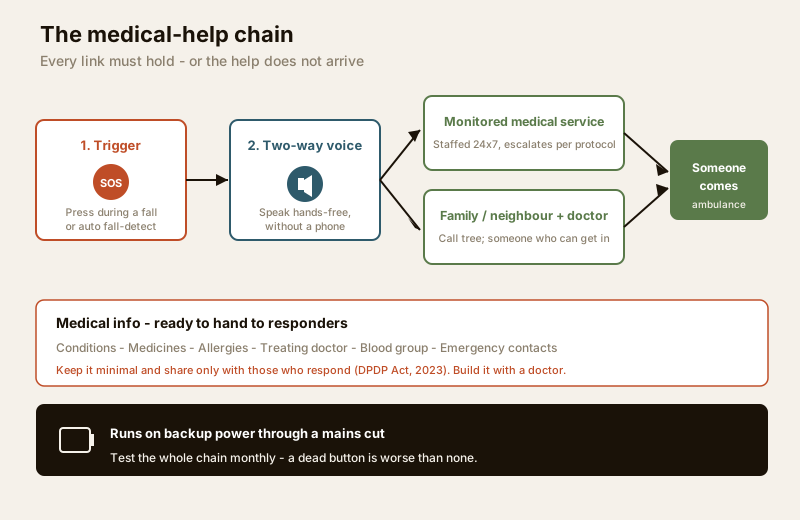
There are two honest models for the response, and a home can use either or both.
A monitored medical-alert service. The button connects to a staffed response centre that answers day and night, speaks to the person, and escalates - calling family, the person's doctor, or an ambulance per an agreed protocol. This is the strongest option for a person who lives alone or whose family is in another city or country, but it depends entirely on the service actually being staffed and reliable. Get the response protocol in writing - who they call, in what order, and what happens if the person does not answer - and see alarm monitoring services and remote security monitoring for how monitored response is arranged and what to check.
A family and neighbour call tree. The button alerts a list of family members and trusted neighbours, in order, until someone responds and goes to the person. This costs nothing to run and is often faster in practice, because a neighbour two floors up reaches the door before any ambulance - but it only works if the people on the list have agreed, know what to do, and can actually get in. That last point matters: whoever responds needs a way into the home, so plan a key with a neighbour or a smart lock that a trusted responder can open.
Keep the person's medical information ready. Whoever comes - a neighbour, a paramedic, a doctor - can help faster if the essentials are to hand: the person's conditions, current medicines, allergies, treating doctor, and blood group, plus emergency contacts. Keep a short, current medical summary where a responder will find it - by the door, on the fridge, in a wallet card, and shared with the monitoring service if you use one. This is exactly the information an ambulance crew asks for first, and it is why a doctor should help you write it. Keep it minimal and shared only with responders - it is sensitive health data under the DPDP Act, 2023.
Two-way voice and automatic fall detection: helpful, honestly imperfect
Two features turn a plain button into something more capable. Both are genuinely useful, and it is worth being honest about their limits.
Two-way voice lets the person speak and be heard through the base unit or the wearable itself, hands-free, without a phone. This is a real upgrade: a responder can hear what is wrong, reassure the person, and judge how urgent it is, and the person is not alone and silent while help is arranged. Its limit is range and audibility - a voice unit in the living room may not hear a faint call from a closed bathroom, which is another argument for a wearable with voice built in and for buttons in the rooms that matter.
Automatic fall detection aims to raise the alarm even if the person cannot press the button - if a fall knocks them unconscious, the device senses the impact and calls for help on its own. For a person at real risk of a disabling fall, this is valuable. But be honest about it: fall detection is helpful, not perfect. It can miss a slow slide to the floor, and it can misfire on a heavy sit-down or a dropped pendant. Treat it as a backup to the button, never a replacement - the deliberate press remains the primary path, and fall detection is the safety net for when the person cannot press at all.
India realities: power, ambulance access, and the society around the home
A medical button lives in the real conditions of an Indian home, and those conditions decide whether it works.
Backup power - test it monthly. India's mains cuts are the button's biggest enemy. A device that dies with the power, or whose wearable battery has quietly drained, is not a lifeline - it is a false comfort, and a dead button is worse than none because the family believes they are protected when they are not. Choose a base unit with battery backup, keep the wearable charged, and test the whole chain monthly: press the button, confirm the alert reaches the service or the call tree, and check the batteries. Put it on a calendar.
Ambulance and hospital access. Be realistic about how help physically arrives. Ambulance response times vary enormously across Indian cities and towns, and a private ambulance or a neighbour with a car is often faster than waiting. Know in advance which hospital the person would go to, keep its number with the medical summary, and make sure a responder can get the person out - a lift that works, a clear path, a door that opens.
The society, RWA and gate. In an apartment or a gated community, the medical-help chain runs through the building. The guard at the gate needs to know to expect and speed an ambulance, not delay it; the RWA or society can hold a spare key and a medical contact for a resident who lives alone. Fold the building into the plan - the gated communities security guide covers how to coordinate the society, the guard and the gate so help gets in, not stuck outside. For an elder living alone, this coordination is as important as the button itself.
Who benefits most
A medical emergency button earns its place for anyone at raised risk of a sudden crisis at home, especially when they are alone.
- Elders, particularly those living alone or with family in another city or country - see the senior citizen homes security guide.
- People with chronic or unpredictable conditions - heart disease, epilepsy, diabetes, severe allergies, respiratory illness - where an episode can strike fast and needs help within minutes; plan this with a doctor.
- People recovering from surgery, who are temporarily frail, unsteady and at risk of a fall or a faint.
- People with disabilities, for whom reaching a phone in a crisis may not be possible - see security for people with disabilities.
- Anyone who spends long stretches alone, where there is nobody in the room to notice a crisis and act.
Dignity: a tool the person controls
A medical button is at its best when it is understood as what it is - a tool the person controls for their own safety and independence. It is not a way for a worried family to monitor a parent, and it should never feel like surveillance or a loss of autonomy. Framed rightly, it does the opposite: it lets an elder keep living in their own home, alone, with the confidence that help is one press away. That confidence is the whole point. Choose a device the person finds comfortable and is willing to wear, explain plainly that it exists for them, and let them own it.
Keep the health data minimal and shared only with those who respond, in the spirit of the DPDP Act, 2023 - conditions and contacts for responders, not a broadcast of a person's medical life. And build the plan with a doctor, so the button, the medical summary and the response all fit the person's real condition. To pressure-test the wider home around the button, run the home security risk scorecard.
Key takeaways
- A medical emergency button is a one-press lifeline for a fall, a cardiac or breathing event, a diabetic or epileptic crisis, or the frail days after surgery - it summons help without a phone.
- It is not a security panic button. A medical button calls medical help - a service, family, the doctor, an ambulance; a panic button calls security help. Many devices do both, but the household must know who each button calls.
- Placement decides everything. Prioritise a waterproof button in the bathroom, add one at the bedside for the night, and put a wearable on the person so it is never across the room - and mount every fixed button low enough to reach from the floor.
- The response is the product. A device is only as good as who answers and comes - a monitored medical-alert service or a family and neighbour call tree - plus the person's medical info ready for responders and the ambulance.
- Two-way voice and fall detection help, honestly. Voice lets the person speak without a phone; automatic fall detection is a valuable backup to the press, not a perfect replacement.
- Test it monthly on backup power - a dead button is worse than none - coordinate the society and ambulance access, keep health data minimal under the DPDP Act, and build the plan with a doctor.
Where to go next
- Personal emergency response systems - the whole-system view this button sits inside: how the full help system works and what to choose.
- Panic buttons - the security counterpart; read alongside this to decide who each button in the home should call.
- Security for specific users - the pillar that frames security around who lives in the home.
- Senior citizen homes security guide, security for people living alone and security for people with disabilities - who a medical button protects most.
- Alarm monitoring services and remote security monitoring - how a monitored response is arranged and what to verify.
- Gated communities security guide - coordinating the society, the guard and the gate so an ambulance gets in fast.
- Home security risk scorecard - test the wider home around the button.
References
- Digital Personal Data Protection Act, 2023 - a person's conditions, medicines, alert logs and location are sensitive personal data; collect the minimum, share only with those who respond, and keep it under the person's control.
- Rights of Persons with Disabilities Act, 2016 (RPwD Act), Government of India - the basis for treating reachable, usable help paths in the home as an entitlement for people with disabilities rather than an optional extra.
- National Building Code of India (SP 7), Bureau of Indian Standards - accessible, fail-safe egress and life-safety provisions that any home help system must respect so a person is never trapped; verify the current edition via the BIS catalogue: https://www.services.bis.gov.in/
- Manufacturer specifications - confirm on the maker's own datasheet the features you rely on: waterproof rating for a bathroom button, wearable water resistance and battery life, base-unit backup power, two-way voice range, and how automatic fall detection behaves and how often it misfires.
- Treating physician - the person's own doctor is the authority on what an emergency looks like for their condition and what a responder or ambulance crew needs to know; build the medical summary and the response plan with them.
This is an educational overview, not medical or legal advice. A medical emergency button, its placement, and the response behind it should be planned with the person's own doctor, a licensed installer for any fixed device, and the monitoring service or family responders in writing, and any standard's current status verified via the BIS catalogue before you rely on it.
Export this guide
Related Guides — Deep-dive reading
Personal Emergency Response Systems for Indian Homes (2026): The Help Button When a Phone Is Out of Reach
A personal emergency response system is the wearable or bedside help button that lets an elder living alone, or anyone with a medical condition or disability, summon help fast when they cannot reach a phone. This guide covers how it works, what to choose, and the honest truth: it is only as good as the response behind it.
SecuritySecurity for People Living Alone in India (2026): Calm, Practical Habits When There Is No Second Person to Notice
Living alone is an ordinary and growing part of Indian life - the student in a new city, the working single, the elder whose children are abroad, the person after a separation. It does not call for fear. It calls for a few deliberate habits, because there is no second person in the home to notice trouble, raise the alarm, or catch an accident. This is calm self-reliance, layer by layer.
SecuritySecurity Guide for Senior-Citizen Homes
How to protect elderly people living independently or with family in India without stripping away their dignity or independence — verifying who is at the door, simple one-touch systems, the overlap of security with fall and medical emergencies, respectful remote reassurance for family, and honest vetting of caregivers and help.
SecurityRelated Tools — Try Free
Access-Control Battery-Backup Calculator
Size the standby battery so an access system keeps running through a power cut, with an egress life-safety note.
Battery BackupApartment Video Door System Planner
Enter flats, entrances, floors and guard desk for a first-pass building intercom plan — door stations, indoor monitors, guard station, the right architecture and an indicative cost band.
Building PlannerHome Security Risk Scorecard
Score your home across six security layers — perimeter, entry points, lighting, detection, alarm and habits — and get a prioritised action plan.
Security Scorecard