
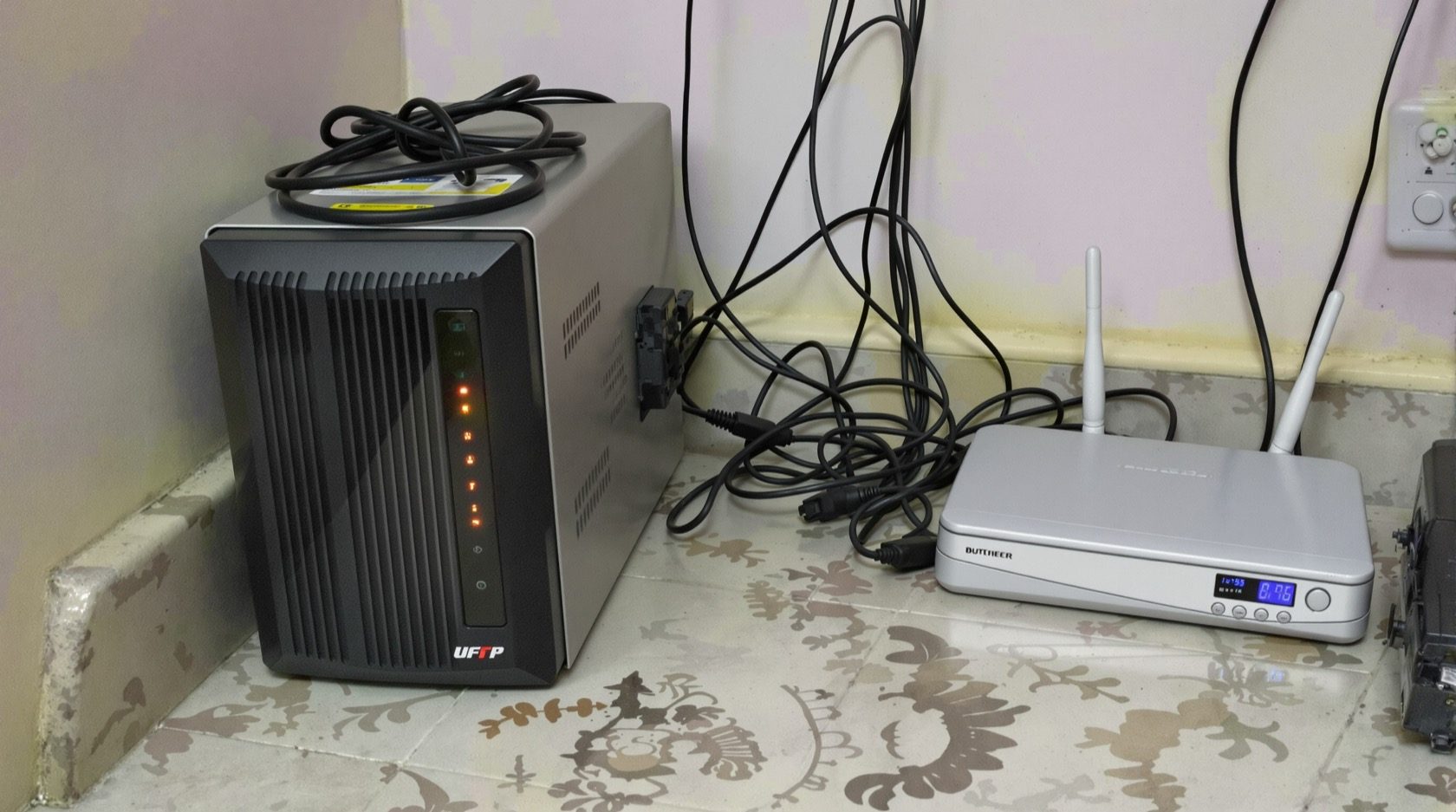
CCTV Power Supply and UPS Backup in India (2026): Keep Watching Through a Power Cut
How to power the cameras and the recorder reliably in Indian homes - 12V DC adapters vs PoE power, why the NVR, PoE switch and router must ALL sit on a UPS or inverter, sizing runtime, and protecting the whole chain from spikes and lightning.
A CCTV system is only as reliable as the power behind it, and in India the power is the problem. Cameras draw very little, but the moment the mains drops during an evening load-shedding slot, the whole system can go dark - not recording, not viewable on your phone - exactly when you might most want it watching. This guide is the cctv power supply and backup explainer in Studio Matrx's CCTV hub: how to power the cameras and the recorder, and how to keep the system alive through a cut.
It stays in its lane. The cable that carries power to an IP camera is covered in the cabling and wiring guide; how much power a PoE switch can hand out across its ports (the watt budget) is in the network switch and PoE budget guide; the recorder itself is in NVR vs DVR. Here we focus on the supply and the backup - the adapters, the UPS, the runtime and the surge protection.
Scope & safety. This guide helps you specify and supervise. All mains-electrical work, surge protection at the board and earthing belong to a licensed electrician - do not DIY them. Security cabling and equipment must never block a fire exit, an electrical panel or fire-fighting access. Position and secure everything so it can be reached for maintenance but not by an intruder.
Two ways a camera gets its power
Before the backup question, understand how each camera is fed. There are two common approaches in Indian homes.
- 12V DC adapters (analog and many IP cameras). Each camera runs off a small 12V DC supply. On an analog system this is usually a separate power cable run alongside the coax, often fed from a central SMPS power box (a metal box with one transformer feeding many cameras through fused outputs) rather than a plug-top adapter per camera. It is simple and cheap, but it is a second thing to power and back up.
- PoE (Power over Ethernet) - IP systems. A single Cat5e/Cat6 cable carries both data and power from a PoE switch or a PoE NVR to the camera. There is no separate power run and no adapter at the camera. This is the modern default for most new home installs, and it makes backup far simpler: power the switch, and every camera on it stays alive. The watt budget across all those ports is the switch's job - see the PoE budget guide.
The practical takeaway: with PoE you have one thing to keep powered on the camera side (the switch); with 12V adapters you have the SMPS box and the recorder. Fewer power points to protect is one more reason PoE dominates new installs.
The critical Indian point: back up the whole chain, not just the recorder
This is the single most important idea on the page, and the one most home installs get wrong.
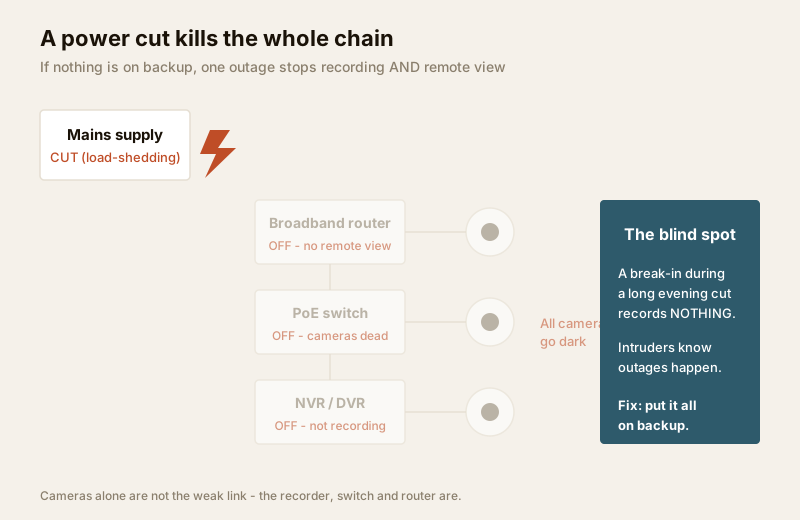
A CCTV system is a chain: cameras → PoE switch (on IP systems) → recorder (NVR/DVR) → broadband router (for remote view). During a power cut, that chain only stays working if every link is powered. The common mistake is to put a small UPS on the NVR alone. Then during an outage:
- The NVR stays on - good.
- But the PoE switch is dead, so on an IP system every camera loses power and there is nothing to record.
- And the router is dead, so even if it were recording, you cannot watch remotely on your phone.
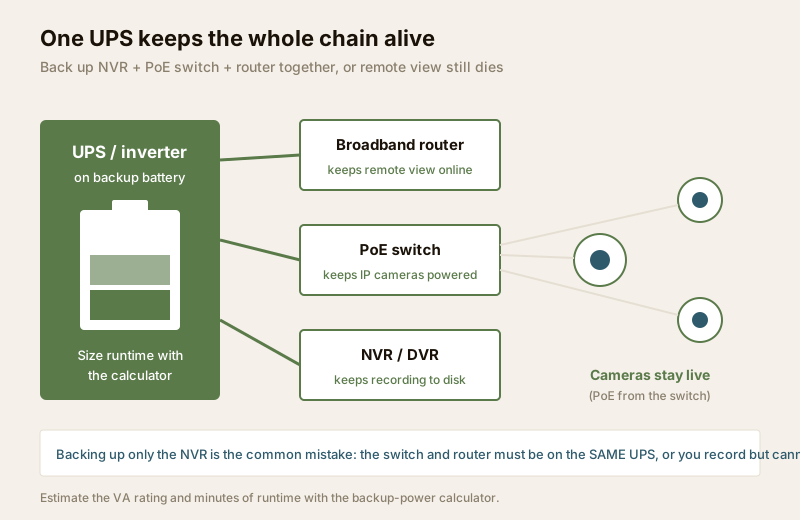
You end up with a powered recorder capturing black screens. To actually keep watching through a cut, the NVR, the PoE switch and the broadband router must all sit on the same UPS or inverter. On an analog system, that means the DVR and the SMPS camera-power box together.
What to back up, by system type
| System type | Must be on backup together | Why |
|---|---|---|
| IP / PoE | NVR + PoE switch + broadband router | Switch powers cameras; router carries remote view; NVR records |
| Analog / DVR | DVR + SMPS camera-power box + router | SMPS feeds the 12V cameras; DVR records; router for remote view |
| Hybrid | Recorder + switch + SMPS + router | Whichever links feed your cameras and network |
| Cameras only (wrong) | - | Cameras draw little; backing them up alone does nothing useful |
Many Indian homes already have a whole-house inverter. If yours does, the neat solution is often to put the CCTV rack on a circuit the inverter already covers, rather than a separate UPS - but confirm the inverter's spare capacity and switchover behaviour with your electrician. For how this fits the broader building assessment, see security power supply requirements and the electrical backup assessment for security.
Sizing the backup: how much runtime, and how big a UPS
Two numbers matter: the load (how many watts the chain draws) and the runtime (how many minutes or hours you want it to survive). CCTV loads are modest, which is good news - the whole rack of a typical home system often draws in the tens of watts, not hundreds.
Indicative continuous draw for a small-to-mid home system (treat as ballpark to sanity-check a quote, not exact):
| Component | Typical continuous draw | Notes |
|---|---|---|
| IP camera (each, over PoE) | ~3 - 8 W | Higher with IR at night and heaters/PTZ |
| 8-port PoE switch (loaded) | ~30 - 60 W | Dominated by the cameras it feeds |
| NVR (with 1 - 2 HDDs) | ~15 - 40 W | HDDs add a few watts each |
| Broadband router / ONT | ~8 - 15 W | Keep the ISP's ONT powered too |
| Small home system total | ~60 - 120 W | 4 - 8 cameras plus switch, NVR, router |
Do not try to derive the exact VA rating and battery sizing here by hand - that is what the security backup power calculator is for. Feed it your components and target runtime and it returns the UPS/inverter size and battery capacity. A few rules of thumb to guide the inputs:
- Decide your target runtime first. A short online/line-interactive UPS (10 - 30 minutes) rides through brief cuts and gives a clean shutdown. To survive a long Indian evening cut of 2 - 4 hours, you need an inverter with a larger battery, not a small desktop UPS.
- Right UPS type. A cheap "offline" UPS may not switch fast enough or hold long enough; line-interactive or a proper inverter suits CCTV. Match the UPS VA rating to the load with headroom (the calculator adds this).
- Battery is what buys minutes. Runtime comes from battery amp-hours, not the UPS box. Doubling runtime roughly means doubling battery capacity.
- Account for night draw. IR illuminators switch on after dark and raise the load - size for the night figure, which is when cuts and intrusions both peak.
For the wider readiness view - broadband uptime for remote viewing during outages - see internet and network readiness for security.
Surge protection and earthing - route this to a professional
India's grid brings not just cuts but voltage spikes, brownouts and nearby lightning. Surges ride in on the mains and on long outdoor cable runs (a camera at the far gate is effectively an antenna). A single spike can kill an NVR, a switch and every camera on it at once - far more expensive than the protection would have cost.
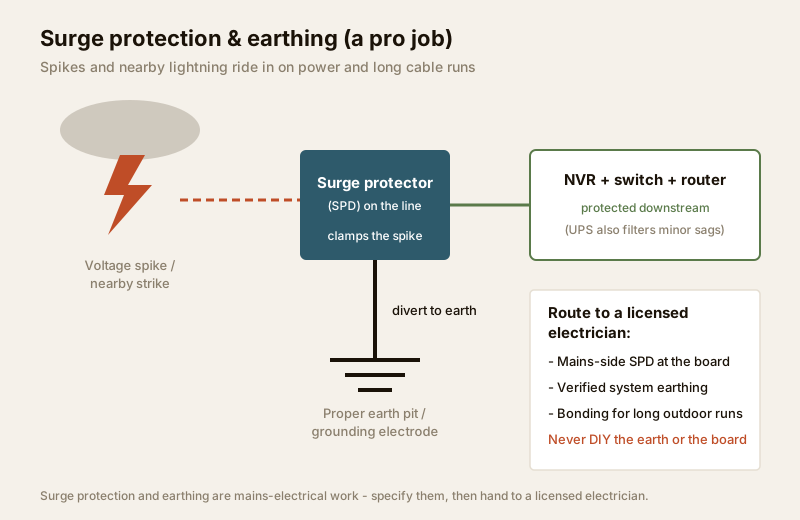
What good protection looks like (specify it; a licensed electrician installs it):
- A surge protection device (SPD) at the board, plus a good point-of-use surge strip on the CCTV rack. The UPS also filters minor sags and swells, but it is not a substitute for a mains-side SPD.
- Verified system earthing. A properly installed earth pit / grounding electrode gives the surge somewhere safe to go. Earthing is mains-electrical work - never DIY it.
- Bonding and protection for long outdoor runs. A camera on a tall pole or a long compound run needs consideration for induced surges; your electrician and installer should plan this together.
When to bring in a professional. You specify and supervise; the hands-on work is a licensed pro's. Hand the mains connections, the SPD at the board, the earthing/earth pit, and any wiring inside the electrical panel to a licensed electrician - see the electrical hub. Hand mounting at height and cable pulling to your installer. Doing mains or earthing work yourself is dangerous and can void insurance; this is not negotiable.
Do this / avoid this
| Do | Avoid |
|---|---|
| Put NVR + switch + router on ONE UPS/inverter | Backing up only the NVR (records black screens) |
| Size runtime for a 2 - 4 hr evening cut if needed | Assuming a small desktop UPS lasts hours |
| Use a line-interactive UPS or a proper inverter | A cheap offline UPS for a critical system |
| Fit an SPD at the board (electrician) | Skipping surge protection to save a little |
| Verify earthing before energising | DIY earthing or opening the mains panel |
| Keep the ISP ONT powered for remote view | Forgetting the ONT/router in the backup plan |
| Size for the higher night-time (IR-on) load | Sizing only for the daytime draw |
| Use the calculator to fix the VA and battery | Guessing the UPS size and hoping |
Key takeaways
- A power cut kills a CCTV system unless it is on backup - and cameras are not the weak link; the recorder, switch and router are.
- Back up the whole chain together: NVR + PoE switch + broadband router (or DVR + SMPS + router on analog). Backing up only the recorder captures black screens.
- PoE simplifies backup - power the switch and every camera stays alive; 12V/SMPS means one more thing to power.
- Decide your target runtime (a short UPS for brief cuts, an inverter with a big battery for a long evening cut), then size the UPS VA and battery with the security backup power calculator.
- Surge protection and earthing guard against spikes and lightning - specify them, then hand the mains work to a licensed electrician. Never DIY the board or the earth.
References
- Digital Personal Data Protection Act, 2023 - CCTV footage is personal data; keep the recorder and its backup secure. This is an educational overview, not legal advice.
- National Building Code of India (SP 7), Bureau of Indian Standards, and the relevant Indian Standards for electrical installation, earthing and surge protection - verify the current edition and status via the BIS catalogue: https://www.services.bis.gov.in/
- Manufacturer specification sheets for your cameras, switch, NVR and UPS - confirm actual power draw (watts) and UPS VA/runtime before ordering.
This is an educational overview for planning and supervision. All mains-electrical work, surge protection and earthing are qualified professional tasks - engage a licensed electrician and verify any standard's current status via the BIS catalogue before relying on it. Not legal advice.
Export this guide
Related Guides — Deep-dive reading
Electrical Safety for Security Systems in India (2026): Powering It Without Peril
A homeowner's guide to the power side of home and RWA security systems, CCTV, alarms, gates, access control and NVRs, done so it protects you instead of quietly becoming a shock or fire hazard. What makes a supply safe, what to insist on, and why the mains work belongs to a licensed electrician.
SecuritySecurity Power Supply Requirements for Indian Homes
How to plan and provision the electricity a security system needs — PoE over the data cable versus local 12V adapters, where mains points actually belong, a dedicated circuit for the equipment room, and surge, earthing and drawing coordination for the Indian grid.
SecurityEarthing for CCTV and Security Equipment in India (2026): The Ground Truth
Why proper earthing quietly keeps your security system safe, alive and clear, what a good earth actually is in plain language, the tell-tale signs of a bad one, and why the earth itself is a job for a licensed electrician, never a do-it-yourself improvisation.
SecurityRelated Tools — Try Free
Security Backup Power Calculator
Size a UPS/inverter and battery to keep CCTV, NVR, router and alarm running through a power cut — load, Ah, VA and cost.
Backup PowerSecurity Cabling & PoE Planner
Estimate cable length, drops, PoE power budget, the right switch, conduit and cost for a CCTV/security cabling plan.
Cabling PlannerInverter & Battery Calculator
Size a home inverter (VA) and battery (Ah) for the load you want to back up and the hours of backup you need.
Backup Power