

CCTV Maintenance and AMC in India (2026): Keeping the System Alive
How to keep a CCTV system actually working after install: clean lenses and housings, check every camera still records, watch drive health and retention, update firmware, and decide whether an Annual Maintenance Contract (AMC) is worth it.
Most CCTV systems in India do not fail on the day something goes wrong. They fail slowly and silently, months earlier: a lens fogs under monsoon film, a spider spins a web across the IR ring, a hard drive quietly stops recording, or the retention slips from thirty days to five without anyone noticing. Then the one night you need footage, there is a black screen or a gap in the timeline.
CCTV maintenance is the unglamorous habit that separates a working system from an expensive ornament. This guide is the last step in Studio Matrx's CCTV hub: after the cameras are placed, commissioned and handed over, how do you keep the whole thing alive? It covers what you can do yourself in fifteen minutes a month, what needs a professional, and whether an Annual Maintenance Contract (AMC) earns its fee.
Scope & safety. This guide helps you plan and supervise upkeep and hold a service provider to account. Cleaning a camera you can reach from the ground is fine; anything on a ladder, at height, or near the mains board is a licensed professional's job. Security hardware must never block a fire-escape route, and footage is personal data under the Digital Personal Data Protection Act, 2023 — keep passwords private and do not hand a service provider standing access to your recordings without agreeing it in writing. This is educational guidance, not legal advice.
Why a system needs tending at all
A camera is an outdoor electronic device sitting in Indian weather — forty-plus-degree summers, driving monsoon rain, dust storms, and the odd bird or wasp deciding the warm housing is a good home. Nothing about that is gentle. Left alone, three things drift:
- The optics get dirty. A film of dust, a monsoon water-mark, a cobweb, or a lizard's droppings on the dome will look almost fine by day and turn the night image into a useless glare-blur. This is the single most common "my camera is broken" complaint that is really just a dirty lens.
- The recording quietly stops or shrinks. Hard drives are consumables. A drive nearing the end of its life starts dropping frames or stops writing altogether — and unless someone looks, the NVR keeps showing a live picture while recording nothing. Separately, if someone bumped up the resolution or added a camera, your retention may have silently dropped below the days you need.
- The physical layer degrades. Monsoon works its way into a badly sealed junction box, a rat chews a cable, a connector corrodes, the UPS battery ages. None of it announces itself.
The fix is not clever; it is regular. A short, repeatable routine catches every one of these before it becomes the night you needed footage and had none.
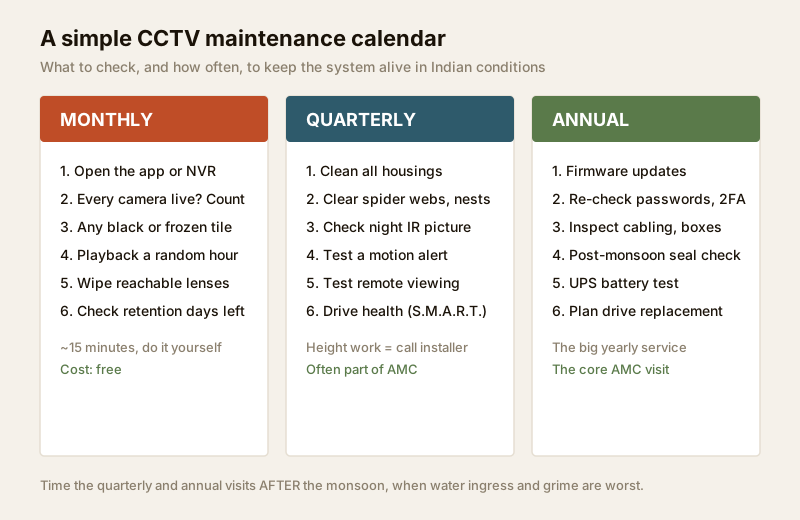
The maintenance calendar
The trick is to split the work by how often it actually needs doing. Most of it you can do yourself; the parts that need a ladder or the mains belong to a professional.
| When | Task | Who | Time / cost |
|---|---|---|---|
| Monthly | Open the app or NVR; confirm every camera is live and none is black or frozen | You | ~15 min, free |
| Monthly | Play back a random past hour to confirm recording is actually happening | You | included above |
| Monthly | Wipe any lens/housing you can reach from the ground | You | included above |
| Monthly | Check the retention still shows the days you need (e.g. 30) | You | included above |
| Quarterly | Clean all housings, clear spider webs, birds' nests, dust from every camera | Installer (for height) | part of AMC or ₹800–₹2,000 a visit |
| Quarterly | Check the night-time IR picture on each camera; re-aim any that drifted | Installer | included |
| Quarterly | Test a motion alert and test remote viewing from outside the home Wi-Fi | You | free |
| Quarterly | Check drive health (the NVR's S.M.A.R.T. or disk status page) | You / installer | free |
| Annual | Apply firmware/app updates to cameras and recorder | Installer | part of AMC |
| Annual | Re-confirm passwords are strong and 2FA is on; review who has access | You | free |
| Annual | Inspect cabling, connectors and junction boxes, especially post-monsoon | Installer | part of AMC |
| Annual | Test the UPS battery; plan hard-drive replacement around year 3–4 | Installer | drive ₹4,000–₹9,000 |
Time the quarterly and annual visits for just after the monsoon (roughly October in most of India). That is when water ingress, grime and web build-up are at their worst, so a single well-timed service catches the most.
The monthly self-check, in plain steps
You do not need a technician for the monthly round. Open the mobile app or sit at the recorder and:
1. Count the cameras. Every one should show a live picture. A black tile, a frozen tile, or a "video loss" message means that camera is down — note which one.
2. Scrub the timeline. Pick a camera, jump to a random hour yesterday, and confirm it actually recorded. This is the check people skip and regret. For how to do playback and export cleanly, your handover training should have covered it.
3. Look at the picture quality. Blurry, hazy, or a bright IR halo at night usually means a dirty lens, not a dead camera.
4. Check the storage/retention page. The recorder shows how many days it is keeping. If it has quietly dropped, use the storage and bitrate calculator to work out whether you need a bigger drive or lower settings.
Cleaning: the highest-value job
Ninety per cent of "the camera has gone bad" turns out to be a dirty lens or housing. In India the usual culprits are monsoon water-film, summer dust, and spiders — who love the warm glow of the IR LEDs and spin webs right across the lens, which then trigger endless false-motion alerts and blur the night image.
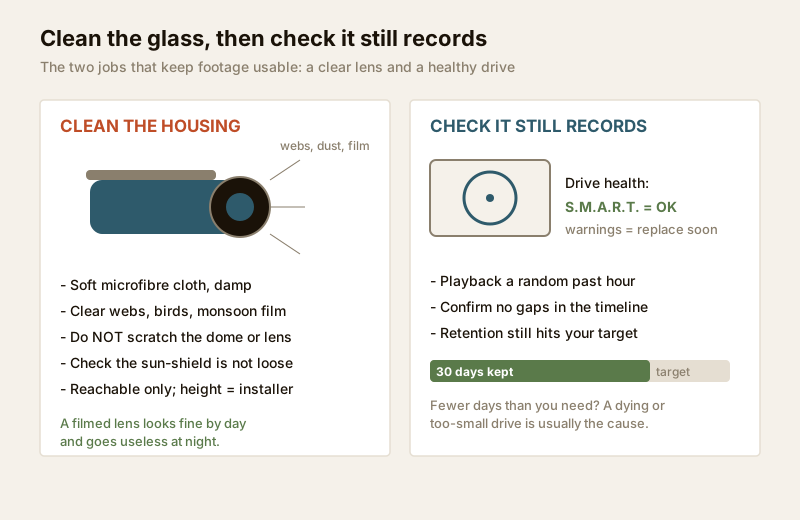
- Use a soft, slightly damp microfibre cloth. Never a dry tissue or anything abrasive — a scratched dome or lens is permanent.
- Wipe the dome or front glass, the IR ring, and the sun-shield. Clear away webs, nests and dust from the whole housing, not just the glass.
- Check the sun-shield is still firmly attached and angled to keep rain off — a loose one drips straight onto the lens.
- Only clean what you can safely reach from the ground. A camera under an eave or on a pole is a ladder job, and a ladder job is a professional's job.
Drive health and retention: the silent failure
The recorder is the heart of the system, and its hard drive is the part most likely to fail with age. Surveillance drives run 24×7, writing constantly — far harder duty than a desktop drive — and they wear out. Two habits catch this:
- Read the drive status. Every NVR/DVR has a disk or S.M.A.R.T. page. "Normal" or "OK" is fine; any warning, error, or a drive that has dropped out means order a replacement before it fails, not after. Around year three to four is a sensible planned replacement even with no warning.
- Watch retention against your target. If you decided you needed thirty days and the recorder now keeps eight, something changed — a failing drive, a new camera, or a resolution bump. The HDD sizing guide and the storage and bitrate calculator tell you what drive size restores your target.
For homes and societies that cannot risk a gap, pairing local recording with a cloud backup means a failed drive does not wipe out the record — though that adds a subscription cost.
Firmware, passwords and the network
Cameras and recorders are small computers on your network, and an un-patched one is a security hole. Once a year (or when the manufacturer flags a security fix):
- Apply firmware updates to cameras and the recorder. These patch security flaws and often fix bugs — but do them carefully, ideally via your installer, since a bad update can brick a device.
- Re-check the security basics from handover: every default password changed to a strong unique one, 2FA enabled on the app/cloud account, and no leftover standing remote access for an installer you no longer use. Review this the same way you would review who holds a key to your home; see the remote access security guide.
- Keep the router firmware current too, since the whole system reaches you through it.
Cabling, power and the monsoon check
The parts you cannot see fail too. After each monsoon, have the installer:
- Open and inspect outdoor junction boxes for water, corrosion or ants; re-seal any that let moisture in. A taped joint that survived one monsoon rarely survives two — see cabling and wiring.
- Check connectors and cable runs for rodent damage, sagging, or UV-cracked outdoor cable.
- Test the UPS/battery backup that keeps the recorder and network alive through a power cut. A CCTV system that dies with the evening load-shedding is only half a system; the power supply and UPS guide covers sizing and battery life, and outdoor sealing ties back to weatherproofing and IP ratings.
Is an AMC worth it?
An Annual Maintenance Contract is a yearly agreement with the installer or a service company to keep the system healthy — scheduled visits, cleaning, checks, and a promise to respond when something breaks. Whether it is worth it depends on your system and your appetite for doing the checks yourself.
An AMC makes sense when:
- The system is large (a society, a shop, many cameras) or the cameras are high up and you cannot clean or inspect them yourself.
- You want a guaranteed response time when a camera goes down, rather than scrambling to find someone.
- No resident or owner will reliably do the monthly self-checks.
You might skip a formal AMC when:
- It is a small home system of a few reachable cameras and you are happy to do the monthly and quarterly checks, calling a technician only when something actually breaks (pay-per-visit).
What a good AMC must cover
The difference between a useful AMC and a paper one is in the fine print. Insist these lines are named explicitly:
| Line item | What to insist on |
|---|---|
| Number of visits | A specific number a year (2–4), not "as needed" |
| Cleaning & inspection | Lenses, housings, webs, cabling, junction boxes each visit |
| Recording verified | Each visit confirms every camera records and retention meets target |
| Firmware & updates | Applied as part of the contract |
| Fault response time | A written SLA (e.g. same-day or within 48–72 hours) |
| Parts: included or extra | Is a failed hard drive covered (comprehensive) or billed (labour-only)? |
| Visit report | A short written report you keep after every visit |
| Data & access terms | No standing remote access; your passwords stay yours; who may see footage (DPDP) |
| Exit terms | On ending the contract, all access is revoked and data stays with you |
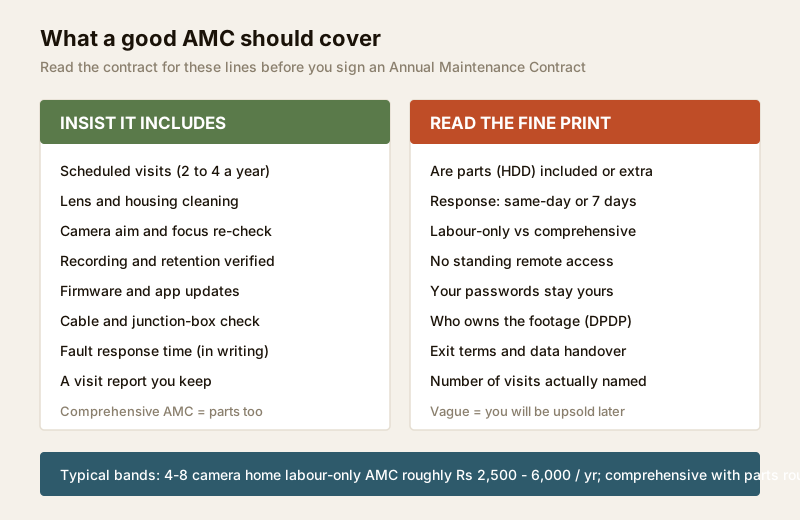
Typical Indian AMC cost bands
Treat these as ballparks to sanity-check a quote, not fixed rates — they move with city, camera count and whether parts are included.
| System | Labour-only AMC (₹/yr) | Comprehensive AMC, parts included (₹/yr) |
|---|---|---|
| Small home, 2–4 cameras | ₹1,500 – ₹3,500 | ₹4,000 – ₹8,000 |
| Larger home / villa, 4–8 cameras | ₹2,500 – ₹6,000 | ₹6,000 – ₹15,000 |
| Small shop / office, 4–8 cameras | ₹3,000 – ₹7,000 | ₹8,000 – ₹18,000 |
| Society / gated community (16–64 cameras) | ₹15,000 – ₹60,000+ | negotiated per site |
| Pay-per-visit (no contract) | — | ₹500 – ₹2,000 per visit |
A labour-only AMC covers visits and workmanship but bills you for parts like a hard drive; a comprehensive one folds in agreed parts. For a small home the pay-per-visit route often works out cheaper if you do the monthly checks yourself; for a society, a comprehensive AMC with a named response time is usually money well spent, and the RWA should hold the vendor to the visit reports.
When to bring in a professional. Do the monthly app checks, ground-level lens wipes, alert tests and retention reads yourself. Hand anything at height, cable and junction-box work, firmware flashing, drive replacement and mains-connected work to a licensed installer or electrician — see the electrical hub. If you run a society system, make the AMC vendor produce a written report each visit and keep them to the response-time SLA. Never give a departing contractor lingering remote access to your recordings.
Key takeaways
- CCTV maintenance is a habit, not an event — a short monthly self-check plus a well-timed post-monsoon service keeps a system alive.
- Clean the optics regularly: dust, monsoon film and spider webs are the number-one cause of "the camera stopped working," and a dirty lens looks fine by day but blinds the camera at night.
- Watch drive health and retention — a recorder can show a live picture while recording nothing; plan a hard-drive replacement around year 3–4 and use the storage and bitrate calculator to keep the days you need.
- Keep it patched and private: annual firmware updates, strong unique passwords, 2FA, and no standing remote access — footage is personal data under the DPDP Act, 2023.
- An AMC is worth it for large, high, or society systems where you want a guaranteed response; read the fine print for visits, parts, response time and access terms; for a small reachable home system, pay-per-visit plus your own checks can be enough.
References
- Digital Personal Data Protection Act, 2023 — CCTV footage is personal data; restrict who may access recordings, keep passwords private, and set data-handling and exit terms with any AMC vendor in writing.
- Manufacturer specifications — verify hard-drive duty ratings (use surveillance-grade drives), firmware release notes and IP ratings on the maker's own datasheet before ordering or updating.
- National Building Code of India (SP 7), Bureau of Indian Standards, and local municipal bye-laws for any electrical or life-safety aspect of an install or service; verify the current edition via the BIS catalogue: https://www.services.bis.gov.in/
This is an educational overview, not legal advice. Work at height, cabling, firmware flashing and any electrical work are qualified professional tasks — engage licensed installers and verify any standard's current status via the BIS catalogue before relying on it.
Export this guide
Related Guides — Deep-dive reading
CCTV Storage Maintenance in India (2026): Keeping the Footage There When You Need It
Surveillance storage is a wear item that fails silently. This professional guide covers checking disk health, verifying recordings actually exist for the full retention window, planning drive replacement before failure, keeping a spare, and holding an off-site backup so a dead or stolen recorder is not total loss.
SecurityCCTV Recording Failure in India (2026): Live View Works but Nothing Was Saved
You open the recorder to pull footage of an incident and there is nothing there, even though every camera shows a crisp live picture. A calm, ordered guide to why an Indian CCTV system records live but saves nothing, and how to fix it before the next incident.
SecurityVideo Door Phone Maintenance in India (2026): Keeping Your Door Station Working for Years
A homeowner's routine for keeping a video door phone alive in Indian weather: cleaning the outdoor lens, testing two-way audio and the door release, minding batteries and firmware, and a simple monthly, quarterly and annual calendar with Indian service costs.
SecurityRelated Tools — Try Free
CCTV Camera Coverage & Count Calculator
Estimate how many CCTV cameras you need, the NVR channels, storage in TB for your retention period, and an indicative all-in cost with GST.
CCTV CalculatorCCTV Cloud vs Local Cost Calculator
Compare cloud CCTV subscription against a local NVR + HDD — upfront, 5-year total, monthly fee and break-even.
Cloud vs LocalCCTV Recording-Duration Calculator
How many days of footage your storage holds, from cameras, bitrate, hours per day and recording mode.
Retention Days