
CCTV Storage Maintenance in India (2026): Keeping the Footage There When You Need It
Surveillance storage is a wear item that fails silently. This professional guide covers checking disk health, verifying recordings actually exist for the full retention window, planning drive replacement before failure, keeping a spare, and holding an off-site backup so a dead or stolen recorder is not total loss.
Everything about a CCTV system points at one moment: the night something happens and someone asks to see the footage. The cameras can be perfectly sited, the cabling neat, the recorder humming away with a reassuring blue light on the front — and still that moment can end in nothing, because the one component that has to hold the evidence has quietly worn out. Surveillance storage is a consumable. It is written to continuously, day and night, in a hot cabinet in an Indian summer, and it fails the way consumables fail: silently, and usually at the worst possible time.
The particular cruelty of storage failure is that the system looks alive right up until you need it. The lights are on, the cameras show live pictures on the monitor, guards report "all normal" — and yet the disk may have stopped recording weeks ago, or filled up and stopped overwriting, or developed bad sectors that eat the footage you most wanted. Nobody notices, because live view and recording are two different jobs and only one of them is on display. The whole point of storage maintenance is to catch that gap before an incident does, by treating the drive as the wear item it is and actually verifying, on a schedule, that footage exists.
This is a professional upkeep guide for facility managers, security integrators, IT teams and building operators who own a recorder they cannot afford to find empty. It sits inside a wider maintenance discipline: this guide is the storage half of recorder care, so read it alongside the NVR and DVR maintenance guide for the recorder as a whole, and the security system maintenance pillar for how the pieces fit into a single routine.
Scope & safety. This is a maintenance and verification guide, not a price guide or a buying guide. It draws a firm line between what an operator can safely do (read the recorder's own health page, verify footage plays back, watch free space and retention, keep a logbook) and what belongs to a qualified technician (opening the recorder, swapping a drive, RAID rebuilds and any data recovery from a failing disk). Mishandling a failing drive can destroy the very evidence you are trying to save. CCTV footage is personal data under the DPDP Act 2023, so retention limits and the secure disposal of old drives are part of maintenance, not an afterthought. When storage is behaving oddly, stop writing to it and call your AMC provider before you make it worse.
Why surveillance drives wear out
A surveillance drive does not live the life of a desktop disk. It is under a specific, relentless load, and every part of that load shortens its life.
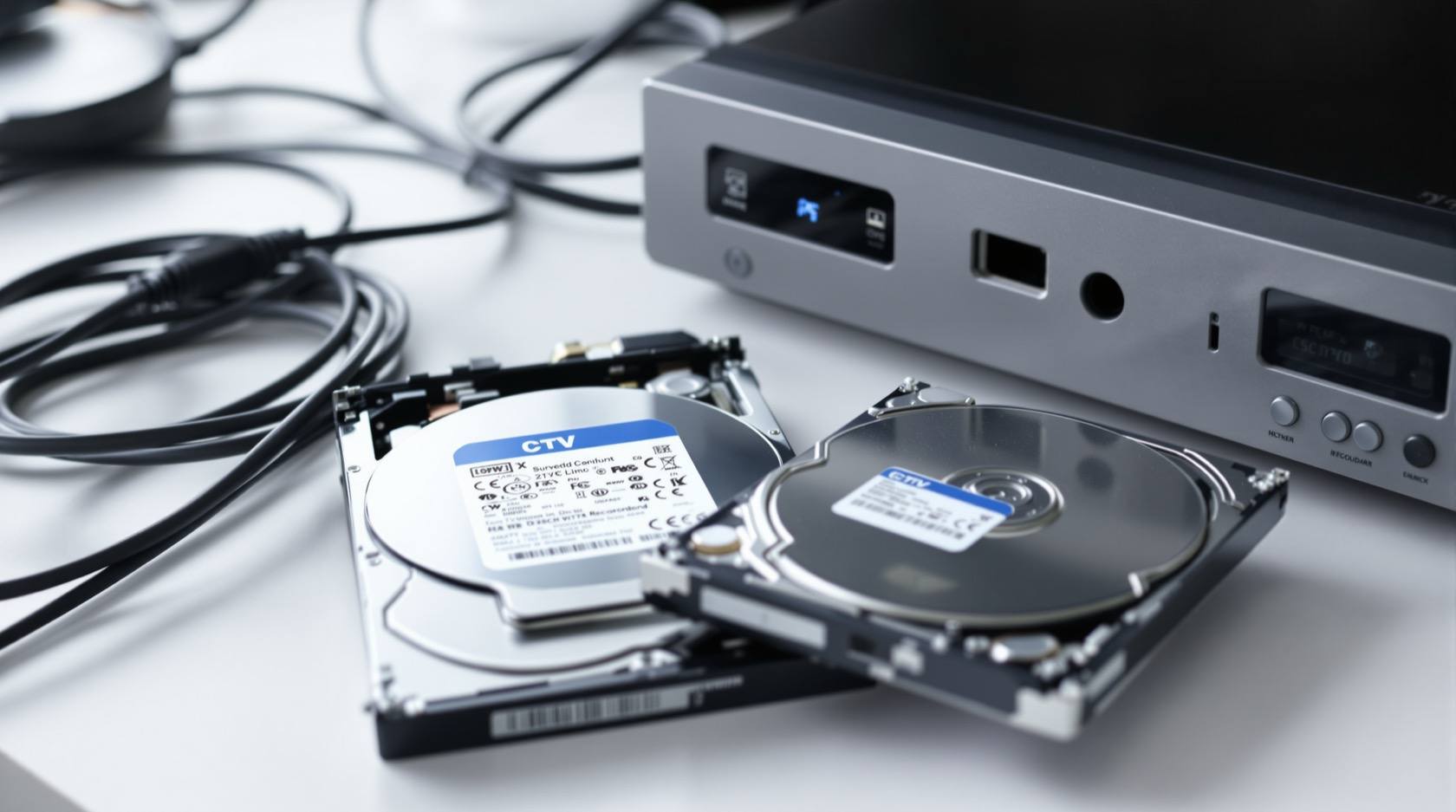
- A 24x7 write stream. Recorders write continuously — every camera, all day, all night, with no idle time. A drive designed for occasional office use is being asked to do something it was never rated for; only purpose-built surveillance drives are specified for this always-writing duty.
- Heat, and Indian ambient temperature. Drives hate heat, and a recorder often sits in a cupboard, a shaft, a UPS room or a shop back-office with poor airflow, in a country where summer ambient alone can be punishing. A hot drive ages faster and fails sooner; sustained overheating is one of the commonest killers.
- Dust. Fans pull dust, dust blankets the board and blocks the vents, the recorder runs hotter, and the cycle feeds itself. A clogged cabinet is a slow cooker for the disk.
- Power fluctuation. Sags, spikes, brownouts and abrupt cuts on an unprotected recorder mean writes interrupted mid-stream, file-system damage and stress on the drive electronics. Storage on a recorder without a healthy UPS is living dangerously.
Put those together and the conclusion is simple: a surveillance drive is a planned-replacement item, not a fit-and-forget one. The maintenance question is never "will it fail" but "will I replace it before it does, or after."
What to actually check
Storage maintenance is a handful of distinct checks, and they matter because each one catches a different silent failure. Doing one and skipping the others leaves a real gap open.
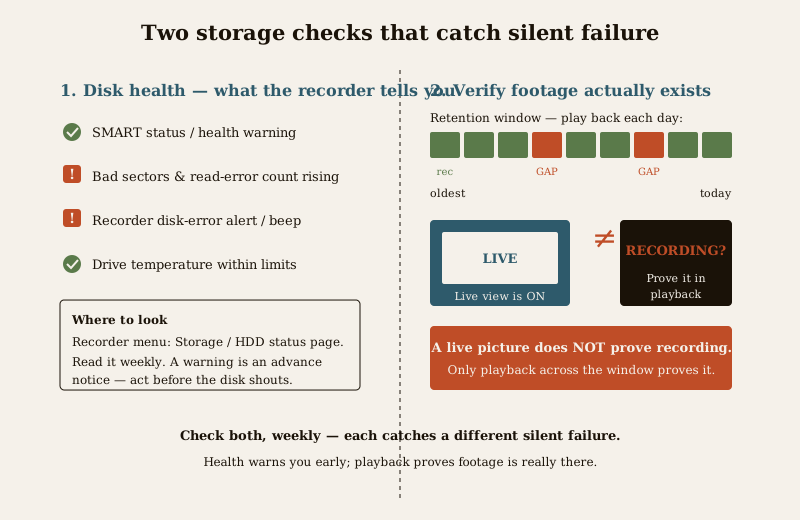
Disk health — what the recorder tells you
Every modern NVR and DVR reads the health of its own drives and will show it to you if you look. This is the single most useful operator check, and it needs no tools.
- SMART status and health warnings. In the recorder's storage or HDD menu there is a status line for each disk — typically "Normal / Good" or a warning. A drive reporting anything other than healthy is telling you, in advance, that it is on the way out. Read it; do not wait for it to shout.
- Bad sectors and read errors. A rising bad-sector or read-error count is a drive beginning to shed the footage stored on it. A few, stable, may be tolerable; a growing count is a replacement signal.
- The recorder's own disk-error alert. Recorders raise an on-screen alert, a log entry and often an audible beep when a disk errors, drops out or is not detected. Those alerts are not nuisance noise to be muted — they are the early warning. Make sure they are enabled and that someone sees them.
- Drive temperature. Where the recorder reports disk temperature, watch it. A disk running hot is a disk aging fast, and it points straight at a ventilation problem to fix.
That recording is actually happening
This is the check people skip and regret. A live picture on the monitor does not prove anything is being recorded. Live view and recording are separate functions; a disk can be full, faulted or misconfigured while the cameras still show a perfect live feed. The only honest test is to go into playback and confirm that footage genuinely exists.
- Pick a camera, scrub back through yesterday, last week, and the far edge of your retention window, and confirm continuous recording with no unexplained gaps.
- Do this for a sample of cameras, not just one — a channel can drop out on its own.
- If footage that should exist is missing, treat it as a live fault, not a curiosity.
Retention days are still being met
Retention silently erodes as a system grows. Add cameras, raise resolution from 2MP to 4K, bump the frame rate or switch codec, and the same disk now holds far fewer days than it did on day one. The number of days you believe you keep and the number you actually keep drift apart quietly.
- Verify the oldest available footage is as old as your policy requires — count back and check the date actually plays.
- Re-check whenever cameras or quality change, because that is exactly when retention shrinks.
- Under DPDP, retention is also a policy question, not only a technical one — keep as long as you need and no longer, and know what your real window is.
Free space and the overwrite loop
A surveillance disk is meant to fill and then loop, overwriting the oldest footage. Confirm that loop is working: the disk should be near-full and cycling, not stopped. A recorder set to stop-when-full instead of overwrite, or one whose overwrite has jammed, quietly stops recording the day it fills — and everyone assumes it is still going.
Temperature and ventilation of the recorder
Because heat is the enemy, the physical environment is a storage check. Confirm the recorder's fan spins and is not choked with dust, the vents are clear, the cabinet is ventilated and not sealed in a hot cupboard, and the room is not baking. Keeping the recorder cool is one of the cheapest life-extending things you can do for its disks. Detailed recorder-cooling and cabinet care lives in the NVR and DVR maintenance guide.
RAID and redundancy health, where used
Larger systems spread storage across several drives in a RAID array so that one drive failing does not lose footage. Redundancy only helps if it is monitored: a RAID that has silently dropped a drive is running degraded, with no safety margin, and the next failure loses everything. Check the array status is healthy, not degraded, and treat a degraded array as an urgent technician job — a rebuild is not an operator task.
The lifespan reality — drives are consumables
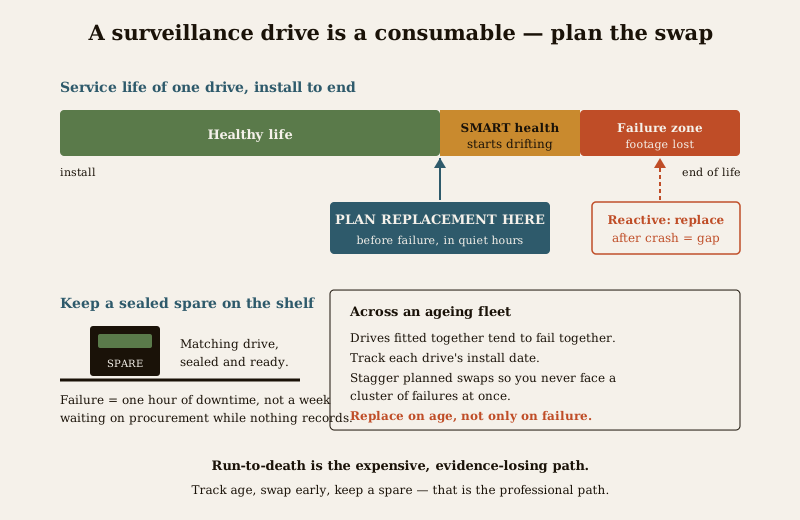
Here is the mindset shift that prevents most storage disasters. A surveillance drive is not permanent infrastructure; it is a consumable with a service life, like a filter or a tyre. Running it until it dies and then reacting is the expensive, evidence-losing path. The professional path is to plan its replacement before it fails.
- Plan replacement on age, not just on failure. Track when each drive went in. As a drive approaches the end of its expected surveillance service life, or once its SMART health starts drifting, schedule a planned swap during quiet hours rather than waiting for the crash.
- Keep a spare on the shelf. A matching, sealed spare drive means a failure is an hour of downtime, not a week of waiting for procurement while the system records nothing. For any system you actually depend on, an on-shelf spare is not a luxury.
- Replace proactively across an ageing fleet. If a site has several recorders whose disks all went in together, they will also tend to fail together. Stagger planned replacements so you are never facing a cluster of failures at once.
The backup you will be glad you had
Everything above keeps the footage on the recorder healthy. But the recorder itself is a single point of failure sitting inside the building being watched — and that is the scenario that hurts most. If the recorder is stolen, smashed or burned in the very incident you needed it for, on-box footage is gone with it. A thief who knows what they are doing takes the recorder on the way out.
The answer is a copy that does not live in the same box, or ideally not in the same building.
- An off-site or cloud copy of critical footage means a lost recorder is a setback, not a total loss. Even a modest off-site copy of high-value cameras changes the outcome.
- Verify the backup, do not assume it. A backup that has silently stopped is worse than none, because you trust it. Test a restore periodically — a backup is only real once you have pulled footage back out of it.
- Export and preserve evidence promptly. When an incident happens, export the relevant clip to separate media straight away, before the overwrite loop reaches it — footage left only on the recorder will be overwritten in due course.
The full off-site and redundancy discipline, including 3-2-1 style thinking and testing restores, is covered in the security system backup guide — treat that as the companion to this one.
Signs of trouble
Storage rarely fails without warning; the warnings are just easy to ignore. Learn to read them.
- Recording gaps. Footage that should be there and is not — the clearest sign of all. A missing hour, a missing camera, a missing night.
- Disk-error beeps and on-screen alerts. The recorder telling you a disk has errored, dropped out or is not detected. Never mute it into silence.
- A SMART or health warning on the storage page — an advance notice you were given time to act on.
- Overheating — a hot cabinet, a recorder warm to the touch, a fan choked with dust, a rising reported disk temperature.
- Sluggish playback, freezing or corrupt footage — a drive struggling to read back what it stored is a drive on the edge.
- Retention quietly shorter than it should be — the disk holding fewer days than policy, usually after cameras or quality changed.
Any one of these is a reason to act now, while you still have a working system, rather than after the crash.
DIY-safe versus professional
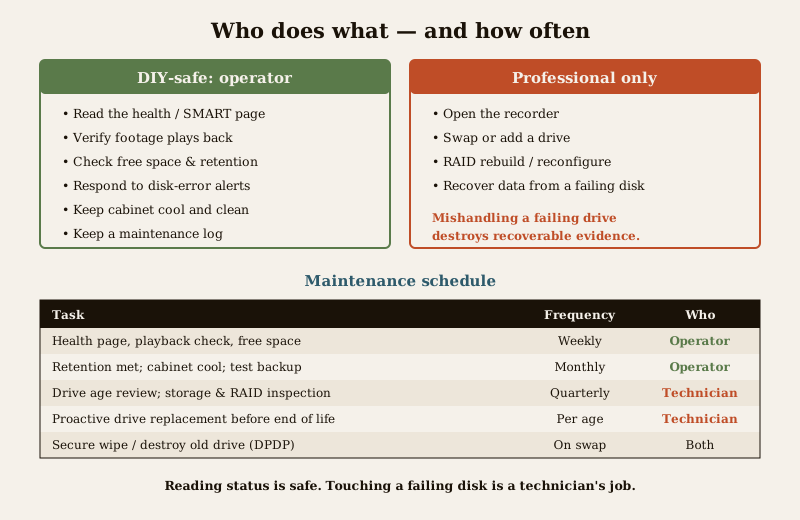
The split here is sharp, and the reason is simple: reading status is safe, but touching a failing drive can destroy the evidence and void any chance of recovery.
Safe for an operator or facility person:
- Reading the recorder's storage and SMART health page and noting warnings.
- Verifying, in playback, that footage exists across the retention window.
- Checking free space, that overwrite is looping, and that retention days are met.
- Watching for and responding to disk-error alerts and beeps.
- Keeping the cabinet clean, ventilated and cool, and the recorder on a healthy UPS.
- Keeping a maintenance logbook and flagging problems.
Strictly for a qualified technician or your AMC provider:
- Opening the recorder and swapping or adding a drive.
- Any RAID rebuild or array reconfiguration.
- Any attempt to recover data from a failing or failed drive — a mishandled recovery attempt can permanently lose footage that a professional could have saved. Stop writing to a suspect drive and hand it over.
- Diagnosing repeated disk failures that point at power, heat or a recorder fault.
Do not improvise on a failing drive. If a disk is throwing errors, the instinct to poke at it, reformat it or run recovery software is exactly the instinct that destroys recoverable evidence. Power down further writes and call a professional. The cost of a technician is trivial next to footage of the one incident that mattered.
A maintenance schedule
Storage upkeep is a rhythm, not a one-off. This is a sensible baseline to adapt to how critical the site is.
| Task | Frequency | Who |
|---|---|---|
| Glance at the recorder health/SMART page for warnings | Weekly | Operator |
| Verify footage plays back for a sample of cameras | Weekly | Operator |
| Confirm free space and that overwrite is looping | Weekly | Operator |
| Check the oldest footage still meets retention policy | Monthly | Operator |
| Check cabinet is cool, fan clear, vents dust-free | Monthly | Operator / facility |
| Test that the off-site or cloud backup restores | Monthly | Operator / IT |
| Review drive age against expected service life | Quarterly | Operator / AMC |
| Full storage and RAID health inspection, disk diagnostics | Quarterly / half-yearly | Technician / AMC |
| Planned proactive drive replacement before end of life | Per drive age | Technician / AMC |
| Secure disposal of decommissioned drives (DPDP) | On replacement | Technician / operator |
Fold this into your wider routine using the security maintenance calendar, and if a professional carries the load, an AMC should name storage health, footage verification and planned drive replacement as explicit deliverables — not leave them assumed.
DPDP — footage is personal data
Storage maintenance and data protection meet in two places, and both matter under the DPDP Act 2023.
- Retention. Footage is personal data, so keeping it forever is a liability, not a virtue. Your real retention window should be set to what you need and defended — the storage checks above keep the actual window honest against policy.
- Secure disposal of old drives. A decommissioned surveillance drive is full of recorded personal data. It must be securely wiped or physically destroyed before it leaves your control — never sold, handed to a scrap dealer or dumped with recognisable footage still on it. Make secure disposal a fixed step in every drive replacement, and record that it was done.
A quick checklist
- Read the recorder's SMART/health page and act on any warning.
- Verify in playback that footage actually exists across the full retention window — never trust the live view.
- Confirm free space, a working overwrite loop, and retention days still met after any camera or quality change.
- Keep the recorder cool, clean and on a healthy UPS.
- Track drive age, plan replacement before failure, and keep a sealed spare on the shelf.
- Hold and test an off-site or cloud backup so a stolen or dead recorder is not total loss.
- Leave opening the box, drive swaps, RAID rebuilds and data recovery to a technician.
- Securely wipe or destroy old drives on disposal, and log it.
Where to go next
- NVR and DVR maintenance — caring for the recorder itself, of which storage is one half.
- CCTV cable inspection — the other silent CCTV failure, on the wiring side.
- Security system backup — the off-site copy discipline this guide leans on.
- CCTV maintenance AMC and the security maintenance calendar — folding storage upkeep into a serviced routine.
- The security system maintenance pillar, the maintenance sub-hub, the CCTV sub-hub and the main security hub.
References
- Digital Personal Data Protection Act, 2023 — CCTV footage is personal data; retention should be limited to what is necessary and decommissioned surveillance drives must be securely wiped or destroyed before disposal.
- National Building Code of India (SP 7), Bureau of Indian Standards — for the wider electrical and equipment-room environment in which recorders and their storage sit; verify the current edition (SP 7:2026) via the BIS catalogue: https://www.services.bis.gov.in/
- Surveillance-drive manufacturer guidance — purpose-built surveillance drives are specified for continuous 24x7 write workloads and rated operating temperatures; consult the drive maker's documented service life and environmental limits rather than assuming desktop-drive figures.
This is an educational maintenance overview for facility managers, integrators and building operators — not an installation manual, a data-recovery procedure or legal advice. Do not open a recorder, swap a drive, rebuild a RAID or attempt recovery on a failing disk yourself; engage a qualified technician or your AMC provider, and verify any standard's current status via the BIS catalogue before relying on it.
Export this guide
Related Guides — Deep-dive reading
CCTV Recording Failure in India (2026): Live View Works but Nothing Was Saved
You open the recorder to pull footage of an incident and there is nothing there, even though every camera shows a crisp live picture. A calm, ordered guide to why an Indian CCTV system records live but saves nothing, and how to fix it before the next incident.
SecurityNVR and DVR Maintenance in India (2026): Keeping the Recorder Alive, Cool and Secure
The recorder is the brain of a CCTV system, and a neglected one quietly loses footage, drops cameras or gets hacked. A practical upkeep routine for NVRs and DVRs in Indian conditions — heat and dust, clean power, firmware and security patches, network hygiene, time sync and the disk — with a clear split between what a facility person can safely do and what belongs to a technician.
SecurityCCTV Maintenance and AMC in India (2026): Keeping the System Alive
How to keep a CCTV system actually working after install: clean lenses and housings, check every camera still records, watch drive health and retention, update firmware, and decide whether an Annual Maintenance Contract (AMC) is worth it.
SecurityRelated Tools — Try Free
CCTV Camera Coverage & Count Calculator
Estimate how many CCTV cameras you need, the NVR channels, storage in TB for your retention period, and an indicative all-in cost with GST.
CCTV CalculatorCircadian Light Meter
Patient-centric circadian lighting visualizer for Indian healthcare design — time-of-day × intensity → CCT, melanopic lux (EML / mEDI), melatonin suppression, and an alertness curve. Calibrated against WELL v2 L03 Circadian Lighting Design, CIE S 026:2018, Brainard 2001, and Lucas et al. 2014.
Circadian ToolCCTV Cloud vs Local Cost Calculator
Compare cloud CCTV subscription against a local NVR + HDD — upfront, 5-year total, monthly fee and break-even.
Cloud vs Local