
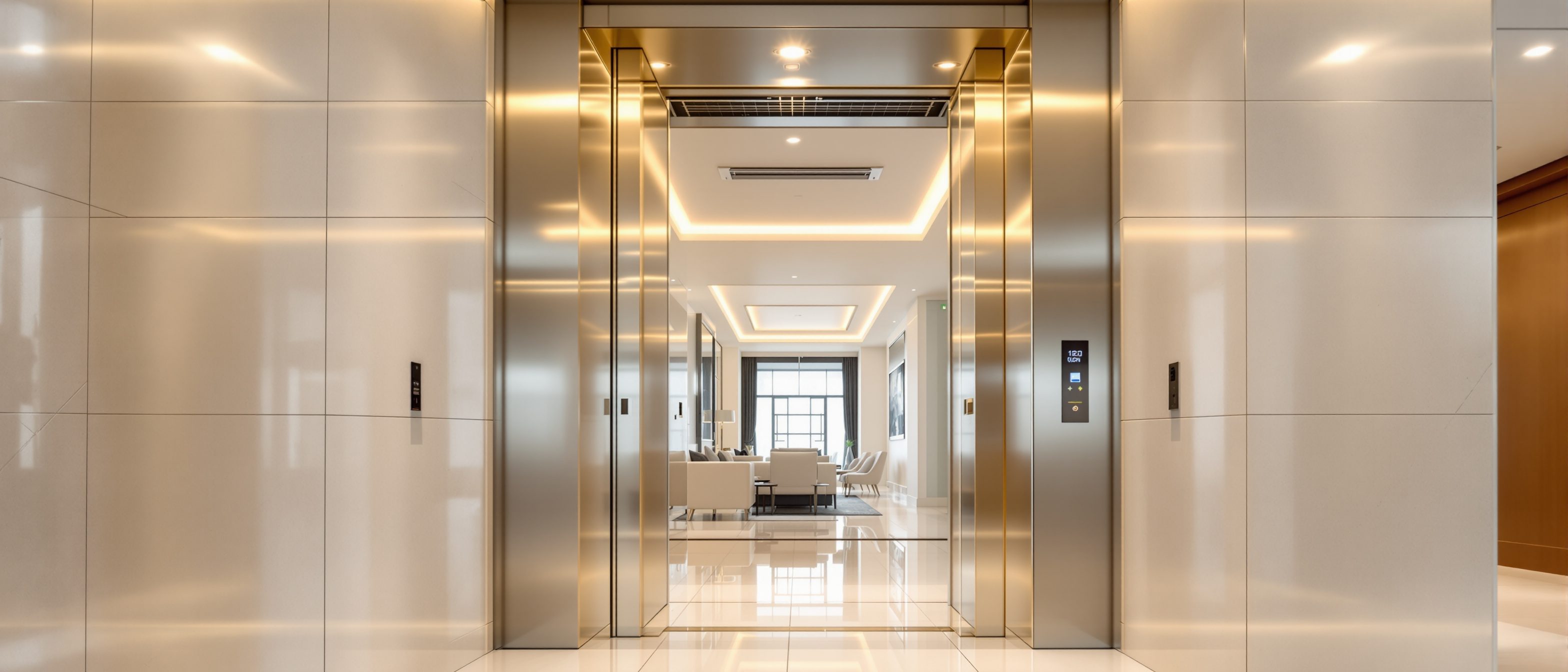
Lift Automation Features Explained (India): Doors, Levelling, Control and Standby
How a home lift runs itself — automatic doors, auto-levelling, collective control, standby and automatic rescue — and why each one matters
A modern home lift is not really "driven" by anyone. You press one button, and the machine decides the rest — when to open the doors, exactly where to stop, which call to answer first, when to switch its own lights off, and what to do when the power dies. That self-operating behaviour is what we mean by lift automation: the lift running itself safely, without an attendant standing inside with a lever.
This guide explains the automation layer in plain language — the automatic doors, auto-levelling, collective control, automatic standby, automatic rescue and obstruction re-open that together make a home lift push-button simple. It is deliberately separate from the connected layer (your phone app, voice assistants, notifications). For that, see our companion guide on smart home lift design and smart-home integration for elevators. Here we stay on the machine that thinks for itself.
Automation answers a simple homeowner question: "Can my parents, or a child, or a guest use this lift alone, safely, every single day — with no training?" A well-automated lift means yes.
All figures below are indicative — confirm exact behaviour, timings and options with your vendor and electrician, because they vary by brand, model and your building's wiring.
What "automation" actually means (and what it does not)
It helps to separate three layers that people lump together as "features":
- Automation — the lift operates itself: doors, levelling, call handling, standby, rescue, obstruction sensing. This is on-board, certified, safety-relevant logic. It is the subject of this guide.
- Smart / connected — the lift talks to your home and phone: call-from-app, voice, arrival alerts, remote monitoring. Convenience, not safety. Covered in the smart guides.
- Accessibility — features that serve wheelchair users and the elderly: ≥900 mm doors, audio-visual indicators, Braille buttons, handrails. Often delivered through automation (auto doors, levelling).
The golden rule, repeated across the industry, is that safety-critical automation lives on the lift's own certified controller — never on a home-automation hub. Doors, levelling, brakes, overspeed and rescue must keep working even if your Wi-Fi, app or smart speaker is dead.
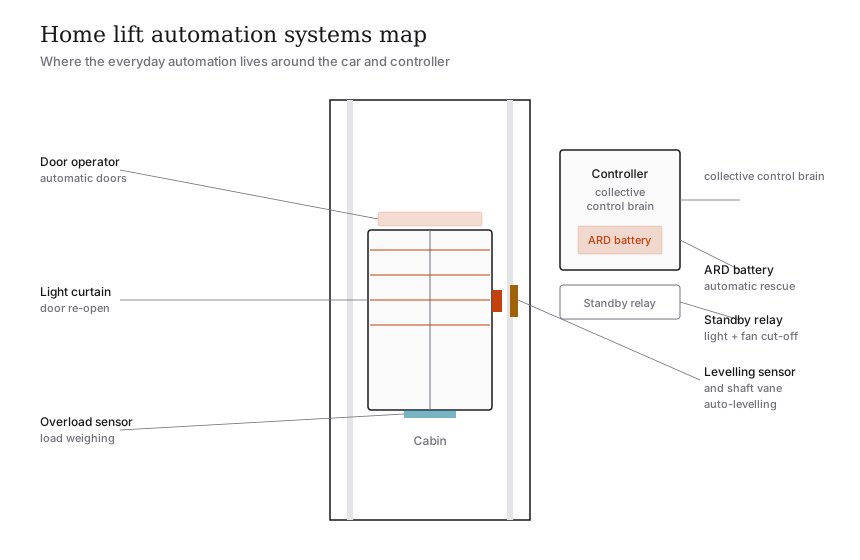
The automation features at a glance
| Feature | What it does | Why it matters |
|---|---|---|
| Automatic doors | Power door operator opens on arrival and closes after a set dwell time | No heavy manual door to drag; essential for the elderly, children and wheelchair users |
| Auto-levelling | Stops the car flush with the landing, then micro-corrects as load changes | Removes the trip-hazard step; lets a wheelchair or trolley roll straight across |
| Collective / selective control | Remembers several calls and serves them in a logical sweep | One trip answers several floors; no need to ride along or re-press |
| Door re-open on obstruction | Light curtain / sensor re-opens doors if something is in the way | Stops doors closing on a hand, walker, pet or child |
| Automatic standby | Cuts cabin light and fan after the lift sits idle | Saves power and lamp life; lift wakes instantly on the next call |
| Automatic rescue device (ARD) | On a power cut, battery moves the car to the nearest floor and opens the doors | No one is trapped during India's frequent outages |
| Overload sensing | Refuses to start and beeps if the car is over its rated load | Protects the machine and passengers; keeps you within the IS 14665 limit |
| Attendant-less operation | All of the above combine so anyone can ride alone, push-button | The lift is genuinely self-service, no operator needed |
Each row is explained below.
Automatic doors: the lift opens for you
The cheapest home lifts still use manual swing doors — you pull a hinged door open, step in, and pull it shut. They are simple and inexpensive, but they are not automation and not wheelchair-friendly: you cannot hold a heavy door and manage a walker or chair at the same time.
Automatic doors use a small motor — the door operator — mounted on the car. When the car arrives and levels, the operator slides the car door and the landing door open together, holds them open for a set dwell time, then closes them. Two common styles:
- Telescopic sliding — panels slide sideways and nest, opening to one side; common where shaft width is tight.
- Centre-opening — two leaves part from the middle; faster effective opening, smoother feel.
The accessibility benchmark (CPWD Harmonised Guidelines) asks for a clear door width ≥ 900 mm and an automatic door closing time of at least 5 seconds, so a slow-moving person clears the doorway before the doors begin to close. That 5-second dwell is itself an automation setting your vendor can tune.
If anyone in the household uses a wheelchair, walker or stick — or you are planning for ageing parents — automatic doors are not a luxury, they are the feature that makes solo use possible.
Auto-levelling: stopping flush with the floor
This is the single most underrated automation feature in a home lift, and the one homeowners notice first when it is missing.
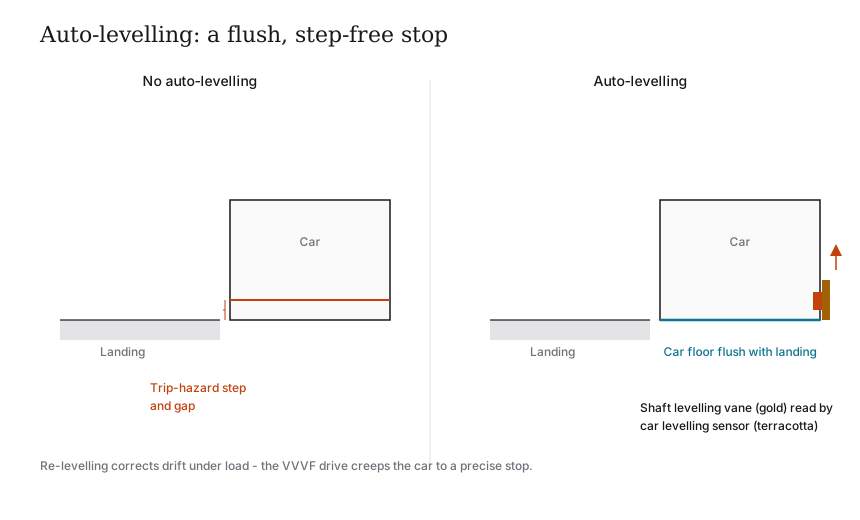
A lift that does not auto-level can stop a few millimetres or even a couple of centimetres above or below the landing — leaving a lip you trip over, and a gap a wheelchair or trolley cannot cross. Worse, a lift loads and unloads: as people step out, ropes stretch or hydraulic oil settles and the car can creep, so a car that was level when it stopped may not be level when you leave.
Auto-levelling fixes both problems:
1. As the car nears a floor, a levelling sensor (typically a magnetic or optical vane that the car reads against a strip in the shaft) tells the controller exactly where the floor is.
2. The drive slows and stops the car so its floor is flush with the landing — no step.
3. Re-levelling keeps watching while the doors are open. If the car drifts as load changes, the drive nudges it back to flush automatically.
In traction lifts this is done by a VVVF (variable-voltage, variable-frequency) drive that can creep the motor at very low speed for a precise stop; in hydraulics, a levelling valve trims the oil. The homeowner-visible result is the same: you walk straight out, the wheelchair rolls straight across, every time.
Door re-open on obstruction: the lift will not close on you
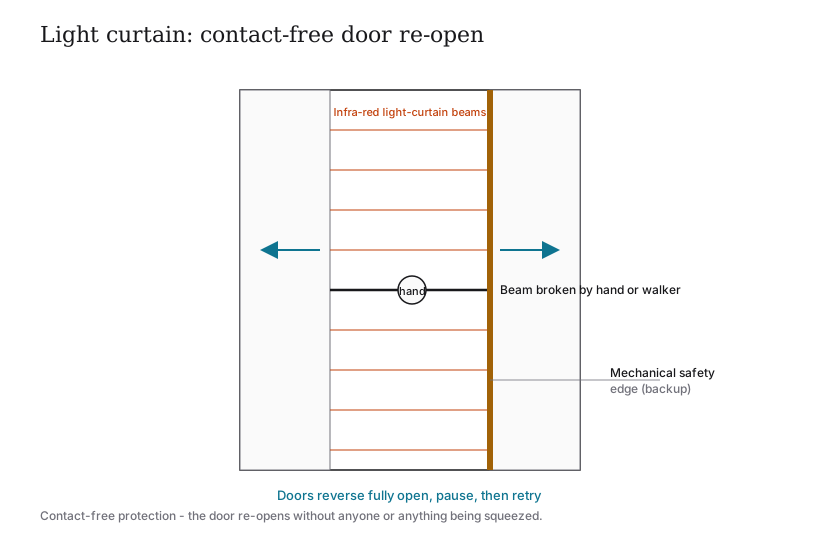
When automatic doors close, something has to guarantee they will not trap a hand, a foot, a walking stick or a curious child. That guarantee is the obstruction re-open feature, and it works in two layers:
- Light curtain — an invisible grid of infra-red beams across the doorway. If anything breaks a beam while the doors are closing, the controller instantly reverses the doors fully open, then tries again after a pause. This is the primary, contact-free protection in modern lifts.
- Mechanical safety edge / pressure sensing — if the door leaf physically meets resistance, the operator senses the stall (a rise in motor current or a contact edge) and re-opens. This is the backup.
Because it is contact-free, the light curtain protects a slow wheelchair user or an elderly person who is still in the doorway when the doors begin to close — the doors simply wait. This is classic automation: the lift watches the doorway so you never have to "beat the doors."
Collective / selective control: the lift remembers your calls
On the simplest lifts, one call locks the lift until that trip is done; press a landing button while it is busy and nothing is remembered. That is fine for a tiny G+1, but frustrating for a G+2 or G+3 home where several people use the lift.
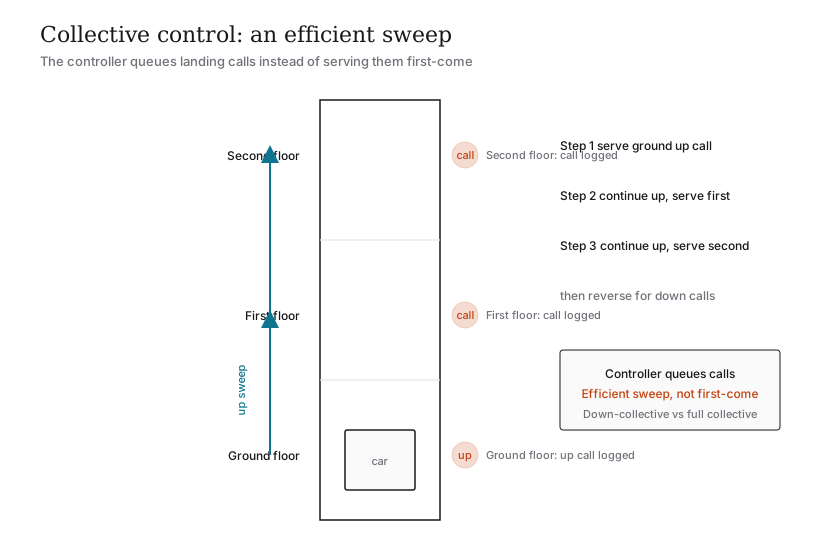
Collective control is the brain that remembers multiple calls and serves them in a sensible order rather than first-come-first-served. The common home variants:
- Down-collective (collective-down) — the lift answers car calls on the way down and picks up landing calls travelling down, sweeping efficiently to the ground. Typical and economical in homes.
- Full collective (up-and-down) — answers calls in both directions on each sweep; smoother where traffic is heavier or floors are more.
Picture a G+2 home: someone on the ground floor presses up while you, on the first floor, also call the lift. A collective controller logs both, decides the efficient sweep, stops at the first floor, then continues to the second — instead of making you wait for an entire unrelated trip to finish. You press once and trust the lift to sequence the rest.
Automatic standby: the lift switches itself off
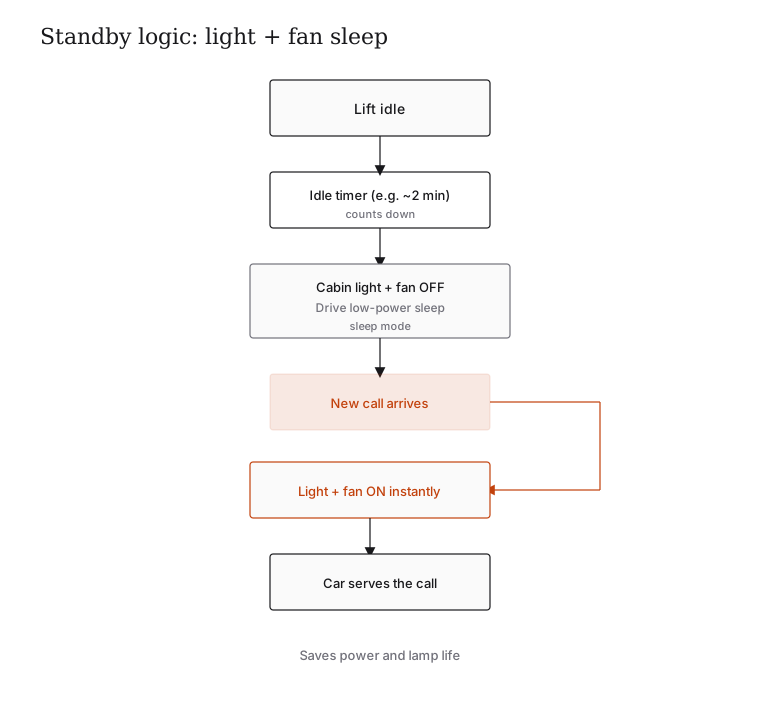
A home lift sits idle most of the day. Automatic standby is a small, satisfying piece of automation that simply switches off the cabin light and ventilation fan after the lift has been idle for a set time (often a couple of minutes), and instantly switches them back on the moment a call arrives.
Why it matters:
- Saves electricity and lamp life — the cabin is not lit and ventilated 24 hours a day for a lift that runs a few times.
- Quieter home — the fan is off when nobody is riding (relevant if the shaft is near living spaces; see noise reduction in residential lifts).
- No downside — wake-up is instant, so you never notice it was asleep.
More advanced systems extend this into a standby / sleep mode for the whole drive and controller, dropping the machine into a low-power state between trips. On MRL gearless lifts this contributes to the lift's overall efficiency; for the electrical picture, see lift power requirements.
Automatic rescue (ARD): nobody gets trapped in a power cut
Given how often Indian neighbourhoods lose power, this is the automation feature you must never skip. The Automatic Rescue Device (ARD) is a small battery and control board that, the moment mains power fails, drives the car at slow speed to the nearest landing and opens the doors automatically — so a passenger simply steps out, rather than waiting in the dark for a technician.
A few points worth understanding:
- ARD performs one short rescue move on a power cut; it is not the same as keeping the lift running on battery. That continuous-running job belongs to a full lift UPS or inverter.
- It works regardless of drive type (traction, hydraulic, screw) and needs its own small, maintained battery.
- It is automation and safety — which is why it stays firmly on the lift's certified controller, not your home hub.
This guide only introduces ARD as an automation behaviour. For the full rescue picture — manual hand-winding by a technician, alarms and intercom, what to do if trapped — see emergency rescue systems for home lifts. For the battery and UPS side — ARD-only versus keep-the-lift-running, battery chemistry and replacement intervals — see battery backup systems for elevators.
Buyer rule from our fact base: do not buy a home lift without an ARD. In India it is not optional automation — it is the difference between a brief inconvenience and being trapped.
Overload sensing and attendant-less operation
Two smaller pieces complete the picture:
- Overload sensing — the car weighs its load. If you exceed the rated capacity (for example, an 8-person / ~544 kg car), the controller refuses to start, sounds a buzzer and keeps the doors open until someone steps out. This protects the machine and keeps you within the IS 14665 load limit. See the lift capacity guide for how capacity is rated.
- Attendant-less operation — this is the sum of everything above. Automatic doors, auto-levelling, collective control, obstruction re-open, standby, ARD and overload sensing together mean that any household member can ride alone, push-button, with no operator and no training. That is the entire point of automating a home lift.
How the pieces fit together on the controller
All of these behaviours are coordinated by the lift's controller — the certified brain in the shaft (on an MRL lift) or in a small cabinet. A simple call plays out like this:
1. You press a landing call. The controller logs it (collective control) and wakes the lift from standby (light and fan on).
2. The drive moves the car, slowing as the levelling sensor reads the approaching floor, and stops flush (auto-levelling).
3. The door operator opens the doors; the light curtain guards the doorway and re-opens if anything intrudes.
4. After the dwell time the doors close, the car serves any further logged calls in sequence, then settles and, after idle, returns to standby.
5. If mains power fails at any point, the ARD takes over and brings you to the nearest floor.
Note what stays off the home network in all of this: every safety-critical step. Your app can call the lift and notify you — but it cannot override the doors, the levelling or the rescue. That separation is the deliberate design covered in the smart home lift design guide.
What to ask your vendor
Use this as a quick automation checklist (and the fuller lift specification checklist when you buy):
- Automatic doors with ≥900 mm clear width and an adjustable dwell of at least 5 seconds?
- Auto-levelling and re-levelling — is it true micro-levelling under load, or just a single stop?
- Light curtain door protection (not just a mechanical edge)?
- Collective control — down-collective or full collective, and is it suited to your number of floors?
- Automatic standby for light and fan, and a low-power drive mode?
- ARD fitted as standard, with a maintained battery — confirm in writing.
- Overload sensing with audible warning?
Get the answers in writing on the quotation. Automation features are where two superficially similar lifts diverge most — and where the daily experience of using the lift, especially for elderly parents, is won or lost.
Where to go next
- How home lifts work in India — the drives and core components behind the automation.
- Smart home lift design and smart-home integration — the connected layer (app, voice, monitoring).
- Emergency rescue systems and battery backup systems — the full rescue and power story behind ARD.
- Residential elevator buyer's guide and home lift cost in India — the buying and budgeting pillars.
References
- IS 14665 (Part 1) — Electric Traction Lifts: Outline Dimensions (BIS): https://law.resource.org/pub/in/bis/S05/is.14665.1.2000.pdf
- IS 14665 (Part 2) — Code of Practice for Installation, Operation and Maintenance (BIS): https://law.resource.org/pub/in/bis/S05/is.14665.2.1-2.2000.pdf
- IS 15259 — Hydraulic Lifts (BIS, cited by name for hydraulic levelling).
- National Building Code of India 2016, Part 8 (Building Services), Section 5 — Installation of Lifts, Escalators and Moving Walks (BIS): https://www.bis.gov.in/standards/technical-department/national-building-code/
- BIS Guide for Using NBC 2016: https://www.bis.gov.in/wp-content/uploads/2022/08/Booklet-Guide-for-Using-NBC-2016.pdf
- CPWD / MoHUA Harmonised Guidelines and Space Standards for a Barrier-Free Built Environment (door width, ≥5 s closing time, indicators): https://www.cpwd.gov.in/Publication/Harmonisedguidelinesdreleasedon23rdMarch2016.pdf
- RPwD Act 2016 (accessibility obligations for public buildings): https://ssepd.odisha.gov.in/sites/default/files/2024-01/RPWD%20ACT.pdf
- Nibav — Machine-Room-Less (MRL) home elevator (controller-in-shaft context): https://www.nibavlifts.com/machine-room-less-mrl-home-elevator/
All technical figures and timings are indicative and vary by brand, model and installation — confirm exact behaviour with your lift vendor and a licensed electrician. Last verified June 2026.
Export this guide
Related Guides — Deep-dive reading
Power Failure Safety in Elevators (India): What Happens and What to Do
A power cut does not drop the car. Here is exactly what happens, why an ARD is non-negotiable in India, and how to protect the controller so your lift restarts safely.
Home Lifts & AccessibilitySecurity for People Living Alone in India (2026): Calm, Practical Habits When There Is No Second Person to Notice
Living alone is an ordinary and growing part of Indian life - the student in a new city, the working single, the elder whose children are abroad, the person after a separation. It does not call for fear. It calls for a few deliberate habits, because there is no second person in the home to notice trouble, raise the alarm, or catch an accident. This is calm self-reliance, layer by layer.
SecurityLift Emergency Communication in India (2026): The Phone That Must Answer
The life-safety system that lets someone trapped in a lift reach help: the alarm button, the two-way voice that connects to a manned point answering 24x7, the backup power that keeps it alive in a mains cut, and the responder and testing habit without which the hardware is just a box on the wall.
SecurityRelated Tools — Try Free
Accessibility Compliance Calculator
Check a planned lift against the CPWD and RPwD accessible-lift benchmarks for a score.
Lift CheckerAccess-Control Battery-Backup Calculator
Size the standby battery so an access system keeps running through a power cut, with an egress life-safety note.
Battery BackupCross-Ventilation Analyzer
Estimate airflow and air changes per hour (ACH) from room size, window areas, layout, and local wind — with NBC 2016 Part 8 compliance check.
Ventilation Calculator