

Smart Home Integration for Elevators (India): Voice, App and the Connected Home
How to wire a home lift into Alexa, Google, your phone app, CCTV and vendor monitoring — and the safety line integration must never cross.
You have read the broad picture in our Smart Home Lift Design guide. This guide does the focused, practical thing: it shows you how to wire a home lift into the connected home you already run — the Alexa or Google speaker in the living room, the app that controls your lights and AC, the CCTV at the gate, the intercom at the door. What can the lift actually do inside that ecosystem today? What is genuinely useful, what is marketing, and where is the hard line that integration must never cross?
That line is the whole point of this guide, so we put it first.
The lift's own certified controller owns every safety-critical function — doors, brakes, the overspeed governor and the Automatic Rescue Device. Smart-home integration sits OUTSIDE that controller. It can call the lift, watch it, and notify you. It must never be allowed to drive a door, override a brake, or stand in for a safety device.
Hold that thought through everything below.
Two different "smart" words
People use "smart" for two unrelated things, and confusing them leads to bad buying decisions.
- Automation is the lift operating ITSELF — automatic doors, auto-levelling flush with the floor, collective control that remembers calls, the ARD that rescues you on a power cut. These live entirely inside the lift controller and need no internet. We cover them in the Lift Automation Features guide.
- Integration (this guide) is connecting that lift to your HOME — your phone, your voice assistant, your cameras, your automation hub. This is a convenience and monitoring layer bolted on top of the lift, talking to it through a gateway.
A lift can be fully automated and not connected at all. It can also be connected without you adding any home-automation hub — many "smart" home lifts simply ship with the maker's own phone app. Decide which layers you actually want before you pay for them.
What integration can really do today
Here is the honest capabilities table. "Works well" means it is mature and reliable in Indian homes in 2026. "Patchy" means it exists but depends heavily on brand, model and a stable internet connection. Treat every row as indicative — confirm the exact feature list against the model your vendor quotes.
| Capability | How it works | Maturity | Caveat |
|---|---|---|---|
| Call the lift from a phone app | App sends a "come to my floor" request to the lift's gateway over your home Wi-Fi or the cloud | Works well | Convenience only; the lift still validates and executes the call on its own controller |
| Voice call ("Alexa, send the lift to the ground floor") | Voice assistant routes a phrase to a skill/action that hits the same gateway | Patchy | Depends on a vendor-supplied Alexa skill / Google action; many brands have none. Voice should never open or hold doors |
| Arrival and door notifications | Controller reports car position and door state to the cloud; the app pushes a message | Works well | Notification, not control — you are told, you do not act through it |
| Status and usage dashboard | App shows current floor, in-use, last service, error codes | Works well | Read-only; accuracy depends on the gateway link being live |
| CCTV view of cabin or lobby | A separate camera (yours or the maker's) streams to your existing NVR/app | Works well | This is camera integration, not lift control; cabin cameras raise privacy questions |
| Intercom / video door phone link | Cabin intercom ties into your building's intercom or your VDP | Works well | Two-way audio is a safety/rescue aid; keep it on its own reliable path |
| "Scenes" (e.g. "Leaving home") | Hub triggers lights-off, AC-off AND a lift call to the parking floor together | Patchy | Only the lift CALL belongs in a scene; never let a scene touch doors or hold the car |
| Remote vendor monitoring + predictive maintenance | Gateway streams run-counts, fault codes and door cycles to the maker's cloud; their system flags wear before failure | Works well (premium) | Genuinely useful in India; check it is included, what data leaves your home, and that it does not let anyone command the lift remotely |
| Geofenced auto-call ("arrive home, lift comes down") | Phone location triggers a call as you near home | Patchy | Battery and reliability are inconsistent; treat as a gimmick, not a feature you pay extra for |
| Smart-home control of safety functions | — | Not available, by design | No reputable system lets a hub, app or voice command override doors, brakes, ARD or the governor |
The pattern across the whole table: integration calls and watches; it never overrides safety.
How the pieces actually connect
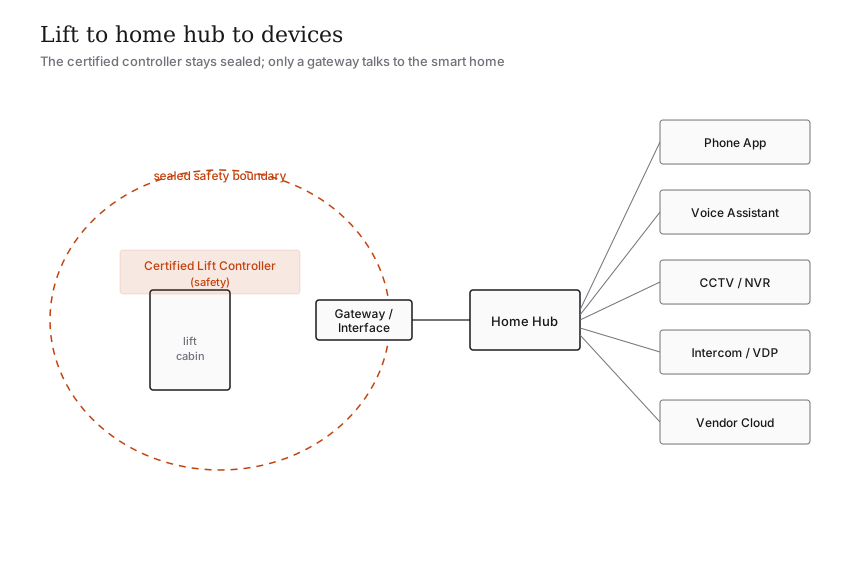
Three boxes do all the work.
1. The lift controller — the certified brain that runs the motor, doors, levelling, governor and ARD. Sealed. Safety-rated.
2. The gateway / interface module — a small board the vendor adds that exposes a SAFE, limited set of signals from the controller: current floor, in-use, door state, fault code, and an "accept a hall call" input. It speaks Wi-Fi, Ethernet or, increasingly, the maker's cloud.
3. Your home ecosystem — phone app, Alexa/Google, an automation hub (Home Assistant, a Matter hub, a brand hub), your CCTV NVR and your intercom.
The gateway is deliberately a narrow door. The controller hands out a read-only status feed plus exactly one "command" — register a call — and nothing more. Everything your app or voice assistant does flows through that one narrow door, which is why a buggy app or a hacked speaker still cannot make the lift do anything unsafe.
Ask your vendor a single clarifying question before you buy any integration: does the gateway expose anything beyond status-read and hall-call-register? If the answer is "yes, it can open doors / control the brake," walk away.
Calling the lift: app and voice, realistically
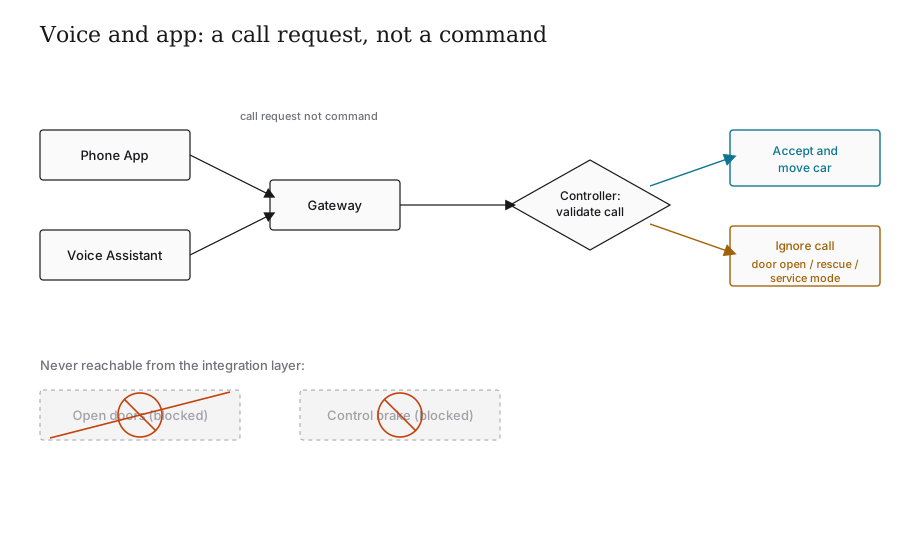
The headline feature is "call the lift before you reach it." It works, and it is pleasant — you press a button in the same app that runs your lights, or you say a phrase, and the car is waiting when you arrive.
Be realistic about three things:
- Voice coverage is thin. Many Indian home-lift brands have no official Alexa skill or Google action. Where one exists, treat it as a nice-to-have, not a deciding factor. Confirm the skill exists, in your region, for your exact model — not "the brand supports Alexa" in general.
- A call is a request, not a command. Your phrase or tap asks the controller to register a hall call. The controller decides — it will ignore the request if a door is open, if it is mid-rescue, or if it is in service mode. That is correct behaviour, not a bug.
- Latency depends on the path. Local Wi-Fi calls are near-instant; cloud-routed calls add a second or two and fail entirely if your internet is down. For something as physical as a lift, a feature that needs the internet to summon the car is a fragile feature. Prefer local control where the vendor offers it.
A good test of a home-lift app: with your broadband unplugged, can you still call the lift normally from the landing button? The answer must be yes. The app is a convenience on top of a lift that works perfectly without it.
Scenes, CCTV, intercom and security
Scenes are where integration feels magical and where people overreach. A "Leaving home" scene that turns off the lights and the AC and calls the lift down to the parking floor is fine — the lift part is just a call. A scene that tries to "hold the doors open while I load luggage" is not fine; door dwell time belongs to the controller and to the door sensors, never to a hub macro. Keep scenes to calls only.
CCTV integration is really camera integration: a cabin or lobby camera streams to the same NVR and app as the rest of your cameras. Useful for seeing who is in the lift and whether an elderly parent reached their floor. Two cautions — a camera inside the cabin is a privacy decision for the whole household, and the camera must be on its own power/network so a lift fault never blinds it.
Intercom and video door phone integration genuinely matters for safety. The cabin's two-way intercom should reach a person reliably — tied into your building intercom or your VDP — so anyone in a stalled car can talk to help. Because this is a rescue aid, give it a dependable path (often a dedicated line plus the ARD's emergency light), not a best-effort smart-home route that dies with the Wi-Fi. The rescue picture as a whole is in our Emergency Rescue Systems guide.
Notifications and remote monitoring: the quietly best feature
The flashiest features (voice, geofencing) are the weakest. The most valuable integration in India is the unglamorous one: notifications and vendor remote monitoring.
- Arrival and door notifications tell you the car has reached a floor or a door was left open — handy for a household with children or elderly members.
- Fault and power-event alerts tell you the lift tripped, an ARD rescue ran, or the supply failed — useful in a country where power cuts are routine and where you want to know your battery backup did its job.
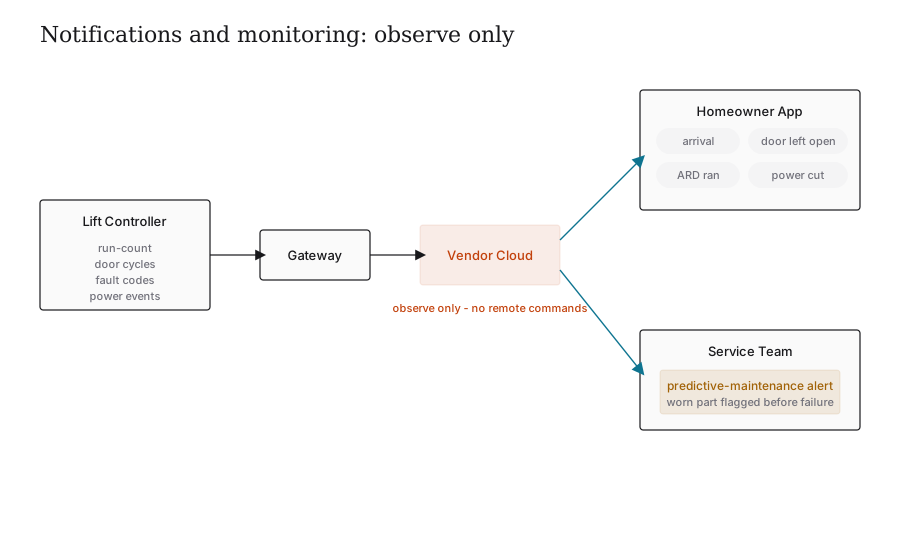
- Predictive maintenance is the real prize. The gateway streams run-counts, door cycles and fault codes to the maker's cloud, whose system flags a worn part or a drifting door before it strands you. On a premium contract this turns the AMC from "wait for it to break" into "fixed before you noticed."
Three questions to ask the vendor about monitoring: is it included or extra; what data leaves your home and where is it stored; and — critically — does remote access let anyone command the lift, or only observe it? The safe answer to the last one is "observe only."
The safety boundary, stated plainly
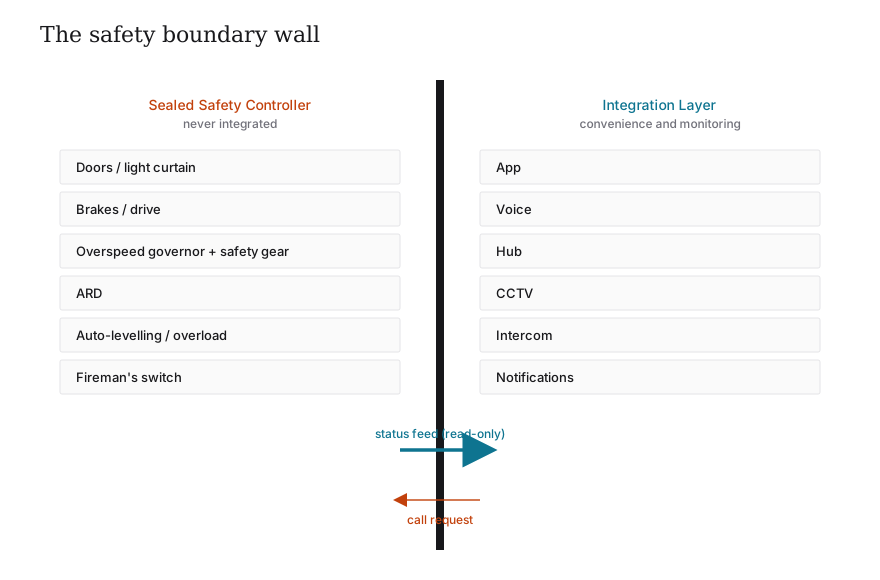
Everything in this guide lives on the convenience side of a wall. On the other side, untouchable by any app, hub or voice command, sit the functions that keep you alive:
| Stays on the certified lift controller (NEVER integrated) | May be integrated (convenience / monitoring) |
|---|---|
| Door open/close timing and the door safety sensor / light curtain | Calling the lift to a floor |
| Brakes and the motor drive | Reading current floor and in-use status |
| Overspeed governor and safety gear | Arrival and door-left-open notifications |
| Automatic Rescue Device (ARD) operation | CCTV view of cabin / lobby |
| Auto-levelling and overload sensing | Intercom audio path |
| Fireman's switch / emergency stop | Fault and power-event alerts, predictive maintenance |
If a salesperson offers "open the doors from your phone" or "smart-home control of the safety system," that is a red flag, not a feature. The reason is simple: the safety functions are certified to IS 14665 and validated by the state lift inspectorate as a closed, deterministic system. Bolting a phone app or a consumer voice assistant into that loop would break the very certification that makes the lift legal and safe to ride.
A sensible integration plan for your home
You do not need everything. A practical order of priority:
- Always: the lift's own safety set — ARD, door sensors, alarm and intercom — independent of any smart-home anything. These are non-negotiable regardless of integration; see the Specification Checklist.
- High value: vendor remote monitoring / predictive maintenance and fault notifications. Buy these.
- Nice: the maker's phone app for calling the lift and seeing status, on local Wi-Fi where possible.
- Optional: CCTV and a tied-in intercom, with privacy and a dedicated path settled first.
- Skip unless it is free and proven: voice control and geofenced auto-call. Pleasant, not dependable.
Specify the gateway and any integration in your purchase contract, confirm it survives an internet outage, and confirm in writing that it cannot command safety functions. Then enjoy the convenience knowing the lift underneath it is exactly as safe as a lift with no app at all.
References
- IS 14665 (Electric Traction Lifts), Part 1 — Outline dimensions, BIS: https://law.resource.org/pub/in/bis/S05/is.14665.1.2000.pdf
- IS 14665, Part 2 — Code of practice for installation, operation and maintenance, BIS: https://law.resource.org/pub/in/bis/S05/is.14665.2.1-2.2000.pdf
- National Building Code of India 2016, Part 8 Section 5 (Installation of Lifts, Escalators and Moving Walks), BIS: https://www.bis.gov.in/standards/technical-department/national-building-code/
- BIS Guide for Using NBC 2016: https://www.bis.gov.in/wp-content/uploads/2022/08/Booklet-Guide-for-Using-NBC-2016.pdf
- Nibav — silent home lifts (home-segment integration features): https://www.nibavlifts.com/silent-home-lifts/
- Nibav — machine-room-less (MRL) home elevator: https://www.nibavlifts.com/machine-room-less-mrl-home-elevator/
Export this guide
Related Guides — Deep-dive reading
Geofencing Home Security in India (2026): Convenience Without the Trap
A geofence is a virtual boundary around your home; your phone crossing it can arm the alarm as the last person leaves and light the place up as you arrive. This guide explains the genuinely useful security uses, and the honest caveats: never let a phone's location alone unlock your door, never make a geofence the only thing that arms your home, and treat continuous family tracking as sensitive data.
SecuritySecurity Fire Alarm Integration in India (2026): Smart Alerts, Certified Systems, Fail-Safe Egress
The most important sentence a smart-home designer can say about fire is also the least profitable: a smart-home smoke sensor or fire notification is a helpful add-on, not a substitute for a certified fire-alarm system. This guide draws the line hard — life-safety detection and alarm belongs to the NBC-governed certified system — and then covers the genuinely useful, correctly-scoped automations the smart layer can add on a verified fire signal: unlock for egress, open the gate for the fire tender, light the escape path, stop the away-scene, and notify everyone loudly. All of it fail-safe. None of it in the way of the system that actually saves lives.
SecuritySmart Garage Doors & Openers for Indian Homes (2026 Guide)
A garage door is the largest moving object in most homes, and a heavy one. This guide covers smart garage doors and openers for Indian homes end to end — motorised sectional, roller and sliding doors; what a smart opener actually adds; retrofit controllers versus smart openers; the safety sensors you must never skip; rolling-code security; the manual release for power cuts; integration with cameras and your wider smart home; and real brands with ₹ prices.
Smart HomeRelated Tools — Try Free
Lift Safety Audit Checklist
Interactive checklist that scores your home lift on safety devices, compliance and upkeep.
ChecklistVideo Door Phone Type Selector
Answer a few questions about your building, cabling, budget and internet and get the right video door phone — analog / wired / wireless / IP, single-home or multi-apartment, monitor or app.
Door Phone SelectorApartment Video Door System Planner
Enter flats, entrances, floors and guard desk for a first-pass building intercom plan — door stations, indoor monitors, guard station, the right architecture and an indicative cost band.
Building Planner