
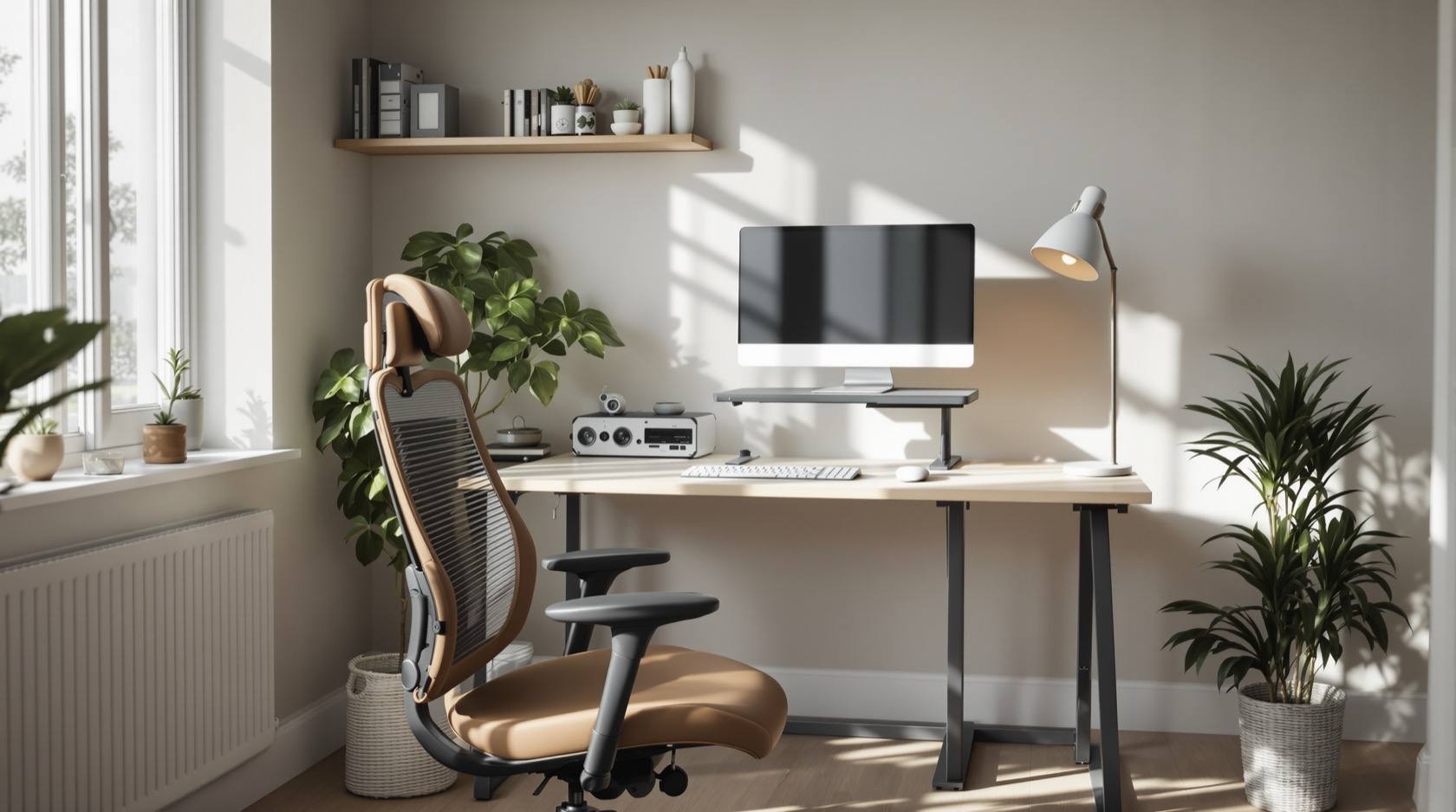
Home Office Furniture & Ergonomics: Desk, Chair & Setup (2026)
How to build a healthy, productive work-from-home setup in an Indian apartment — the ergonomic ideal, the desk and chair that matter most, laptop-into-workstation fixes, lighting and small-space tricks, plus a setup-dimensions table and a chair-features checklist.
Since 2020 the dining table has doubled as an office for millions of Indian homes, and the bodies have paid for it — a spare chair, a laptop on the table, eight hours a day, and within months a stiff neck, an aching lower back and a tingling wrist. A home office does not need to be a room; it needs to be a posture that your furniture holds for you without you thinking about it. Get the chair, the desk height and the screen height right and your body stops being the thing that ends the workday early.
This guide is the practical, health-first setup manual for a work-from-home corner in an Indian apartment — how to hit the ergonomic ideal, which piece to spend on (the chair, every time), how to turn a laptop into a real workstation, and how to fit it all into a bedroom corner without a dedicated study. It is a sibling to the broader furniture ergonomics guide and sits under the complete guide to furniture in India pillar; for the room-scale storage that a good office corner also needs, lean on smart storage interiors and space-saving furniture.
Scope & how to read this. Every height, depth and dimension here is typical and indicative — a starting point to help you plan, budget and shop, not a prescription. Bodies differ, so tune every figure to your own build using the desk-and-chair-height calculator. This is a comfort and habit guide, not medical advice: persistent back, neck, shoulder or wrist pain, numbness or tingling is a signal to see a doctor or physiotherapist, not to buy another cushion. Rupee bands are relative and regional — get local quotes. Fabrication and joinery of any built-in desk is the carpenter's craft; this guide helps you specify and lay it out.
The ergonomic ideal — what "good" actually looks like
Every recommendation below is chasing one neutral seated posture. Learn the picture once and you can judge any setup at a glance.
- Screen top at (or just below) eye level. You should look slightly down at the middle of the screen, with your head balanced over your spine — not craned forward. A screen too low is the single biggest cause of the work-from-home "tech neck".
- Eyes about an arm's length from the screen — roughly 50 to 70 cm. Closer strains the eyes; further and you lean in.
- Elbows near 90 degrees, upper arms relaxed at your sides, so your hands reach the keyboard without lifting or reaching.
- Neutral, flat wrists — not bent up over a laptop hinge or down off a high desk. This is where RSI (repetitive strain injury) and carpal-tunnel trouble start.
- Lower back supported. The chair's lumbar curve should meet the inward curve of your lower back so the spine keeps its natural S, instead of slumping into a C.
- Thighs roughly parallel to the floor, knees near 90 degrees, with a small gap behind the knees.
- Feet flat — on the floor, or on a footrest if the chair is raised to fix the desk height.
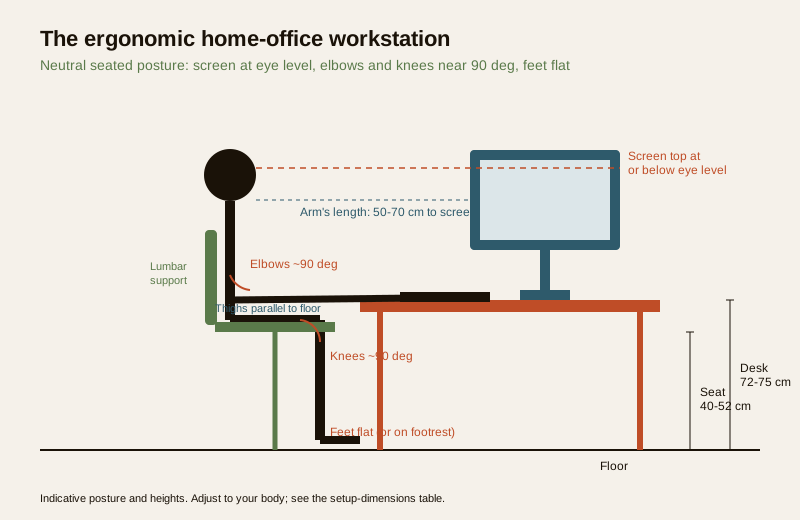
Notice what does the work here: the chair sets three of these (back, hips, feet) and the desk plus a riser set the other three (screen, elbows, wrists). That is why the two big buys are the chair and a way to raise the screen — everything else is adjustment.
The chair — your single most important buy
If you spend on one thing, spend on the chair. You sit in it for thousands of hours; a bad one quietly damages your back while a good one disappears. A dining or plastic chair has none of the adjustments your body needs and should never be a full-time work seat.
What actually matters, in order:
| Feature | Why it matters | What to look for |
|---|---|---|
| Seat-height adjustment | Sets elbow and knee angles; the foundation of the whole setup | Gas-lift lever, smooth range covering your height (see the table) |
| Lumbar support | Holds the lower-back curve; prevents slump and back pain | A firm curve at belt height, ideally height/depth adjustable |
| Seat depth | Too deep cuts behind the knees; too shallow gives no thigh support | 2-3 fingers gap behind the knee; sliding seat pan is a bonus |
| Armrests | Take load off shoulders and neck; keep wrists neutral | Adjustable height (2D/3D); should tuck under the desk |
| Recline / tilt | Lets you shift load through the day; static sitting is the enemy | Tilt with lock, or a synchro-recline that reclines back and seat together |
| Backrest height | Supports the mid and upper back, not just the lumbar | Reaches at least to the shoulder blades |
| Base and casters | Stability and easy movement | 5-star base; soft/PU casters for hard floors, or a chair mat |
Mesh vs foam. Mesh backs breathe well in Indian heat and humidity and resist the sweaty-back feeling; good foam is plusher but warmer and can sag over years. Either works if the lumbar and adjustments are right — those matter far more than the material. As an indicative band, a genuinely adjustable ergonomic task chair in India runs from a mid band for a solid mesh chair with lumbar and adjustable arms up to a premium band for the well-known ergonomic brands; below the mid band you are usually buying looks, not adjustments. For the seat foam and upholstery basics, upholstered furniture is the companion read.
Casters vs a fixed floor chair: casters win for a working chair — you move to reach, turn to talk, roll back to stand. Reserve fixed or floor seating for occasional or lounge corners, not eight-hour days.
Chair features to demand — a checklist
- Seat height adjusts across a range that suits your height (not a token 3 cm).
- A real lumbar curve you can feel against your lower back — adjustable if possible.
- Armrests that raise, lower and tuck fully under the desk.
- Seat depth that leaves 2-3 fingers behind your knee.
- A recline or tilt with a lock, so you can change posture through the day.
- A stable 5-star base with casters suited to your floor.
- Breathable back (mesh) for our climate, or quality foam that will not sag.
- You have actually sat in it, at your desk height, before buying.
The desk — height, depth and cable sense
The desk is simpler than the chair but two numbers decide everything: height and depth.
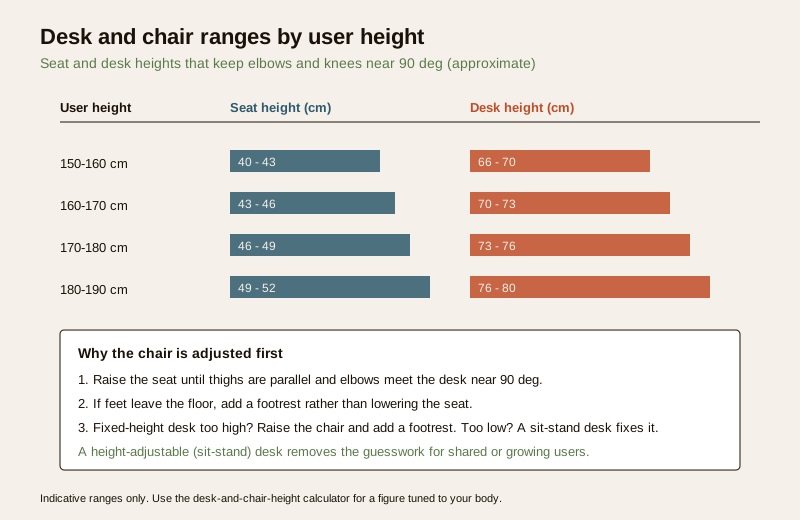
- Height. A standard fixed desk sits around 72-75 cm, which suits average heights with the chair adjusted to match. If you are much shorter or taller, either adjust the chair (and add a footrest) or, better, buy a height-adjustable (sit-stand) desk that you set to your body — and can raise to stand for part of the day. Alternating sitting and standing beats either one held for hours.
- Depth. You need enough depth to sit the monitor an arm's length away — roughly 60-75 cm of desk depth. A shallow 40 cm desk forces the screen too close and leaves no space for a keyboard in front of it.
- Width. 100-120 cm is comfortable for a laptop-plus-monitor setup with room to write; 120-140 cm if you run dual monitors or spread papers.
- Cable management. Plan it or it plans you: a grommet hole or a cable tray under the top, a small surge-protected power strip clamped to the desk, and Velcro ties turn a nest of wires into something you can vacuum under. In humid coastal homes, keep power strips off the floor and away from damp walls.
Materials follow the same logic as any furniture: an engineered-wood desk (see engineered-wood furniture and MDF vs particle board) is the value default, plywood (plywood furniture) is sturdier and better for a wall-fixed top, and solid wood (solid-wood furniture) is the heirloom option. For an enclosed corner, prefer lower-formaldehyde E1 (or E0) boards for indoor air quality.
The laptop trap — and the fix
A laptop is a compromise device: the screen and keyboard are joined, so you cannot have both at the right height. Look at the screen and you hunch your neck; drop it to type comfortably and the screen is in your lap. Used bare, full-time, it guarantees neck and upper-back pain.
The fix is cheap and transformative: raise the laptop on a stand or riser so its screen top hits eye level, then plug in an external keyboard and mouse for your hands to reach at elbow height. This separates the two heights the laptop glues together. Add an external monitor and the laptop becomes a second screen on its stand. This one change — riser plus keyboard — is the highest-value upgrade most home workers can make.
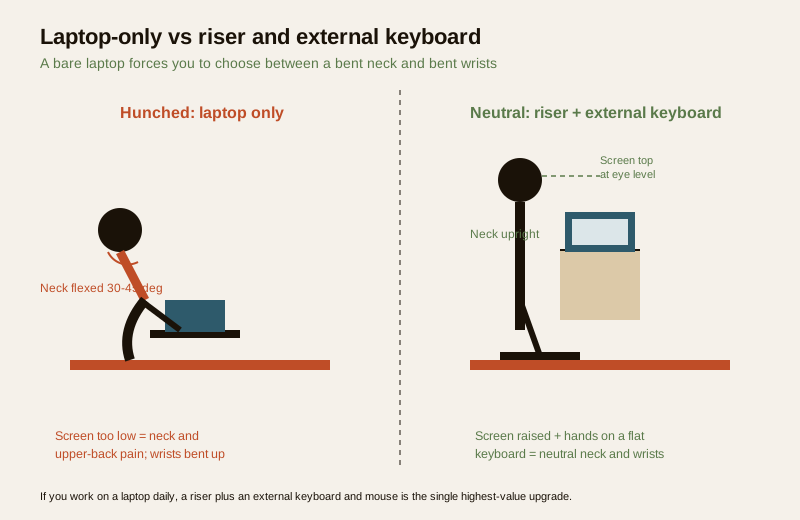
A footrest completes the loop for shorter users or high desks: when you raise the chair so your elbows meet the desk, your feet may leave the floor — a footrest restores the flat-feet, supported-thigh posture instead of dangling legs that cut circulation.
Setup dimensions by user height
Use this as a shortlist, then fine-tune with the desk-and-chair-height calculator. Seat and desk heights are the ones to match; monitor and keyboard follow your posture.
| User height | Seat height | Desk height (sitting) | Monitor top | Keyboard |
|---|---|---|---|---|
| 150-160 cm | 40-43 cm | 66-70 cm | At or just below eye level | Flat, elbows ~90 deg; add footrest if feet lift |
| 160-170 cm | 43-46 cm | 70-73 cm | At or just below eye level | Flat, elbows ~90 deg |
| 170-180 cm | 46-49 cm | 73-76 cm | At or just below eye level | Flat, elbows ~90 deg |
| 180-190 cm | 49-52 cm | 76-80 cm | At or just below eye level | Flat, elbows ~90 deg |
The rule these figures serve: adjust the chair to your body first, then bring the screen and keyboard to you. A fixed desk that ends up too high is fixed with a raised chair plus a footrest; too low is best solved by a sit-stand desk. For standing, set the desk so your elbows are near 90 degrees when standing tall, and the screen still at eye level.
Lighting, glare and the window
Even a perfect chair cannot save tired, squinting eyes. Light the space for screens, not just the room.
- Window to the side, not in front of or behind the screen. A window behind you throws glare onto the screen; a window facing you makes the screen a dark silhouette and forces your pupils to fight the brightness. Sitting side-on to the window gives soft daylight without either.
- Layer the light. Ambient ceiling light plus a task light angled onto papers (not the screen) prevents the harsh contrast between a bright screen and a dark room that tires the eyes.
- Cut glare. A sheer curtain or blind tames harsh afternoon sun; matte screens and a tidy screen angle help. In north- and east-lit rooms, morning light is gentle and ideal for a desk.
- Follow the 20-20-20 habit: every 20 minutes, look about 20 feet (6 m) away for 20 seconds to rest the eyes — furniture cannot do this one for you.
Small spaces and the Indian apartment corner
Most Indian homes carve the office out of a bedroom, living room or balcony edge, not a spare room. That is entirely workable with the right pieces.
- Foldaway and wall-mounted desks. A wall-fixed drop-down desk or a slim console folds flat when the day ends, reclaiming a bedroom corner. A console-depth desk (about 45-50 cm) works if you raise the screen and keep the keyboard forward.
- Dual-use corners. A well-chosen console can be a desk by day and a dressing or display top by evening — the dressing table and vanity guide covers the shared-surface trick. A guest-room desk that doubles as a bedside or study surface earns its floor.
- Vertical storage. When the floor is scarce, go up: a slim shelf or pegboard above the desk, and drawers under it. Route this through smart storage interiors and space-saving furniture so the office does not eat the room.
- Loose over built-in when you rent. A movable desk-and-chair set travels with you; reserve built-ins for owned homes where a wall-fixed top and integrated cable routing pay off.
- Separate work from rest. Even a visual divider — a low shelf, a rug, a screen — helps the brain switch off. Avoid working from the bed full-time; it wrecks both posture and sleep.
Storage still matters: a couple of drawers for stationery and documents and an open shelf for reference keep the desktop clear, which keeps the posture honest — a cluttered desk pushes the keyboard and screen out of place.
Kids' study tables — grow with the child
A child's study desk is an ergonomics problem on a moving target: they grow several centimetres a year, so a fixed adult desk leaves them either dangling or hunched.
- Buy adjustable. A height-adjustable desk and chair (or a chair with a footrest plate that raises as the seat does) keeps the same neutral posture — feet supported, elbows ~90 degrees, screen or book at a comfortable angle — as the child grows.
- A tilt-top helps reading and writing by bringing the page closer to square with the eyes, easing the neck.
- Feet must be supported — a dangling child fidgets and slumps; a footrest or a lower chair fixes it.
- Good task light and a window to the side matter even more for young eyes.
- Round over sharp edges and check stability (anti-tip for tall shelving above the desk) for younger children.
The same posture rules as the adult table apply; only the adjustability and safety weigh heavier. For the study-corner storage, the storage guides above apply equally.
How it connects
- Start with the furniture ergonomics guide for the body-first principles behind every sizing choice, and the complete guide to furniture in India pillar for the whole map.
- Size the room around it with residential furniture guide; for a shared or serviced workspace, contrast with the commercial furniture guide and BIFMA-tested seating.
- Fit a small home with space-saving furniture and smart storage interiors; share a surface using the dressing table and vanity guide.
- Keep the setup healthy through the healthy-homes hub — daylight, low-VOC materials and clean air around your desk.
- Dial in the numbers with the desk-and-chair-height calculator, check standard sizes on the furniture size chart, and budget with the furniture cost calculator.
- Designers and students can go deeper on the discipline in space planning and ergonomics.
Key takeaways
- Chase one neutral posture: screen top at eye level, elbows and knees near 90 degrees, feet flat, neutral wrists, lower back supported.
- The chair is the single most important buy — insist on seat-height adjustment, real lumbar support, adjustable armrests, right seat depth and a recline; a dining chair is not an office chair.
- Set the desk at ~72-75 cm or, better, buy a sit-stand desk you tune to your body; keep 60-75 cm of depth so the screen sits an arm's length away.
- A bare laptop causes neck and wrist pain — raise it on a riser to eye level and add an external keyboard and mouse; add a footrest if raising the chair lifts your feet.
- Light for screens: window to the side, layered task light, cut glare, and rest your eyes on the 20-20-20 habit.
- In Indian apartments, foldaway and dual-use desks plus vertical storage make an office corner work without a spare room.
- Kids' desks must adjust as the child grows, keep feet supported, and stay stable and rounded.
- Every figure is indicative — tune it to your body with the calculator, and treat persistent pain as a medical matter, not a furniture one.
References
- Bureau of Indian Standards furniture standards (IS 4838 and the IS furniture strength, stability and durability series) — named generally for chair and desk safety, strength and stability.
- BIFMA furniture performance standards — commonly referenced for office/task seating and desk testing (named generally; typical for commercial-grade furniture).
- RPwD Act 2016 and the Harmonised Guidelines — accessible work-surface and seating dimensions where an inclusive setup is needed.
- Formaldehyde emission classes E0 / E1 / E2 (CARB / EN 13986 context) — indoor-air-quality reference for engineered-wood desks in enclosed home offices.
- General occupational ergonomics guidance on seated computer work (neutral posture, screen height, viewing distance, sit-stand alternation) — named generally; not a substitute for medical advice.
All heights, depths and dimensions here are indicative planning aids only; tune every figure to your own body with the desk-and-chair-height calculator, get local quotes for cost, choose lower-emission materials for enclosed spaces, and treat persistent back, neck, shoulder or wrist pain as a medical matter to raise with a doctor or physiotherapist.
Export this guide
Related Guides — Deep-dive reading
Apartment-Friendly Home Office Design
Building a real workspace in a flat that has no spare room
Apartment LivingResidential Furniture Guide: Every Room in an Indian Home (2026)
A room-by-room planning checklist for the whole house — the must-have pieces, one sizing rule per room, the mistake to avoid, and the buy-versus-build cut — with links out to the deep guide for each space instead of repeating it.
FurnitureThe Complete Guide to Furniture for Indian Homes (2026)
The start-here master guide for furnishing an Indian home — what furniture actually does, the five families of pieces, the decisions in the order you face them (space and needs, loose vs modular vs built-in, materials, size and layout, budget, buy, maintain), an honest read on plywood, humidity and termites, and where every choice hands off to the carpenter, the brand or the fixer.
FurnitureRelated Tools — Try Free
Apartment Interior Planning Checklist
51-item checklist across structural, ceiling, lighting, furniture, storage, electrical, kitchen, bathroom.
ChecklistApartment Furniture Size Chart
Standard furniture dimensions for Indian apartments — sofas, beds, tables, dining, storage.
Reference ChartCross-Ventilation Analyzer
Estimate airflow and air changes per hour (ACH) from room size, window areas, layout, and local wind — with NBC 2016 Part 8 compliance check.
Ventilation Calculator