
CCTV Audio Recording in India (2026): The Law, Consent & When to Use It
Recording sound with your cameras is not the same as recording video. Before you switch the microphone on, understand the privacy and consent questions in India, then decide where audio genuinely helps and where you should leave it off.
Video and cctv audio recording are two different decisions, and people almost always make them together by accident. You buy a camera, the app has an audio toggle, it is on by default, and now every conversation within a few metres of that lens is being captured and stored — often without a moment's thought about whether that is wise, kind, or lawful.
This guide is deliberately law-and-ethics first. In India, recording what someone says engages privacy and consent in a way that a silent video of a driveway simply does not. So before we get to microphone types and audio quality, we start where you should start: with whether you should be recording sound at all, and where. This sits inside Studio Matrx's CCTV hub and the wider building security systems guide.
Not legal advice. This is an educational overview, not legal advice. Privacy and evidence law in India is evolving and fact-specific. For a real decision — a shop, a rented property, a workplace, a dispute with a neighbour — consult a qualified lawyer about your exact situation before you rely on any recording.
Why audio is legally sensitive, and video (mostly) is not
A camera pointed at your own gate, recording silent video of who comes and goes, is widely accepted as a legitimate security measure. Sound is different. A conversation is private in a way a face crossing a public path is not. Someone standing at your gate does not expect their words to be captured and kept — and that expectation is exactly what privacy law protects.
Two principles run through it:
- Consent and expectation. People have a reasonable expectation that a private conversation is not being recorded. Recording the words of your neighbours, your domestic staff, delivery workers, guests or passers-by without their knowledge or a lawful basis is where audio gets you into trouble — far more quickly than video does.
- Purpose and proportionality. The Digital Personal Data Protection Act, 2023 (DPDP Act) frames personal data collection around a clear, legitimate purpose, notice, and using no more data than you genuinely need. A recorded voice is personal data. Ask honestly: does capturing sound serve a real security purpose here, or are you just collecting people's conversations because the toggle was there?
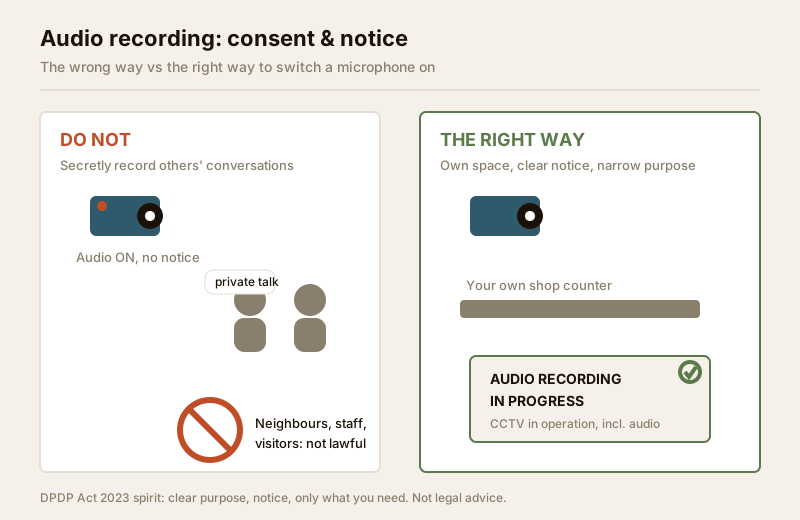
The safe posture for a home is simple: default the microphone off, and only turn it on for a specific, defensible reason on space you control — never to eavesdrop on people who have not been told.
Post clear notice — the single most important step
If you do record audio, tell people. A visible, plain notice does two things: it respects the people being recorded, and it supports the "notice and purpose" spirit of the DPDP Act.
- Put up a sign. At a shop entrance or a gate where audio is on, a printed notice — "CCTV in operation, including audio recording" — is the minimum courtesy and a sensible legal step. It removes the "secret recording" problem, which is the worst version of this.
- Tell the people who work with you. Domestic staff, shop employees and regular visitors should know if a space they spend time in records sound. Surprising someone later with a recording of their private words is both unkind and legally risky.
- Keep the purpose narrow. Notice plus a genuine security purpose (a shop counter you own, to settle disputes over transactions) is defensible. Notice for the sake of it, over a space where people reasonably expect privacy, is not.
For a structured way to think about who and what your cameras capture, and how to reduce the intrusion, work through the security & privacy assessment guide. Where a camera unavoidably overlooks a neighbour, the answer is not audio at all but privacy masking to black the area out.
Where you must NOT record audio
Some places are simply off-limits, for video and doubly for audio:
- Bathrooms, bedrooms, changing areas — never any camera, ever, let alone a microphone.
- A neighbour's property, windows or balcony — capturing their conversations across a boundary is exactly the intrusion privacy law exists to stop.
- Private conversations you are not part of — staff talking among themselves, guests in a private room, a tenant's living space if you are a landlord.
- Public areas beyond your control — the road, the lane, a shared society corridor where audio serves no purpose you can defend.
If in doubt, leave it off. The cost of an over-broad microphone is high; the security benefit of blanket audio is usually near zero.
The two microphone types: built-in vs line-in
Once you have decided audio is justified for a specific spot, here is how it is actually captured. There are two mechanisms, and they behave very differently.
- Built-in microphone. A tiny mic is baked into the camera housing, next to the lens. It is convenient and needs no extra wiring — but it hears whatever is near the camera, which is often mounted high and far from where people actually talk. Wind, rain on the housing, traffic and the camera's own IR or fan noise all get in.
- Line-in (external) microphone. A separate microphone connects to the camera or recorder by a dedicated audio input (the "line-in" or "audio-in" terminal). You place the mic where the sound matters — at the counter, near the till — not where the camera happens to hang. Quality is far better, and placement is deliberate, which also means you can point it only at the space you intend to record.
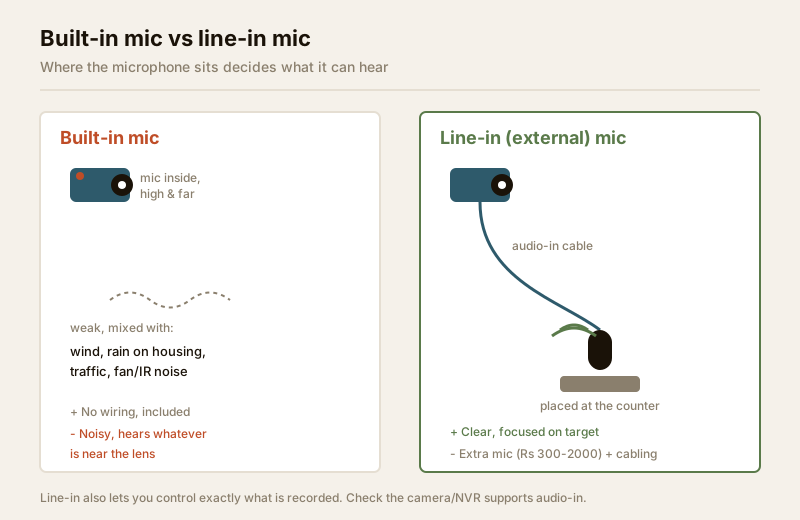
| Feature | Built-in mic | Line-in (external) mic |
|---|---|---|
| Wiring | None — inside the camera | Separate audio cable to camera/recorder |
| Placement | Fixed at the camera, often high and far | Deliberate — put it where sound matters |
| Audio quality | Weak, noisy, picks up housing/wind noise | Much clearer, focused on the target |
| Cost | Included | Extra mic (₹300 – ₹2,000) + cabling |
| Privacy control | Records whatever is near the lens | You choose exactly what it hears |
| Best for | A quiet indoor room you fully control | A specific counter, till or reception point |
Note that not every camera even has audio-in; many budget cameras have only a built-in mic, and some NVRs need audio explicitly enabled and mapped to a channel. This is a spec to check before you buy — a licensed installer can confirm what your kit supports.
The honest limits of CCTV audio quality
It is worth setting expectations, because CCTV audio disappoints people who expect a clean recording:
- It is not studio sound. Compressed, low-bitrate audio over a security stream is muffled. A voice two metres from a built-in mic in a breezy porch may be barely intelligible.
- Distance kills it fast. A microphone hears the nearest, loudest thing. At the far end of a driveway, a conversation is just murmur under wind.
- Noise floods in. Ceiling fans, air-conditioners, traffic, the monsoon on a metal roof — all of it competes with the voices you actually care about.
- Sync and storage. Audio adds to file size and, on some systems, can drift out of sync with video. It is another thing to configure and maintain.
The practical upshot: audio is useful in a quiet, close, controlled setting and close to worthless as a blanket outdoor feature. That reality should shape where — if anywhere — you switch it on.
Where audio genuinely helps — and where to disable it
Audio earns its place in a narrow set of situations, almost all of them a space you own and control, with people who have been told.
- A shop or counter you own. A microphone at your own till, under clear signage, can settle a genuine dispute over what was agreed or said in a transaction. This is the textbook legitimate case: your space, your business, clear notice, narrow purpose.
- A reception or front desk. A recorded record of interactions at a business you run, again with notice.
- An entry intercom you are part of. Talking to a courier through a video doorbell or gate station is a live conversation you are in — a different feature covered in the two-way audio guide — not covert recording of others.
And where to disable it — which for most homes is nearly everywhere:
- General home cameras watching the gate, garden or driveway: turn audio off. You want to see who is there, not record the road's conversations.
- Any camera that reaches a neighbour, a shared corridor or the street.
- Any space where staff or guests hold private conversations.
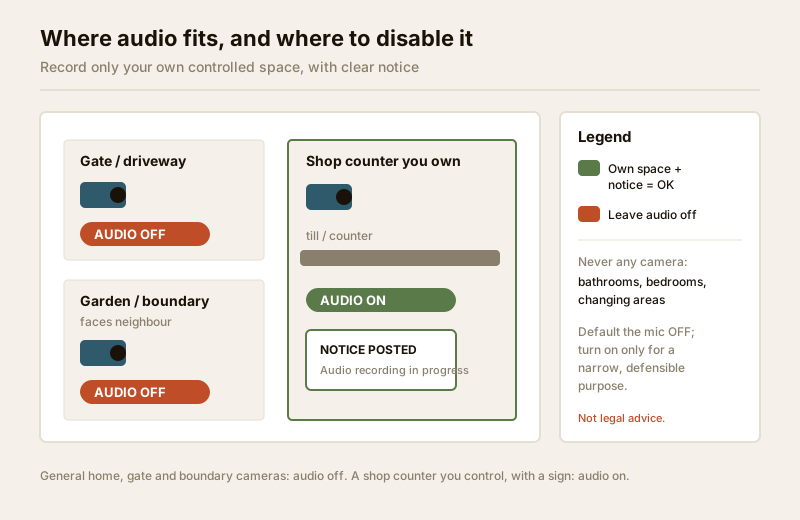
| Location | Record audio? | Why |
|---|---|---|
| Own shop counter / till | Yes, with notice | Legitimate purpose, controlled space, people told |
| Business reception you run | Yes, with notice | Record of interactions you are responsible for |
| Home gate / driveway | No | Captures the road and passers-by; no real benefit |
| Garden / boundary facing a neighbour | No | Records neighbours' private conversations |
| Shared society corridor / lift | No | Not your space; audio serves no defensible purpose |
| Any room with private staff/guest talk | No | Private conversations, high intrusion, low value |
| Bathroom / bedroom / changing area | Never any camera | Absolute no-go, full stop |
Audio recording vs two-way audio — don't confuse them
These are different features and different laws-of-thumb. Audio recording is passive: the camera captures and stores whatever sound it hears, which is the sensitive part. Two-way audio is a live talk-back conversation you initiate — greeting a courier, warning off a loiterer — where you are a party to the exchange. They can exist on the same camera but are separate toggles. The talk-back side is covered fully in the two-way audio guide; this guide is only about the recording and storing of sound.
When to bring in a professional
- Wiring a line-in microphone to a camera or NVR, and mapping the audio channel correctly, is best done by a licensed installer who can confirm your kit even supports audio-in and configure it cleanly.
- Any mains-electrical or cabling work behind the camera is a qualified electrician's job — see the electrical hub. Security hardware must never block a door, window or fire-escape route.
- The legal question — should you record audio here, and how must you notify people? — is a matter for a qualified lawyer, especially for a shop, a workplace, a tenancy or any recording you might one day rely on as evidence. Treat everything above as a starting point for that conversation, not a substitute for it.
Legal & ethics caution (not legal advice). Recording conversations in India can engage privacy, consent and evidence law. The safe default is audio off; where you turn it on, record only your own controlled space, post clear notice, keep the purpose narrow, and confirm your specific situation with a lawyer. Do not record the private conversations of neighbours, staff, visitors or the public without a lawful basis.
For the fuller privacy picture across your whole camera scheme, work through the security & privacy assessment guide and, for cameras that unavoidably see a neighbour, privacy masking. For the residential system as a whole, see the residential CCTV guide and the complete guide to CCTV systems in India.
Key takeaways
- Audio is a separate, more sensitive decision than video. Recording what people say engages privacy and consent in India in a way silent video does not — decide it deliberately, not by leaving a toggle on.
- Default the microphone off. Turn it on only for a specific, defensible reason on space you control, and post clear notice where you do.
- Never record bathrooms/bedrooms/changing areas, a neighbour's property, or private conversations you are not part of.
- Line-in mics beat built-in mics for quality and, crucially, for controlling exactly what is captured — but CCTV audio is muffled, short-range and noisy at best.
- Audio genuinely helps at a shop counter or reception you own, with notice; on general home, gate and boundary cameras, leave it off.
- This is not legal advice — for any real decision about recording sound, consult a qualified lawyer, and route wiring and mains work to a licensed professional.
References
- Digital Personal Data Protection Act, 2023 — collect personal data (including recorded voice) only for a clear, legitimate purpose, with notice, and no more than needed; verify current text and rules before relying on it.
- Reasonable expectation of privacy — recording private conversations without consent or a lawful basis raises privacy and evidentiary issues; seek qualified legal advice for your specific situation.
- Manufacturer specification sheets — confirm whether a camera or NVR supports audio-in and how audio channels are enabled before purchase and install.
This is an educational overview, not legal advice. Whether and how you may lawfully record audio depends on your exact facts — consult a qualified lawyer, and engage licensed professionals for wiring and any electrical work.
Export this guide
Related Guides — Deep-dive reading
Where Not to Install CCTV in India (2026): The No-Go Zones
A camera is a powerful thing, and pointing it at the wrong place can turn a security measure into a serious intrusion. This is the plain, humane list of places a camera must never point, plus the borderline spots to think twice about.
SecuritySecurity Privacy Assessment for Indian Homes
Getting the privacy side of home security right: camera placement ethics and limits, notice and consent, the extra caution audio demands, and treating footage as personal data you store, retain and delete responsibly under India's DPDP Act 2023 direction.
SecurityPublic Footpath Camera Restrictions in India (2026): Your Camera, the Public's Street
You can put a camera on your own gate, but the footpath and road outside are public space full of people who never agreed to be filmed. Here is how to point your camera fairly, capture the least public space you need, and stay a good neighbour.
SecurityRelated Tools — Try Free
CCTV Camera Coverage & Count Calculator
Estimate how many CCTV cameras you need, the NVR channels, storage in TB for your retention period, and an indicative all-in cost with GST.
CCTV CalculatorBefore vs After — Cost Reality Check
Compare what you expected to pay vs what you actually paid, category by category.
Reality CheckCCTV Placement Compliance Checker
A quick DPDP-grounded privacy and safety self-check for where a camera is pointed — flags the items to fix.
Compliance