
Security System Redundancy for Indian Homes
How to design redundancy into a home security system so no single failure blinds it — eliminating single points of failure across power, connectivity, storage, detection, response and devices, with redundancy kept proportional to what you protect.
A security system you have paid good money for can be defeated by the smallest thing: a two-hour power cut, a snapped internet cable, or a burglar who simply walks off with the recorder that holds every clip. Each of those is a single point of failure — one component whose failure takes the whole system dark. Redundancy is the discipline of designing those single points out, so that when one thing fails, something else keeps watching, recording or alerting.
This guide sits inside Studio Matrx's Home Security Hub and complements your risk assessment: once you know what you are protecting, redundancy decides how hard it is to knock that protection out. The good news is that you do not need a second of everything. You need backups in the few places where a single failure would blind you — and you need them proportional to what you protect, so a two-bedroom flat and a jewellery-heavy villa get very different plans.
Scope & safety. This is a defensive planning guide. It helps you specify a more resilient system — never how to defeat one. Backup power, inverters, solar and any mains wiring are qualified electrical work: specify what you want, then have a licensed electrician install and certify it. Security hardware must never block a fire-escape route or lock anyone in during a power failure.
Redundancy is not a bolt-on — layered security already gives you some
If you have followed layered security design, you already have redundancy without calling it that. A perimeter light, a gate sensor, a door contact and an indoor camera are four independent layers; a burglar who slips past one still trips another. That overlap is exactly what redundancy means — no single element carries the whole load.
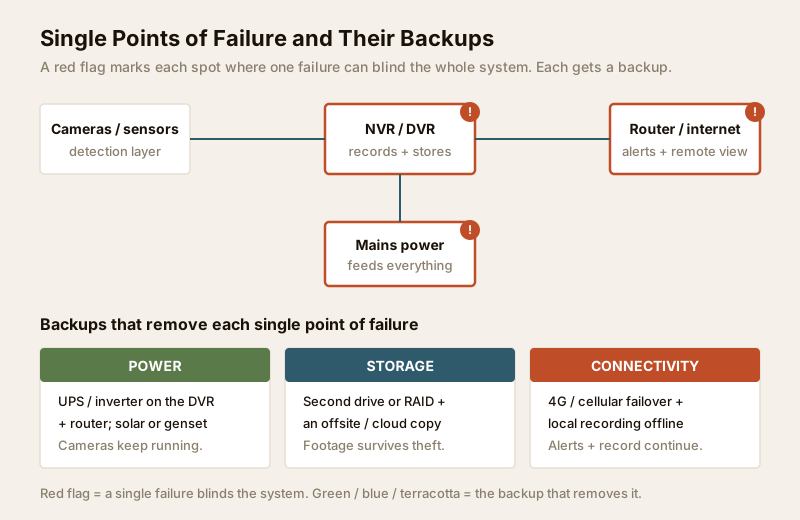
So the goal here is not to bolt a parallel system onto your home. It is to find the handful of places where layering does not protect you — the shared spine that everything depends on — and add a backup there. Three things sit on that shared spine in almost every home: power, the recorder that stores footage, and the internet link that sends alerts. Lose any one and multiple layers go dark at once. Those are the single points of failure worth money.
The six failure points, and the backup for each
Walk your system the way you would walk your home in a risk assessment — but this time ask of every part: "if this dies, what still works?" Six failure points cover almost every home.
1. Power — the cut that kills everything
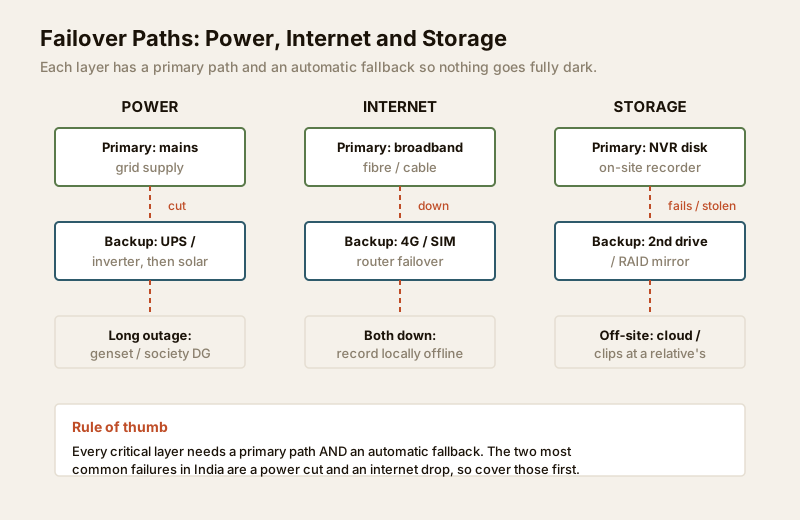
A power cut is the most common failure in an Indian home, and mains power feeds the cameras, the recorder, the router, the alarm and the lights. Lose it and, without a backup, your entire system goes dark exactly when an empty, unlit house is most tempting. Power is therefore the first redundancy every home should fund.
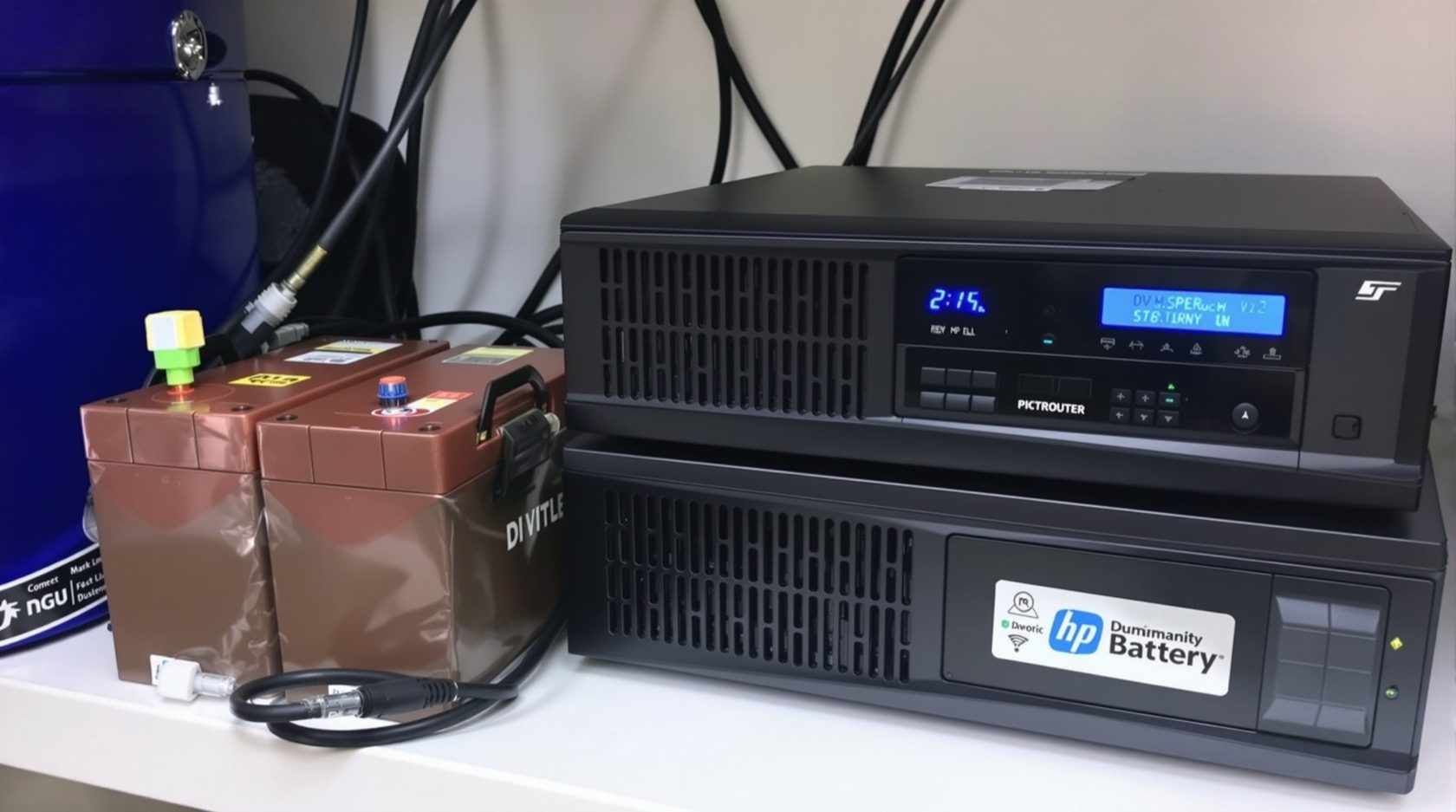
The fix is a battery that carries the critical load through the cut: a UPS or inverter sized to keep the recorder, the router and the cameras running, with solar or a generator for longer outages. A camera on its own is useless if the recorder it feeds has died, so back the recorder and router together, not just the cameras. Sizing this properly — which loads, how many hours — is exactly what the backup power calculator is for, and the electrical backup assessment walks the whole runtime question for your specific setup.
2. Connectivity — the internet drop that silences alerts
Your broadband does two jobs for security: it pushes alerts to your phone and lets you view cameras remotely. When the line drops — a common event during monsoon or a cable fault — a cloud-only system goes silent, and you would never know an alert was missed.
Two backups matter here. First, cellular / 4G failover: a router (or a camera with a SIM slot) that switches to a mobile network when broadband fails, so alerts keep flowing. Second, and just as important, local recording: cameras that write to an on-site NVR or SD card keep recording even with no internet at all. Insist on local recording as the floor — cloud is a copy, never the only place footage lives. The internet and network readiness guide covers failover in depth.
3. Storage — the recorder that gets stolen or fails
Here is the failure people forget: the burglar takes the NVR. Every camera worked perfectly, and the only copy of the evidence walked out the door. A hard drive can also simply die — they are the most failure-prone part of any system. Either way, one box is a single point of failure for all your footage.
Redundancy for storage means a second copy in a second place. Options, roughly in order of effort: a second drive or RAID mirror inside the recorder (survives a disk failure, not a theft); an off-site or cloud copy of important clips (survives theft and fire); and hiding the recorder itself so it is not the obvious grab. For a high-value home, do both a mirror and an off-site copy. Plan this properly with the data storage planning guide.
4. Detection — do not trust one sensor type
If your whole alarm rests on one kind of sensor, that sensor's blind spot is your system's blind spot. A PIR motion detector can be fooled by a covered lens or a slow, low approach; a door contact says nothing about someone coming through a window; a single camera has one field of view. Relying on one is a detection single point of failure.
The answer is the layering you already know: combine sensor types so they cover each other. A door contact plus a PIR plus a camera on the same zone means defeating one still trips another, and cross-confirmation cuts false alarms too. This is redundancy through diversity — not two of the same sensor, but different sensors watching the same asset.
5. Response and monitoring — one alert path is no alert path
An alert that goes to exactly one phone that happens to be on silent, out of coverage, or left at home is a response failure. If the one path to a human breaks, detection and recording were for nothing.
Build more than one path to a person who will act: alerts to multiple family members, not just one; a mix of app notification and SMS so a single channel outage does not swallow the warning; and for higher-value homes, professional monitoring or your RWA guard as a second responder alongside self-monitoring. Agree in advance who calls whom — the emergency preparedness guide turns this into a written plan your household can actually follow at 2am.
6. Devices — the one that quietly stops
Any camera or sensor can fail — a lens hazes over, a unit dies in the heat, a cable frays. For a critical location (the main gate, the front door), being blind there for the week it takes to source and fit a replacement is a real gap.
Full device redundancy — two cameras on every point — is overkill for a home. The practical version is a critical spare: keep one spare camera and a spare drive on the shelf, so a failure at an important spot is a same-day swap, not a week of exposure. This is a genuinely nice-to-have, funded only after power and storage are covered.
The single-point-of-failure register
Write your own version of this table — it is the core deliverable of a redundancy plan. For each failure, name the impact and the backup that removes it.
| Single point of failure | Impact if it fails | Redundancy that removes it |
|---|---|---|
| Mains power | Cameras, recorder, alarm, lights all dead during the cut | UPS / inverter on recorder + router + cameras; solar or genset for long outages |
| Internet / router | No alerts, no remote view | 4G / cellular failover; keep recording locally regardless |
| NVR / DVR stolen | All footage gone with the box | Off-site or cloud copy; hide / secure the recorder |
| Hard drive failure | Footage lost, no evidence | Second drive or RAID mirror inside the recorder |
| One sensor type only | A blind spot defeats the whole alarm | Layer PIR + door contact + camera on key zones |
| Single alert recipient | Warning missed, no one responds | Multiple recipients + app-and-SMS + monitoring / guard |
| Critical camera dies | Blind at an important spot for days | A spare camera and spare drive on the shelf |
Must-have, should-have, nice-to-have
Redundancy has diminishing returns, so rank it. Fund the must-haves — the failures that leave you fully blind — before anything else, then work down as budget and the value of what you protect allow.
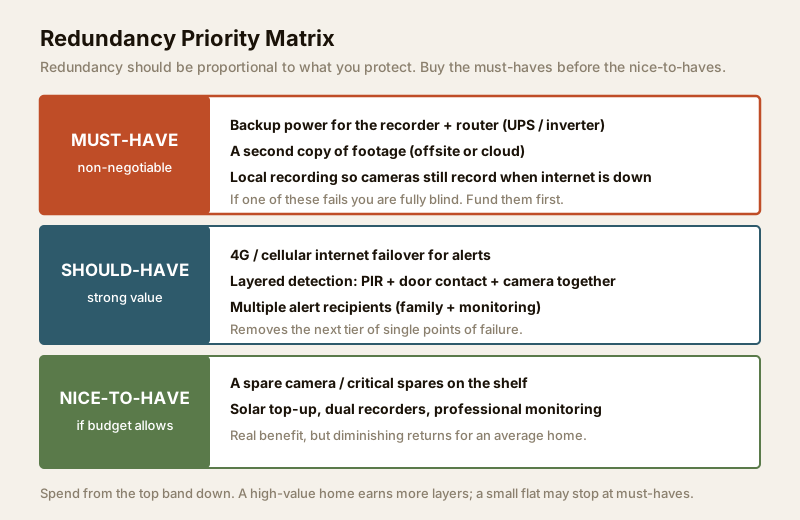
| Priority | Redundancy | Why this tier | Rough Indian cost |
|---|---|---|---|
| Must-have | Backup power for recorder + router (UPS / inverter) | A power cut otherwise blinds everything | Rs 4,000 to Rs 20,000+ by load and runtime |
| Must-have | A second copy of footage (off-site / cloud) | The recorder can be stolen or fail | Cloud from ~Rs 150/month; a spare drive Rs 3,000+ |
| Must-have | Local recording (cameras record with no internet) | Cloud-only goes silent when the line drops | Usually built into the NVR you already buy |
| Should-have | 4G / cellular internet failover | Keeps alerts flowing when broadband fails | Router + SIM data plan, a few hundred rupees/month |
| Should-have | Layered detection (PIR + contact + camera) | No single sensor's blind spot defeats the alarm | Sensor cost; often already in the design |
| Should-have | Multiple alert recipients + monitoring | One missed notification is not a missed break-in | Free (extra recipients) to a monitoring subscription |
| Nice-to-have | Spare camera / critical spares | Same-day swap instead of a week blind | One unit's cost, held on the shelf |
| Nice-to-have | Solar top-up, dual recorders | Resilience for long outages / very high value | Higher; justified only for high-value homes |
Keep it proportional. A small rented flat with modest valuables may sensibly stop at the must-haves. A villa with jewellery, or a home that is empty for long stretches, earns the should-haves and some nice-to-haves too. Let the asset value from your risk assessment set the depth — do not gold-plate a low-risk home, and do not leave a high-value one on a single thread. When you cost it out, the backup power calculator sizes the biggest line item, and redundancy should be folded into your overall security budget rather than bolted on afterwards. If you expect to grow the system, plan headroom now with the future expansion guide.
Redundancy needs maintenance to stay real
A backup that has quietly failed is worse than none, because you trust it. An inverter battery that died a year ago, a cloud sync that stopped, a spare camera that was never bought — all give false confidence. Redundancy is only real if it is tested: check that the inverter actually carries the load through a cut, that off-site copies are current, and that alerts still reach every recipient. Build these checks into your routine with the maintenance access planning guide, and make sure your installer leaves the backups accessible for testing rather than sealed away.
When to bring in a professional
Do the planning yourself — you know which assets matter and where the single points of failure sit. But hand the execution to qualified people wherever mains power or life-safety is involved: sizing and wiring a UPS, inverter, solar array or generator is licensed electrical work, and any change that touches fire-escape doors or emergency egress must be reviewed so a security measure never traps anyone. When you appoint the installer, use the vendor and installer evaluation guide and check that redundancy — backup power, a second footage copy, failover — is written into the scope, not quietly dropped to hit a price.
Key takeaways
- Find the shared spine. Layered security already gives you redundancy; the failures worth money are the shared ones — power, the recorder and the internet link — where a single fault blinds many layers at once.
- Cover six failure points: power (UPS / inverter / solar), connectivity (4G failover + local recording), storage (RAID + off-site copy), detection (layer PIR + contact + camera), response (multiple recipients + monitoring), and devices (a critical spare).
- Keep a single-point-of-failure register — failure, impact, backup — as your core plan.
- Fund must-haves first: backup power for the recorder and router, and a second copy of footage. Should-haves and nice-to-haves follow as value and budget allow.
- Make redundancy proportional to what you protect, and test the backups — an untested backup is false confidence. Route UPS, inverter, solar and any mains wiring to a licensed electrician.
This is an educational planning guide. It is strictly defensive and does not describe how to defeat any security measure. Backup-power, solar, inverter and mains-electrical work is qualified professional work — engage licensed installers, keep all fire-escape routes clear, and verify any applicable National Building Code or municipal bye-law requirement for your project.
Export this guide
Related Guides — Deep-dive reading
Smart Home Maintenance & Troubleshooting for Indian Homes
A smart home is not a one-time purchase — it is a small fleet of computers that needs firmware updates, fresh batteries, occasional reboots and a plan for the day a manufacturer switches off the cloud. This guide gives you a maintenance calendar, a troubleshooting flow for the failures Indian homes actually see, and the UPS and security hygiene that keep it all running through power cuts and voltage swings.
Smart HomeLocal Storage vs Cloud CCTV in India (2026): Where Your Footage Should Live
A homeowner's honest head-to-head on where CCTV footage is kept — on a hard disk in the recorder at home, or uploaded to a per-camera cloud plan — across cost, theft resilience, internet dependence, retention, remote access and DPDP privacy, ending in a clear which-suits-whom, with hybrid usually the smartest answer.
SecuritySecurity Fire Alarm Integration in India (2026): Smart Alerts, Certified Systems, Fail-Safe Egress
The most important sentence a smart-home designer can say about fire is also the least profitable: a smart-home smoke sensor or fire notification is a helpful add-on, not a substitute for a certified fire-alarm system. This guide draws the line hard — life-safety detection and alarm belongs to the NBC-governed certified system — and then covers the genuinely useful, correctly-scoped automations the smart layer can add on a verified fire signal: unlock for egress, open the gate for the fire tender, light the escape path, stop the away-scene, and notify everyone loudly. All of it fail-safe. None of it in the way of the system that actually saves lives.
SecurityRelated Tools — Try Free
Security Backup Power Calculator
Size a UPS/inverter and battery to keep CCTV, NVR, router and alarm running through a power cut — load, Ah, VA and cost.
Backup PowerCCTV Camera Coverage & Count Calculator
Estimate how many CCTV cameras you need, the NVR channels, storage in TB for your retention period, and an indicative all-in cost with GST.
CCTV CalculatorCCTV Cloud vs Local Cost Calculator
Compare cloud CCTV subscription against a local NVR + HDD — upfront, 5-year total, monthly fee and break-even.
Cloud vs Local