
Security Equipment Room Planning for Indian Homes
How to plan the small but critical space that houses the security brains — NVR, network switch, router, UPS, patch panel and alarm panel: where to put it, how to keep it cool, powered, dust-free, lockable and protected so an intruder cannot destroy your evidence.
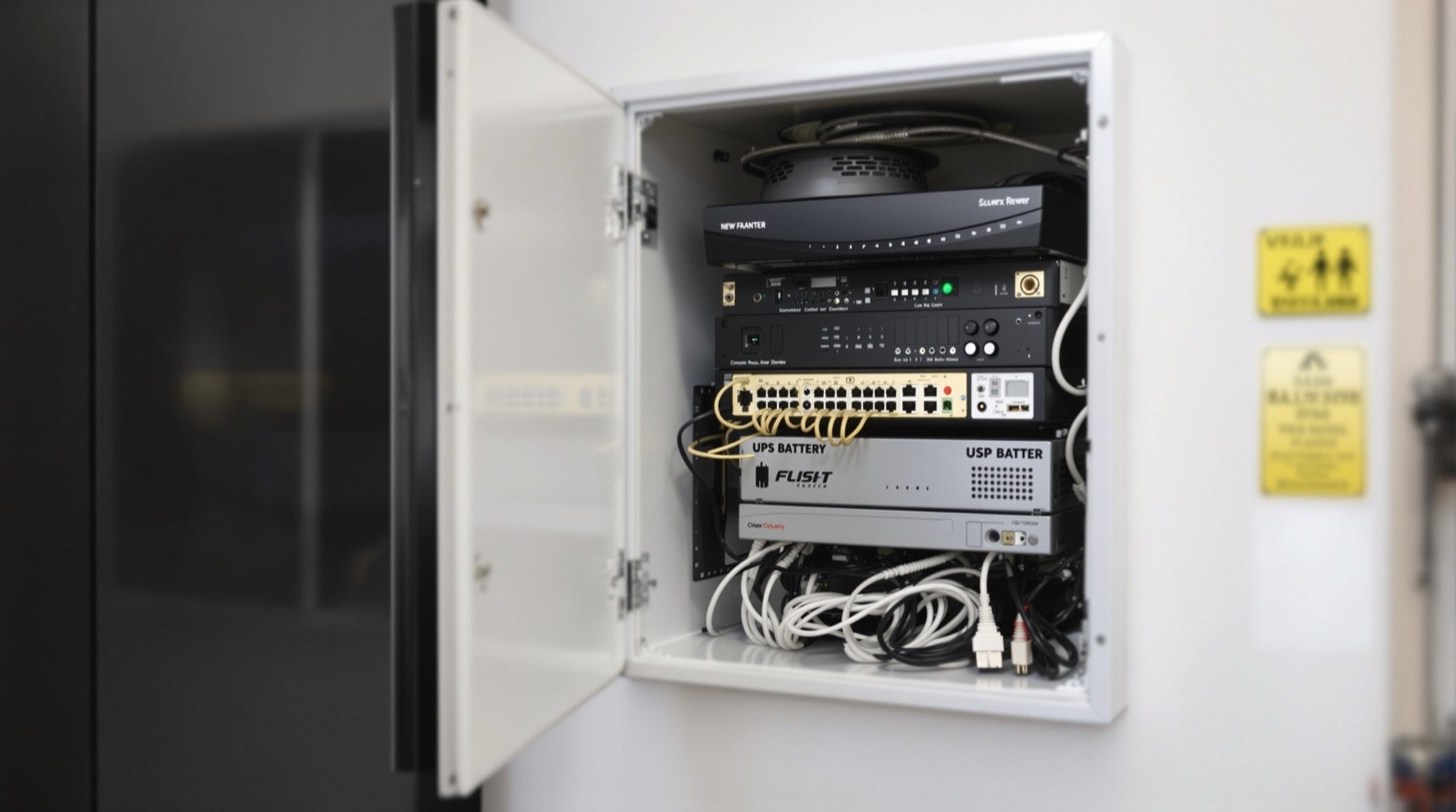
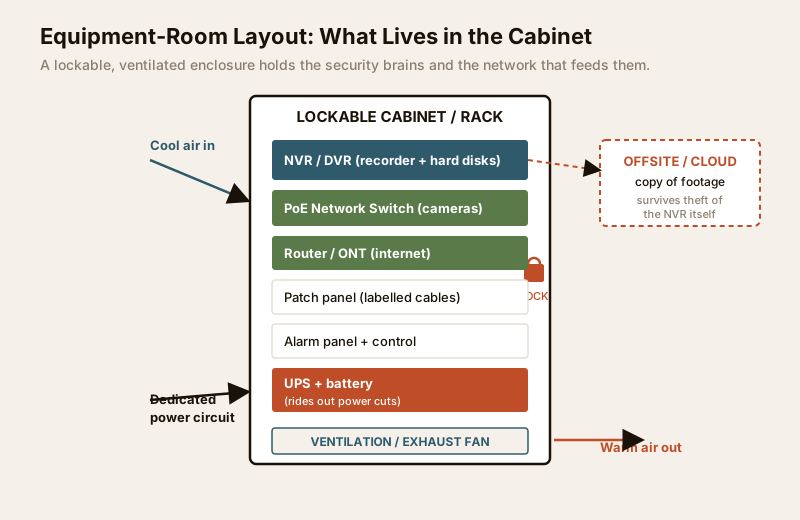
Every camera, sensor and door phone in your home eventually reports to one small space — a cabinet, a cupboard, a utility niche or, in larger houses, a dedicated little room. Inside it sit the brains of the whole system: the NVR or DVR that records your CCTV, the network switch that powers and connects the cameras, the router or ONT that carries footage to your phone, the UPS that keeps everything alive through a power cut, the patch panel where cables land, and the alarm panel. Plan this space well and the system runs quietly for years. Plan it badly and you get overheating recorders, dropped cameras, and — the worst case — an intruder who finds the box and walks off with your only copy of the evidence.
This guide is part of the infrastructure layer of the Home Security Hub. It complements the risk assessment guide, which tells you what to protect; this one tells you where the machinery lives. It is a planning guide: you decide the layout and write the spec, then a licensed professional handles the mains electrical and any structural work.
Scope & safety. This is a defensive planning guide. Mains wiring, a dedicated circuit, earthing and any structural cutting are qualified electrical and building work — specify them, then have a licensed professional install and certify them. Never let a cabinet, rack or cable route block a fire escape, an electrical panel or any egress path.
Why the equipment room deserves its own plan
Homeowners obsess over camera brands and forget the box they all plug into. Yet the equipment room decides three things the cameras cannot:
- Reliability. Heat and dust kill electronics. A recorder that overheats in a sealed cupboard fails in the Indian summer exactly when you rely on it.
- Continuity. When the power cuts — as it does — a UPS in this room is the difference between footage that keeps rolling and a system that blinks off.
- Evidence survival. This is the one most people miss. If a burglar finds the NVR, smashing or stealing it destroys the local recording. The room must be hard to find, hard to reach and hard to open, and your footage should also have an offsite or cloud copy so the evidence survives even if the hardware does not. Plan that second copy alongside your data storage and backup.
Where to put it: location trade-offs
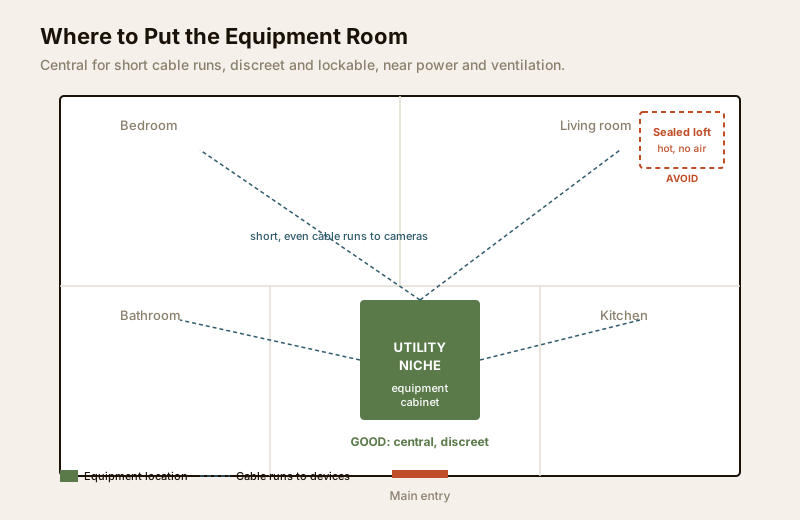
The ideal spot balances four pulls that often fight each other: central (so cable runs to cameras are short and even), discreet (so an intruder cannot find it), serviceable (so you can reach it to maintain), and safe for the electronics (cool, dry, powered, ventilated). No single spot is perfect; you are choosing the best compromise for your home.
| Location option | Strengths | Weaknesses | Best when |
|---|---|---|---|
| Central utility niche or store | Short, even cable runs; discreet; easy to service; near power | Needs deliberate ventilation | The default choice for most homes |
| Under-stair cupboard | Central, hidden, lockable | Often cramped, poorly ventilated, dusty | Small homes, if you can add airflow |
| Dedicated small room / server closet | Room for growth, easy service, can be air-conditioned | Uses floor area; costs more | Villas, large homes, home offices |
| Loft / attic / above false ceiling | Hidden, out of the way | Hot, dusty, hard to service, no easy power | Avoid unless ventilated and accessible |
| Living area / open shelf | Easy to service | Not discreet; NVR easily found and grabbed | Never for the recorder |
| Outdoor / garage box | Frees indoor space | Dust, heat, damp, monsoon, theft risk | Only weatherproof, locked, ventilated units |
Two rules cut through the trade-offs. First, never put the recorder somewhere obvious — the whole point of hiding footage is defeated by an NVR sitting on an open TV console. Second, keep it central so cabling stays short: long runs cost more, drop signal and complicate the layout. Coordinate the position early with your cabling plan and your home network readiness, because the router and switch want to live here too.
The requirements checklist
Treat the space like a tiny machine room. Each aspect below has a requirement and a reason — use it as a spec you hand to your installer and electrician.
| Aspect | Requirement | Why it matters |
|---|---|---|
| Location | Central, discreet, not visible from living areas | Short cable runs; the recorder is hard for an intruder to find |
| Ventilation | Airflow, an exhaust fan, or AC for enclosed spaces | Electronics and the UPS shed heat; a sealed cupboard cooks them |
| Power | A dedicated circuit plus a UPS on the load | Clean, uninterrupted supply; rides out Indian power cuts |
| Dust protection | Filtered intake, closed cabinet, off the floor | Dust clogs fans and hard disks and shortens equipment life |
| Cable management | Patch panel, ties, clear labels on every cable | Faults are found fast; nothing is unplugged by mistake |
| Room security | Lockable door or cabinet, tamper alert, hidden | An intruder cannot smash the NVR and erase the evidence |
| Evidence backup | Offsite or cloud copy of footage | Recording survives even if the local hardware is stolen |
| Sizing | Fits the kit today plus room to grow | You can add cameras and disks without rebuilding |
| Access | Reachable for cleaning, checks and repairs | Maintenance actually happens instead of being skipped |
| Safety | Never blocks fire escape, egress or the electrical panel | Life safety always outranks security hardware |
Heat and ventilation — the silent killer
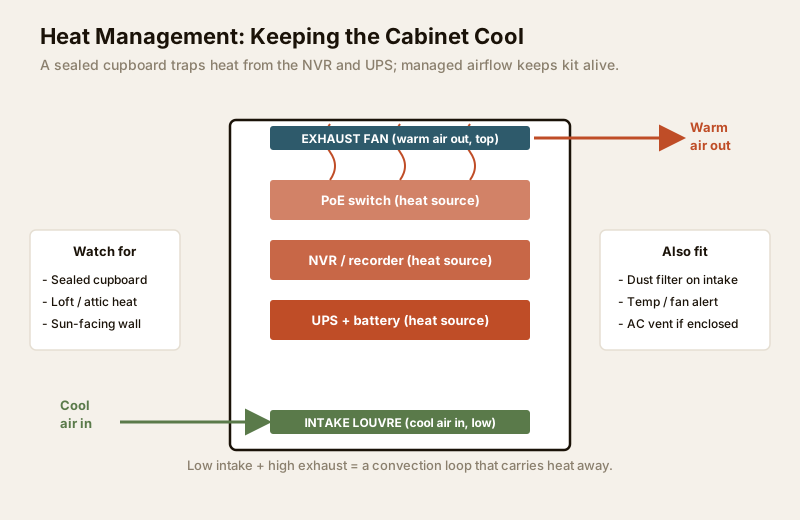
The most common cause of a failed home CCTV system in India is not a bad camera; it is a recorder baked inside a closed cupboard. The NVR, the PoE switch and especially the UPS all give off heat continuously, and a sealed enclosure has nowhere to send it. On a summer afternoon a shut cabinet can climb well past what the electronics tolerate, and they respond by throttling, corrupting disks or simply dying.
The fix is airflow, and it is cheap. Give the cabinet a low intake and a high exhaust so a convection loop carries heat out, add a quiet exhaust fan sized to the enclosure, and in a fully enclosed small room consider a small AC vent. A temperature-and-fan alert that pings your phone if it runs hot is a worthwhile add. Route the electrical side of any fan or AC through your electrical planning and confirm your backup power covers the ventilation too, not just the recorder.
Power — a dedicated supply and a UPS
The equipment room wants clean, continuous power. Plan a dedicated circuit for it rather than sharing a socket with an air-conditioner or geyser whose switching disturbs the supply. On that circuit sits a UPS sized to carry the NVR, switch, router and cameras through a typical power cut — long enough to keep recording and to notify you, not just to shut down gracefully. Size the battery honestly for your area's outage pattern; the backup power calculator helps you match runtime to load, and the power supply requirements guide covers provisioning in full. Remember that PoE cameras draw their power through the switch, so the switch must be on the protected supply — otherwise the cameras die the moment mains drops even if the recorder stays on.
When to bring in a professional. Do the planning yourself — you know your home and your kit. But the dedicated circuit, the wiring, earthing, the fan or AC connection, and any wall-cutting or false-ceiling work are qualified electrical and building tasks. Specify what you want and why, then engage a licensed electrician to install and certify it, and a security installer to commission the NVR, switch and alarm. For new builds, fold this room into the design early with the security planning guide for new homes.
Dust protection
Indian homes see a lot of dust, and dust is the quiet enemy of any fan or spinning hard disk. Keep the equipment in a closed cabinet with a filtered intake, lift it off the floor where dust and stray water settle, and plan a light periodic clean of the filter and vents. A closed-but-ventilated enclosure — not a wide-open shelf and not a hermetically sealed box — is the sweet spot.
Cable management and labelling
When a camera drops at 11 pm, you do not want to trace a spaghetti of identical black cables. Land every cable on a patch panel, tie the runs neatly, and label both ends of every cable with the camera or device it serves. Leave a little service loop so you can move equipment without re-pulling wire. Good management here makes every future fault, addition and audit faster — and it is far easier to plan now than to retrofit. This dovetails with your cabling requirements and the PoE cabling planner.
Room security and tamper protection
The room protects the evidence, so the room itself must be protected. Make the door or cabinet lockable, keep it out of sight of the front door and living areas, and consider a tamper alert — a sensor that notifies you if the cabinet is opened or the recorder loses power unexpectedly. Because even the best-hidden box can be found, the offsite or cloud copy of footage is your real insurance: it means smashing the NVR no longer erases the record. Any physical hardening — a reinforced door, a security enclosure — is structural work; specify it and see the structural safety guide for how to route it properly.
Sizing for today and tomorrow
Size the space for the kit you have plus honest room to grow. Count the units — recorder, switch, router or ONT, UPS, patch panel, alarm panel — add their depth and the space each needs for airflow, then leave spare capacity: a couple of extra camera channels on the NVR, free ports on the switch, a spare disk bay, and a little physical room in the cabinet. Homes almost always add cameras later; a room planned tight to today's count forces a costly rebuild the first time you extend coverage. If you are budgeting the whole system, the security cost planning guide and the cost estimator help you sequence spending.
Access for maintenance
A system you cannot reach is a system you will not maintain. Leave enough clearance to open the cabinet, swap a disk, reseat a cable and clean the filter without dismantling the room. Plan a light routine — check recording is live, glance at temperatures, clean the vents — and keep a simple label or note of what each device is. The whole point of a well-planned room is that upkeep becomes a five-minute habit rather than a dreaded project.
Key takeaways
- The equipment room is the brains of your security system — plan the cabinet or niche as deliberately as you plan the cameras.
- Place it central, discreet and serviceable: short cable runs, hidden from intruders, reachable for maintenance.
- Beat heat and dust with a low intake, a high exhaust fan, filtered air and a closed-but-ventilated enclosure — a sealed cupboard cooks the electronics.
- Give it a dedicated power circuit and a UPS sized to keep recording through Indian power cuts, with the PoE switch on the protected supply.
- Protect the evidence twice: lock and hide the room and keep an offsite or cloud copy, so smashing the NVR cannot erase your footage.
- Route mains electrical and structural work to licensed professionals, and never let hardware block a fire escape.
Plan the space now, then browse the full security guides collection to detail the cabling, power and storage that feed it.
This is an educational planning guide. It is strictly defensive and does not describe how to defeat any security measure. Electrical, ventilation and structural work is qualified professional work — engage licensed installers and verify any applicable National Building Code or municipal bye-law requirement for your project.
Export this guide
Related Guides — Deep-dive reading
Electrical Safety for Security Systems in India (2026): Powering It Without Peril
A homeowner's guide to the power side of home and RWA security systems, CCTV, alarms, gates, access control and NVRs, done so it protects you instead of quietly becoming a shock or fire hazard. What makes a supply safe, what to insist on, and why the mains work belongs to a licensed electrician.
SecurityNVR and DVR Maintenance in India (2026): Keeping the Recorder Alive, Cool and Secure
The recorder is the brain of a CCTV system, and a neglected one quietly loses footage, drops cameras or gets hacked. A practical upkeep routine for NVRs and DVRs in Indian conditions — heat and dust, clean power, firmware and security patches, network hygiene, time sync and the disk — with a clear split between what a facility person can safely do and what belongs to a technician.
SecurityPoE vs Wi-Fi CCTV: Which Home Security Cameras Are Better?
One camera type runs power and video down a single Cat6 cable to an NVR and almost never drops out; the other clips to a wall in minutes and streams over your home Wi-Fi. This guide settles PoE vs Wi-Fi CCTV for Indian homes — reliability, video quality and bandwidth, cabling and power, retrofit versus new-build effort, NVR versus SD and cloud storage, hacking risk, real rupee costs, scalability and outdoor use — and gives a clear verdict for each kind of home.
Smart HomeRelated Tools — Try Free
CCTV Camera Coverage & Count Calculator
Estimate how many CCTV cameras you need, the NVR channels, storage in TB for your retention period, and an indicative all-in cost with GST.
CCTV CalculatorElectrical Safety & Load Audit
Home electrical audit — 10 categories, 65+ checkpoints across earthing, RCCB, MCB, wiring, switchboards, appliance circuits, DG/inverter backup.
Safety AuditSecurity Cabling & PoE Planner
Estimate cable length, drops, PoE power budget, the right switch, conduit and cost for a CCTV/security cabling plan.
Cabling Planner