
NVR and DVR Maintenance in India (2026): Keeping the Recorder Alive, Cool and Secure
The recorder is the brain of a CCTV system, and a neglected one quietly loses footage, drops cameras or gets hacked. A practical upkeep routine for NVRs and DVRs in Indian conditions — heat and dust, clean power, firmware and security patches, network hygiene, time sync and the disk — with a clear split between what a facility person can safely do and what belongs to a technician.
Every camera on a site points at the same small box in a cupboard, and that box is where the footage actually lives. The recorder — an "NVR" for IP and PoE cameras, a "DVR" for the older analog and coax kind — is the brain of the whole CCTV system. When it is healthy, nobody thinks about it. When it is neglected, it fails in the quietest and most expensive way possible: the cameras still glow, the lights still blink, the wall monitor still shows a live picture, and yet the night you go back for the clip that matters, it is not there. The disk filled and stopped, or a camera dropped weeks ago and no one noticed, or the timestamp was three hours wrong, or the whole unit had been silently rebooting itself in the heat.
In Indian conditions the recorder has a harder life than the datasheet imagines. It sits in an unventilated cupboard, a security cabin, a shop back-room or a shaft near the DB — hot, dusty places where the mains sags and spikes all day. Heat and dust choke its fan and vents; unclean power corrupts recordings and shortens the life of both the unit and its disk; and because it is a networked device reachable from the internet, it is one of the most commonly hijacked pieces of equipment in any building. A recorder is not fit-and-forget hardware. It needs a routine.
This guide is that routine. It treats the NVR and the DVR together, because most of the upkeep is shared, and flags the few places they differ — the PoE switch and network on an NVR, the coax and analog side on a DVR. For where the footage is stored, pair this with CCTV storage and disk maintenance; for keeping the whole system on a calendar, see the security maintenance calendar; and for the wider picture, the security-system maintenance pillar.
Scope & safety. This is an upkeep guide for facility managers, integrators and technically confident owners — not an installation manual. Some tasks are genuinely DIY-safe: dusting the exterior vents, confirming every camera is online and recording, checking the time and date, exporting the config and applying a vendor firmware update through the recorder's own screen. Others are strictly for a qualified technician or your AMC provider: opening the unit for internal cleaning, any mains-electrical or UPS wiring work, re-architecting the network, and recovering a corrupted or failed recorder. This is not a price guide or a buying guide — for costs and contracts see the AMC guide, and cross-link out for the rest. A recorder holds CCTV footage, which is personal data under the DPDP Act 2023; handle it accordingly during any maintenance.
What "maintaining a recorder" actually means
A CCTV recorder is not one thing to look after but seven, and every one of them fails in its own way. Keep this whole picture in view — skipping any single item is how a system that looks alive turns out to have recorded nothing.
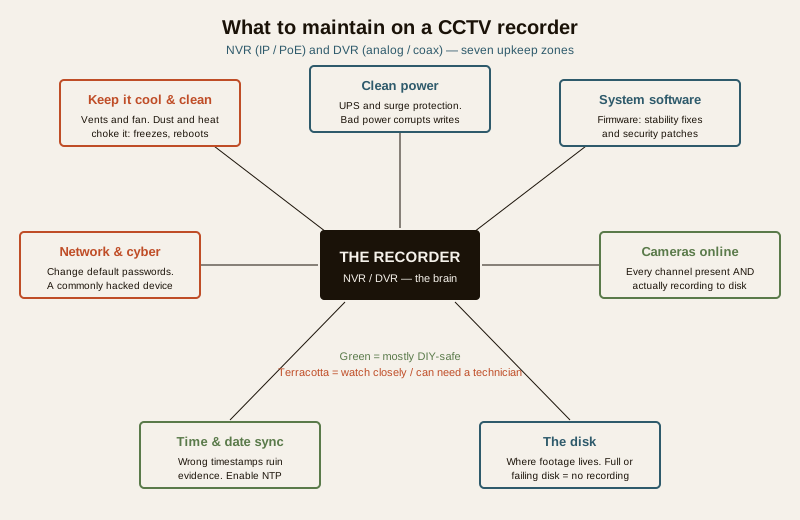
- Keep it cool and clean. Heat and dust are the number-one killers of recorders in India. A blocked vent or a seized fan cooks the unit; overheating shows up as freezing, spontaneous reboots and premature disk death.
- Clean power. A recorder on raw mains rides every sag, spike and cut. Unclean power corrupts recordings mid-write, damages the disk file system and shortens the life of the whole unit.
- System software. Firmware gives you both stability fixes and, crucially, security patches. An unpatched recorder is a known way in.
- Network and cyber hygiene. Default passwords and careless remote access make the recorder the single most-hijacked device in a building.
- Cameras online and recording. Cameras drop off quietly; a channel can go dark for weeks unless someone checks that all of them are present and actually writing to disk.
- Time and date sync. A wrong clock ruins evidence — footage with the wrong timestamp is hard to rely on and easy to challenge.
- The disk. The storage is where footage lives; a full, failing or wrongly-configured disk means no recording when it counts.
Heat and dust — the number-one killer in India
If you fix only one thing, fix this. Indian equipment cupboards run hot, and they run dusty, and a recorder's small internal fan pulls that dust straight onto its heatsink and disk. Over months the vents clog into a grey felt, the fan slows or seizes, internal temperature climbs, and the unit starts misbehaving — freezing, rebooting on its own, dropping cameras, and quietly ageing its disk far faster than it should. This is the commonest cause of "the DVR keeps restarting" and "the NVR froze again" complaints on Indian sites, and almost all of it is preventable.
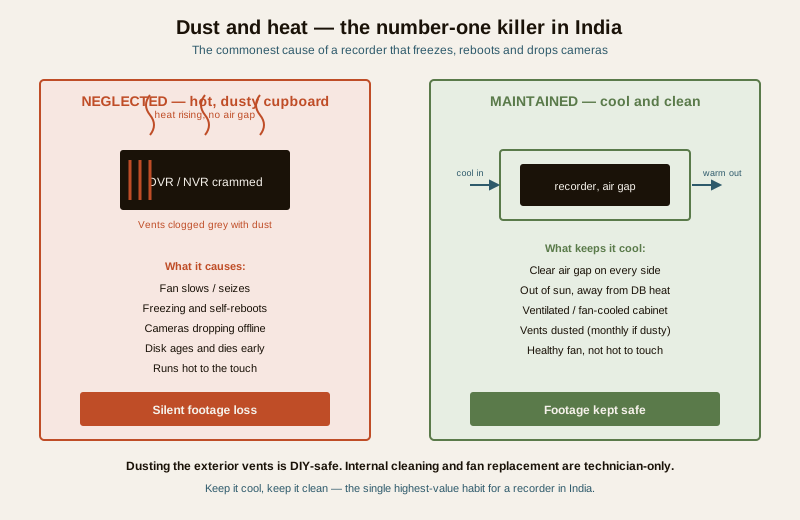
What keeps a recorder cool (and who does it):
- Placement — do this once, correctly. The recorder belongs in the coolest, cleanest, best-ventilated spot available: out of direct sun, away from the heat of a distribution board or inverter, not sealed inside an airtight box, and with a clear air gap on every side so its fan can breathe. A ventilated or fan-cooled cabinet in a dust-heavy site pays for itself.
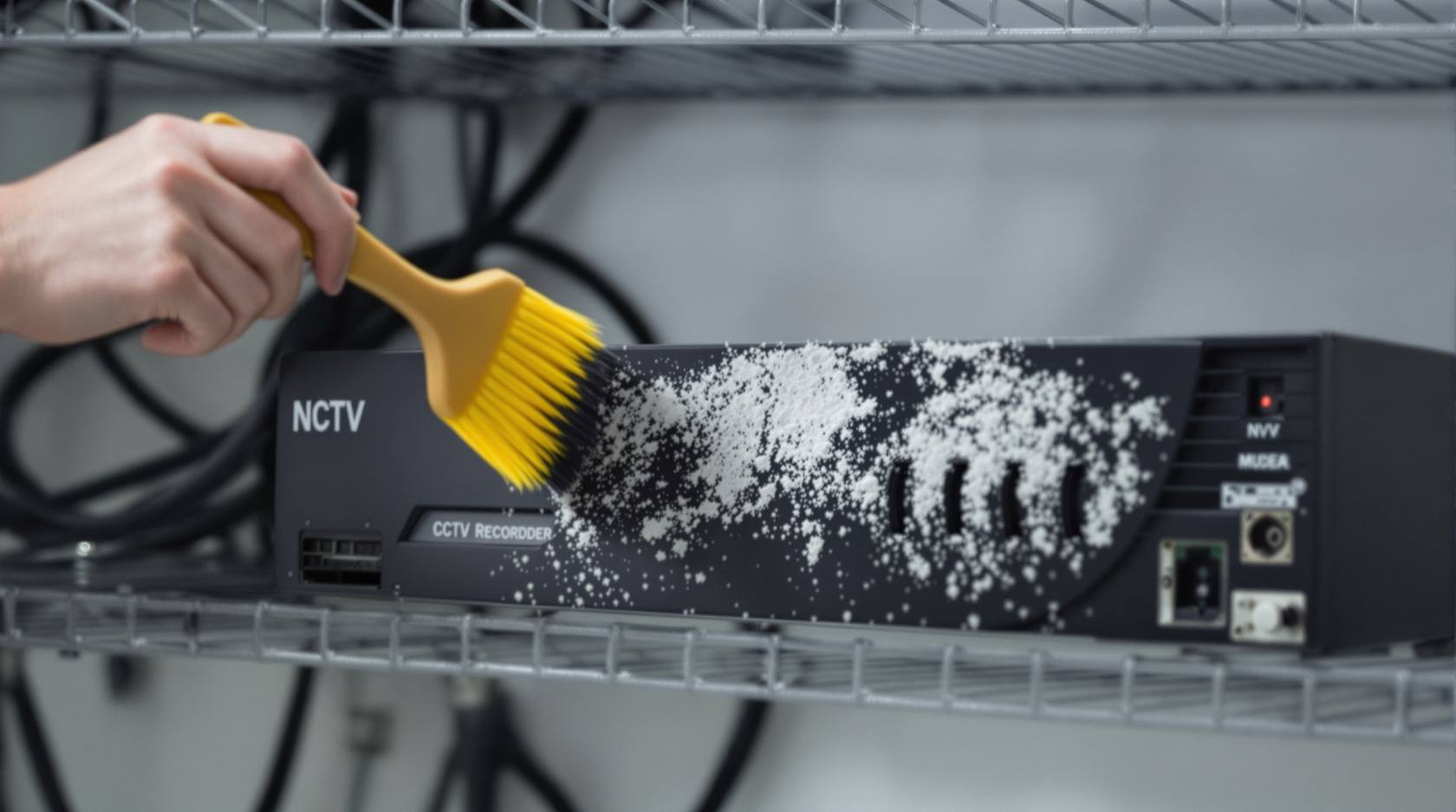
- Dust the exterior vents — DIY-safe, and the highest-value routine task. With the unit powered down, wipe the outside casing and clear the intake and exhaust vents. A soft brush and a vacuum held near (not jammed into) the vents lifts the felt of dust before it reaches the fan. Do this monthly on a dusty site, quarterly elsewhere. This is safe for a facility person and prevents the majority of heat failures.
- Internal cleaning and fan replacement — technician only. Opening the recorder to blow out the heatsink or replace a failed fan is a job for your integrator or AMC provider. A fan that is audibly grinding, or a unit that runs hot to the touch and reboots, needs the cover off — but not by untrained hands, and not while it holds evidence you have not backed up.
Watch the temperature the way you would watch anything else: a recorder that is hot to the touch, whose fan is silent when it should hum, or which reboots on the hottest afternoons is telling you its cooling has failed.
Clean power — protect the recordings and the disk
A recorder writes to disk continuously, and a write interrupted by a power cut or a spike is a corrupted file — at best a lost clip, at worst a damaged file system that takes recording down entirely. Indian mains, with its sags, surges and outages, is exactly the environment that does this.
- A UPS is not optional for a recorder. An appropriately-sized UPS lets the unit ride through short cuts and shut its writes cleanly, and it smooths the sags and brownouts that make a recorder reboot. The recorder and, ideally, the PoE switch or camera power should sit behind it — a recorder that stays up while its cameras lose power is only half-protected.
- Surge protection on the incoming supply guards against the spikes that kill recorder power boards and disks, especially in monsoon and on generator changeover.
- Any mains, UPS-wiring or electrical work is a technician's job. Confirming the UPS is on, its battery healthy and the recorder plugged into it is a fine visual check; wiring, load calculation and battery replacement are for a qualified person.
A recorder on clean, backed-up power lives longer and, more importantly, keeps its recordings intact through exactly the disturbances that a burglar or a monsoon night will throw at it.
System software — firmware for stability and security
Firmware updates do two jobs at once. They fix stability bugs — the freezes, the channel drop-outs, the memory leaks that make a recorder need weekly reboots — and they patch security holes. That second job is critical: recorders are a favourite target, and vendors ship security patches precisely because vulnerabilities are found and exploited. An unpatched NVR or DVR reachable from the internet is a standing invitation.
- Applying a vendor firmware update through the recorder's own menu is DIY-accessible — but do it carefully: use only firmware from the manufacturer for your exact model, read the release notes, export your configuration first (see below), and do not cut power mid-update. A botched firmware flash can brick a unit, so on a critical site let your integrator handle it or do it under an AMC.
- Reboots have their place. A scheduled periodic reboot clears memory and is a legitimate part of upkeep for units that get sluggish — but a recorder that needs frequent reboots to keep working is faulting, not maintained, and wants firmware attention or a service visit.
Firmware is the overlap between reliability and cybersecurity, and it is worth its own discipline across every networked device on site — cameras and recorder alike. See firmware and security updates for doing this properly across the system.
Network and cyber hygiene — the recorder is a hacked device
An NVR or DVR is a small networked computer, and it is one of the most commonly compromised devices in any building — hijacked for its footage, for a foothold on the network, or simply swept up by automated scanners hunting default logins. Treating the recorder as a security appliance, not an appliance, is the whole point.
- Change every default password. The factory admin login is public knowledge; leaving it is the single most exploited weakness. Set strong, unique credentials on the recorder and on every camera, and disable or rename default accounts where the unit allows.
- Secure remote access, or close it. Remote viewing is useful and dangerous. Prefer the manufacturer's proper cloud or a VPN over exposing the recorder's ports directly to the internet; disable UPnP and any port-forwarding you do not actively need; and never leave a recorder reachable on its default port with its default password.
- Segment and patch. Keep cameras and the recorder on their own network segment or VLAN where the site allows, keep firmware current (above), and audit who has login access.
- DPDP obligation. The footage on a recorder is personal data under the DPDP Act 2023. Securing the recorder against intrusion is not only good practice, it is part of protecting that data — and any remote access, retention and who-can-view decisions should be made deliberately.
Network re-architecture, VLAN design and VPN setup are technician work; changing passwords and turning off remote access you do not need are things a competent administrator should do today.
Cameras online, and the clock right
Two checks cost minutes and save cases.
- Every camera online and recording. Cameras drop off — a PoE port dies, a cable corrodes, a camera fails — and the loss is invisible unless someone looks. Regularly confirm that every channel shows a live image and that each one is actually writing to the disk (a live picture is not proof of recording). On an NVR, a dropped camera often traces to the PoE switch or a port; check switch and port health, and for the cabling behind a persistent drop see CCTV cable inspection.
- Time and date sync. A recorder with the wrong clock produces footage that is hard to trust and easy to dispute — timestamps that do not match reality can undermine an entire piece of evidence. Enable network time sync (NTP) so the recorder holds the correct time by itself, and after any power event or firmware update, verify the date, time and time-zone are still right. This is a simple, DIY-safe check with outsized value.
The disk, backups and the config
- The disk is covered in depth in CCTV storage and disk maintenance — confirm the recorder is retaining the days of footage you expect, that no disk is reporting errors, and that recording has not silently stopped. Surveillance-grade drives and a periodic health check belong to that routine; here, just make it a standing part of the recorder check.
- Back up the configuration. Export the recorder's settings — channels, schedules, motion zones, network and user setup — to a file and keep it safe. If the unit fails or a firmware update goes wrong, a config export turns a day of re-programming into a few minutes of restore. Do this after any significant change and before every firmware update.
- The PoE switch and ports (NVR). On an NVR the built-in or separate PoE switch powers and connects the cameras; keep it cool and dust-free like the recorder, watch for ports that no longer deliver power, and treat a whole bank of cameras dropping together as a switch or power fault rather than a camera fault.
Signs your recorder needs attention
A faulting recorder usually warns you first. Treat any of these as a prompt to act — several together mean call a technician now:
- Freezing or an unresponsive interface, or a live picture that stutters and lags.
- Spontaneous reboots, especially in the heat of the afternoon — a classic overheating signature.
- Cameras dropping offline, one intermittently or a whole group at once (suspect PoE/switch or power on an NVR).
- The unit running hot to the touch, or a fan that has gone silent or grinds.
- Remote access that has stopped working, or that you never secured in the first place.
- A wrong or drifting clock, or timestamps that do not match reality.
- Gaps in recorded footage, or fewer days of retention than the disk should hold — often the first sign of a failing disk or a unit that keeps rebooting.
The DIY-safe versus professional split, and a schedule
Most recorder upkeep is either clearly DIY-safe or clearly a technician's job. Keeping the line straight protects both the evidence and the person.
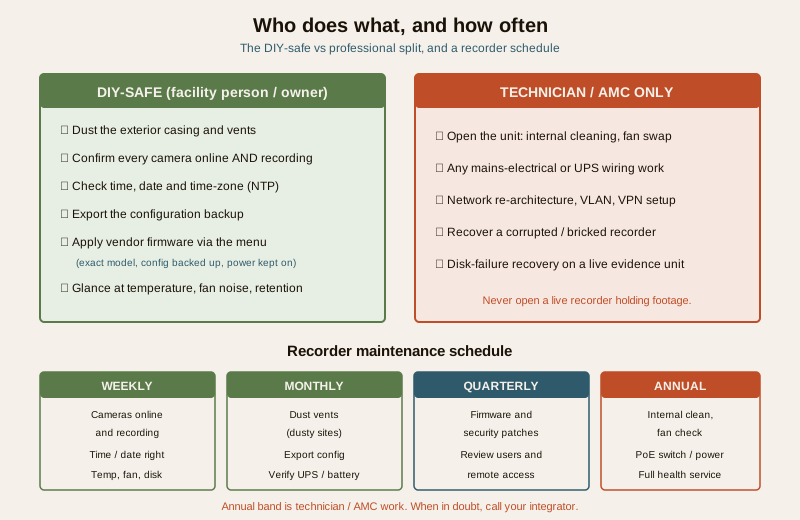
Safe for a facility person or confident owner: dusting the exterior casing and vents; confirming every camera is online and recording; checking the time, date and time-zone; exporting the configuration; and applying a manufacturer firmware update for the exact model through the recorder's own screen, with the config backed up first and power kept on throughout.
Strictly for a qualified technician or AMC provider: opening the unit for internal cleaning or fan replacement; any mains-electrical or UPS wiring work; network re-architecture, VLAN and VPN configuration; and recovering a corrupted, bricked or disk-failed recorder — especially one holding footage you have not exported.
| Task | Frequency | Who |
|---|---|---|
| Confirm every camera online and recording; check the time and date | Weekly | Facility person (DIY-safe) |
| Glance at recorder temperature, fan noise and free disk / retention | Weekly | Facility person (DIY-safe) |
| Dust exterior vents and casing (dusty sites monthly) | Monthly to quarterly | Facility person (DIY-safe) |
| Export configuration backup; verify UPS and battery are healthy | Monthly | Facility person / technician |
| Apply firmware and security patches; review users and remote access | Quarterly (or on vendor release) | Technician or careful admin |
| Internal cleaning, fan check, PoE-switch and power inspection, full health service | Annual | Technician / AMC |
| Change passwords, close unused remote access, audit network | On setup, then reviewed quarterly | Technician / admin |
Do not skip, do not improvise. Never open a live recorder, do mains work, or attempt data recovery yourself on a unit holding evidence. When a recorder is freezing, rebooting or has lost remote access and the basics have not fixed it, call your integrator or AMC provider — a recorder that fails on the night it mattered is the whole failure this routine exists to prevent.
A short recorder checklist
- Recorder placed cool, ventilated, out of direct sun and DB heat, with clear air gaps.
- Exterior vents dusted; fan healthy; unit not running hot.
- On a UPS with surge protection; UPS battery confirmed healthy.
- Firmware current; security patches applied; config exported and stored safely.
- Default passwords changed; unused remote access closed; DPDP handling deliberate.
- Every camera online and recording; PoE switch and ports healthy (NVR).
- Time, date and time-zone correct; NTP enabled.
- Disk retaining the expected days with no errors (see storage maintenance).
Key takeaways
- The recorder is the brain of the CCTV system — a neglected NVR or DVR fails silently, and you find out the night you need footage that was never saved.
- Heat and dust are the number-one killer in India — placement, dusting the exterior vents and keeping the fan healthy prevent most freezes, reboots and premature disk death.
- Clean power protects the recordings — a UPS and surge protection stop the sags, spikes and cuts that corrupt writes and shorten the unit's life.
- Firmware does double duty — stability fixes plus security patches; an unpatched, default-password recorder is one of the most commonly hijacked devices in any building.
- Check the cheap things often — every camera online and recording, and the clock right, cost minutes and save cases.
- Keep the split clean — dust, checks, time and vendor firmware are DIY-safe; internal cleaning, electrical work, network changes and recovery are technician-only.
Where to go next
- CCTV storage and disk maintenance — the disk the recorder writes to, retention and drive health.
- Firmware and security updates — patching the recorder and cameras across the whole system.
- CCTV cable inspection — chasing a camera that keeps dropping to its cabling.
- CCTV maintenance and AMC — putting recorder upkeep on a contract, and what an AMC should cover.
- Security maintenance calendar and the security-system maintenance pillar — the whole-system routine this fits into.
- The maintenance sub-hub, the CCTV sub-hub and the main security hub.
References
- Digital Personal Data Protection Act, 2023 — CCTV footage held on an NVR or DVR is personal data; securing the recorder, controlling remote access, and setting retention and viewing rights are part of protecting it during maintenance.
- Manufacturer firmware, release notes and hardening guidance for your specific recorder model — the authoritative source for updates, default-credential changes and secure remote-access configuration; apply only firmware issued for your exact model.
- CERT-In advisories on network-video-recorder and IP-camera vulnerabilities — background on why recorders are a common target and why timely patching and password changes matter.
This is an educational upkeep overview for facility managers, integrators and technically confident owners — not an installation manual, an electrical guide, or a substitute for a qualified technician. Do not open a live recorder, undertake mains or UPS wiring, or attempt data recovery yourself; engage your integrator or AMC provider for anything beyond the clearly DIY-safe checks, and handle all footage in line with the DPDP Act 2023.
Export this guide
Related Guides — Deep-dive reading
CCTV Remote Access in India (2026): Watch From Your Phone, Safely
How to view your own cameras from anywhere without leaving the front door open to the internet — change the defaults, use strong credentials and 2FA, keep firmware current, prefer the vendor's secure cloud relay or a VPN, segment the camera network, and treat footage as personal data.
SecurityCCTV Maintenance and AMC in India (2026): Keeping the System Alive
How to keep a CCTV system actually working after install: clean lenses and housings, check every camera still records, watch drive health and retention, update firmware, and decide whether an Annual Maintenance Contract (AMC) is worth it.
SecurityCCTV Recording Failure in India (2026): Live View Works but Nothing Was Saved
You open the recorder to pull footage of an incident and there is nothing there, even though every camera shows a crisp live picture. A calm, ordered guide to why an Indian CCTV system records live but saves nothing, and how to fix it before the next incident.
SecurityRelated Tools — Try Free
CCTV Camera Coverage & Count Calculator
Estimate how many CCTV cameras you need, the NVR channels, storage in TB for your retention period, and an indicative all-in cost with GST.
CCTV CalculatorElectrical Safety & Load Audit
Home electrical audit — 10 categories, 65+ checkpoints across earthing, RCCB, MCB, wiring, switchboards, appliance circuits, DG/inverter backup.
Safety AuditSecurity Backup Power Calculator
Size a UPS/inverter and battery to keep CCTV, NVR, router and alarm running through a power cut — load, Ah, VA and cost.
Backup Power