
Parking Panic Buttons in India: Fixed Help Points for the Walk to the Lift
A parking area — especially an enclosed basement or an unmanned stilt at night — is exactly where someone is alone, out of sight, and often out of mobile signal. A fixed, lit, well-marked help point turns the lonely walk from car to lift into a place where help is one press away.
Walk any Indian basement car park late at night and you feel it: the phone signal drops halfway down the ramp, the light is a few tubes with dark bays beyond, and the walk from the car to the lift is long, private and unwatched. If something goes wrong on that walk — a fall, a collapse, someone waiting behind a pillar — the person there often has no way to call for help. Their phone has no bars. There is no one in sight. The guard is at the gate, floors away, and does not know anything is wrong. That gap, precisely at the moment a person is most alone, is what a parking panic button is for.
This is a professional, strictly defensive guide to parking panic buttons — the fixed emergency help points that belong in a car park. It sits in the Security Knowledge Hub under the parking and garage sub-hub, alongside the complete parking and garage security guide that frames the whole subject. It is a companion, not a duplicate, of the general panic buttons for Indian homes guide: that one covers personal and home devices — keyfobs, pendants, bedside buttons — while this one is only about the fixed help point in a parking area, where the problem is being alone, out of sight, and out of signal.
Scope & safety. This is an educational planning guide for owners, RWAs and facility managers. You plan, decide and coordinate; licensed professionals install and certify the wiring, mains supply, alarm and intercom links. Any mains or fixed cabling is a licensed electrician's work. One rule overrides everything: a help point near an escape route must never obstruct egress — it sits beside the exit path, never across it. And a parking panic button is not a fire alarm call point — they are different systems for different emergencies; do not confuse or combine them. Never frame or use these as surveillance of residents.
What a parking panic button actually is
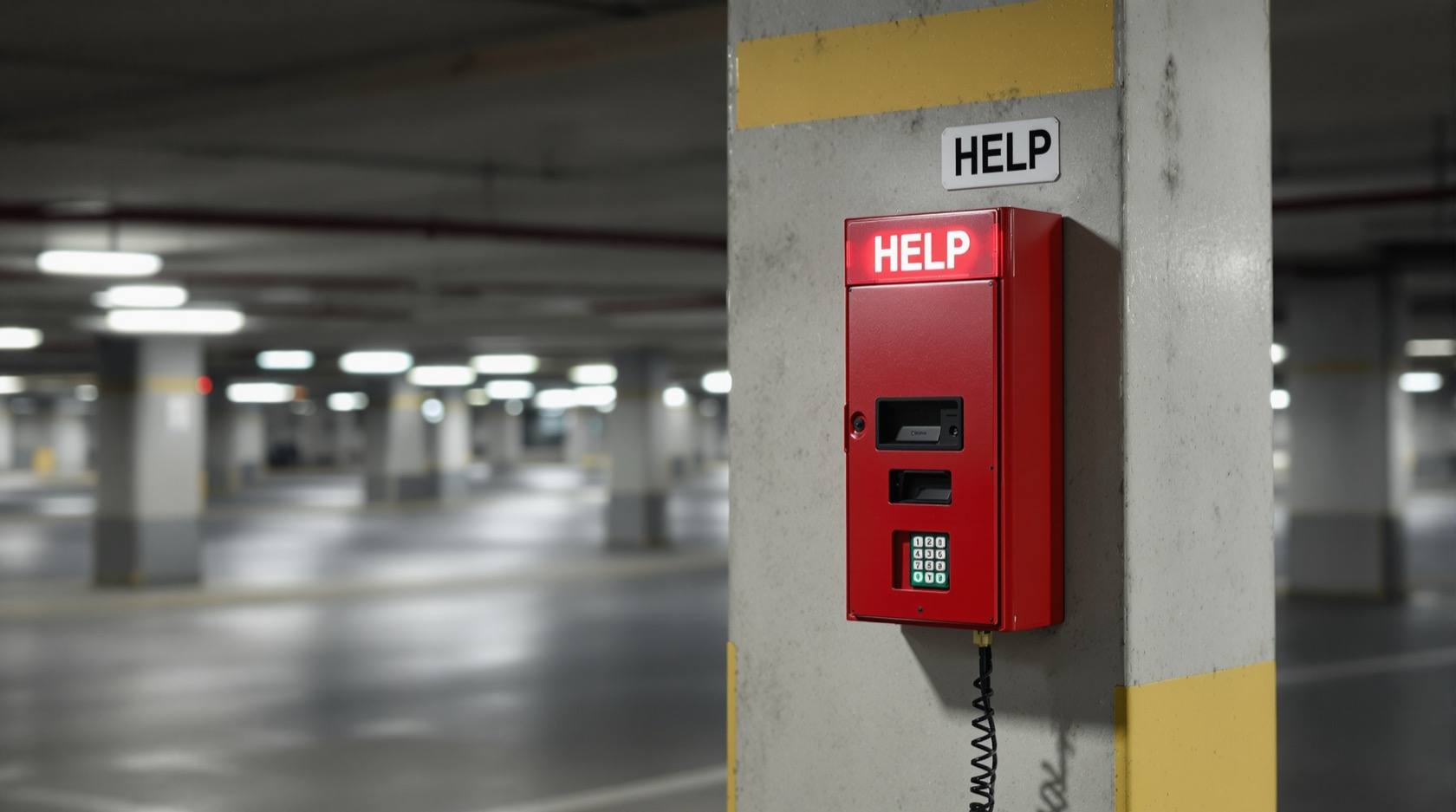
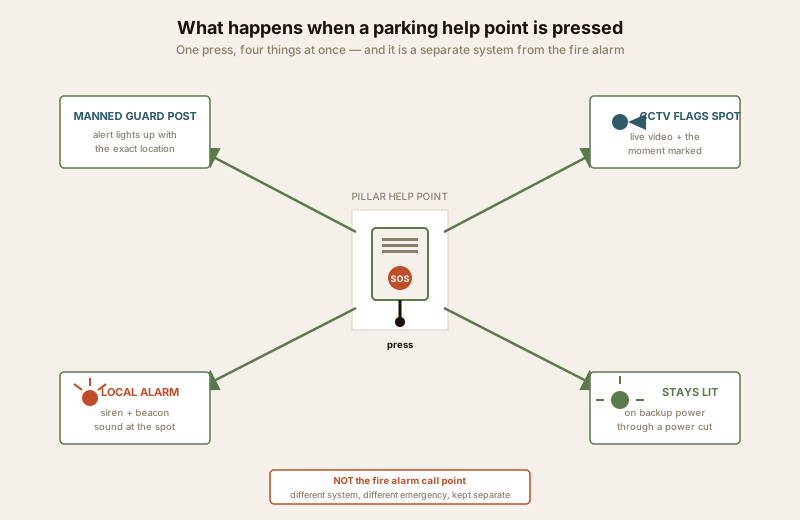
A parking panic button — better called a help point — is a clearly marked, well-lit call point fixed to a pillar or wall in the parking area. When a person presses it (or, in the better form, speaks into it), it does four things at once:
- Raises an immediate alert to a manned point — the guard post, gate cabin or control room — that says someone needs help, at this exact spot.
- Flags the CCTV covering that location, so the person watching the alert is looking at live video of the help point the instant it is pressed, and the recorder marks that moment for review. (See CCTV placement for parking and control-room monitoring.)
- Sounds a local alarm or beacon at the spot — a siren or flashing light that both deters and tells anyone nearby that an alarm has been raised.
- Reassures by simply being there. A visible, lit help point tells every resident walking to the lift that help is designed into this space. That reassurance is part of the value, not a side effect.
The difference between a help point and a personal panic device is the whole point of this guide. A pendant or a phone app helps the person who already carries it and remembered to charge it. A help point is fixed to the building, works when the phone does not, is found by anyone, and needs nothing brought or remembered. In a place with no signal and no witnesses, that is the only thing that reliably works.
Where the help points go
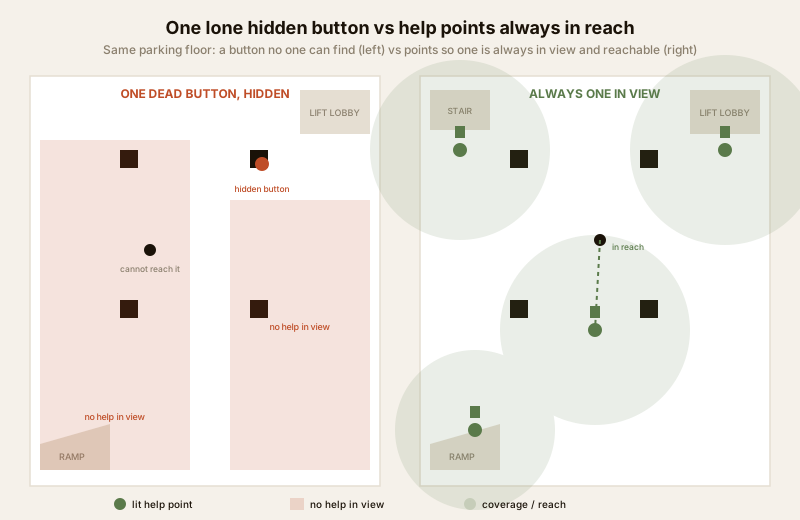
Placement is where most installations fail — not because a button is missing, but because it is in the wrong place. The governing idea is simple: one help point should always be in view and within reach from wherever a person is on foot. A person who has to hunt for a button in the dark, or walk toward the threat to reach one, has no help point at all.
- At the lift lobby and stair lobbies. This is where a person waits, enclosed and out of sight — the single most exposed spot. A help point belongs at every lift lobby and at the foot of every stair.
- Along the walk from the far bays to the lift. The long, lonely stretch across the floor needs a point in view along the way, so the person is never out of reach of one while walking.
- Near the ramps. The ramp is the choke point and the place where signal first dies. A point at the top and bottom of the ramp covers the transition.
- At accessible height, for everyone. Mount them at a height a standing adult, a seated wheelchair user, and — where relevant — a child or an elderly person can reach without stretching. Confirm the accessible-reach range against the National Building Code and your local bye-laws rather than guessing a figure.
- Lit so they are findable in the dark and in a power cut. A help point that vanishes when the mains drops is useless exactly when it matters most. Each point needs its own light and must stay visible on backup power. This is where parking security lighting and the help-point plan meet — see parking security lighting.
There is no honest fixed spacing-in-metres you can quote as a mandate. The right answer is "spaced so one is always in view, and reachable, from anywhere a person walks," worked out on the actual floor plan against the sightlines and the security plan — not a number copied from a brochure. On a pillared basement floor, that usually means more points than a first guess, because pillars break the line of sight.
Making it work, not just exist
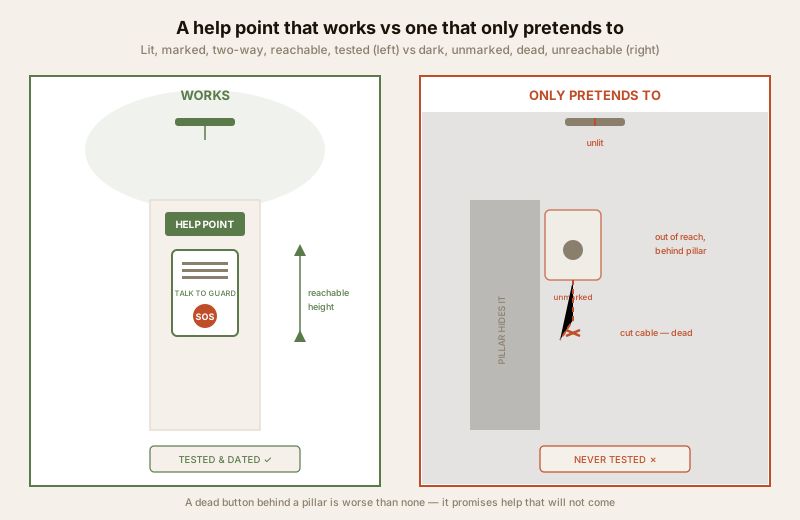
A parking panic button is only real if pressing it actually reaches a person who responds. A dead button behind a pillar is worse than no button at all, because it promises help that will not come and lulls a building into thinking the problem is solved. The gap between "installed" and "working" is where almost every failure lives.
- It must reach a manned point. The alert has to arrive somewhere a human is present around the clock — the guard cabin, gate or control room — with a clear indication of which help point fired and where it is. A signal that goes to an unwatched panel is not a response system. Tie it to the building security systems and, in a society, to the shared-response model in the gated community security guide.
- It must be linked to CCTV. The value multiplies when the press flags the camera on that spot, so the responder sees the situation before they even move. This is the loop the CCTV control-room monitoring guide describes.
- It must be tested — and the tests logged. A help point is a life-safety-adjacent device; it needs a regular test that confirms the button fires, the alert arrives at the manned point, the intercom carries voice both ways, the local alarm sounds, and the light is on. Log every test with the date and result. An untested help point quietly rots — a battery dies, a cable is cut in a renovation, a shift changes and no one now watches the panel — and no one knows until the night it is needed.
- It must have an owner. In a shared building, decide who is responsible for the help points, who responds, and how a real press is handled versus a false one. Fold this into the periodic parking security audit and the basement audit so it is re-checked, not assumed.
Wireless vs wired, and the power-cut question
Help points come as wired or wireless call points, and the choice is a real engineering decision, not a preference.
| Consideration | Wired help point | Wireless help point |
|---|---|---|
| Reliability | Hard-wired signal path; no radio to jam or drop | Depends on radio reaching a receiver through concrete and pillars |
| Power | Fed from the building supply; needs the mains/cabling done | Battery, so battery life and replacement become the risk |
| Basement fit | Suits new build or where cabling can be run | Useful for retrofit where chasing cable is hard |
| Backup | Should ride the DG/inverter/UPS feed for the parking security circuit | Needs charged batteries plus a receiver that itself has backup |
| Weak point | A cut or damaged cable during renovation | A flat battery or a radio dead-spot no one tested |
Whichever type is chosen, the power-cut backup is non-negotiable. A basement panic system that dies with the mains has failed at the one moment — a dark, unwatched floor in an outage — when a person is most exposed. The help points, their lights, the link to the guard post and the recorder must all ride backup power. The mains supply and any fixed cabling are a licensed electrician's work; specify the backup path explicitly and have it tested as part of the log above.
Two-way intercom: the better form of help point
A plain button says someone somewhere pressed something. A two-way intercom help point — a call point with a speaker and microphone — lets the person talk to the guard: to say what is wrong, to be told help is coming, and simply to have a calm human voice answer in a frightening moment. That confirmation matters. It tells the responder whether this is a medical emergency, a threat, or a child pressing a button, so the right response goes; and it tells the person in the parking area that they have been heard.
The intercom form is the one to specify wherever the budget and the site allow, particularly at the lift and stair lobbies where a person is most likely to wait, alone. It builds naturally on the same infrastructure as apartment intercom systems but is dedicated to the parking help-point role. Where a full intercom is not possible at every point, a sensible pattern is intercom points at the lobbies and simpler alarm-and-CCTV-flag buttons along the walk.
Visibility, signage and reassurance
A help point that no one knows about is only half a system. People must be able to see that help is there — both so they can find it in an emergency and, just as importantly, so the space feels safer to walk through. Clear signage, a distinct colour, a light that marks each point, and a short line of words that says what it is and what happens when you press it, all turn a hidden device into visible reassurance.
This is where the people-safety thread and the reassurance value meet. A resident — often a woman returning late, a member of staff finishing a shift, an elderly person walking slowly to the lift — who can see a lit, marked help point every few steps walks a different walk than one crossing a dark, silent floor. The point is not to make people afraid; it is to make a genuinely lonely space visibly, honestly safer. Handled this way, the help point is a piece of dignity: anyone can arrive at any hour and know that help is within reach.
Because the parking area may also carry CCTV, remember that any recording — including intercom audio — is personal data under the DPDP Act 2023: post a clear notice, capture only what security needs, secure it, and verify the current position of the Act and rules, as the details continue to evolve.
Life-safety: what a help point must never do
Because help points live near lifts, stairs and escape routes, two life-safety lines are absolute.
- Never obstruct the escape route. A help point is mounted beside the exit path — on a pillar face or wall clear of the walkway — never where it narrows a stair, blocks a door swing, or clutters the route people must run along in a fire. Security sits alongside egress; it never crosses it.
- Never confuse it with the fire alarm. A parking panic button and a fire alarm manual call point are different systems for different emergencies and must stay separate — different device, different colour, different signage, different response. A person pressing for personal help must not trigger a fire evacuation, and someone raising a fire alarm must not have it read as a personal-safety call. The lit-when-power-fails companion to a help point is the mandated emergency lighting that keeps the escape route visible in an outage — see emergency lighting — which is life-safety infrastructure independent of, and never replaced by, the security help point.
Verify placement, accessible height and any clearance against the National Building Code of India (SP 7:2026) and your local municipal bye-laws, in their current editions, with your architect or fire consultant — and do not assume a dimension from memory. Guards who staff the response are governed by PSARA 2005.
Key takeaways
- A parking panic button is a fixed help point — a lit, marked call point on a pillar or wall — for the moment a person is alone, out of sight, and out of mobile signal on the walk from car to lift, especially in an enclosed basement or an unmanned stilt at night.
- It must reach a manned point, flag the CCTV, and sound a local alarm — a press has to arrive where a human responds around the clock, put live video of the spot in front of them, and raise a local siren, or it is not a system.
- Place one so it is always in view and reachable — at the lift and stair lobbies, along the walk from the far bays, near the ramps, at accessible height, and lit so it is found in the dark and in a power cut. There is no honest fixed metre-spacing to mandate.
- Make it work, not just exist — a dead button behind a pillar is worse than none. Test it, log every test, give it an owner, and back it up through a power cut. Prefer the two-way intercom form so the person can talk to the guard.
- Respect the lines — never obstruct egress, never confuse it with the fire alarm, respect the DPDP Act on any recording, use licensed electricians for mains and cabling, and never frame it as surveillance of residents.
Where to go next
- Frame the whole subject with the complete parking and garage security guide and browse the parking sub-hub.
- See where help points fit the enclosed floor in basement parking security, and the general device family in panic buttons for Indian homes.
- Connect them to surveillance and response with CCTV placement for parking, CCTV control-room monitoring and building security systems.
- Light the floor so the points are found with parking security lighting, keep life-safety clear with emergency lighting, and coordinate voice with apartment intercom systems.
- Handle the shared-community case in the gated community security guide, and re-check it with the basement parking security assessment and the parking security audit.
- Score your site with the home security risk scorecard and the site perimeter security assessment.
References
- National Building Code of India, SP 7:2026 (Bureau of Indian Standards) — Part 4, Fire and Life Safety, and accessibility provisions relevant to reach and placement. Verify the current edition and amendments.
- Local municipal building and fire bye-laws for parking, basement and escape-route requirements — confirm the specific requirement for your building with your architect or fire consultant.
- Digital Personal Data Protection Act, 2023 — for any CCTV or intercom audio recording associated with parking help points; verify the current position of the Act and its rules.
- PSARA 2005 — Private Security Agencies (Regulation) Act, for the deployed guards who staff the response to a help point.
This is an educational, strictly defensive planning guide. It does not describe how to defeat any security measure, and it is not a design for surveillance of residents. Mains, cabling, alarm and intercom work is qualified professional work — engage licensed installers, keep help points clear of every escape route, never confuse them with the separate fire alarm system, and verify all requirements against the current National Building Code and municipal bye-laws.
Export this guide
Related Guides — Deep-dive reading
Panic Buttons for Indian Homes (2026): One Press for Help in Any Emergency
A panic button is one manual control that instantly raises the alarm and summons help — for an intrusion, a medical collapse, a fire, or a threat at the door. This guide covers the types, where to place them, and how to build the response plan that makes them actually work in India.
SecurityParking Security Lighting in India (2026): Lighting Basement, Stilt and Open Parking So Nothing Hides in the Dark
How to light apartment and commercial parking so vehicles, people and number plates are clearly seen, cameras can actually read the scene, and the space stops being a soft spot for theft and lurking, without ever compromising the emergency lighting on the escape route.
SecurityLift Lobby Security in India (2026): The Control Point Where Public Becomes Private
The lobby is where an outsider is screened, a visitor is verified before the inner door, and access to the lifts and stairs is granted or denied. This guide shows how to design the entrance lobby and the upper lift lobbies so the guard sees who enters, a waiting resident feels safe, and egress always wins.
SecurityRelated Tools — Try Free
Security Backup Power Calculator
Size a UPS/inverter and battery to keep CCTV, NVR, router and alarm running through a power cut — load, Ah, VA and cost.
Backup PowerAccess-Control Battery-Backup Calculator
Size the standby battery so an access system keeps running through a power cut, with an egress life-safety note.
Battery BackupChild & Elder Home-Safety Audit
Room-by-room safety audit for households with children or seniors — 10 categories, 70+ checkpoints tagged by audience.
Safety Audit