
Security Device Hacked (2026): A Calm, Defensive Response Playbook
Think your CCTV camera, video doorbell, smart lock or NVR has been compromised? A calm, strictly defensive incident guide for Indian homeowners: read the real signs, then isolate, secure, update, reset, check, review and report — in that order.
The camera pans on its own. A stranger's voice comes out of the baby monitor. The app shows a login from a city you have never visited, or a new admin user you did not create. It is an unsettling feeling, and it is worth taking seriously — but panic is not a plan. The good news is that a suspected device compromise has a calm, ordered response that almost any homeowner can work through, and most of the steps are the same ones that make your whole home network safer afterward.
This guide is a strictly defensive incident-response playbook for a home security device you think has been hacked — a CCTV camera, a video doorbell, a smart lock, or the NVR or DVR that records them. It does two things. First, it helps you tell a genuine sign of compromise from an innocent explanation, because a "moving" camera is very often a family member on the app or a firmware quirk, not an intruder. Then, if the signs are real, it walks the response in the right order: isolate the device, secure your passwords, update, factory reset, check everything else, review what may have been exposed, and report.
Scope and safety. This is a defensive incident-response and diagnostic guide for a homeowner, not a hacking tutorial — it explains only how a victim detects, contains, recovers and prevents, never any attacker technique. The DIY-safe actions here are all software and settings: unplug a device, toggle Wi-Fi, change a password, run an app update, press a recessed reset button. Anything involving mains wiring, working at height to reach a pole camera, or opening a sealed unit is a job for a qualified installer or your AMC, not a DIY fix. Footage and recordings are personal data; where a real leak is involved, the Digital Personal Data Protection Act, 2023 and CERT-In are relevant, and this is general guidance, not legal advice.
First: is it really a compromise, or an innocent explanation?
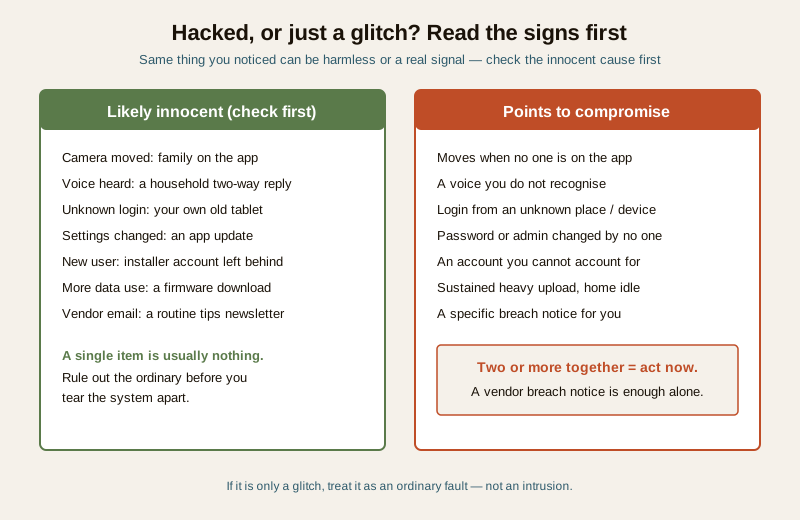
Before you tear your system apart, spend two minutes ruling out the ordinary. Most "my camera is hacked" scares turn out to be something mundane. Work down this list from the most common, harmless cause to the rarest, most serious one.
| What you noticed | Innocent explanation (check first) | When it points to compromise |
|---|---|---|
| Camera moved or panned by itself | A family member using the app; a saved patrol/tour preset; auto-tracking of motion | It moves when no one is on the app and tracking is off |
| A voice came from the device | Two-way audio triggered by a household member; a delivery two-way reply | A voice you do not recognise, saying things about your home, with no family app session open |
| App shows a login or device you do not know | Your own second phone, an old tablet, a family member's login | A login from an unknown place or device, at a time nobody was using it |
| Settings changed on their own | An app update changed defaults; another household admin changed them | Passwords, admin users or recording settings changed with no one owning the change |
| A new admin user appears | Installer account left behind; a family member added | An account you cannot account for, especially with full control |
| Higher-than-usual data use | A firmware download, more motion events, cloud backup | Sustained heavy upload when nothing at home explains it |
| Vendor emailed about a breach | A generic security-tips newsletter | A specific notice that your account or their systems were breached |
A single item is usually innocent. Two or more together — say, an unknown login and settings you did not change — is a real signal. A direct vendor breach notice, or a live voice from the device that no one in the house is producing, is enough on its own to act.
If, after this, it looks like a glitch rather than a break-in, treat it as a normal fault — a device that behaves oddly, will not connect, or drops offline is usually a connectivity or firmware issue. The security system troubleshooting guide covers those ordinary faults, and the security app not connecting guide covers the common app-side gremlins that masquerade as something sinister.
The response playbook, in order
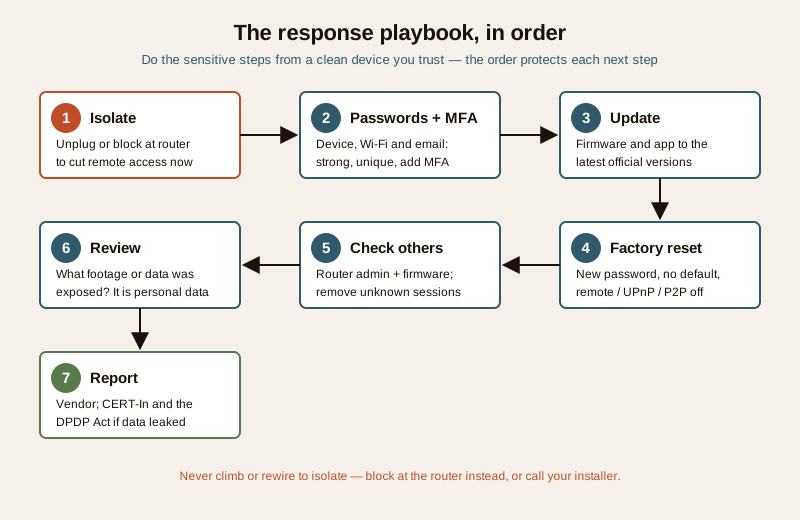
If the signs are real, do not improvise. Work these seven steps in sequence — the order matters, because each one protects the next. The single most important principle: do the sensitive steps from a clean device you trust, not from the phone or computer that might itself be affected.
1. Isolate — cut off remote access now
The first move is to take the device off the internet so no one can reach it remotely while you work. Physically unplug the camera, doorbell, lock hub or NVR from power and network — pulling the plug is faster and surer than fiddling in an app. If you cannot easily unplug it (a hard-wired pole camera, for instance), turn off its Wi-Fi at the router by blocking or removing the device, or take the whole network offline for a moment. The aim is simple: stop the remote hands on it before you change anything else.
Do not climb or rewire to isolate. If a camera is mounted high or hard-wired into the mains and you cannot safely reach a plug, isolate it at the router instead, or switch off the relevant circuit only if that is safe and within your comfort. Reaching an out-of-reach or mains-wired device is a job for your installer, not a ladder-and-screwdriver moment.
2. Change passwords — from a clean device
Now, from a device you trust, change the credentials — and change three things, not one:
- The device or app account password — the login that controls the camera, doorbell, lock or NVR.
- The Wi-Fi password, because if an attacker had your network they can return through it. Changing it forces every device to re-authenticate.
- The email account tied to the app, if there is any chance it was reused or exposed, since a hijacked email can reset everything else.
Make each one strong and unique — long, unguessable, and not shared with any other account. Then turn on multi-factor authentication (MFA / two-step verification) everywhere it is offered, so a stolen password alone is no longer enough to log back in. If you struggle to invent and remember unique passwords, a password manager does exactly that job.
3. Update — firmware and the app
Compromises often ride in on a known, unpatched flaw. With the device isolated, take this moment to make sure it is running the latest firmware and that your app is fully updated on your phone. Do the firmware update through the manufacturer's official app or website only. You may need to briefly reconnect the device to apply an update; that is fine as long as you have already changed the passwords above.
4. Factory reset — and reconfigure securely
For anything you strongly suspect was compromised, a factory reset is the clean-slate step: it wipes settings, added users and lingering access an attacker may have planted. There is usually a small recessed reset button (press with a pin) or a reset option in the app. After the reset, set it up again properly, not carelessly:
- Set a new, strong, unique password — never leave the default one the device ships with.
- Remove any default or leftover accounts, including an installer account you do not need.
- Disable remote features you do not use — remote viewing over the internet, UPnP, and P2P cloud relay. If you genuinely need remote access, keep it but behind strong credentials and MFA. If you do not, turning it off shrinks the target dramatically.
5. Check the rest — do not stop at one device
Assume the problem may not be isolated to the one gadget. Two things especially deserve a look:
- Your router. It is the front door to everything. Change its admin password (the login to the router's own settings, not just the Wi-Fi), and update its firmware. If the router itself was weak or default, hardening one camera achieves little.
- Your other devices and sessions. In each security app, look for unknown users, paired phones or active sessions and remove any you do not recognise. Do the same for other cameras, locks and hubs on the same account, and reset the password on any account that shared credentials with the compromised one.
6. Review — what was exposed
Take a breath and think about what an intruder could actually have seen or taken. Footage from a home camera is personal data — of your family, and sometimes of neighbours, staff or visitors in frame. Consider what the camera covered, what recordings sit in the cloud or on the NVR, and whether audio was captured. This matters both for your own peace of mind and because, in India, exposure of personal data carries obligations under the DPDP Act, 2023 — a point we return to below. If the device watched a shared or common area, be considerate: others' data may be involved too. For the bigger picture of how to plan for and learn from an incident like this, see the incident response planning guide.
7. Report — vendor, and the India context
Finally, report what happened. Tell the vendor or manufacturer through their official support channel — they can confirm whether it was a known issue, help you recover the account, and flag a wider breach. Then note the India-specific context, generically and without treating this as legal advice:
- CERT-In (the Indian Computer Emergency Response Team) is the national body for reporting cyber security incidents, and Indian rules expect certain incidents to be reported to it. For a serious compromise, reporting is the responsible step.
- The DPDP Act, 2023 treats leaked footage or personal data as a personal-data-breach matter. If your recordings or account data were genuinely exposed — especially data about other people — that is the lens through which it is viewed.
Keep it factual: note the dates, what you saw, and what you did. That record helps the vendor, and it helps you if the matter goes further.
What you can safely do yourself, and when to call a professional
Almost every step above is safe, software-and-settings work for a homeowner. The split is clean:
- Safe to do yourself: unplug a device, toggle Wi-Fi, change passwords, enable MFA, update an app or firmware, press a recessed factory-reset button, remove unknown users and sessions, change the router admin password.
- Call a qualified installer or your AMC when: the device is mounted high or hard-wired and you cannot safely reach a plug; it involves mains electrical work; a sealed unit needs opening; a whole NVR or professionally installed system is affected and you are unsure how to reset it without losing needed recordings; or you simply want expert help preserving evidence before you reset. For choosing trustworthy suppliers and gear in the first place, the vendor cybersecurity assessment guide is the reference.
Never let "securing" a device push you into an unsafe climb or into cutting mains wiring. The whole point of an isolate-at-the-router step is that you rarely need to.
Prevention — the real fix
Working the playbook once is far less tiring than working it twice. Nearly every home device compromise traces back to a handful of avoidable gaps, and closing them is the durable fix.
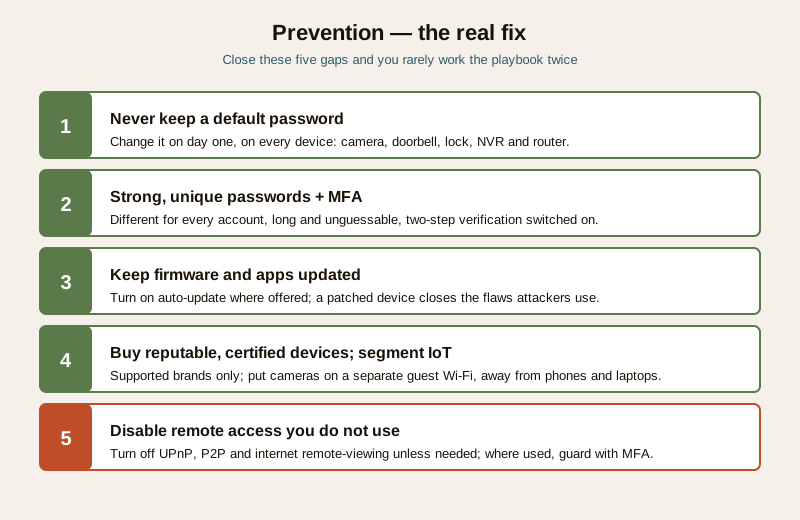
- Never keep a default password. The single biggest cause. Change it on day one, on every device — camera, doorbell, lock, NVR and router.
- Strong, unique passwords plus MFA. Different for every account, long and unguessable, with two-step verification switched on wherever it is offered.
- Keep firmware and apps updated. Turn on automatic updates where available; a patched device closes the flaws attackers rely on.
- Buy reputable, certified devices. A cheap no-name camera with abandoned firmware is a standing risk. Choose established, supported brands — the vendor cybersecurity assessment guide explains what to look for.
- Segment your IoT onto a guest network. Put cameras and smart-home gadgets on a separate guest Wi-Fi, away from your phones and laptops, so a weak device cannot become a doorway into everything.
- Disable remote access you do not use. Turn off UPnP, P2P and internet remote-viewing unless you actively rely on them — and where you do, protect them with strong credentials and MFA.
For the deeper, camera-specific version of all this, the preventing camera hacking guide is the companion piece, and the wider cybersecurity sub-hub collects the home-network hardening that keeps every device safer.
A quick recovery checklist
- Rule out the innocent explanation first; two or more real signs, or a vendor breach notice, means act.
- Isolate: unplug the device or block it at the router to cut remote access now.
- Passwords: from a clean device, change the device/account, Wi-Fi and email passwords to strong unique ones; enable MFA.
- Update: firmware and app to the latest official versions.
- Factory reset the suspect device; reconfigure with a new password, no defaults, remote/UPnP/P2P off if unused.
- Check others: router admin password and firmware; remove unknown users, sessions and paired phones.
- Review what footage or data may have been exposed — it is personal data.
- Report to the vendor; note CERT-In and the DPDP Act, 2023 angle if data genuinely leaked.
- Prevent: no defaults, unique passwords plus MFA, updates on, reputable gear, IoT on a guest network, remote access off unless needed.
Handled in this order, a frightening moment becomes a manageable one — and you come out of it with a network that is genuinely harder to touch than it was before.
Where to go next
- Security system troubleshooting — the pillar for ordinary faults, offline devices and glitches that are not a hack.
- Preventing camera hacking and the cybersecurity sub-hub — the durable prevention layer.
- Incident response planning — planning for and learning from a security incident.
- Security app not connecting — when the app, not the device, is the real problem.
- Vendor cybersecurity assessment — choosing devices and suppliers that stay secure.
- The troubleshooting sub-hub and the main security hub.
References
- Indian Computer Emergency Response Team (CERT-In), Ministry of Electronics and Information Technology — the national agency for reporting and responding to cyber security incidents in India; consult its current guidance and reporting requirements at the official portal.
- Digital Personal Data Protection Act, 2023 — treats leaked footage and personal data as a personal-data-breach matter; where recordings or account data about identifiable people are exposed, this is the governing lens. General information, not legal advice.
- Manufacturer and vendor security advisories — the first and best source for device-specific firmware updates, breach notices and account-recovery help; use only official support channels.
This is an educational, strictly defensive incident-response overview for homeowners — not a hacking tutorial, not legal advice, and not an installation manual. Do only the safe software-and-settings steps yourself; call a qualified installer or your AMC for anything mounted high, hard-wired, sealed or beyond your comfort. Where personal data may have leaked, treat CERT-In reporting and the DPDP Act, 2023 as your reference points and seek professional advice for a serious breach.
Export this guide
Related Guides — Deep-dive reading
CCTV Remote Access in India (2026): Watch From Your Phone, Safely
How to view your own cameras from anywhere without leaving the front door open to the internet — change the defaults, use strong credentials and 2FA, keep firmware current, prefer the vendor's secure cloud relay or a VPN, segment the camera network, and treat footage as personal data.
SecurityComplete Guide to Security System Cybersecurity in India (2026): Protecting the Systems That Protect You
The cameras, locks, alarms and door phones you install to feel safer are internet-connected computers that can themselves be attacked, and an insecure one is worse than none. This pillar maps the whole attack surface — devices, network, accounts and data, operations — and points to every guide that hardens it.
SecuritySecurity Mobile App Not Connecting in India (2026): View Your Cameras and Locks Again
Your camera or smart-lock app is stuck loading, shows the device offline, or will not let you view a live feed remotely. A calm, ordered path from your phone, to your home internet, to the app and the account, with clear safe DIY steps and when to call the installer.
SecurityRelated Tools — Try Free
Security Vendor Evaluation Scorecard
Rate a CCTV/security installer or guarding agency across eight weighted criteria for a hire / negotiate / walk-away verdict.
Vendor ScorecardNVR Channel Calculator
What size recorder a system needs with room to grow, plus a check on its incoming bandwidth.
NVR ChannelsCCTV Bandwidth Calculator
Total network bandwidth an IP CCTV system needs, camera-to-recorder on the LAN and the internet upload for remote viewing.
Bandwidth