
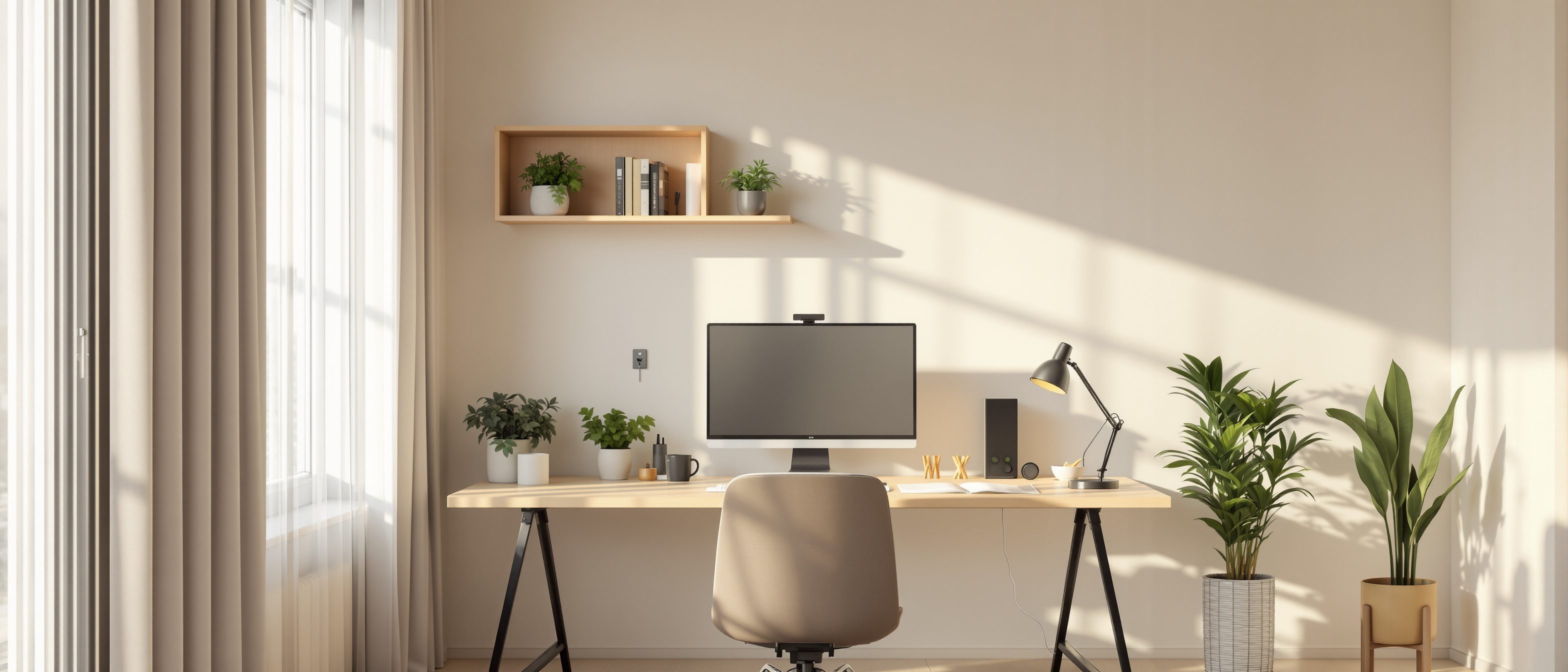
Home Office Design for Remote Work in India
Build a permanent, provisioned home workspace that can revert to a bedroom later
For two years the home office was a kitchen-table truce: a laptop pushed aside at lunch, a saree or a bedsheet hung behind the chair to hide the clutter, a call dropped because the inverter died mid-sentence. Everyone assumed it was temporary. It was not. Hybrid work has settled into the Indian middle-class home the way the scooter and the geyser once did — quietly, permanently, and without anyone designing for it.
The numbers make this structural, not seasonal. A large share of India's IT, consulting, design, finance and customer-support workforce now spends two to four days a week working from home, and a meaningful slice is fully remote. That means the house you build or renovate in 2026 will host paid, deadline-bound, client-facing work for the next fifteen years — often two earners doing it at the same time, in the same flat, on two different video calls. A spare desk in the corner of the bedroom is no longer a fair answer to that.
The good news is that a genuinely good home office is mostly a planning problem, not a money problem. The expensive mistakes — the window in the wrong place, the single 6A socket feeding a desk that needs a UPS, the bedroom that doubles as an office and lets neither sleep nor work happen well — are all cheap to avoid at the drawing stage and painful to fix later.
A home office is no longer a nice-to-have nook; it is a small, provisioned room with its own circuit, its own data point, its own door that closes — and, ideally, the ability to become a bedroom again when the work life changes.
If you live in a flat with no spare room and the real question is simply where does the desk go, read our companion guide Apartment home-office design in India first — it is written for exactly that constraint. This guide is the broader one: dedicated rooms, two-earner households, and the wiring, acoustics and convertibility that make a home office last.
1. The first decision: a dedicated room, a nook, or a convertible room
Before you argue about chairs and monitors, settle the spatial question, because it drives everything else — acoustics, wiring, daylight, resale, and your own mental health.
There are three honest options, and the right one depends on how much you work from home and how much floor area you can spare.
| Option | Best when | Floor area | Door that closes? | Convertibility |
|---|---|---|---|---|
| Dedicated office room | Both partners WFH most days; client video calls | 8–12 sq m (90–130 sq ft) | Yes | Designed to revert to bedroom/guest room |
| Built-in nook / study alcove | One person, 2–3 days a week; few calls | 3–5 sq m | Usually no | Stays a nook |
| Convertible spare bedroom | You need the room as a guest/child room and an office | 9–11 sq m | Yes | Primary purpose; office is the "for now" use |
The convertible spare room is, for most Indian homeowners, the smartest of the three — and it ties directly into the cluster's flexibility thinking in Flexible homes for changing families. You build the room as a bedroom (window, cupboard, a 1.2 m wide door, a fan point) but provision it from day one to work as an office: extra power circuits, two data points, and a wall left clear for a desk. When the work life changes — a baby, an elder moving in, a grown child returning — it becomes a bedroom again with a day's notice, not a renovation.
Neufert's Architects' Data, the standard space reference, allows roughly 8–10 sq m for a small single home study including circulation. Below about 6 sq m you have a nook, not a room — fine for one quiet worker, not for calls or two people.
2. The two-worker household: two calls, at once, in one home
This is the design problem the pandemic exposed and most homes still fail. Two earners, both on video, both talking, eight feet apart, each one a distraction and an embarrassment to the other. Solving it well is the single biggest upgrade you can plan for.
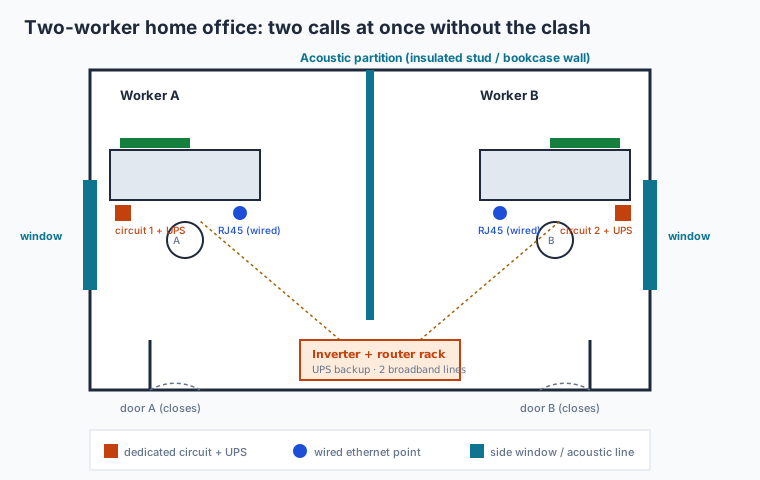
Figure 1: Two simultaneous video calls need acoustic separation, two desks facing away from each other, and independent power and data — not a shared table.
Three things make two-worker work tolerable:
- Acoustic separation. Sound, not space, is the enemy. If you can give each worker a separate small room, do it. If you must share one room, split it with a real partition — an insulated stud wall, or even a full-height bookcase wall packed with books (mass blocks sound) — rather than an open desk-to-desk layout. Soft furnishings (curtains, a rug, an upholstered chair, acoustic foam or fabric panels on one wall) cut the hard echo that makes a small room sound like a call centre.
- Two desks facing away from each other, ideally toward opposite walls, so neither person is in the other's camera and their voices project away from each other.
- Independent power and data to each desk — covered in section 5 — so one person rebooting a router or tripping a breaker doesn't kill the other's client call.
A blunt rule worth following: if both of you take live video calls for a living, budget for two acoustically separate spaces, even if one is small. A 5 sq m sound-isolated nook beats a 10 sq m shared room where neither call works.
3. Daylight, glare and the window-behind-you trap
Good light is the cheapest upgrade a home office can have, and the most commonly botched. The mistakes are predictable.
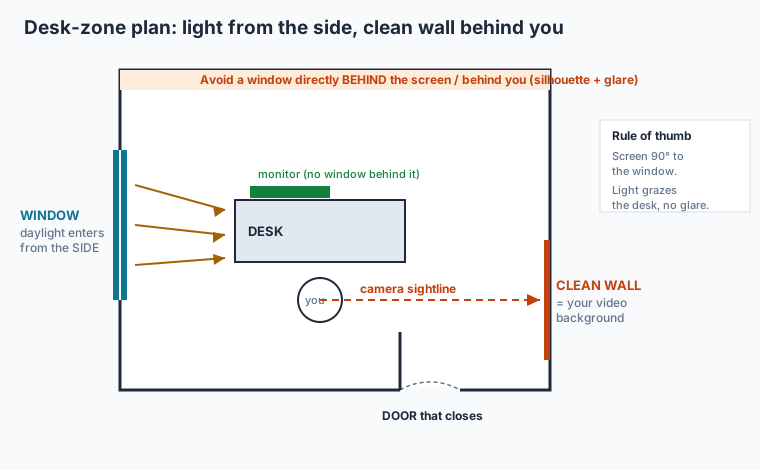
Figure 2: Set the screen at right angles to the window so daylight grazes the desk from the side; keep a clean wall, not a window, behind you.
The two rules:
1. Daylight to the side of the screen, never behind it and never directly in front of it. A window behind the monitor throws bright light into your eyes and makes the screen look washed out; a window behind you turns you into a silhouette on video and bounces glare off the screen. Set the desk so the screen sits at right angles (90 degrees) to the window. The light then grazes the desktop from the side — bright, even, glare-free.
2. A clean wall behind you for video. Your camera should look at a calm, uncluttered surface — a painted wall, a low bookshelf, a framed print — not a window, not an open kitchen, not the family walking past. Plan the desk's orientation around the camera sightline at the layout stage. You can test orientations quickly with our layout planner before the furniture arrives.
For the inevitable late evenings and dark monsoon afternoons, add a desk-level task light (a small adjustable lamp) and a soft ceiling light — the worst video setup is a single overhead tube light directly above you, which casts hard shadows under the eyes. A light in front of and slightly above your face, even just a bright window by day, is what makes you look present on a call.
4. Ergonomics: the numbers that protect your back and neck
A home office you sit at forty hours a week is a health decision, not a furniture-shopping decision. The standard ergonomic dimensions are not negotiable, and most "computer tables" sold in India get the desk height wrong.
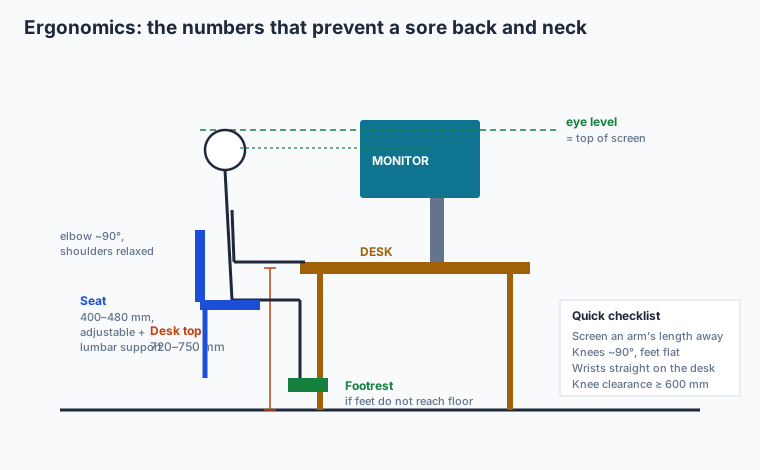
Figure 3: The non-negotiable numbers — desk top 720–750 mm, top of the monitor at eye level, elbows and knees near 90 degrees, feet supported.
| Element | Target | Why it matters |
|---|---|---|
| Desk top height | 720–750 mm | Forearms parallel to floor; elbows near 90 degrees |
| Knee clearance under desk | 600 mm min | Legs not jammed; allows a footrest |
| Monitor top edge | At seated eye level | Neck neutral; no looking down |
| Monitor distance | ~ one arm's length (500–700 mm) | Reduces eye strain |
| Seat height | 400–480 mm, adjustable | Feet flat or on a footrest, knees ~90 degrees |
| Chair | Adjustable height + lumbar support | The one item worth real money |
Two practical notes for Indian homes. First, if you buy or build a fixed desk, target 720–750 mm; a dining-table-height surface (often 760+ mm) forces shoulders up. Second, a laptop alone cannot be ergonomic — its screen and keyboard are joined, so either your neck bends or your wrists do. The fix is cheap: a separate keyboard and mouse plus a laptop stand (or an external monitor) that lifts the screen to eye level. Provision a slightly deeper desk (600 mm) so a monitor sits an arm's length away.
5. Provisioning the desk: power, backup and data
This is the section the cluster exists for. The difference between a frustrating home office and a professional one is almost entirely about what is in the wall behind the desk — and it costs very little to get right while the walls are open, and a fortune to retrofit later.
Power — a dedicated circuit. A serious workstation (desktop or laptop, two monitors, a router, a printer, phone chargers, a desk lamp, and in summer a fan or AC) should sit on its own dedicated circuit from the distribution board, not share a circuit with the bedroom AC or the kitchen. A dedicated 16A circuit with its own MCB means a tripped iron elsewhere doesn't black out your call, and you can isolate the desk safely. For a two-worker setup, run two independent circuits. Our electrical safety checklist covers the earthing and MCB basics; the wiring logic is laid out in Future-proof wiring systems and read alongside Electrical drawings explained.
Backup — UPS, not just an inverter. This is the Indian reality the rest of the world ignores. A power cut mid-call is a dropped client. The house inverter typically has a switchover delay of a few milliseconds to a second — long enough to reboot a desktop and a router. So provision a small desk-level UPS (a 600–1000 VA line-interactive unit) that holds the computer, monitor and router through the switchover and gives you a few minutes to save and switch gracefully. The inverter then carries the longer outage. Plan a socket near the desk specifically for the UPS.
Data — a wired ethernet point. WiFi is fine until forty people in your tower are also on video calls. Provision at least one Cat6 ethernet point at every desk, run back to where the router lives, while the conduits are open. A wired connection is more stable and lower-latency than WiFi for calls — and it costs a few hundred rupees of cable now versus chasing walls later. If you can, plan for broadband redundancy: two providers (e.g. a fibre line plus a second fibre or a 5G/4G failover router), so a cable cut in your area doesn't end your workday. Where the router and inverter live, leave a small ventilated rack or cupboard — see Smart infrastructure planning.
| Provision now (walls open) | Indicative cost now | Retrofit later (walls closed) |
|---|---|---|
| Dedicated 16A desk circuit + MCB | ₹1,500–3,000 | ₹8,000–15,000 (chasing + making good) |
| Cat6 ethernet point + conduit to router | ₹800–1,500 | ₹4,000–8,000 (surface trunking or re-chase) |
| Spare conduit for second data/power line | ₹400–800 | Often impossible without breaking walls |
| UPS socket + labelled circuit | ₹500 | ₹3,000+ |
The cluster's golden rule applies exactly here: the cost to provision a desk properly — circuit, UPS socket, wired data, spare conduit — is a few thousand rupees while the slab and plaster are open. The cost to retrofit it after you move in is several times higher, messier, and sometimes physically impossible. Lay the cheap groundwork now.
6. Summer heat, the AC, and staying cool on camera
A home office in much of India is unusable in May without cooling, and an AC changes the electrical and acoustic plan. Account for it early.
Put the office AC (or its provisioning — the wall sleeve, the dedicated heavy-duty point, the outdoor-unit space) into the plan from the start; a 1–1.5 ton unit on a home office needs a 16A point and ideally its own circuit, separate from the desk circuit so the compressor's inrush doesn't disturb the workstation. If you would rather not run an AC all day, a well-placed ceiling fan plus cross-ventilation — designed in the way our passive design for India's climate zones guide describes — keeps a small room comfortable for much of the year and cuts the running cost. Note the acoustic trade-off: an old, rattly AC or a loud pedestal fan is audible on every call, so choose a quiet inverter AC and position fans away from the mic.
7. Separating work from rest — the mental-health case for a door
The most underrated feature of a home office is the most basic: a door that closes. It is what lets you stop working.
When the office and the bedroom are the same room, the laptop glows at the foot of the bed and the workday never ends; sleep, focus and family time all blur. A door — even a sliding or pocket door, even a curtain on a sturdy track in a tight flat — creates a boundary the brain respects. You enter to work and leave to rest. For families, the door also signals do not interrupt, which matters enormously in the Indian joint-family home where a closed door is one of the few ways to say "I'm on a client call" without saying it.
A boundary you can see and hear — a door that shuts, a light that signals "in a meeting" — does more for remote-work wellbeing than any productivity app. Design the boundary into the architecture, not into your willpower.
If a separate room is impossible, fall back to ritual boundaries: a desk that physically closes (a fold-down or cabinet desk), a screen that hides the work zone at day's end, a corner the family agrees is "the office." The apartment guide linked above goes deep on these tight-flat tactics.
8. The joint-family interruption problem
Indian homes are rarely empty during the workday. Grandparents, children home from school, the cook, the maid, the doorbell, the pressure cooker — all of it lands in the middle of your 3 p.m. call. Design can absorb most of it.
Locate the office away from the noise spine of the house — not next to the kitchen, the TV room, or the main door. Tuck it toward a quieter corner or an upper floor. A small visual signal helps everyone: a simple "on a call" light or even a coloured card on the door handle tells the household to wait, which avoids both the awkward on-camera interruption and the family member's hurt feelings. And the closing door, again, does the heavy lifting — it converts "Amma walking in to ask about dinner" from a guaranteed interruption into a knock. For multi-generational homes specifically, coordinate this with the wider planning in Multi-generational home design.
9. The "Zoom room" — designing a client-facing corner
If you sell, advise, teach or pitch on video, one corner of your office is effectively your shopfront, and it is worth designing deliberately.
A client-facing corner needs four things, all cheap: a clean, branded-feeling background (a calm wall, a tidy shelf, one plant, a framed piece — not a cluttered cupboard); flattering, even light on your face (a window in front of you by day, a soft light source slightly above and ahead at night — never a single back light); good audio (soft furnishings to kill echo, a quiet room, ideally a dedicated mic or headset); and a stable wired connection so you never freeze mid-pitch. Frame the desk so the camera looks at this corner — that is why the camera sightline appears on the plan in section 3. You are not decorating; you are setting the first impression every client forms of your work.
10. Designing the office to become a bedroom again
Work lives change. The fully remote job becomes hybrid; the couple has a child and needs a nursery; an elderly parent moves in. An office that can only ever be an office is a room you may resent in five years. The cluster's flexibility principle says: design it so it can revert.
That means giving the office the bones of a bedroom even while it serves as an office — a window that meets bedroom light-and-ventilation norms, a built-in or easily-added cupboard, a 1.2 m door, a fan point and a light point where a bed would want them, and enough clear wall for a bed. Keep the desk on furniture or a light demountable counter rather than a heavy masonry built-in, so removing it is a morning's work. Provision the data and power generously (you'll want a socket and an internet point by the bed anyway). Done this way, the same room is an office now and a bedroom or guest room later, with no demolition — the exact logic explored in Flexible homes for changing families and, at the whole-house scale, in our pillar guide Designing homes for 2040 in India and the family-lifecycle umbrella Future-proof home design for Indian families.
You can sanity-check whether a room is big enough to swing both ways with our room measurement tool before you commit the plan.
Sources & further reading
- National Building Code of India (NBC) 2016, Bureau of Indian Standards — Part 8 on building services and Part 4 on lighting and ventilation; the basis for room daylight, fenestration and electrical-safety norms.
- IS 732: Code of Practice for Electrical Wiring Installations, BIS — circuit, MCB and earthing requirements for the dedicated desk circuits discussed above.
- IS 3646: Code of Practice for Interior Illumination, BIS — task-lighting levels for office work (about 300–500 lux at the desk).
- Ernst Neufert, Architects' Data — standard space allowances for home studies, desk ergonomics and seated workplace dimensions.
- Eco Niwas Samhita (ENS) / ECBC-Residential, Bureau of Energy Efficiency — daylight and ventilation provisions relevant to a naturally lit, low-cooling office.
- Central Electricity Authority (CEA) Safety Regulations — earthing and installation safety underpinning a UPS-and-inverter desk setup.
Pairs with: the pillar Designing homes for 2040 in India, plus Flexible homes for changing families and Smart infrastructure planning for homes.
Export this guide
Related Guides — Deep-dive reading
Space-Efficient Homes — A 2026 Working Reference for Compact Indian Apartments
Five spatial multipliers · Floor plan tricks · Dual-purpose furniture
Room PlanningApartment-Friendly Home Office Design
Building a real workspace in a flat that has no spare room
Apartment LivingDesigning Adaptable & Universal-Design Homes
Accessibility, Aging-in-Place, and the Multi-Stage Family — Code, Anthropometrics, and Plan-Stage Discipline for Indian Residential Architects
Room PlanningRelated Tools — Try Free
Cross-Ventilation Analyzer
Estimate airflow and air changes per hour (ACH) from room size, window areas, layout, and local wind — with NBC 2016 Part 8 compliance check.
Ventilation CalculatorAcoustic Privacy (STC) Visualizer
Indian healthcare acoustic visualizer — compare wall assemblies and noise sources, see received SPL after STC attenuation, and check FGI 2018 / IS 1950 / NABH speech-privacy compliance with live dual-canvas waveform.
Acoustic ToolApartment Interior Planning Checklist
51-item checklist across structural, ceiling, lighting, furniture, storage, electrical, kitchen, bathroom.
Checklist