
CCTV Storage and HDD Sizing in India (2026): Getting the Days You Need
Why a surveillance-grade drive, not a desktop one, sizing storage by retention and bitrate, how many HDD bays and when RAID earns its place, loop recording and keeping drives healthy — for Indian homes and small buildings.
Every camera you install is only as useful as the footage it keeps. When something happens at 2am and you go to review it three days later, the whole system stands or falls on one question: is the clip still there? That is what cctv storage hdd sizing decides — the drive inside your recorder, how big it is, how many days it holds before it starts writing over itself, and how likely it is to survive the heat, dust and 24x7 grind of an Indian install.
This guide is the focused explainer on storage and the hard drive within Studio Matrx's CCTV hub. It stays in that lane. The recorder itself — DVR vs NVR, channels and bays — is covered in the NVR vs DVR guide; powering it through a cut is in the power supply and UPS guide; and the wider local-vs-cloud decision sits in the local storage guide and the cloud CCTV guide. Here we answer only: which drive, how big, how many, and how to keep it alive.
Scope & safety. This guide helps you specify and supervise. Fitting a drive inside a recorder is low-voltage and usually done by the installer at commissioning; anything at the mains board, the cabling and mounting are licensed-professional work. Footage is personal data — under the Digital Personal Data Protection Act, 2023 it should be kept only as long as you have a genuine reason to, and secured. This is educational, not legal advice.
Why a surveillance-grade drive, not a desktop one
The single most common — and most expensive — mistake is fitting an ordinary desktop or PC hard drive into a recorder because it was lying around or looked cheaper. It will appear to work for a while, and then let you down.
A CCTV recorder is a write-almost-always machine. Where a PC drive spends most of its life idle with occasional bursts of activity, an NVR or DVR is writing a continuous stream from every camera, all day, every day, for years. A surveillance-grade drive (sold under names like WD Purple, Seagate SkyHawk and similar) is built for exactly that:
- Rated for 24x7 operation rather than the on-and-off duty of a desktop.
- Tuned for many simultaneous streams — several cameras writing at once, which is a very different load from one user opening files.
- A higher workload rating (terabytes written per year) and firmware that prioritises smooth, dropped-frame-free recording over raw read speed.
- A longer warranty band, commonly three years, reflecting the harder duty it is designed for.
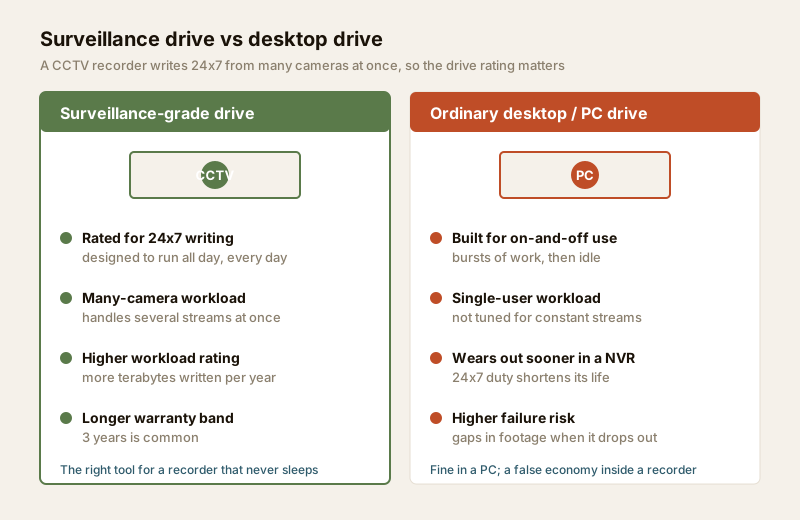
Put a desktop drive in a recorder and two things tend to happen: it wears out early under the constant duty, and it can drop frames or stall under a multi-camera load — leaving gaps in your footage exactly when you need it. In an Indian install, with ambient heat inside a cupboard and dust in the air, that margin matters even more. The price gap between a desktop and a surveillance drive is small next to the cost of missing footage. Always specify a surveillance-rated drive — and, for a larger many-camera system, one rated for a higher number of drive bays.
Sizing the drive: retention x bitrate
How big a drive you need comes down to a simple idea, even if the arithmetic behind it is fiddly:
Storage = bitrate per camera x number of cameras x how many days you want to keep.
Three levers, and pulling any one of them up pushes the terabytes up:
- Bitrate per camera — driven by resolution (2MP vs 4MP vs 8MP/4K), frame rate, and the compression codec (H.265 roughly halves the size of the older H.264 for the same picture). A 4MP camera on H.265 might average a few megabits per second; the same scene at 8MP is far more.
- Number of cameras — four cameras write four streams; sixteen write sixteen.
- Retention — the number of days before the oldest footage is overwritten. A week is a common home default; many housing societies and some situations expect 30 days.
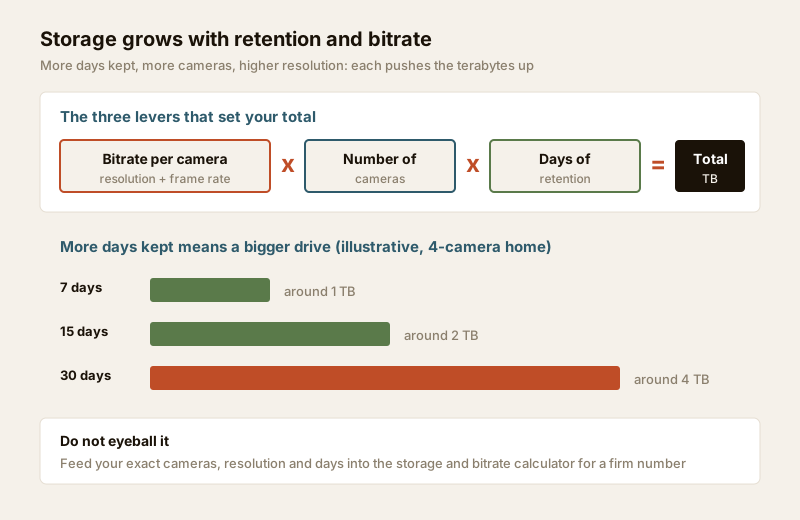
The numbers move so much with resolution, frame rate and codec that you should not eyeball this. Do the actual sum for your exact cameras with the CCTV storage and bitrate calculator — feed in your camera count, resolution and the days you want, and it returns the terabytes to buy. As a rough sanity-check only, a typical 4-camera 4MP home on H.265 lands near the bands below; treat them as ballparks to challenge a quote, not as your final spec.
| Retention target | Rough drive size (4x 4MP, H.265, continuous) | Typical use |
|---|---|---|
| 3 days | ~0.5 TB | Bare minimum; too short if you travel |
| 7 days | ~1 TB | Common home default |
| 15 days | ~2 TB | Comfortable margin for a holiday |
| 30 days | ~4 TB | Society / compliance expectations |
| 60 days | ~8 TB | Larger villa, shop, higher resolution |
Two levers cut the storage you need without buying a bigger drive: motion or event-based recording (record only when something moves, not empty hours) and choosing H.265 over H.264. Motion recording can dramatically extend retention on the same drive, though it needs sensible tuning so it does not miss slow movement or drop the pre-event seconds. Whichever you choose, buy a little more than the sum suggests — headroom absorbs a future camera, a bump to higher resolution, or a longer retention rule.
How many bays, and when RAID earns its place
The recorder's HDD bays cap how much storage it can hold. This ties directly to recorder selection, so decide the two together — see the NVR vs DVR guide and, when picking the box, the recorder selector.
- A typical home NVR/DVR has 1 or 2 bays. One large surveillance drive covers most homes comfortably.
- Larger systems — 16, 32 or more cameras for a big villa, a shop, or a housing society — need more bays or a purpose-built recorder, because a single drive cannot hold 30 days of that many streams.
For many-camera systems, RAID enters the picture. RAID combines several drives so the system keeps working if one drive fails. The trade-off is capacity for safety:
| Setup | What it gives you | Best for |
|---|---|---|
| Single drive (1 bay) | All capacity usable; cheapest; simplest | Most homes |
| Two drives, no RAID | More total capacity; still no redundancy | Homes needing longer retention |
| RAID with redundancy | Survives one drive failing with no lost footage; gives up some capacity to parity | Societies, shops, large villas that must not lose footage |
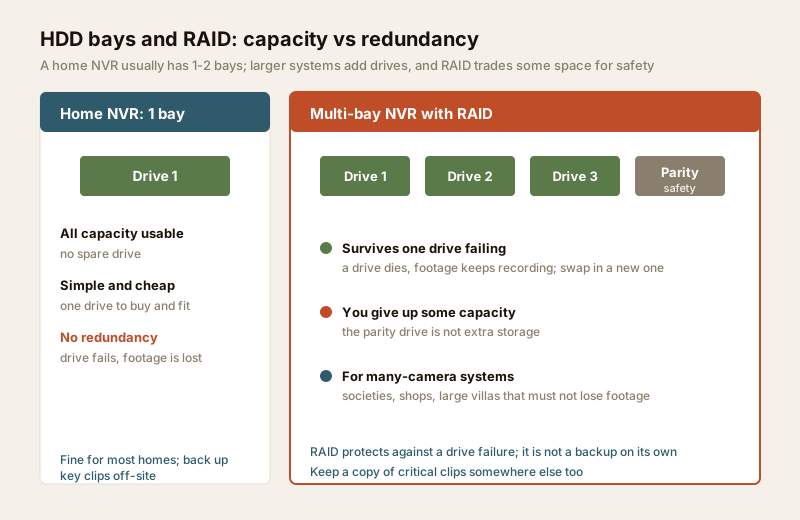
Two cautions. First, RAID is not a backup. It protects against a drive failing; it does not protect against theft of the recorder, a fire, a lightning-fried board, or someone deleting footage. For anything genuinely critical, keep a copy elsewhere — which is where a hybrid local-plus-cloud approach helps; weigh the ongoing cost with the cloud vs local cost calculator. Second, most homes do not need RAID at all — a single well-chosen surveillance drive, plus the habit of exporting any important clip off the recorder, is the right level.
Overwrite (loop) recording — how the drive never fills up
CCTV recorders use loop (overwrite) recording: when the drive is full, the recorder writes over the oldest footage first, continuously. This is why the drive size effectively sets your retention window — a bigger drive simply holds more days before the loop comes around.
A few practical points:
- Check the actual retention after install. Ask the installer to confirm how many days the system is really holding once it is running with your final settings — it is easy for the real number to differ from the estimate.
- Protect or export clips you care about. Because overwrite is automatic, an important clip will eventually be written over. Export it to a pen drive or the cloud, or use the recorder's "lock/protect" feature, before it ages out.
- Mind the retention rule. Keep footage for as long as you have a genuine reason to and no longer — over-retention of footage of visitors and neighbours works against the spirit of the DPDP Act. A sensible, stated retention period is both good privacy practice and good housekeeping. For the wider footage-handling picture, see the security and privacy assessment.
Keeping the drive healthy — and replacing it
A hard drive is the one part of a CCTV system with moving parts, so it is the part most likely to fail over the years. Treat it as a consumable that needs a little care:
| Do | Avoid |
|---|---|
| Use a surveillance-rated drive matched to the bay count | Fitting a random desktop or old PC drive |
| Keep the recorder cool and dust-free — ventilated spot, off the floor | A sealed, hot cupboard or a dusty shelf |
| Enable and check the recorder's drive-health (S.M.A.R.T.) alerts | Ignoring "disk error" warnings on screen |
| Test playback monthly — confirm footage is really being kept | Assuming a green light means it is recording |
| Put the recorder on backup power so the drive is not hit by dirty power | Bare mains through India's frequent cuts and spikes |
| Plan a replacement around the warranty window (often ~3 years) | Running a worn drive until it dies mid-incident |
India adds two stresses worth designing around. Heat: an equipment cupboard can run hot, and heat shortens drive life — give the recorder air. Power cuts and spikes: abrupt loss of power mid-write is hard on a drive and can corrupt the recording, and a surge can kill both drive and recorder. A UPS for the recorder, plus proper surge protection and earthing (a licensed electrician's job), protects the drive and keeps you recording through a cut — the full picture is in the power supply and UPS guide.
When the drive shows S.M.A.R.T. warnings, starts clicking, or drops footage, replace it promptly — do not wait for it to fail during the one week you needed it. Swapping a drive in a single-bay recorder is quick; a professional will fit and re-initialise it and confirm recording has resumed.
When to bring in a professional. You specify the storage — the drive type, the target retention, whether the system warrants more bays or RAID — and you supervise the result by confirming real retention and testing playback. Hand the mains-electrical supply, surge protection and earthing for the recorder to a licensed electrician (see the electrical hub); leave cabling, conduit and any working at height to the installer. Never let CCTV equipment or its wiring block a fire-escape route or fire-fighting access.
Key takeaways
- Always use a surveillance-grade drive (24x7 rated) — a desktop drive wears out early and risks gaps in footage under a many-camera load.
- Size storage by retention x bitrate x camera count; do the real sum with the storage and bitrate calculator rather than guessing, and add headroom.
- A typical home NVR has 1-2 bays; one well-chosen drive suits most homes. RAID suits many-camera systems that must not lose footage — but it is not a backup.
- Recorders use loop/overwrite recording, so drive size sets your retention window — export or lock any clip you need before it ages out, and keep footage only as long as you genuinely need it.
- Keep the drive cool, dust-free and on backup power, watch its health alerts, test playback monthly, and replace it around the warranty window. Route mains, surge protection and cabling to licensed professionals.
References
- Digital Personal Data Protection Act, 2023 — footage is personal data; retain it only as long as you have a genuine purpose, secure it, and avoid needless capture of neighbours and passers-by.
- Manufacturer surveillance-drive specifications (workload rating in TB/year, 24x7 duty, supported bay count) — verify on the drive maker's datasheet before ordering.
- National Building Code of India (SP 7), Bureau of Indian Standards, and local municipal bye-laws for any structural, electrical or life-safety aspect of an install; verify the current edition via the BIS catalogue: https://www.services.bis.gov.in/
This is an educational overview, not legal or engineering advice. Mains-electrical work, surge protection, earthing, cabling and any working at height are qualified professional tasks — engage licensed professionals and verify any standard's current status via the BIS catalogue before relying on it.
Export this guide
Related Guides — Deep-dive reading
CCTV Storage Maintenance in India (2026): Keeping the Footage There When You Need It
Surveillance storage is a wear item that fails silently. This professional guide covers checking disk health, verifying recordings actually exist for the full retention window, planning drive replacement before failure, keeping a spare, and holding an off-site backup so a dead or stolen recorder is not total loss.
SecurityLocal Storage vs Cloud CCTV in India (2026): Where Your Footage Should Live
A homeowner's honest head-to-head on where CCTV footage is kept — on a hard disk in the recorder at home, or uploaded to a per-camera cloud plan — across cost, theft resilience, internet dependence, retention, remote access and DPDP privacy, ending in a clear which-suits-whom, with hybrid usually the smartest answer.
SecurityCCTV Recording Failure in India (2026): Live View Works but Nothing Was Saved
You open the recorder to pull footage of an incident and there is nothing there, even though every camera shows a crisp live picture. A calm, ordered guide to why an Indian CCTV system records live but saves nothing, and how to fix it before the next incident.
SecurityRelated Tools — Try Free
CCTV Camera Coverage & Count Calculator
Estimate how many CCTV cameras you need, the NVR channels, storage in TB for your retention period, and an indicative all-in cost with GST.
CCTV CalculatorCCTV Cloud vs Local Cost Calculator
Compare cloud CCTV subscription against a local NVR + HDD — upfront, 5-year total, monthly fee and break-even.
Cloud vs LocalCCTV Recorder Selector
Camera type, count, PoE need and resolution to the right recorder — DVR, NVR, NVR-with-PoE or hybrid — with channels, HDD bays and PoE ports.
Recorder Selector