
CCTV NVR vs DVR in India (2026): Choosing the Right Recorder
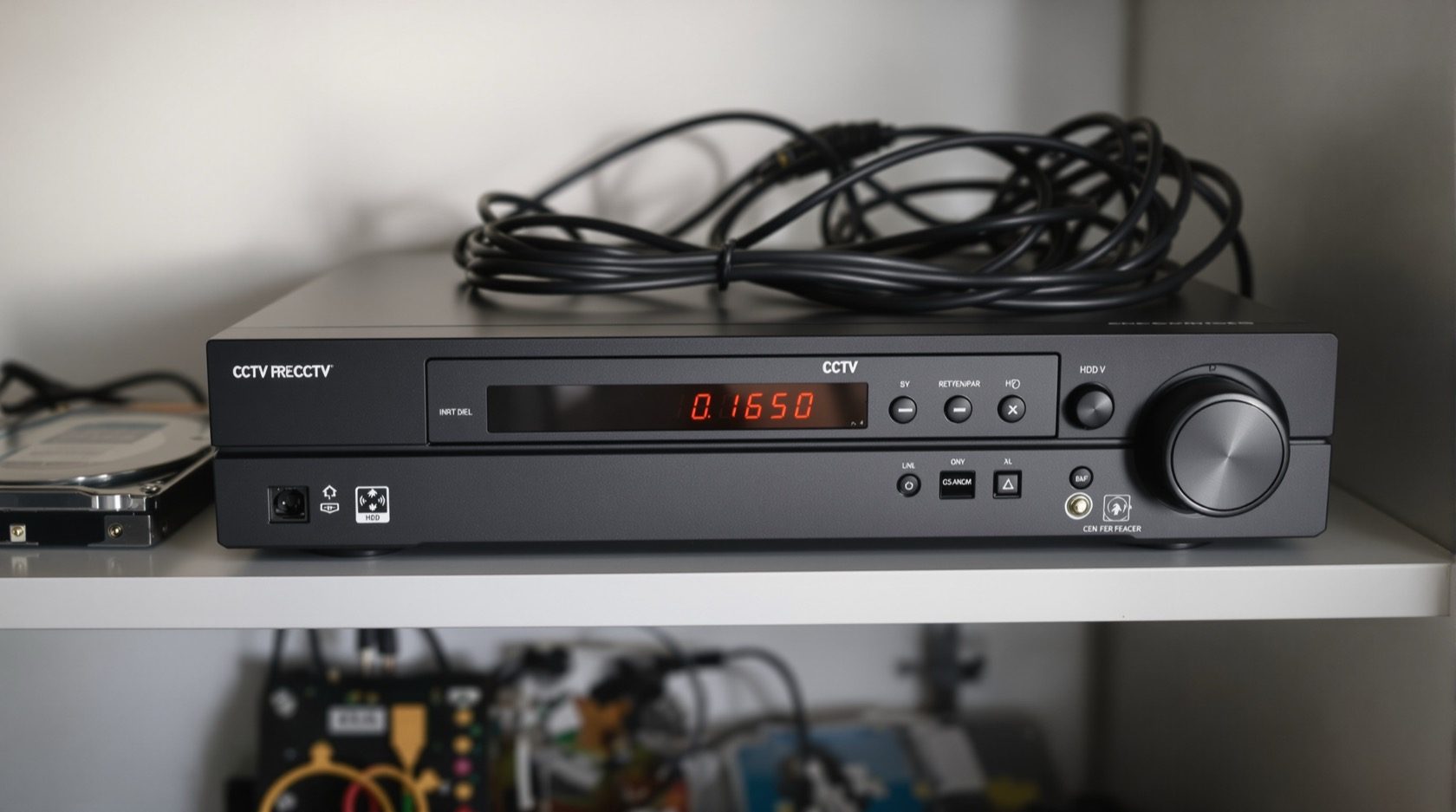
The recorder is the brain of a CCTV system. What separates a DVR from an NVR, how each one wires up, why channel count and total bandwidth both matter, and how to pick the box that fits your cameras and your Indian home.
Every CCTV system has a brain, and it is not any of the cameras — it is the recorder sitting in a cupboard, on a shelf, or in a small rack. Cameras only see; the recorder is what stores the footage, lets you play it back, and streams it to your phone. Get the cameras wrong and you can swap one out. Get the recorder wrong and you may have to replace the whole thing, because the recorder decides which cameras you can even use, how many, and at what quality.
This is the plain-English guide to CCTV NVR vs DVR for an Indian home — the recorder-selection decision, and nothing else. It stays in its lane: the cabling behind it, the network switch that feeds an IP system, the drives inside it, and the power that keeps it alive through a cut each have their own guide, cross-linked below. Here we answer one question well: which box do I buy, and how big?
Scope & safety. This guide helps you specify and supervise. Mounting, structured cabling, conduit or chasing, earthing and any mains-electrical work belong to licensed professionals — plan the recorder here, then have a qualified installer wire and commission it. Never let a recorder, its cabling or its cupboard block a fire-escape route or fire-fighting access. Footage is personal data under the Digital Personal Data Protection Act, 2023 — secure it. This is not legal advice.
The three kinds of recorder
There are really just three boxes to choose between, and the difference comes down to what kind of camera they talk to.
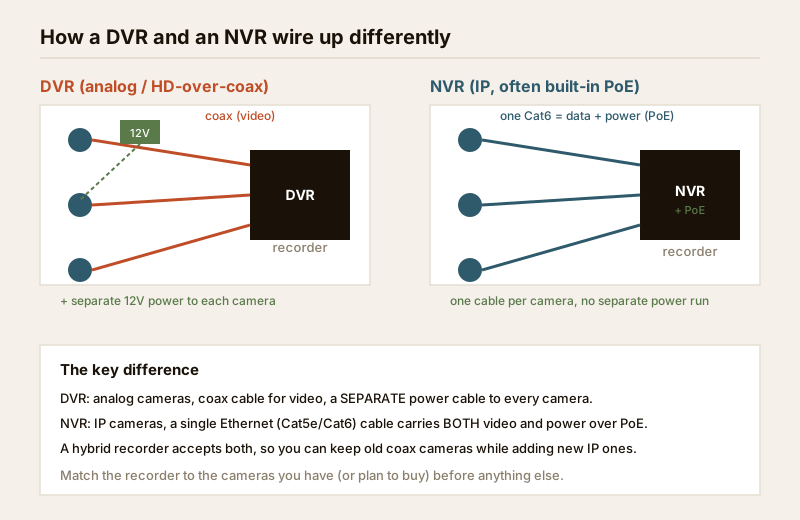
- DVR — Digital Video Recorder. The recorder for analog cameras, including modern HD-over-coax cameras (HDCVI, TVI, AHD). Each camera sends its video down a coax cable to the DVR, and needs a separate power wire as well. This is the older, cheaper family — the workhorse of budget Indian installs and the box you inherit if a house already has coax in the walls.
- NVR — Network Video Recorder. The recorder for IP (network) cameras. Each camera is a tiny networked computer that sends a digital stream over an Ethernet (Cat5e/Cat6) cable. A PoE NVR has network ports built in that also carry power, so one cable per camera does everything — video, control and power. This is the modern, higher-resolution family, and where most new homes should land.
- Hybrid (XVR). A recorder that accepts both analog and IP cameras. It is the bridge box: keep the old coax cameras you already have, and add new IP ones over time without throwing the recorder away.
If you have not yet decided between analog and IP as a system, read that first — it drives the recorder choice, not the other way round. See analog CCTV explained, IP CCTV explained and hybrid CCTV systems, and let the CCTV system type selector walk you through it. Once the system type is settled, the recorder follows almost automatically.
DVR vs NVR vs hybrid — the comparison
| Factor | DVR | NVR | Hybrid (XVR) |
|---|---|---|---|
| Cameras it uses | Analog / HD-over-coax | IP (network) cameras | Both analog and IP |
| Cable per camera | Coax + separate power | One Ethernet (data + PoE power) | Coax or Ethernet |
| Typical resolution | 2MP–5MP | 2MP–8MP (4K) and beyond | Up to each camera's limit |
| Wiring at the recorder | BNC connectors + power distribution | RJ45 network ports (built-in PoE) | Mix of both |
| Cable distance limit | Coax runs long (100m+) | ~90–100 m per Ethernet run | Per cable type |
| Where footage smarts live | In the DVR | In the camera (edge AI) and NVR | Mixed |
| Upgrade path | Limited to analog | Full IP, easy to extend | Best for staged upgrades |
| Cost | Lowest | Higher per channel | Middle |
| Best for | Reusing existing coax, tight budgets | New installs, high detail, staged growth | Mixed old + new cameras |
A quick way to remember it: coax = DVR, network cable = NVR, both = hybrid. If a builder already ran coax through your walls, a DVR (or hybrid) saves you re-cabling. If you are wiring a new home, an NVR with PoE is almost always the cleaner, more future-proof choice — one cable per camera and no separate power runs.
Channels: count what you have, then leave headroom
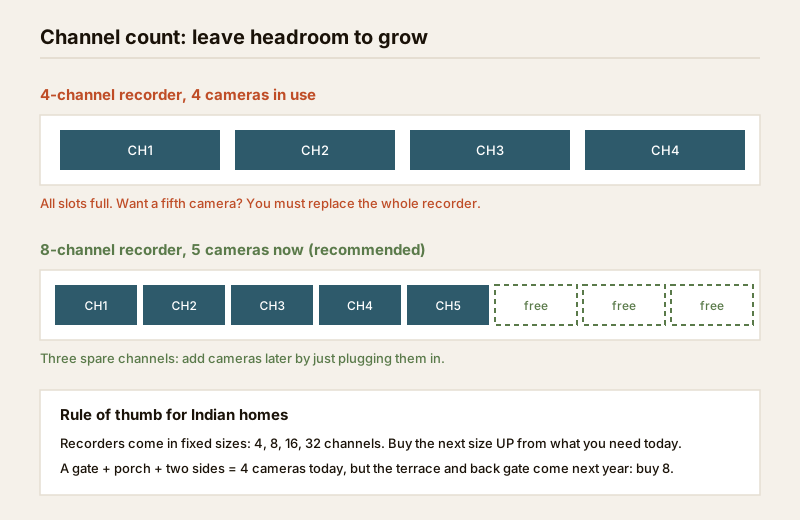
A recorder has a fixed number of channels — one per camera — and they come in standard sizes: 4, 8, 16 and 32. This is the single most common sizing mistake in Indian homes: people buy a 4-channel box for exactly four cameras, then want a fifth for the terrace or the back gate next year and discover the recorder is full. There is no expansion slot — you replace the whole unit.
The rule is simple: buy the next size up from what you need today. A gate, porch and two side cameras is four now, but the terrace, the back gate and the car park are the obvious next additions. An 8-channel recorder for a four-camera home today costs a little more and saves a full replacement later.
For a PoE NVR, also check that the number of built-in PoE ports matches the channel count you will actually use — some 8-channel NVRs ship with only 4 or 8 PoE ports, and extra cameras then need a separate PoE switch. That switch, its watt budget and how the camera network is isolated are covered in the network switch & PoE budget guide — plan them together so ports and power line up.
The hidden limit: total bandwidth (throughput)
Here is the trap that catches people who did buy enough channels. Every NVR has a maximum total bandwidth — a ceiling on the combined Mbps it can record across all channels at once, usually printed on the spec sheet as "incoming bandwidth". Channels tell you how many cameras fit; bandwidth tells you whether they fit at full quality.
A high-resolution 4K camera on high frame rate might push 6–8 Mbps. Sixteen of those is nearly 100 Mbps — enough to exceed a recorder rated for 80 Mbps, even though it has sixteen channels free. The result is dropped frames, refused streams, or the recorder quietly dropping everyone to a lower quality.
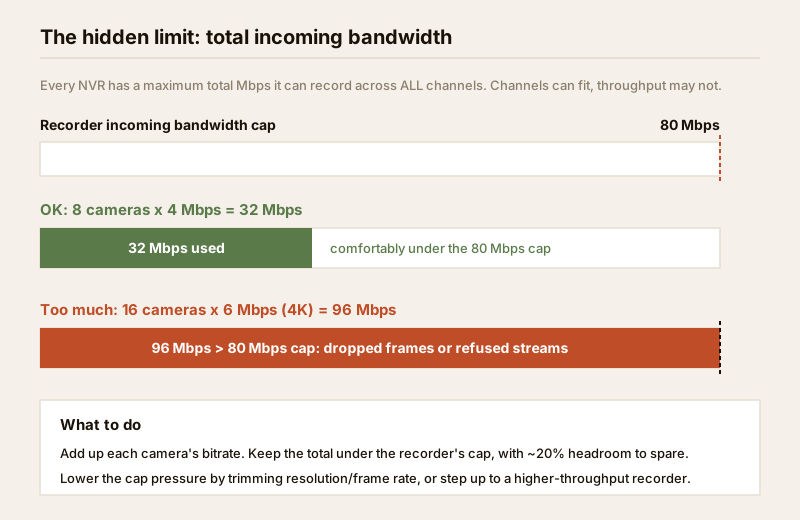
The fix is arithmetic, not guesswork: add up each camera's bitrate and keep the total under the recorder's cap, with roughly 20% headroom to spare. If it does not fit, either trim resolution or frame rate on the less-important cameras, or step up to a higher-throughput recorder. The same per-camera bitrate you use here also drives how much disk you need — the CCTV storage bitrate calculator does that sum, and the storage & HDD sizing guide explains it.
HDD bays: the drives live inside
The recorder is also the home for the hard drives. Two numbers matter:
- Number of HDD bays. Small home DVRs and NVRs take one drive; larger 8/16-channel units take two; and bigger boxes take four or more. More bays means more total storage and, on higher-end units, RAID for redundancy so a single drive failure does not lose your footage.
- Maximum drive size supported. Recorders have a cap on the biggest disk each bay accepts — commonly 8TB, 10TB or more per bay. Check it before buying a large drive that the box cannot use.
Two practical India notes. First, most recorders ship without a drive — budget for a surveillance-grade disk separately (a desktop drive is not built for 24/7 writing and fails early). Second, how many days of footage a given drive holds depends on your cameras and retention target, which is exactly the sizing done in the storage & HDD sizing guide. Do not overspend on bays you will never fill, or underspend and lose the week you needed.
Matching the recorder to your cameras
Putting it together, the recorder decision follows the cameras in a fixed order:
1. System type first. Analog or IP? That alone decides DVR vs NVR (or hybrid if you are mixing). Settle this with the system type selector.
2. Channels next. Count today's cameras and buy the next size up (4 → 8, 8 → 16) for headroom.
3. Bandwidth check. Add up camera bitrates; confirm the total sits under the recorder's incoming-bandwidth cap with headroom.
4. Resolution support. Confirm the recorder records at each camera's full resolution — an old DVR may cap a 5MP camera at 2MP.
5. PoE ports (NVR only). Make sure built-in PoE ports cover your cameras, or plan a separate PoE switch.
6. HDD bays and max drive size. Enough bays and drive capacity for your retention target, with a surveillance-grade disk.
To turn those six inputs into a specific box size, use the new CCTV recorder selector — it asks for your camera count, type and resolution and points you at the right channel count and recorder family. It is the fastest way to sanity-check a vendor's quote before you pay.
Do / avoid at a glance
| Do | Avoid |
|---|---|
| Decide analog vs IP before the recorder | Buying a box, then forcing cameras to fit it |
| Buy the next channel size up for headroom | Sizing channels to exactly today's camera count |
| Add up bitrates against the bandwidth cap | Assuming free channels means free capacity |
| Confirm full-resolution recording per camera | Pairing a 5MP camera with a 2MP-limited DVR |
| Use a surveillance-grade HDD, sized to retention | A desktop hard drive running 24/7 |
| Put the recorder + switch + router on backup power | A recorder that dies with the evening power cut |
Keep the recorder alive and reachable — safely
Two things sit just outside recorder selection but decide whether it is useful. First, power: in an Indian home with regular cuts, a recorder that switches off with the grid records nothing and drops your phone view. Plan a UPS or inverter for the NVR + PoE switch + router together, sized in the power supply & UPS guide; surge protection and earthing are a licensed professional's job.
Second, remote viewing: watching your cameras from your phone is one of the main reasons to have a recorder, but do it safely — change every default password, use a strong unique password with 2FA, keep the firmware updated, and prefer the vendor's secure cloud/relay or a VPN over exposing the recorder directly to the internet. The secure remote access guide covers this properly; treat footage as personal data and secure it.
When to bring in a professional. Choose the recorder family, channel count and drive size yourself — then hand the structured cabling, coax or Ethernet runs, PoE wiring, earthing, surge protection and any mains-electrical work to a licensed installer, and anything at the mains board to a licensed electrician (see the electrical hub). Working at height for the cameras and keeping cabling clear of fire-escape routes are non-negotiable. A correctly sized recorder installed by a qualified professional is worth far more than a bigger box wired badly. For the whole picture, the building security systems guide and the CCTV hub tie the pieces together.
Key takeaways
- The recorder is the brain of a CCTV system and the hardest part to swap — choose it to match your cameras, not the reverse.
- DVR = analog/coax, NVR = IP/network cable, hybrid = both. Decide the system type first with the system type selector; the recorder follows.
- Channels come in 4/8/16/32 — buy the next size up for headroom; a full recorder cannot be expanded.
- Watch the total bandwidth cap, not just free channels: add up camera bitrates and keep ~20% headroom.
- Check HDD bays and max drive size, use a surveillance-grade disk, and put the recorder, switch and router on backup power.
- Size it in minutes with the CCTV recorder selector, then have a licensed professional cable and commission it.
References
- Digital Personal Data Protection Act, 2023 — CCTV footage is personal data; store it securely, limit access, and keep cameras to a legitimate purpose on your own property and shared areas.
- Manufacturer specification sheets — verify a recorder's channel count, incoming/recording bandwidth, supported resolutions, PoE port count and maximum HDD size before ordering.
- National Building Code of India (SP 7), Bureau of Indian Standards, and local municipal bye-laws for any structural, electrical or life-safety aspect of an install; verify the current edition via the BIS catalogue: https://www.services.bis.gov.in/
This is an educational overview. Structured cabling, PoE and coax runs, earthing, surge protection and any mains-electrical work are qualified professional tasks — engage licensed installers and verify any standard's current status via the BIS catalogue before relying on it.
Export this guide
Related Guides — Deep-dive reading
CCTV Remote Access in India (2026): Watch From Your Phone, Safely
How to view your own cameras from anywhere without leaving the front door open to the internet — change the defaults, use strong credentials and 2FA, keep firmware current, prefer the vendor's secure cloud relay or a VPN, segment the camera network, and treat footage as personal data.
SecurityCCTV Recording Failure in India (2026): Live View Works but Nothing Was Saved
You open the recorder to pull footage of an incident and there is nothing there, even though every camera shows a crisp live picture. A calm, ordered guide to why an Indian CCTV system records live but saves nothing, and how to fix it before the next incident.
SecurityData Storage Cost for CCTV in India (2026): Local Disks vs Cloud, and How to Size It
The running cost people forget when they buy cameras. Where the footage actually lives — a one-time surveillance hard disk in the recorder, or a recurring per-camera cloud plan — and how camera count, resolution, frame rate, recording mode and retention days decide how many terabytes, and how much money, you really need.
SecurityRelated Tools — Try Free
CCTV Recorder Selector
Camera type, count, PoE need and resolution to the right recorder — DVR, NVR, NVR-with-PoE or hybrid — with channels, HDD bays and PoE ports.
Recorder SelectorCCTV Camera Coverage & Count Calculator
Estimate how many CCTV cameras you need, the NVR channels, storage in TB for your retention period, and an indicative all-in cost with GST.
CCTV CalculatorCCTV Cloud vs Local Cost Calculator
Compare cloud CCTV subscription against a local NVR + HDD — upfront, 5-year total, monthly fee and break-even.
Cloud vs Local