
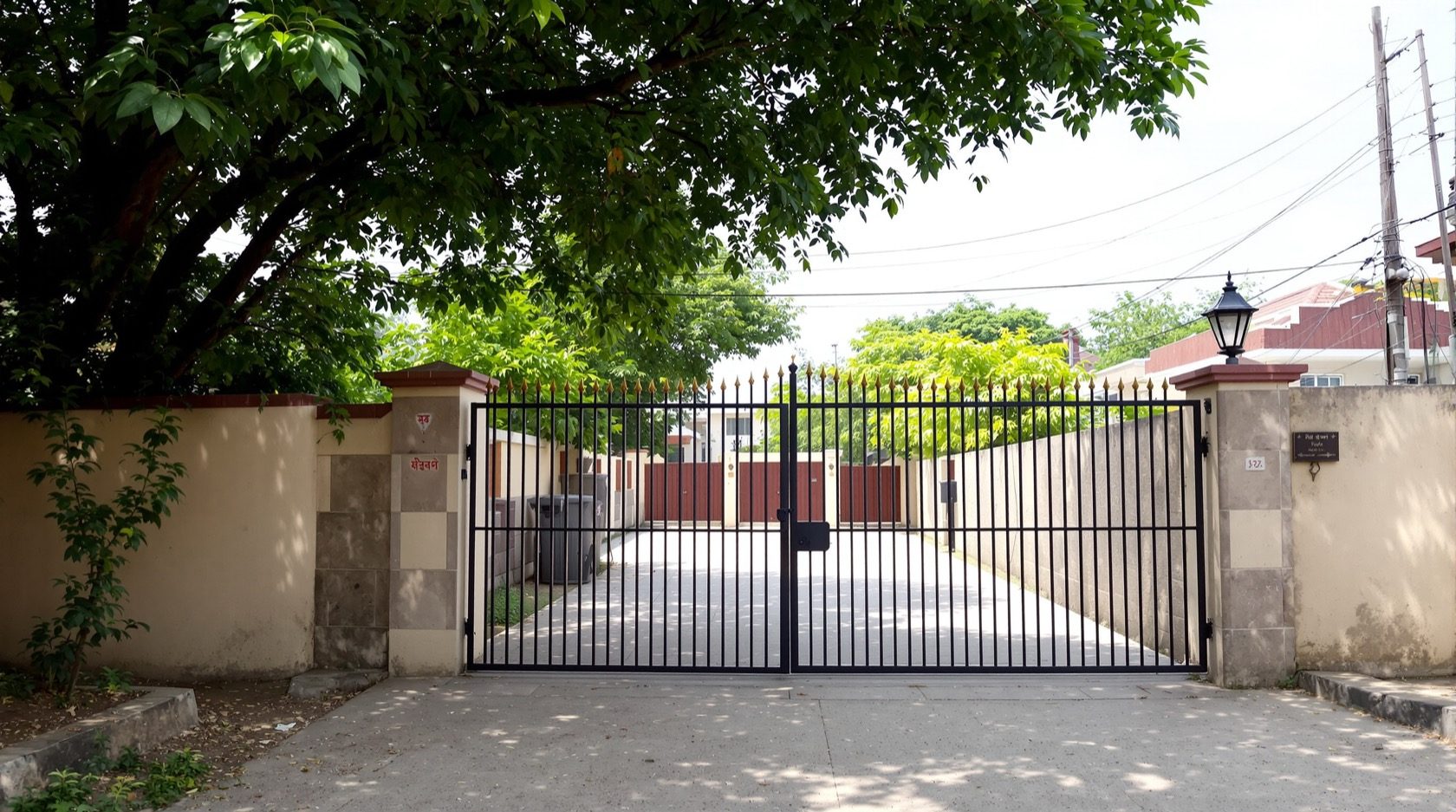
CCTV Line Crossing Detection (India 2026): Virtual Tripwire for Your Boundary
How a direction-aware virtual tripwire alerts you the moment someone crosses your gate, driveway or boundary line the wrong way — when it beats zone detection, how to place it, and how to keep the line on your own property.
CCTV line crossing detection — often called a virtual tripwire — is one of the most useful smart-detection tricks a modern camera offers, and one of the easiest to get right. Instead of reacting to movement anywhere in the frame, the camera watches a single line you draw across the scene and alerts only when a subject actually crosses it. Draw that line along your gate threshold, across the mouth of the driveway, or over the one gap in a boundary wall, and you have turned a whole camera view into one crisp question: did someone step over this line, and which way were they going?
This guide is the focused explainer on line-crossing in Studio Matrx's CCTV hub. It sits between two neighbours you should read alongside it: plain motion detection, which floods you with alerts because it reacts to any pixel change, and intrusion-zone detection, which watches a whole area rather than a single edge. Line-crossing is the sharpest tool of the three when what you are protecting is a clean, single boundary.
Scope & safety. This guide helps you plan and decide, then brief an installer. Mounting cameras at height, running cabling and any mains-electrical work belong to licensed professionals. Security hardware must never block a door, window or fire-escape route. Cameras — and any detection line — belong only on your own property and shared areas, never bathrooms, bedrooms or changing areas, and positioned to respect neighbours and the spirit of the Digital Personal Data Protection Act, 2023.
What line-crossing detection actually does
Inside the camera (or the recorder), the software tracks moving objects and works out the path each one takes across the frame. You draw a straight line — the tripwire — and set a direction. When an object's path crosses that line in the direction you flagged, the camera fires: it records a clip, pushes a notification to your phone, and can trigger a siren, a light or a linked action.
Two things make it far more precise than raw motion:
- It is an edge, not an area. A leaf blowing about, a dog wandering the far corner, rain streaking the lens — none of it matters unless it physically crosses your line. The alert is tied to one deliberate event.
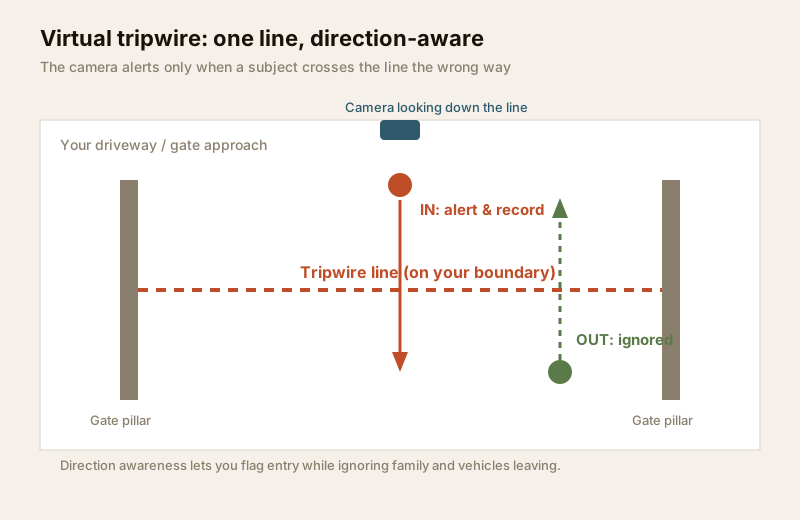
- It is direction-aware. You choose whether to trigger on A-to-B, B-to-A, or both. That single setting is what separates a useful tripwire from a nuisance one, and it is the feature plain motion can never offer.
Why direction awareness is the whole point
Think about the traffic across your own gate on a normal day. Family walking out to the car, the car reversing onto the road, the maid or cook leaving in the evening, a delivery rider heading back to the gate. Most of the crossings you do not care about are people and vehicles leaving. What you care about is something entering when it should not — at 2 a.m., or up the side path, or over the low back wall.
Set the tripwire to trigger only on the in-bound direction and the noise collapses. Exits pass silently; entries light up your phone. This is impossible with a motion box, which cannot tell an arrival from a departure — it just sees movement and shouts. Direction awareness is the single biggest reason people upgrade from motion to line-crossing.
When a line beats a zone (and when it does not)
Line-crossing and intrusion-zone detection are cousins, and beginners often reach for the wrong one. The rule of thumb:
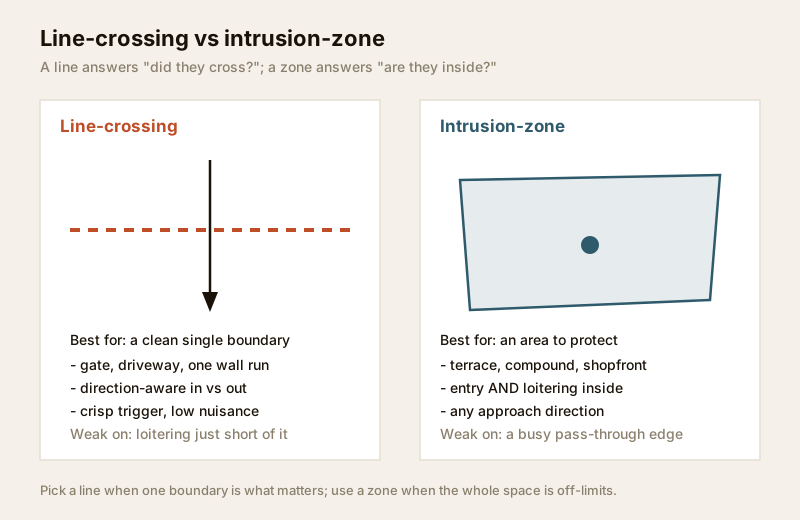
- Use a line when what matters is a single boundary being crossed — a threshold, an edge, a gap. A gate. The mouth of a driveway. One run of boundary wall. The top of a compound-wall where someone would climb over.
- Use a zone when what matters is presence inside an area — someone standing on your terrace, loitering at your shopfront, wandering the compound. A zone catches lingering that never crosses any particular edge.
A line answers did they cross? A zone answers are they inside? On a plot with one clean entry point, the line is crisper and gives fewer nuisance alerts, because a person can trip a zone just by drifting near its edge, while a line demands a clear, committed crossing.
| Situation | Line-crossing | Intrusion-zone | Better choice |
|---|---|---|---|
| Main gate threshold | Crisp single-crossing trigger | Fires on anyone drifting near | Line |
| Long driveway mouth | One committed cross to enter | Whole strip alerts on movement | Line |
| Climb-over point on back wall | Line along the wall-top | Zone on the ground behind | Line (or both) |
| Open terrace at night | No single edge to cross | Presence anywhere = intrusion | Zone |
| Shopfront after hours | People pass along the front | Presence inside = alert | Zone |
| Busy shared corridor | Constant legitimate crossings | Same problem | Neither — human-detect only |
For an area rather than an edge, hand off to the intrusion-zone guide. Many Indian homes end up using both — a tripwire on the gate and a zone on the terrace — driven from the same camera or NVR.
Placement: where the line goes and how the camera sits
A tripwire is only as good as the pixels it is drawn on. Three things decide whether it works.
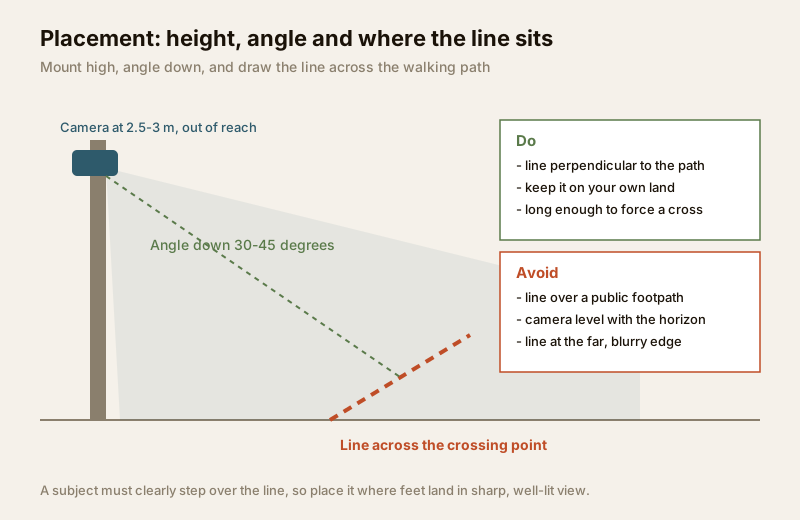
1. Mount the camera high and angle it down. At roughly 2.5–3 metres, angled down about 30–45 degrees, the camera sees a subject cross the line clearly and stays out of reach. A camera mounted level with the horizon catches sky, glare and only the tops of heads — a poor place to judge a crossing. This usually means working at height, which is an installer's job.
2. Draw the line across the walking path, not along it. The line should sit perpendicular to the direction people move, so anyone entering has no choice but to step over it. A line drawn parallel to the path, or tucked into a corner people skirt around, gets bypassed. Make it long enough to span the whole gap — gate pillar to gate pillar — so there is no way through without crossing.
3. Put the line where the image is sharp and lit. Detection is weakest at the far, blurry edge of the frame and in deep shadow. Place the tripwire in the near-to-mid field, where feet land in crisp, well-lit view. In India that means minding the low morning and evening sun, headlight wash across the gate at night, and dark patches beyond the reach of the camera's infrared. Good low-light performance matters here; see the low-light CCTV guide and the image quality guide.
Keeping the line on your OWN property
This matters both legally and for good-neighbour sense. Draw the tripwire on your side of the boundary — never across a public footpath, a shared lane, or a neighbour's gate. A line placed over the road outside your compound will alert on every passer-by, and it points your surveillance at people going about their business on public ground. That is both a nuisance-alarm generator and a privacy overreach.
The sound placement is a line that sits on your threshold, facing inward — it triggers when someone crosses into your space, not when the public walks past. This keeps the alerts meaningful and keeps you aligned with the spirit of the Digital Personal Data Protection Act, 2023, which expects surveillance to be proportionate and limited to a legitimate purpose. For a structured walk-through of what your cameras may lawfully and neighbourly see, use the security & privacy assessment guide. Line-crossing does not lower your privacy duty just because it is one line — it still records the people who cross it.
False triggers in India, and how to cut them
Even a well-placed tripwire will misfire if you leave it naive. The usual Indian culprits and their fixes:
| False-trigger source | Why it crosses the line | How to cut it |
|---|---|---|
| Stray dogs, cats, cattle | Animals wander across the gate | Add human/vehicle classification; set a minimum object size |
| Crows and birds | Fly or hop across the line | Object-size filter; raise the line off the extreme foreground |
| Swaying trees, shadows | Moving shade crosses the line | Keep the line clear of overhanging branches; use smart detection |
| Monsoon rain, drips | Streaks read as motion paths | Object classification; sun-shield on the camera; lens kept clean |
| Headlight glare at night | Sweeping light crosses the frame | Angle away from the road; good WDR / low-light camera |
| Insects on the lens at night | IR-lit bugs look like objects | Object-size filter; periodic lens wipe; light sited away from lens |
The single most powerful fix is to combine the tripwire with human and vehicle classification, so the line only counts a crossing when the thing crossing is a person or a vehicle — not a dog, a crow, or a shadow. That upgrade is covered in the human & vehicle detection guide, and it is what turns line-crossing from clever to genuinely quiet. Be honest with yourself, though: classification reduces false alarms, it does not eliminate them — distance, poor light and partial views still fool the model.
Edge-AI vs NVR-side vs cloud
Where the line-crossing logic runs shapes cost and reliability:
- Edge-AI (in the camera). The camera itself does the tracking and classification. Fastest, keeps working if the network drops, and no ongoing fee — but you pay more per camera. Best for the one or two gate cameras that matter most.
- NVR-side. The recorder analyses feeds from simpler cameras. Lets you add tripwires to cameras that lack their own brain; the recorder must be capable enough. A power cut takes the recorder down, so put it on a UPS.
- Cloud. Analysis happens on the provider's servers. Flexible and always-updated, but depends on your broadband and a subscription, and it sends footage off-site — weigh that against your privacy duty. See the cloud CCTV guide and local storage guide.
For the bigger picture of AI-driven cameras and where tripwires sit among the smarter features, see AI-powered CCTV and smart CCTV. To decide which detection features a given camera should have, walk through the CCTV detection feature selector.
When to bring in a professional. Decide the line positions, directions and camera count yourself — then hand the mounting at height, cable pulling, weatherproof terminations, recorder set-up and the on-site drawing and testing of each tripwire to a licensed installer. Anything at the mains board is a licensed electrician's job; see the electrical hub. Ask the installer to walk-test every line — crossing it in both directions on foot — before they leave, so you know it fires when it should and stays quiet when it should not.
A worked example: a typical Indian plot
On a standard independent house, a strong line-crossing scheme might be:
- Gate: one bullet camera, high on the pillar or house corner, angled down. Tripwire across the gate threshold, set to trigger in-bound only, combined with human/vehicle classification. Exits stay silent; a 2 a.m. entry lights up your phone.
- Side path: a second line across the narrow gap most intruders would use to reach the back, set to trigger both directions at night.
- Terrace: here a zone, not a line — presence anywhere on the terrace after dark is what you want, so use intrusion-zone detection instead.
Size the storage and bandwidth for those cameras with the storage bitrate calculator, and plan the whole layer of cameras against your plot's weak points using the perimeter vulnerability assessment.
Key takeaways
- Line-crossing detection is a virtual tripwire: draw one line, and the camera alerts only when a subject actually crosses it — far crisper than plain motion detection.
- Direction awareness is the whole point — trigger on entry, ignore exits, and the nuisance alerts collapse.
- Use a line for a clean single boundary (gate, driveway, wall gap); use intrusion-zone detection when presence inside an area is what matters.
- Placement decides everything: mount high, angle down, draw the line perpendicular to the path, in sharp well-lit near-field pixels.
- Keep the line on your own property, facing inward — never over a public footpath — to stay quiet and respect neighbours and the DPDP Act, 2023.
- Combine with human & vehicle detection to cut India's stray-animal, bird and headlight false alarms; it reduces, not eliminates them.
- Choose features with the detection feature selector, and route mounting, cabling, mains work and tripwire testing to a licensed professional.
References
- Digital Personal Data Protection Act, 2023 — keep any detection line and camera view on your own property and shared areas with a legitimate, proportionate purpose; avoid capturing public paths and neighbours' private spaces.
- Manufacturer specification sheets — verify a camera's line-crossing, direction and object-classification capabilities, and its low-light and weatherproofing (IP66+ outdoors) ratings, before ordering.
- National Building Code of India (SP 7), Bureau of Indian Standards, and local municipal bye-laws for any structural, electrical or life-safety aspect of an install; verify the current edition via the BIS catalogue: https://www.services.bis.gov.in/
This is an educational overview. Mounting at height, cabling and any electrical work are qualified professional tasks — engage licensed installers and verify any standard's current status via the BIS catalogue before relying on it.
Export this guide
Related Guides — Deep-dive reading
CCTV Human Vehicle Detection (India 2026): Human & Vehicle AI Alerts, Fewer False Alarms
How AI object classification alerts you only on people and vehicles - cutting the flood of false alarms that plain motion creates - where the AI runs (edge, NVR-side or cloud), its real limits, and the extra privacy weight of person-detection.
SecurityHow to Choose a CCTV Camera (2026): The Homeowner's Decision Guide for India
Cut through the spec-sheet noise and choose the right CCTV camera for each spot around an Indian home. What actually matters — sensor and low-light performance, lens and field of view, form factor, IP and IK ratings, honest smart features — and the marketing claims to ignore.
SecurityCCTV Intrusion Zone Detection (India 2026): Guarding an Area, Not a Line
Draw a region over your backyard, terrace or shopfront and alert on anyone entering or loitering inside it - how zone detection works, when it beats a line, day/night arming, dwell time, and keeping every zone on your own property.
SecurityRelated Tools — Try Free
CCTV Cloud vs Local Cost Calculator
Compare cloud CCTV subscription against a local NVR + HDD — upfront, 5-year total, monthly fee and break-even.
Cloud vs LocalCCTV Camera Coverage & Count Calculator
Estimate how many CCTV cameras you need, the NVR channels, storage in TB for your retention period, and an indicative all-in cost with GST.
CCTV CalculatorAcoustic Privacy (STC) Visualizer
Indian healthcare acoustic visualizer — compare wall assemblies and noise sources, see received SPL after STC attenuation, and check FGI 2018 / IS 1950 / NABH speech-privacy compliance with live dual-canvas waveform.
Acoustic Tool