
CCTV Intrusion Zone Detection (India 2026): Guarding an Area, Not a Line
Draw a region over your backyard, terrace or shopfront and alert on anyone entering or loitering inside it - how zone detection works, when it beats a line, day/night arming, dwell time, and keeping every zone on your own property.
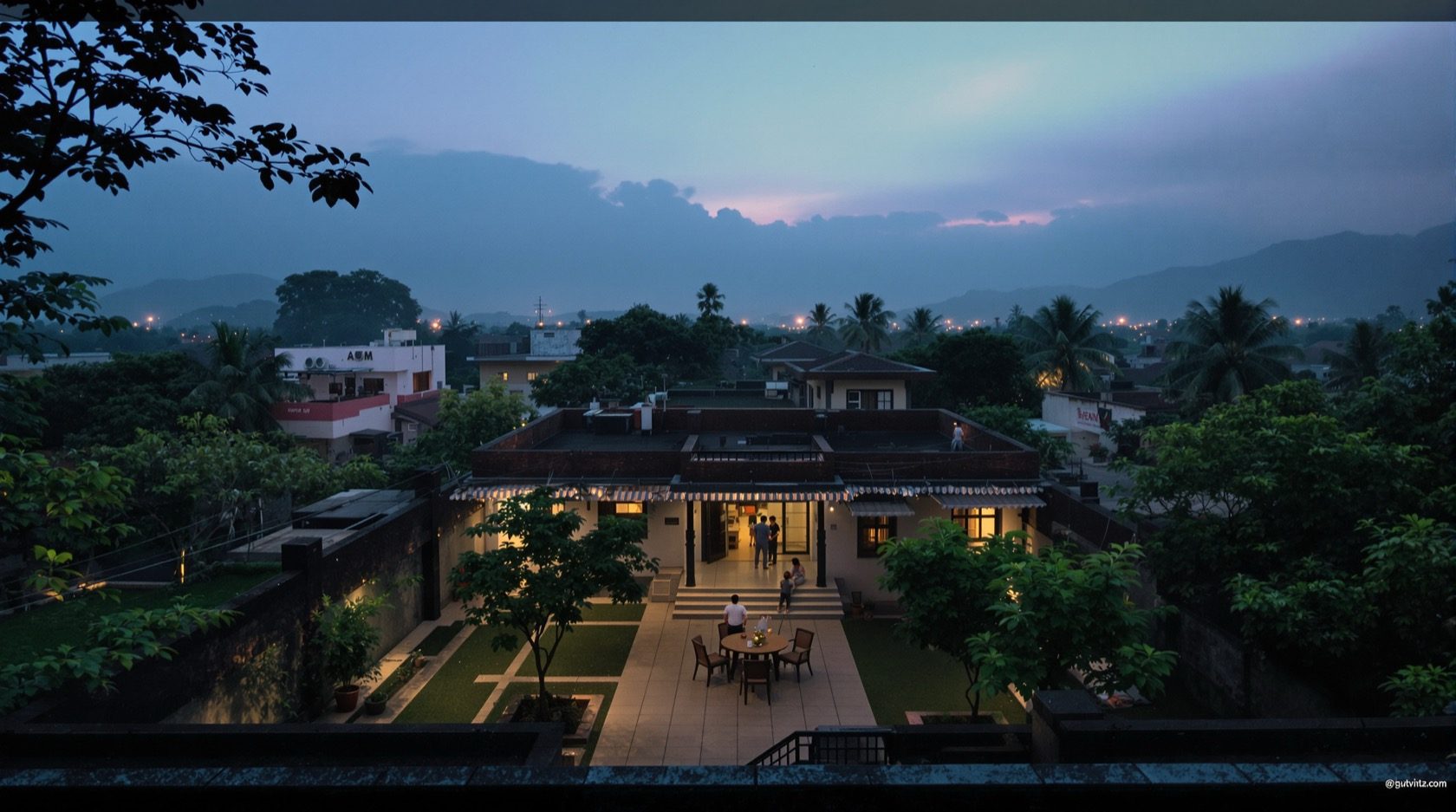
Some parts of your property should simply be empty after dark. The backyard behind the kitchen, the terrace once everyone is indoors, the strip of ground behind a shop's shutters at night - nobody has any business being there. CCTV intrusion zone detection is the feature built for exactly that idea: you draw an area on the camera's view, and the system alerts you when someone enters it or lingers inside. It guards a region, not a crossing.
This is the focused explainer on intrusion-zone (also called region or area) detection in Studio Matrx's CCTV hub. It sits alongside its close cousin, the virtual tripwire in line-crossing detection, and both stand on the object-classification layer covered in human and vehicle detection. If you have not yet met the raw building block underneath all of them, start with plain motion detection and come back.
Scope & safety. This guide helps you choose and configure a feature so you can brief an installer. Camera mounting at height, cabling and any mains-electrical work belong to licensed professionals. Security hardware must never block a door, window or fire-escape route. Detection zones belong only on your own property and shared areas - never bathrooms, bedrooms or changing areas, and drawn to respect neighbours and the spirit of the Digital Personal Data Protection Act, 2023.
What intrusion zone detection actually does
Where basic motion watches the whole frame for any pixel change, and a line watches a single crossing, an intrusion zone watches an enclosed area you define. You open the camera app or NVR, drag out a polygon - three, four or more points - over the region you care about, and the camera raises an alert whenever a qualifying target is present inside that shape.
Two words carry all the meaning:
- Entry. The moment a person (or vehicle, if you allow it) steps into the polygon, the event fires. This is the classic "someone is in my backyard" trigger.
- Presence / loitering. Because a zone cares about being inside, not about a single crossing, it naturally handles loitering - someone who climbs in and stays. Pair it with a dwell time and you can say "alert me only if a person is inside for more than five seconds," which quietly filters out the cat that clips a corner and leaves.
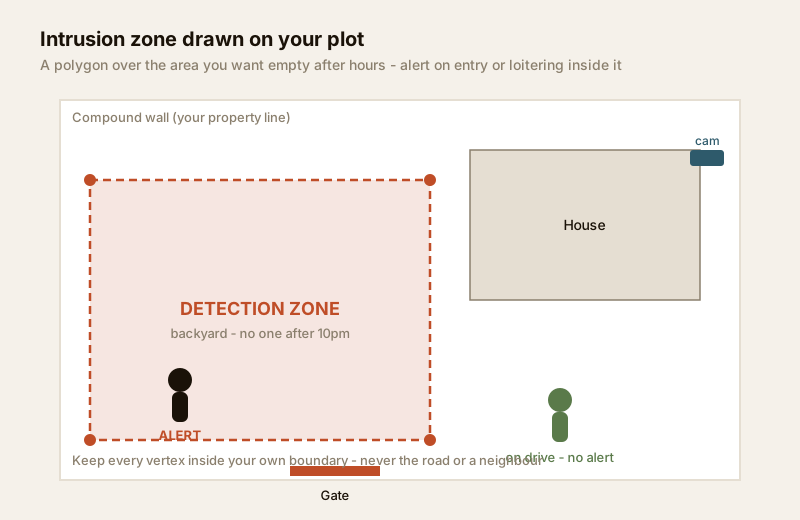
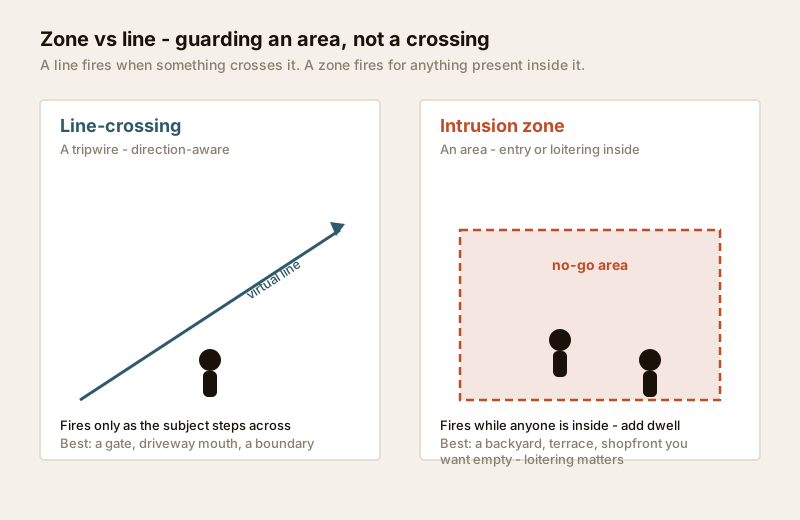
The key mental shift from a tripwire: a line asks "did something cross here?" while a zone asks "is anyone in this space right now?" That makes a zone the right tool whenever the goal is an area that should stay clear, not a boundary you expect to be crossed legitimately.
Zone vs line - which to reach for
These two features look similar in the menu and confuse a lot of buyers. They solve different problems, and most good setups use both.
| Question | Reach for a zone | Reach for a line |
|---|---|---|
| Goal | An area should stay empty | A boundary should not be crossed |
| Fires on | Presence / entry / loitering inside | The moment of crossing (direction-aware) |
| Loitering | Handled naturally (with dwell time) | Poorly - it is a one-off crossing event |
| Classic use | Backyard, terrace, shopfront, storeroom | Gate, driveway mouth, a wall you own |
| Wide-open ground | Strong - covers the whole patch | Weak - a line is a single thread |
| Direction | Not directional (in vs present) | Direction-aware (in-only, out-only, both) |
When a zone beats a line: an area you want no one in after hours. A backyard, a chained-off terrace, the sunken setback behind a shop - there is no single "line" that matters, you just want the whole space watched. A line here would be arbitrary; a zone maps the intent exactly. When a line beats a zone: a defined threshold that is normally crossed by legitimate traffic during the day - your own gate - where you care about direction (someone coming in at 2am) far more than mere presence. For that, see line-crossing detection.
Day/night schedules and arming
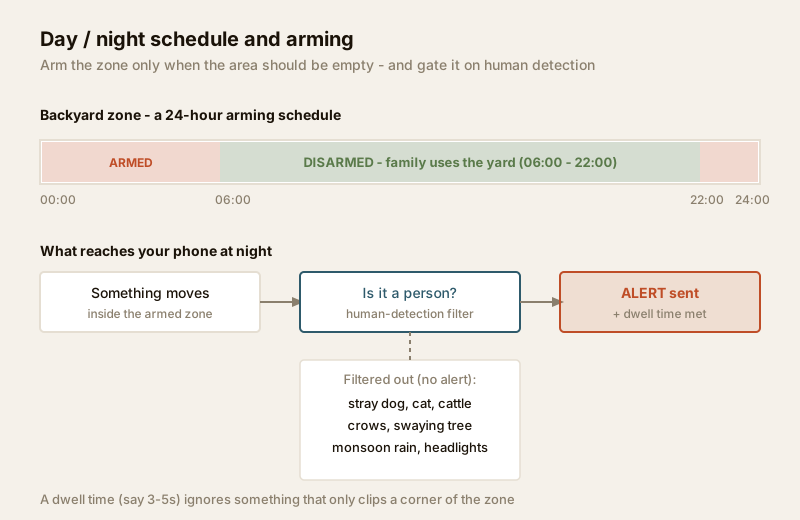
A zone drawn over your own backyard is useless if it screams every time your family walks out to the tulsi plant at 7am. The feature that makes it livable is scheduling - arming the zone only during the hours the area should be empty.
Almost every NVR and camera app lets you set an arming schedule per zone: active nights and weekends, dormant during the day. So the backyard zone arms at 22:00 and disarms at 06:00; the shopfront zone arms when you pull the shutters and disarms when you open.
Good arming practice for an Indian home or shop:
- Match the schedule to real life. Arm the zone only when the space is genuinely off-limits. An over-armed zone trains you to swipe alerts away - and a zone you have learned to ignore protects nothing.
- Separate zones, separate schedules. The terrace can arm earlier than the backyard if the family stops using it earlier. Draw them as distinct zones.
- Plan for the power cut. A zone that dies with the evening load-shedding is armed against nothing. Put the recorder and network on a UPS - see the resilience section of the building security systems guide.
- Combine with day-mode delivery. Many systems let a disarmed zone still record on motion while only notifying when armed - so you keep footage without the 2pm noise.
Cutting false alarms - the India reality
Raw zone detection based on pixel motion will drown you. Inside any outdoor polygon in India, the following things move: stray dogs, cats and cattle wandering in; crows landing; a swaying tree or its shadow; sheets of monsoon rain; headlight glare sweeping across a wall; and, at night, insects and spiders drawn to the camera's IR glow crawling across the lens. A dumb zone treats every one of these as an intruder.
Two settings tame it, and they are why zone detection is worth configuring rather than leaving on defaults:
1. Gate the zone on human detection. This is the single biggest win. Layer human and vehicle detection so the zone only alerts when the thing inside is classified as a person. A dog, a cow and a crow no longer reach your phone. Be honest, though: AI classification reduces false alarms, it does not eliminate them - heavy rain, a distant or partly-hidden figure, and poor night light all still cause misses and the odd false hit.
2. Set a sensible dwell time. A dwell of three to five seconds means the target must actually be inside the zone for that long, so something merely clipping a corner - a passing cat, a branch dipping in - is ignored. Raise it for a large, slow-to-cross area; lower it where you need an instant alert.
You can also shape the polygon tightly so a busy road, a neighbour's gate or a tree line simply falls outside it - fewer irrelevant things move inside a well-drawn zone. For the wider menu of smart triggers and how they stack, see video analytics and, for the raw layer beneath, motion detection.
| False-alarm source | Plain motion zone | Zone + human detection | Zone + human + dwell |
|---|---|---|---|
| Stray dog / cat / cattle | Alerts every time | Mostly ignored | Ignored |
| Crows, insects on lens | Frequent night alerts | Ignored | Ignored |
| Swaying tree / shadow | Common | Rare | Rare |
| Monsoon rain sheet | Floods you | Reduced, not zero | Reduced |
| Headlight glare on wall | Common | Reduced | Reduced |
| Person climbing in | Alerts (buried in noise) | Alerts clearly | Alerts clearly |
Where zone detection earns its keep
Play to the strength: an area that should be empty.
- The backyard / rear setback. The classic blind side of an Indian house - narrow, unlit, out of sight from the road. A zone over it, armed at night and gated on human detection, is one of the highest-value single settings you can configure.
- The terrace. Once the family is indoors, a rooftop zone catches anyone who has climbed up from a neighbouring wall.
- The shopfront and shuttered forecourt. A commercial zone over the area in front of the shutters, armed after closing, flags loiterers and anyone testing the lock. See the commercial CCTV guide.
- A storeroom or car porch overnight. Any indoor or semi-outdoor space that should have zero footfall after a certain hour.
For placing these within a whole scheme - which cameras, what coverage, no blind spots - work from the complete guide to CCTV systems and the outdoor angles in the outdoor CCTV guide. To decide which smart trigger each camera needs, the new CCTV detection feature selector walks you view by view.
Edge-AI, NVR-side or cloud - where the zone is judged
Zone detection can run in three places, and it matters for reliability and privacy:
- On the camera (edge-AI). The camera itself draws and judges the zone. Fastest, keeps the analysis on your own device, and keeps working if the internet drops. Best for privacy.
- On the recorder (NVR-side). The NVR runs the analytics across several cameras. Useful when your cameras are simple, but the NVR must be powerful enough.
- In the cloud. Footage is analysed on a provider's server. Convenient, sometimes more accurate, but your video leaves your premises - weigh this carefully under the DPDP Act, 2023, and prefer edge or on-premise where you can.
For the storage and bandwidth this implies, the storage bitrate calculator helps you size a recorder.
Privacy - keep the zone on your own ground
A detection zone that identifies and flags people carries more privacy duty, not less. The rules are simple and non-negotiable:
- Every vertex of the polygon must sit inside your own boundary. Do not draw a zone that covers the public road, a neighbour's gate, their window or their yard. If your camera's view includes them, shape the zone to exclude them - many systems also offer a privacy mask to grey out areas you should not record at all.
- A zone is for protecting a space, never for profiling people. Do not use loitering or presence alerts to monitor a neighbour's comings and goings, staff, or the public.
- Never in private spaces. No zone - and no camera - in bathrooms, bedrooms or changing areas.
For a structured way to check your whole scheme against these duties, see the security and privacy assessment.
India price bands (indicative)
Zone detection is usually a free software feature of a camera that already supports smart detection - you are paying for the camera's AI capability, not the zone itself. Treat these as ballparks to sanity-check a quote.
| Item | Typical range (₹) | Notes |
|---|---|---|
| Basic IP camera with pixel-motion zones only | ₹1,500 - ₹3,500 | Zones exist but no human filter - expect false alarms |
| Smart camera with edge-AI human detection + zones | ₹3,500 - ₹8,000 | The practical sweet spot; gate zones on person-detection |
| 4K / long-range AI camera | ₹7,000 - ₹15,000 | Bigger area covered well; more storage |
| NVR with server-side analytics | ₹8,000 - ₹25,000+ | Runs zones across many simple cameras |
| Cloud analytics subscription | ₹150 - ₹600 / camera / month | Convenient; weigh where your video is stored |
When to bring in a professional
When to bring in a professional. You can and should draw the zones, set the schedules and dwell times, and enable human-detection filtering yourself - that is the point of the feature. Hand the camera mounting at height, cabling, weatherproof terminations and recorder commissioning to a licensed installer, and anything at the mains board to a licensed electrician - see the electrical hub. If you run several zones across a shop or a large plot and want them tuned to genuinely low false-alarm rates, a good installer will set arming schedules, dwell and sensitivity far faster than trial and error. A zone must never sit on hardware that blocks a fire-escape route.
Key takeaways
- Intrusion zone detection guards an area - you draw a polygon and it alerts on anyone entering or loitering inside it.
- Reach for a zone when a space should stay empty (backyard, terrace, shopfront); reach for a line for a threshold that is normally crossed and where direction matters.
- Arm it on a day/night schedule so it is active only when the area is off-limits - an over-armed zone trains you to ignore alerts.
- Cut India's false alarms by gating the zone on human detection and setting a dwell time; be honest that this reduces, not eliminates, noise from dogs, crows, rain and headlights.
- Keep every vertex on your own property, use privacy masks for anything beyond it, and never profile people or point a camera at a private space - respect the DPDP Act, 2023. Plan each camera's trigger with the detection feature selector.
References
- Digital Personal Data Protection Act, 2023 - draw detection zones to cover only your own property and shared areas with a legitimate purpose; avoid capturing neighbours' private spaces, and use privacy masks where a view overreaches.
- Manufacturer specification sheets - confirm a camera supports AI human/vehicle classification (not just pixel-motion zones) and per-zone arming schedules and dwell time before ordering.
- National Building Code of India (SP 7), Bureau of Indian Standards, and local municipal bye-laws for any structural, electrical or life-safety aspect of an install; verify the current edition via the BIS catalogue: https://www.services.bis.gov.in/
This is an educational overview. Mounting at height, cabling and any electrical work are qualified professional tasks - engage licensed installers and verify any standard's current status via the BIS catalogue before relying on it.
Export this guide
Related Guides — Deep-dive reading
CCTV Human Vehicle Detection (India 2026): Human & Vehicle AI Alerts, Fewer False Alarms
How AI object classification alerts you only on people and vehicles - cutting the flood of false alarms that plain motion creates - where the AI runs (edge, NVR-side or cloud), its real limits, and the extra privacy weight of person-detection.
SecurityHow to Choose a CCTV Camera (2026): The Homeowner's Decision Guide for India
Cut through the spec-sheet noise and choose the right CCTV camera for each spot around an Indian home. What actually matters — sensor and low-light performance, lens and field of view, form factor, IP and IK ratings, honest smart features — and the marketing claims to ignore.
SecurityCCTV Motion Detection Explained (India 2026): Cutting the False Alarms
Why plain motion detection floods your phone with alerts in India, how basic pixel-change, PIR-assisted and smart motion differ, and how zones, sensitivity and scheduling get you to alerts you can actually trust.
SecurityRelated Tools — Try Free
CCTV Cloud vs Local Cost Calculator
Compare cloud CCTV subscription against a local NVR + HDD — upfront, 5-year total, monthly fee and break-even.
Cloud vs LocalCCTV Camera Coverage & Count Calculator
Estimate how many CCTV cameras you need, the NVR channels, storage in TB for your retention period, and an indicative all-in cost with GST.
CCTV CalculatorCCTV Detection Feature Selector
Answer four questions and get the right detection feature — basic motion, human/vehicle AI, line-crossing, intrusion-zone, auto-tracking or video analytics.
Detection Selector