
CCTV Handover and Documentation in India (2026): What to Receive Before You Sign Off
The as-built layout, recorder and network details, every password, warranties and bills, the app setup and a short playback-and-export training you must receive at CCTV handover — and why you change every password and turn on 2FA before you pay.
The cameras are up, the picture looks sharp, the installer is packing his ladder — and this is the exact moment most home and society CCTV systems are quietly signed off wrong. The wiring is done, but the cctv handover — the paperwork, the passwords and the ten minutes of training that decide whether the system is really yours — gets skipped. Money changes hands, the installer leaves with your admin password still in his phone, and six months later, when something happens, nobody can find the footage or the warranty card.
This guide is the "take ownership" step in Studio Matrx's CCTV hub. It is not about aiming cameras or checking the night picture — that is the acceptance walk-through in the commissioning and testing guide. This is about what you must receive and lock down before you sign the handover note and release the final payment.
Scope & safety. This guide helps the owner, RWA committee or architect run the handover and hold the installer to account. The physical work — mounting, cabling, any mains-electrical connection — belongs to the licensed professional; you supervise and sign off. Nothing here is legal advice. CCTV footage of identifiable people is personal data under the Digital Personal Data Protection (DPDP) Act, 2023, so treat access to it seriously.
Why handover is the step that protects you
Commissioning proves the system works today. Handover makes sure you can still run it, prove it and get it repaired long after the installer has gone. Three things go wrong when handover is rushed:
- You cannot find footage when it matters. Nobody showed you how to play back and export a clip, so at 2 a.m. after an incident you are helpless — or you have to call the installer and wait.
- The system is not secure. The recorder is still on its default or the installer's standard password, remote access is wide open, and there is no 2FA. Your home footage is one leaked password away from a stranger.
- You have no proof of anything. No itemised bill, no warranty card, no record of which camera is which model — so a warranty claim or an AMC dispute a year later is your word against theirs.
Handover fixes all three at once, in the half hour before you pay.
What you must receive: the document pack
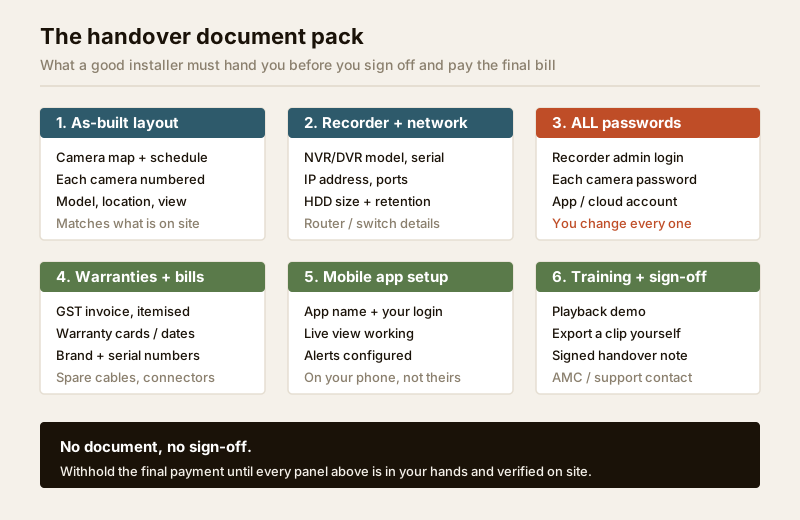
Ask for these in writing — a printed folder or a shared PDF — and check each one against the system on the wall before you sign. A good installer already has this ready; hesitation is a warning sign.
1. As-built camera layout and schedule
Not the sales proposal — the as-built record of what was actually installed, because positions always shift a little on site. It should include:
- A simple plan or sketch of the plot/floor with every camera marked and numbered.
- A camera schedule table: camera number, its location in plain words, the model, and what it is watching.
- Cable routes and the recorder location, at least roughly.
This is the map you will hand to a future technician, an AMC vendor or the police. Without it, "Camera 4" means nothing to anyone.
2. Recorder and network details
The heart of the system. Write these down and keep them safe:
- Recorder — NVR or DVR make, model and serial number (see NVR vs DVR if the terms are new).
- Hard drive — capacity fitted and the recording days it gives you at the chosen settings; confirm the number against the storage and bitrate calculator.
- Network — the recorder's IP address, the router/switch it connects to, and any port settings. This is what a technician needs to log in later without guesswork.
3. ALL passwords — then you change them
The installer must hand over every login: the recorder admin password, each camera's password, and the mobile-app or cloud account. Do not accept "it is all set, do not worry." You cannot own a system whose passwords you do not hold. As soon as you have them, you change them — covered in the next section.
4. Warranties, bills and spares
- An itemised GST invoice listing every camera, the recorder, the drive, cabling and labour — not a single lump sum.
- Warranty cards or the warranty period for each major item, with serial numbers, plus brand support details.
- Any leftover cable, connectors and mounting spares you paid for.
5. The mobile app, on your phone
Live viewing must work on your own phone before the installer leaves — logged into your account, not his demo login. Confirm live view opens, cameras are named sensibly, and motion alerts arrive (the mechanics are in the remote access security guide).
6. A short training and a signed handover note
Ten minutes that pay for themselves — see the training section below — closed by a signed handover note listing what was delivered, the date, and who to call for support or an AMC.
The security step: change every password, turn on 2FA
This is the single most important thing you do at handover, and it is why we treat footage as personal data. A CCTV system handed over on factory defaults or on the installer's standard password is not secure — default logins are published online and probed by bots continuously, and an installer who reuses one password across dozens of clients is a single point of failure for all of them.
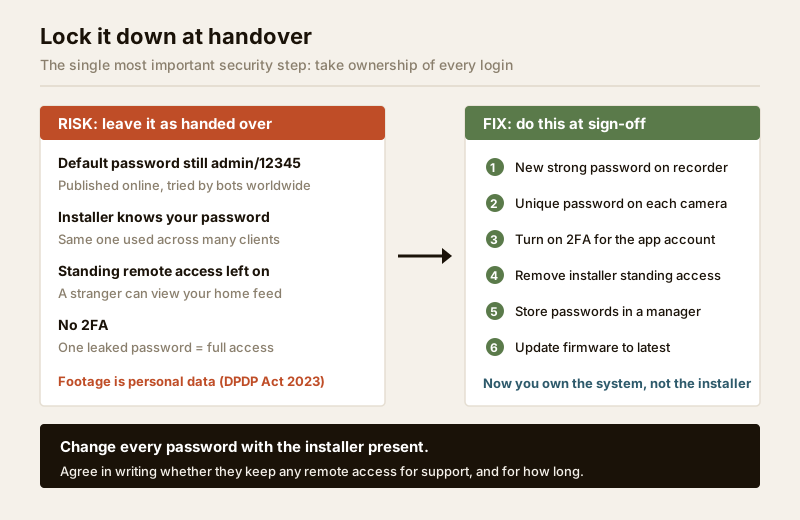
Do this with the installer standing there, so if anything breaks you fix it together:
1. New strong password on the recorder. A long, unique password — not a birthday, not the flat number. Different from anything you use elsewhere.
2. A unique password on each camera. Cameras have their own logins too; do not leave them on defaults.
3. Turn on 2FA (two-factor authentication) for the app/cloud account so a leaked password alone cannot open your feed.
4. Remove the installer's standing remote access. If they want access for future support, that is fine — but agree it explicitly and in writing, ideally access they request each time rather than a permanent open door. Do not leave standing access by accident.
5. Store the passwords in a password manager or a securely kept written note — not a sticky label on the recorder.
6. Update firmware to the latest version while support is present; outdated firmware is a common weak point.
Footage is personal data. Under the DPDP Act, 2023, video that identifies people is personal data. That is a strong reason to keep access tight, keep signage up so people know cameras are present, never point cameras at private spaces or neighbours' interiors, and delete old footage on a sensible retention cycle rather than hoarding it. See the security and privacy assessment guide for the wider picture.
Handover security checklist
| Step | What to confirm | Done when |
|---|---|---|
| Recorder password | Changed from default/installer to a strong unique one | You log in with the new password |
| Camera passwords | Each camera off its default | Installer confirms none left default |
| 2FA on app | Two-factor turned on for the app/cloud account | A test login asks for the second factor |
| Installer remote access | Removed, or agreed in writing with a time limit | Written note signed by both |
| Firmware | Recorder and cameras on latest available | Version shown matches latest |
| Password storage | Saved somewhere safe, not on the device | You can retrieve them without the installer |
The 10-minute training: playback and export
A system you cannot pull footage from is worthless. Before the installer leaves, you — not just watching, actually doing it with your own hands — must be able to find and export a clip.
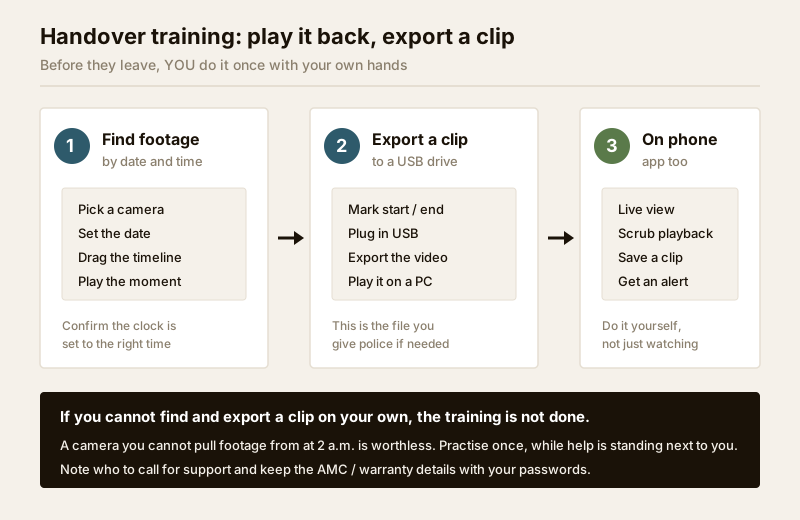
Cover these, and do each one yourself once:
- Find footage by date and time. Pick a camera, choose a date, drag the timeline, play a moment. Confirm the recorder's clock is set correctly — footage with the wrong time stamp is far weaker as evidence.
- Export a clip to a USB drive. Mark a start and end, plug in a pen drive, export the video, and confirm it plays on a normal computer. This is the exact file you would hand to the police, so practise it now.
- Do the same on the phone app. Open live view, scrub back through recordings, save a clip, and confirm a motion alert reaches your phone.
- Know who to call. Note the support number, the AMC contact if any, and warranty details — keep them with your passwords.
If you cannot complete the export on your own while help is standing next to you, the training is not finished. Say so, and do it again.
Handover document checklist (tick before you pay)
Keep the final payment as your leverage. Do not release it until every row below is a genuine yes.
| Item | Received? | Notes |
|---|---|---|
| As-built camera layout + numbered schedule | Yes / No | Matches the cameras actually on site |
| Recorder model, serial, IP and settings | Yes / No | Written down and stored |
| HDD capacity + confirmed recording days | Yes / No | Cross-check with the storage calculator |
| All passwords handed over (recorder + cameras + app) | Yes / No | Then changed by you |
| Every default/installer password changed; 2FA on | Yes / No | Installer remote access removed or agreed |
| Itemised GST invoice | Yes / No | Not a single lump sum |
| Warranty cards / periods + serial numbers | Yes / No | Per major item |
| App working on your phone, your account | Yes / No | Live view + alerts confirmed |
| Playback + USB export done by you | Yes / No | Clip plays on a PC |
| Signed handover note + support/AMC contact | Yes / No | Dated, both parties |
For the acceptance testing that should already be complete before you reach this point — every camera aimed, focused and checked day and night — walk the commissioning and testing guide and its companion CCTV commissioning checklist, which also carries the handover fields so you can run both in one visit.
For a society or shop, add a layer
The essentials are the same, but shared premises need custody to survive people changing:
- Two custodians hold the passwords — say the RWA secretary and one committee member — not a single person who may move away, and certainly not only the guard or the installer.
- A written retention and access policy: how long footage is kept, who may view it and on what request, logged in a simple register. This matters under the DPDP Act, 2023 and keeps the gated-community security approach clean.
- The AMC and warranty papers live in society records, not one resident's drawer, so the next committee inherits them.
When to bring in a professional
You run the handover and hold the installer to account — but the hands-on work stays professional:
- Mains-electrical connections, cabling and any work at height are for the licensed installer and, at the board, a licensed electrician; see the electrical hub. Security hardware must never obstruct a fire-escape route.
- If the installer cannot produce an as-built layout, itemised bill or warranty papers, that itself is a reason to withhold sign-off and ask for them before paying.
- For anything touching evidence, privacy complaints or a data request, get proper legal advice — this guide is educational, not legal advice.
Key takeaways
- Handover is a step, not an afterthought. Commissioning proves it works; handover makes sure you can run it, prove it and repair it after the installer leaves.
- Receive the full pack: as-built layout and schedule, recorder and network details, all passwords, warranties and an itemised bill, the app on your phone, and a signed handover note.
- Lock it down: change every default/installer password to a strong unique one, turn on 2FA, update firmware, and do not leave the installer standing remote access unless you agree it in writing.
- Train on playback and export yourself — if you cannot pull a clip to a USB drive and play it on a PC, the training is not done.
- Footage is personal data under the DPDP Act, 2023 — keep access tight, signage up, and retention sensible. Withhold the final payment until every handover row is a real yes, and use the commissioning checklist to run testing and handover together.
References
- Digital Personal Data Protection Act, 2023 — CCTV video identifying people is personal data; keep access controlled, purpose legitimate and retention limited.
- Manufacturer documentation for your specific recorder and cameras — the authoritative source for changing passwords, enabling 2FA, updating firmware and exporting footage; follow it over any generic instruction.
- Bureau of Indian Standards catalogue for any structural, electrical or life-safety standard referenced in an install; verify the current edition at https://www.services.bis.gov.in/
This is an educational overview, not legal advice. Cabling, work at height and any electrical connection are qualified professional tasks — engage licensed installers, and consult a professional for legal or data-protection questions.
Export this guide
Related Guides — Deep-dive reading
CCTV Recording Failure in India (2026): Live View Works but Nothing Was Saved
You open the recorder to pull footage of an incident and there is nothing there, even though every camera shows a crisp live picture. A calm, ordered guide to why an Indian CCTV system records live but saves nothing, and how to fix it before the next incident.
SecurityCCTV Remote Access in India (2026): Watch From Your Phone, Safely
How to view your own cameras from anywhere without leaving the front door open to the internet — change the defaults, use strong credentials and 2FA, keep firmware current, prefer the vendor's secure cloud relay or a VPN, segment the camera network, and treat footage as personal data.
SecuritySecure Device Disposal for Security Systems in India (2026): Wipe Before You Sell, Return or Bin It
The forgotten end-of-life risk: a security camera, NVR or DVR you sell on OLX, return, hand to a repair shop or give the kabadiwala still holds months of footage, saved Wi-Fi and account passwords, and a live link to your cloud account. This homeowner guide is the secure decommissioning checklist to run before any device leaves your hands.
SecurityRelated Tools — Try Free
CCTV Commissioning & Handover Checklist
An interactive go/no-go checklist to run at handover — cameras day and night, recording, alerts, passwords and documents — before you clear the final bill.
Handover ChecklistCCTV Recording-Duration Calculator
How many days of footage your storage holds, from cameras, bitrate, hours per day and recording mode.
Retention DaysCCTV Camera Coverage & Count Calculator
Estimate how many CCTV cameras you need, the NVR channels, storage in TB for your retention period, and an indicative all-in cost with GST.
CCTV Calculator