
Security Budget Planning for Indian Homes
The budgeting process, not the price list: how to set a realistic total from your home value, allocate it by risk, split capex from the ongoing opex, phase the spend when money is tight, hold a contingency, and read like-for-like quotes.
A security system is one of the few purchases where spending more can leave you less safe — because money flows to the exciting gadget instead of the boring gap that actually protects you. Budgeting is the discipline that stops that. This guide is about the process of planning the spend: how much to set aside, how to divide it by risk, how to plan for the money the system keeps costing you after installation, and how to compare quotes so you buy well.
It sits inside the Home Security Hub and pairs with two companions. If you want the actual price ranges and a five-year total-cost-of-ownership view, read the security cost planning guide and run the security system cost estimator. This guide assumes you know roughly what things cost and focuses instead on turning a risk assessment into a funded, phased plan.
Scope & safety. This is a planning guide. It helps you decide how to spend, then hand life-safety-critical and mains-electrical work — fire and alarm systems, electric locks, electronic access control, structural grilles and gates — to licensed professionals to install and certify. Security hardware must never block a fire-escape route. Budget planning does not change that rule; it funds it.
Start from the risk assessment, not the catalogue
Every rupee in this plan should be traceable to a finding in your home security risk assessment. If you have not done one, do it first: it produces the ranked list of weaknesses that this budget funds. Budgeting without an assessment is how people end up with four cameras and a rear door that still does not lock.
The order is always the same: assess the risk, rank the gaps, then allocate money to the top of that list. A good budget is simply a risk assessment with prices attached and a calendar.
How big should the budget be?
There is no universal number, but two anchors keep you realistic without over- or under-spending.
As a share of home value or project cost. For most Indian homes, a sensible first-pass security budget lands somewhere around 0.5% to 2% of the property value, and toward the lower end of that band for an existing home doing a focused upgrade. If you are building or renovating, fold security in as a line item from the start — retrofitting later always costs more, a point the security planning guide for new homes makes in detail.
As what the gap is worth. The other anchor is protection value: it is rarely rational to spend ₹1,00,000 protecting ₹40,000 of realistically-at-risk assets, nor to protect a lakh of gold and years of family safety with a ₹2,000 latch and nothing else. Let the assets and their exposure — from your risk model — set the ceiling and the floor.
Whichever anchor you use, write down a total figure before you look at any product. A named total is what lets you say no to the upsell later.
Allocate by risk, not by product category
The single most important budgeting move is to divide the total by risk priority, so the largest share goes to the highest-impact, most-likely gaps — usually the unglamorous basics of entry hardening and detection, not the camera count.
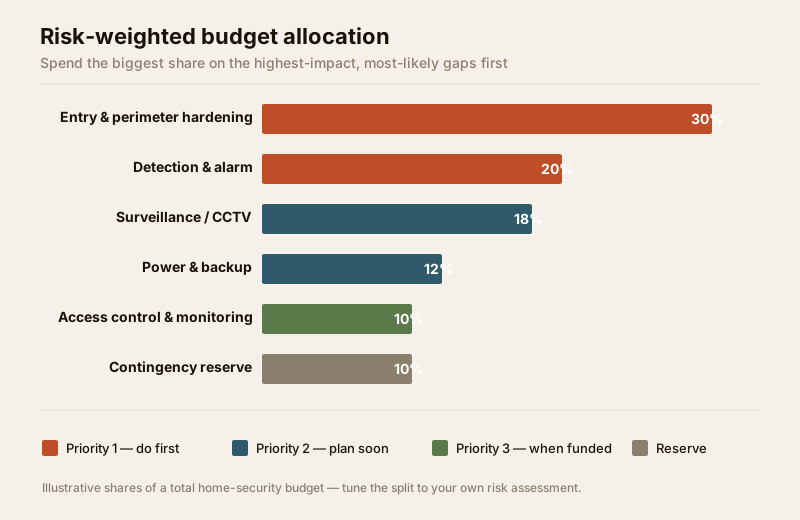
The table below is a starting split for a typical home. It is not a prescription — the whole point is that you shift the percentages toward wherever your assessment found the worst gaps. A home with a weak boundary and no detection should pour more into the first two rows; a home with solid doors already may move money down to surveillance.
| Area | Risk priority | Typical share of budget | What it buys |
|---|---|---|---|
| Entry & perimeter hardening | 1 — do first | ~30% | Good locks, solid doors, grilles, gate that actually locks |
| Detection & alarm | 1 — do first | ~20% | Door/window sensors, alarm panel, video door phone |
| Surveillance / CCTV | 2 — plan soon | ~18% | Cameras + recorder/storage for the real blind spots |
| Power & backup | 2 — plan soon | ~12% | UPS/inverter so security survives a power cut |
| Access control & monitoring | 3 — when funded | ~10% | Keypad/smart lock, visitor log, monitoring link |
| Contingency reserve | — | ~10% | Overruns, surprises, the quote you underestimated |
Two rules protect this allocation:
- Fund the basics before the gadgets. A ₹600 window latch and a ₹1,200 motion-sensor light often cut more risk than a fourth camera. Never let a shiny product starve a Priority-1 basic — that is the classic false economy in reverse.
- Beware gadget-led over-spending. Cameras record a break-in; locks and detection prevent one. If your draft budget is more than half surveillance, you are probably buying evidence of a burglary rather than protection against it. Rebalance toward the top of the list. The layered security design guide explains why deterrence and detection outrank recording.
Capex is only half the money: plan the opex
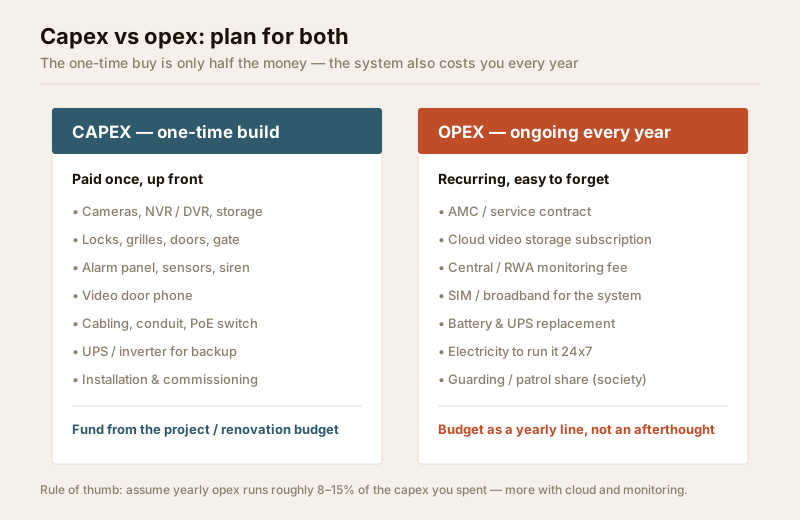
The mistake that wrecks more security budgets than any other is treating the purchase as a one-time cost. It is not. Every system carries ongoing operating cost — maintenance, cloud, monitoring, power, replacements — that you must plan for as a yearly line, or the system quietly decays until it is protecting nothing.
| Cost type | Examples | When it hits | How to budget it |
|---|---|---|---|
| Capex (one-time) | Cameras, recorder, locks, grilles, alarm panel, cabling, UPS, installation | Up front | From the project / renovation budget |
| Opex (recurring) | AMC / service contract, cloud storage, RWA or central monitoring, SIM/broadband, battery & UPS replacement, electricity to run it 24x7, guarding share | Every year | A standing annual line in the household budget |
A useful rule of thumb: assume yearly opex runs roughly 8% to 15% of the capex you spent, and higher if you take cloud recording and professional monitoring. Before you commit to any subscription-based product — cloud CCTV especially — multiply the monthly fee by sixty and treat that as part of the true five-year price, exactly as the cost planning guide models it. A cheaper camera with a costly mandatory cloud plan can be the expensive choice.
Do not skip the AMC. An unmaintained camera that stopped recording, or an alarm no one services, is a gap dressed as a measure. Budget maintenance from day one and plan physical access for it — the security maintenance and access planning guide covers making service actually possible, and the maintenance audit guide covers keeping it honest.
Phase the spend when money is tight
Very few homes can fund the whole plan at once, and you should not try. Phasing lets you buy safety in the right order: cheap, high-impact fixes now, planned upgrades next, big projects when funds allow — without ever leaving a Priority-1 gap open because you were saving for a Priority-3 luxury.
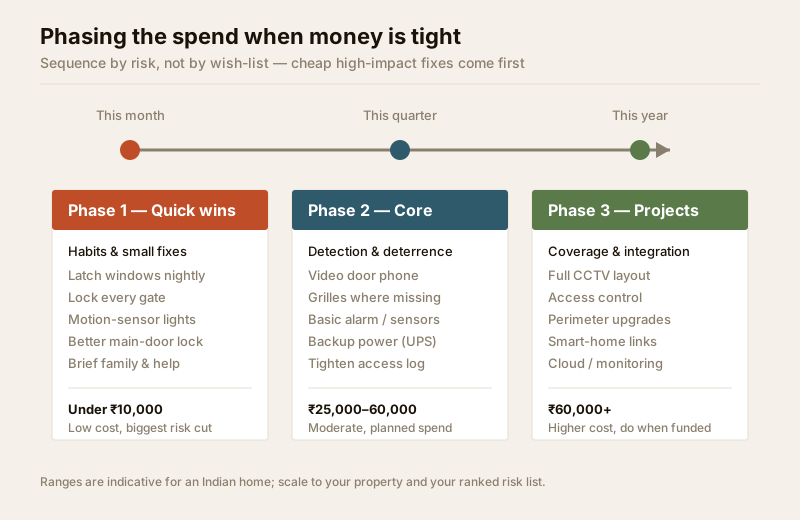
- Phase 1 — Quick wins (this month, under ~₹10,000). Habits and small fixes: latch windows nightly, lock every gate, add motion-sensor lights to dark corners, upgrade the main-door lock, brief family and domestic help. Much of this is free, and it usually cuts the most risk per rupee.
- Phase 2 — Core (this quarter, ~₹25,000–60,000). Detection and deterrence: a video door phone, grilles where missing, a basic alarm or a couple of well-placed cameras, backup power so it all survives a cut, and a tightened visitor/help access log.
- Phase 3 — Projects (this year, ₹60,000+). Coverage and integration: a fuller CCTV layout, access control, perimeter improvements, and any smart-home security integration. If you expect the system to grow, plan the headroom now with the future expansion planning guide so Phase 3 does not mean ripping out Phase 2.
Phasing has a hidden benefit: each phase teaches you something before the next spend, so you buy Phase 3 knowing what you actually use.
Hold a contingency
Notice the 10% contingency reserve in the allocation table. It is not padding — it is the line that keeps a project from stalling when the electrician finds the cable run is twice as long as quoted, or the old door frame will not take the new lock. Security projects on Indian homes routinely surface a surprise or two. Budget for the surprise you cannot yet name, and if you do not spend it, roll it into the next phase.
Getting and reading quotes
When you move to procurement, the budget only holds if you compare quotes properly. The single most common way homeowners overpay is accepting quotes that look different because they are different — one includes cabling and an AMC, another does not.
Insist on like-for-like. Give every vendor the same written scope — the same camera count, the same coverage points, the same cabling, the same backup, the same warranty and AMC terms — so the numbers are actually comparable. A quote is only cheaper if it covers the same work.
Read each quote against this checklist:
| What to check in a quote | Why it matters | Red flag |
|---|---|---|
| Itemised, not lump-sum | You can compare and spot padding | One number for everything |
| Cabling & conduit included | Often the hidden cost | Silent on wiring |
| Installation & commissioning labour | Frequently quoted separately later | Hardware price only |
| Warranty terms & duration | Determines opex risk | Vague or verbal |
| AMC cost from year two | Your recurring opex | Not mentioned |
| Backup power provision | System is useless in a cut | Assumes mains only |
| Make/model, not just category | Cheap unbranded kit fails early | Camera type unnamed |
| Post-install support & response | You will need service | No SLA |
Get at least three quotes, and treat the cheapest with the same suspicion as the dearest — a price far below the others usually means something was left out, and you will pay for it later. The security vendor and installer evaluation guide covers vetting the company behind the quote, and the vendor evaluation scorecard turns that into a repeatable score. For sizing the pieces before you ask, the cost estimator and backup power calculator give you defensible numbers to hold each quote against.
When to bring in a professional
Do the budgeting yourself — no one else knows your priorities and your wallet. But bring in qualified people to scope and price the technical work: a licensed electrician for any mains and backup wiring, a PSARA-licensed agency for guarding, and an experienced installer to size CCTV, alarm and access control. For larger properties or a housing society, a one-off professional survey before you finalise the budget usually pays for itself by aiming the spend correctly. Architects planning a new build should cost security into the design using the security design guide for architects. Handle any personal data the system captures — video especially — responsibly and in line with India's data-protection law.
Key takeaways
- Budget from the risk assessment down. Set a total (roughly 0.5–2% of home value), then fund the ranked gaps from the top — start with the risk assessment.
- Allocate by risk, not by product. The biggest share goes to entry hardening and detection; do not let gadgets starve the basics.
- Plan opex, not just capex. Assume ~8–15% of capex per year for AMC, cloud, monitoring, power and replacements — an unmaintained system is a gap.
- Phase the spend — quick wins this month, core this quarter, projects this year — and hold a ~10% contingency.
- Compare like-for-like quotes, itemised, from at least three vendors, and be as wary of the cheapest as the dearest.
Set your total with the security system cost estimator, score your vendors with the vendor evaluation scorecard, then browse the full security guides collection to plan each phase in depth.
This is an educational planning guide. It is strictly defensive and does not describe how to defeat any security measure. Fire, alarm, electrical, electronic-lock and structural work is qualified professional work — engage licensed installers, never let security hardware block a fire-escape route, and verify any applicable National Building Code or municipal bye-law requirement for your project.
Export this guide
Related Guides — Deep-dive reading
Security Cost Planning Guide for Indian Homes
How to budget a home or building security system sensibly in India — the real cost drivers, tiered budgets with honest rupee ranges for a flat and an independent house, the ongoing costs people forget, prioritising spend by risk, and the 5-year total cost of ownership instead of the sticker price.
SecurityWireless CCTV Cost in India (2026): Cheap to Buy, Read the Running Costs First
What Wi-Fi and wire-free CCTV really costs an Indian home — a low, DIY-friendly install price that hides a subscription, battery and reliability bill. An honest, capex-versus-opex look at where the money actually goes over three to five years, with indicative bands and the drivers that move them.
SecurityElectrical Safety for Security Systems in India (2026): Powering It Without Peril
A homeowner's guide to the power side of home and RWA security systems, CCTV, alarms, gates, access control and NVRs, done so it protects you instead of quietly becoming a shock or fire hazard. What makes a supply safe, what to insist on, and why the mains work belongs to a licensed electrician.
SecurityRelated Tools — Try Free
Security Vendor Evaluation Scorecard
Rate a CCTV/security installer or guarding agency across eight weighted criteria for a hire / negotiate / walk-away verdict.
Vendor ScorecardCCTV Camera Coverage & Count Calculator
Estimate how many CCTV cameras you need, the NVR channels, storage in TB for your retention period, and an indicative all-in cost with GST.
CCTV CalculatorHome Security Risk Scorecard
Score your home across six security layers — perimeter, entry points, lighting, detection, alarm and habits — and get a prioritised action plan.
Security Scorecard