

Wireless CCTV Cost in India (2026): Cheap to Buy, Read the Running Costs First
What Wi-Fi and wire-free CCTV really costs an Indian home — a low, DIY-friendly install price that hides a subscription, battery and reliability bill. An honest, capex-versus-opex look at where the money actually goes over three to five years, with indicative bands and the drivers that move them.
Wireless CCTV is the cheapest, easiest way to put a camera up in an Indian home, and that is exactly why it sells. You buy a neat little Wi-Fi camera, peel a sticker, screw in a bracket or just stand it on a shelf, scan a code in an app, and you are watching your front door in ten minutes with no electrician, no conduit and no drilling through walls. For a renter, a small flat, or anyone who wants coverage this weekend, that is genuinely the right tool. The trouble is that the sticker price on the box is not what the camera costs you. It is what it costs you to switch on.
The honest money question with wireless CCTV is not "how much is the camera" — cameras are cheap and getting cheaper. It is "how much does it cost me to keep it recording, keep it powered and keep it working, every year, for as long as I own it." That is where wireless quietly stops being the cheap option. A camera that cost a few thousand rupees can, over five years, cost more in cloud subscriptions than the hardware ever did — and a battery camera adds a recharge-or-replace chore on top. This guide is about seeing that whole bill before you buy, not after.
Scope & how to read the numbers. Every figure here is a wide, indicative ballpark for 2026 — a "verify locally" band, not a quote, and never a precise price. Wireless kit and cloud plans change fast, vary by brand and city, and GST applies on top of equipment and subscriptions. Before you commit, get at least three written, itemised quotes or plan comparisons and, crucially, separate the one-time cost (capex: cameras, any hub, a memory card) from the ongoing cost (opex: cloud subscription, battery replacement, electricity, replacements) — with wireless, the running cost is the part people miss and the part that usually decides value. Nothing here compromises life-safety; a camera is never a substitute for a smoke alarm, a fire escape or a locked door.
What "wireless" actually means — and why the word is doing two jobs
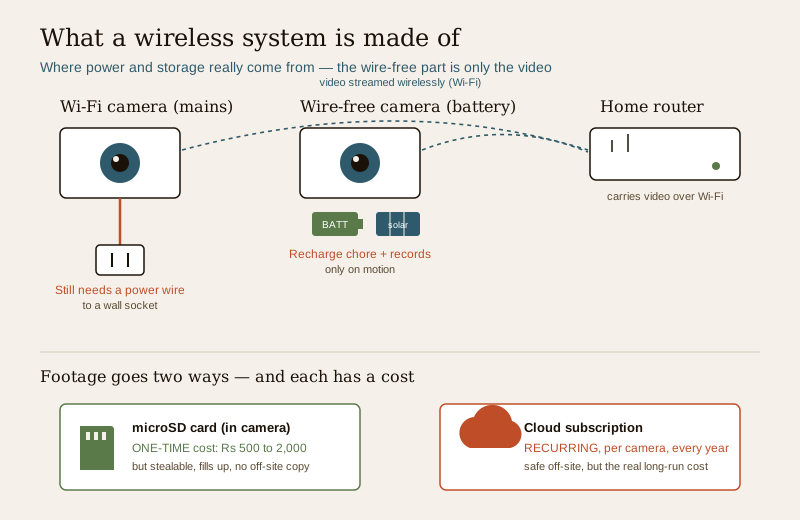
The word "wireless" hides a distinction that matters for your wallet, because it is used for two different things.
- Wi-Fi cameras are wireless for video — they send footage to your router over Wi-Fi instead of a network cable — but they still need a power wire. Every Wi-Fi camera plugs into a socket or a USB adaptor. "No wires" here means no data cabling, not no cabling at all. You still need a power point near every camera.
- Wire-free (battery) cameras are wireless for both — no data cable and no power cable, because they run off a rechargeable battery (sometimes topped up by a small solar panel). This is what makes a camera you can stick anywhere. But the battery is not free: it must be recharged every few weeks to months, or replaced when it ages, and to save battery these cameras record only when they detect motion rather than continuously.
That single distinction drives the cost. A Wi-Fi camera on mains power behaves a lot like a normal camera minus the network cable. A wire-free battery camera trades the install wire for an ongoing battery chore and a recording compromise — and both have a cost. Keep the two apart in your head when you read any "wireless CCTV" price.
Where the money goes — the capex (one-time) side
The upfront cost of a wireless system is refreshingly simple, which is a large part of the appeal. There are only a few line items, and none of them is an installer's day rate.
| One-time item | What it is | Indicative band (2026) | What moves it up or down |
|---|---|---|---|
| Per camera (Wi-Fi, mains) | A basic indoor or outdoor Wi-Fi camera | roughly Rs 1,500 to Rs 5,000 each | resolution, brand, outdoor weatherproofing, pan-tilt, night colour |
| Per camera (wire-free battery) | A battery or solar wire-free camera | roughly Rs 3,500 to Rs 9,000 each | battery size, solar panel, resolution, brand |
| Optional hub / base station | Base some wire-free brands need to bridge cameras to your router and hold local storage | roughly Rs 3,000 to Rs 12,000 | brand ecosystem, number of cameras it supports |
| microSD card (local storage) | A card inside the camera to record without cloud | roughly Rs 500 to Rs 2,000 | capacity (32 to 256 GB), endurance grade |
| Install | Usually you, from the app | often Rs 0 (DIY); Rs 300 to Rs 1,500 if you pay someone to mount a couple | height, drilling, whether a pro mounts it |
Read the band with its drivers, never alone. A small flat with two Wi-Fi cameras on microSD storage can be a genuinely low one-time spend — often roughly Rs 4,000 to Rs 12,000 all in, install included, because the install is you and the socket is already there. Add wire-free battery cameras, a base station and outdoor units and the same "small set" idea climbs to roughly Rs 15,000 to Rs 35,000. Those are wide bands on purpose: brand, resolution and battery-versus-mains swing them hard. Get three current price comparisons before you settle, because this market moves month to month.
The low install cost is the whole point. There is no cabling, no conduit, no chasing walls, no electrician half-day. That is what makes wireless DIY-friendly and rental-friendly — you can fit it, move it, and take it with you. If your only question were the day-one bill, wireless would almost always win. But the day-one bill is not the bill.
The honest part — the opex (ongoing) side that dominates
Here is where wireless earns its reputation for being deceptively cheap. The running costs are easy to wave away at the shop and hard to escape afterwards.
Cloud subscription — the real long-run cost
Most wireless cameras record properly only if you pay a monthly or yearly cloud subscription, usually priced per camera. Without a plan you often get a few seconds of clip, a still image, or nothing kept at all — the useful, keep-the-last-30-days recording sits behind the subscription. This is the single number that decides whether wireless is cheap.
- Cloud plans run roughly Rs 100 to Rs 400 per camera per month, or roughly Rs 1,000 to Rs 4,000 per camera per year — with the band driven by how many days of history you keep, resolution, and whether the plan covers one camera or several.
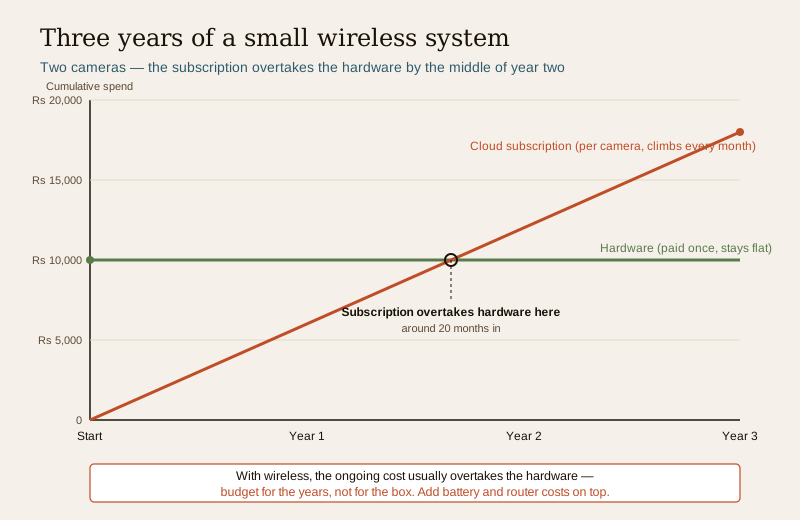
- The trap is arithmetic. Two cameras at, say, Rs 200 each per month is roughly Rs 4,800 a year, or Rs 24,000 over five years — more than the cameras and card cost you on day one. Four cameras and you are comfortably past the price of a modest wired system that has no subscription at all.
This is why the running cost, not the sticker, is the honest headline for wireless. A microSD card avoids the fee — footage records locally, no monthly bill — but a card can be stolen with the camera, fills up and overwrites, and does not survive the camera being smashed, whereas cloud footage is off-site and safe. Many buyers end up paying for cloud anyway. Decide the storage question, and its cost, before you buy, not after the free trial ends. Our companion cloud CCTV cost guide walks through subscription pricing in detail.
Battery replacement and recharging
Wire-free cameras trade the install wire for a chore. Batteries are recharged every few weeks to a few months depending on how much motion they see, and they age — after a couple of years a rechargeable pack holds less and needs replacing, at roughly Rs 800 to Rs 2,500 per battery if it is user-replaceable, or a whole-camera replacement if it is not. A solar panel reduces the recharging but adds to the upfront cost and depends on the camera getting real sun. This is a small, recurring, easy-to-forget cost that Wi-Fi mains cameras simply do not have.
Electricity, bandwidth and router load
Mains Wi-Fi cameras draw a trickle of power — a few units a month across a small set, not a number worth losing sleep over, but not zero either. The bigger hidden load is on your internet and router. Every camera streaming and uploading to cloud eats upload bandwidth continuously; a cheap router or a modest broadband plan can be pushed hard by four cameras, slowing the rest of the house and occasionally dropping the camera feed. If you scale up, a better router — roughly Rs 2,000 to Rs 6,000 — sometimes becomes a real, if one-time, part of the wireless bill.
Capex versus opex — why wireless flips over three to five years
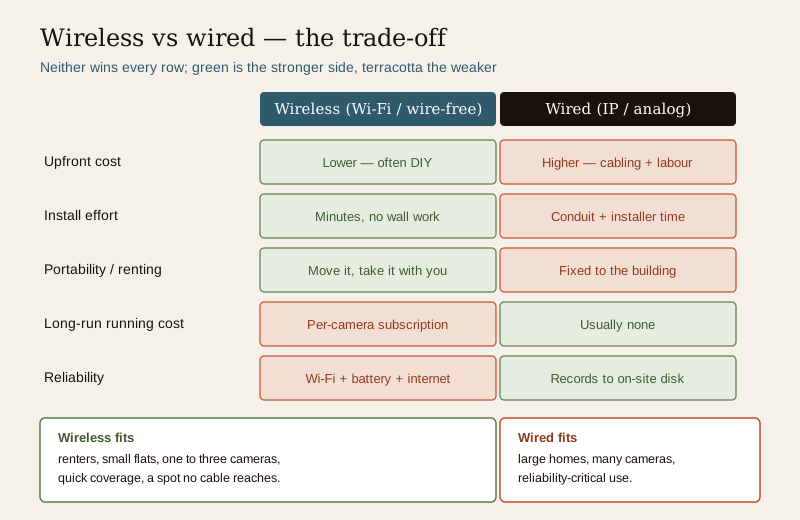
Put the two sides together and the picture is clear: wireless is cheap to buy and expensive to keep, wired is the reverse. A wireless system front-loads almost nothing and back-loads a subscription; a wired IP or analog system front-loads the cabling and the installer and then costs very little to run.
| Wireless (Wi-Fi / wire-free) | Wired (IP / analog) | |
|---|---|---|
| Install cost | Low — often DIY, no cabling | Higher — cabling, conduit, installer time |
| Per-camera hardware | Low to moderate | Low (analog) to moderate (IP) |
| Storage | microSD (one-time) or cloud (recurring) | Recorder with hard disk on site (one-time) |
| Ongoing subscription | Common, per camera — the big one | Usually none |
| Battery upkeep | Wire-free cameras only, recurring | None |
| 3 to 5 year total | Often opex-dominated | Mostly the day-one spend |
The crossover matters because most people keep a camera for years. Over a single year, wireless usually looks cheaper. Over three to five years, the subscription arithmetic often makes it the dearer choice, especially past two or three cameras. That is not a reason to avoid wireless — it is a reason to count the running cost into your decision instead of discovering it later. For the wired alternative whose costs sit almost entirely on day one, compare the IP CCTV cost guide and the analog CCTV cost guide; the home security system cost pillar sets all of these in one budget.
Security is a cost too — a cheap Wi-Fi camera badly set up is a liability
There is one more cost of wireless that never shows on a quote: a poorly secured Wi-Fi camera is a genuine risk, to your privacy and to the wider internet. Cheap cameras shipped with a default password and left unchanged have been hijacked at scale and pulled into botnets, and a camera watching inside your home is watching your family. This is not a reason to fear wireless; it is a reason to set it up properly.
- Change the default password on every camera and on the app account, and use a strong, unique one. This is the single most important thing you will do, and it is free.
- Keep firmware updated — the app usually prompts you; do not ignore it.
- Prefer a reputable brand with a real security-update track record over the cheapest unbranded camera, even at a small premium.
- Mind privacy law. CCTV footage is personal data under the Digital Personal Data Protection Act, 2023 (DPDP). Cameras must not point into a neighbour's home or a shared corridor in a way that intrudes, and if footage sits in a cloud you should know where and how it is stored. A camera indoors, watching your own household, deserves thought about who can see the feed.
Treat the ten minutes of setup as part of the cost of ownership. It is cheaper than any consequence of skipping it.
Where wireless is worth it — and where it is not
Wireless is not better or worse than wired; it is a different shape of cost that fits some homes and not others. Right-size to yours.
Wireless is strong value when:
- You rent, or expect to move — you can fit it without touching the structure and take it with you.
- You have a small flat and want one to three cameras — the subscription stays small and the DIY install saves the most.
- You want coverage quickly, this weekend, without an installer or a cabling job.
- You have a spot no cable reaches easily — a far gate, a boundary wall — where a wire-free solar camera earns its keep.
Wireless is the weaker choice when:
- You have a large home or many cameras — the per-camera subscription multiplies fast, and Wi-Fi range struggles to cover a big footprint reliably.
- You need reliability you can trust — continuous recording that never depends on Wi-Fi holding up, a battery not being flat, or the internet being up. Wired recording to an on-site disk keeps working when the broadband does not.
- You are building or renovating anyway, so running cable is cheap right now — the one-time wired cost you would pay while walls are open beats years of subscription.
For siting, coverage and how cameras fit the wider home-security picture regardless of wired or wireless, the CCTV hub is the place to plan, and the cost sub-hub collects every budgeting guide in one view.
How to read a wireless CCTV decision
- Price the years, not the box. Add the cameras, the card or the cloud plan times your number of cameras times sixty months, and the batteries. That five-year total is the real number to compare, not the shop sticker.
- Decide storage first. microSD (one-time, but stealable and finite) versus cloud (safe off-site, but a recurring per-camera fee). This choice drives most of the lifetime cost.
- Count the cameras honestly. Wireless is cheapest at one to three cameras. If you truly need five or six, price the wired alternative too — it may well cost less over five years.
- Check your Wi-Fi and router before buying four cameras that will lean on them.
- Set it up securely — change passwords, update firmware, mind DPDP. It is free and it is not optional.
- Get three itemised comparisons — hardware and the subscription plan, side by side — before you commit.
Key takeaways
- Wireless CCTV is cheap to buy and easy to fit — that low, DIY-friendly install cost is the whole appeal, especially for renters and small flats.
- "Wireless" means two things: Wi-Fi cameras still need a power wire; wire-free battery cameras add a recharge-or-replace chore and record only on motion.
- The one-time cost is small and simple — roughly Rs 1,500 to Rs 9,000 per camera, a cheap microSD, and usually no installer.
- The ongoing cost is the honest headline. A per-camera cloud subscription — roughly Rs 1,000 to Rs 4,000 per camera per year — often overtakes the hardware within two years and dominates over three to five.
- Over the long run wireless flips: cheap to buy, dear to keep; wired is dear to install, cheap to run. Count the running cost into the decision.
- A badly secured Wi-Fi camera is a real risk — change default passwords, update firmware, and treat footage as personal data under DPDP.
- Right-size: wireless for renters, small flats and quick coverage; wired for large homes, many cameras and reliability-critical use. Get three itemised comparisons first.
Where to go next
- The home security system cost pillar — sets wireless CCTV inside your whole security budget.
- The cloud CCTV cost guide — the subscription that decides whether wireless is cheap, in detail.
- The IP CCTV cost guide and analog CCTV cost guide — the wired alternatives whose cost sits mostly on day one.
- The CCTV hub and the security cost sub-hub — siting and every budgeting guide in one place.
References
- Digital Personal Data Protection Act, 2023 (DPDP) — home and wireless CCTV footage is personal data; be clear about where cloud footage is stored, who can view it, and avoid intruding on neighbours or shared spaces. Verify obligations as rules are notified.
- National Building Code of India (SP 7:2026), Bureau of Indian Standards — for the building-safety context a home security system sits within; a camera never substitutes for fire detection or clear escape. Verify the current edition via the BIS catalogue: https://www.services.bis.gov.in/
- Goods and Services Tax — applies to CCTV equipment and to cloud subscriptions; confirm the current rate on any quote or plan, as it is charged over the indicative bands shown here.
This is an educational, right-sizing cost overview for homeowners and renters — not a quote, a price list, or legal advice. Every rupee band is a wide, indicative ballpark for 2026 that varies by brand, spec, city and time, with GST extra; get at least three written, itemised comparisons before deciding, separate one-time from ongoing costs, and never let a camera stand in for genuine life-safety measures.
Export this guide
Related Guides — Deep-dive reading
Data Storage Cost for CCTV in India (2026): Local Disks vs Cloud, and How to Size It
The running cost people forget when they buy cameras. Where the footage actually lives — a one-time surveillance hard disk in the recorder, or a recurring per-camera cloud plan — and how camera count, resolution, frame rate, recording mode and retention days decide how many terabytes, and how much money, you really need.
SecurityLocal Storage vs Cloud CCTV in India (2026): Where Your Footage Should Live
A homeowner's honest head-to-head on where CCTV footage is kept — on a hard disk in the recorder at home, or uploaded to a per-camera cloud plan — across cost, theft resilience, internet dependence, retention, remote access and DPDP privacy, ending in a clear which-suits-whom, with hybrid usually the smartest answer.
SecurityPoE vs Wi-Fi CCTV: Which Home Security Cameras Are Better?
One camera type runs power and video down a single Cat6 cable to an NVR and almost never drops out; the other clips to a wall in minutes and streams over your home Wi-Fi. This guide settles PoE vs Wi-Fi CCTV for Indian homes — reliability, video quality and bandwidth, cabling and power, retrofit versus new-build effort, NVR versus SD and cloud storage, hacking risk, real rupee costs, scalability and outdoor use — and gives a clear verdict for each kind of home.
Smart HomeRelated Tools — Try Free
CCTV Cloud vs Local Cost Calculator
Compare cloud CCTV subscription against a local NVR + HDD — upfront, 5-year total, monthly fee and break-even.
Cloud vs LocalCCTV Camera Coverage & Count Calculator
Estimate how many CCTV cameras you need, the NVR channels, storage in TB for your retention period, and an indicative all-in cost with GST.
CCTV CalculatorCCTV System Type Selector
Answer five questions and get the right CCTV setup — analog / IP / hybrid, wired / wireless, local / cloud — with reasons.
CCTV Selector