
Security Maintenance and Audit Guide for Indian Homes
The neglected half of home security — keeping the system actually working. Why defences silently decay, a weekly-to-annual maintenance schedule (task, frequency, who), how to periodically re-audit and re-score your home, and how to hold your AMC vendor and guards accountable. India-grounded, plain language.
Most security systems in India are not defeated by clever intruders. They are defeated by time. The camera that was crisp on installation day is now a blur of monsoon grime, aimed three degrees off after a monkey knocked it. The alarm sensor has a dead battery nobody replaced. The recorder filled up eight months ago and has been silently overwriting nothing useful. The smart lock still runs the default password. The AMC lapsed last year. On paper the home is protected; in reality it is not.
This is the neglected half of home security — the upkeep that turns a one-time purchase into a working defence. A system you install and forget is a system that quietly rots until the night you need it. This guide gives you the maintenance rhythm and the periodic re-audit that keep your defences alive, all in plain language and grounded in Indian conditions — dust, monsoon, power cuts, and the RWA-and-guard realities of Indian living.
Scope & safety. This guide helps you plan, schedule and coordinate upkeep. Fire and gas detection, electronic access control and electric locks, and mains electrical work are life-safety-critical: test and observe them yourself, but leave servicing, re-wiring and re-commissioning to a licensed professional. Security hardware must never obstruct fire escape. Nothing here replaces a site-specific service by a qualified installer.
Why security systems silently decay
The danger of decay is that it is invisible until it is tested. Nothing beeps to tell you the camera drifted or the battery died. The first alert you get is often the break-in itself. Understanding the common failure modes lets you pre-empt them.
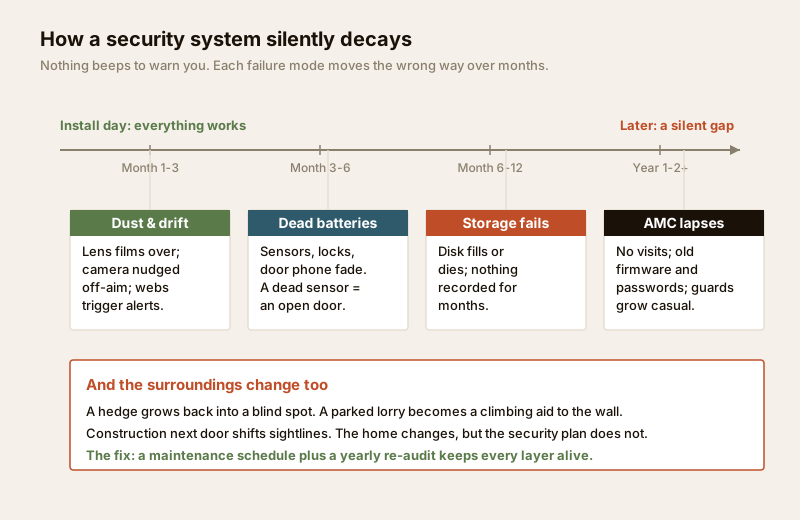
- Dead batteries. Wireless sensors, smart locks, video door phones and alarm keypads run on batteries that fade in 6-18 months. A dead sensor is an open door the panel thinks is armed.
- Camera drift and blinding. Wind, monkeys, cleaning staff and thermal expansion nudge cameras off-aim over months. Dust films the lens; monsoon leaves water spots and fungus; spider webs and insects trigger false motion at night. A camera pointed at a wall records nothing useful.
- Full or failed storage. DVR/NVR hard disks fill up and overwrite, or the disk simply fails (they are the first component to die). Many owners discover on the day of an incident that nothing was recorded for months.
- Unpatched firmware and weak passwords. Cameras, recorders and smart locks shipped with default or reused passwords, and firmware that never gets updated, are the most common way home CCTV gets remotely hijacked. This is a real, growing risk in India.
- Expired AMC and complacency. The annual maintenance contract lapses; the vendor stops visiting; the guards grow casual, stop logging visitors and doze on the night shift.
- The landscape reopens gaps. A hedge grows back into a blind spot. A newly parked lorry becomes a climbing aid to the compound wall. Construction next door changes sightlines. The home and its surroundings change, but the security plan does not.
The through-line: a security system is a living thing that needs feeding. Left alone, every one of these failure modes moves in the wrong direction. For the full picture of the layers being maintained here, the ultimate guide to home security in India and the building security systems guide set the foundation.
The maintenance schedule: task, frequency, who
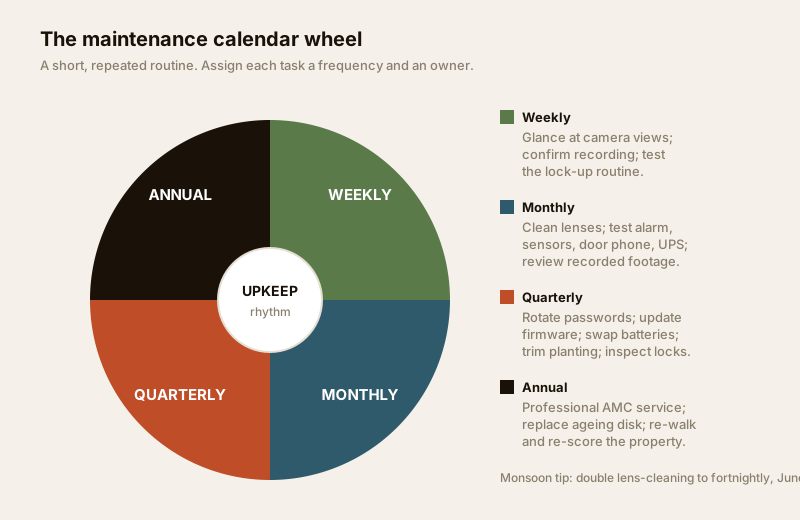
Good upkeep is not heroic — it is a short, repeated routine. The trick is to assign each task a frequency and an owner so nothing falls through the gap between "the vendor will do it" and "I thought you did it." The wheel below shows the rhythm; the table makes it a checklist you can actually run.
| Task | Frequency | Who |
|---|---|---|
| Glance at all camera live views on phone; confirm each is up, aimed and clear | Weekly | Homeowner |
| Confirm recorder is recording and disk is not full or in error | Weekly | Homeowner |
| Test locking-up routine; check main door, grilles and gates lock properly | Weekly | Homeowner |
| Wipe camera lenses and housings; clear cobwebs, insects, leaves | Monthly | Homeowner / help |
| Test alarm: trip each door/window contact and motion sensor, confirm siren + phone alert | Monthly | Homeowner |
| Test video door phone, intercom and motion-sensor lights | Monthly | Homeowner |
| Check UPS / backup batteries hold charge during a power cut | Monthly | Homeowner |
| Review a sample of recorded footage; confirm playback and retention window | Monthly | Homeowner |
| Rotate / update passwords on CCTV, recorder, router and smart locks | Quarterly | Homeowner |
| Update firmware on cameras, recorder, smart locks and router | Quarterly | Homeowner / vendor |
| Replace fading sensor, lock and keypad batteries (before they die) | Quarterly | Homeowner |
| Trim hedges, tree limbs and planting that create blind spots or climbing aids | Quarterly | Homeowner / gardener |
| Inspect locks, hinges, grilles, gates and boundary for wear, rust, looseness | Quarterly | Homeowner / fabricator |
| Full professional service: cameras, wiring, recorder health, alarm calibration | Annual | AMC vendor |
| Replace recorder hard disk if nearing end of life; verify safe / safe-room | Annual | AMC vendor |
| Re-walk and re-score the whole property (a full re-audit) | Annual | Homeowner |
| Review guard performance, visitor logs and RWA security arrangements | Annual | Homeowner / RWA |
Two Indian specifics deserve emphasis. First, monsoon doubles the cleaning cadence — move lens-wiping to fortnightly from June to September, and inspect for water ingress and fungus after heavy rain. Second, power cuts are your free UPS test — every unplanned outage is a chance to confirm cameras, recorder and alarm ride through on backup; if they do not, the battery is your next job. The electrical hub covers the backup-power side safely.
Storage and retention: the check people skip
Recording is worthless if it is not retained long enough to matter. Break-ins are often discovered days later — after a holiday, on return from travel. Set your recorder so its retention window comfortably exceeds your longest expected absence. Verify it monthly by playing back footage from the oldest date you expect to still have.
| Cameras (typical home) | Rough disk per 30 days of continuous recording | Practical retention on a 2 TB disk |
|---|---|---|
| 2 cameras, 2 MP | ~0.4-0.9 TB | ~60-120 days |
| 4 cameras, 2-4 MP | ~0.9-1.8 TB | ~30-60 days |
| 6-8 cameras, 4 MP | ~1.8-3.5 TB | ~15-30 days |
Figures are indicative — motion-only recording, lower bitrate and H.265 compression stretch these several-fold; continuous high-bitrate recording shrinks them. The point is to check your own numbers, not to assume the installer set a sensible window. The CCTV camera coverage calculator helps you sanity-check camera count and coverage while you are at it.
Passwords, firmware and the cyber side
The fastest-growing failure mode for Indian home security is not the crowbar — it is the internet. A camera on a default password, reachable from the web, can be watched by strangers or roped into a botnet. Treat the digital hygiene as core maintenance, not an afterthought:
- Change every default password on cameras, recorder, router and smart locks the day they are installed, and rotate them quarterly. Never reuse the same password across devices.
- Keep firmware current — updates routinely patch the exact holes attackers use. Enable auto-update where the device offers it; otherwise put it on the quarterly list.
- Segregate and secure the network — a separate Wi-Fi/VLAN for cameras, a strong router password, and remote access only through the manufacturer's proper app rather than open ports.
- Revoke stale access — remove app users, PINs and fingerprints for staff, tenants or guests who have left.
This overlaps with your wider connected-home hygiene. The smart security systems guide and the smart home privacy and security guide go deeper on locking down the digital layer without losing convenience.
Periodic re-audit: re-walk and re-score
Maintenance keeps yesterday's system working. A re-audit asks a harder question: is yesterday's system still the right one? Homes change — a new gate, a converted balcony, a grown child, a work-from-home routine, a tenant. Threats change — a spate of break-ins in the locality, new construction next door, a lorry that now parks against your wall every night. A plan that fit two years ago can have quiet new holes today.
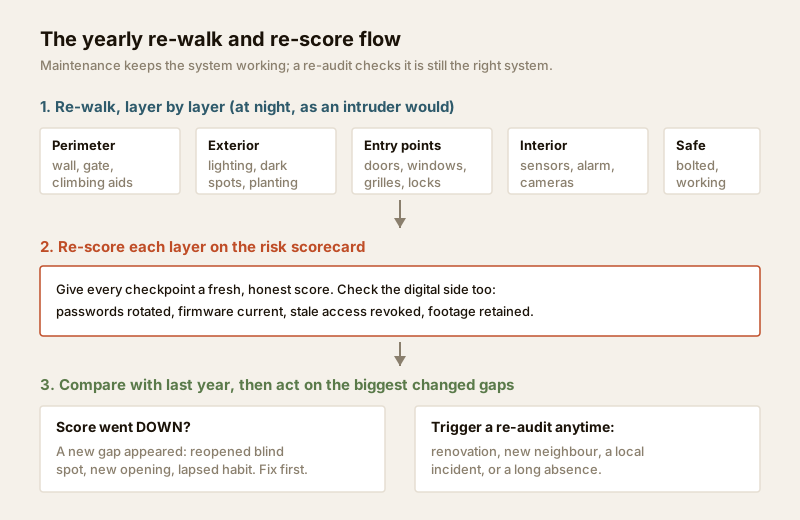
Re-audit at least once a year, and also after any major change — renovation, a new neighbour, a local incident, or a long absence. The method mirrors your first assessment: walk the property as an intruder would, at night, layer by layer, and re-score each honestly.
| Audit checkpoint | What to re-check | Changed since last time? |
|---|---|---|
| Perimeter / boundary | Wall height, gate lock, new climbing aids (bins, parked vehicles, sheds, tree limbs) | |
| Exterior & lighting | Dark spots, failed lights, overgrown planting reopening blind spots | |
| Entry points | New/altered doors, windows, balconies; grille and lock condition; a converted opening | |
| Cameras & coverage | Aim, clarity, new blind spots from construction or growth, adequate night view | |
| Detection | Every sensor tests live; alarm reaches you; response contacts current | |
| Valuables / safe | Safe still bolted and working; new high-value items unprotected | |
| Digital | Passwords rotated, firmware current, stale access revoked | |
| People & procedure | Locking habits holding; guards logging visitors; RWA arrangements intact |
Score each checkpoint just as you did the first time, and compare against last year's score to see what has drifted. The quickest way to do this consistently is to re-run the home security risk scorecard — it gives you a repeatable, ranked list of gaps you can track over time. For the deeper method behind the walk, the security risk assessment guide is the companion to this one: assessment sets the plan, maintenance and re-audit keep it true.
AMC versus self-maintenance
Most of the weekly-to-quarterly tasks above are genuinely DIY — glancing at cameras, testing sensors, wiping lenses, rotating passwords. What tips a job into professional / AMC territory is anything involving wiring, mains power, ladders at height, life-safety systems, or specialist calibration.
| Do it yourself | Annual Maintenance Contract (AMC) | |
|---|---|---|
| Covers | Daily/weekly/monthly checks, cleaning, testing, battery swaps, passwords | Annual deep service, wiring, recorder health, alarm calibration, priority repairs |
| Typical cost | Your time + consumables (batteries) | ~₹2,000-8,000/year for a small home CCTV+alarm; more for larger or integrated systems |
| Best for | Everyone — the routine layer | Homes with wired CCTV, alarms, access control or a safe you cannot service yourself |
| Watch for | Skipping tasks; no records kept | Vague scope, "visit only on breakdown," slow response, no report per visit |
A good AMC is worth it for anything you cannot safely service yourself — but read the scope. Insist on a fixed number of preventive visits (not merely breakdown call-outs), a written report each visit, a committed response time for faults, and clarity on what parts are included. The DIY routine and the AMC are complementary, not either-or: you handle the frequent light-touch checks, the vendor handles the annual depth.
Documentation and vendor / guard accountability
You cannot maintain what you have not written down. A simple security asset list is the backbone of upkeep — and it is invaluable to police and insurers after an incident.
Keep a single document (a note, spreadsheet or folder) recording, for each device: what it is, where it is, when it was installed, warranty and AMC dates, the vendor's contact, firmware version, and when its password was last changed and battery last replaced. Add camera positions, the recorder's retention setting, and your emergency contacts. Store it securely — not taped to the recorder — and share access only with those who need it. Pair this with the household plan in the emergency preparedness guide.
Hold people accountable with records, not memory:
- Vendor — log every service visit and fault. A vendor who knows you keep records, expect a report, and track response times is a vendor who shows up.
- Guards — in a villa or standalone home with a guard, and in societies, insist on a visitor log and patrol record. Spot-check it. A log that is always blank or filled in retrospect is a warning sign.
- RWA / society — in flats and gated communities, much of the maintenance (boundary, gates, common-area CCTV, guard rosters) belongs to the society. Raise upkeep gaps in writing at meetings, and confirm the common CCTV is actually recording and retained. The security guide for apartments and the security guide for gated communities cover coordinating this shared layer.
When to bring in a professional
Do the routine yourself, but route these to a licensed professional:
- Fire, gas and CO detection and alarms — test the buttons yourself monthly, but leave servicing, sensor replacement and re-commissioning to a competent fire-safety professional; never disable them to stop nuisance beeps.
- Electronic access control and electric locks — a badly serviced electric lock can trap people during a fire; use the original installer or a licensed access-control technician.
- Mains electrical and backup power — any re-wiring, UPS/inverter servicing or new circuits for cameras and gates is a licensed electrician's job (see the electrical hub).
- Structural and perimeter — re-anchoring grilles, gates, safe rooms or a damaged boundary wall is fabricator and structural work; verify it stays fire-escapable (see structural safety and building regulations and compliance).
Your job is to observe, test, schedule and coordinate. Their job is to service, re-wire and certify what is life-safety-critical.
Key takeaways
- The neglected half of security is upkeep. Systems are rarely defeated by clever intruders — they silently decay through dead batteries, drifted and dusty cameras, full storage, unpatched firmware and lapsed AMCs.
- Run a schedule with an owner. Weekly glance-and-lock, monthly test-and-clean, quarterly passwords-firmware-batteries-and-planting, annual professional service — each task assigned to a person, not left to chance.
- Treat the cyber side as core maintenance — change default passwords, rotate them, and keep firmware current to stop remote hijacking of home cameras.
- Re-audit yearly. Homes and threats change; re-walk and re-score with the risk scorecard and compare against last year to catch new gaps.
- Document everything and hold people accountable — keep a security asset list, insist on AMC reports and guard logs, and route life-safety servicing to licensed professionals.
Where to go next
- Re-score your home: Home Security Risk Scorecard and the Security Risk Assessment Guide.
- The foundation being maintained: Ultimate Guide to Home Security in India and Building Security Systems Guide.
- Lock down the digital layer: Smart Security Systems Guide and Smart Home Privacy & Security.
- Prepare the household: Emergency Preparedness Guide, or browse all guides.
References
- National Building Code of India (SP 7), Bureau of Indian Standards — fire and life-safety provisions relevant to alarms, egress and safe rooms; verify the current edition via the BIS catalogue before relying on it.
- Device manufacturers' service and firmware guidance — follow the maker's maintenance schedule, firmware releases and password advice for your specific cameras, recorder, alarm and locks.
- Local police station, housing society bye-laws and residents' welfare association (RWA) guidance — govern common-area CCTV, guard arrangements, visitor logs and retention of footage; check your city and society rules.
This is an educational overview for planning and coordinating maintenance. Fire, gas and CO detection, electronic access control, mains electrical and backup-power work, and structural perimeter elements are qualified professional work — engage licensed professionals for servicing, re-wiring and certification, and verify any standard's current status via the BIS catalogue before relying on it.
Export this guide
Related Guides — Deep-dive reading
Smart Home Maintenance & Troubleshooting for Indian Homes
A smart home is not a one-time purchase — it is a small fleet of computers that needs firmware updates, fresh batteries, occasional reboots and a plan for the day a manufacturer switches off the cloud. This guide gives you a maintenance calendar, a troubleshooting flow for the failures Indian homes actually see, and the UPS and security hygiene that keep it all running through power cuts and voltage swings.
Smart HomeCCTV Maintenance and AMC in India (2026): Keeping the System Alive
How to keep a CCTV system actually working after install: clean lenses and housings, check every camera still records, watch drive health and retention, update firmware, and decide whether an Annual Maintenance Contract (AMC) is worth it.
SecuritySecurity for People Living Alone in India (2026): Calm, Practical Habits When There Is No Second Person to Notice
Living alone is an ordinary and growing part of Indian life - the student in a new city, the working single, the elder whose children are abroad, the person after a separation. It does not call for fear. It calls for a few deliberate habits, because there is no second person in the home to notice trouble, raise the alarm, or catch an accident. This is calm self-reliance, layer by layer.
SecurityRelated Tools — Try Free
Window Hardware Cost Calculator
Estimate window hardware cost — hinges, handles, locks, rollers and multipoint gears.
Window CalculatorCCTV Camera Coverage & Count Calculator
Estimate how many CCTV cameras you need, the NVR channels, storage in TB for your retention period, and an indicative all-in cost with GST.
CCTV CalculatorHome Security Risk Scorecard
Score your home across six security layers — perimeter, entry points, lighting, detection, alarm and habits — and get a prioritised action plan.
Security Scorecard