
Home Office & Study Lighting: Bright, Glare-Free & Focused (2026)
The design guide to lighting a home office or study for long-hour focus and eye comfort in an Indian home — a good ambient base, a proper task lamp, no screen glare or reflections, the right colour temperature through the day, and flattering light for the video call.
The desk you work at for eight hours is the most demanding lighting problem in the house, and usually the worst-lit. Most Indian home offices are an afterthought carved out of a bedroom corner or a spare-room table, lit by whatever ceiling tube was already there — a single harsh source, badly placed, that leaves the desk in shadow, bounces off the screen, and quietly grinds down your eyes across a working day. Since 2020 that corner became a full-time workplace for millions, and a study table became where a child spends years of homework. Both deserve to be lit properly, and the good news is that getting it right is mostly about arrangement, not expense.
This is the design guide to lighting a home office and study for focus and long-hour eye comfort. It sits inside the complete guide to lighting in India and leans on the plug-and-play table lamps and floor lamps guide, because a good desk lamp is often the single best upgrade you can make.
Scope & how to read this. This is a design and specification guide, not a wiring manual. It helps you plan the layers, place the light and choose the fixture — the choices that decide comfort and focus. Anything involving actual wiring, a new switched socket or point at the desk, or a built-in wall dimmer is electrical work for a licensed electrician, and it is safety-critical. Tunable and automated colour-temperature control lives in the Smart Home hub; the deep lumens and CRI technicals live in the Electrical hub. All lux figures, colour-temperature values and cost bands are indicative planning aids — get local quotes.
What good desk lighting has to do
A workspace has to satisfy several comfort goals at once, and they pull against each other — which is why one bright tube fails at all of them:
- Enough brightness for the work — reading, writing and screen work need a genuinely bright, even pool of light on the desk, far more than a lounge does.
- No glare — no bare bulb, no fixture, and no window blazing into your field of view or reflecting off the monitor.
- No screen reflections — nothing bright mirrored in the glass, which forces your eyes to fight the image underneath it.
- No harsh shadows — light that fills the work surface evenly, so your hand or the monitor does not cast the page or keyboard into darkness.
- Comfort for long hours — a light quality you can sit under for a full day without the low-grade headache that harsh, flickery or badly contrasted light produces.
The single biggest mistake, covered across common lighting mistakes, is treating the desk like any other room and lighting it from one overhead point. A workspace needs a considered, layered scheme — the same functional, ambient and accent logic as any room, tuned for focus.
The three layers of a workspace
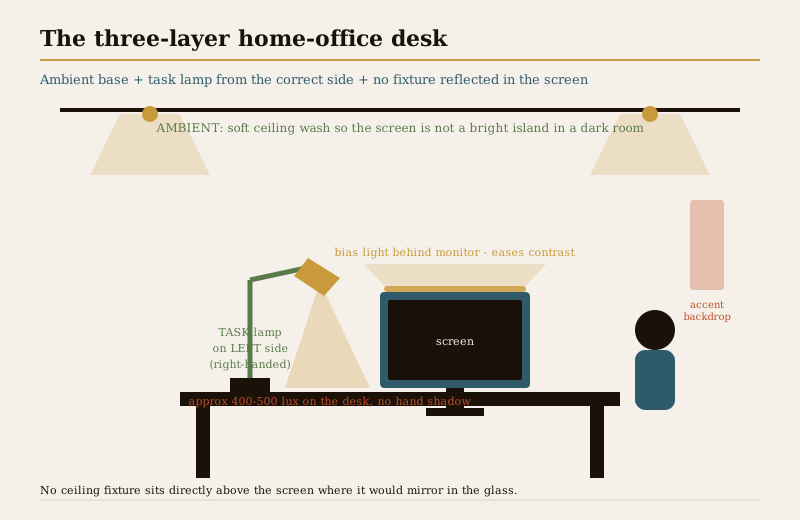
A proper ambient base — the layer everyone skips
The instinct for screen work is to dim the room and let the monitor light the desk. It is exactly wrong. A bright screen floating in a dark room is one of the harshest things you can ask an eye to do all day: the pupil keeps hunting between a blazing screen and black surroundings, and that constant adjustment is what leaves your eyes aching by evening.
So the first job is a soft, even ambient wash that lifts the whole room to a comfortable level, so the screen is not a bright island. A ceiling fixture, cove light or an up-lighting floor lamp bouncing off the ceiling all work — the point is gentle, general light with no hotspot. Keep it soft: this is the base coat, not the task light.
The task layer — an adjustable desk lamp
This is the heart of workspace lighting. A dedicated adjustable desk lamp gives you a bright, controllable pool exactly where you read and write, without over-lighting the whole room. The rules that matter:
- Adjustable. An articulated arm and pivoting head let you aim the light onto the work and away from your eyes and the screen. A fixed lamp you cannot angle is half a lamp.
- From the side opposite your writing hand. Right-handed, the lamp goes on the left; left-handed, on the right — so your own hand never shadows what you are writing.
- Bright enough for the task. A desk for reading and writing wants roughly 400 to 500 lux on the surface — brighter than a living room, and something a single ceiling light rarely delivers to a corner. Size it with the lux level calculator.
- Shaded so no bulb shows. Set the head so the pool lands on the desk and the bulb stays out of your line of sight — and out of the screen's reflection.
An accent layer — a pleasant backdrop
A small accent — a wall light, a shelf strip or a plant uplight behind the desk — is not decoration for its own sake. It softens the contrast behind the monitor and makes the corner somewhere you want to sit for hours, which matters more than it sounds over a long working day.
Screen glare and reflections — the make-or-break
Everything about a workspace comes down to keeping bright things out of the glass and out of your eyes. Position the desk and the lights so no fixture reflects in the monitor, and no window or lamp sits directly behind or directly in front of the screen.
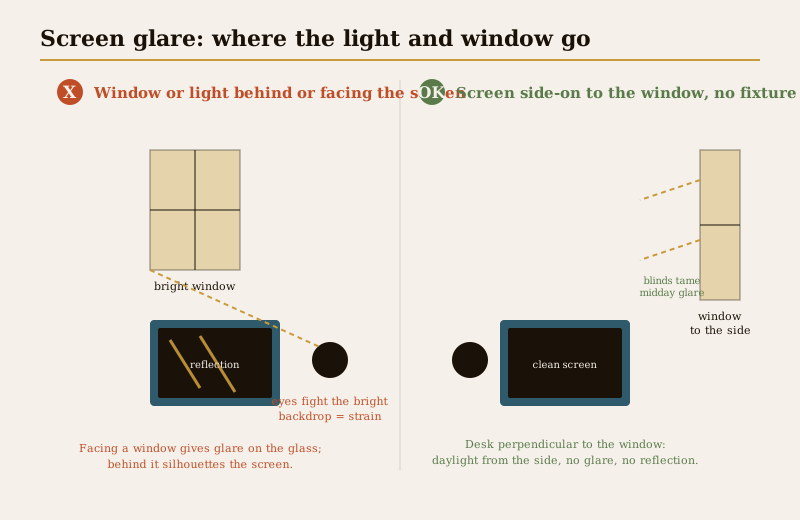
The three failure modes to design out:
- Light behind the screen. A window or bright lamp behind the monitor silhouettes it — your eyes squint against the bright backdrop while trying to read the darker screen. Exhausting within minutes.
- Light in front of the screen. A window or fixture facing the monitor reflects straight off the glass, laying a bright veil over your work. You unconsciously tilt and crane to dodge it.
- A fixture mirrored in the glass. A ceiling downlight or lamp positioned where it reflects in the screen puts a permanent hotspot on your work. Move the desk, the lamp, or both.
The clean solution for most rooms is to place the desk perpendicular to the window so daylight comes from the side, never from front or back — then aim task and ceiling light so nothing lands in the screen's reflection. When you plan the light, sit in the chair and physically check the glass: if you can see a bulb or a window in it, something has to move.
Colour temperature: cool to focus, warm to wind down
Colour temperature sets the mood and the alertness of a workspace, and the ideal shifts through the day:
| Time / task | Colour temperature | Why |
|---|---|---|
| Daytime deep-focus work | Neutral to cool, approx 4000K | Crisper light supports alertness and concentration |
| Detailed / technical work | Up to approx 5000K daylight | Highest clarity for close, exacting tasks |
| Evening work, winding down | Warm, approx 2700-3000K | Eases the eyes and does not fight your body clock at night |
| Kids' homework (daytime) | Neutral, approx 4000K | Alert, glare-free light for reading and writing |
The best answer is a tunable desk lamp or smart bulb that runs neutral-cool through the working day and shifts warm in the evening — so the same lamp keeps you sharp at 3pm and lets you down gently at 9pm. Pick the value with the colour temperature selector, understand the trade-offs in colour temperature and CRI, and set up the day-to-evening shift with the smart lighting guide. Also insist on good colour rendering (a high CRI) so documents, screens and skin tones read true rather than washed-out — the technical detail sits in the Electrical hub.
Bringing in daylight
Daylight is the best work light there is — free, full-spectrum and good for wellbeing — but only if it does not become glare. The design move is to place the desk beside or perpendicular to a window, so soft daylight falls across the work from the side rather than blasting from front or back. Then give yourself control: blinds, sheer curtains or shutters to knock back the harsh, high-contrast midday sun that would otherwise wash out the screen. On a bright afternoon you dial daylight down; on a dull morning you let it in and let the task lamp carry the rest.
Getting the window and desk relationship right is worth real thought — the full treatment is in daylighting design and windows, and the wellbeing case for good natural light runs through the Healthy Homes hub.
Lighting for the video call
The video call has its own rule, and it is the opposite of what people do by instinct: soft light in front of your face, never behind it.
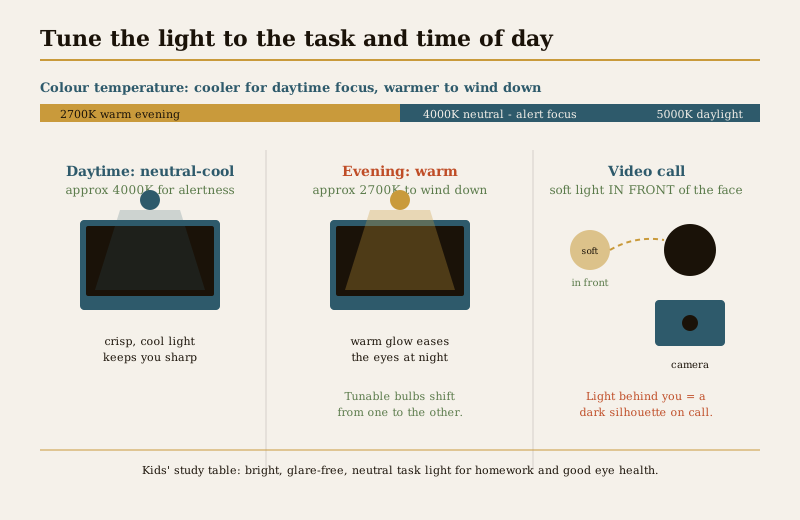
- Put the light in front. A soft, diffuse source roughly at eye level in front of you — a lamp beside the monitor, a small ring or panel light, or daylight from a window you face — lights your face evenly and warmly for the camera.
- Never sit with a window or bright light behind you. Backlight turns you into a dark silhouette against a blown-out background — the single most common bad-call-lighting mistake.
- Keep it soft and even. Diffuse, wrapping light flatters; a hard direct bulb throws unflattering shadows. Aim for gentle fill, not a spotlight.
A neutral colour temperature around 4000K reads natural and professional on camera. This one adjustment does more for how you come across on a call than any camera upgrade.
The kids' study table
A child's homework table is a workspace too, and its lighting matters for developing eyes over years of reading and writing. The priorities are simple and non-negotiable:
- A dedicated, adjustable task lamp on the study table — bright, focused and angled onto the work, never relying on the room's ceiling light alone.
- Glare-free and from the correct side — opposite the writing hand, shade hiding the bulb, so no hotspot and no hand shadow across the page.
- Bright, neutral light for reading — a well-lit page (again around 400 to 500 lux, checked with the lux level calculator) at a neutral colour temperature keeps a child alert and reduces eye strain over long study stretches.
- An ambient base in the room too — so the child is not reading a bright page in an otherwise dark room, the same island-in-the-dark strain adults suffer.
Good study lighting is one of the cheapest investments you can make in a child's eye comfort and concentration.
A bias light behind the monitor
One small, cheap upgrade punches well above its price: a bias light — a soft glow placed behind the monitor, washing the wall it faces. It gently lifts the dark area immediately around the bright screen, cutting the harsh contrast between screen and surroundings that tires your eyes. A low-brightness LED strip stuck to the back of the monitor, glowing a neutral white onto the wall, is all it takes. For long screen days it is a genuinely comfortable finishing touch.
The workspace lighting setup at a glance
| Layer / element | What to use | The design rule |
|---|---|---|
| Ambient base | Ceiling fixture, cove, or uplight floor lamp | Soft, even, no hotspot — so the screen is not a bright island |
| Task light | Adjustable desk lamp | From the side opposite your writing hand; approx 400-500 lux on the desk |
| Accent | Small wall light, shelf strip, plant uplight | Softens the backdrop; makes the corner pleasant for hours |
| Bias light | Low LED strip behind the monitor | Eases screen-to-wall contrast; neutral white |
| Colour temperature | Tunable lamp / smart bulb | Approx 4000K daytime focus, warmer approx 2700K evening |
| Daylight | Window to the side, blinds/sheers | Light from the side, controlled against midday glare |
| Video-call light | Soft source in front of the face | In front, never behind; neutral colour |
Anti-glare and eye-comfort checklist
| Check | Aim for | Avoid |
|---|---|---|
| Screen vs window | Perpendicular / side-on to the window | Window directly behind or facing the screen |
| Fixture reflection | Nothing mirrored in the glass | A ceiling light or lamp reflected in the monitor |
| Ambient level | Room lifted so screen is not an island | Working with only the monitor lit in a dark room |
| Task lamp side | Opposite the writing hand | Same side, casting a hand shadow on the page |
| Bare bulbs | Shade hides the bulb from your eyes | Any bulb visible in your line of sight |
| Contrast | Bias light softens screen surroundings | Bright screen against a black wall |
| Colour temperature | Cool to focus, warm to wind down | Cold daylight bulbs late into the evening |
How it connects
- Start from the complete guide to lighting in India, then plan the desk with the functional, ambient and accent layers and the wider lighting design principles.
- The best single upgrade is a good desk lamp — choose it in table lamps and floor lamps — and avoid the single-source trap in common lighting mistakes.
- Get the colour right with colour temperature and CRI and the colour temperature selector; make it shift through the day with the smart lighting guide and the Smart Home hub.
- Bring daylight in without glare via daylighting design and windows and the wellbeing case in the Healthy Homes hub.
- Size the task light with the lux level calculator; hand any wiring, new socket or dimmer to a licensed electrician via the Electrical hub.
Key takeaways
- Light the room, not just the screen — a soft ambient base so the monitor is not a bright island in the dark is the single biggest fix for all-day eye strain.
- A proper adjustable task lamp is the heart of a workspace — from the side opposite your writing hand, around 400-500 lux on the desk, shade hiding the bulb.
- Design out glare and reflections — nothing bright behind or in front of the screen, no fixture mirrored in the glass; place the desk perpendicular to the window.
- Tune colour temperature — neutral-cool around 4000K for daytime focus, warm around 2700K to wind down; a tunable smart bulb does both.
- Video calls need light in front of the face, never behind — backlight makes you a silhouette.
- A kids' study table needs its own bright, glare-free, correctly-sided task lamp and an ambient base — good for developing eyes.
- A cheap bias light behind the monitor softens screen contrast for long days; all lux, colour and cost figures are indicative — confirm against IS 3646 and NBC (SP 7:2026), and leave wiring to a licensed electrician.
References
- National Building Code of India, NBC (SP 7:2026), Bureau of Indian Standards — general illumination and lighting provisions for interior spaces (named generally).
- IS 3646 — code of practice for interior illumination and recommended lux levels for reading, writing and office/study tasks (named generally).
- IS 16107 and IS 10322 / IEC 60598 — LED luminaire performance and luminaire safety for desk and task fittings (named generally).
- BEE star rating for LED lamps and bulbs — energy-efficiency guidance for desk and study lighting (named generally).
- ECBC (Energy Conservation Building Code) — lighting power density guidance for work spaces (named generally).
All lux levels, colour-temperature values, distances and cost bands here are indicative design aids only; confirm the governing figures against IS 3646, NBC (SP 7:2026) and product ratings, get local quotes, and engage a licensed electrician for any wiring, new socket, point or dimmer work — electrical work is safety-critical.
Export this guide
Related Guides — Deep-dive reading
Circadian Lighting for Homes
Light is the master cue for your body clock. Here is how to design a home's electric lighting — colour temperature, brightness and layers through the day — so it supports sleep, mood and energy instead of quietly wrecking them.
Healthy HomesHome Office Curtains: Screen Glare & Light Control (India 2026)
The WFH window done right — kill screen glare and video-call backlight without going dark, with a sheer-plus-roller combo, the orientation rules that decide everything, and honest Indian costs.
Window TreatmentsApartment-Friendly Home Office Design
Building a real workspace in a flat that has no spare room
Apartment LivingRelated Tools — Try Free
Circadian Light Meter
Patient-centric circadian lighting visualizer for Indian healthcare design — time-of-day × intensity → CCT, melanopic lux (EML / mEDI), melatonin suppression, and an alertness curve. Calibrated against WELL v2 L03 Circadian Lighting Design, CIE S 026:2018, Brainard 2001, and Lucas et al. 2014.
Circadian ToolCross-Ventilation Analyzer
Estimate airflow and air changes per hour (ACH) from room size, window areas, layout, and local wind — with NBC 2016 Part 8 compliance check.
Ventilation CalculatorApartment Interior Planning Checklist
51-item checklist across structural, ceiling, lighting, furniture, storage, electrical, kitchen, bathroom.
Checklist