
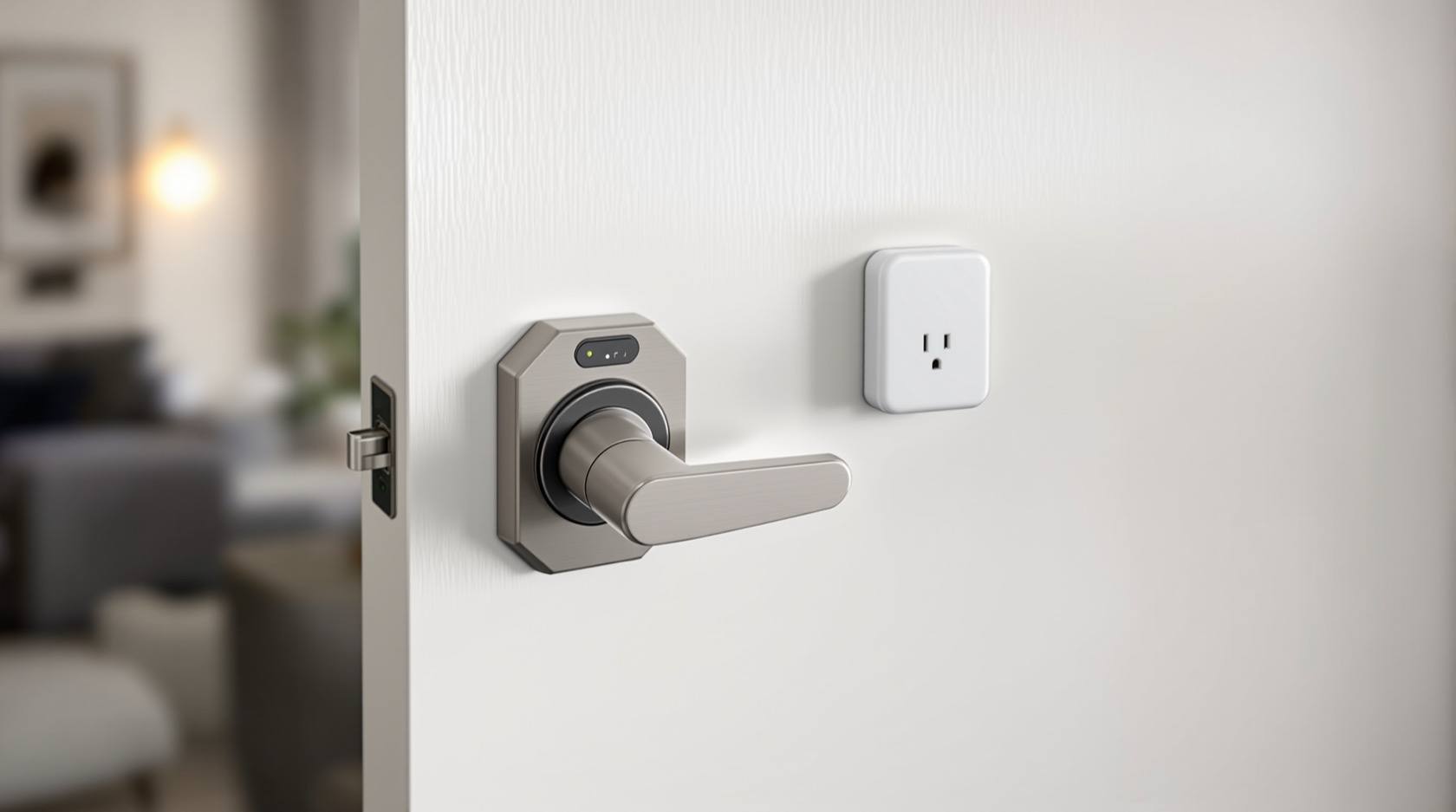
Wi-Fi vs Bluetooth Smart Lock (2026): Which Connection Suits Your Home in India
How a smart lock talks to your phone decides almost everything about how it feels to live with. This even-handed head-to-head compares Bluetooth (short-range, local, long battery) and Wi-Fi (control from anywhere, alerts, faster drain) — and explains why the common sweet spot in India is a Bluetooth lock with a Wi-Fi bridge.
You have decided on a smart lock. The next question surprises most homeowners, because it is not about fingerprint sensors or finishes — it is about how the lock talks to your phone. That single choice, Bluetooth or Wi-Fi, quietly shapes almost everything about living with the lock: whether you can check it from your office, how often you change the batteries, and how much of your home ends up on the internet.
The honest one-line answer: it depends on whether you need to control the lock from far away. If "tap to enter when I am standing at my own door" is all you want, Bluetooth is simpler and its battery lasts far longer. If "let the maid in while I am at work" or "did I lock it? — check from the airport" matters to you, you need Wi-Fi, or the increasingly common compromise of a Bluetooth lock with a Wi-Fi bridge. Neither is "better"; they win in different homes and different lives.
Scope and how to read this. This is a neutral head-to-head to help you choose a connection type, not a buying guide, a price list or a brand ranking. Both Bluetooth and Wi-Fi locks are legitimate; each is the right answer for some households and the wrong one for others. For which specific lock to buy and what it costs, see the buying guide linked below. Because a Wi-Fi lock and any lock-linked app hold access records and can put your door on the internet, treat the security notes here seriously — under the Digital Personal Data Protection Act, 2023, the app maker is handling personal data about who enters your home.
What each one actually is
Before the head-to-head, a plain explanation of both — because most people know one and not the other.
Bluetooth (BLE) — short-range and local
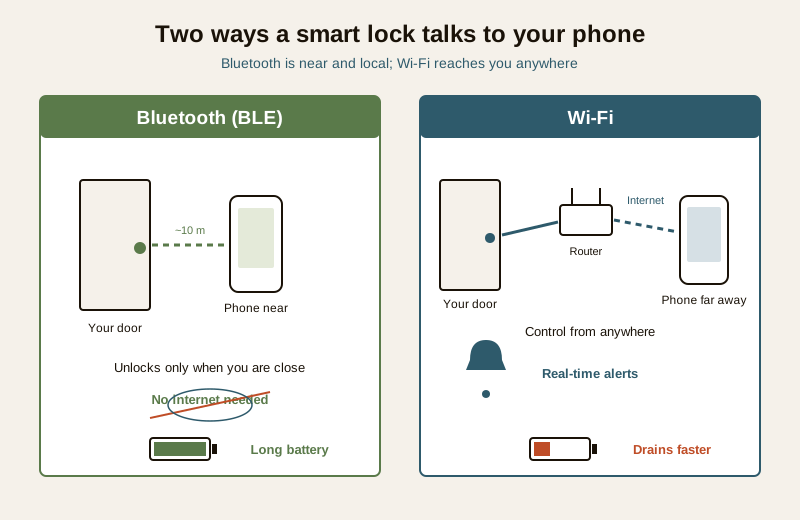
A Bluetooth smart lock (almost always Bluetooth Low Energy, or "BLE") talks directly to your phone over a short-range radio, roughly ten metres, no internet involved. When you walk up to your door with the app in your pocket, the phone and lock recognise each other and the door can unlock — by tap, by auto-unlock as you approach, or by a code or fingerprint on the lock itself. The important part is what is not there: no router, no cloud, no account-in-the-middle for the basic unlock. The lock is a self-contained device you operate when you are near it. That locality is its great strength and its clear limit.
Wi-Fi — on your home network, reachable from anywhere
A Wi-Fi smart lock joins your home Wi-Fi network exactly like a phone or a TV, and through it, the internet. Because the lock is online, it can be reached from anywhere: you can lock or unlock it from another city, check whether it is locked right now, grant or revoke a guest's access remotely, and receive real-time alerts ("front door unlocked at 3:10 pm") on your phone wherever you are. The lock is no longer just a device at your door; it is a device on the internet that happens to live at your door. That reach is its great strength — and the always-on connection is the source of both its faster battery drain and its larger attack surface.
The head-to-head
Here is where the two connection types genuinely differ, dimension by dimension. Both columns have real strengths; read across, not down.
| Dimension | Bluetooth (BLE) | Wi-Fi |
|---|---|---|
| Remote access | Only within about 10 m of the lock; no true remote unless paired with a bridge or hub | Control from anywhere with internet — lock, unlock, check status |
| Guest and staff access | Granted best when you are home / nearby | Grant and revoke remotely, on the fly, from afar |
| Real-time alerts | Limited or delayed; the phone must be in range to sync | Instant push alerts wherever you are |
| Battery life | Sips power — typically much longer between changes | Always-connected radio drains the battery noticeably faster |
| Dependence | Works even if your internet is down; simple and local | Depends on your router and internet staying up |
| Attack surface | Short range limits remote attack; still pair it securely | Always online means a bigger remote attack surface to secure |
| Setup | Usually pair-and-go, very simple | Network join plus an account; a bit more to configure |
| Integration | Basic; ties into wider smart-home only via a hub | Easier to integrate with alerts, routines and other devices |
A few of these deserve unpacking, because they are where households actually get caught out.
Remote access — the whole reason to choose Wi-Fi
This is the deciding line. Bluetooth cannot reach your lock from afar. Standing at the door, it is wonderful; from your office, it may as well not exist. If you want to buzz in a relative who arrived early, let a house-help in while you are at work, or simply confirm you locked up before a weekend away, that is Wi-Fi's home turf. Bluetooth-only locks can still hold codes and fingerprints for people to enter on their own — but you granting or checking access in real time, from a distance, needs Wi-Fi (or a bridge).
Battery life — the real, unglamorous trade-off
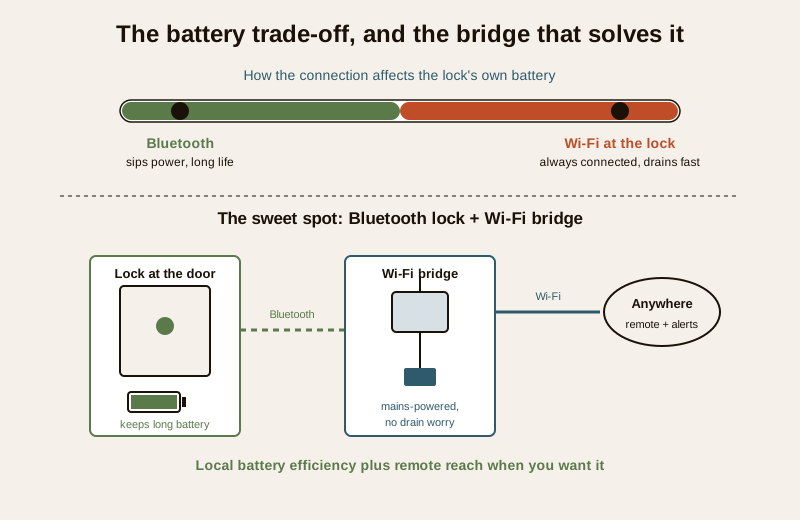
The catch nobody mentions in the showroom: an always-connected Wi-Fi radio drains the lock's battery much faster than Bluetooth's occasional whisper. A Bluetooth lock can run for many months on a set of cells; a lock keeping a live Wi-Fi connection can chew through them far quicker. This is such a real trade-off that many "Wi-Fi" locks are not truly Wi-Fi at the lock at all — they use a plug-in bridge to carry the internet connection, precisely so the lock's own battery is spared. When a battery does run flat, know your fallbacks and warnings cold — see the note on smart lock battery failure.
The honest caveat. A pure Wi-Fi-at-the-lock design gives you remote everything but asks for it in batteries and in exposure. Before you choose it, ask whether you truly need the lock itself online, or whether a bridge — which we come to next — gets you the same reach without the drain.
The hub or bridge — quietly the best of both
Here is the option that resolves most of the argument, and it is why the "Wi-Fi vs Bluetooth" question is often a false binary. Many locks are Bluetooth at the door, plus a small Wi-Fi bridge you plug in nearby. The lock and your phone still talk locally over low-power Bluetooth, so the lock keeps its long battery life. The bridge — mains-powered, so its appetite does not matter — sits between the lock's Bluetooth and your home Wi-Fi, relaying your commands and alerts to and from the internet. You get remote unlock, remote guest access and real-time alerts and Bluetooth's battery efficiency. The lock is not itself burning power to stay online; the plugged-in bridge does that work.
This is, honestly, the common sweet spot for Indian homes: buy a Bluetooth lock, add the bridge when and if you want remote features. If you never plug the bridge in, you have a perfectly good local Bluetooth lock. Plug it in, and the same lock becomes a remote-capable one.
Reliability and setup — the everyday texture
Bluetooth is simple and self-reliant. With nothing between the phone and the lock, there is little to go wrong and nothing that a power cut or an ISP outage can break. In a country where the internet and the mains both take the occasional holiday, a lock that just works when you are standing in front of it has a quiet appeal. Setup is usually pair-and-go.
Wi-Fi trades that self-reliance for reach. Its remote powers exist only while your router is up and your internet is flowing; when the connection drops, the remote features go with it — though you can still unlock at the door by code, fingerprint or Bluetooth fallback on most locks. Setup asks a little more: joining the network and creating an account. A weak Wi-Fi signal at the front door (common where the router sits deep inside a flat) can make a Wi-Fi lock flaky, which is another quiet argument for the plug-in bridge you can site closer to the door.
Security and attack surface — an honest word
Neither is inherently unsafe, but they expose different risks, and you should choose with eyes open.
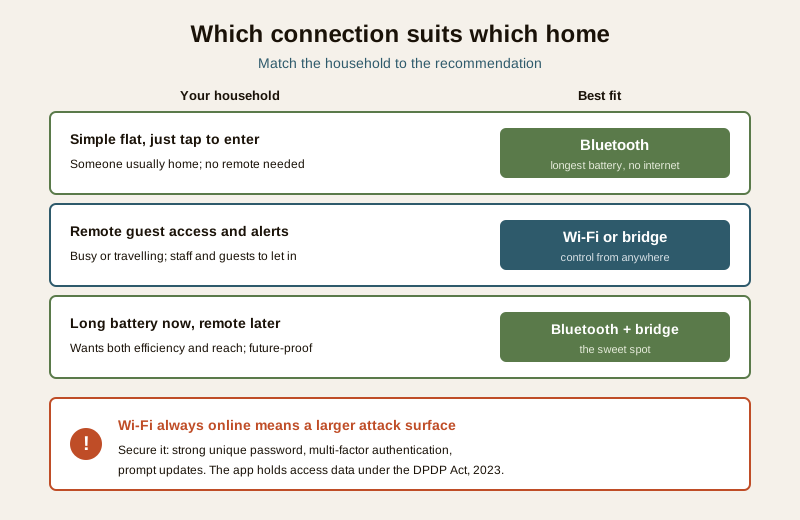
- Wi-Fi, being always online, presents a bigger remote attack surface. A door that is reachable from anywhere is, in principle, reachable by anyone on the internet — so it must be well secured: a strong, unique account password, multi-factor authentication on the app, prompt firmware updates, and a maker you trust with the access records the app inevitably holds. Those records are personal data about who enters your home under the DPDP Act, 2023.
- Bluetooth's short range naturally limits remote attack — an attacker generally has to be physically near your door — but it is not magic. Pair it securely, keep firmware current, and do not assume "offline" means "unbreakable".
Whichever you choose, the connection is only one layer of the lock's safety. For the fuller picture of how any smart lock compares to a plain mechanical one, see smart lock vs traditional lock.
Which suits whom
There is no universal winner — there is a fit for your household. Read for the life that sounds like yours.
- You want the simplest lock, the longest battery, and you are always the one at the door. Choose Bluetooth. Tap to enter, no internet, batteries that last, nothing to break when the ISP sulks. A small flat or a household where someone is usually home leans here.
- You need to let people in from afar, grant and revoke access remotely, and get alerts the moment the door opens. Choose Wi-Fi — or, better, a Bluetooth lock with a Wi-Fi bridge. A busy dual-working household, a home with staff and frequent guests, or an owner who travels wants this reach.
- You want long battery life now and the option of remote later. Choose a Bluetooth lock that supports a Wi-Fi bridge, and add the bridge if and when you need it. This hedges the decision and is the most future-proof path for most homes.
- You manage a second home, a rental or a property you visit rarely. Lean Wi-Fi or bridge — remote status and access matter most exactly when you are not there. Confirm the lock still opens locally during an outage.
- Your front door has weak Wi-Fi signal. Favour a bridge you can site near the door, or a Bluetooth lock, over a pure Wi-Fi-at-the-lock design that may struggle to hold a connection.
For a structured way to match a lock to your priorities — connection, form factor, access methods and budget — the smart lock buying guide walks the full decision, and how to choose access control sets the connection question inside the wider picture of who enters your home and how.
How to decide
When the specifications blur together, decide in this order:
1. Do you genuinely need remote control? Be honest. If "check and control from anywhere" is a real part of your life — travel, staff, guests, a second property — you need Wi-Fi or a bridge. If not, do not pay for it in battery life and exposure you will not use.
2. If yes, prefer a bridge over Wi-Fi-at-the-lock. A Bluetooth lock plus a mains-powered bridge usually gives you the same reach with far better battery life and a lock you can site where the door signal is weak.
3. If no, choose Bluetooth and enjoy the simplicity. Longest battery, no internet dependence, nothing to secure against the whole internet.
4. Whatever you pick, secure it. For Wi-Fi or a bridge: strong unique password, multi-factor authentication, prompt updates, a trustworthy maker. For any lock: know the low-battery warnings and manual fallbacks before you are locked out.
5. Remember the connection is one layer, not the whole lock. Fit to your door, quality of the mechanism, access methods and battery planning all still matter.
The reassuring truth is that this is a low-stakes decision to get "wrong": a Bluetooth lock you later wish were remote can, in many cases, simply have a bridge added; and a Wi-Fi lock still opens at the door if the internet is down. Choose for the life you actually live, and lean on the bridge when you want both.
Key takeaways
- The connection type decides range, battery life, remote control and attack surface — it is the most consequential smart-lock choice, and it is not about looks or sensors.
- Bluetooth is short-range, local and long-lasting — it unlocks when you are near, needs no internet, and sips battery, but cannot be reached from afar on its own.
- Wi-Fi puts the lock on your home network — control from anywhere, remote guest access and real-time alerts, at the cost of faster battery drain and a bigger remote attack surface.
- The common sweet spot is a Bluetooth lock with a Wi-Fi bridge — local battery efficiency plus remote reach when you want it, with the mains-powered bridge doing the always-on work.
- Secure any online lock — strong unique password, multi-factor authentication and updates; the app holds personal data under the DPDP Act, 2023.
- There is no universal winner — Bluetooth for simple tap-to-enter, Wi-Fi or bridge for remote and alerts; decide by whether you truly need to control the door from a distance.
Where to go next
- The smart lock buying guide and how to choose access control — matching a lock and its connection to your home.
- Smart lock vs traditional lock — whether to go smart at all, and what a mechanical lock still does best.
- Smart lock battery failure — the fallbacks and warnings that matter most, especially for always-connected Wi-Fi locks.
- The security comparison hub — more even-handed "this vs that" decisions.
- The security comparison pillar — the wider map of home-security choices.
References
- Digital Personal Data Protection Act, 2023 — a smart lock app and any cloud service behind a Wi-Fi lock or bridge hold personal data about who enters your home and when; prefer a maker who is clear about what is stored, for how long, and who can see it.
- Bluetooth Low Energy (BLE) and Wi-Fi are general wireless standards; a lock's real range, battery life and remote behaviour vary by model, so verify the specific product's stated figures and fallbacks before buying.
- Bureau of Indian Standards catalogue — verify the current status of any cited standard: https://www.services.bis.gov.in/
This is an educational head-to-head to help a homeowner choose a smart-lock connection type, not a buying guide, a brand ranking or a substitute for the product's own documentation. A lock's security depends on how you configure and maintain it; use a strong unique password and multi-factor authentication on any internet-connected lock, keep firmware current, and always confirm the manual and low-battery fallbacks before relying on any smart lock.
Export this guide
Related Guides — Deep-dive reading
Smart Lock vs Traditional Lock in India (2026): Which Should Guard Your Door?
An honest, even-handed head-to-head for Indian homes — keyless convenience, e-keys and remote access on one side, simple key-in-hand reliability with no power dependence on the other — ending in a clear verdict by household, and one rule both must obey: never trap anyone inside.
SecurityFingerprint vs PIN Lock (2026): Which Keyless Entry Suits Your Indian Home?
A neutral head-to-head between the two most common keyless ways to open a smart lock in India — a fingerprint (biometric) and a PIN (code) — across convenience, everyday reliability in Indian conditions, who can use each, security, and privacy, ending in the honest verdict that you rarely have to choose.
SecurityBluetooth Locks in India (2026): How BLE Smart Locks Work, and Their Limits
A homeowner's guide to Bluetooth smart locks — how the phone-to-lock BLE link works without Wi-Fi or a hub, why they are cheaper and cloud-free, and the honest limits: no true remote unlock, phone dependence, and pairing security.
SecurityRelated Tools — Try Free
Stamp Duty Calculator — All Indian States
Stamp duty + registration charges for all 28 states and 8 UTs — gender concessions, urban/rural variants, metro cess built in.
Stamp DutyBefore vs After — Cost Reality Check
Compare what you expected to pay vs what you actually paid, category by category.
Reality CheckAccess-Control Battery-Backup Calculator
Size the standby battery so an access system keeps running through a power cut, with an egress life-safety note.
Battery Backup