
Data Storage Cost for CCTV in India (2026): Local Disks vs Cloud, and How to Size It
The running cost people forget when they buy cameras. Where the footage actually lives — a one-time surveillance hard disk in the recorder, or a recurring per-camera cloud plan — and how camera count, resolution, frame rate, recording mode and retention days decide how many terabytes, and how much money, you really need.
Most people buy cameras and forget about storage until the day they need footage and discover it was already overwritten, or the day a monthly cloud bill quietly renews for the third year running. Yet storage is not an accessory to a CCTV system — it is the system. A camera that sees everything and keeps nothing has protected no one. The footage has to live somewhere, and where it lives, and for how many days, is a real and often recurring cost that a cheap installation quote loves to leave out.
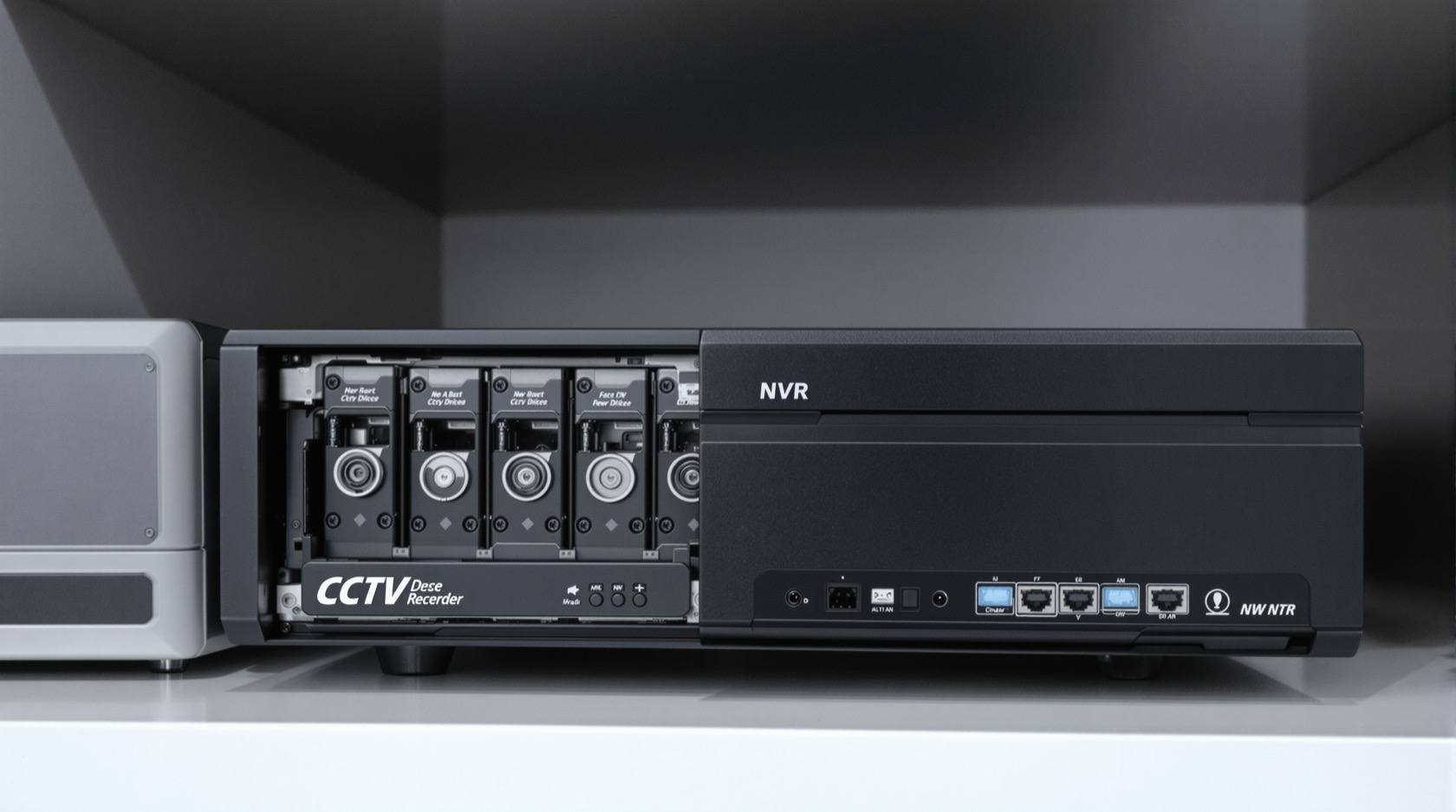
There are two worlds. In the first, footage lives locally, on a surveillance-grade hard disk sitting inside the recorder (the DVR or NVR) in your home. That is a one-time purchase — but the disk is sized by your cameras, it wears out, and one day it gets replaced. In the second, footage lives off-site in the cloud, on someone else's servers, paid for as a recurring per-camera subscription for as long as you want to keep the cameras running. One is a box you buy once; the other is a bill that never ends. Neither is automatically cheaper, and the right answer for a home is often a bit of both.
This guide is about sizing that cost honestly, so you buy the terabytes you actually need and not a day more. It sits under the home security system cost guide and is a companion to the CCTV installation cost guide — installation gets the cameras on the wall; storage keeps what they see.
Scope & safety. These are indicative, ballpark bands to help you budget and read a quote — not price quotes, and never precise figures. Storage prices move constantly with disk capacity, resolution, plan tier, place and time, and GST is charged on top of both hardware and subscriptions. Get at least three written, itemised quotes and ask every installer to state the disk capacity, the recording mode and the resulting retention days in writing before you sign. Separate the one-time cost (the disk) from the ongoing cost (a cloud plan, disk replacement, the electricity your recorder draws, any add-on NAS). CCTV footage is personal data under the DPDP Act 2023 — how long you keep it, and where it is stored, is a decision to make on purpose, not by accident.
Why storage is a cost people forget
A CCTV quote usually reads like a shopping list of cameras, a recorder and cabling, with storage buried as a single line — "1TB HDD included" — or not mentioned at all. That single line hides a decision that quietly sets your running cost for years:
- Local disks wear out and get replaced. A hard disk recording twenty-four hours a day is a mechanical part under constant load. Surveillance-grade disks are built for it, but nothing lasts forever; plan to replace the disk every few years. That replacement is a real, repeating cost, not a one-off.
- Cloud is a forever bill. A per-camera cloud plan is convenient and off-site, but you pay it every month for every camera, indefinitely. Over five years, a modest-looking monthly figure adds up to more than most people expect.
- Retention days are money. The single biggest lever on storage cost is how many days of footage you keep. Keep thirty days when you genuinely only ever look back a week, and you have bought roughly four times the storage you need.
So before comparing disks and plans, understand what actually sets the size.
What sets your storage size — the four dials
Storage is not a fixed number; it is the output of a simple multiplication. Turn any dial up and you need more terabytes, which means more money — whether you pay for that as a bigger disk or a pricier cloud plan.
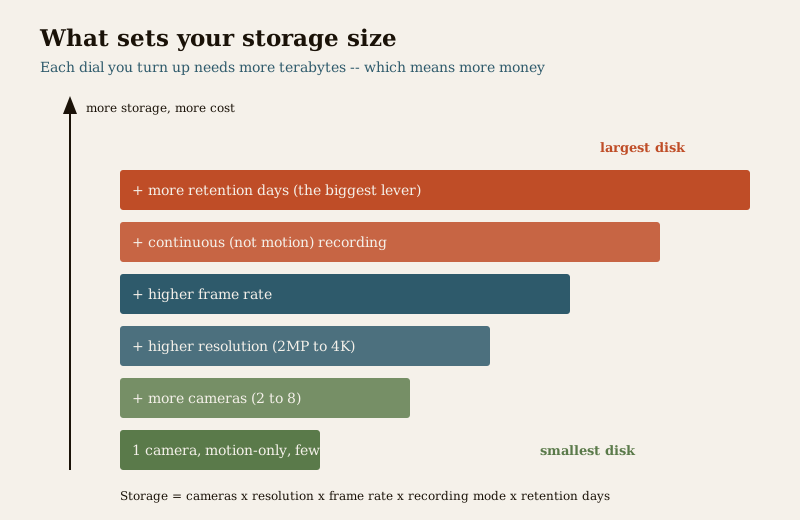
1. Number of cameras. Every camera is another stream to record. Four cameras use roughly twice the storage of two, all else equal. A typical home runs anywhere from two to eight cameras, and the count scales your storage almost linearly.
2. Resolution. A sharper picture is a bigger file. A 2MP (1080p) camera is the common home baseline; a 4MP or 8MP (4K) camera can capture two to four times the data for the same scene. Higher resolution buys you readable faces and number plates — genuinely worth it at a gate — but it is the fastest way to fill a disk. The CCTV installation cost guide covers where the sharper camera earns its keep. For the wider IP-camera picture, see the IP CCTV cost guide.
3. Frame rate. More frames per second is smoother video and a bigger file. Most home footage does not need cinema-smooth motion; a moderate frame rate records clearly and stores far less than the maximum. This is a dial installers often leave at maximum by default, quietly inflating your storage.
4. Recording mode — continuous versus motion. This is the big one. Continuous recording keeps every second of every day; motion-triggered recording only writes when something moves. For a quiet home boundary that is still for most of the night, motion recording can cut storage dramatically. The trade is that a mis-tuned motion setting can miss an event or trigger endlessly on a swaying tree, so it needs to be set up well. Many homes use a sensible middle path: continuous on the gate and door, motion elsewhere.
And sitting on top of all four:
5. Retention days — how far back you can look. All the above sets how much you store per day. Retention is how many days you keep before the oldest footage is automatically overwritten. Thirty days costs roughly twice the storage of fifteen, which costs twice of seven. This is the dial you control most directly and the one worth thinking hardest about.
The compression footnote that matters. Modern recorders use H.265 (also called HEVC) compression, which stores roughly half the data of the older H.264 for a similar picture. If a quote is built around older compression, the same footage needs about twice the disk. Ask which codec the recorder uses — it silently halves or doubles your storage bill.
World one — local storage on a disk you own
Local storage is the default for most Indian homes: a surveillance-grade hard disk inside the DVR or NVR, recording all your cameras onto one box that sits in a cupboard or utility area. Footage never leaves your home.
The one-time cost. You buy the disk once, sized to your cameras and your chosen retention. Surveillance-grade disks — built to run continuously, unlike the ordinary desktop disk in a computer — come in a range of capacities, and as an honest, wide ballpark a home disk lands somewhere in the region of roughly a few thousand rupees for a small 1TB disk up to the high teens of thousands for a large multi-terabyte disk, before GST, moving with capacity and the market. A small home with a few cameras and modest retention often needs only 1TB to 2TB; a larger home with several high-resolution cameras recording continuously for a month can need 4TB, 6TB or more.
Insist on a surveillance-grade disk. A cheap quote may fit an ordinary desktop hard disk to save money. Desktop disks are not built for the constant write load of CCTV and fail sooner — a false economy that costs you the footage when you need it. This is exactly the kind of hidden compromise a cheap quote hides.
The costs a disk quote forgets. The disk itself is only the visible part. Owning local storage also means:
- Replacement every few years. Budget for a new disk on a rolling cycle. A disk that dies unnoticed means weeks of no recording at all — worse than no camera, because you believed you were covered.
- Electricity. The recorder and its disk run every hour of every day. It is a small, steady draw, but it is a running cost, and it belongs in the honest total.
- Redundancy for many cameras. A single disk is a single point of failure. Homes with many cameras, or anyone who cannot afford to lose footage, sometimes use two disks in a mirrored (RAID) arrangement so one failing disk does not lose everything — that roughly doubles the disk cost and is usually overkill for a small home, sensible for a large one.
- A NAS, occasionally. Some larger setups store footage on a separate network drive (a NAS) rather than inside the recorder; that is an added box with its own cost, generally beyond what a typical home needs.
The honest weakness of local storage: if the recorder is stolen or destroyed, the footage goes with it. A burglar who takes the DVR takes the evidence of the burglary. That single risk is the main reason cloud exists.
World two — cloud storage you rent
Cloud storage keeps a copy of your footage off-site, on the provider's servers, reachable from your phone. You pay a recurring subscription, almost always priced per camera per month, scaled by how many days of footage the plan retains and sometimes by resolution.
The recurring cost. As a wide, honest ballpark, per-camera cloud plans in India tend to run from roughly a hundred rupees a month per camera at the low end, for a few days of retention, up to several hundred rupees a month per camera for longer retention or higher resolution, plus GST. The number looks small on one camera. Multiply it by your camera count and by twelve months and by the years you will keep the system, and it becomes the largest line in your CCTV total. Four cameras on even a modest plan is a real annual figure, every year, forever. The cloud CCTV cost guide goes deeper into how these plans are structured and what to watch for.
What the money buys you. Cloud's strength is exactly local storage's weakness: the footage is off-site, so a stolen or smashed recorder does not destroy the evidence. It is also low-maintenance — no disk to replace, no failure to notice — and reachable from anywhere. For some homes that off-site safety is worth the forever bill.
What to check before you rent. Read the plan the way you would read any subscription. How many days does it actually retain? Does the price rise for higher resolution? Is it continuous or only event clips (many affordable cloud plans store only short motion clips, not twenty-four-hour footage — a big difference)? And critically for a home: where are the servers, and who can see your footage? Under the DPDP Act 2023, footage of your family and visitors is personal data; storing it on a third party's servers is a privacy decision, so favour a provider that is clear about where data sits and who may access it.
The real comparison — a one-time disk versus a forever bill
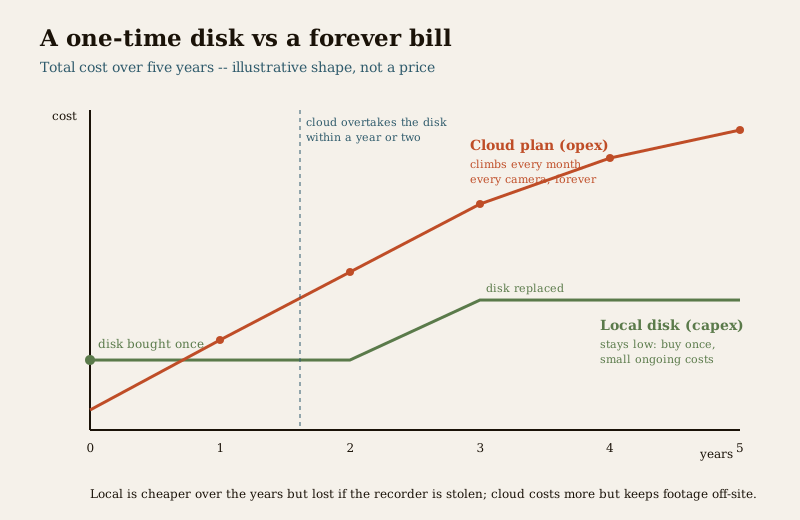
Set the two side by side over the life of the system and the shape of the choice becomes clear.
| Local disk (capex) | Cloud plan (opex) | |
|---|---|---|
| When you pay | Once, up front, plus a replacement every few years | Every month, per camera, indefinitely |
| Cost shape | A one-time buy, then small ongoing (electricity, replacement) | A recurring bill that grows every year it runs |
| Footage safety | Lost if the recorder is stolen or destroyed | Off-site — survives theft or damage at home |
| Maintenance | You watch for disk failure and replace it | None — the provider handles it |
| Privacy / control | Stays in your home, fully under your control | On a third party's servers — a DPDP decision |
| Scales by | Cameras, resolution, retention (bigger disk) | Cameras, retention, resolution (higher plan) |
The pattern is consistent: local storage is cheaper over the years but carries the theft risk; cloud is safer against theft but costs more the longer it runs. For most Indian homes, a well-sized local disk is the sensible backbone, with cloud added selectively — often just for the one or two cameras where losing footage would matter most, such as the main gate. That hybrid keeps the forever bill small while covering the theft weakness where it counts. Think of it in total-cost-of-ownership terms, the same lens the security cost sub-hub applies across the whole system.
Right-sizing retention — the single best way to save
Because retention days multiply everything, deciding them honestly is the highest-value thing you can do for this budget. The instinct is to keep as much as possible "just in case". Resist it, and ask instead: when something happens, how long does it realistically take you to notice and look?
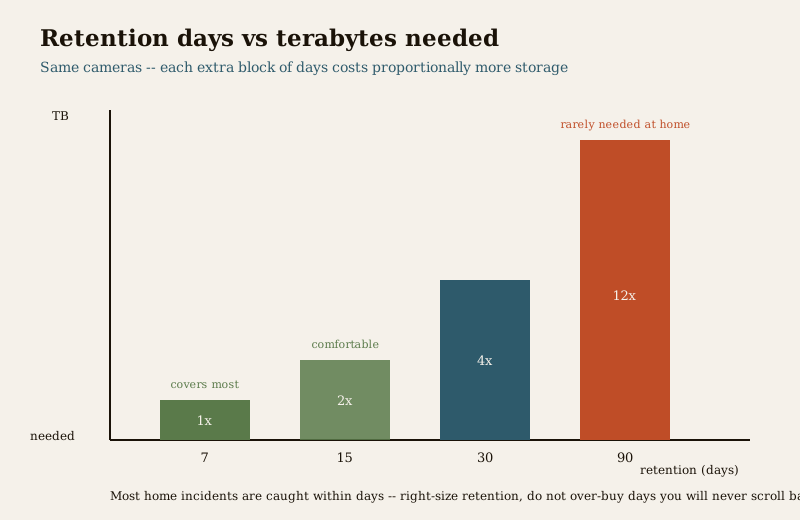
For a home, most incidents are noticed within days — a missing parcel, a scraped car, a break-in found the next morning. Seven to fifteen days of retention covers the great majority of real cases. Thirty days is comfortable headroom. Ninety days is genuinely useful only in specific situations, and it costs several times the storage of a week. Some points to weigh:
- Match retention to how you actually behave, not to a worst case you will never hit. If you check footage the moment anything seems off, a shorter window serves you and costs far less.
- Vary it by camera. You can often keep the gate camera longer than the backyard camera. Not every view needs the same depth of history.
- Do not over-buy days you will never scroll back to. A month of footage you never look past day three is a month of storage you paid for and never used.
- But do not starve life-relevant coverage. Where a longer window genuinely matters to you, keep it — this is one place where under-spending to save a little storage is a false economy.
Set retention deliberately and you may halve your storage cost with no real loss of protection. It is the clearest example of right-sizing in the whole CCTV budget.
DPDP, GST and the fine print
Two pieces of the fine print quietly shape the storage decision:
- DPDP Act 2023 — footage is personal data. Recordings of identifiable people are personal data, so how long you keep it and where it is stored are not just cost questions, they are responsibilities. Keeping footage far longer than you need, or parking it on servers you know nothing about, both cut against the principle of holding personal data only as long and as carefully as necessary. Right-sizing retention is good for the budget and good for privacy at the same time. Avoid pointing cameras into neighbours' private space, and keep the footage access-controlled. The CCTV hub covers placement and privacy in more depth.
- GST is charged on both worlds. The disk, the recorder and the installation all attract GST; so does a cloud subscription. When you compare a one-time disk price against a monthly plan, make sure you are comparing both with tax included, because a quote that shows one before tax and the other after will mislead you.
Putting it together
Storage is where CCTV stops being cameras on a wall and becomes a system you can rely on — and it is a cost with a shape most buyers never see coming. Size it from the dials, not from a guess: your camera count, your resolution, your frame rate, whether you record continuously or on motion, and above all how many days you keep. Choose the world that fits — a one-time surveillance disk you own and replace every few years, a recurring cloud plan whose forever bill buys off-site safety, or the hybrid most homes are best served by. Insist the quote states the disk capacity, the recording mode and the resulting retention days in writing. Get three itemised quotes. And right-size retention to what you will actually use, because a day of footage you never look at is money spent for nothing.
Key takeaways
- Storage is a real, often recurring cost, not a free extra — a cheap CCTV quote hides it in one vague line, and it can quietly dominate the running cost.
- Five dials set the size: camera count, resolution, frame rate, continuous-versus-motion recording, and — most powerfully — retention days. Turn any up and you need more terabytes, which means more money.
- Local disk is a one-time buy (roughly a few thousand to the high teens of thousands of rupees for a home disk, before GST, verify locally) but wears out and gets replaced, and is lost if the recorder is stolen. Insist on a surveillance-grade disk, never a desktop one.
- Cloud is a recurring per-camera bill (a wide ballpark of roughly a hundred to several hundred rupees per camera per month, plus GST) that keeps footage off-site and safe from theft but adds up steeply over the years.
- A hybrid — local disk plus cloud on the one or two cameras that matter most — suits most Indian homes, keeping the forever bill small while covering the theft weakness.
- Right-sizing retention is the single biggest saving — most home incidents are caught within days, so seven to thirty days usually suffices; do not buy ninety days you will never scroll back to.
- Footage is personal data under the DPDP Act 2023, so retention length and storage location are responsibilities as well as costs; GST applies to both disks and subscriptions.
Where to go next
- The home security system cost guide — how storage fits into the whole security budget.
- The CCTV installation cost guide and the IP CCTV cost guide — getting the cameras themselves specified and priced.
- The cloud CCTV cost guide — a deeper look at off-site storage plans and what they include.
- The CCTV hub, the security cost sub-hub and the main security hub — placement, privacy and the wider cost picture.
References
- Digital Personal Data Protection Act, 2023 — CCTV footage of identifiable people is personal data; keep it only as long as genuinely needed, store it securely and access-controlled, and be deliberate about where cloud footage is hosted and who can view it.
- National Building Code of India (SP 7), Bureau of Indian Standards — the wider building and safety framework within which home security systems are planned; verify the current edition via the BIS catalogue: https://www.services.bis.gov.in/
- Goods and Services Tax (GST) — applies to CCTV hardware, storage disks, installation services and cloud subscriptions alike; compare tax-inclusive figures when weighing a one-time disk against a recurring plan.
This is an educational, right-sizing overview for homeowners — not price quotes, tax advice or an installation manual. All rupee figures are wide indicative bands that move with capacity, resolution, plan tier, place and time; get at least three written, itemised quotes and verify current prices locally before deciding.
Export this guide
Related Guides — Deep-dive reading
Local Storage vs Cloud CCTV in India (2026): Where Your Footage Should Live
A homeowner's honest head-to-head on where CCTV footage is kept — on a hard disk in the recorder at home, or uploaded to a per-camera cloud plan — across cost, theft resilience, internet dependence, retention, remote access and DPDP privacy, ending in a clear which-suits-whom, with hybrid usually the smartest answer.
SecurityWireless CCTV Cost in India (2026): Cheap to Buy, Read the Running Costs First
What Wi-Fi and wire-free CCTV really costs an Indian home — a low, DIY-friendly install price that hides a subscription, battery and reliability bill. An honest, capex-versus-opex look at where the money actually goes over three to five years, with indicative bands and the drivers that move them.
SecurityCCTV Storage Maintenance in India (2026): Keeping the Footage There When You Need It
Surveillance storage is a wear item that fails silently. This professional guide covers checking disk health, verifying recordings actually exist for the full retention window, planning drive replacement before failure, keeping a spare, and holding an off-site backup so a dead or stolen recorder is not total loss.
SecurityRelated Tools — Try Free
CCTV Camera Coverage & Count Calculator
Estimate how many CCTV cameras you need, the NVR channels, storage in TB for your retention period, and an indicative all-in cost with GST.
CCTV CalculatorCCTV Cloud vs Local Cost Calculator
Compare cloud CCTV subscription against a local NVR + HDD — upfront, 5-year total, monthly fee and break-even.
Cloud vs LocalWindow Hardware Cost Calculator
Estimate window hardware cost — hinges, handles, locks, rollers and multipoint gears.
Window Calculator