
CCTV Cabling and Wiring in India (2026): Cable Types, Runs and How to Spec Them
Coax vs Cat5e/Cat6, the ~90-100 m Ethernet run limit and how to plan around it, outdoor UV and armoured cable, conduit and chasing, drip loops and sealing, keeping data away from mains, and labelling both ends.
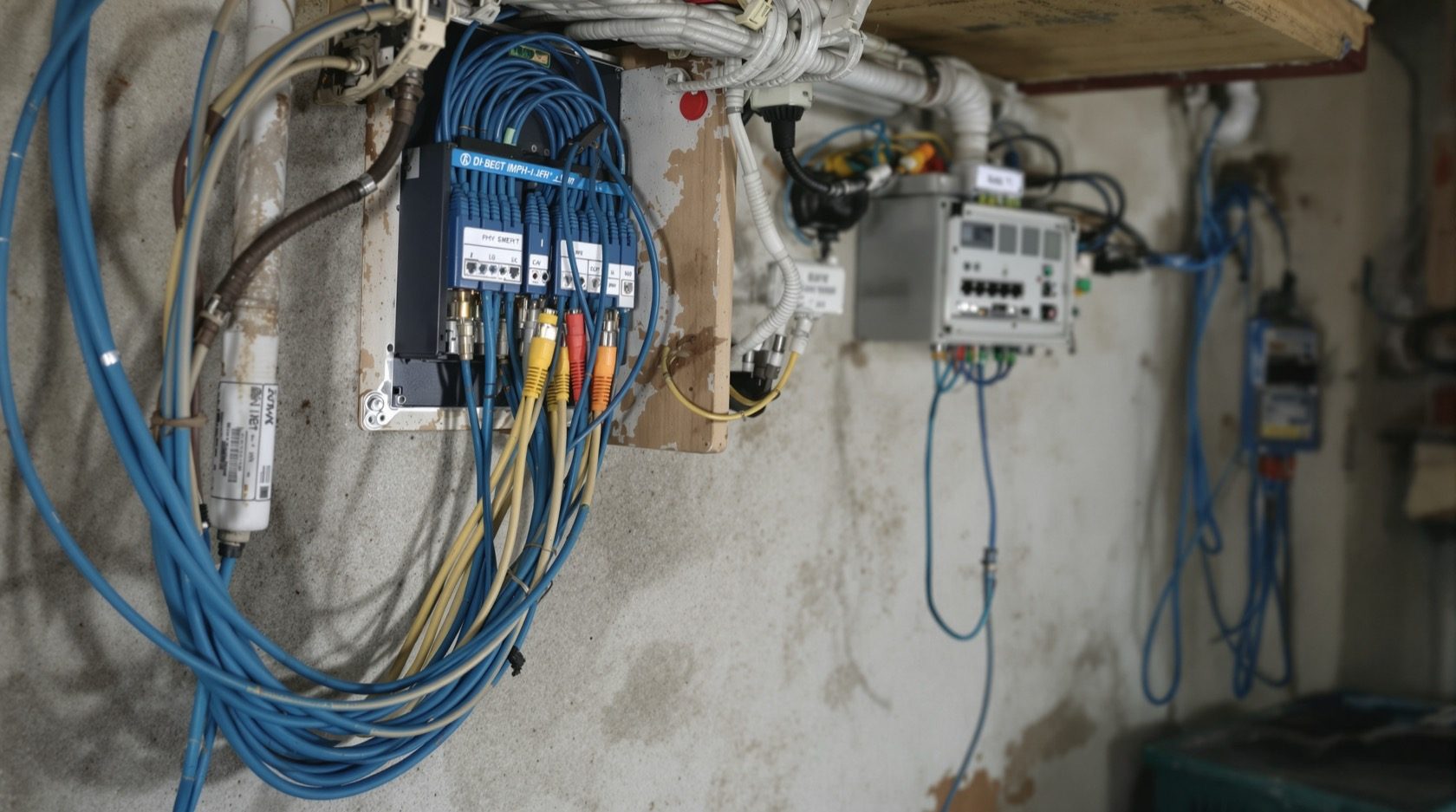
The cameras get all the attention, but the thing that quietly decides whether a CCTV system is reliable for years or flaky within a monsoon is the CCTV cabling behind them. A camera can only ever be as good as the cable feeding it signal and power. Get the cable type, the route and the sealing right and the system disappears into the walls and just works; get them wrong and you get dropped feeds, dead cameras after the first rain, and false alerts from interference.
This guide is the infrastructure explainer in Studio Matrx's CCTV hub. It helps you specify and supervise the cabling — decide the cable type, plan the routes, and know what "done right" looks like — so you can brief and check a professional. It does not teach you to pull the runs yourself.
Scope & safety. This is a plan-and-specify guide, not a DIY-wiring guide. All structured cabling, conduit and chasing, and anything near the mains board belong to licensed professionals. Working at height to reach a camera position is also a professional's job. Security cabling must never block a fire-escape route or fire-fighting access. See the electrical hub for the mains side.
Two cable families: coax vs Cat5e/Cat6
Almost every home CCTV system runs on one of two cable families, and the choice is really a choice between an analog system and an IP one.
- Coaxial cable (RG59 / RG6) carries an analog or HD-over-coax video signal to a DVR. It is a single thick cable with a BNC connector, and it usually needs a separate DC power cable run alongside it (sold together as "3+1" or "shotgun" cable). Coax reaches long distances without any boosters, which is why it still suits very long compound runs and why it is the natural pick when you are reusing an existing analog installation.
- Twisted-pair Ethernet (Cat5e or Cat6) carries an IP camera's data and, over Power over Ethernet (PoE), its power down the same single cable to an NVR and PoE switch. One RJ45-terminated cable per camera, sharper footage, easy to label and expand. This is what most new Indian installs use today.
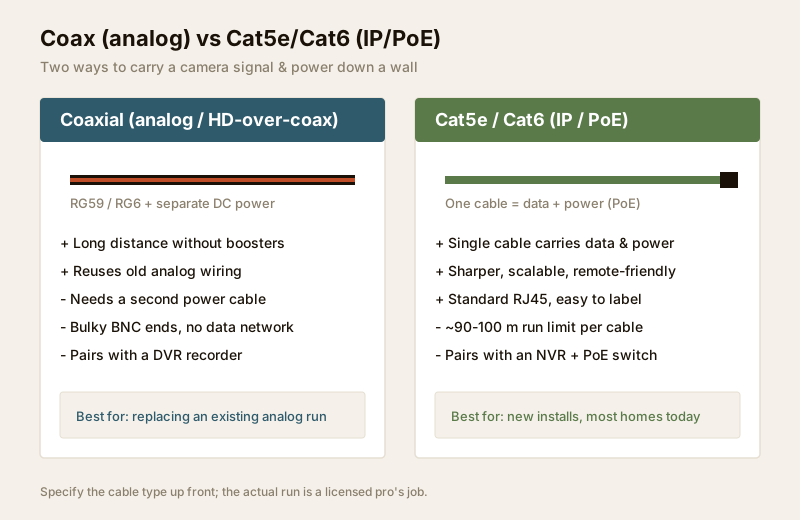
For the broader wired-vs-wireless decision behind the camera, see the wired CCTV guide; for why PoE has become the default, the PoE CCTV cameras guide.
| Factor | Coax (RG59/RG6) | Cat5e / Cat6 (IP/PoE) |
|---|---|---|
| Carries | Analog/HD video only | Data + power (PoE) in one cable |
| Power | Separate DC cable needed | Same cable via PoE |
| Recorder | DVR | NVR (often with built-in PoE) |
| Distance | 200 m+ without boosters | ~90-100 m per cable run |
| Image | Up to HD-over-coax | Up to 4K / 8MP, scalable |
| Connectors | BNC (crimped) | RJ45 |
| Best for | Reusing old analog wiring, very long single runs | New installs, most homes, remote viewing |
| Expandability | Limited | Add cameras and switches freely |
For Cat6, insist on solid-copper conductors, not the cheap "copper-clad aluminium (CCA)" cable that is common in the Indian market. CCA fails at distance, carries PoE power poorly, and is a false economy on a run you will never want to re-pull.
The ~90-100 m Ethernet run limit
This is the single most important number in IP CCTV cabling. A standard Ethernet run — the cable from the PoE switch to the camera — is reliable up to about 90 to 100 metres. Beyond that, both the data signal and the PoE power fall away, and the camera drops out or never powers up at all.
"Metres of cable" means the actual path the cable travels — up the wall, along the conduit, across the ceiling, down to the camera — not the straight-line distance on a plan. A camera that looks 60 m away on paper can easily be a 95 m cable run once you follow the real route, so measure generously.
When a camera sits beyond the limit, there are two clean answers, both a professional's to install:
1. A mid-point PoE switch. Put a small powered switch partway along the route so each leg stays under ~90 m. The switch needs its own power and a dry, ventilated spot.
2. A fibre or coax segment for a genuinely long compound run, converting back to Ethernet near the far cameras.
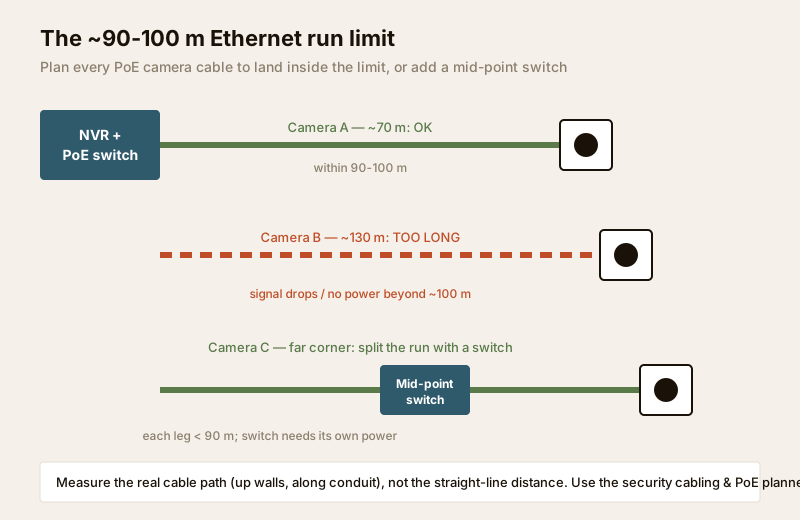
Don't estimate this by eye. The security cabling and PoE planner works out run lengths and flags any that exceed the limit, and the network switch and PoE budget guide covers the switch and power-budget side that goes with it.
Indoor vs outdoor, UV and armoured cable
Indian conditions — direct sun, monsoon, dust, heat, and rodents in the ceiling void — are hard on cable. Match the cable jacket to where it runs:
- Indoor cable is fine for runs that stay inside the house, in the ceiling void or in conduit. It is cheaper but its jacket degrades quickly in sunlight.
- Outdoor / UV-resistant cable has a jacket rated to survive direct sun without going brittle. Anything that runs along a compound wall, under an open eave or across a terrace must be outdoor-grade — indoor cable used outdoors cracks and lets water in within a season or two.
- Armoured / direct-burial cable has a steel or thick protective layer for runs that go underground (across a driveway to a gate camera) or where rodents are a risk. Even armoured cable should ideally sit inside a conduit.
- Gel-filled outdoor cable resists moisture ingress along the run and suits exposed Indian conditions.
| Where the cable runs | Cable to specify | Why |
|---|---|---|
| Inside walls / ceiling void | Standard indoor Cat6 / coax | Cheapest; protected from sun |
| Along walls, eaves, terrace | Outdoor UV-resistant jacket | Sun and monsoon resistance |
| Underground / to gate | Armoured or direct-burial, in conduit | Crush, water and rodent protection |
| Rodent-prone ceiling voids | Armoured or metal conduit | Rats chew ordinary jackets |
| Exposed joints outdoors | In a weatherproof junction box | Keeps the termination dry |
Conduit, chasing and routing
Cable belongs in conduit wherever it can be — PVC conduit indoors and along walls, metal conduit or GI pipe where it is exposed or needs mechanical protection. Conduit protects the cable, keeps rodents off it, and — the part owners forget — lets a future cable be pulled or replaced without breaking the wall open again. Ask the installer to leave a pull string in each conduit for exactly this.
- Chasing (cutting a channel into a wall to bury conduit) is best planned before plaster and paint on a new build or renovation — retrofitting into finished walls is messy and expensive. If cameras are on the plan, get the conduit in early.
- Bend radius: Cat6 in particular does not like sharp kinks. Gentle bends only; a kinked cable can fail intermittently in ways that are miserable to diagnose later.
- Don't overfill conduit. Leave room; a packed conduit overheats PoE cable and makes future pulls impossible.
- Never route through a fire-egress path or across fire-fighting access. Security cabling must not compromise life safety.
Keeping data cable away from mains
Data cable run parallel and close to mains power cable picks up electromagnetic interference that shows up as noise, banding or dropped frames — worse on long runs. The fix is simple discipline at planning time:
- Keep a clear separation (a comfortable gap of at least a couple of hundred millimetres) between CCTV data cable and mains wiring wherever they run alongside each other.
- Cross at right angles, not parallel, where a data cable must pass a power cable.
- Never share a conduit with mains wiring.
- Prefer Cat6 over Cat5e on longer or noisier runs — its tighter twist and (in F/UTP) shielding reject interference better.
This is a coordination item between your CCTV installer and your electrician, and a good reason both are involved early rather than one working around the other's finished work.
Drip loops, sealing and the camera termination
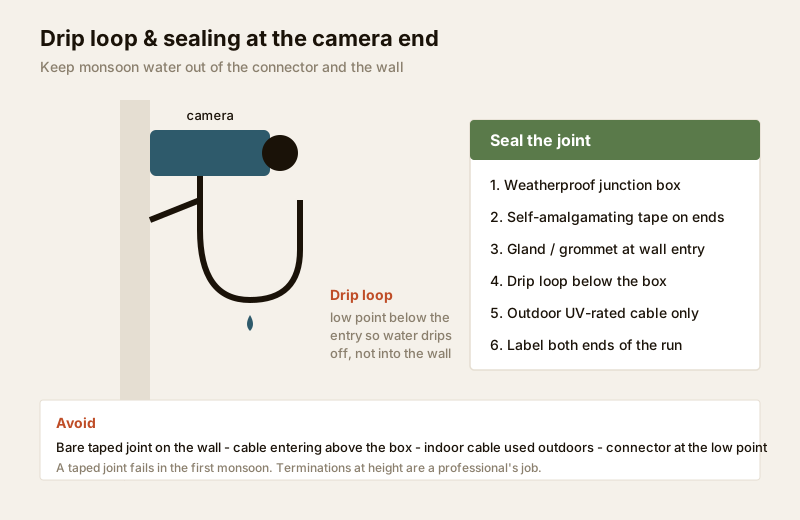
The camera end is where most outdoor CCTV cabling fails, and almost always for the same reason: water gets into the connector or the wall. Three habits prevent it:
- A drip loop. Route the cable so it dips to a low point below the camera and the wall entry before rising into the connector. Water runs down the cable, reaches the bottom of the loop, and drips off instead of tracking into the housing or the wall.
- A weatherproof junction box for the actual joint, with a cable gland where the cable enters, so the termination sits sealed and dry. A bare, taped joint on a wall fails in the first monsoon.
- Cable entry into the wall from below or the side, sealed with a grommet — never a hole that funnels rainwater straight down the cable into the wall.
For how this fits the wider outdoor scheme — mounting height, glare and IP ratings — see the outdoor CCTV guide and the camera placement guide.
Labelling both ends
The least glamorous step saves the most future pain: label every cable at both ends — at the camera and at the recorder/switch — with a consistent scheme (for example "GATE", "PORCH", "REAR-1"). When a feed drops or a camera is added years later, a labelled patch panel turns a half-day of tracing into a two-minute job. Ask the installer to hand over a simple cable schedule or as-built map showing which port feeds which camera; it is part of a professional commissioning.
Do and avoid
| Do | Avoid |
|---|---|
| Specify solid-copper Cat6 for new installs | Copper-clad aluminium (CCA) cable |
| Measure the real cable path, keep runs < ~90 m | Guessing distance from a floor plan |
| Use outdoor UV / armoured cable outdoors | Indoor cable run along a sunny wall |
| Run cable in conduit with a pull string | Loose cable stapled to a wall |
| Seal joints in a weatherproof box + drip loop | A taped joint exposed on the wall |
| Keep data cable clear of mains, cross at 90° | Data and mains bundled in one conduit |
| Label both ends and keep a cable schedule | Unlabelled runs no one can trace later |
When to bring in a professional
Decide the cable type, plan the routes, and set the standard here — then hand the work over:
- All structured cabling, conduit and chasing is a professional installer's job. Cable pulling, RJ45/BNC terminations, and neat conduit work are skills, and a botched termination is the commonest cause of a flaky feed.
- Anything at or near the mains board — power for the recorder, switch, or a mid-point switch — is a licensed electrician's job. See the electrical hub. Surge protection and earthing for the system also belong to a pro; the power supply and UPS guide covers what to specify.
- Working at height to reach a camera position, or underground trenching for a buried run, are professional tasks with their own safety requirements.
A well-specified, well-sealed cabling job you planned and a professional executed will outlast several generations of cameras plugged into it.
Key takeaways
- CCTV cabling is the reliability backbone: choose the cable type up front and specify it clearly.
- Coax + DVR suits reusing analog wiring and very long runs; Cat5e/Cat6 + PoE + NVR suits most new homes — insist on solid-copper Cat6, not CCA.
- Plan every IP camera cable to land within ~90-100 m; split a longer run with a mid-point switch. Use the security cabling and PoE planner to check lengths.
- Use outdoor UV or armoured cable outdoors, run it in conduit (with a pull string), keep it clear of mains, and seal the camera end with a drip loop and weatherproof box.
- Label both ends and keep a cable schedule; route all cabling, conduit and mains work to a licensed professional, and never block fire egress.
References
- Digital Personal Data Protection Act, 2023 — CCTV footage is personal data; plan cabling and camera positions to cover only your own property and shared areas.
- Manufacturer specifications — verify a camera's PoE class, an NVR's PoE-per-port budget, and a cable's UV/IP rating on the datasheet before ordering.
- National Building Code of India (SP 7), Bureau of Indian Standards, and local municipal bye-laws for any electrical, conduit or life-safety aspect of an install; verify the current edition via the BIS catalogue: https://www.services.bis.gov.in/
This is an educational overview to help you specify and supervise. Structured cabling, conduit, working at height and any electrical work are qualified professional tasks — engage licensed installers and a licensed electrician, and verify any standard's current status via the BIS catalogue before relying on it. Not legal advice.
Export this guide
Related Guides — Deep-dive reading
Electrical Safety for Security Systems in India (2026): Powering It Without Peril
A homeowner's guide to the power side of home and RWA security systems, CCTV, alarms, gates, access control and NVRs, done so it protects you instead of quietly becoming a shock or fire hazard. What makes a supply safe, what to insist on, and why the mains work belongs to a licensed electrician.
SecuritySecurity Cabling Requirements for Indian Homes
How to plan the wiring behind a home security system - which cable feeds which device, the 90-metre ethernet rule and the interference rules, and why laying conduit at construction stage beats surface trunking every time.
SecurityPoE vs Wi-Fi CCTV: Which Home Security Cameras Are Better?
One camera type runs power and video down a single Cat6 cable to an NVR and almost never drops out; the other clips to a wall in minutes and streams over your home Wi-Fi. This guide settles PoE vs Wi-Fi CCTV for Indian homes — reliability, video quality and bandwidth, cabling and power, retrofit versus new-build effort, NVR versus SD and cloud storage, hacking risk, real rupee costs, scalability and outdoor use — and gives a clear verdict for each kind of home.
Smart HomeRelated Tools — Try Free
Security Cabling & PoE Planner
Estimate cable length, drops, PoE power budget, the right switch, conduit and cost for a CCTV/security cabling plan.
Cabling PlannerCCTV Cable-Length Calculator
Total cable to buy for a CCTV job and a warning when a run exceeds the cable's maximum length.
Cable LengthCCTV System Type Selector
Answer five questions and get the right CCTV setup — analog / IP / hybrid, wired / wireless, local / cloud — with reasons.
CCTV Selector