
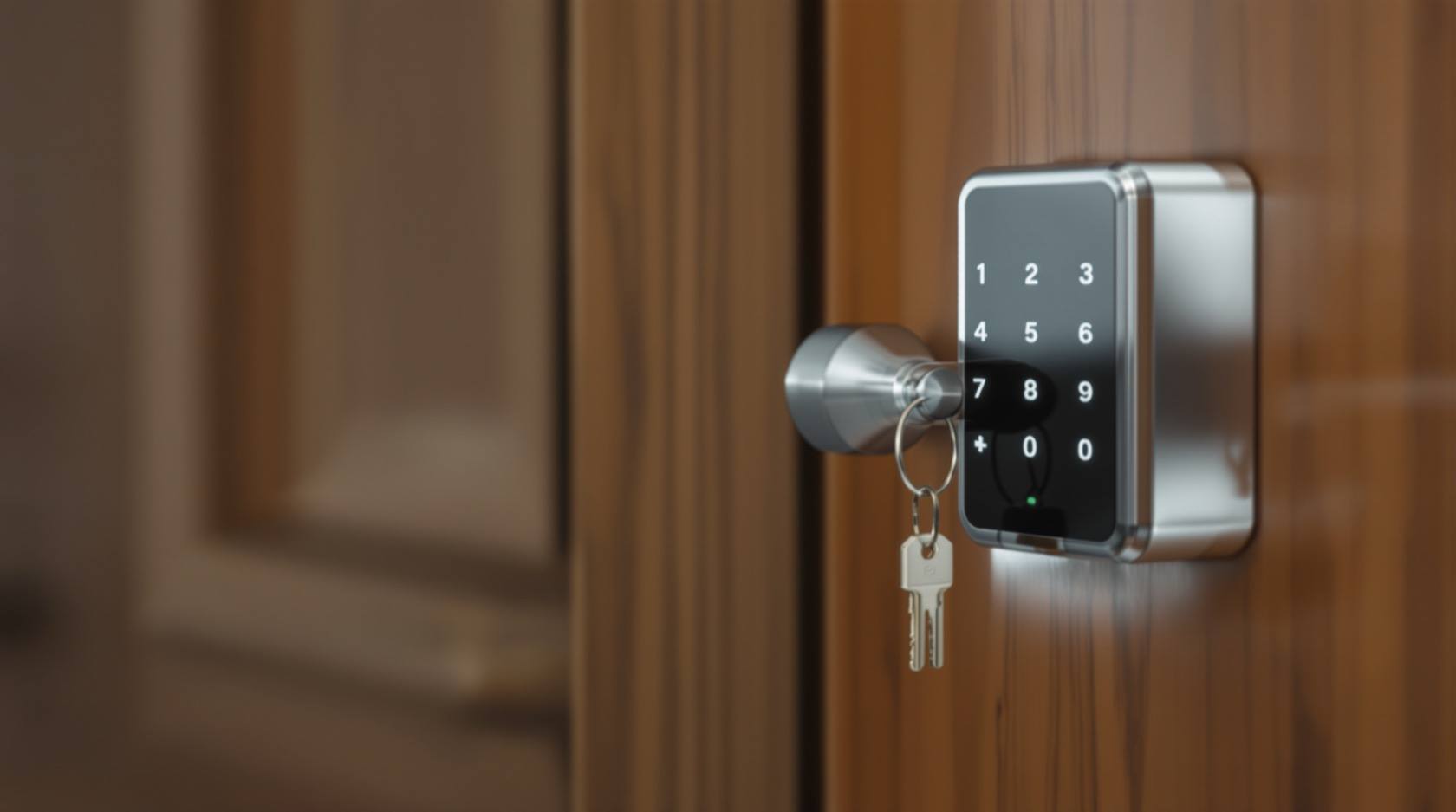
Smart Lock Not Opening (2026): Locked Out or Locked In? A Calm Fix-It Guide for India
Your smart lock will not open and you are at the door wondering if you are stuck. Stay calm: the cause is almost always a flat battery. This homeowner guide walks the emergency-power trick, the physical key override, the ordered causes and the one life-safety rule that must never break.
Your smart lock will not open. You are standing at the door, tapping the keypad or the app, and nothing happens — or worse, you are inside and worried you cannot get out. First, breathe. This is a common, almost always cheap and simple problem, and in the great majority of cases the fix takes a minute once you know where to look. A smart lock that "won't open" is nearly always a smart lock that has run low on power, or one method (the app) failing while the others still work.
The single most important thing to hold on to: almost every smart lock is designed to fail safe, with more than one way in. Most run on batteries and warn you for days or weeks before they die; most have a hidden emergency-power contact you can touch a spare battery to; and most have a concealed physical keyhole as a last resort. Knowing these three before you ever need them turns a locked-out panic into a two-minute fix. Let us walk it calmly, from the most likely cause to the rarest.
Scope and safety. This is a homeowner diagnostic guide, not an installation manual. The simple, safe things you can do yourself are here: give the lock emergency power, use the physical key, replace batteries, re-add a code, gently realign a strike, and lubricate per the maker. A truly jammed lock, a warped or swollen door, a failed motor, or being locked out with no key is a job for a locksmith or the installer — do not force a stuck bolt or pry a lock apart. This is not a price or a buying guide; for choosing a lock or weighing repair against replacement, follow the cross-links. The one rule that never bends: a lock must never trap a person inside in an emergency.
Start here: the one life-safety rule
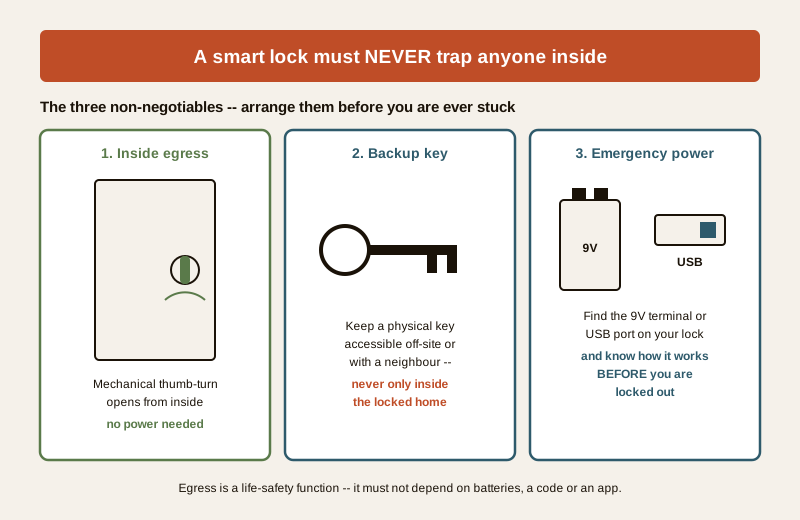
Before any diagnosis, understand the rule that outranks everything else on this page. A smart lock must never trap anyone inside in an emergency. The inside of your door should always open by a simple mechanical thumb-turn or lever that needs no power, no code and no app — turn it and the bolt retracts, every time, even with the batteries stone dead. If your lock does not offer no-power egress from the inside, that is a serious problem to raise with the installer, not a quirk to live with.
So if you are reading this because you fear being locked in: check the inside handle or thumb-turn now. On the overwhelming majority of home smart locks it works mechanically regardless of battery state. Egress is a life-safety function and it does not depend on electronics.
Three things are non-negotiable, and the time to arrange them is before you are stuck:
- Inside egress must be mechanical — the thumb-turn or lever opens from within with no power.
- Keep a physical backup key accessible — ideally off-site or with a trusted neighbour or family member, never only inside the locked home.
- Know your lock's emergency-power method now — read the little manual, find the 9V or USB contact and the hidden keyhole today, while the door is open and calm.
The likely causes, most common first
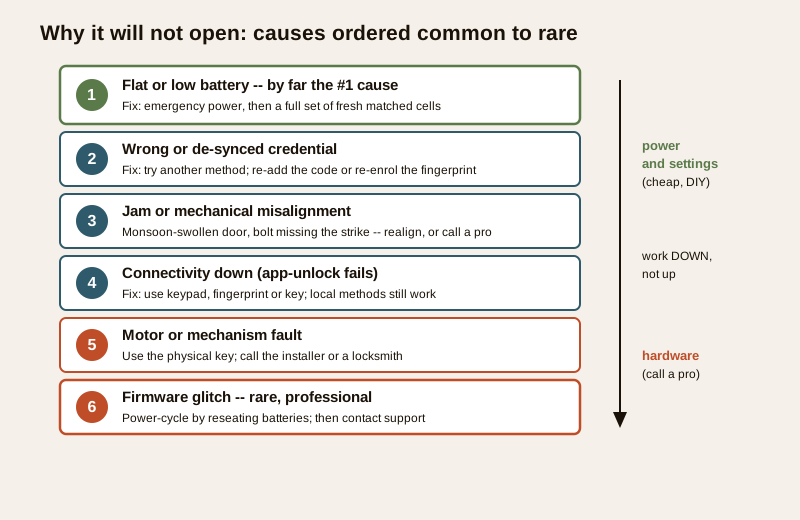
Diagnosing is easy once you order the causes from the everyday to the rare. Do not jump to "the lock is broken" — that is near the bottom of the list.
| Cause | Why it happens | What to do |
|---|---|---|
| Flat or low battery (by far #1) | Almost all smart locks are battery powered; they warn, then die. Heat, cheap cells and skipped changes speed it up | Use the emergency-power trick, then replace all batteries with fresh matched cells |
| Wrong or de-synced credential | A deleted or expired code, a fingerprint that no longer reads, a card gone flat, an app that lost its pairing | Try another method; re-add the code or fingerprint; re-pair the app |
| Jam or mechanical misalignment | A monsoon-swollen or warped door, a bolt not meeting the strike, a dropped hinge, so the motor cannot throw the bolt | Take weight off the door and try again; realign the strike; if it will not move, stop and call a pro |
| Connectivity down | Wi-Fi, Bluetooth, the hub or the internet is out, so app-unlock fails — but local methods still work | Use the keypad, fingerprint or key instead of the app; restore the network later |
| Motor or mechanism fault | The electronics run but the motor will not drive the bolt; worn gears; internal failure | Use the physical key; call the installer or a locksmith |
| Firmware glitch (rare) | An update stalled or corrupted the lock's software | Power-cycle by pulling and reseating the batteries; then contact support |
The pattern to notice: the top of the table is power and settings, cheap and homeowner-fixable; the bottom is hardware, and it is where a professional comes in. Work down the list, not up.
The diagnostic path: two questions answer almost everything
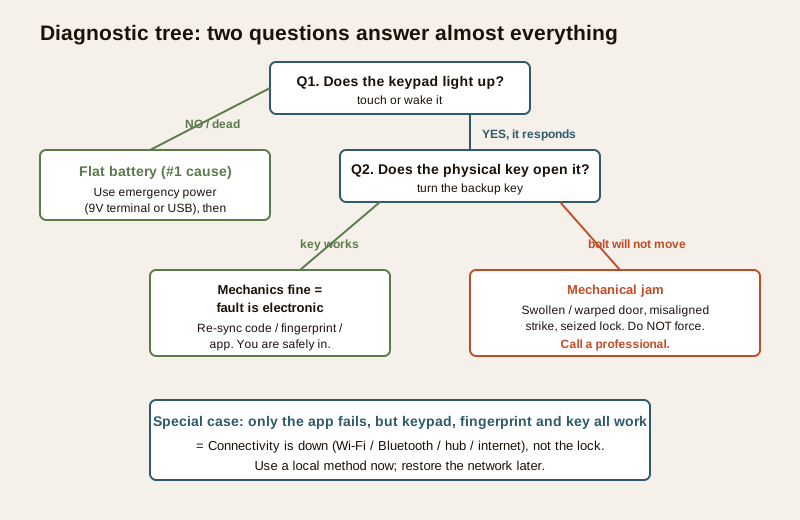
You can narrow the problem in under a minute with two checks. Ask them in order.
Question 1 — does the keypad or screen light up at all?
Touch or wake the keypad. Does anything light, beep or respond?
- Nothing lights, no beep, totally dead — this is almost certainly a flat battery, the number-one cause. Go to the emergency-power step below. You are probably ninety seconds from open.
- It lights but shows a low-battery warning, or is dim or sluggish — still a battery problem, just not fully dead yet. Replace the batteries after you are in.
- It lights and responds normally but still will not unlock — power is fine; the problem is a credential, a jam or connectivity. Go to Question 2.
Question 2 — does the physical key work?
Find the concealed keyhole (often under a sliding cover or the lock body) and turn the backup key.
- The key turns and the door opens — the mechanics are fine, so the fault is electronic: a de-synced code or fingerprint, a dead motor that the key bypasses, or an app/connectivity failure. You are safely in; now fix the electronic method at leisure.
- The key turns but the bolt will not move, or will not turn at all — this points to a mechanical jam: a swollen or warped door, a misaligned bolt and strike, or a seized mechanism. Do not force it. This is where a professional comes in.
- Only the app fails but the keypad, fingerprint or key all work — this is connectivity, not the lock. Wi-Fi, Bluetooth, the hub or the internet is down. Use a local method and restore the network later.
That is the whole tree: light tells you about power, the key tells you mechanical-versus-electronic, and "app-only" tells you it is the network. Everything else is detail.
Safe fixes you can do yourself
These are the calm, safe steps for a homeowner. None of them involve forcing anything or opening the lock's guts.
- Give it emergency power. Most smart locks have an emergency-power feature for exactly this moment. Many have two metal contacts (often at the base of the keypad) where you hold a fresh 9V battery to give the lock a momentary charge — just enough to enter your code once and open. Others have a USB port (micro-USB or USB-C) on the underside; plug in a power bank and the keypad wakes. Check your model's manual for which; keep a 9V cell or a small power bank in your bag or car. This alone rescues most "won't open" situations.
- Use the physical key. Every reputable smart lock ships with a mechanical override key and a concealed keyhole. Keep that key somewhere you can actually reach when locked out — with a neighbour, in your bag, off-site — never only inside the home.
- Replace the batteries. Once you are in, swap in a full set of fresh, matched, good-quality cells (do not mix old and new, or mix brands). Note the type your lock uses and keep spares. This is the single best thing you can do to prevent a repeat.
- Re-add a code or re-enrol a fingerprint. If one credential stopped working, add it again through the lock's menu or app; fingerprints can fade with dry or worn skin and re-enrolling fixes most read failures.
- Re-pair the app or restore the network. If only the app fails, restart your Wi-Fi router or hub, check the internet, and re-pair the lock over Bluetooth. Meanwhile just use the keypad or key.
- Gently help a sticking door and realign the strike. In the monsoon, doors swell and the bolt no longer lines up with the strike plate, so the motor strains. Lift or push the door slightly to take the weight off as you unlock; if the bolt is clearly hitting the strike edge, the strike may need adjusting. Lubricate only with the product the maker specifies. If the bolt still will not move, stop.
When to call a professional or a locksmith
Some faults are past safe DIY. Calling a pro is the smart move, not a failure.
Call a locksmith or the installer when: the door is warped or swollen so the bolt is truly jammed; the lock body is seized and neither key nor motor moves the bolt; the motor or mechanism has failed; the lock is damaged; or you are locked out with no key and no emergency power worked. Do not force a stuck bolt, pry the lock, drill it yourself, or dismantle the mechanism — you can turn a cheap fix into a replacement, or damage the door. A locksmith can open you up without wrecking the door, and the installer can repair or swap the unit.
If you are locked out right now with nothing working, a professional locksmith is the safe answer — and afterwards, fix the reason it happened (usually: no accessible spare key and no charged emergency-power source). If you are deciding whether a repeatedly failing lock is worth repairing or should be replaced, that is a cost-and-lifecycle question — see the maintenance and choosing guides linked below rather than guessing.
Prevention: so it does not happen again
Almost every lockout is preventable. A short routine keeps the door boringly reliable.
- Change the batteries on a schedule, not when they die. Do not wait for the warning. Pick a date — say every festival season or twice a year — and replace the full set. Heat shortens battery life in India, so err early.
- Never ignore the low-battery warning. The lock is telling you days or weeks ahead. Act the first time you see it.
- Keep a spare physical key accessible off-site — with a neighbour, a relative, or in your car — never only inside the home.
- Carry an emergency-power source. A 9V cell or a small power bank plus cable in your bag turns a dead lock into a non-event.
- Test everything monthly. Once a month, unlock with each method — code, fingerprint, app and key — so you find a fading fingerprint or a wandering strike before it strands you.
- Watch the door in the monsoon. If the door starts to stick or the motor strains, get the door or strike adjusted before the bolt jams entirely.
- Keep firmware current through the app, but never start an update when the battery is low.
Key takeaways
- Stay calm — it is almost always a flat battery. Most smart locks are battery powered, warn you first, then die; emergency power and a fresh set of cells fix the majority of "won't open" cases.
- Two questions diagnose it: does the keypad light (power), and does the physical key work (mechanical versus electronic). "App-only" failure means connectivity, not the lock.
- Know your emergency-power method now — a 9V terminal or a USB port gives momentary power to open; and always keep a physical backup key accessible off-site.
- Life-safety is non-negotiable: the inside must open by a mechanical thumb-turn with no power, so no one is ever trapped in an emergency.
- Safe DIY is emergency power, the key, fresh batteries, re-adding a code, and gently realigning a strike. Call a professional for a true jam, a warped door, a failed motor, or a lockout with no key — never force or pry.
- Prevent it by changing batteries on a schedule, heeding the low warning, keeping a spare key, and testing every method monthly.
Where to go next
- Security system troubleshooting — the parent guide to fixing any misbehaving home-security device, calmly and in order.
- Smart lock maintenance — the upkeep routine that stops most lockouts before they start, including battery and strike care.
- Smart lock troubleshooting — the wider fault guide for codes, fingerprints, apps and connectivity beyond "won't open".
- Video door phone not ringing — a companion symptom guide for the other device at your door.
- How to choose access control — for deciding on a lock, or weighing whether a failing one is worth replacing.
- The troubleshooting sub-hub, the smart locks and access control library, and the main security hub.
References
- National Building Code of India (SP 7), Bureau of Indian Standards — means of egress and the principle that occupants must always be able to leave a building freely in an emergency; a lock must never obstruct escape from inside. Verify the current edition (SP 7:2026) via the BIS catalogue: https://www.services.bis.gov.in/
- Digital Personal Data Protection Act, 2023 — smart locks that log entries, store codes, fingerprints or app accounts hold personal data; know what your lock and its app retain and who can see it.
- Manufacturer documentation — always follow your specific lock's manual for the emergency-power method (9V terminal or USB), the location of the physical override keyhole, battery type and firmware updates.
This is an educational homeowner guide, not an installation manual or legal advice. Inside egress and life-safety take priority over any lock: the inside must open mechanically with no power, and a physical backup key should always be accessible. For a truly jammed lock, a warped door, a motor failure or a lockout with no key, engage a locksmith or the installer, and verify any standard's current status via the BIS catalogue before relying on it.
Export this guide
Related Guides — Deep-dive reading
Access Control Maintenance in India (2026): Readers, Locks and Fail-Safe Egress
How to keep a card, keypad, fingerprint or face access-control system reading reliably and locking securely — and, above everything, how to test that its doors still release on a fire alarm and on power loss, so an access-controlled door never becomes a life-safety trap.
SecurityAccess Card Not Working in India (2026): One Card or All Cards? A Facility Manager's Diagnostic Guide
An RFID card or fob will not open the door. The single question that unlocks the whole diagnosis is whether it fails for one person or for everyone: one points at that card or its permissions, all points at the reader, controller, power or network. This professional guide walks the ordered causes, a decision-tree path and the DIY-safe versus admin split, with fail-safe egress first.
SecuritySecurity for People Living Alone in India (2026): Calm, Practical Habits When There Is No Second Person to Notice
Living alone is an ordinary and growing part of Indian life - the student in a new city, the working single, the elder whose children are abroad, the person after a separation. It does not call for fear. It calls for a few deliberate habits, because there is no second person in the home to notice trouble, raise the alarm, or catch an accident. This is calm self-reliance, layer by layer.
SecurityRelated Tools — Try Free
Access-Control Battery-Backup Calculator
Size the standby battery so an access system keeps running through a power cut, with an egress life-safety note.
Battery BackupApartment Video Door System Planner
Enter flats, entrances, floors and guard desk for a first-pass building intercom plan — door stations, indoor monitors, guard station, the right architecture and an indicative cost band.
Building PlannerAccess-Control Schedule Generator
Build the time schedules that decide when each access group can enter — an editable list for your integrator.
Time Schedules