
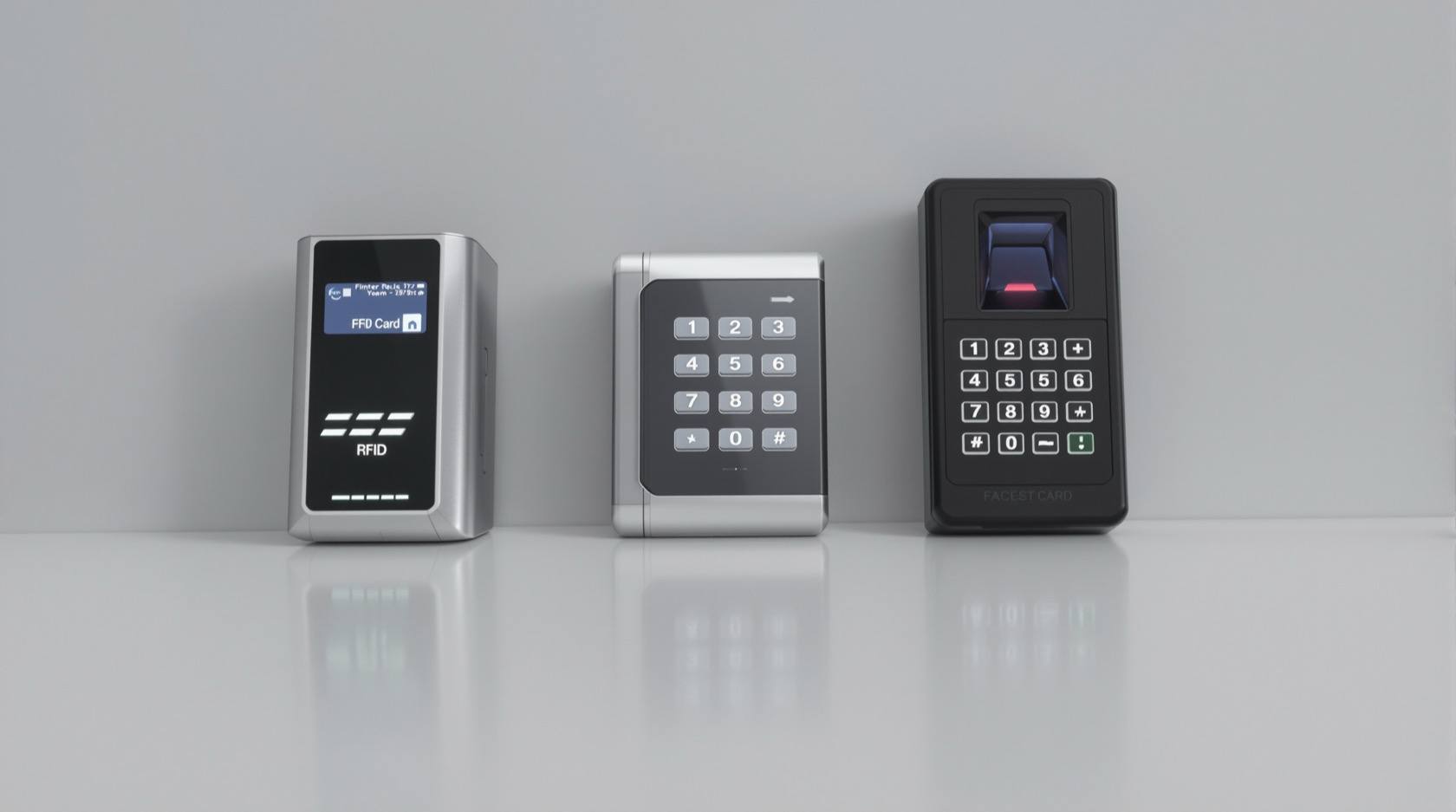
How to Choose Access Control in India (2026): Credential, Architecture and Fail-Safe Egress
A professional buyer's guide to selecting a door-access system for an Indian building — matching the credential technology, standalone-versus-networked architecture, lock hardware and software model to the number of doors and the use-case, with fail-safe egress and DPDP compliance as non-negotiables.
Choosing access control looks like a hardware question and is really a decision question. The reader who asks "which reader should I buy" has usually already narrowed to the wrong axis; the real questions are what a person presents at the door, how many doors you must manage as one system, whether the lock suits the door it sits on, who holds the logs, and — before anything else — whether every door on an escape route will open the instant the building needs to empty. Get those right and a modest system serves a building well for a decade. Get the credential fashionable and the egress wrong, and you have bought a beautiful way to trap people.
This is a selection guide, not a shopping list of models. It is written for the person who has to specify and brief: an architect, a facility or IT manager, a security consultant, a builder fitting out an office, an apartment association upgrading the gate and lobby. The logic below moves from the credential a user presents, through the system architecture and the lock that actually holds the door, to the software and integration, and finally to the one criterion that overrides all the others.
Scope and how to use this. This is a selection and specification guide, not an installation manual and not a price list. For the numbers, see the access control system cost guide; here we deal only in "entry-level / mid / premium" framing so the choice stays about fitness, not budget theatre. Access control that governs an escape door is a life-safety product: certification, fail-safe behaviour and code compliance are never traded for looks or price. Specify the system, then engage a licensed installer to fit it, and — because logs and biometrics are personal data — read the DPDP note below before you choose a credential.
Start with the decision, not the reader
Access control answers one question at a door: is this person allowed through, right now? Everything else is how you answer it. Four choices, made in order, decide almost the whole system:
1. The credential — what the person presents (a PIN, a card, a finger, a face, a phone).
2. The architecture — one self-contained door, or many doors managed by shared software.
3. The lock hardware — the device that actually holds the door, matched to the door type.
4. The software and integration — how it is administered, licensed, and tied to CCTV, video door phones, lifts, alarms and attendance.
And running underneath all four, non-negotiable, is fail-safe egress: whatever you choose, a person on an escape route must always be able to get out. We take the four in order, then close on egress, because egress is the veto that can strike out any otherwise-attractive choice.
This guide sits under the main how to choose a security system pillar; access control is one layer of that whole, alongside cameras and alarms.
Choice 1 — the credential: what the user presents
The credential is the most visible decision and the one most often made on fashion. Each technology trades security, convenience, hygiene, cost and data-sensitivity differently. There is no "best" — there is best-for-this-door.
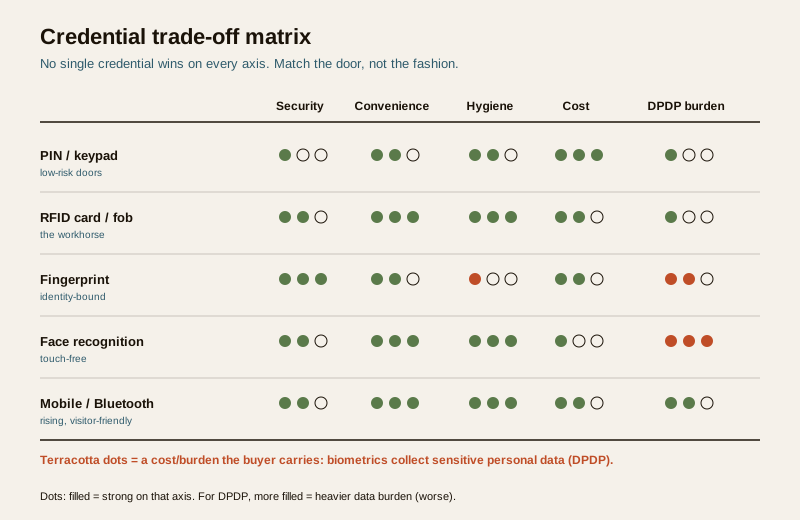
PIN / keypad. A code on a keypad. Cheapest, needs no token, works for a low-risk store-room. But codes are shared, shoulder-surfed and rarely changed; a keypad alone is weak for anything that matters, and identifies nobody — the log only ever says "someone who knew the code". Fine as a second factor or for a low-value door; poor as the sole guard of anything worth guarding.
RFID card / fob. A card or key-fob tapped on a reader. The workhorse of Indian offices and apartments: cheap per user, fast, hygienic (no touch of a shared sensor needed), easy to issue and — crucially — easy to revoke the moment someone leaves or loses one. Its weakness is that it authenticates the card, not the person; cards are lent, cloned (low-frequency 125 kHz especially) and passed back. Specify encrypted 13.56 MHz smart cards over cloneable low-frequency ones, and pair with a PIN where a door needs two factors.
Fingerprint / biometric. A finger on a sensor. Binds access to a person, not a token, and cannot be lent or passed back — strong for identity, and popular in India for the same reason it is popular for attendance. But it is a contact sensor (a hygiene question after 2020, and unreliable with wet, dry, cut or worn fingers, common in industrial and site settings), it enrols slowly, and — the big one — it collects biometric data, which is sensitive personal data under the DPDP Act. That is a genuine buying criterion, not a footnote; see the DPDP section below.
Face recognition. A camera reads a face. Touch-free (the hygiene win biometrics needed) and fast, and it has fallen in price sharply. But it is the most data-sensitive credential of all, the most prone to environmental error (light, angle, masks), and the one most likely to be deployed thoughtlessly at scale. Choose it where touch-free throughput genuinely matters — and only with the DPDP discipline its data demands.
Mobile / Bluetooth / QR. The phone becomes the credential — an app, a Bluetooth handshake, or a one-time QR for a visitor. Convenient (people rarely forget their phone), nothing to issue or collect, and excellent for visitor and delivery flows and for remote grant/revoke. The trade-offs are dependence on the user's device and battery, and a reliance on the vendor's cloud that you must read carefully (see software and DPDP). Increasingly the sensible default for offices and gated communities, often layered over cards for staff.
The honest summary: cards remain the pragmatic backbone for most buildings; biometrics buy stronger identity at a real data-and-hygiene cost; mobile is the rising layer for visitors and convenience. Multi-factor (card plus PIN, or card plus finger) is for the few doors that truly need it — a server room, a cash room, a pharmacy store — not for every door, where it only slows people and tempts them to prop the door.
| Credential | Best for | Watch out for |
|---|---|---|
| PIN / keypad | Low-risk internal doors, second factor | Shared/guessed codes; identifies no one |
| RFID card / fob | Offices, apartments, general staff access | Lend/clone risk; specify encrypted smart cards |
| Fingerprint | Identity-bound access, attendance | Hygiene, wet/worn fingers, DPDP biometric data |
| Face recognition | Touch-free high-throughput doors | Highest data-sensitivity; light/angle errors |
| Mobile / Bluetooth / QR | Visitors, deliveries, remote grant, convenience | Device/battery dependence; cloud/vendor trust |
Choice 2 — architecture: standalone vs networked
This is the choice that quietly decides more than the credential does, and buyers often skip it. It comes down to a single number: how many doors, managed as one thing?
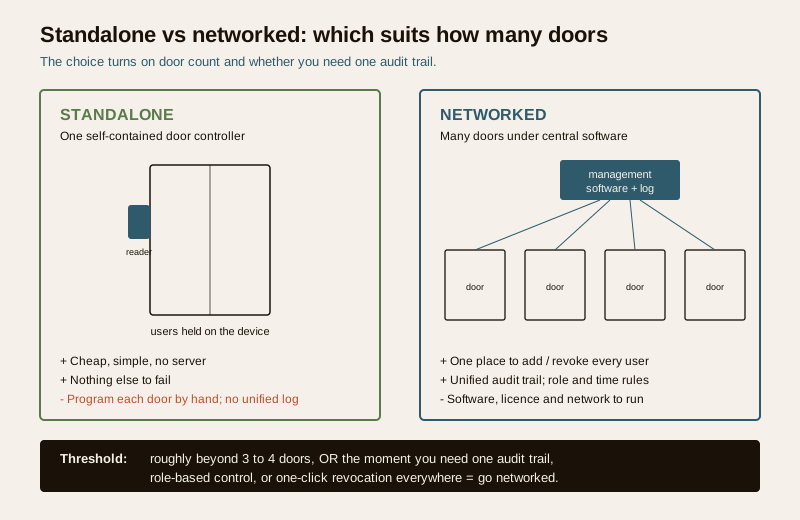
Standalone. A single door controller with its readers and users held on the device itself. No server, no software licence, no network. Cheap, simple, resilient (nothing else to fail). Right for one door, or a handful of unrelated doors — a clinic entrance, a single shop, a farmhouse gate. Its limits appear the moment you have several doors: you program each one by hand, there is no unified log, and to remove a departing employee you must walk to every device.
Networked. Door controllers wired (or, carefully, wireless) back to central management software — on-premise server or cloud. This is what "access control system" usually means at any scale: one place to add and remove users across all doors, a unified audit trail of who went where and when, time-based and role-based rules, and remote administration. The cost is the software, the licensing, the network and the discipline to run it. Right for an office, a factory, a multi-tower apartment complex, anything multi-site.
The practical threshold: roughly beyond three or four doors, or the moment you need one audit trail or role-based control, networked pays for itself — chiefly in the one action standalone does worst: instantly revoking a person everywhere when they leave or a card is lost. If your real requirement is "know who went where" or "cut off a leaver in one click", you need networked, whatever the door count. A useful middle path exists — networked-ready controllers you can start standalone and bring under software later — and it is often the wise buy for a growing site.
Choice 3 — the lock: match the hardware to the door
The reader gets the attention; the lock is what actually holds the door, and mismatching it to the door is one of the most common and most dangerous errors. Three families dominate, and the door type usually chooses for you.
- Electromagnetic (EM) lock. A magnet on the frame holds an armature on the door; power holds it locked, cutting power releases it. Strong, no moving parts, forgiving of misalignment — the default for glass and aluminium doors and gates. Because it is inherently fail-safe (power off = open), it is the natural friend of egress — but that same property means it must be on a supervised supply and paired with a proper release, or a power cut leaves the door open.
- Electric strike. Replaces the standard strike plate; the latch of a normal lockset releases on signal. Neat on timber and metal-framed doors that already have a mortise lock, and it can be specified fail-safe (unlocks on power loss) or fail-secure (stays locked on power loss) — a choice you must make deliberately by door, never by default.
- Electric drop / dead bolt. A motorised bolt drops into the frame or floor. Higher holding force for high-security doors, but it is the family most likely to be fail-secure, and therefore the one most dangerous to put on an escape route without an override. Use with real caution on any door a person might need to flee through.
The rule that ties this section to the last one: on any door in an escape route, the lock and its wiring must fail to the open state on fire alarm and on power loss. An EM lock is fail-safe by nature; an electric strike or bolt must be specified and wired fail-safe for egress doors and interlocked to the fire panel. The lock choice is where egress is won or lost in hardware. For a single leaf where a self-contained smart lock might do the job instead of a full controller-and-strike, weigh it against the smart lock buying guide — but the same egress logic applies to it.
| Lock type | Suits | Fail-safe by nature? | Note |
|---|---|---|---|
| EM lock | Glass, aluminium doors and gates | Yes (power off = open) | Needs supervised supply + release |
| Electric strike | Timber/metal doors with a mortise lock | Configurable | Choose fail-safe for egress doors |
| Electric drop/dead bolt | High-security doors | Usually fail-secure | Dangerous on escape routes without override |
Choice 4 — software, licensing and integration
Once you are networked, the software model is a long-term commitment, so read it before you sign.
On-premise vs cloud. On-premise keeps the server and the logs in your building — full control, no per-month fee, but you run the box, the backups and the security patches. Cloud hands administration and updates to the vendor and lets you manage doors from anywhere — convenient, but a recurring cost and a dependence on the vendor's uptime and, critically, their handling of your access data (a DPDP question). Neither is "better"; a single-office may prefer on-premise, a multi-site chain the cloud.
Licensing. Read how it is charged — per door, per reader, per user, per feature, and whether the software subscription is annual. A quote that looks cheap on hardware can carry a licence that compounds. Ask specifically what stops working if you stop paying (does the door still open? do you lose the logs?).
Controller capacity and scalability. Every controller has limits — doors per panel, users, stored offline events. Specify headroom: a system sized exactly to today needs replacing tomorrow. Ask how it grows and whether adding doors means new panels or just licences.
Integration is where access control earns extra keep — but only integrate what you will actually use:
- CCTV — tie a door event to camera footage so a swipe has a picture; see how to choose a CCTV camera.
- Video door phone — the visitor at the gate is granted or denied and the event logged as one flow.
- Lift access — a credential that calls or authorises floors in an apartment tower or office.
- Time-and-attendance — the same reader that grants access logs hours (the classic Indian dual use — but keep the DPDP basis clear).
- Intrusion alarm — arming/disarming tied to the last person out and first person in.
The red flag here is proprietary lock-in: a system whose readers, cards, controllers and software must all be one brand, with no open protocol, so you can never mix, extend or replace a part without the original vendor. Prefer systems built on open standards (OSDP for reader-to-controller wiring, standard smart-card formats) so you are not a hostage.
The DPDP criterion — biometrics and logs are personal data
This is a genuine buying criterion, not compliance garnish. Under the Digital Personal Data Protection Act, 2023, an access system's records — who entered which door, when — are personal data, and biometric templates (fingerprint, face) are sensitive personal data. That changes the calculus of the credential choice:
- Choosing biometrics means you are now the custodian of sensitive data — you owe notice, a lawful basis (consent, for staff handled carefully), a retention limit, and security of storage. Templates should be stored encrypted, ideally as non-reversible templates, and never casually pooled with a vendor's cloud without a written data agreement.
- A card or mobile credential that identifies without collecting a biometric is, for many buildings, the lighter-footprint choice — a real reason to prefer it where identity-binding is not essential.
- Whatever you choose, decide who can see the logs, how long they are kept, and who the data-processor is (especially on cloud). Put it in writing with the vendor.
In short: the DPDP burden is part of the price of biometrics. Sometimes it is worth paying; often a card is the wiser, lighter choice.
Match it to your building
The same catalogue suits very different buildings differently. Right-size to the use-case:
- Home / villa. Usually one or a few doors — a standalone controller or a self-contained smart lock is proportionate. Mobile or card for the family, a QR or app grant for the maid and the delivery. No networked server needed.
- Office fit-out. Networked from the start — one audit trail, role-based zones (reception vs server room vs finance), card as the backbone with the server room on card-plus-PIN, mobile for visitors, integrated with attendance and CCTV. Every escape door fail-safe.
- Apartment / gated community. Gate, lobby, lift and amenity doors as one networked system; RFID or mobile for residents, QR/app for visitors via the video door phone, lift access by credential. Egress at every gate and stair, and DPDP care because you hold a whole community's movement data.
- Factory / warehouse. Many doors and gates, rugged readers (fingerprints struggle with worn or dirty hands — cards or mobile often win on the shop floor), attendance integration, high-value stores on multi-factor. Egress is paramount where people work among machines and stock.
Red flags when choosing or being quoted
The non-negotiable, in one line: never buy an access system or lock that can trap a person. A biometric turnstile or a fail-secure bolt on an escape route, with no fire-alarm release and no manual override, is not a security upgrade — it is a fatality waiting for a power cut. Egress overrides everything below.
- A biometric or maglock on an escape door with no fail-safe release and no interlock to the fire alarm. Walk away.
- No audit trail — a system that cannot tell you who went where and when is barely access control; it is an expensive lock.
- Proprietary lock-in — single-brand readers, cards, controllers and software with no open protocol, so you can never extend or switch vendor.
- Low-frequency (125 kHz) cloneable cards sold as secure — insist on encrypted 13.56 MHz smart cards.
- Biometrics quoted with no mention of DPDP — where the data lives, who sees it, how long it is kept. Silence here is a warning.
- A quote with no licence detail — "software included" that turns into a compounding annual per-door fee, or logs you lose the day you stop paying.
- No manual egress hardware — no green break-glass or push-to-exit on the inside of a controlled door.
- An installer who cannot explain the fire-panel interlock for your egress doors. If they do not raise it, you must.
For choosing the installer as carefully as the system, use the security vendor and installer evaluation guide.
Fail-safe egress — the criterion that vetoes all others
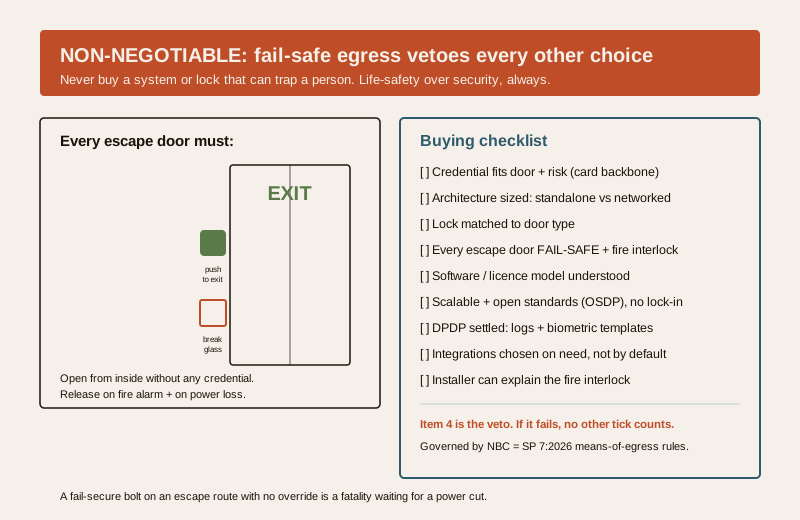
Every other choice in this guide can be revisited; this one cannot be compromised. A door on a means of escape must, without exception:
- Open from the inside without a credential — a push-to-exit, a request-to-exit sensor, or simple free mechanical egress. No one should ever need a card, code or finger to leave.
- Release on fire alarm. The access system must be interlocked with the fire panel so that on alarm, the maglocks on escape routes drop and the doors are free. This is a wiring and commissioning requirement, not an optional feature.
- Fail to open on power loss for egress doors — which is why EM locks (fail-safe by nature) suit them, and why an electric strike or bolt on such a door must be specified and wired fail-safe.
- Carry a manual override — a clearly marked break-glass or emergency door release on the secure side of every controlled escape door.
These are matters of the National Building Code (NBC = SP 7:2026) and life-safety practice; means of egress, exit width and the freedom to leave are not negotiable against stock or secrecy. For the detail of making a lock and an escape route coexist, this pattern recurs across the hub — the principle is constant: security must never win over the freedom to get out.
The buying checklist
Before you sign, you should be able to answer yes to each:
1. Credential fits the door and the risk — card as backbone, multi-factor only where it earns it, biometrics only where identity-binding is worth the DPDP burden.
2. Architecture sized right — standalone for one/a-few independent doors; networked once you need one audit trail, role-based control, or one-click revocation (roughly 3-4+ doors).
3. Lock matched to the door — EM for glass/aluminium, strike for framed doors with a lockset, bolt only where high security justifies it and egress allows.
4. Every escape door fail-safe — unlocks on fire alarm and power loss, opens from inside without a credential, manual override fitted, fire-panel interlock commissioned.
5. Software and licence understood — on-prem vs cloud chosen deliberately; per-door/user/feature licensing read; you know what still works if you stop paying.
6. Scalable and open — controller headroom for growth; open standards (OSDP, standard smart cards) not single-brand lock-in.
7. DPDP settled — where logs and any biometric templates live, who can see them, retention period, written data agreement with a cloud vendor.
8. Integrations chosen on need — CCTV, VDP, lift, attendance and alarm tied in only where they earn their keep.
9. Installer competent — can explain the fire interlock and egress wiring unprompted; PSARA-compliant where guards are also deployed.
Key takeaways
- Make four decisions in order — credential, architecture, lock, software — and let fail-safe egress veto any of them that traps a person.
- The credential is a trade-off, not a ranking — cards remain the pragmatic backbone, biometrics buy identity at a data-and-hygiene cost, mobile is the rising layer for visitors and convenience.
- Architecture turns on door count and audit need — standalone for one or a few doors, networked once you need one log, role-based control or instant revocation everywhere.
- Match the lock to the door — EM for glass, strike for framed doors, bolt only where high security allows; and fail-safe on every egress door.
- Biometrics carry a real DPDP burden — sensitive personal data with notice, retention and storage duties; a card is often the lighter, wiser choice.
- Watch the red flags — no egress override, no audit trail, proprietary lock-in, cloneable cards, hidden licences.
- Never choose a system or lock that traps people — every escape door must open on fire alarm and power loss, per NBC (SP 7:2026).
Where to go next
- How to choose a security system — the pillar this access-control choice sits within.
- How to choose a CCTV camera — the camera layer that integrates with door events.
- Access control system cost — the numbers this guide deliberately defers.
- Smart lock buying guide — when a single self-contained lock is the proportionate choice.
- Security vendor and installer evaluation — choosing the installer as carefully as the system.
- The smart locks and access control sub-hub — where this buying guide lives.
References
- National Building Code of India (SP 7), Bureau of Indian Standards — means of egress, exit doors, exit width and travel distance, and the requirement that escape routes remain freely openable from the egress side. Verify the current edition (SP 7:2026) via the BIS catalogue: https://www.services.bis.gov.in/
- Digital Personal Data Protection Act, 2023 — access logs and, in particular, biometric templates (fingerprint, face) are personal and sensitive personal data; agree in writing who is the data-processor (especially for cloud systems), the lawful basis, retention period and storage security before choosing a biometric credential.
- Open Supervised Device Protocol (OSDP) — the open reader-to-controller communication standard to specify in place of proprietary wiring, to avoid single-brand lock-in and to support encrypted, supervised reader connections.
- Private Security Agencies (Regulation) Act, 2005 (PSARA) — where the access system is operated alongside deployed guards, those guards must be supplied through a PSARA-registered agency.
This is an educational selection and specification overview for architects, facility and IT managers, security consultants and building owners — not legal advice, an installation manual or a price list. Life-safety and free egress take priority over any access-control measure; every escape door must remain openable and must release on fire alarm and power loss per NBC (SP 7:2026). Engage a licensed installer to fit any system, settle DPDP responsibilities in writing before choosing a biometric credential, and verify any standard's current status via the BIS catalogue before relying on it.
Export this guide
Related Guides — Deep-dive reading
Access Control System Cost in India (2026): Priced Per Door, Per System, Per User
What a building-scale access control system actually costs in India — broken down per controlled door (reader, electric lock, controller, cabling and power) and per system (software, licences, integration and AMC) — with the standalone-versus-networked split, how the bill scales with the number of doors and the credential you choose, and the non-negotiable rule that escape-route doors must fail safe.
SecurityAccess Control Maintenance in India (2026): Readers, Locks and Fail-Safe Egress
How to keep a card, keypad, fingerprint or face access-control system reading reliably and locking securely — and, above everything, how to test that its doors still release on a fire alarm and on power loss, so an access-controlled door never becomes a life-safety trap.
SecurityMulti-Factor Access Control in India (2026): Two-Factor Doors, Anti-Passback and Mantraps Done Right
What multi-factor access control means, the three factor categories, common two-factor combinations, and which high-security doors truly need them versus where a second factor just slows honest people down.
SecurityRelated Tools — Try Free
Access-Control Battery-Backup Calculator
Size the standby battery so an access system keeps running through a power cut, with an egress life-safety note.
Battery BackupVideo Door Phone Type Selector
Answer a few questions about your building, cabling, budget and internet and get the right video door phone — analog / wired / wireless / IP, single-home or multi-apartment, monitor or app.
Door Phone SelectorCCTV Cloud vs Local Cost Calculator
Compare cloud CCTV subscription against a local NVR + HDD — upfront, 5-year total, monthly fee and break-even.
Cloud vs Local