
Security System Troubleshooting in India (2026): The Calm Diagnostic Method
When a camera goes dark, an alarm keeps crying wolf, or the app says offline, most faults are simple and cheap to fix. This master guide teaches the ordered diagnostic method that ties the whole troubleshooting library together, plus the safe reset ladder and the line between a two-minute DIY fix and a call to a professional.
Something has stopped working. A camera tile in the app has gone grey, the alarm went off for no reason at 2 a.m., the app spins and says "offline", or the whole system fell silent after last night's power cut. The instinct is to jab at buttons, unplug things, or hit "factory reset" and hope. That instinct is exactly what turns a five-minute fix into a weekend and a technician's bill.
Here is the reassuring truth, and it holds for the vast majority of home and small-building security faults in India: most problems are simple, cheap and shallow. Power that is off or tripped. A cable that has worked loose. Wi-Fi that dropped. A setting someone changed. A battery that finally went flat. Genuine hardware failure — a dead camera, a burnt board — is the rarest cause, not the first. This guide is the master method for finding which of those it is, calmly and in order, and knowing when to stop and call for help.
Scope and safety. This is a diagnostic guide for a homeowner or facility person, not an installation manual. Everything here is deliberately DIY-safe: looking, restarting, checking a cable is seated, checking Wi-Fi and settings, swapping an accessible battery. Anything involving mains electrical work, ladders and working at height, opening sealed or high-voltage equipment, or gate-motor and fire-panel internals is for a qualified technician or your AMC — stop and call. Life-safety faults are special: a fire alarm or smoke detector fault must be diagnosed and fixed by a competent person and the system restored, never simply disconnected or muted to make it quiet. This is not a price or a buying guide; for those numbers, follow the cross-links.
Why the method matters more than the fix
A security system is a small network of devices — cameras, sensors, an alarm panel or hub, a recorder, an app, all leaning on power and your Wi-Fi. When one part misbehaves, the symptom you see (a black camera tile) is often several steps away from the cause (the router rebooted and the camera has not rejoined). Random button-pressing changes several variables at once, so even if it works you never learn what was wrong, and if it does not you have added new problems on top of the old one.
The method is the opposite: change one thing at a time, in order of likelihood, and observe what happens. It costs a little patience and saves you the technician call in most cases. The whole of the troubleshooting library — the specific "X is not working" guides — sits on top of this one method. Learn it once here and every individual fault becomes a shorter path.
Step 1 — Name the symptom precisely, and what changed
Before touching anything, get specific. "It's not working" is not a symptom a technician (or you) can act on. Ask, and note the answer:
- What exactly is wrong? No picture at all, or a frozen picture? No recording, or recording that will not play back? A false alarm, or an alarm that stays silent when it should not? App will not connect, or connects but shows the wrong thing?
- One device, or the whole system? If one camera is dark but the others are fine, the fault is at that camera or its cable. If everything is offline at once, the fault is shared — power, the recorder or hub, or the internet.
- What changed just before? This is the single most useful question. A power cut or storm last night. A Wi-Fi password change. A router swap by the internet provider. A firmware or app update. New furniture in front of a sensor. Someone "tidied" a cable. Faults rarely appear from nowhere; something moved.
Write these three answers down. Half of all fault-finding is done the moment you have them.
Step 2 — Check the universals first, in this order
Nine times out of ten the cause is one of four everyday things, and they are checked in a fixed order because each is faster and more likely than the next. Do not skip ahead.
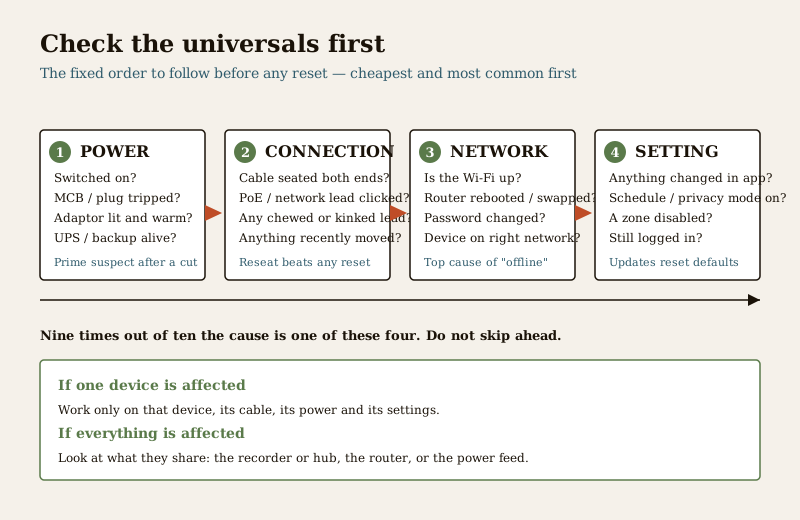
1. Power. Is the device actually getting power? Check the socket is switched on, the plug is firm, and the little light on the adaptor is lit. Check whether an MCB has tripped in the distribution board, or a shared extension board is off. If it runs on a backup battery or UPS, has that gone flat or failed after a long power cut? A great many "dead" cameras and panels are simply unpowered. Power is the first suspect after any outage; if this is your whole problem, see the security system power failure guide.
2. Physical connections. Is the cable seated firmly at both ends — at the device and at the recorder, router or hub? A network or PoE lead should click home; a video or power lead should be snug, not half out. Look for a chewed, kinked or pulled cable, especially anything recently disturbed. Reseating a loose connector fixes more faults than any reset.
3. Network and Wi-Fi. If the app says offline, is your internet actually up? Check another device on the same Wi-Fi. Did the router reboot or get replaced, or the password change — because then wireless cameras and hubs will have silently dropped off and need to rejoin. This is the most common single cause of "offline" once power is ruled out; the security system network failure guide walks it through in detail.
4. Settings and the app. Was anything changed? A recording schedule, a privacy or "away" mode, a disabled zone, a notification that got switched off, an account that logged itself out after an update. Open the app and check the device's settings actually say what you expect. Updates sometimes reset a preference to default.
If none of these four is the cause, only now do you move to restarting things.
Step 3 — Isolate: one device or the whole system?
Use the answers from Step 1 to narrow it. This single fork saves the most time:
- Only one device is affected — the problem is local to that device, its cable, its power adaptor, its position or its settings. Leave the rest of the system alone and work only on that one.
- Everything is affected at once — the problem is shared. Look at what they have in common: the recorder or hub, the router and internet, or the power feed that supplies them all. Fixing the common part fixes them all together.
- It started right after an event — a power cut, a storm, an update, a network change — treat that event as the prime suspect and check its consequences first.
Isolating tells you where to point the next step, so you are not restarting the whole house when one camera lost its cable.
Step 4 — The safe reset ladder
Only after the universals and isolation do you restart anything — and even then, gently, from the smallest, safest action to the largest, most drastic. Climb the ladder one rung at a time and re-test after each rung; most faults clear on the lower rungs.
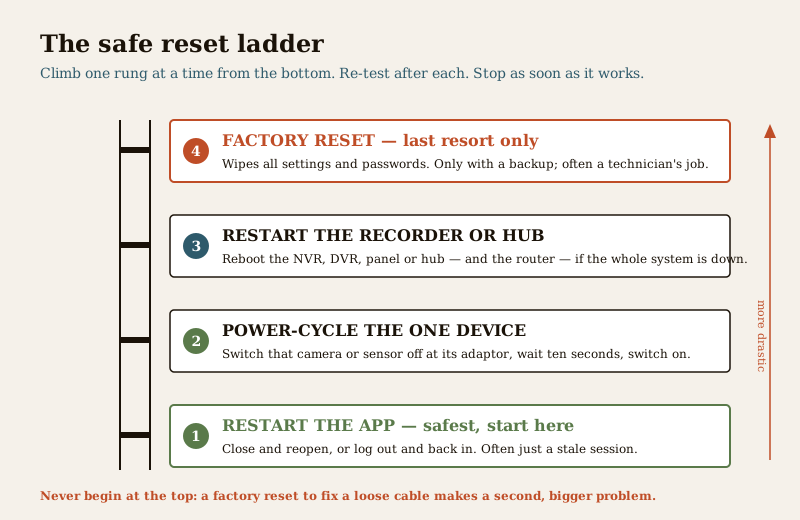
1. Restart the app. Fully close it and reopen, or log out and back in. A surprising number of "offline" messages are just a stale app session, with the device perfectly fine.
2. Power-cycle the one device. Switch the affected camera or sensor off at its adaptor, wait about ten seconds, and switch it on. Give it a minute to boot and rejoin the network before judging.
3. Restart the recorder or hub — and the router. If the whole system is affected, reboot the NVR, DVR, alarm panel or hub, and power-cycle the router too. Turn the router on first, let it settle, then the security kit, so the devices find a network waiting for them.
4. Factory reset — last resort only. A factory reset wipes every setting, camera name, recording schedule and password, and often needs the system reconfigured from scratch. Do it only when everything else has failed, only if you have the configuration and passwords written down or backed up, and ideally with your installer on the phone. On many systems a full reset is genuinely a technician's job, not a homeowner's; if you are unsure, stop here.
Never begin at the top of the ladder. Starting with a factory reset to fix a loose cable creates a second, bigger problem on top of the first.
Step 5 — Know your limits: DIY-safe versus professional
The most important judgement in troubleshooting is knowing when to put the screwdriver down. There is a clean line, and it is about safety, not pride.
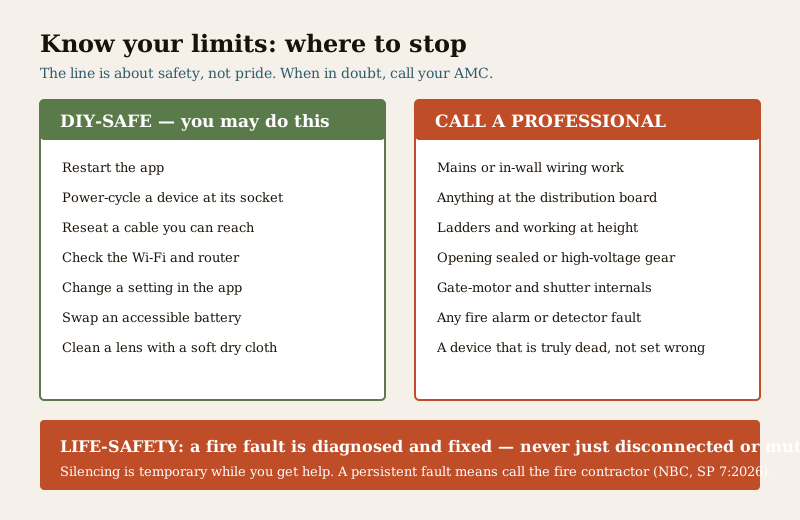
Safe for a homeowner or facility person: restarting the app, power-cycling a device at its socket, reseating a cable you can comfortably reach, checking Wi-Fi and the router, changing a setting in the app, swapping an accessible battery, and gently cleaning a camera lens or sensor with a soft, dry cloth.
Strictly for a professional or your AMC: any mains electrical or in-wall wiring work; anything that needs a ladder or working at height (a rooftop or high-mounted camera is a fall risk, not a DIY job); opening sealed, high-voltage or pressurised equipment; gate-motor and shutter internals; and anything you have traced to genuine hardware failure. When a device is truly dead rather than misconfigured, the question becomes whether to mend or change it — defer that to the repair or replace security equipment guide rather than guessing.
Life-safety faults are not to be silenced away. A fire alarm panel fault, a smoke detector that keeps false-alarming, or any life-safety device misbehaving must be diagnosed and fixed by a competent person, and the system restored — never permanently disconnected, muted or disabled to make it quiet. Silencing is a temporary measure while you get help, never the fix. A persistent fire-system fault means call your fire contractor, promptly. Under the National Building Code (SP 7:2026) these systems are there to protect life, and a disabled one protects no one.
If you suspect a camera or device has been hacked rather than merely broken — it behaves oddly, settings change on their own, or you see unknown access — treat it as an incident, defensively: disconnect the device from the network, change the account and Wi-Fi passwords, update the firmware, then factory-reset and reconfigure it securely with a strong unique password. Check whether other devices are affected. Where footage or personal data may have leaked, that is a personal-data-breach matter under the DPDP Act 2023 as well, and serious cases can be reported to CERT-In.
The specific "not working" guides
This master method points to the detailed guides for each common symptom. Once you have run Steps 1 to 3 and know what you are dealing with, go straight to the right one:
- A camera that is dark, frozen, blurry or offline — the CCTV camera not working guide.
- An alarm that keeps going off for no reason — the false burglar alarms guide.
- The whole system dead or unstable after a power cut — the security system power failure guide.
- Everything showing "offline" in the app — the security system network failure guide.
The wider troubleshooting sub-hub collects them all in one place.
Prevention — so it does not recur
Most repeat faults come back because the system was never set up to be diagnosed. A little discipline once saves many bad nights:
- Label everything. Mark each camera, cable and adaptor with what it is and where it goes. When something drops off, you find it in seconds instead of tracing spaghetti behind the TV.
- Keep a simple record. One page or note listing your devices, their locations, the app account, the Wi-Fi they use, and the installer's contact. Note the day of any change — a password reset, a router swap — so "what changed" is answerable.
- Back up the configuration. Where the system allows it, export or write down the settings and passwords, so a factory reset is recoverable rather than catastrophic.
- Protect the power. A small UPS on the recorder and router keeps the system alive through the short cuts that cause so many faults, and a clean restart after a long one.
- Keep an AMC. An annual maintenance contract turns the professional-only jobs into a phone call, and regular servicing catches the loose connector or tired battery before it fails at 2 a.m. The security system maintenance guide and the maintenance sub-hub cover keeping the system healthy so troubleshooting is rarely needed.
A one-page checklist
- Name the symptom precisely, and what changed just before.
- One device or all of them? Isolate before you act.
- Check the universals in order: power, connection, network, setting.
- Climb the reset ladder gently: app, then device, then recorder and router, and factory reset only as a last resort with a backup.
- Stop at the DIY-safe line: no mains work, no ladders, no opening sealed gear.
- Never disable a life-safety or fire fault to silence it — get it fixed and restored.
- If broken beyond a setting, decide repair or replace with the cost guides.
Key takeaways
- Most security faults are simple and cheap — power, a loose connection, Wi-Fi, a setting, or a flat battery. Hardware failure is the rarest cause, not the first.
- Panic makes it worse. Random button-pressing and premature factory resets add new problems. Change one thing at a time, in order.
- Name the symptom and what changed, then isolate — one device points to that device; everything at once points to power, the recorder or hub, or the internet.
- Follow the universals then the reset ladder — power, connection, network, setting; then app, device, recorder and router, with factory reset only as a backed-up last resort.
- Know the line. Restarting, reseating, Wi-Fi, settings and accessible batteries are DIY-safe; mains work, height, sealed equipment and gate or fire internals are for a professional.
- A fire or life-safety fault is diagnosed and fixed, never disabled to keep it quiet — a persistent fault means call the fire contractor (NBC, SP 7:2026).
Where to go next
- The specific symptom guides: CCTV camera not working, false burglar alarms, security system power failure and security system network failure.
- Repair or replace security equipment — when a fault is genuine hardware failure rather than a setting.
- Security system maintenance and the maintenance sub-hub — prevention so faults rarely arise.
- The troubleshooting sub-hub and the main security hub.
References
- National Building Code of India (SP 7), Bureau of Indian Standards — fire alarm, detection and life-safety provisions that govern why a fire or life-safety fault must be diagnosed and restored, not disabled. Verify the current edition (SP 7:2026) via the BIS catalogue: https://www.services.bis.gov.in/
- Digital Personal Data Protection Act, 2023 — where a fault, or a suspected device compromise, involves CCTV footage or personal data leaking, the personal-data-breach obligations apply alongside the fix.
- Indian Computer Emergency Response Team (CERT-In) — the national body to which serious security-device compromise or data-breach incidents can be reported.
This is an educational diagnostic overview for homeowners and facility persons, not legal advice or an installation manual. Every procedure here is deliberately DIY-safe; anything involving mains electrical work, working at height, sealed or high-voltage equipment, gate-motor internals or a fire or life-safety system is for a qualified technician or your AMC. Never disable a life-safety device to silence it. Verify any standard's current status via the BIS catalogue before relying on it.
Export this guide
Related Guides — Deep-dive reading
CCTV Camera Not Working (2026): A Calm, Step-by-Step Fix for Indian Homes
A black screen, no feed or a dead camera almost always traces back to power or a loose connection long before the camera itself has failed. This guide walks a homeowner through diagnosing the cause in order, the safe fixes you can do yourself, and exactly when to call a technician.
SecuritySecurity System Network Failure (2026): When Everything Goes Offline at Once, and How to Get It Back
When your whole security system drops offline together, the fault is almost never in the cameras. It is in the shared network they all lean on. This guide helps an Indian homeowner tell an internet outage from a router, switch or cabling fault, power-cycle things in the right order, and know when to call a professional.
SecurityBoom Barrier Not Operating (2026): Diagnose a Stuck or Dead Parking Gate Arm
A calm, ordered diagnostic path for a facility or security team when an apartment, office or parking boom barrier will not raise or lower, is stuck up or down, or will not respond — starting with the manual release so a jammed arm never traps a vehicle or blocks a fire lane, then power, trigger, safety loop and mechanical causes, and a clear line between safe checks and technician-only work.
SecurityRelated Tools — Try Free
Access-Control Battery-Backup Calculator
Size the standby battery so an access system keeps running through a power cut, with an egress life-safety note.
Battery BackupSecurity Backup Power Calculator
Size a UPS/inverter and battery to keep CCTV, NVR, router and alarm running through a power cut — load, Ah, VA and cost.
Backup PowerCCTV Camera Coverage & Count Calculator
Estimate how many CCTV cameras you need, the NVR channels, storage in TB for your retention period, and an indicative all-in cost with GST.
CCTV Calculator