
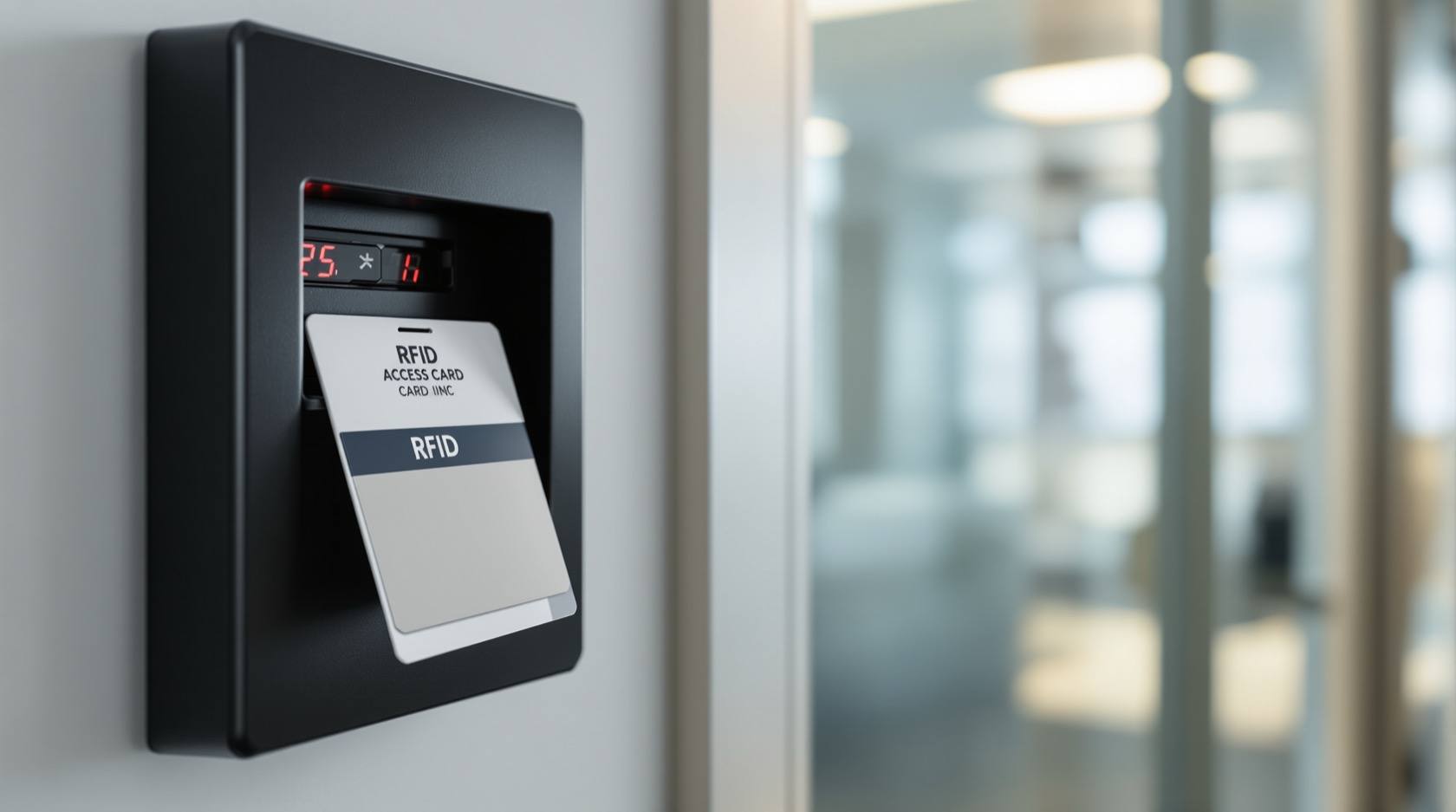
Access Card Not Working in India (2026): One Card or All Cards? A Facility Manager's Diagnostic Guide
An RFID card or fob will not open the door. The single question that unlocks the whole diagnosis is whether it fails for one person or for everyone: one points at that card or its permissions, all points at the reader, controller, power or network. This professional guide walks the ordered causes, a decision-tree path and the DIY-safe versus admin split, with fail-safe egress first.
An access card will not open the door. Someone is standing at the reader, tapping their RFID card or fob, and the door stays shut — no beep, no green light, or a red one. Before you touch anything, breathe: on a well-installed access-control system this is almost always a simple, cheap and quickly-found fault. Most "card not working" calls come down to a tired card, a permission that was never set or has lapsed, or a reader that needs a clean and a closer tap. Hardware failure sits near the bottom of the list, not the top.
The single most useful move you can make is to ask one question before you diagnose anything: does the door fail for this one card and user, or for everyone? That one answer splits the entire problem. If it is one card while colleagues sail through, the fault lives in that card or that person's permissions. If it is every card at that door, the fault lives in the reader, the controller, the power or the network — the shared parts. Get that split right and you have already halved the search.
Scope and safety. This is a diagnostic and coordination guide for facility managers, security supervisors and access-control administrators — not an installation manual. The safe, do-it-yourself checks are here: try a known-good card, clean the reader, tap closer, check the user is enrolled and active and in the right access group and time-schedule, and confirm the reader has power and its LED lights. Reader replacement, controller and network faults, card-frequency mismatches and any lock or mains wiring are strictly for a qualified technician or your AMC. Life-safety outranks everything: doors must always allow free exit, so never treat a stuck card as a reason to defeat fail-safe egress. Access logs and the cardholder database are personal data under the DPDP Act 2023. This is not a price or a buying guide; for repair-versus-replace or choosing a new system, follow the cross-links.
Start here: one card, or all cards?
Everything begins with this split, so make it the first thing you establish — ideally before you walk to the door, just by asking on the phone.
- It fails for ONE card or user, and others work at the same door. The shared hardware is clearly fine, because other people are getting in. So the fault is confined to that card (worn, cracked, demagnetised, bent, or a cheap clone that has faded) or that person's permissions in the software (never enrolled, deactivated, expired, or blocked by their access group or time-schedule).
- It fails for ALL cards at that door — nobody is getting in. The individual cards are almost certainly fine; the fault is in something shared: the reader (no power, faulted, or wrong frequency after a swap), the door or lock not releasing though the card read fine, or the controller, software or network being down so nothing can be authorised.
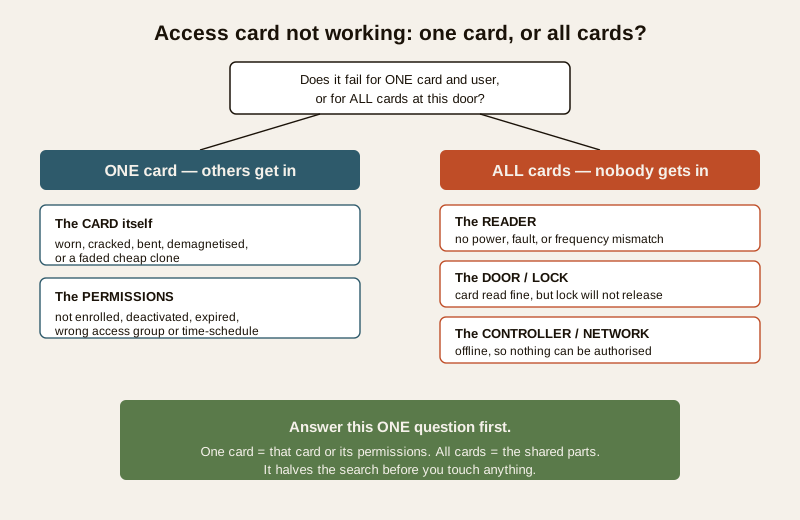
Hold that split in mind for the rest of this guide. Almost every step below is really asking, in a more precise way, "is this a one-card problem or an all-cards problem?"
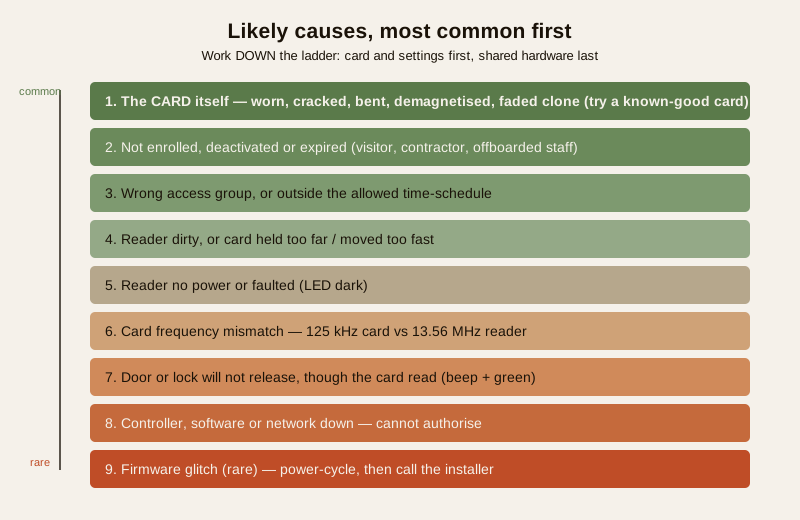
The likely causes, most common first
Order the causes from the everyday and cheap to the rare and expensive, and work down the list rather than jumping to "the reader is broken."
| Cause | Why it happens | What to do |
|---|---|---|
| The card itself (by far #1) | RFID cards wear, crack, bend, delaminate, or fade — especially cheap clones and cards carried loose in a wallet against coins and phones | Try a known-good card at the same door; if that works, re-issue the failing card |
| Not enrolled, deactivated or expired | Very common: the card was never added, access was revoked, a temporary/visitor card lapsed, or an offboarded user was disabled | Check the cardholder record in the software; enrol, re-activate or renew as policy allows |
| Wrong access group or time-schedule | The user is active but not permitted at THIS door, or is tapping outside their allowed shift or time-window | Check the user's access group and schedule; correct the group or the time-window |
| Reader dirty or card too far | A grimy or wet reader face, or a card held too far or moved too fast, so the read never completes | Clean the reader face; tap the card flat and hold it steady against the target |
| Reader no power or faulted | The reader lost power, its LED is dark, or the unit has failed | Check the LED and power; if dead or erratic, call a technician to test or replace it |
| Card frequency mismatch | 125 kHz cards presented to a 13.56 MHz reader (or vice-versa) after a reader or card change — the reader cannot read the card at all | Confirm the card and reader frequency match; an admin/installer job, not a card fault |
| Door or lock will not release | The card reads and is authorised (beep and green), but the electric lock or strike does not open | A lock, power or controller-output fault; see access-control maintenance and call a technician |
| Controller, software or network down | The panel is offline or the network is out, so the reader cannot reach the controller to authorise anyone | Check the controller and network; restore the link — an admin/IT job |
| Firmware glitch (rare) | A stalled or corrupt firmware update on the reader or controller | Power-cycle the affected unit; if it persists, contact the installer/support |
The shape of the table is the shape of the fix: the top is the card and the software settings — cheap, fast and doable by a supervisor or admin; the bottom is shared hardware and network — where a technician comes in. Work down, not up.
The diagnostic path: three checks answer almost everything
You can pin most faults in a couple of minutes with three checks, asked in order. Each one is really a sharper version of "one card or all cards?"
Check 1 — does the reader respond at all when a card is tapped?
Watch the reader as a card is presented. A healthy reader gives feedback — an LED changes colour and it beeps.
- The reader is dark and silent, no LED and no beep for anyone — the reader has likely lost power or failed, or the controller or network behind it is down. This is an all-cards fault. Check the reader LED and power, then the controller and network; this is an admin/technician path.
- The reader beeps and its LED responds to a tap, but the door does not open — the reader is alive, so the fault is a credential (this card or its permissions) or the lock not releasing. Go to Check 2 with a known-good card.
Check 2 — does a known-good card work at the same door?
Take a card you know is active and correctly permitted for that door, and tap it.
- The known-good card opens the door — the shared hardware is fine. The problem is confined to the original card (worn, cracked, demagnetised or a faded clone) or to that user's permissions. Go to Check 3.
- The known-good card also fails — this is now an all-cards fault at that door. The reader read it (it beeped) but authorisation or release failed: suspect the controller, network, access rule for the whole door, or the lock not releasing. Escalate to the admin and, for a lock that will not release, a technician.
Check 3 — is the user enrolled, active and permitted here and now?
Open the failing user's record in the access-control software and read it against this door and this moment.
- Enrolled and active? If the card is not in the system, has been deactivated, or has expired (a common cause for visitor, contractor and offboarded-staff cards), that is your answer — enrol, re-activate or renew per policy.
- Right access group for THIS door? An active user still cannot enter a door their group does not include. Check the group and the door's permission set.
- Inside the allowed time-schedule? Shift and time-window restrictions deny an otherwise-valid card outside its hours. Confirm the user is tapping within their permitted window.
That is the whole tree: the reader's beep and LED tell you power-and-controller, the known-good card tells you card-versus-shared, and the software record tells you enrolled-active-permitted. Everything else is detail.
Safe fixes an admin or supervisor can do
These are the calm, safe steps a facility manager, supervisor or access administrator can take. None of them involve opening the reader, touching the lock wiring, or working on mains power.
- Try a known-good card at the door. The fastest single test there is — it instantly separates a one-card problem from an all-cards problem.
- Clean the reader face. A grimy, dusty or wet reader face weakens the read. Wipe it with a dry or lightly-damp cloth; do not spray liquid into the unit.
- Tap correctly — closer, flatter, steadier. Hold the card flat against the reader's target, close, and still for a moment. A card whisked past at speed or held at an angle often misses.
- Check the cardholder record. In the software, confirm the user is enrolled, active and not expired; if a card was lost or an employee has left, that record is where you activate, deactivate or re-issue.
- Check the access group and time-schedule. Confirm the user's group includes this door and that they are within their allowed hours. Correcting a group or a time-window resolves a large share of "my card suddenly stopped working" calls.
- Confirm the reader has power and its LED lights. A dark, dead reader is an all-cards signal — note it and escalate rather than tapping harder.
- Re-issue a suspect card. If a card is cracked, bent, worn or a faded clone and a known-good card works, replace it and disable the old credential in the software.
When to call a technician or your AMC
Some faults are past safe admin work and belong to a qualified installer, your AMC contractor, or IT. Escalating is the right call, not a failure.
Call a technician or your AMC when: a reader is dark or erratic and needs testing or replacement; you suspect a card-frequency mismatch (125 kHz cards against a 13.56 MHz reader, or vice-versa, usually after a reader or card change); the card reads and is authorised but the electric lock or strike will not release; the controller is offline or the network is down; there is any mains electrical work; or a firmware fault persists after a power-cycle. Do not open a reader, rewire a lock, or work on the controller's power yourself — for the lock-release and maintenance side, see the access-control maintenance guide, and for the wider system see the troubleshooting pillar.
Fail-safe egress comes first — never defeat it. Whatever the card fault, people must always be able to LEAVE. Do not, as a "quick fix" for an entry problem, disable a fail-safe exit device, chain a door, or wedge an egress path that must stay clear. Free exit is a life-safety function governed by the National Building Code (SP 7:2026) and outranks any access convenience. If a fault has left a door unable to release for exit, treat it as urgent, keep the exit manned or propped safely open until it is fixed, and get a technician on it — a locked-in occupant is never acceptable.
Prevention: so it does not recur
Most repeat "card not working" calls are preventable with a little discipline on cards and the cardholder list.
- Issue good cards, and match the frequency. Use quality cards suited to your reader's frequency; avoid cheap clones that fade. When you add readers or cards, confirm the frequency matches across the estate.
- Keep the cardholder list current. Enrol joiners promptly, and deactivate leavers, lost cards and lapsed visitor/contractor passes the same day. A tidy list prevents both lockouts and the security risk of live orphan cards — the audit-trail guide covers keeping this clean and reviewable.
- Keep spare cards and a supervisor override. A few pre-blank spares and a known-good test card let you resolve a card fault on the spot and confirm a door quickly.
- Clean readers on the maintenance round. Fold a reader-face wipe into routine upkeep so grime never builds to the point of weak reads.
- Test after every change. After a reader swap, a firmware update or an access-rule edit, test with a known-good card before you consider the job done.
- Review access groups and schedules periodically. Confirm groups and time-windows still match who should go where, so valid staff are not denied and stale permissions do not linger.
Key takeaways
- Ask one question first: one card or all cards? One means that card or its permissions; all means the reader, lock, controller, power or network. That split halves the diagnosis.
- Order the causes, cheap first: the card itself, then not-enrolled/deactivated/expired, then wrong access group or time-schedule, then a dirty reader or a too-far tap — hardware failure and frequency mismatch are near the bottom.
- Three checks settle it: does the reader beep and light (power and controller), does a known-good card work (card versus shared), and is the user enrolled, active and permitted here and now (permissions).
- Safe admin work is a known-good card, cleaning the reader, tapping correctly, and checking enrolment, access group and time-schedule. Call a technician for reader replacement, a frequency mismatch, a lock that will not release, or a controller/network fault.
- Fail-safe egress is non-negotiable — never disable an exit device to work around an entry fault; free exit outranks everything.
- Prevent it with good frequency-matched cards, a current cardholder list, spare and test cards, clean readers, and a test after every change.
Where to go next
- Security system troubleshooting — the parent guide to diagnosing any misbehaving security device in a calm, ordered way.
- Access control maintenance — the upkeep routine behind reliable readers, locks and controllers, and the place to start when the card reads but the lock will not release.
- Smart lock not opening — the companion symptom guide for a smart lock at a door rather than a card reader.
- How to choose access control — for weighing a repeatedly-failing system for repair versus replacement, or specifying a new one.
- Access control audit trails — keeping the cardholder list and access logs current and reviewable, which prevents most permission-based card failures.
- The troubleshooting sub-hub, the smart locks and access control library, and the main security hub.
References
- National Building Code of India (SP 7), Bureau of Indian Standards — means of egress and the principle that occupants must always be able to leave a building freely in an emergency; access control must never obstruct exit. Verify the current edition (SP 7:2026) via the BIS catalogue: https://www.services.bis.gov.in/
- Digital Personal Data Protection Act, 2023 — access-control systems hold personal data in the cardholder database and the entry/exit logs; know what is retained, who can see it, and keep the list current and access to it controlled.
- Manufacturer documentation — always follow your specific reader and controller manuals for the card frequency (125 kHz or 13.56 MHz), enrolment and access-group procedures, LED and beep meanings, and firmware updates.
This is an educational guide for facility and security professionals, not an installation manual or legal advice. Fail-safe egress and life-safety take priority over any access control: doors must always allow free exit, and no entry fault justifies defeating an exit device. For reader replacement, a card-frequency mismatch, a lock that will not release, or any controller, network or mains work, engage a qualified technician or your AMC, and verify any standard's current status via the BIS catalogue before relying on it.
Export this guide
Related Guides — Deep-dive reading
Access Control Maintenance in India (2026): Readers, Locks and Fail-Safe Egress
How to keep a card, keypad, fingerprint or face access-control system reading reliably and locking securely — and, above everything, how to test that its doors still release on a fire alarm and on power loss, so an access-controlled door never becomes a life-safety trap.
SecurityAlarm Siren Not Working (2026): Why It Triggers but Stays Silent in India
Your burglar alarm detects and the panel reacts, but the siren does not sound, or sounds weak and thin. A calm, ordered diagnostic for Indian homes: the settings, power, backup battery, wiring and hardware faults that leave an alarm that cannot be heard, what you can safely check yourself, and when to call your installer.
SecurityBoom Barrier Not Operating (2026): Diagnose a Stuck or Dead Parking Gate Arm
A calm, ordered diagnostic path for a facility or security team when an apartment, office or parking boom barrier will not raise or lower, is stuck up or down, or will not respond — starting with the manual release so a jammed arm never traps a vehicle or blocks a fire lane, then power, trigger, safety loop and mechanical causes, and a clear line between safe checks and technician-only work.
SecurityRelated Tools — Try Free
Access-Control Schedule Generator
Build the time schedules that decide when each access group can enter — an editable list for your integrator.
Time SchedulesElectrical Safety & Load Audit
Home electrical audit — 10 categories, 65+ checkpoints across earthing, RCCB, MCB, wiring, switchboards, appliance circuits, DG/inverter backup.
Safety AuditWindow Cleaning Cost Calculator
Estimate professional window cleaning cost per visit and per year by access and frequency.
Window Calculator