
Privacy by Design for Security Systems in India (2026): Build It In, Not On
The kindest and safest way to run cameras is to design privacy in from the first sketch, not bolt it on after complaints. Here is how a home, an RWA or a small office can plan a security system so restraint, notice and deletion are the defaults.
Most privacy problems with home and building cameras are not caused by bad people. They are caused by good people who bought the kit first and thought about the neighbours, the domestic help and the footage later. The camera arrives, the app defaults are all on, it points wherever the bracket was easy to fix, and only when someone objects does anyone ask whether it should have been there at all.
Privacy by design for security systems turns that order around. It is a simple idea: decide how you will protect people's privacy at the planning stage, on paper, before you buy a single camera or drill a single hole. Privacy becomes the default rather than the afterthought. This guide is the design-stage companion to the wider privacy, ethics and data protection hub in the Studio Matrx Security library, and it is written for the person doing the planning: a homeowner, a resident welfare association committee member, or someone fitting out a small office.
Scope & how to read this. This is practical, India-grounded guidance grounded in the principles of the Digital Personal Data Protection Act, 2023 (the DPDP Act), not legal advice. A couple of cameras run for genuinely personal, domestic purposes may fall outside some formal obligations, but the ethical duties of notice, restraint and not pointing at other people still apply. For anything with legal weight, a workplace, a tenancy, an RWA-wide scheme or a data breach, take professional advice, and at every choice pick the least-intrusive option that still does the job.
What privacy by design actually means
The phrase sounds like jargon, but it is really seven plain habits. Privacy is the default, not a setting you have to hunt for. It is built into the plan, not patched on afterwards. It is proactive rather than reactive, so you prevent the intrusion instead of apologising for it. It is end to end, covering the whole journey of the footage from the camera lens to the day it is deleted. It is transparent, so the people around your cameras know they exist and why. And through all of it, you keep the dignity and rights of the people in view ahead of the convenience of watching them.
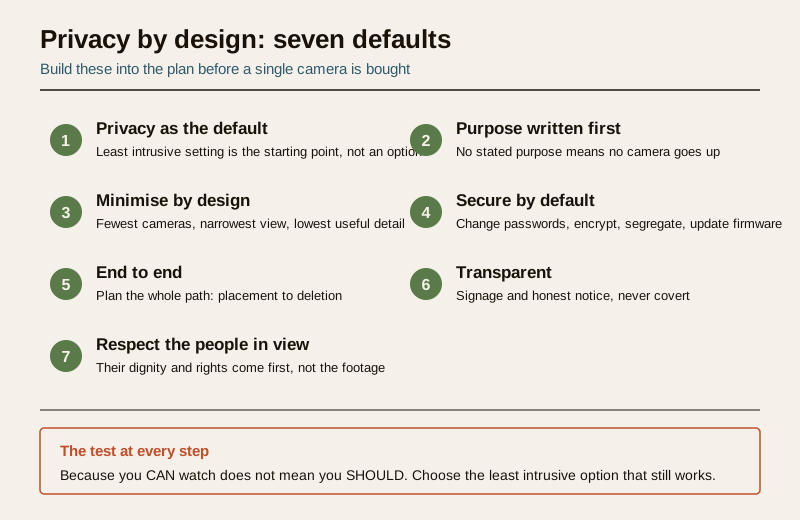
None of this needs a lawyer or a large budget. It needs a pencil, an honest look at your plot, and the willingness to install fewer cameras than the salesperson would like.
Step one: start from purpose, not from products
Before you look at a single camera, write down what each camera is for. One line each. "Front gate camera: to see who arrives and record any attempted break-in." "Car porch camera: to protect the vehicle." If you cannot finish the sentence with a specific, legitimate security reason, that camera should not be installed. "In case it is useful one day" is not a purpose.
This is the heart of the DPDP Act in plain language: you collect personal data, and camera footage of an identifiable person is personal data, only for a clear and lawful purpose. Purpose is also the discipline that stops scope creep, the slow drift where a gate camera quietly becomes a way to watch the maid, the watchman or the family next door.
Dignity comes first. A security system is there to protect a place, not to monitor the people who live and work in it. Never plan a camera whose real purpose is to keep an eye on domestic workers, tenants, children or women in spaces where they are entitled to feel unwatched. If a camera's honest purpose is control or suspicion of a particular person rather than protection of a place, that is the moment to put the pencil down.
Step two: minimise at the design table
Once every camera has a purpose, make each one as narrow as that purpose allows. Minimisation is the single most powerful privacy tool you have, and it is almost free, because you are choosing what NOT to build.
- Fewest cameras. Four well-placed cameras beat ten that blanket everything. Every extra lens is more footage, more risk and more intrusion.
- Narrowest field of view. Aim and zoom so the frame covers your gate and boundary, not the neighbour's front door, their windows or the public street beyond. Where a camera unavoidably catches a neighbour, use privacy masking to black that region out permanently.
- Never point inside private interiors. No camera in a bathroom, bedroom or changing area, ever, and think hard before putting one anywhere household staff or guests have a reasonable expectation of privacy.
- Prefer no audio. Recording sound is far more intrusive than silent video and rarely justified for home security. Leave microphones off unless there is a specific, defensible reason.
- Resolution only as high as the purpose needs. Enough detail to identify a visitor at your gate is not the same as enough to read faces across the whole street.
- Prefer local storage or well-secured cloud. Fewer copies in fewer places is more private and easier to protect.
The recurring test is proportionality. For a deeper walk-through of these choices, the CCTV privacy guide for India covers camera-by-camera intrusion in detail, and the smart security privacy guide does the same for app-connected and cloud gear.
Step three: secure by default
A camera scheme that leaks is a privacy failure even if every lens is aimed perfectly. Security is not a separate project bolted on later, it is part of designing privacy in.
- Change every default password before the system goes live. Default credentials are the single most common way home cameras are hijacked.
- Segregate the camera network from your main home or office network so a compromised camera cannot reach your other devices.
- Turn on encryption for the stream and stored footage where your equipment supports it, and keep firmware updated.
- Limit who can view. Every extra login is another door. Keep the viewer list short and remove people who no longer need access.
These are design decisions, made when you choose and configure the kit, not chores for "some day". The complete guide to security system cybersecurity in India is the full companion here; treat secure-by-default as inseparable from privacy-by-default.
Step four: design retention and access, do not improvise them
The most overlooked privacy decision is how long you keep footage and who can watch it. Decide both before the system records its first frame.
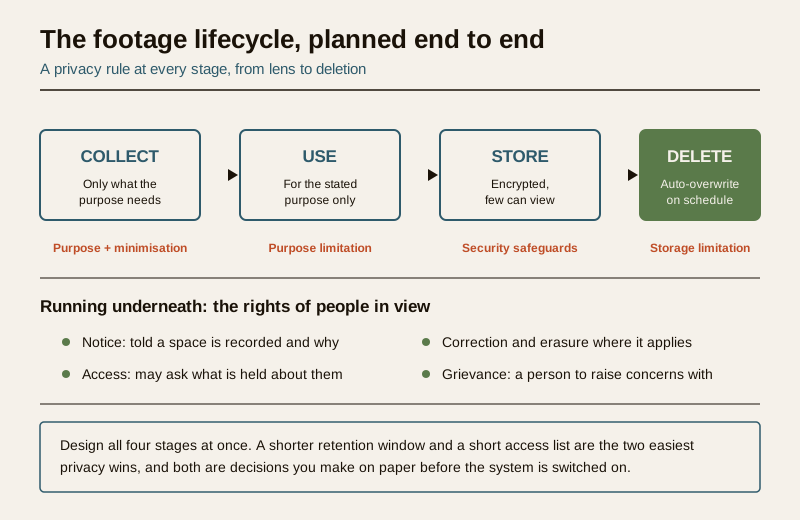
Set a retention window: a fixed period after which footage is automatically overwritten. Most modern recorders loop and overwrite as storage fills, so you are really choosing a disk size that gives you a sensible window rather than an ever-growing archive. Keeping footage indefinitely "just in case" is the opposite of storage limitation and turns a security tool into a surveillance archive. Keep only what your purpose needs, and let the rest overwrite.
Then design access:
| Design decision | What to write down | DPDP principle it serves |
|---|---|---|
| Retention window | A set period, then auto-overwrite | Storage limitation |
| Who can view live and recorded footage | A short named access list | Security and accountability |
| Who may export or share a clip | One or two responsible people | Purpose limitation |
| When footage may be reviewed | Only for the stated purpose or a genuine incident | Purpose limitation |
| Where footage is stored | Local or well-secured cloud, encrypted | Security safeguards |
For an RWA or an office, keep a simple log of who accessed footage and why. That habit, an audit of who watches, is what keeps a shared system honest and is a fair, non-intrusive discipline for the committee to adopt. The security and privacy assessment guide gives a structured way to record all of this.
Step five: transparency by default
Privacy by design is not secrecy. People are entitled to know they may be recorded.
- Post clear signage where cameras operate, at the gate, the entrance, the reception, so visitors and workers are not caught unaware. The CCTV signage guide for India covers what a good notice says.
- Tell the people who spend time in the space. Household staff, an office team and regular visitors should know a space is recorded and why. Covert recording of the people who work in your home or building is exactly the kind of intrusion privacy law and basic decency exist to prevent.
- Be ready to honour reasonable requests. Under the DPDP framing, the people in your footage, the data principals, may ask what is held about them, ask for a correction, or raise a grievance. You do not need a corporate process for a two-camera home, but you should be willing to answer honestly and have a person to whom concerns can be addressed.
What to do and what not to do
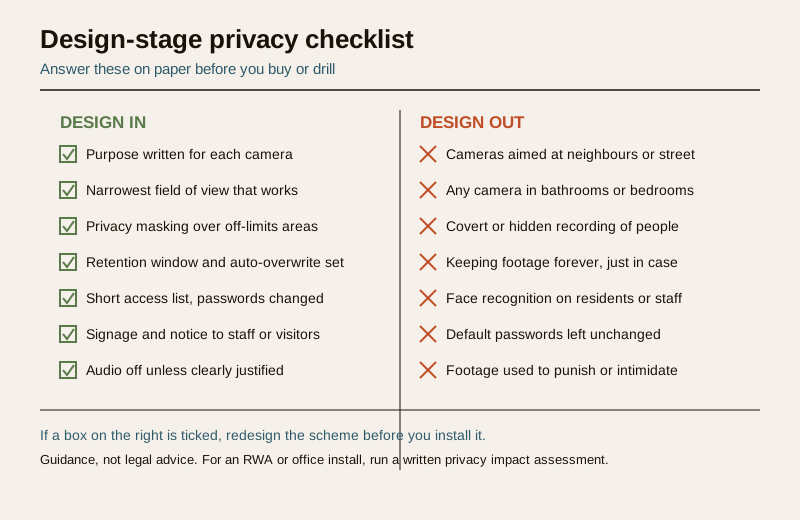
A design-stage system stands or falls on a handful of yes-or-no choices. Keep this checklist beside your plot drawing.
Design in, from the start
- A written purpose for every single camera.
- The narrowest useful field of view, with masking over anything off-limits.
- A set retention window with automatic overwrite.
- A short, named access list and changed passwords.
- Signage, and honest notice to staff and visitors.
- Audio off unless there is a specific justification.
Design out, never install
- Cameras pointed at a neighbour's home, windows or the public street.
- Any camera in a bathroom, bedroom or changing area.
- Covert or hidden recording of the people around you.
- Footage kept forever with no deletion plan.
- Face recognition switched on over residents, staff or children by default, a restraint the ethical AI surveillance guide and the facial recognition and privacy guide both make the case for.
- Any use of footage to monitor, punish, wage-dock or intimidate a worker, tenant or family member.
For a bigger install: a privacy impact mini-assessment
A home with a couple of cameras can hold the whole design in one page. An RWA covering common areas, a gate, a clubhouse and a parking basement, or an office recording a team, is handling other people's data at a scale where a short written assessment is worth the hour it takes.
Before approving the scheme, work through five questions and record the answers:
1. Purpose. What is each camera for, in one line, and is that purpose legitimate and proportionate?
2. People affected. Whose data does this capture, residents, staff, visitors, passers-by, and could any of them be vulnerable?
3. Minimisation. Is every camera as narrow as its purpose allows, with masking where it overlooks private or public space?
4. Safeguards and retention. How is footage secured, how long is it kept, and who can access it?
5. Transparency and rights. Is there signage, has the community or team been told, and is there a named person to handle concerns?
If the scheme involves face recognition, monitoring of staff or tenants, or large-scale footage of the public, that is the point to bring in professional help. Consult a lawyer, and, for an organisation of any size, a Data Protection Officer or a qualified privacy adviser, before you deploy. The smart lock privacy guide is a useful reminder that access logs and biometric entry data raise the very same design questions as cameras do, and deserve the same care.
When to get legal or professional advice. Treat everything here as a starting point, not a ruling. For a workplace-monitoring policy, a tenancy, a police or court request for footage, a suspected data breach, or any use of biometrics or face recognition, take qualified legal advice and follow due process. The DPDP Act 2023, the IT Act 2000, CERT-In breach-reporting directions and the constitutional right to privacy all sit behind these choices; none of them is something to improvise your way through.
Key takeaways
- Design privacy in before you buy. The cheapest, kindest privacy protections, fewer cameras, narrower views, a retention window, a short access list, are decisions made on paper at the planning stage.
- Start from purpose. If you cannot write down a legitimate reason for a camera, do not install it, and never aim one at the people you should be protecting rather than the place you are securing.
- Minimise, secure, retain briefly, tell people. These four habits map directly onto the DPDP principles of minimisation, security, storage limitation and notice.
- Respect the people in view. Their dignity and rights, notice, access, correction, grievance, come ahead of the footage, always.
- Scale the effort to the install. A home fits on one page; an RWA or office deserves a short written privacy impact assessment and, where AI, biometrics or staff monitoring are involved, professional advice.
References
- Digital Personal Data Protection Act, 2023 — collect personal data, including identifiable camera footage, only for a clear and lawful purpose, with notice, minimisation, storage limitation, security safeguards and the rights of the data principal; verify the current text and rules before relying on it.
- Constitutional right to privacy (Article 21, as affirmed by the Supreme Court) — a general basis for treating recorded footage of people as sensitive and for proportionate, least-intrusive design; not a specific operating rule.
- CERT-In directions on cyber-incident reporting — relevant if a camera system or its stored footage is breached; follow current requirements and take professional advice.
- Manufacturer and installer documentation — confirm what your equipment supports for encryption, network segregation, privacy masking and retention before purchase and installation.
This is an educational, design-stage overview, not legal advice. What you may lawfully record, keep and share depends on your exact situation — consult a qualified lawyer, and for an RWA or office a Data Protection Officer or privacy adviser, and engage licensed professionals for installation and any electrical work.
Export this guide
Related Guides — Deep-dive reading
Security Privacy Assessment for Indian Homes
Getting the privacy side of home security right: camera placement ethics and limits, notice and consent, the extra caution audio demands, and treating footage as personal data you store, retain and delete responsibly under India's DPDP Act 2023 direction.
SecurityCCTV Footage Retention in India (2026): How Long to Keep It, and When to Delete
Footage of identifiable people is personal data, and the honest answer to how long to keep it is almost never forever. Here is how to set a sensible retention window for a home, an RWA or a small office, delete on schedule, and preserve only what a real incident needs.
SecurityComplete Guide to Security System Cybersecurity in India (2026): Protecting the Systems That Protect You
The cameras, locks, alarms and door phones you install to feel safer are internet-connected computers that can themselves be attacked, and an insecure one is worse than none. This pillar maps the whole attack surface — devices, network, accounts and data, operations — and points to every guide that hardens it.
SecurityRelated Tools — Try Free
CCTV Camera Coverage & Count Calculator
Estimate how many CCTV cameras you need, the NVR channels, storage in TB for your retention period, and an indicative all-in cost with GST.
CCTV CalculatorCCTV Placement Compliance Checker
A quick DPDP-grounded privacy and safety self-check for where a camera is pointed — flags the items to fix.
ComplianceVisitor Access Planner
Size visitor handling at a gate or reception — lanes needed at peak and the temporary-pass pool.
Visitor Flow