
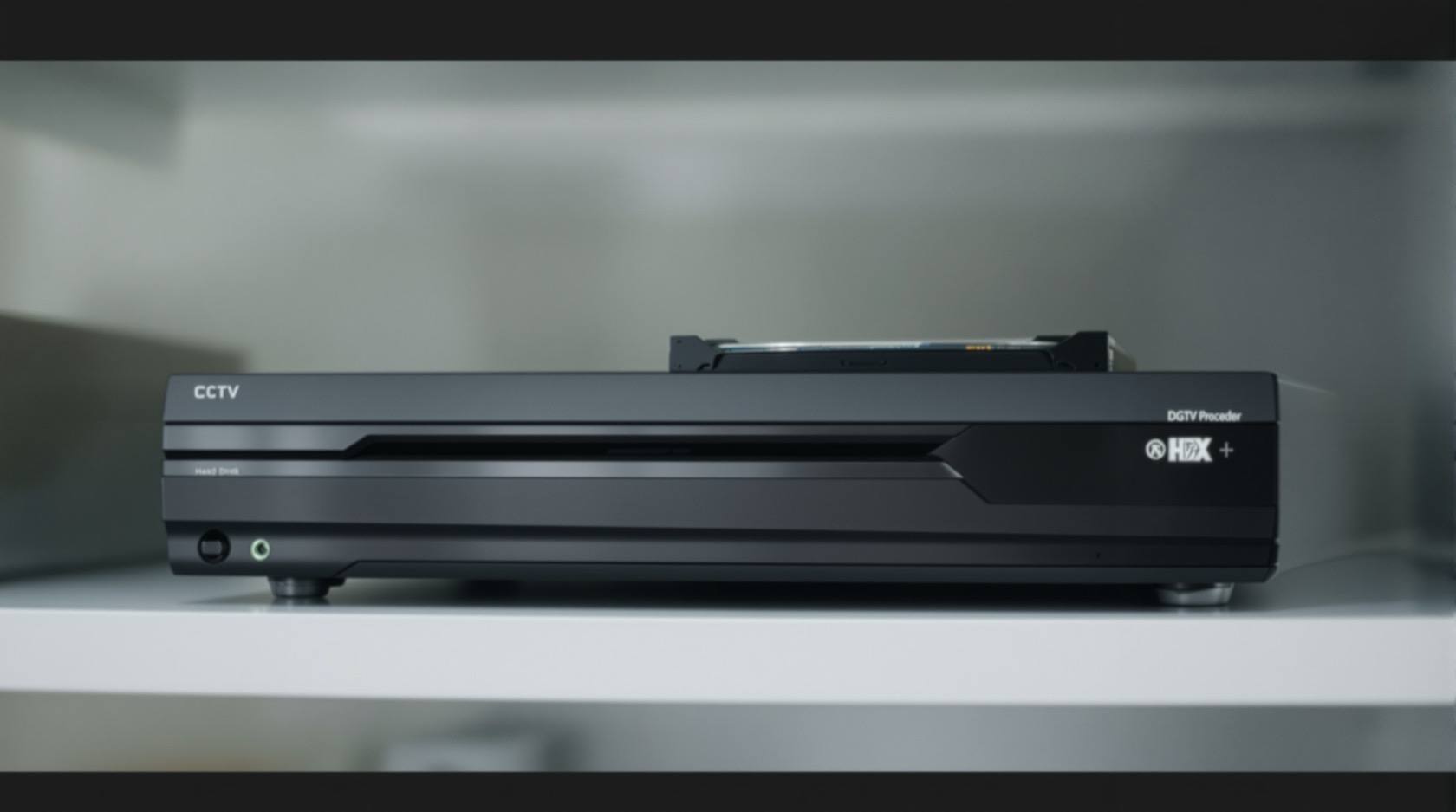
CCTV Footage Retention in India (2026): How Long to Keep It, and When to Delete
Footage of identifiable people is personal data, and the honest answer to how long to keep it is almost never forever. Here is how to set a sensible retention window for a home, an RWA or a small office, delete on schedule, and preserve only what a real incident needs.
Ask most people how long they keep their camera footage and the honest answer is: however long the recorder happens to hold before it fills up. Nobody chose it. The disk that came in the box decides, and the system quietly loops. That drift is the opposite of a decision, and it is worth replacing with a real one, because footage of identifiable people is personal data, and cctv footage retention is one of the clearest places where the rule "keep only as long as you need, then delete" actually bites.
The instinct to keep everything forever feels safe. It is not. Every extra day of footage you hold is a day more that can leak, be misused, or intrude on people who did nothing wrong. Longer is not safer. It is more liability, more storage, and more of other people's lives sitting on a box in your utility room. This guide sits inside the wider privacy and data protection layer of the Security Hub, and it is written to help a home, a resident welfare association or a small office get the window right.
Scope & how to read this. This is practical guidance grounded in the storage-limitation principle of the Digital Personal Data Protection Act, 2023 (DPDP Act), not legal advice. It gives no mandated number of days, because for a home or small setting there is rarely a single fixed one. For anything with legal weight, take professional advice, follow due process, and choose the least-intrusive option that still meets your genuine need.
Why "keep it forever" is the wrong instinct
The DPDP Act 2023 runs on a set of plain principles, and one of them is storage limitation: personal data should be kept only as long as the purpose it was collected for actually requires, and then deleted. Footage that shows a recognisable face, a number plate, a person's movements or an entry log is personal data. So the question is never "how much can this disk hold?" It is "what am I keeping this for, and how long does that purpose genuinely last?"
For a home the honest purpose is usually short: to check back if something happened in the last few days, a delivery went missing, a gate was left open, a car was scratched. That purpose is served by a window measured in days, not months. Keeping six months of your own family and every visitor and passer-by serves no purpose you can name, and it quietly builds a large, sensitive archive that you now have to protect.
This is the proportionality and minimisation test applied to time rather than to camera angles: the shortest window that still does the job is the right one. If you cannot state a reason a clip needs to exist tomorrow, it should not.
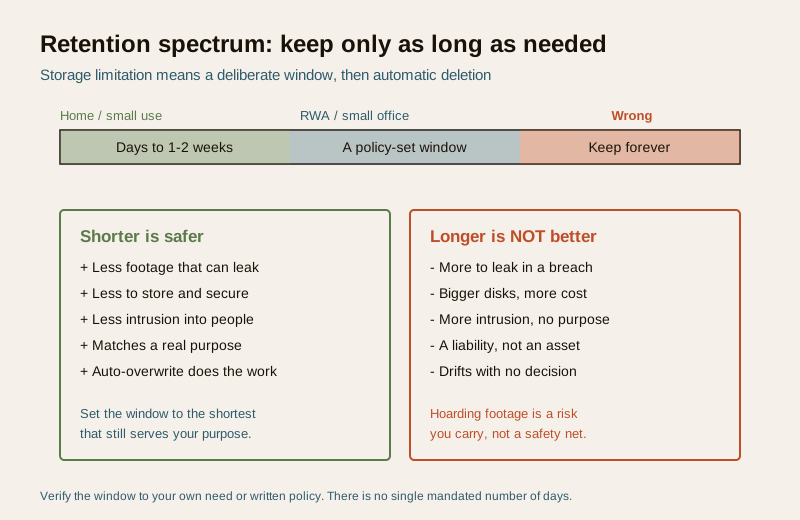
A household running a couple of cameras for purely personal use may fall outside some formal obligations, but the ethical spine still holds: do not hoard, do not point at neighbours, do not keep what you cannot justify. For the broader dignity-and-restraint picture, work through the CCTV privacy guide.
How retention actually works on your system
Here is the mechanical reality most people never look at. Almost every DVR, NVR and cloud camera plan records on a loop. New footage writes to the disk until the disk is full, and then the system overwrites the oldest footage to make room. Your retention window is simply the number of days it takes to fill up before that overwrite begins. Nobody sets it directly; it emerges from the hardware.
That window is driven by a handful of things:
- Disk size — a bigger drive holds more days.
- Number of cameras — more streams fill the disk faster.
- Resolution and frame rate — 4K at high frame rate eats space many times faster than modest HD.
- Recording mode — continuous recording fills far quicker than motion-only or event-only recording.
- Compression — newer codecs stretch the same disk further.
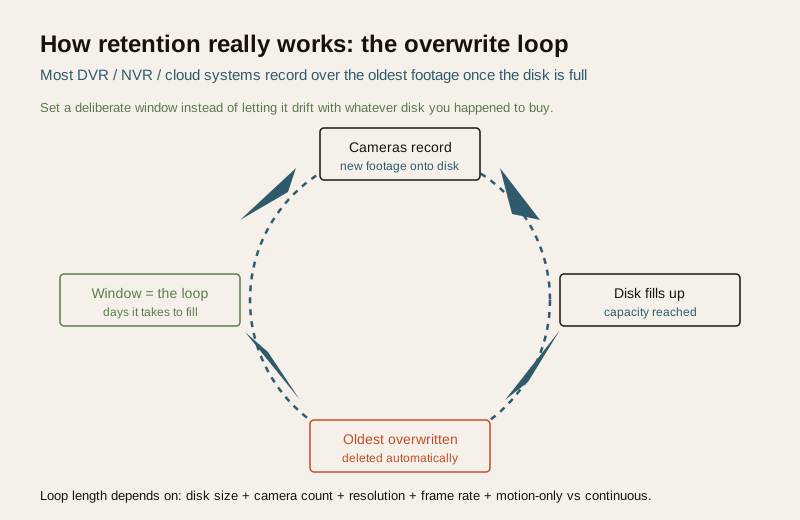
The difference between a drifting system and a deliberate one is small but important. Most recorders let you cap retention explicitly: set a maximum number of days, and the system deletes footage older than that even if the disk still has room. That turns an accidental by-product of disk size into a chosen policy. If your kit supports it, set the window on purpose. If it does not, size the disk so the natural loop lands roughly where you want it, and check occasionally that it has not been quietly extended by a hardware upgrade.
The same logic applies to entry and access logs — the timestamped records of who badged in, which gate opened when. These are personal data too, they accumulate silently, and they deserve the same "how long do we actually need this?" question. Do not let logs pile up for years just because storing text is cheap.
Choosing a window: home, RWA, small office
There is no universal legally mandated retention period for ordinary home or society cameras, and you should be suspicious of anyone who quotes an exact number of days as if it were law. What you can do is match the window to the context and the real purpose, then write it down.
| Context | Sensible window (verify to your need or policy) | Why |
|---|---|---|
| Home, personal use | A few days to about two weeks | Enough to catch a recent incident; no reason to archive family life |
| RWA / apartment common areas | A short, policy-set window agreed by the committee | Balances resident safety with resident privacy; decided, documented, applied evenly |
| Small office / shop | A modest window tied to a stated business purpose | Long enough for disputes to surface; short enough to minimise the archive |
| A specific incident under review | Preserve only that clip, for as long as the matter needs | Legal hold on one item, not the whole system |
| Any camera reaching a neighbour or the public road | Shortest possible, or mask the area out | You should not be building an archive of other people at all |
For a home, a window of a few days up to a couple of weeks covers almost every honest use, and letting older footage overwrite is a feature, not a loss. For an RWA, retention should be a written policy the committee decides, not whatever the vendor left on the box: agree a window, apply it to every camera in common areas evenly, and revisit it. A small office should tie its window to a stated purpose and keep it modest.
Longer windows are not a safety net. They are a growing pile of sensitive data you now have to secure and could one day have to explain. The security value of month-old routine footage is close to zero; the risk it carries is not.
The legal-hold exception: preserve one clip, not everything
There is one situation where you deliberately keep footage beyond the normal window: a real incident, complaint, insurance claim or court matter means a specific clip is now evidence and must not be lost to the overwrite loop. This is called a legal hold, and the mistake people make is to respond by freezing the entire system or keeping weeks of everything "just in case". That is over-retention wearing a helpful face.
The proportionate response is narrow:
1. Find the specific clip or clips that matter.
2. Export them to secure, separate storage, off the loop.
3. Note who exported it, what it shows, when, and why it is being kept.
4. Restrict access to the few people who genuinely need it.
5. Let all the unrelated footage continue to overwrite as normal.
6. Delete the held clip once the matter is genuinely resolved.
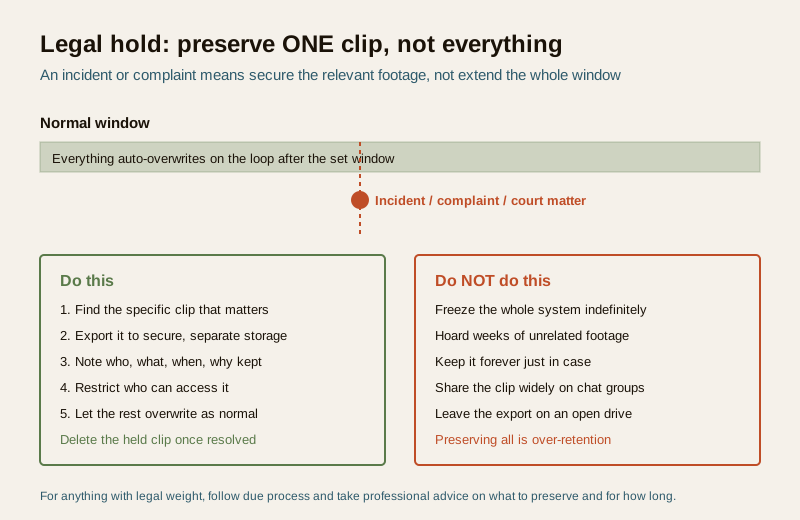
Preserving one relevant clip is minimisation done right. Preserving everything because something happened is the failure the storage-limitation principle exists to prevent. If you are unsure what to preserve or for how long, that is exactly the point to take advice, because it has legal weight. Any onward sharing of a held clip, including with police or a committee, should follow the careful approach in sharing CCTV footage rather than a group chat.
Secure storage and secure deletion
Retention is only half the story. While footage exists, it must be protected; when its time is up, deletion has to be real.
- Protect what you hold. Change default passwords, keep the recorder and any drives physically secure, limit who can view or export, and encrypt where you can. Cloud plans should meet the same bar, covered in cloud CCTV data protection.
- Fewest people, least access. The number of people who can pull footage should be as small as the number of days you keep it. Both are minimisation.
- Deletion means gone. Overwriting on the loop genuinely destroys old footage, which is one honest advantage of the loop. But exported clips, backups and copies on phones or drives are the ones that outlive your policy. Track every export and delete it too, or your written window means nothing.
- Decommissioning. When you replace a recorder or drive, wipe or destroy the old one properly before it leaves the building. An old NVR disk sold on is a data breach waiting to happen.
If footage is ever exposed or a device is lost or stolen, treat it seriously and follow a plan rather than hoping; the data breach response guide walks through the steps.
Who decides, and writing it down
For a home, the person who owns the system decides the window, ideally with the household informed. For an RWA or office, retention should not be an accident of procurement; it should be a short written policy that names the window, who can access footage, how exports and holds are handled, and who is accountable. Building this thinking in from the start, rather than bolting it on, is the heart of privacy by design for security systems. The choice between keeping footage on a local recorder or in the cloud also shapes how retention and deletion behave in practice.
What to do — a retention checklist
- Name the purpose each camera serves, and set the window to the shortest time that purpose needs.
- Set retention explicitly on the recorder if it allows a maximum-days cap; otherwise size the disk so the natural loop lands there.
- Keep the window short for a home; make it a documented, evenly applied policy for an RWA or office.
- Apply the same thinking to access and entry logs, not just video.
- On an incident, export only the relevant clip, log it, secure it, and let the rest overwrite.
- Secure everything you hold, and delete exports and backups on schedule, not just the loop.
- Wipe drives before disposal, and take professional advice for anything with legal weight.
What NOT to do
- Do not keep footage forever or default to the biggest disk you can afford "to be safe". Storage is not safety.
- Do not treat an incident as a reason to freeze or hoard the whole system — preserve the one clip that matters.
- Do not let exported clips and phone copies drift outside your policy; they are how "we delete after two weeks" quietly becomes false.
- Do not build an archive of neighbours or the public road; shorten, narrow the field of view, or mask it out.
- Do not invent a legal retention period or repeat a vague "must keep for X days" you cannot source; match the window to your real need, and verify anything binding with a professional.
Key takeaways
- Footage of identifiable people is personal data, so the honest default is to keep it only as long as its purpose needs, then delete.
- Retention is a loop driven by disk size, cameras, resolution and mode — set it deliberately instead of letting it drift.
- Match the window to the context: days to a couple of weeks for a home; a short written policy for an RWA or office; there is no single mandated number.
- Longer is not safer — it is more to leak, store and explain.
- On a real incident, preserve one clip, not everything, secure it, and delete it when the matter ends.
- This is guidance, not law — for anything with legal weight, follow due process and take professional advice.
References
- Digital Personal Data Protection Act, 2023 — storage limitation and data minimisation: keep personal data, including identifiable footage and access logs, only as long as the stated purpose requires; verify the current text and rules before relying on it.
- Manufacturer and installer documentation — confirm whether your DVR, NVR or cloud plan supports an explicit maximum-days retention cap and how the overwrite loop is configured.
- Qualified legal advice — for any incident, complaint, tenancy, workplace or court matter, confirm what footage to preserve and for how long for your specific facts.
This is an educational overview, not legal advice. How long you should keep footage depends on your exact purpose and setting — set the shortest window that genuinely serves it, delete on schedule, and consult a qualified professional for anything with legal weight.
Export this guide
Related Guides — Deep-dive reading
CCTV Recording Failure in India (2026): Live View Works but Nothing Was Saved
You open the recorder to pull footage of an incident and there is nothing there, even though every camera shows a crisp live picture. A calm, ordered guide to why an Indian CCTV system records live but saves nothing, and how to fix it before the next incident.
SecurityCCTV Storage Maintenance in India (2026): Keeping the Footage There When You Need It
Surveillance storage is a wear item that fails silently. This professional guide covers checking disk health, verifying recordings actually exist for the full retention window, planning drive replacement before failure, keeping a spare, and holding an off-site backup so a dead or stolen recorder is not total loss.
SecurityData Storage Cost for CCTV in India (2026): Local Disks vs Cloud, and How to Size It
The running cost people forget when they buy cameras. Where the footage actually lives — a one-time surveillance hard disk in the recorder, or a recurring per-camera cloud plan — and how camera count, resolution, frame rate, recording mode and retention days decide how many terabytes, and how much money, you really need.
SecurityRelated Tools — Try Free
CCTV Camera Coverage & Count Calculator
Estimate how many CCTV cameras you need, the NVR channels, storage in TB for your retention period, and an indicative all-in cost with GST.
CCTV CalculatorCCTV Cloud vs Local Cost Calculator
Compare cloud CCTV subscription against a local NVR + HDD — upfront, 5-year total, monthly fee and break-even.
Cloud vs LocalSecurity Vendor Evaluation Scorecard
Rate a CCTV/security installer or guarding agency across eight weighted criteria for a hire / negotiate / walk-away verdict.
Vendor Scorecard