
Security Maintenance Calendar for India (2026): A Ready-to-Use Daily-to-Annual Schedule
One printable schedule for the whole security system — what to check daily, weekly, monthly, quarterly and yearly, who does each task (self versus professional), and how India's monsoon, dust and heat shape the timing so nothing is forgotten the night it matters.
Most security systems do not fail dramatically. They fail quietly, on a schedule of neglect, and the failure is only discovered the one night the system was supposed to work. A camera that has been showing a spider-web-blurred image for three months. A backup battery that went flat in April and was never replaced. A door sensor knocked out of alignment by a slammed gate. A siren nobody has heard since installation. None of these announce themselves. They wait — and the household assumes it is protected right up until it is not.
A maintenance calendar is the cure for that quiet decay. Instead of trying to remember an unbounded list of things that might need attention, you convert the whole system into a rhythm: a few seconds of looking each day, a small test each week, a proper clean and battery check each month, a deeper look each quarter, and a professional service once or twice a year. Set against that rhythm, faults surface while they are cheap and harmless to fix, not on the night of a break-in or a fire.
This guide gives you that calendar as a ready-to-follow schedule for an Indian home or small building — organised by frequency, with each task marked for who should do it, and tuned to the seasons that actually stress equipment here: monsoon damp, pre-monsoon storms and surges, summer heat on batteries, and the dust that coats every lens and vent. It is the companion schedule to the security system maintenance guide, which explains the how of each task in depth; this page is the when.
Scope & safety. This is an upkeep and scheduling guide, not a price list or a buying guide. It separates the simple checks you can safely do yourself — looking at indicator lights, pressing a test button, wiping a lens with the right cloth, swapping user-accessible batteries, keeping a log — from work that is strictly for a qualified professional or your annual-maintenance-contract (AMC) provider: mains electrical work, working at height, opening sealed equipment, gate-motor internals, and any statutory fire-safety testing. Life-safety maintenance (smoke detectors, fire alarm, extinguishers, emergency lighting) is scheduled and often statutory under the National Building Code (NBC = SP 7:2026) and must never be skipped. Handling CCTV footage during maintenance is still personal-data handling under the DPDP Act 2023. When any task feels beyond a simple check, stop and call a qualified technician.
How to use this calendar
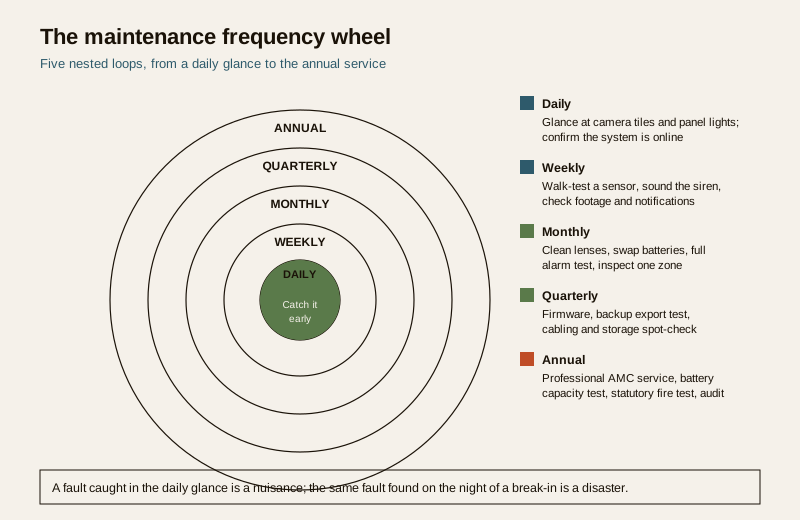
Think of the schedule as five nested loops, from a glance to a full service. Each loop catches a different class of fault:
- Daily catches the obvious — a dark camera tile, a red fault light, an unarmed panel.
- Weekly catches the silent — a sensor that no longer triggers, a siren that no longer sounds, an app that stopped notifying.
- Monthly catches the creeping — a dirty lens, a weakening battery, a loose contact, a blind spot grown over by a plant.
- Quarterly catches the hidden — firmware left un-patched, a recording gap, cabling working loose, storage filling silently.
- Half-yearly and annual catches the structural — battery capacity fade, a professional end-to-end test, statutory fire testing, and an honest audit of the whole system.
The golden rule underneath all of them: a maintained cheap system beats a neglected expensive one. The commonest real-world failure is not a defeated burglar alarm — it is a flat battery or a dirty lens, found too late. Prevention is the entire point of a calendar.
The master schedule
Here is the whole calendar in one table. Each row names the task, how often, and who does it — S for something you can safely do yourself, P for a professional or AMC visit. Print it, stick it inside a cupboard door, and tick as you go. The maintenance logbook guide gives you a proper page to record each check against a date, which turns this table into evidence you actually did it.
| Task | Frequency | Who |
|---|---|---|
| Glance at all camera live tiles — every one showing a clear picture? | Daily | S |
| Check the alarm panel and hub for a green/armed state, no fault light | Daily | S |
| Confirm the app or monitoring dashboard shows the system online | Daily | S |
| Look at gate, door and outdoor camera for obvious damage or tampering | Daily | S |
| Walk-test one motion sensor or door contact — does it trigger? | Weekly | S |
| Sound the siren briefly (warn the household first) — is it loud and clear? | Weekly | S |
| Check that recordings from the last week actually exist and are readable | Weekly | S |
| Test that an alarm event pushes a notification to your phone | Weekly | S |
| Clean camera lenses and housings with a soft microfibre cloth | Monthly | S |
| Check and replace user-accessible batteries in sensors, remotes, keypads | Monthly | S |
| Full alarm test: arm, trigger a zone, confirm siren and alert, disarm | Monthly | S |
| Inspect one zone in depth — sensor alignment, blind spots, plant overgrowth | Monthly | S |
| Check backup battery indicator on the panel and NVR/DVR | Monthly | S |
| Firmware and app updates for cameras, panel, hub, smart locks | Quarterly | S |
| Test the recording backup — can you export and play back a clip? | Quarterly | S |
| Spot-check cabling and connectors for looseness, rodent damage, corrosion | Quarterly | S/P |
| Check storage health and free space on the NVR/DVR | Quarterly | S |
| Clean vents and check for heat build-up in the recorder cabinet | Quarterly | S |
| Professional AMC service — full system test, mains and wiring checks | Half-yearly / Annual | P |
| Backup-battery capacity test and planned replacement | Annual | P |
| Gate-motor, boom-barrier and electric-fence servicing | Annual | P |
| Statutory fire-safety testing (alarm, detectors, extinguishers, lighting) | Per statute / Annual | P |
| Full security audit — coverage, blind spots, obsolete gear, access review | Annual | S/P |
Two visits a year from your AMC provider is the realistic professional baseline for a typical home; a building with lifts, gate motors, an electric fence or a full fire system needs the statutory intervals its equipment demands, which are usually more frequent.
Daily — the ten-second glance
Daily maintenance is not a chore; it is a habit of looking. It costs seconds and it catches the failures that matter most, because a camera or panel that has stopped working is worthless the moment it stops, not the moment you next remember to check it.
- Are all camera tiles live and clear? One dark or frozen tile means one blind spot — investigate it today, not next month.
- Is the panel or hub healthy? A steady armed indicator and no fault or trouble light. A blinking fault LED is the system asking for help.
- Is the system online? The app or monitoring dashboard should show every device connected. An offline device is an unwatched door.
All of this is self (S) — it is looking, not touching. If the glance reveals a fault you cannot explain, that is where the calendar hands off to a professional.
Weekly — test that it still responds
Weekly, you move from looking to a light test, because a device can appear healthy and still not do its job. A sensor can sit with a green light and no longer trigger; a siren can be wired and silent; an app can be installed and no longer notifying.
- Walk-test a sensor. Pick one motion detector or door contact each week and confirm it registers on the panel or app. Rotate through them so every sensor is tested over a couple of months.
- Sound the siren. Warn the household, then trigger a short test so you actually hear it. A siren nobody has heard since installation is a guess, not a defence.
- Check footage retention. Open last week's recordings and confirm they exist and play. This is where a silently failed disk or an overwritten clip shows up — and where DPDP-minded retention discipline lives, since footage is personal data you should keep only as long as you need it.
- Confirm notifications reach you. Trigger one event and check your phone actually buzzes. A monitoring path that has gone quiet is the most dangerous kind of failure, because it looks like peace.
These remain self (S) tasks — pressing buttons and watching results.
Monthly — clean, batteries, full test, one zone
The monthly loop is where most preventable failures are actually stopped, because it attacks the two commonest culprits directly: the dirty lens and the tired battery.
- Clean lenses and housings. A soft, dry microfibre cloth on every camera lens and dome. India's dust, cobwebs, and monsoon film blur an image gradually, so the picture looks fine until you compare it to a clean one. Never use a wet cloth on live electrics or spray anything into a housing — wipe gently, and if a camera is at height, this is a professional job, not a ladder gamble.
- Batteries you can reach. Swap the user-accessible batteries in wireless sensors, remotes and keypads on a rolling basis. A wireless door sensor with a flat cell is simply an open door the system cannot see. Note replacements in the logbook so you know each cell's age.
- A full alarm test. Once a month, arm the system, trigger a zone, confirm the siren sounds and the alert fires, then disarm. This is the single most valuable monthly habit — it proves the whole chain end to end.
- Inspect one zone in depth. Each month take one area and look hard: is the sensor still aimed right, has a plant grown into a camera's view, has furniture created a new blind spot, is a contact loose? Rotate zones so the whole property is covered over the year.
All self (S) — except cleaning anything at height, which is professional.
Quarterly — firmware, backups, cabling, storage
Every quarter, go deeper into the parts that fail invisibly. These faults never show on a daily glance because they live inside the system.
- Firmware and app updates. Un-patched cameras, panels, hubs and smart locks are both a reliability risk and a cyber risk. Apply vendor updates for every connected device. Keep default passwords changed and the network segmented — maintenance is also security hygiene.
- Test the backup and export. Actually export a clip and play it back on another device. A recording system you have never successfully retrieved from is an assumption, not a backup.
- Spot-check cabling. Look for loose connectors, corrosion at outdoor joints, and rodent-gnawed insulation — common in Indian installations. Simple visual checks are self; anything involving mains wiring, a distribution board, or opening a powered enclosure is strictly professional (P).
- Storage and heat. Check the NVR/DVR has free space and is not silently overwriting what you meant to keep, and that its cabinet is ventilated and not cooking in a hot cupboard.
For CCTV specifically, the quarterly and annual cadence — and what belongs in a professional AMC versus your own routine — is set out in the CCTV maintenance and AMC guide.
Half-yearly and annual — the professional layer
Some tasks require test equipment, trained hands, or statutory competence. These are the professional (P) rungs of the calendar, and they are not optional garnish — they are where deep, dangerous faults are found.
- AMC service visit. A half-yearly or annual visit from your installer or AMC provider: a full end-to-end system test, inspection of mains connections and wiring, checks that are unsafe or impractical for a homeowner, and a professional eye on wear.
- Backup-battery capacity test. A backup battery can show a healthy indicator and still be unable to hold the system up through a real outage, because capacity fades with heat and age. Only a load or capacity test reveals this — and Indian summers accelerate the fade. Plan replacement on the manufacturer's cycle, not on the day it fails.
- Motorised and high-voltage gear. Gate motors, boom barriers and electric fencing have moving parts and electrical hazards; service them annually through a competent technician. Never open a gate-motor gearbox or an electric-fence energiser yourself.
- Statutory fire-safety testing. Smoke and heat detectors, the fire-alarm panel, extinguishers, sprinklers and emergency lighting are life-safety systems, tested and serviced on a schedule by competent persons under the NBC (SP 7:2026) and local fire rules. This has its own dedicated schedule — follow the fire-safety maintenance calendar, and treat it as non-negotiable.
Life-safety — do not skip. Fire detection, alarms, extinguishers, sprinklers and emergency lighting protect lives, not just property. Their testing is scheduled and frequently statutory. A slipped fire-safety service is not a deferred chore; it is a removed safeguard. If money or time is tight, cut somewhere else — never here.
The seasonal India layer
A calendar that ignores India's climate misses the point, because the seasons dictate when equipment is most stressed. Overlay these seasonal moves on the base schedule.
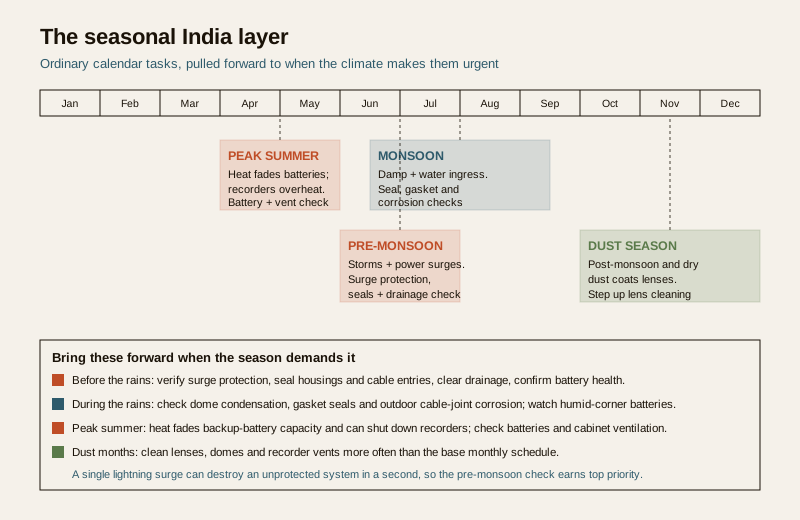
- Before the monsoon (pre-monsoon). This is the most important seasonal window. Storms bring lightning and voltage surges that kill cameras, recorders and panels, and the coming rain finds every weak seal. Bring forward a surge-protection check, confirm outdoor housings and cable entries are sealed, clear drainage away from equipment, and verify the backup battery is genuinely healthy before the first grid outage of the rains. A single surge can take out an unprotected system in a second.
- During the monsoon. Damp is the enemy. Check outdoor camera seals and gaskets for water ingress, watch for condensation inside domes, and inspect cable joints for corrosion. Wireless sensors in humid corners drain faster — keep an eye on their batteries.
- Peak summer. Heat is hard on batteries and recorders. High ambient temperature accelerates backup-battery capacity fade and can push an NVR/DVR into thermal shutdown. Move the summer battery check and a cabinet-ventilation check to the front of the queue, and make sure the recorder is not baking in an enclosed cupboard.
- Post-monsoon and dry-season dust. Dust is relentless across much of India and coats lenses, vents and sensor windows. Step up lens cleaning after the rains and through the dusty months, and clear recorder vents more often.
None of these seasonal tasks are new inventions — they are the ordinary calendar items, pulled forward to the moment the climate makes them urgent.
Who does what — the self versus professional split
The safety line running through this whole calendar is the split between what you can safely do and what you must hand to a qualified person. Getting this line right keeps you safe and keeps the system genuinely maintained.
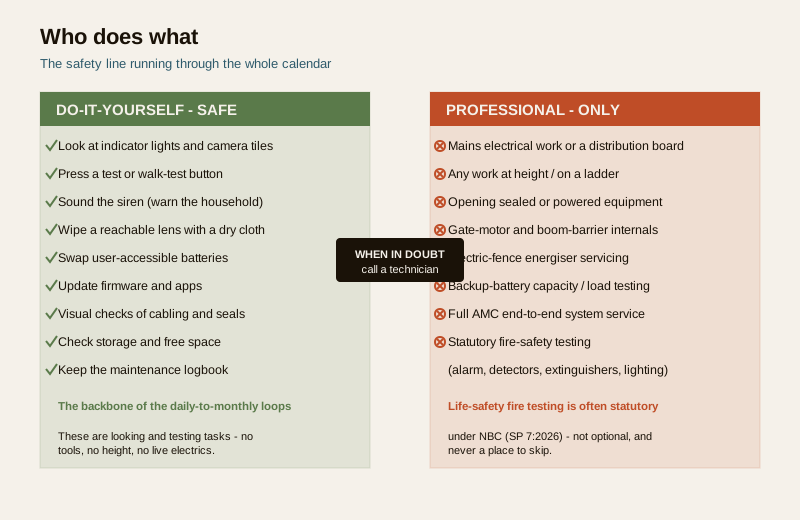
Safe for you (self): looking at any indicator light or camera tile; pressing a test or walk-test button; sounding the siren; wiping a reachable lens with a dry microfibre cloth; swapping user-accessible batteries; updating firmware and apps; visual checks of cabling and seals; checking storage and free space; and keeping the logbook. These are the backbone of the daily-to-monthly loops.
Strictly professional (call your AMC): anything on mains electricity or a distribution board; anything requiring a ladder or work at height; opening a sealed, pressurised or powered enclosure; gate-motor, boom-barrier or electric-fence internals; backup-battery capacity or load testing; and all statutory fire-safety testing. When any task feels beyond a simple check, stop and call a qualified technician — no camera angle or saved service charge is worth a fall or a shock.
Signs a check is overdue
Between scheduled checks, the system will sometimes tell you it needs attention. Treat any of these as a prompt to act now, not at the next calendar slot:
- A camera image that is blurred, hazy, spider-webbed, or darker than it used to be — dirty lens or failing sensor.
- A fault, trouble or low-battery light on the panel, hub or a sensor.
- A device showing offline in the app, or notifications that have gone quiet.
- A siren that sounds weak, or that you realise you have not heard in a long time.
- A recorder that is hot to the touch, noisy, or reporting a disk error.
- Condensation inside a camera dome, or corrosion at an outdoor cable joint after rain.
- A backup that runs down within minutes of a power cut — a battery near the end of its life.
A short starter checklist
If you do nothing else, build the habit around these:
- Daily: glance at camera tiles and the panel; confirm the system is online.
- Weekly: walk-test one sensor, sound the siren, check last week's footage and notifications.
- Monthly: clean lenses, swap reachable batteries, run a full arm-trigger-disarm test, inspect one zone.
- Quarterly: update firmware, test a backup export, spot-check cabling and storage.
- Before the monsoon: surge check, seal check, drainage, battery health.
- Annually: book the AMC service, battery capacity test, and the statutory fire-safety testing — and do a full audit.
Record every check in the maintenance logbook, and use the maintenance audit guide to step back once a year and confirm the whole system — not just each part — still covers what it should.
Key takeaways
- A maintenance calendar turns an endless worry list into a rhythm — daily glance, weekly test, monthly clean-and-battery, quarterly deep check, annual professional service — so faults surface while they are cheap and harmless.
- The commonest real failure is a flat battery or a dirty lens found too late — the monthly loop targets exactly these, which is why it earns its place.
- Mark every task self or professional and respect the line — looking, testing and swapping accessible batteries are yours; mains work, height, sealed equipment and statutory fire testing are a professional's.
- Tune the schedule to India's seasons — a pre-monsoon surge-and-seal check, monsoon damp checks, summer battery-and-heat checks, and stepped-up dust-season lens cleaning.
- Life-safety maintenance is scheduled, statutory and non-negotiable — fire detection, alarms, extinguishers and emergency lighting per NBC (SP 7:2026); never let it slip.
- Write it down — a logbook makes the calendar real and turns each check into evidence you can act on and audit.
Where to go next
- The security system maintenance guide — the pillar that explains how to do each task this calendar schedules.
- The maintenance logbook guide — a page to record each dated check against this schedule.
- The CCTV maintenance and AMC guide — the camera-specific routine and what belongs in a professional contract.
- The fire-safety maintenance calendar — the dedicated, statutory life-safety schedule to run alongside this one.
- The maintenance audit guide and the maintenance sub-hub, plus the main security hub.
References
- National Building Code of India (SP 7), Bureau of Indian Standards — scheduled testing and servicing of fire detection, alarm, extinguishing and emergency-lighting systems as life-safety provisions. Verify the current edition (SP 7:2026) via the BIS catalogue: https://www.services.bis.gov.in/
- Digital Personal Data Protection Act, 2023 — CCTV footage handled or exported during maintenance is personal data; keep retention only as long as needed and control who may view recordings.
- Manufacturer maintenance schedules — follow the specific service intervals and battery-replacement cycles set by your equipment's makers and your AMC provider, which take precedence over any generic calendar.
This is an educational upkeep and scheduling guide for homeowners and facility managers — not legal advice, an installation manual, a price guide or a buying guide. Do only the simple checks described as self tasks; hand mains electrical work, work at height, sealed equipment and all statutory fire-safety testing to a qualified professional or your AMC provider, and verify any standard's current status via the BIS catalogue before relying on it.
Export this guide
Related Guides — Deep-dive reading
Burglar Alarm Maintenance in India: Testing, Batteries & AMC (2026)
How to keep a burglar alarm actually working: weekly walk-tests, backup and sensor battery cycles, clean sensors, a live SIM, and an end-to-end alert check, plus what a good AMC covers.
SecurityCCTV Maintenance and AMC in India (2026): Keeping the System Alive
How to keep a CCTV system actually working after install: clean lenses and housings, check every camera still records, watch drive health and retention, update firmware, and decide whether an Annual Maintenance Contract (AMC) is worth it.
SecurityNVR and DVR Maintenance in India (2026): Keeping the Recorder Alive, Cool and Secure
The recorder is the brain of a CCTV system, and a neglected one quietly loses footage, drops cameras or gets hacked. A practical upkeep routine for NVRs and DVRs in Indian conditions — heat and dust, clean power, firmware and security patches, network hygiene, time sync and the disk — with a clear split between what a facility person can safely do and what belongs to a technician.
SecurityRelated Tools — Try Free
CCTV Camera Coverage & Count Calculator
Estimate how many CCTV cameras you need, the NVR channels, storage in TB for your retention period, and an indicative all-in cost with GST.
CCTV CalculatorMonsoon-Readiness Checklist
Pre-rain home audit across 9 categories — terrace, drains, waterproofing, electrical, HVAC, pest, vehicles, documents.
Seasonal AuditElectrical Safety & Load Audit
Home electrical audit — 10 categories, 65+ checkpoints across earthing, RCCB, MCB, wiring, switchboards, appliance circuits, DG/inverter backup.
Safety Audit