
CCTV Cable Inspection in India (2026): The Invisible Failure Point Behind a Dark Camera
The cabling is the quiet weak link in every CCTV system — a rodent-chewed coax, a sun-perished sheath, water in a junction box or a corroded connector kills a camera. A professional guide to inspecting the run, spotting a cabling fault, and knowing which checks are safe to do yourself.
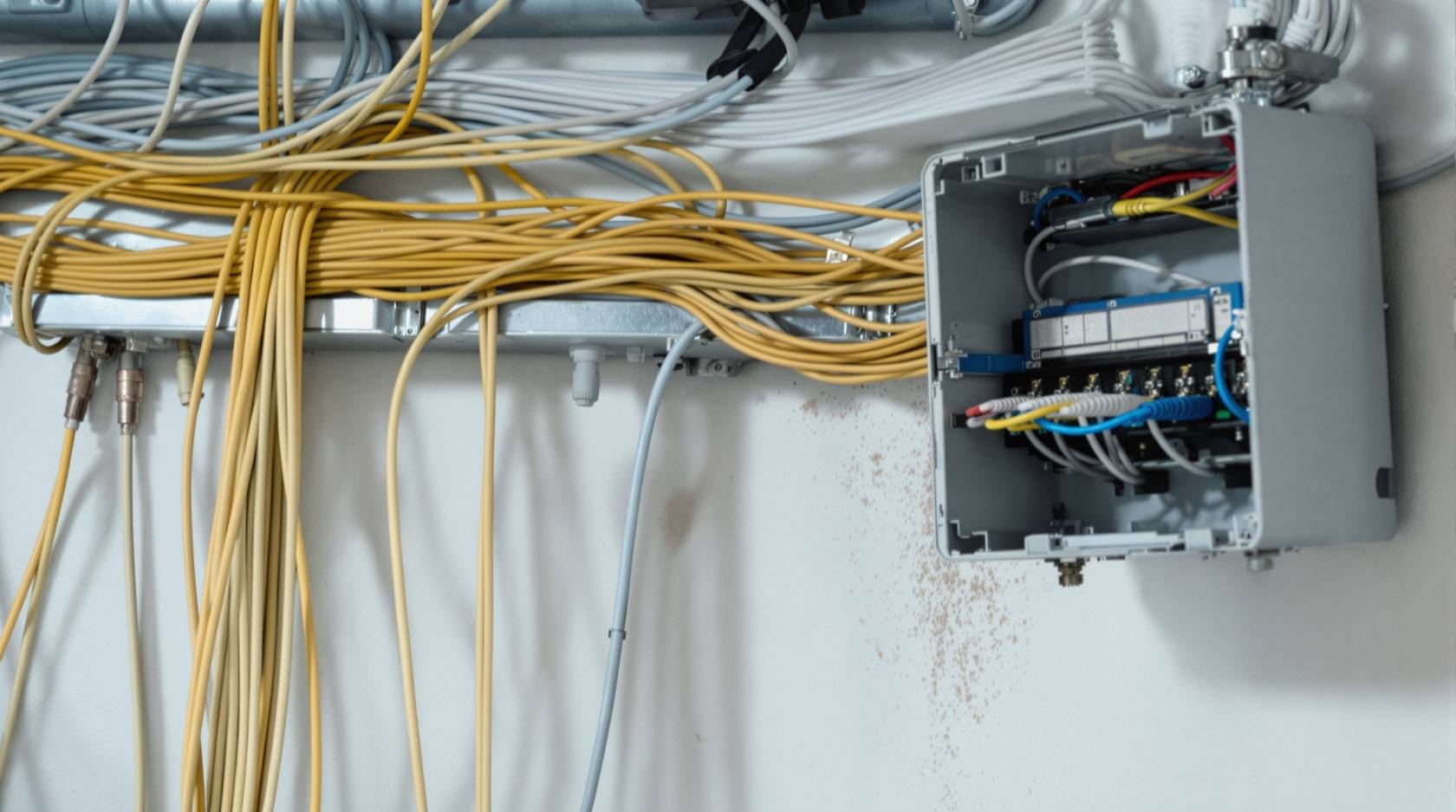
When a camera goes dark, almost everyone reaches for the same suspects first: the camera itself, the recorder, the power supply, the app. The cable is the last thing anyone checks and, very often, the thing that was actually wrong. It is the least glamorous and least visible part of the whole system — buried in conduit, stapled behind a false ceiling, run up an external wall in the sun, or dropped through a duct nobody has opened since installation day. And it is precisely because nobody looks at it that it becomes the quiet weak link.
A CCTV cable does not fail dramatically. It degrades. A rodent takes a few nibbles at the sheath over a monsoon. Ultraviolet light slowly bakes an outdoor jacket until it cracks. Water finds its way into an unsealed junction box and sits on a connector until the copper greens over. A termination that was "good enough" on commissioning day loosens with a season of thermal expansion. None of these announces itself. The feed just starts flickering, or one camera drops out at night, or a PoE camera begins rebooting in a loop — and the system that was supposed to be watching the night you needed it was quietly half-blind for weeks.
This guide is about finding that failure before the night you need the footage. It treats the cabling as a first-class part of the system that deserves its own inspection routine, and it is honest about the split that matters most: walking the route and spotting damage is accessible to a trained facility person; re-terminating, cable-testing, working at height and anything near mains is a qualified technician's job.
Scope & safety. This is an upkeep and inspection guide for facility managers, integrators and technically minded owners of an installed CCTV system — not an installation manual and not a price or buying guide. A visual, walk-the-route inspection — looking for rodent damage, cracked sheathing, water at junctions, sagging and corroded connectors — is safe and valuable, and this guide teaches it. But re-terminating cable, using a cable tester, checking PoE voltage, working at height, in ducts or on mains-adjacent runs is strictly a qualified technician's or your AMC provider's job. Never disturb a live electrical route, never open a junction box you are unsure is dead, and never work at height without proper access equipment. For scheduled servicing see the CCTV maintenance and AMC guide; for costs of a fresh install see the CCTV installation cost guide. CCTV cabling carries footage, which is personal data under the DPDP Act 2023 — a technician touching your cabling is touching your data path.
Why the cable is the failure point nobody checks
A CCTV signal chain is only as strong as its weakest metre. The camera can be a perfect 4K unit, the recorder can have terabytes free, the power supply can be immaculate — and a single chewed cable between them turns all of it into a black rectangle. The cable is also, physically, the most exposed component: cameras and recorders live in boxes and cabinets, but the cable runs across the whole hostile journey between them, through everything the weather, the rodents and the building itself can do to it.
Three things make cabling the commonest quiet failure in Indian installations specifically. First, long outdoor runs in a punishing climate — monsoon water, coastal salt air, and months of direct sun on cable that was never rated for it. Second, rodents — rats and squirrels treat a soft PVC sheath as a chew toy, and an unprotected cable run at low level along a compound wall is an open invitation. Third, the "make it work today" install — an unsealed joint, a run left sagging, a connector crimped in a hurry — that passes on commissioning day and fails a season later. The camera survives; the cable does not.
The cable types and how each one fails
You cannot inspect what you cannot identify. Two families of cable carry almost every CCTV signal in India, and they fail in different ways.
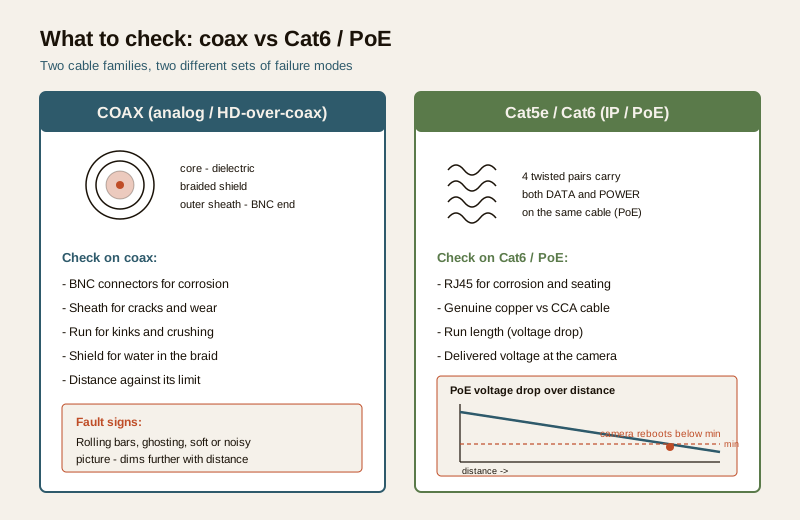
Coaxial cable (coax) — analog and HD-over-coax systems. A single copper core, an insulating dielectric, a braided/foil shield, and an outer sheath, usually carrying video on RG-59 or RG-6 with a separate power pair. Coax is robust but its failure modes are specific: a crushed or kinked run changes its electrical behaviour and softens or ghosts the picture; a corroded or loose BNC connector introduces noise and rolling bars; water wicking into the braid degrades the shield and lets interference in. Analog runs also have a hard distance limit — push coax too far and the picture dims and smears regardless of connector health.
Twisted-pair (Cat5e / Cat6) — IP and PoE systems. Four twisted pairs carrying both data and, on Power-over-Ethernet, the camera's power on the same cable. This is the modern default and it fails differently. Because the same cable carries power, a marginal cable does not just soften the picture — it can starve the camera of voltage. On a long or thin run, resistance drops the delivered voltage below what the camera needs, and the classic symptom appears: the camera boots, the infrared LEDs kick in at night and draw more current, the voltage sags, and the camera reboots — a night-time reboot loop that looks like a camera fault but is a cabling-and-power fault. Cat6 handles this better than Cat5e over distance; a thin, unbranded "CCA" (copper-clad aluminium) cable sold as Cat6 is far worse than genuine solid copper and is a frequent hidden cause of PoE trouble.
What to inspect — walking the route
A cable inspection is, at heart, a walk. You follow the cable from the camera back toward the recorder and you look — with your eyes and, gently, with your hands — for the specific things that go wrong. This visual walk is the safe, high-value part of the job and it is where most faults are actually found. Work in daylight, take photographs, and note the location of anything suspect for the technician who will do the physical work.
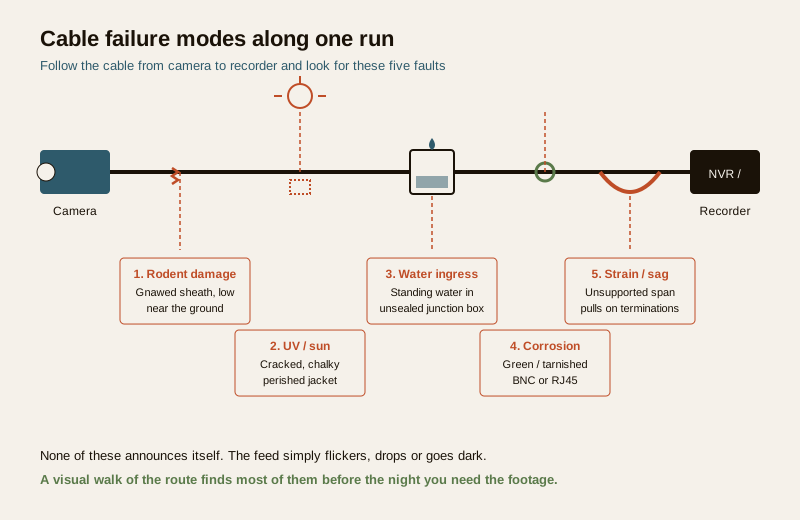
- Physical routing and protection. Is the cable in conduit or trunking where it should be, or is it run loose and exposed? Bare cable along a wall, across a terrace, or dropping down to a low camera is a rodent and weather target. Note any stretch that has lost its protection.
- UV-degraded outdoor sheathing. On sun-exposed runs, look for a jacket that has faded, gone chalky, hardened, or cracked. A sheath that flakes or splits when gently flexed has lost its weather protection and the copper underneath is now exposed to moisture. Outdoor runs should use UV-rated cable; ordinary indoor cable run outside perishes fast.
- Rodent damage. Look low, near the ground, at wall bases and where cable enters buildings. Gnaw marks, exposed shield or conductors, and gnawed insulation are the signature. Even partial chewing that has not yet cut the signal is a failure waiting for the next rat or the next rain.
- Water ingress at junctions and glands. Open (only if safe and dead) or inspect junction boxes for standing water, condensation, rust, or a cable gland that is not sealing. Water sitting in a box is the single commonest killer of an outdoor joint. Check that boxes are mounted so water drains away, not in.
- Connector corrosion and oxidation. At every BNC and RJ45, look for green or white corrosion, tarnish, or a connector that is not fully seated. Corroded contacts add resistance and noise — soft picture on coax, packet loss or PoE voltage sag on twisted pair.
- Strain and sagging. A cable should be supported so its own weight, wind, and thermal movement are not pulling on the connectors. A long unsupported span sagging between two points is putting tension on its terminations at both ends, and a termination under constant strain works loose.
- Tightness of terminations. Without disturbing a live route, note any connector that looks loose, any cable that moves at its termination, any BNC that is not hand-tight. Loose terminations are the classic cause of intermittent, comes-and-goes faults.
The signs of a cabling fault
Cabling faults have a recognisable signature that separates them from camera or recorder faults. Learning to read the symptom saves hours of swapping healthy hardware.
- Intermittent or flickering feed. A picture that comes and goes, rolls, or breaks up — especially when it changes as someone walks past the cable, opens a duct, or in wind or rain — is almost always cabling or a connector, not the camera. Hardware faults tend to be steady; cabling faults tend to flicker.
- No signal on exactly one camera while the rest are fine. This points hard at that camera's individual run — its cable, its connectors, or its power leg — rather than at the recorder or the network.
- Night-only dropout. A camera that is perfect by day and drops out, freezes, or reboots at night is the tell-tale of a PoE voltage problem: the infrared LEDs switching on at dusk push current demand up, a marginal cable cannot deliver it, and the camera fails only under that heavier night load.
- A PoE camera rebooting in a loop. Boot, run for a while, drop, boot again — the classic sign of insufficient delivered voltage over a long or thin run, or a switch port that cannot supply the camera's PoE class. It looks like a dying camera; it is usually the cable, the run length, or the power budget.
- Gradual softening or noise on an analog feed — rolling bars, ghosting, a picture that has slowly gone soft — points to coax degradation, a corroding connector, or a run pushed past its distance limit.
This is where the split gets sharp. Spotting these signs is diagnosis anyone can learn. But confirming the cause means testing — continuity, voltage, re-termination — and that is a qualified technician's job with the right instruments. Do not start cutting and re-crimping cable to "test" a theory: you can turn a marginal run into a dead one, and a mains-adjacent or at-height run is genuinely dangerous.
Testing — and who is allowed to do it
Once a visual inspection has found a suspect, confirming and fixing it is technical work. This section is here so you know what your technician should be doing, not so you do it yourself.
- Visual and physical. The walk-the-route inspection above — the part you can safely do. It finds the majority of faults.
- Continuity and cable testing. A cable tester or a wire-map tester confirms whether each conductor is intact, correctly terminated, and free of shorts and mis-pairs. On twisted pair this catches a broken pair, a split pair, or a bad crimp instantly. This is a technician's instrument and a technician's read.
- PoE voltage check. Measuring the voltage actually delivered at the camera end tells you whether voltage drop over the run is starving the camera. If the delivered voltage is marginal, the fix may be a shorter or thicker run, genuine copper cable, a mid-span injector, or a switch with a bigger PoE budget — see the CCTV maintenance and AMC guide for how this fits into scheduled servicing. This measurement is done by someone qualified to work on the powered system.
- Re-termination. Replacing a corroded BNC or a bad RJ45 with a fresh, correctly crimped connector is often the whole fix — but crimping is a skill, and a badly re-terminated connector is worse than the one you removed. Re-termination, especially at height or near mains, is a technician's task.
Preventive measures — stopping the fault before it starts
The cheapest cable inspection is the one that finds nothing because the run was protected in the first place. Most cabling failures are preventable with detailing that costs little at install time and saves a dark camera later.
- Conduit and trunking on every exposed run. Cable in rigid conduit is protected from rodents, sun and casual damage. The runs worth protecting hardest are the low ones near the ground and the sun-exposed ones on external walls and terraces.
- Drip loops at every device and box. A gentle downward loop in the cable before it enters a camera or junction box lets water run off the low point of the loop and drip away, instead of running along the cable into the connector. A drip loop is free and it is the single best defence against water ingress.
- Sealed glands and boxes. Outdoor junctions belong in a properly rated, gasketed box with cable glands that actually grip and seal the cable. A box mounted so it drains, with sealed entries, keeps the joint dry — and a dry joint lasts years longer than a wet one.
- UV-rated cable outdoors. Specify cable rated for outdoor and UV exposure on any sun-exposed run. It is a small premium that avoids a perished sheath in a couple of seasons.
- Rodent protection. Metal conduit, rodent-resistant cable, and keeping runs up off the ground and away from cover all reduce the gnaw risk. Where rodents are a known problem, protection is not optional.
- Support and strain relief. Clip and support runs so no span sags and no connector carries the cable's weight. A supported cable keeps its terminations tight.
- Label and record. A labelled cable and a record of each run — camera, route, cable type, length — turns the next inspection from a puzzle into a checklist. Good documentation is part of maintainability.
A CCTV cable inspection schedule
Cabling does not need constant attention, but it needs attention on a rhythm — and the outdoor, exposed runs need it more often than the protected indoor ones. Frequencies below are a sensible default for a typical Indian installation; a coastal, heavily-rodent-prone, or fully-outdoor site should inspect more often. Fold cable inspection into the broader routine in your security maintenance programme.
| Task | Frequency | Who |
|---|---|---|
| Check every live feed for flicker, dropout, night-time reboot | Monthly | Facility person (visual, on the monitor) |
| Walk exposed outdoor runs for rodent damage, cracked sheath, sagging | Quarterly | Facility person (visual, in daylight) |
| Inspect outdoor junction boxes and glands for water and corrosion | Quarterly | Facility person (visual) / technician if opening a box |
| Check connectors for corrosion and seating at accessible points | Half-yearly | Facility person (visual) / technician for re-seating |
| Continuity / cable test on any suspect or intermittent run | On symptom | Qualified technician only |
| PoE voltage check on any night-dropout or rebooting camera | On symptom | Qualified technician only |
| Re-terminate corroded or loose connectors | On symptom | Qualified technician only |
| Full cabling inspection at height, in ducts, near mains | Annually | Qualified technician / AMC provider |
| Review and update cable records and labels | Annually | Facility person with technician |
The DIY-safe versus professional split
The whole point of this guide is to draw one line clearly, so that useful inspection happens without anyone getting hurt or breaking a working run.
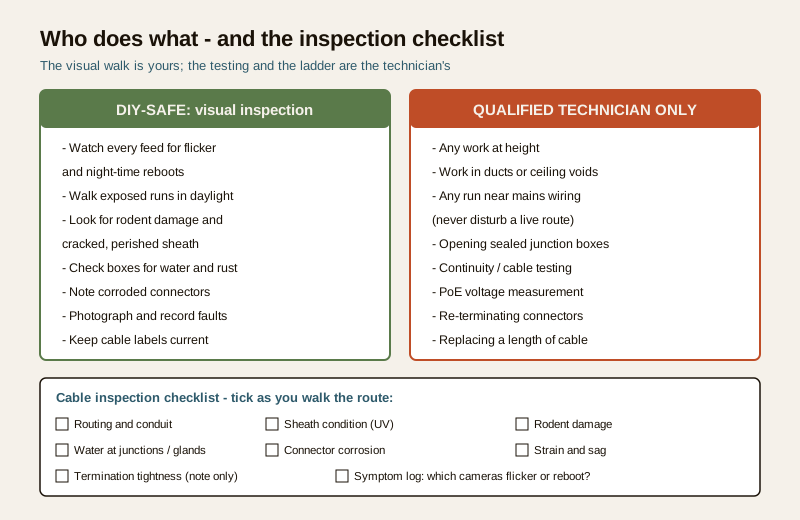
Safe to do yourself — the visual, hands-off inspection:
- Watching every feed for flicker, dropout, or a camera that reboots at night.
- Walking exposed runs in daylight, looking for rodent damage, cracked or perished sheath, and sagging.
- Looking at accessible junction boxes and glands for standing water, rust, and corrosion — without opening a box you are unsure is dead.
- Noting corroded or loose-looking connectors at low, accessible, non-live points.
- Photographing and recording anything suspect for the technician.
- Keeping the cable records and labels current.
Strictly for a qualified technician or your AMC provider:
- Any work at height — a camera or run above safe reach needs proper access equipment.
- Anything in a duct, ceiling void, or confined space.
- Any run adjacent to or shared with mains electrical wiring — never disturb a live electrical route.
- Opening sealed or possibly-live junction boxes.
- Continuity testing, cable testing, and PoE voltage measurement.
- Re-terminating connectors, re-routing, or replacing a length of cable.
When in doubt, do not touch it — call your technician or AMC provider. A visual inspection that ends with a clear note and a photograph is worth far more than a well-meant repair that turns a marginal cable into a dead one or puts someone on an unsafe ladder. The reward for the DIY part is diagnosis; the fix belongs to a qualified hand.
A quick cable inspection checklist
Print this, walk the route, and tick as you go. Anything flagged goes to the technician — do not fix it on the ladder.
- Routing and protection — is the run in conduit where it should be, or exposed?
- Sheath condition — faded, chalky, cracked, or perished on sun-exposed runs?
- Rodent damage — gnaw marks, exposed shield or conductors, especially low and near walls?
- Water at junctions — standing water, condensation, rust in boxes; glands sealing?
- Connector corrosion — green/white corrosion or tarnish on BNC and RJ45; connectors seated?
- Strain and sag — any span pulling on its terminations; anything unsupported?
- Termination tightness — anything loose or moving at the connector (note only, do not disturb live runs)?
- Symptom log — which cameras flicker, drop out at night, or reboot? Record for the technician.
Where this fits in the wider system
A cable inspection is one strand of keeping a whole CCTV system honest. The recorder needs its own upkeep — see NVR and DVR maintenance — and the cameras, power, storage and the rest belong to a scheduled programme, which is what an AMC covers. The cabling is the connective tissue that everything else depends on, and it is the part most likely to be neglected precisely because it is out of sight. A maintained cheap system beats a neglected expensive one: the commonest reason a camera is dark the night it mattered is not a failed sensor but a chewed, cracked, waterlogged or corroded cable that nobody had looked at in a year.
Key takeaways
- Cabling is the quiet weak link. A rodent-chewed coax, a UV-perished sheath, water in a junction box, or a corroded connector kills a camera as surely as a broken lens — and it is the last thing anyone checks.
- Know your cable and its failure mode. Coax (analog) fails by crushing, corroded BNCs and distance limits; Cat5e/Cat6 (IP/PoE) fails by voltage drop over long or thin runs, with genuine copper far better than CCA.
- Read the symptom. Intermittent flicker, no signal on one camera, night-only dropout, and a PoE camera rebooting in a loop are cabling and power signatures, not camera faults.
- The split is the safety line. The visual walk-the-route inspection is safe and finds most faults; re-termination, cable-testing, PoE voltage checks, work at height and anything near mains are strictly a qualified technician's job.
- Prevention is the whole point. Conduit, drip loops, sealed glands, UV-rated cable, rodent protection and proper support stop the fault before it starts.
- Inspect on a rhythm. Watch the feeds monthly, walk the exposed runs quarterly, and have a technician do the at-height, in-duct and mains-adjacent work annually.
Where to go next
- CCTV maintenance and AMC — the scheduled servicing programme this inspection fits inside.
- NVR and DVR maintenance — keeping the recorder at the other end of the cable healthy.
- CCTV installation cost — for a fresh or re-cabled install.
- The security system maintenance guide — the pillar that ties all upkeep together.
- The security maintenance and CCTV sub-hubs, and the main security hub.
References
- Digital Personal Data Protection Act, 2023 — CCTV cabling carries footage, which is personal data; a technician or AMC provider working on the cabling is working on the data path, and access, retention and handling of that footage remain governed by the Act.
- National Building Code of India (SP 7), Bureau of Indian Standards — electrical installation, cable routing and separation of extra-low-voltage CCTV cabling from mains wiring are addressed within the code and relevant wiring practice; verify the current edition (SP 7:2026) via the BIS catalogue: https://www.services.bis.gov.in/
- Manufacturer installation and maintenance instructions for the specific cameras, cable and PoE switches in use — follow the maker's guidance on cable grade, maximum run length, PoE class and outdoor rating.
This is an educational upkeep and inspection overview for facility managers, integrators and technically minded owners — not an installation manual, a price guide, or a substitute for a qualified technician. The visual walk-the-route inspection is safe to do; testing, re-termination, work at height, work in ducts and any work near mains electrical routes are strictly for a qualified technician or your AMC provider. Never disturb a live electrical route, and verify any standard's current status via the BIS catalogue before relying on it.
Export this guide
Related Guides — Deep-dive reading
CCTV Recording Failure in India (2026): Live View Works but Nothing Was Saved
You open the recorder to pull footage of an incident and there is nothing there, even though every camera shows a crisp live picture. A calm, ordered guide to why an Indian CCTV system records live but saves nothing, and how to fix it before the next incident.
SecurityNVR and DVR Maintenance in India (2026): Keeping the Recorder Alive, Cool and Secure
The recorder is the brain of a CCTV system, and a neglected one quietly loses footage, drops cameras or gets hacked. A practical upkeep routine for NVRs and DVRs in Indian conditions — heat and dust, clean power, firmware and security patches, network hygiene, time sync and the disk — with a clear split between what a facility person can safely do and what belongs to a technician.
SecurityCCTV Storage Maintenance in India (2026): Keeping the Footage There When You Need It
Surveillance storage is a wear item that fails silently. This professional guide covers checking disk health, verifying recordings actually exist for the full retention window, planning drive replacement before failure, keeping a spare, and holding an off-site backup so a dead or stolen recorder is not total loss.
SecurityRelated Tools — Try Free
CCTV Cable-Length Calculator
Total cable to buy for a CCTV job and a warning when a run exceeds the cable's maximum length.
Cable LengthSecurity Cabling & PoE Planner
Estimate cable length, drops, PoE power budget, the right switch, conduit and cost for a CCTV/security cabling plan.
Cabling PlannerPoE Power-Budget Calculator
Whether a PoE switch can power the connected cameras with cable-loss headroom, and how many devices it supports.
PoE Budget